
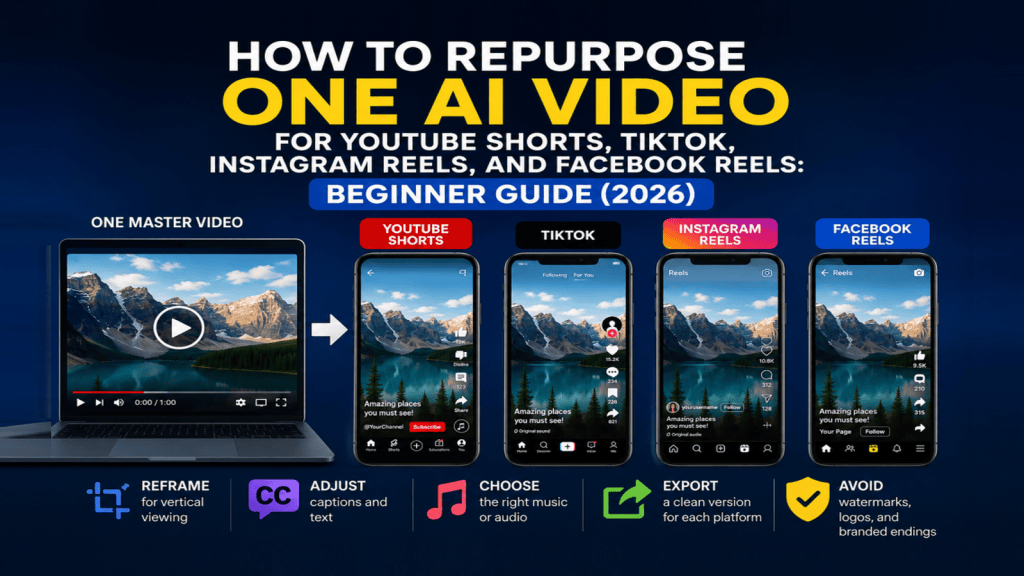
Estimated Reading Time: 18 minutes
Last Updated: August 14, 2026
Before Learning
Before you begin, it helps to have one finished video that you can use as your main source video. This can be a video you created with AI, edited yourself, or produced using a combination of AI tools and regular video-editing software.
You do not need four completely different videos for YouTube Shorts, TikTok, Instagram Reels, and Facebook Reels. In this guide, you will learn how to start with one clean master video and adapt separate versions for each platform.
What You’ll Learn
By the end of this guide, you will know how to:
· Prepare one clean master video before repurposing it.
· Adapt the same video for YouTube Shorts, TikTok, Instagram Reels, and Facebook Reels.
· Reframe or crop the video for vertical viewing without cutting off important content.
· Adjust captions, text, music, and other elements for each platform.
· Export a separate clean version for each platform.
· Avoid carrying another platform’s watermark, logo, or branded ending into your new version.
· Keep your original project files and master export so you can make future versions more easily.
Introduction
Repurposing a video means taking one finished video and creating new versions of it for different platforms. Instead of starting from the beginning every time, you reuse the main content while adjusting the format, framing, captions, length, and other details when needed.
This can save time and help you publish the same core idea across YouTube Shorts, TikTok, Instagram Reels, and Facebook Reels. However, you should not simply upload the exact same exported file everywhere. Each platform can display video differently, and text or important visual elements may be cropped or covered by interface controls.
A better approach is to keep one clean master video and create a separate export for each platform. This also makes it easier to avoid unwanted watermarks, logos, branded endings, or other elements from one platform appearing on another.
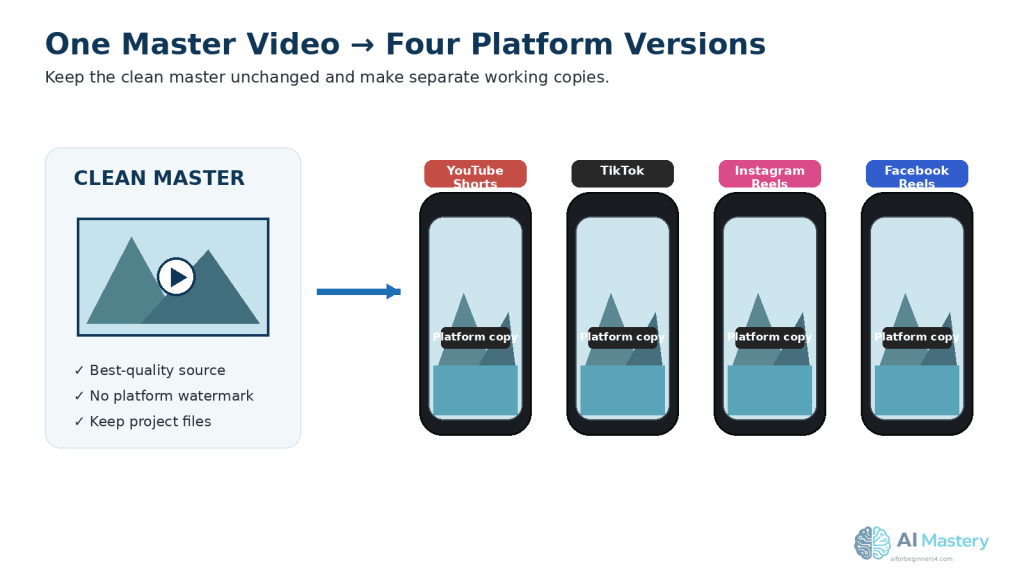
Figure 1. One clean master video can be adapted into separate versions for YouTube Shorts, TikTok, Instagram Reels, and Facebook Reels.
Keeping the master unchanged gives you a reliable source for future edits and exports.
What Does It Mean to Repurpose a Video?
Repurposing does not mean simply uploading the same video file to every social media platform. It means using the same main content as your starting point and making a version that fits each platform better.
For example, you may keep the same narration, main visuals, and message while changing the crop, text position, captions, music, opening seconds, or ending. You may also shorten or rearrange parts of the video if one platform works better with a faster or shorter version.
The most important idea is to keep one clean master version of your video before making platform-specific copies. This gives you a reliable original that does not contain another platform’s watermark, logo, interface elements, or branded ending.
Practical example: You create one 60-second vertical video about three beginner AI tools. From that master video, you can make separate versions for YouTube Shorts, TikTok, Instagram Reels, and Facebook Reels without rebuilding the entire video four times.
Why Start with a Clean Master Video?
A clean master video is the best-quality version of your finished video before you adapt it for individual social media platforms. It should contain the main visuals, narration, captions, music, and edits you want to keep, but it should not include a platform-specific watermark, logo, username overlay, or branded ending.
Keeping a clean master makes repurposing easier because you can return to the original whenever you need another version. For example, if you later want to create a Pinterest Video Pin or another short-form version, you do not have to download one of your already-published videos and edit it again.
A master video also helps protect video quality. Downloading a published video from a social platform and then editing and exporting it again can reduce quality because the video may already have been compressed.
Keep the clean master video in a clearly named folder together with the original editing project, narration files, images, music licences, permissions, prompts, and other source files you may need later.
Example: Instead of downloading your TikTok version to create a YouTube Short, open your clean master project and export a new YouTube version from it.
Step 1: Prepare Your Master Video for Repurposing
Before creating versions for different platforms, check that your clean master video is complete and ready to reuse. It is easier to fix problems now than after you have created several separate exports.
Check the master video for:
· Clear narration or dialogue.
· Correct spelling in captions and on-screen text.
· Images and video clips that are sharp enough to use.
· Music and sound effects at comfortable levels.
· No unwanted platform logos, watermarks, usernames, or branded endings.
· No private information that should not appear publicly.
· Permission or suitable licences for music, stock footage, photographs, fonts, and other assets you did not create yourself.
· Important text and subjects positioned so they can still be seen if the video needs to be reframed.
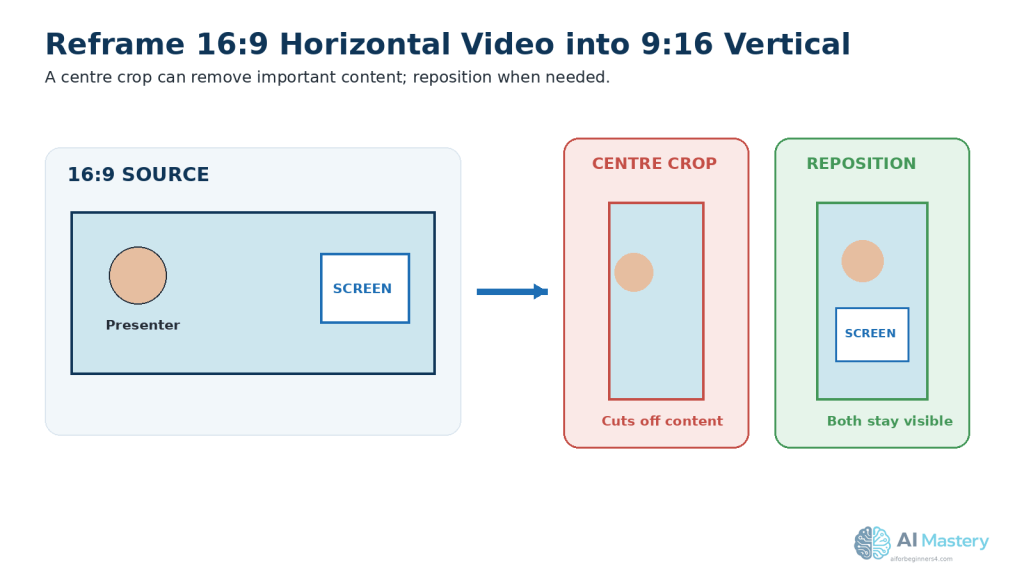
Figure 2. Check the clean master for quality, privacy, licensing, and visible content before creating platform copies.
Fixing problems in the master first prevents the same problem from appearing in several exports.
Watch the entire master video from beginning to end before making your platform versions. Pay special attention to the first few seconds, because the opening should quickly make it clear what the video is about.
Practical example: If your master video contains a title placed very close to the bottom edge, move it higher before creating your platform versions. Interface buttons, captions, or other controls may cover text placed too close to an edge.
Step 2: Use a Vertical Format for the Four Platforms
For this repurposing workflow, use a 9:16 vertical video as your main working format. This tall format is well suited to phone screens and is supported for YouTube Shorts, TikTok, Instagram Reels, and Facebook Reels. YouTube accepts square or vertical videos for Shorts, while Instagram supports several Reel aspect ratios; Meta and TikTok specifically recommend 9:16 for full-screen vertical viewing.
A common 9:16 video size is 1080 × 1920 pixels. We will cover video dimensions and export settings in more detail in the next AI Mastery guide, so for now the important point is to work vertically rather than creating a separate horizontal video for each short-form platform.
When converting an existing horizontal video to vertical, do not simply crop the middle automatically and assume everything will remain visible. Check every scene. A person, product, screenshot, chart, or important text may be cut off when the frame becomes narrower.
Keep important subjects and on-screen text away from the extreme top, bottom, and sides of the frame. Social platforms place interface elements over videos, and TikTok specifically advises keeping key information within its safe zone.
Practical example: If a horizontal scene shows a person on the left and a laptop demonstration on the right, a simple centre crop may remove one of them. You may need to reposition the scene, zoom differently, or show the person and laptop in separate shots.
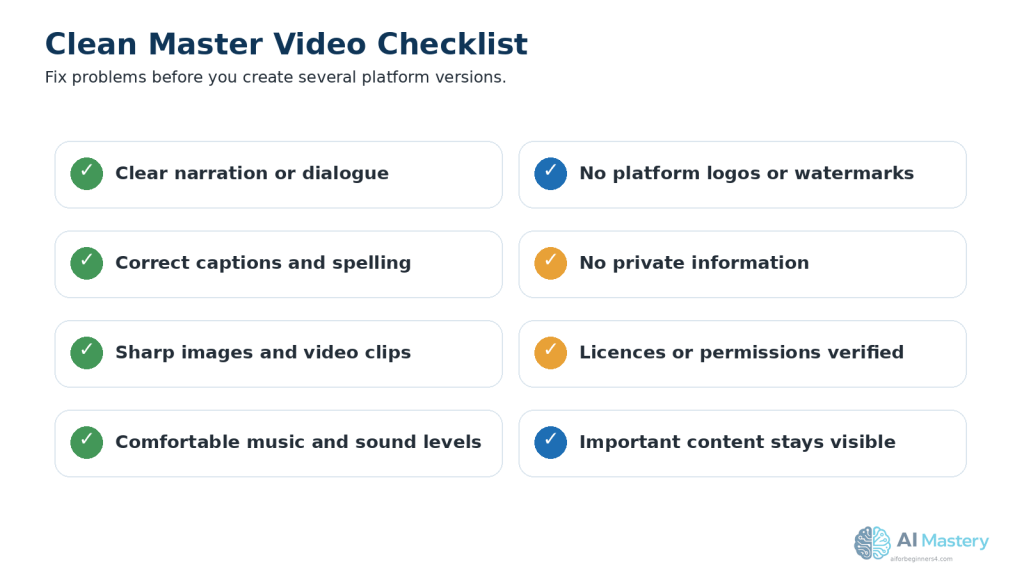
Figure 3. Reframing a 16:9 video for 9:16 viewing may require repositioning rather than a simple centre crop.
Check each scene so important people, text, screenshots, and demonstrations remain visible.
Step 3: Create a Separate Version for Each Platform
Once your clean master video is ready, make a separate copy for each platform instead of editing the master file directly.
Create four working versions:
· YouTube Shorts
· TikTok
· Instagram Reels
· Facebook Reels
Give each version a clear filename so you do not accidentally upload the wrong file later. For example:
· video-topic-youtube-shorts.mp4
· video-topic-tiktok.mp4
· video-topic-instagram-reels.mp4
· video-topic-facebook-reels.mp4
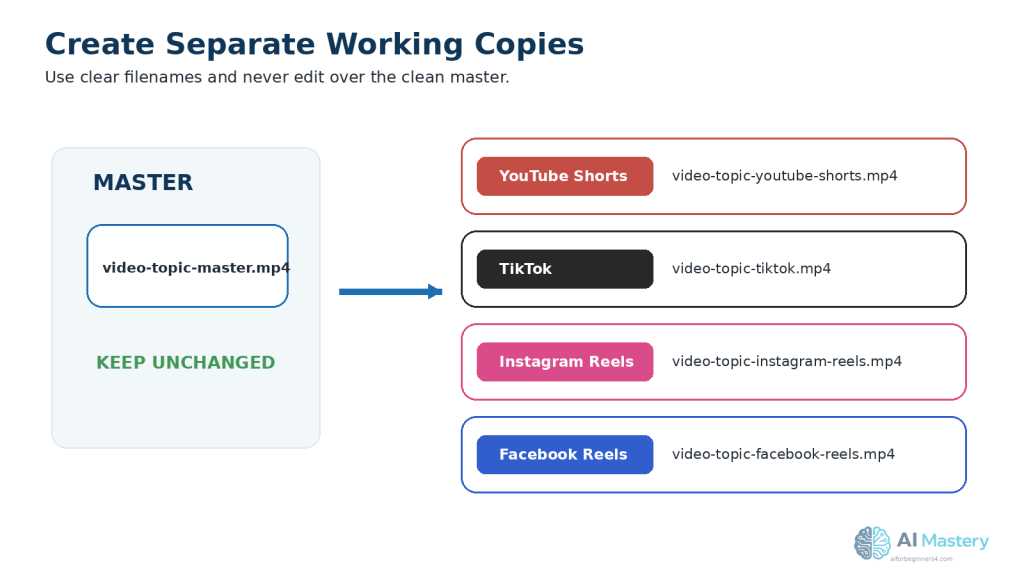
Figure 4. Create clearly named working copies for each platform while keeping the clean master unchanged.
Clear filenames reduce the risk of editing or uploading the wrong version.
Keep your original clean master unchanged. If you make a mistake while editing one platform version, you can return to the master and create a fresh copy.
Practical example: If you add TikTok-specific text or change the opening of the TikTok version, those changes should remain only in the TikTok copy. Your YouTube Shorts, Instagram Reels, and Facebook Reels versions can be adjusted separately.
This simple file system also makes it easier to keep track of your final exports, thumbnails, captions, and publication records.
Step 4: Reframe Each Video Carefully
Even when all four versions use a vertical format, you should check the framing of every scene before exporting. A crop that looks good in one part of the video may cut off important content in another part.
Watch each platform version from beginning to end and check that:
· Faces and important subjects remain fully visible.
· On-screen text is not too close to the edges.
· Captions do not cover important visual details.
· Screenshots and demonstrations are large enough to read on a phone.
· Charts, lists, and graphics are not cropped.
· Important information is not placed at the very top or bottom of the frame where platform controls may appear.
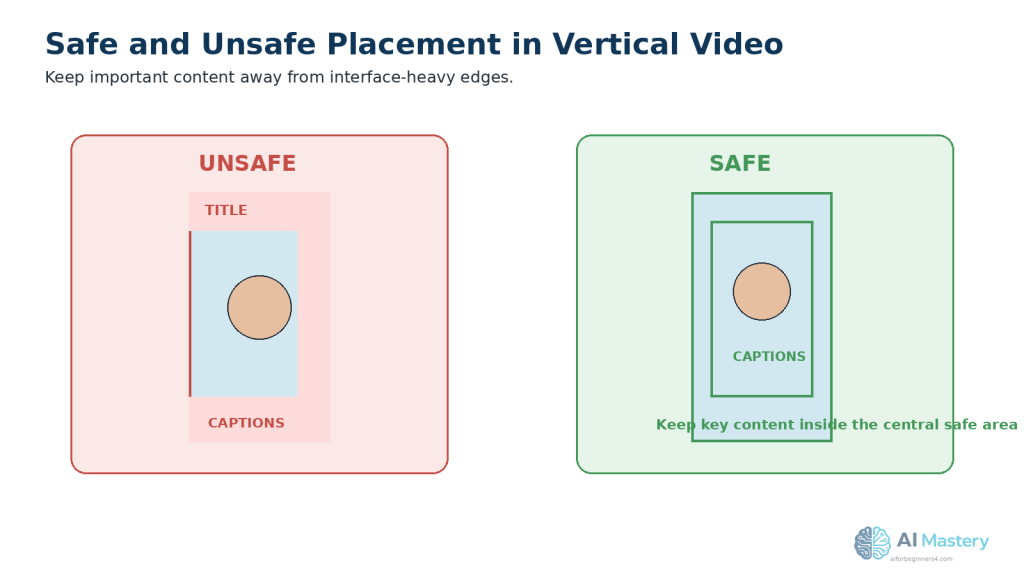
Figure 5. Keep important subjects, captions, and text inside a central safe area in vertical video.
Platform controls can cover content near the top, bottom, and sides.
If a scene does not fit well vertically, do not force it into a simple centre crop. You can reposition the image, zoom in or out, split the scene into two shots, or use a background behind the original footage.
Practical example: A computer screen recording may contain useful information across the entire horizontal screen. Instead of shrinking the whole screen until the text becomes unreadable, crop into the important area and move to another area when the narration changes.
Step 5: Adjust Captions and On-Screen Text
Captions and on-screen text can make short videos easier to follow, especially when viewers are watching without sound. However, text that looks good in your editing program may be partly covered by buttons, usernames, descriptions, or other platform controls after publishing.
Keep important text away from the extreme top, bottom, and sides of the video. Place it closer to the central viewing area whenever possible.
Use captions that are:
· Large enough to read on a phone.
· Easy to distinguish from the background.
· Broken into short, readable phrases.
· Timed closely with the spoken words.
· Positioned so they do not cover faces, demonstrations, or other important information.
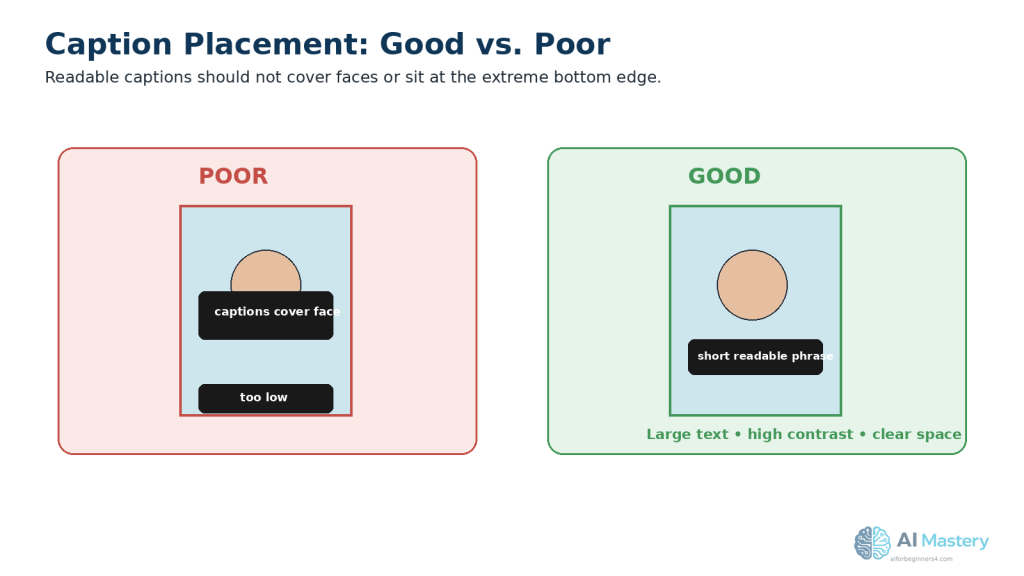
Figure 6. Good captions are readable, high-contrast, and positioned away from faces and interface-heavy edges.
Caption placement affects both accessibility and readability on small screens.
Do not overcrowd the screen with several text boxes at the same time. A short video is usually easier to understand when viewers can focus on one main message at a time.
Accessibility: Captions are especially helpful for people who are deaf or hard of hearing, people watching with the sound turned off, and viewers who may have difficulty understanding the narration.
Practical example: If your captions sit at the very bottom of the master video, move them slightly higher before exporting your platform versions. This can reduce the chance that platform controls cover them.
Step 6: Check Music and Audio Before Reusing the Video
Before uploading the same video to several platforms, check the music, sound effects, and other audio included in your master video. Permission to use music on one platform does not automatically mean that you can reuse that music on every other platform.
For example, YouTube offers music through its Shorts Audio Library and Audio Library, Instagram provides licensed audio and Meta Sound Collection, and TikTok has its own music options, including a Commercial Music Library for certain commercial content. These libraries operate under their own licensing conditions.
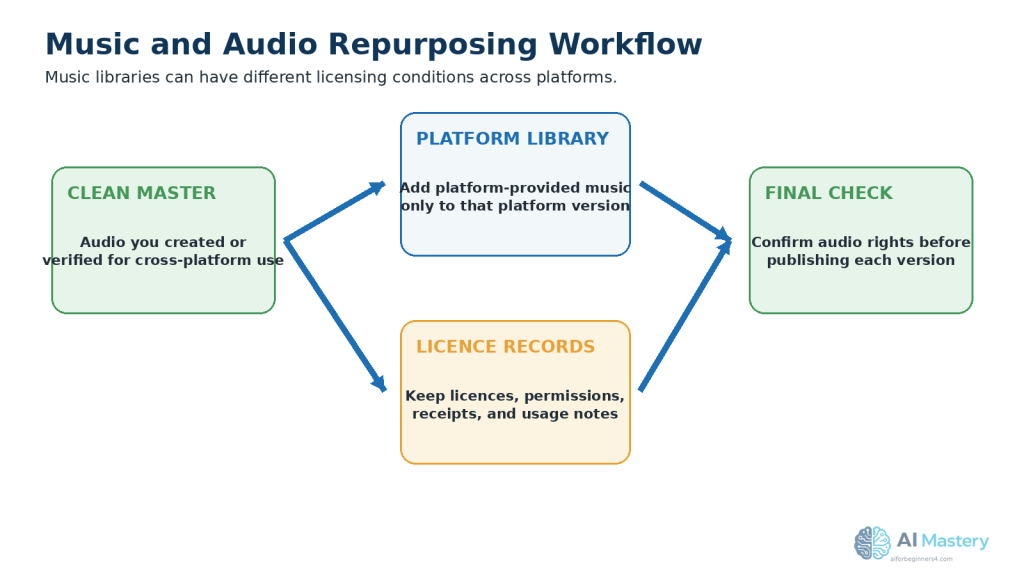
Figure 7. Keep cross-platform audio rights clear and add platform-specific music only where its licence allows.
Music available inside one platform does not automatically carry the same rights elsewhere.
The safest workflow for repurposing is to keep a clean master version with audio that you created yourself or that you have verified you are allowed to use across the platforms where you plan to publish. If you want to use music supplied by a particular platform, consider adding that music separately when preparing the version for that platform.
Warning: Do not assume that a song is copyright-free simply because you can select it inside a social media app. For example, Instagram describes licensed audio as copyrighted audio available through its library, and YouTube explains that music rights can affect how a video may be used.
Keep a copy of any music licence, permission, receipt, or other record that explains how you are allowed to use an audio track. Licensing conditions and platform music features can change, so check the relevant terms when you first use a music source, when your plan or usage changes, or when the provider announces an update.
Practical example: If you add a song from TikTok after uploading your TikTok version, keep that song out of your clean master video. Use the clean master again when creating the YouTube Shorts, Instagram Reels, and Facebook Reels versions.
Step 7: Avoid Platform Watermarks, Logos, and Branded Endings
When you repurpose a video, start from your clean master file rather than downloading a version that has already been published on another social media platform.
A downloaded or previously exported version may contain a platform watermark, username, logo, branded ending, or other element that you do not want in the next version.
Before exporting each platform version, check the entire video for:
· Platform names or logos that were added automatically.
· Watermarks from editing or AI video tools.
· Usernames or account names that belong only to another platform.
· Branded ending screens added by an app or template.
· Trial-version marks or export restrictions.
· Unwanted text or interface elements captured in screen recordings.
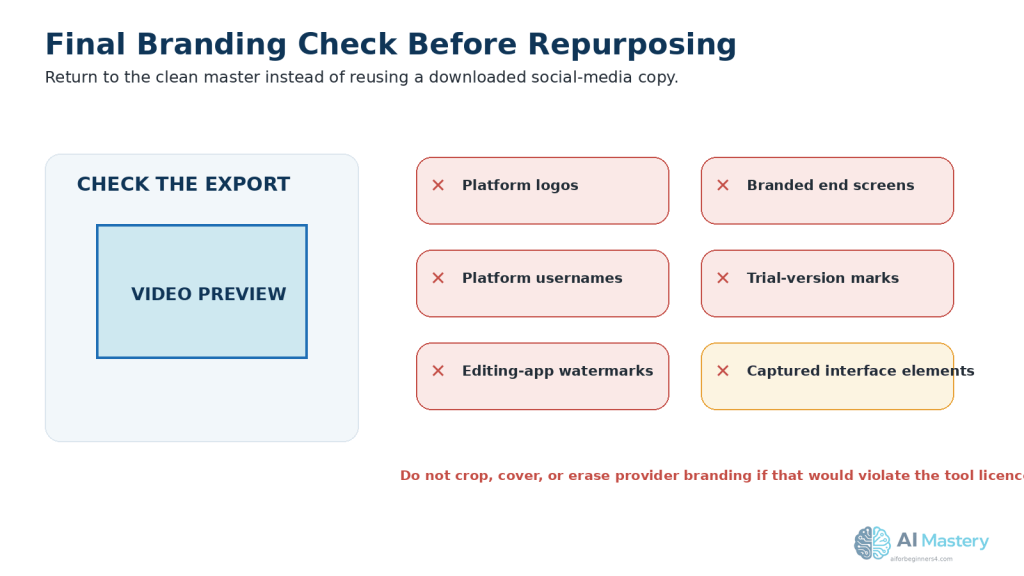
Figure 8. Review every export for platform logos, usernames, watermarks, branded endings, and captured interface elements.
Return to the clean master instead of reusing a downloaded social-media copy.
If your editing or AI tool adds branding to free exports, check whether the tool provides a legitimate way to remove it. Do not crop, cover, or erase a provider’s watermark if doing so would violate the tool’s licence or terms.
Keep your clean master video free from platform-specific branding. Then create separate exports for YouTube Shorts, TikTok, Instagram Reels, and Facebook Reels.
Practical example: If you publish a video on TikTok and later want to make a YouTube Short, return to your clean master project instead of downloading the TikTok version and uploading that file to YouTube.
Step 8: Adjust the Opening and Ending for Each Platform
The main content of your video can stay the same, but the opening and ending may need small changes for each platform.
Check the first few seconds carefully. A viewer should quickly understand what the video is about without needing a long introduction. Remove unnecessary pauses, blank frames, or lengthy opening graphics that delay the main point.
You can also adjust the final message depending on where the video will be published. For example, avoid ending every version with instructions that only make sense on one platform.
Instead of saying something platform-specific such as “Subscribe to my YouTube channel” in every version, you could use a more general message in the clean master, such as:
· Follow for more beginner AI tips.
· Save this video for later.
· Share this with someone learning about AI.
· Visit aiforbeginners4.com for more beginner guides.
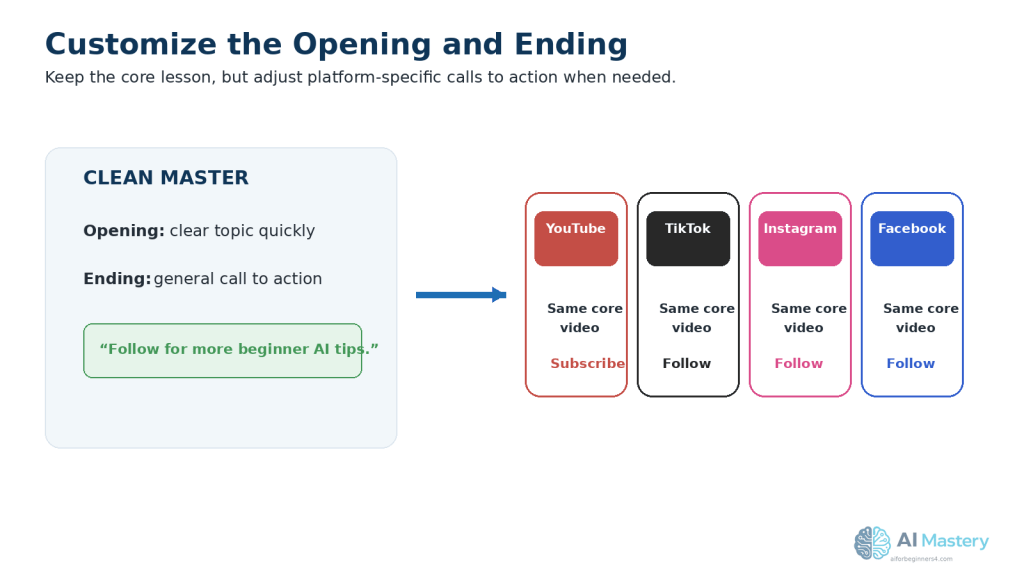
Figure 9. Keep the core lesson but adjust the opening or call to action when a platform-specific version needs it.
Small platform-specific changes can improve relevance without rebuilding the entire video.
Then, if appropriate, customize the final message in each platform version.
Practical example: Your YouTube Shorts version could mention subscribing, while your TikTok or Instagram version could use a more suitable follow message. The educational content itself does not need to be recreated.
Keep these changes in the individual platform copies and leave your clean master unchanged.
Step 9: Export a Separate Final File for Each Platform
When you finish editing, export a separate final video file for each platform. Do not overwrite your clean master video.
Use clear filenames so you can immediately tell which file belongs to which platform. For example:
· video-topic-youtube-shorts-final.mp4
· video-topic-tiktok-final.mp4
· video-topic-instagram-reels-final.mp4
· video-topic-facebook-reels-final.mp4
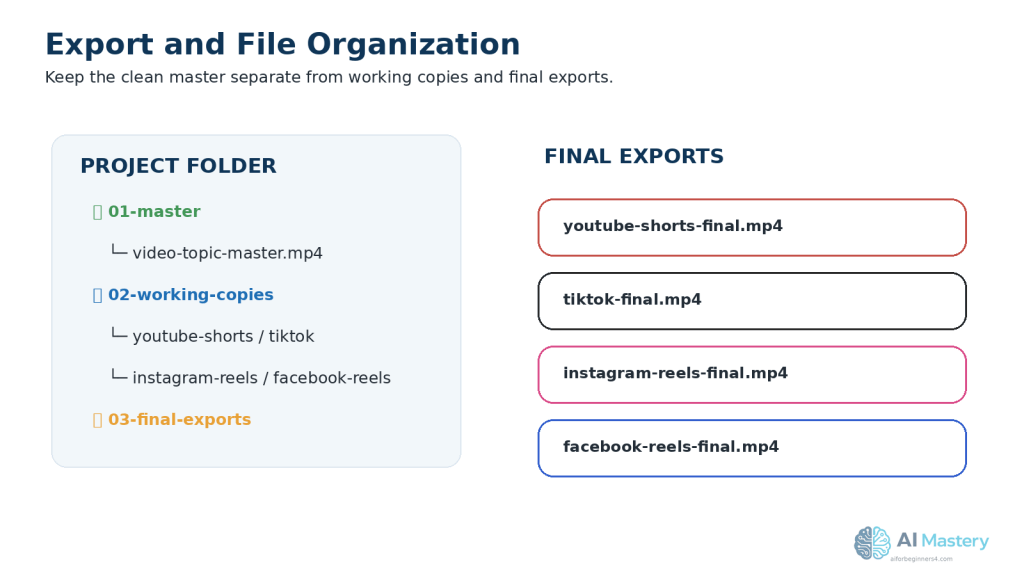
Figure 10. Organize the master, working copies, and final exports in separate folders.
Good organization makes corrections, publishing, and future repurposing easier.
Before uploading, watch each exported file from beginning to end. Check the picture, audio, captions, text placement, opening, ending, and overall quality.
Also check that the exported video does not accidentally contain another platform’s watermark, username, logo, editing-app branding, or unwanted end screen.
If you use your own small creator or business mark, keep it unobtrusive and away from important text, captions, faces, and platform interface areas. A small mark can help identify the original source, but it does not prevent someone from copying the video.
Keep the final exports in a separate folder from your master project. This makes it easier to find the correct file when you are ready to publish.
Practical example: After completing your four versions, your project folder might contain one clean master video and four clearly labelled final exports. If you later need to make a correction, return to the editing project or clean master rather than editing a downloaded social-media copy.
Step 10: Upload Each Version Directly to Its Platform
When your four final video files are ready, upload each one directly to the platform it was prepared for. Avoid publishing on one platform, downloading that published copy, and then using the downloaded file on the next platform.
Uploading your clean platform-specific exports helps you preserve better video quality and reduces the chance of carrying unwanted watermarks, usernames, logos, or other platform-specific elements into another version.
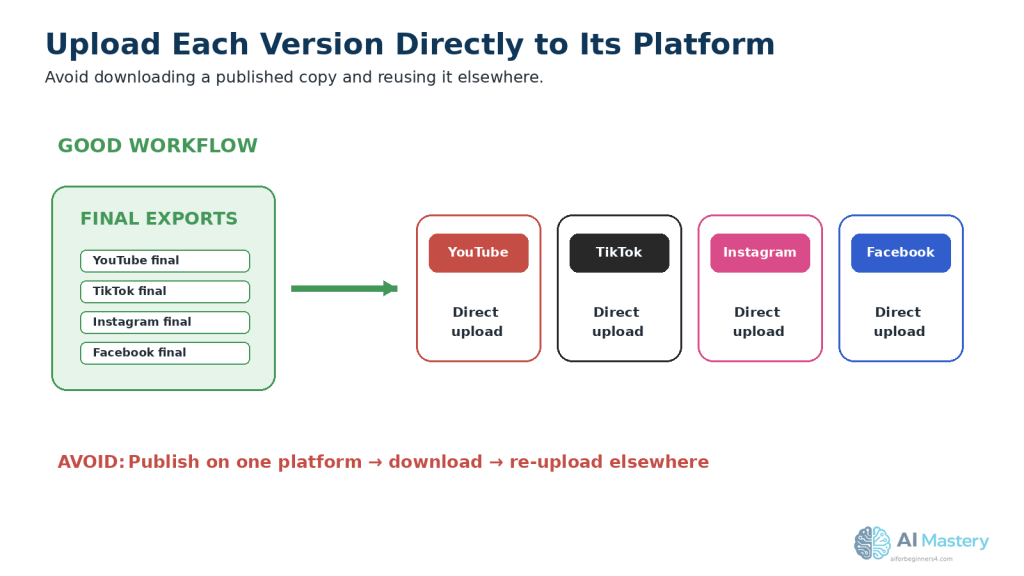
Figure 11. Upload each clean platform-specific export directly instead of downloading and reusing a published copy.
Direct uploads reduce quality loss and unwanted platform branding.
Before you publish each video, check:
· You selected the correct platform-specific file.
· The title, caption, or description matches the platform and video.
· Any links or calls to action are correct.
· Captions and important text remain visible in the preview.
· The thumbnail or cover frame looks appropriate when the platform allows you to choose one.
· Required AI-content disclosures or labels are completed when applicable.
· No private or confidential information appears in the video or description.
Do not assume that the same caption or description must be copied word-for-word across all four platforms. You can keep the main message consistent while adjusting the wording for the audience and features of each platform.
Practical example: The educational video itself may stay almost identical across all four platforms, but the YouTube Shorts title, TikTok caption, Instagram Reel caption, and Facebook Reel description can be prepared separately.
Common Mistakes to Avoid When Repurposing Videos
Repurposing can save time, but a few common mistakes can make the finished videos look less professional or create unnecessary problems.
Common mistakes include:
· Downloading a published video from one platform and uploading that copy to another platform.
· Leaving another platform’s watermark, username, logo, or branded ending in the video.
· Cropping a horizontal video without checking whether faces, text, screenshots, or other important details were cut off.
· Placing captions or important text too close to the edges of the screen.
· Using music on several platforms without checking whether the licence allows that use.
· Exporting over the clean master video instead of creating separate platform versions.
· Reusing exactly the same call to action even when it refers to features available only on one platform.
· Uploading the wrong platform-specific file because the filenames are unclear.
· Forgetting to watch the final exported video before publishing.
· Deleting the original project files after publishing.
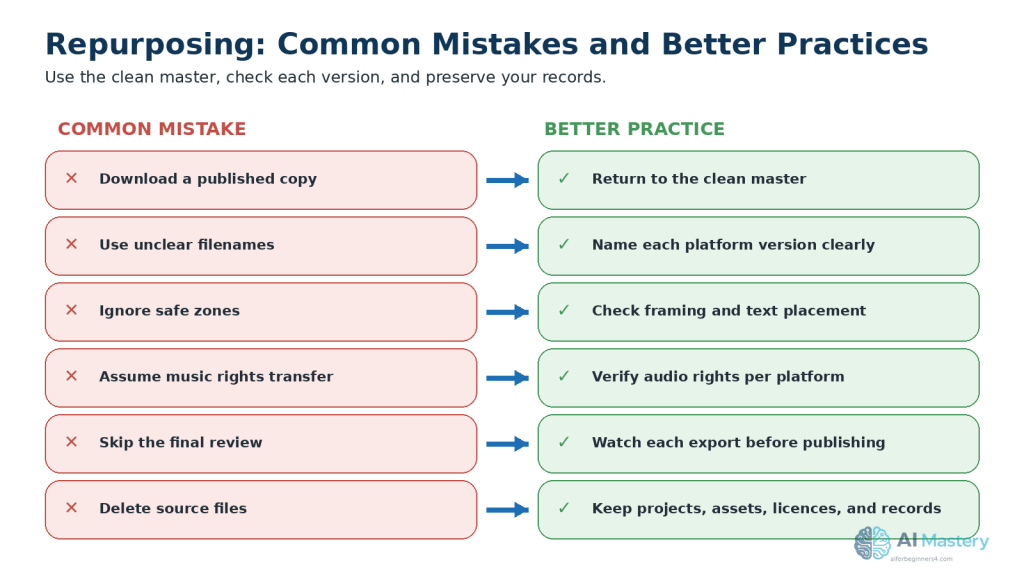
Figure 12. Replace common repurposing mistakes with a clean-master, platform-specific workflow.
A simple repeatable workflow improves organization, quality, and licensing awareness.
How to Avoid These Mistakes
Keep one clean master video, create clearly named copies for each platform, and perform a final review of every exported file before uploading it.
Keep your original project, source files, licences, permissions, and final exports together so you can correct or repurpose the video again later.
Benefits of Repurposing One Video
Repurposing one video for several platforms can make content creation more efficient without requiring you to create every video from the beginning.
Key benefits include:
· Saves time: You can reuse the same main idea, narration, and visuals instead of rebuilding the entire video.
· Reduces editing work: Most changes involve reframing, captions, text placement, audio, or platform-specific details.
· Keeps your message consistent: Viewers on different platforms receive the same main information.
· Makes planning easier: One finished video can become several publishing opportunities.
· Helps you reach different audiences: Some people mainly use YouTube, while others may prefer TikTok, Instagram, or Facebook.
· Makes corrections easier: Keeping a clean master allows you to fix a problem once and create new exports when needed.
· Improves file organization: Separate platform versions make it easier to identify what has been published and where.
· Supports future reuse: Your clean master can later be adapted for another platform or format without starting again.
Repurposing works best when the original video is well organized and the platform versions are treated as separate exports rather than identical copies.
Limitations of Repurposing One Video
Repurposing can save time, but one video will not always work perfectly on every platform without changes.
Common limitations include:
· Different viewing layouts: Text or subjects that look correct in one version may be partly covered or cropped on another platform.
· Different audiences: A style that performs well with one audience may not interest viewers on another platform.
· Music restrictions: Audio that is permitted on one platform may not be licensed for use elsewhere.
· Different platform features: Calls to action, captions, covers, descriptions, and publishing options can vary.
· Quality loss: Repeatedly downloading, editing, and re-exporting published videos can reduce visual quality.
· Extra checking is still required: Each final version needs to be reviewed before publishing.
How to Reduce These Limitations
Keep a clean master video and create a separate working copy for each platform. Make only the changes that are genuinely needed, such as reframing, repositioning text, changing music, or adjusting the opening and ending.
Repurposing should reduce unnecessary work, not eliminate the final quality check.
Common Myths About Repurposing Videos
Repurposing is useful, but several common myths can lead beginners to make poor editing or publishing decisions.
Myth 1: Repurposing Means Uploading the Exact Same File Everywhere
Reality: A clean master video can be the starting point, but each platform version may need small changes to framing, captions, text placement, audio, opening, ending, or description.
Myth 2: A Vertical Video Will Automatically Look Good on Every Platform
Reality: Even when the video uses a 9:16 format, platform controls can cover different areas of the screen. Important text, captions, and subjects should still be checked in each version.
Myth 3: Music Available on One Platform Can Be Used Anywhere
Reality: Music libraries and licences can differ between platforms. Always verify that you have permission to use the audio in each place where you plan to publish it.
Myth 4: Downloading a Published Video Is the Best Way to Reuse It
Reality: Returning to the clean master is usually better because a downloaded version may contain platform branding, watermarks, usernames, or reduced video quality.
Myth 5: Repurposing Means You Never Need to Edit Again
Reality: Repurposing reduces repeated work, but every final version still needs a quality check before publication.
Frequently Asked Questions
Can I Upload the Same Video to YouTube Shorts, TikTok, Instagram Reels, and Facebook Reels?
Yes, you can reuse the same main video content, but it is better to create a separate version for each platform. Check the framing, captions, text placement, audio, opening, ending, and other platform-specific details before publishing.
Should I Download My TikTok Video and Upload It to YouTube Shorts?
It is better to return to your clean master video instead. A downloaded TikTok version may include a watermark, username, platform branding, or reduced video quality.
Do I Need to Create Four Completely Different Videos?
No. The purpose of repurposing is to reuse the same main content. You normally keep the core message, narration, and visuals while making only the adjustments needed for each platform.
Should I Keep a Copy Without Music?
Keeping a clean version without platform-specific music can be useful. You can then add suitable music separately when preparing each platform version, especially when music licensing conditions differ.
Can I Use My Own Logo or Watermark on All Four Versions?
Yes, you can use a small creator or business mark on your own original video. Keep it unobtrusive and away from captions, faces, important information, and areas where platform controls may appear.
A watermark can help identify the source of your content, but it does not guarantee that other people cannot copy the video.
What Should I Keep After Publishing?
Keep your clean master video, editing project, source files, final platform exports, prompts, licences, permissions, and publication records. These files make future corrections and repurposing much easier.
Key Takeaways
Repurposing one video across several platforms can save time while keeping your main message consistent.
Remember these main points:
· Start with one clean master video.
· Keep the master free from platform-specific watermarks, usernames, logos, and branded endings.
· Create separate versions for YouTube Shorts, TikTok, Instagram Reels, and Facebook Reels.
· Check framing, captions, text placement, music, opening, and ending in every version.
· Use clear filenames so you do not confuse your exports.
· Return to the clean master instead of downloading a published social-media copy.
· Verify licences and permissions for music, stock footage, images, fonts, and other third-party assets.
· Keep your original project files, prompts, licences, permissions, master export, and publication records.
· Review every final export before publishing.
Repurposing works best when you reuse the main content while still giving each platform version a careful final check.
Final Tip
Create once, but publish carefully.
A well-organized clean master video can become several platform-specific versions without requiring you to rebuild the entire project. The time-saving benefit comes from reusing your strongest work while making only the adjustments each platform genuinely needs.
Before publishing any version, watch the final exported file from beginning to end. Check the framing, captions, audio, text placement, branding, licences, and overall quality.
Keeping your master video, source files, project files, permissions, licences, and final exports organized will make future updates and repurposing much easier.
Continue Learning
If you want to continue building your AI video skills, these AI Mastery guides are useful next steps:
· Best AI Video Tools for Beginners: Complete Guide (2026) — Learn about beginner-friendly tools for creating AI videos.
· How to Edit AI-Generated Videos: Beginner Step-by-Step Guide (2026) — Learn how to improve clips, timing, transitions, and overall video quality.
· How to Add Voice, Music, and Captions to AI Videos: Beginner Step-by-Step Guide (2026) — Learn how to add narration, audio, and accessible captions.
· How to Create Faceless YouTube Videos with AI: Complete Beginner Step-by-Step Guide (2026) — Follow a complete workflow for creating faceless YouTube videos.
· How to Create YouTube Thumbnails, Titles, and Descriptions with AI (2026) — Learn how to prepare the publishing elements that support your videos.
· How to Create an AI Virtual Presenter for YouTube Videos: Beginner Guide (2026) — Learn how to create videos using a fictional AI presenter.
· How to Create AI Virtual Presenter Videos for TikTok: Beginner Guide (2026) — Learn how to adapt virtual-presenter videos for TikTok.
Sources and References
The following official sources were checked for the platform, video-format, music, safe-zone, and AI-disclosure information in this guide. Platform features and policies can change, so check the relevant official guidance when you first use a feature, when your account or plan changes, or when a platform announces an update.
· YouTube Help — Upload YouTube Shorts: YouTube explains that Shorts uploads can use a square or vertical aspect ratio and can be up to three minutes long.
· YouTube Help — Disclosing Use of Generative AI Content: YouTube explains when creators should disclose content that is AI-generated or meaningfully altered.
· YouTube Help — Use Music and Sound Effects from the Audio Library: YouTube explains how its Audio Library works, including licensing and attribution requirements for certain tracks.
· TikTok Support — About AI-Generated Content: TikTok explains its AI-generated-content labels and when creators are required to label realistic AI-generated images, audio, or video.
· TikTok for Business — Creative Best Practices: TikTok recommends vertical 9:16 video and advises keeping important content within the interface safe zone.
· TikTok Support — Commercial Use of Music on TikTok: TikTok explains that commercial content should use appropriately licensed music and recommends its Commercial Music Library for commercial uses.
· Instagram Help — Reel Size and Aspect Ratios: Instagram explains the supported aspect ratios and minimum technical requirements for Reels.
· Meta Business Help — Best Practices for Aspect Ratios: Meta recommends 9:16 vertical video for Reels placements to use the full mobile screen.
· Meta Business Help — Safe Zones for Reels: Meta advises keeping important text and visual elements away from areas that may be covered by interface elements.
· Meta Business Help — Sound Collection: Meta provides information about music and sound effects available through its Sound Collection for Facebook and Instagram content.
Important: This guide provides general educational information about video creation, licensing, and platform practices. It is not legal advice. Always verify that you have the necessary rights or permissions for music, images, video clips, fonts, voices, and other material you publish.
 AI Mastery
Leave a comment