
Estimated reading time: 35–40 minutes
Last updated: August 16, 2026
Introduction
Python is a general-purpose programming language that can be used to give a computer instructions for many different kinds of work. It is widely used for automation, data analysis, web development, scientific computing, artificial intelligence, testing, scripting, and many other software tasks. For a complete beginner, however, the most useful starting point is much smaller: learn how to read a few lines of code, run them, change one part, and check what happens.
Unlike HTML, which describes the structure of web content, Python is a programming language. It can calculate values, compare information, make decisions, repeat actions, store groups of values, read input, and organize reusable instructions into functions. Those ideas are the foundation of many larger programs.
A first Python program can contain only one line:
print(“Hello, world!”)
When Python runs that instruction, it displays the text Hello, world!. The example is small, but it introduces an important programming habit: write an instruction, run it, observe the result, and then make a deliberate change.
You do not need previous programming experience to follow this guide. You also do not need expensive development software. The examples use current Python 3 and stay deliberately small so that you can focus on understanding what each part does.
This article also shows how ChatGPT can support the learning process. You can ask for a simpler explanation, request a short exercise, compare two approaches, or get help investigating an error. OpenAI currently provides Codex as its dedicated software-development experience, while ChatGPT can still be useful for conversational explanations and focused learning questions. AI assistance should be treated as help to review and understand code, not as proof that the code is correct.
Throughout the guide, you will also see privacy, security, copyright, licensing, and responsible-use reminders. These habits matter even in beginner practice because code can contain passwords, API keys, personal information, copied material, or third-party packages with their own licence conditions.
The goal is straightforward: by the end of the article, you should be able to create, read, modify, and troubleshoot small Python programs while understanding the main concepts well enough to keep learning independently.
What You’ll Learn
By the end of this guide, you will understand the basic role of Python and how several core programming ideas work together.
- what Python is and what it is commonly used for
- how to install and run current Python 3 on Windows
- how to use print() to display output
- how variables store values
- the difference between strings, integers, floating-point numbers, and Boolean values
- how input() receives user input and why conversion may be necessary
- how to perform basic arithmetic
- how comparisons and if statements make decisions
- how for and while loops repeat work
- how lists store several related values
- how functions package reusable work
- how to read common error messages and troubleshoot small programs
- how to build a small beginner project in layers
- how ChatGPT can help with explanations, practice, and focused troubleshooting
- why AI-suggested code still needs review and testing
- how to protect secrets and private information in code
- why third-party packages and copied code need licence and source checks
- what to learn next after the foundations are comfortable
You will not build a large application in this article. The examples stay small so that you can see why each line exists and what changes when you modify it.
Before You Start
You need only a computer, a current Python 3 installation, a simple editor such as IDLE, access to ChatGPT if you want AI-assisted explanations, and a folder for saving practice files.
Use the Current Stable Python 3 Release
As of August 16, 2026, Python.org lists Python 3.14.7, released August 5, 2026, as the latest stable Python 3 release. Python 3.15 is still a pre-release branch at this date. Versions change, so a beginner should normally use the current stable Python 3 release available from the official Python website rather than following an old download link from an outdated tutorial.
Create a Practice Folder
Create a folder somewhere easy to find, for example Python-Practice. You can keep every exercise in that folder and use descriptive filenames such as hello.py, variables.py, conditions.py, loops.py, and mini_project.py.
Use Fictional Practice Information
Do not practise with real passwords, API keys, customer details, payment information, private file paths, or confidential business data. Use placeholders such as YOUR_API_KEY_HERE and name@example.com. This matters especially if you later paste part of the code into an online service for help.
Save Working Versions
When a program works, save a copy before making a large change. Simple filenames such as mini_project-v1.py and mini_project-v2.py are enough for beginner practice. Version-control systems become useful later, but a basic working copy already gives you a safe point to return to.
Use the Edit, Run, Check Routine
1. Make one small change.
2. Save the file.
3. Run the program.
4. Read the output or error message.
5. Compare the result with what you expected.
6. Continue only after you understand what changed.
This routine is one of the most useful habits you can develop. It makes errors easier to isolate and turns each change into a learning step.
What Is Python?
Python is an interpreted, general-purpose programming language. The official Python tutorial describes it as easy to learn and powerful, with high-level data structures and a straightforward approach to programming. Python source files normally use the .py filename extension.
Your First Python Instruction
print(“Hello, world!”)
The built-in print() function displays values. In this example, the value is a string: text surrounded by quotation marks.
Python Is Case-Sensitive
Python treats uppercase and lowercase names as different. print is the built-in function name. Print is a different name and will not call the same function unless you have defined it yourself.
Comments
# This is a comment
print(“Hello”)
A comment beginning with # is ignored as an instruction. Use comments to explain a useful reason or reminder, but avoid filling simple code with comments that merely repeat what is obvious.
Indentation Matters
if 5 > 2:
print(“Five is greater than two.”)
The indented line belongs to the if statement. In Python, indentation is part of the language structure rather than only visual formatting. You will use indentation repeatedly with conditions, loops, and functions.
Do not try to memorize the entire language. At this stage, become comfortable recognizing instructions, names, text values, punctuation, comments, and indentation.
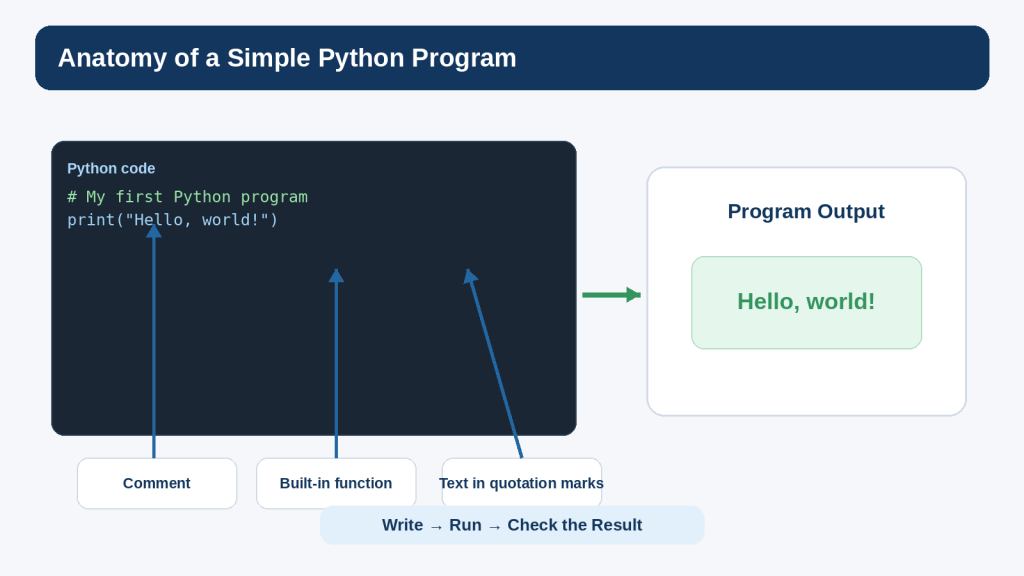
Figure 1. A simple Python program contains instructions that Python processes to produce a result.
Explanation: Even a one-line program introduces functions, text values, punctuation, and output. Begin with small examples and change one part at a time so you can see how each change affects the program.
Install Python and Run Your First Program
Download Python only from an official source. On Windows, Python now documents the Python install manager as the normal way to obtain and manage Python runtimes. Installer wording can change over time, so use the current instructions shown on Python.org.
Step 1: Download Python
7. Open the official Python downloads page.
8. Choose the current stable Python 3 download for Windows.
9. Follow the current Python installation instructions.
10. Allow the installation to complete.
Step 2: Check That Python Works
Open Windows Terminal or Command Prompt and type:
python
If Python starts, you should see version information and an interactive prompt. Depending on the installation and Windows configuration, the py command may also be available. Use the current official Windows documentation if the expected command does not work.
Step 3: Try an Instruction
print(“Hello, world!”)
Then try a calculation:
print(10 + 5)
The result should be 15.
Step 4: Use IDLE for a Saved File
IDLE is Python’s Integrated Development and Learning Environment and is commonly included with Python installations. It provides a Python Shell for quick experiments and an editor for saved .py files.
11. Open IDLE.
12. Choose File > New File.
13. Type print(“Hello from my first Python file!”).
14. Choose File > Save As.
15. Save the file as hello.py in your Python-Practice folder.
16. Use Run > Run Module.
17. Read the output in the Python Shell.
Common Beginner Mistake: Typing the >>> Prompt
Tutorials sometimes show >>> before interactive examples. The >>> characters are the Python Shell prompt. You normally type only the code after them.
Common Beginner Mistake: Saving hello.py.txt
How to Avoid This Mistake: Check the complete filename when you save the program. A Python source file should end in .py, not .py.txt.
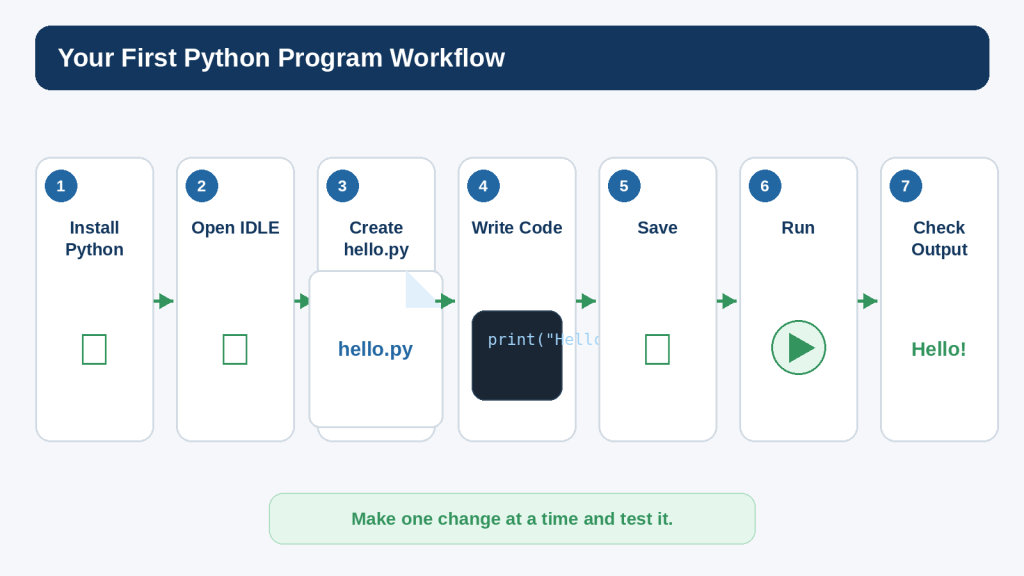
Figure 2. A beginner Python workflow is to install Python, create a .py file, write a small instruction, save it, run it, and check the result.
Explanation: Repeating the same write, save, run, and check process helps you understand which change caused each result and makes beginner troubleshooting easier.
Use Variables and Basic Data Types
Programs become more useful when they can remember information. A variable is a name that refers to a value.
name = “Alex”
age = 25
print(name)
print(age)
The equals sign performs assignment: the value on the right is assigned to the name on the left.
Choose Clear Variable Names
student_age = 25
total_price = 19.99
is_member = True
Clear names are easier to understand than vague names such as x or a when the value has a real meaning.
Strings: str
city = “London”
message = “I am learning Python.”
Strings represent text. Single or double quotation marks can be used for ordinary string literals.
Integers: int
students = 12
score = 100
Integers represent whole numbers.
Floating-Point Numbers: float
temperature = 21.5
price = 19.99
Floating-point values represent numbers with a fractional part. For ordinary beginner calculations they are convenient, but binary floating-point arithmetic cannot represent every decimal value exactly. For important financial calculations, learn the appropriate decimal-handling approach rather than assuming float gives exact decimal arithmetic.
Booleans: bool
is_beginner = True
is_finished = False
Boolean values represent True or False. The capitalization shown here matters.
Check a Type
name = “Alex”
print(type(name))
The built-in type() function can help you see what kind of value Python is working with.
Common Beginner Mistake: Quoting Numbers
price = “10” # text
price = 10 # number
How to Avoid This Mistake: Ask whether the value is supposed to be text or something you want to calculate with. The quotation marks change the type.
Store information in variables, use those variables in instructions, and change the values when the program needs different information.
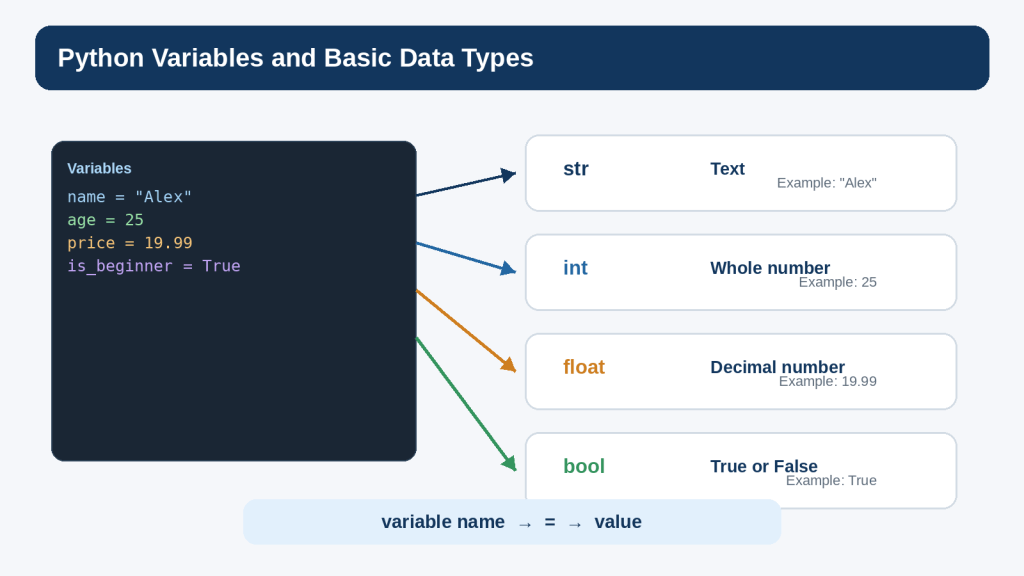
Figure 3. Python variables give names to values, and those values can have different types such as text, whole numbers, decimal numbers, and Boolean values.
Explanation: Understanding whether a value is text, a number, or a true-or-false value helps you predict how Python will use it. Clear variable names also make programs easier to read.
Get Input from the User
The built-in input() function lets a program display a prompt and wait for the user to type a response.
name = input(“What is your name? “)
print(“Hello”, name)
If the user types Sam, the variable name receives the text Sam and the program displays Hello Sam.
input() Returns Text
A very important beginner rule is that input() returns a string. Even if a person types 25, the program initially receives the characters “25” as text.
age_text = input(“Enter your age: “)
print(type(age_text))
Convert Text to an Integer
age = int(input(“Enter your age: “))
print(age + 1)
The int() function converts suitable text such as “25” into the integer 25. If the user types something that cannot be converted to an integer, Python raises an exception. You will learn a simple way to handle that later.
Convert to a Floating-Point Number
price = float(input(“Enter a price: “))
print(price)
Use float() when a decimal value is appropriate. Remember that float is not exact decimal arithmetic.
Keep Prompts Clear
A prompt should tell the user what information is expected. Compare input(“Value: “) with input(“Enter the number of tickets: “). The second is easier to understand.
Do Not Collect Information You Do Not Need
For practice exercises, use fictional information. In a real program, collecting names, addresses, account details, health information, payment information, or other personal data can create privacy and security responsibilities beyond the scope of a beginner exercise.
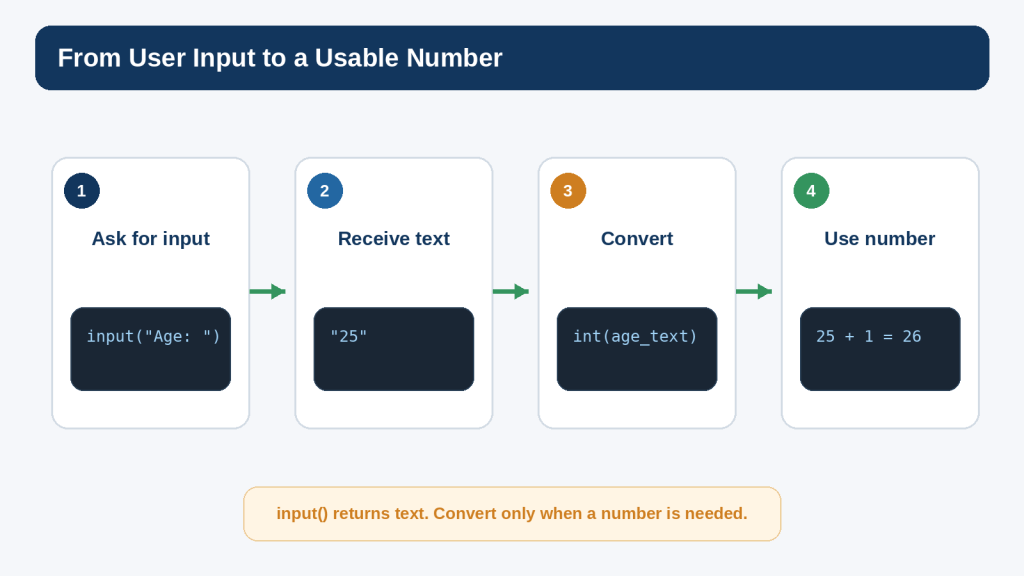
Figure 4. User input starts as text and can be converted to a numeric type when the program needs to calculate with it.
Explanation: Remember that input() returns a string. Convert only when the entered value is supposed to become a number, and be prepared for invalid input.
Perform Basic Calculations
Python supports familiar arithmetic operators. You can use numbers directly or store them in variables first.
print(10 + 5)
print(10 – 5)
print(10 * 5)
print(10 / 5)
- + adds values
- – subtracts values
- * multiplies values
- / performs division
- // performs floor division
- % gives the remainder
- ** performs exponentiation
Use Variables in a Calculation
price = 12
quantity = 3
total = price * quantity
print(total)
The program calculates 12 × 3 and stores the result in total.
Order of Operations
result = 2 + 3 * 4
print(result)
Multiplication is performed before addition, so the result is 14. Use parentheses when you want the grouping to be explicit.
result = (2 + 3) * 4
print(result)
Now the result is 20.
Round Only When It Is Appropriate
value = 10 / 3
print(round(value, 2))
round() can make displayed results easier to read, but rounding is not a substitute for choosing an appropriate numeric representation for the problem.
Practice Exercise
Create a program that stores a fictional item price and quantity, calculates the total, and prints the result. Then change only the quantity and run the program again.
Make Decisions with if Statements
Programs often need to choose between different actions. An if statement evaluates a condition and runs an indented block when that condition is true.
age = 20
if age >= 18:
print(“Adult”)
Comparison Operators
- == equal to
- != not equal to
- > greater than
- < less than
- >= greater than or equal to
- <= less than or equal to
Do not confuse ==, which compares values, with =, which assigns a value to a variable.
Add an else Branch
age = 16
if age >= 18:
print(“Adult”)
else:
print(“Under 18”)
Use elif for Another Possibility
score = 82
if score >= 90:
print(“Excellent”)
elif score >= 70:
print(“Good progress”)
else:
print(“Keep practising”)
Python checks the conditions in order. When one matches, its block runs and the later branches in that chain are skipped.
Combine Conditions Carefully
age = 25
has_ticket = True
if age >= 18 and has_ticket:
print(“Entry allowed”)
The Boolean operators and, or, and not can combine or modify conditions. Keep early examples simple so you can see why each condition is true or false.
Common Beginner Mistake: Missing the Colon
if age >= 18:
print(“Adult”)
How to Avoid This Mistake: Remember the colon at the end of the if, elif, and else line, followed by an indented block.
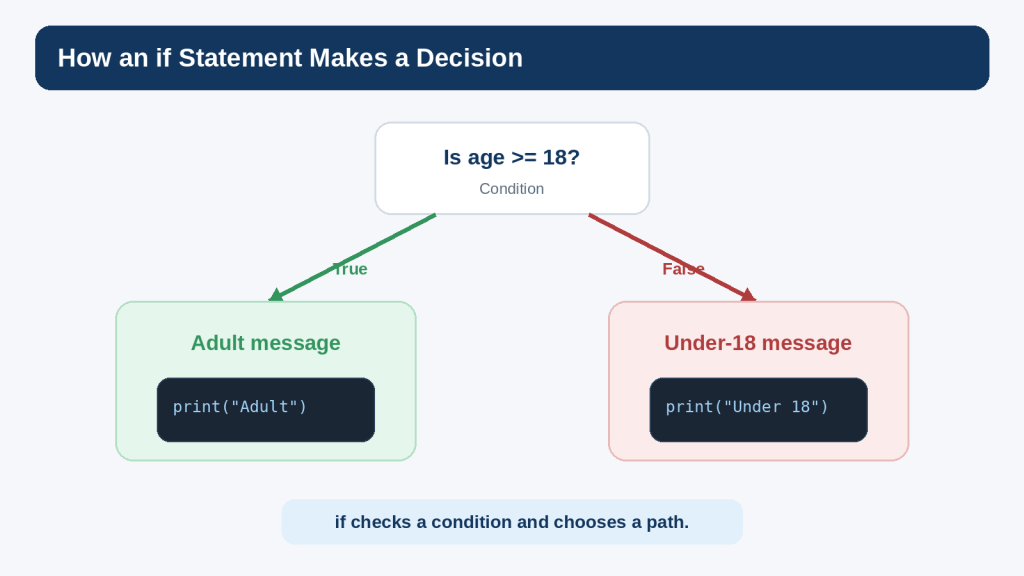
Figure 5. An if statement evaluates a condition and chooses which indented block of code should run.
Explanation: Conditions let a program make decisions. Test boundary values so you know the comparison behaves the way you intended.
Repeat Work with Loops
A loop repeats a block of code. This saves you from writing the same instruction many times.
A for Loop
for number in range(1, 4):
print(number)
The output is 1, 2, and 3. range(1, 4) starts at 1 and stops before 4.
Loop Through Text Values
names = [“Alex”, “Sam”, “Mina”]
for name in names:
print(“Hello”, name)
The for loop takes each item from the list in order and runs the indented block.
A while Loop
count = 1
while count <= 3:
print(count)
count = count + 1
A while loop continues while its condition remains true. The line that changes count is important; without it, the condition could remain true indefinitely.
Avoid Accidental Infinite Loops
How to Avoid This Mistake: When you use while, identify what will eventually make the condition false. If you cannot explain that, the loop may never stop on its own.
Use break Sparingly at First
while True:
answer = input(“Type quit to stop: “)
if answer == “quit”:
break
break exits the nearest loop. It is useful, but do not use it to hide logic you do not understand.
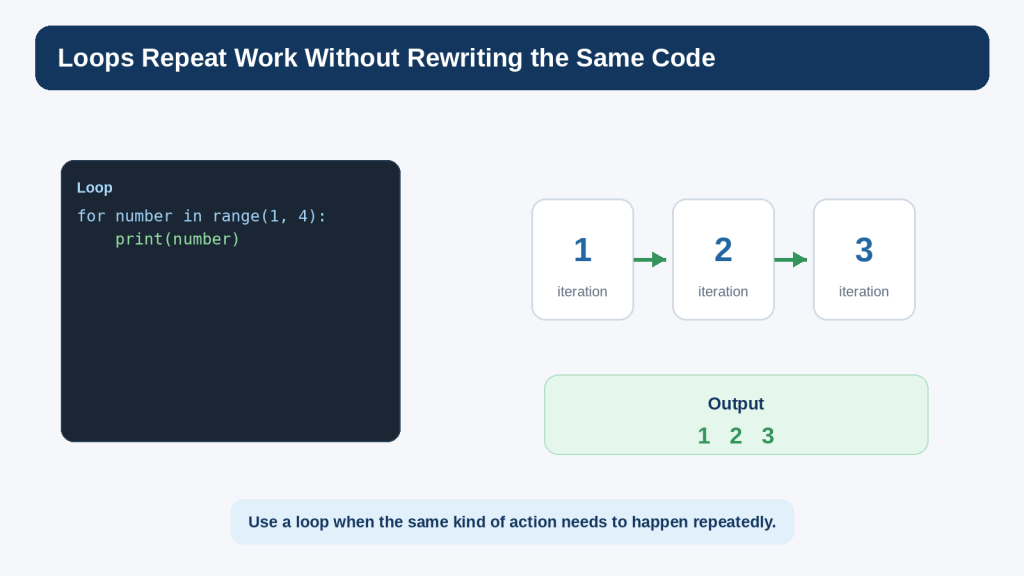
Figure 6. A loop repeats the same kind of work without requiring you to write the instruction again for every item.
Explanation: Use loops when an action needs to repeat. Keep the stopping condition understandable, especially with while loops.
Store Several Values in Lists
A list stores several values in one ordered collection.
fruits = [“apple”, “banana”, “orange”]
print(fruits)
Access an Item by Index
fruits = [“apple”, “banana”, “orange”]
print(fruits[0])
Python uses zero-based indexing, so the first item is at index 0.
Change an Item
fruits[1] = “pear”
print(fruits)
Add an Item
fruits.append(“grapes”)
Check the Length
print(len(fruits))
len() returns the number of items in the list.
Loop Through the List
for fruit in fruits:
print(fruit)
Lists and loops are often used together because a program can apply the same kind of action to every item.
Common Beginner Mistake: Asking for an Index That Does Not Exist
If a list contains three items, valid positive indexes are 0, 1, and 2. Trying to access fruits[3] raises an IndexError.
How to Avoid This Mistake: Remember that the first index is 0 and use len() when you need to understand how many items are present.
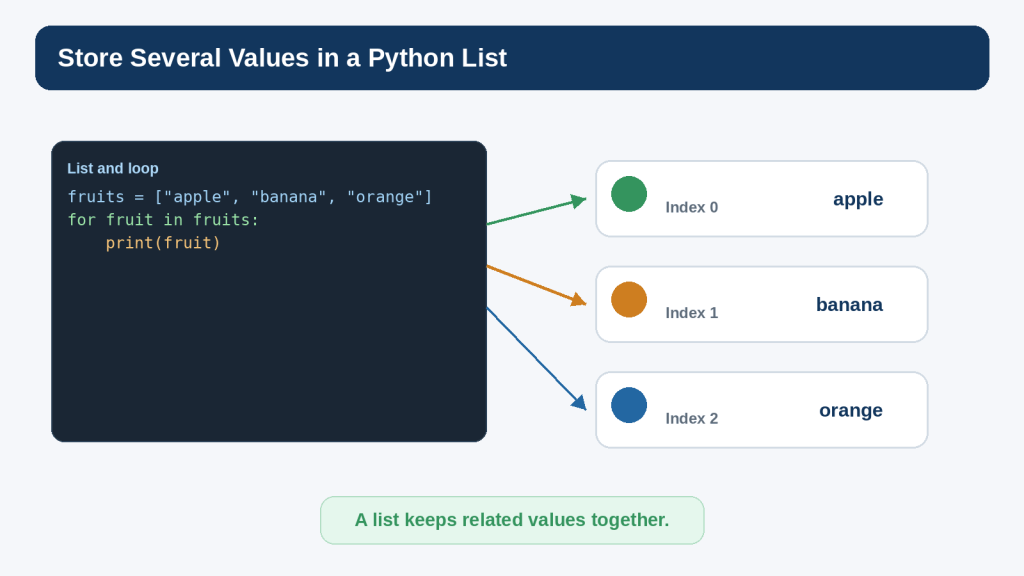
Figure 7. A Python list keeps related values together, and a loop can process the items one by one.
Explanation: Lists are one of the first useful data structures for beginners. Remember that the first positive index is zero.
Create Reusable Work with Functions
A function groups instructions under a name so that the work can be reused.
def greet():
print(“Hello!”)
greet()
The def statement defines the function. The later greet() call runs it.
Pass Information into a Function
def greet(name):
print(“Hello”, name)
greet(“Alex”)
greet(“Sam”)
The parameter name receives the value supplied by each call.
Return a Result
def add_numbers(a, b):
return a + b
total = add_numbers(5, 3)
print(total)
return sends a value back to the code that called the function.
Why Functions Help
- they reduce repeated code
- they give a useful name to a task
- they make a larger program easier to divide into smaller parts
- they allow one part to be tested separately
- they can make code easier to read when the function name is clear
Keep Beginner Functions Small
A first function does not need to handle many unrelated jobs. If you cannot describe its purpose in one short sentence, consider whether it should be divided into smaller functions.
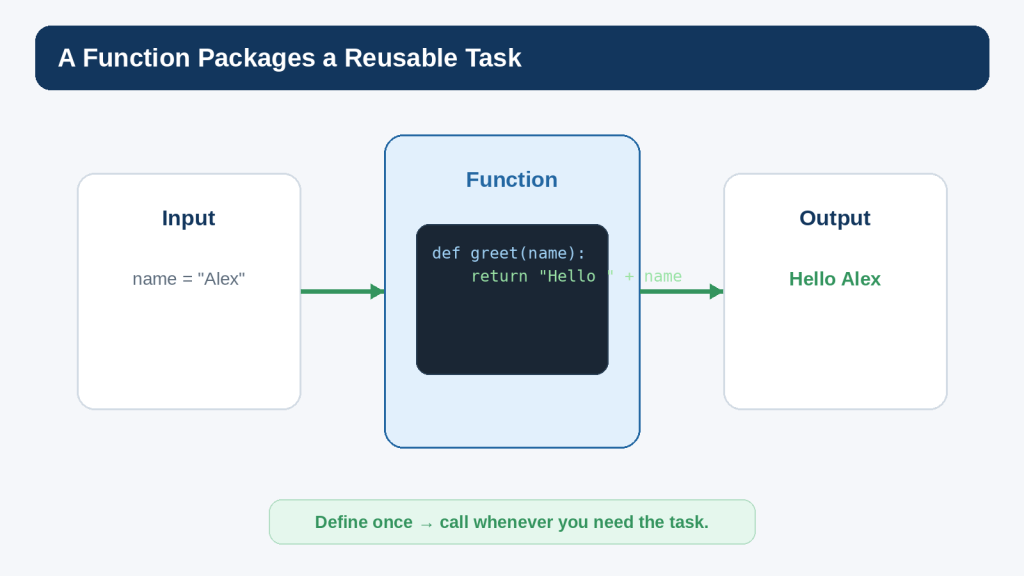
Figure 8. A function packages a reusable task and can receive information, process it, and return or display a result.
Explanation: Small functions make programs easier to organize. Give each beginner function one clear responsibility when possible.
Understand Errors and Troubleshoot Your Code
Errors are normal when learning to program. The goal is not to avoid every error; it is to learn how to read what Python tells you and investigate the smallest likely cause.
Syntax Errors
A syntax error means Python could not understand the structure of the code.
print(“Hello”
The closing parenthesis is missing. The exact message may point near the place where Python detected the problem, which is not always exactly where the mistake began.
Exceptions
Code can be syntactically valid and still fail while it is running. Python calls many runtime problems exceptions.
number = int(“hello”)
The text hello cannot be converted to an integer, so Python raises a ValueError.
Read the Last Line of the Traceback
A traceback can look intimidating, but the final line often tells you the exception type and a short description. Then look upward for the line in your own file that caused the problem.
Common Beginner Errors
- NameError: a name is used before it is defined or is misspelled
- TypeError: an operation is used with an inappropriate type
- ValueError: a value has the right general type of input but cannot be converted or used as requested
- IndexError: a sequence index is outside the available range
- IndentationError: indentation is inconsistent or missing where Python requires it
- SyntaxError: the code does not follow Python syntax
A Simple Troubleshooting Routine
18. Read the error message.
19. Check the most recent change.
20. Check spelling, capitalization, brackets, quotation marks, colons, and indentation.
21. Confirm you saved the file you are actually running.
22. Reduce the problem to a smaller example when possible.
23. Compare the feature with current official Python documentation.
24. Ask ChatGPT or another helper a focused question only after you can describe what you expected and what actually happened.
Use try and except for Expected Input Errors
try:
age = int(input(“Enter your age: “))
print(“Next year you will be”, age + 1)
except ValueError:
print(“Please enter a whole number.”)
This example handles one expected conversion error. Do not use a broad except block to hide every possible problem. Catch only errors you understand and can respond to appropriately.
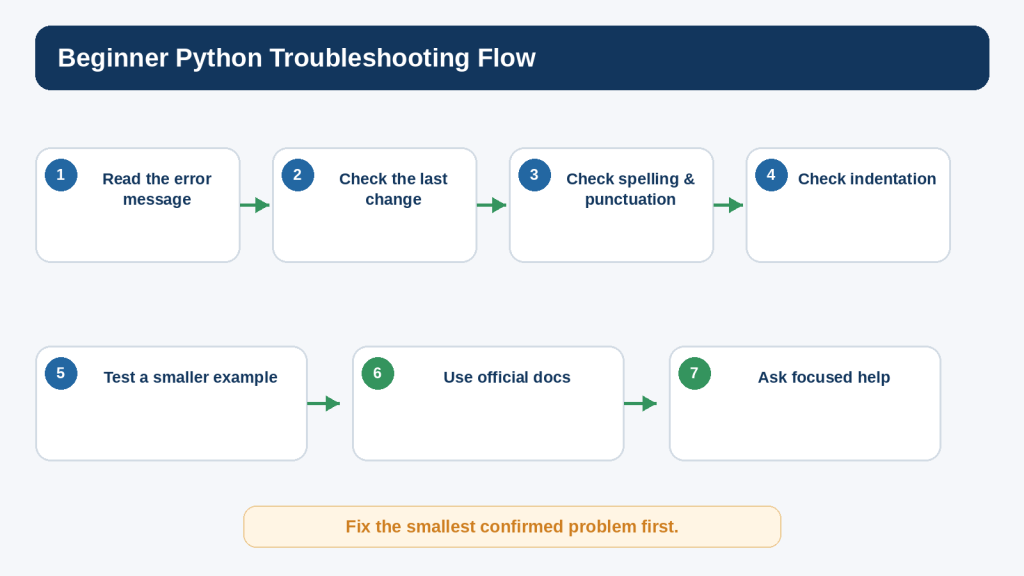
Figure 9. Beginner Python errors are easier to solve when you read the message, check the latest change, and isolate one problem at a time.
Explanation: A traceback is useful information. Start with the exception type and the line in your own file before replacing large parts of the program.
Build a Small Beginner Project
A small project helps connect several concepts. The following program asks for a fictional study goal and minutes available, then gives a simple message. It uses input, conversion, a condition, variables, and output without requiring personal information.
Step 1: Plan the Program
- ask for a fictional study topic
- ask how many minutes are available
- convert the minutes to an integer
- give one message when the time is at least 30 minutes and another when it is shorter
- print a short summary
Step 2: Write the First Working Version
topic = input(“What would you like to practise? “)
minutes = int(input(“How many minutes do you have? “))
if minutes >= 30:
message = “You have time for a focused practice session.”
else:
message = “Keep the session small and practise one concept.”
print(“Topic:”, topic)
print(“Minutes:”, minutes)
print(message)
Step 3: Test Several Inputs
- topic = Python variables, minutes = 45
- topic = Python loops, minutes = 15
- a whole-number value exactly at 30 minutes
Testing different inputs helps you see whether the condition behaves at the boundary you intended.
Step 4: Add Simple Error Handling
topic = input(“What would you like to practise? “)
try:
minutes = int(input(“How many minutes do you have? “))
if minutes >= 30:
message = “You have time for a focused practice session.”
else:
message = “Keep the session small and practise one concept.”
print(“Topic:”, topic)
print(“Minutes:”, minutes)
print(message)
except ValueError:
print(“Please enter the minutes as a whole number.”)
Step 5: Improve One Thing at a Time
Possible beginner improvements include rejecting negative minutes, placing the message logic inside a function, or repeating the program until the user chooses to stop. Add only one improvement at a time and test it before continuing.
This layered approach scales well: plan, create one working version, test it, and then improve it deliberately.
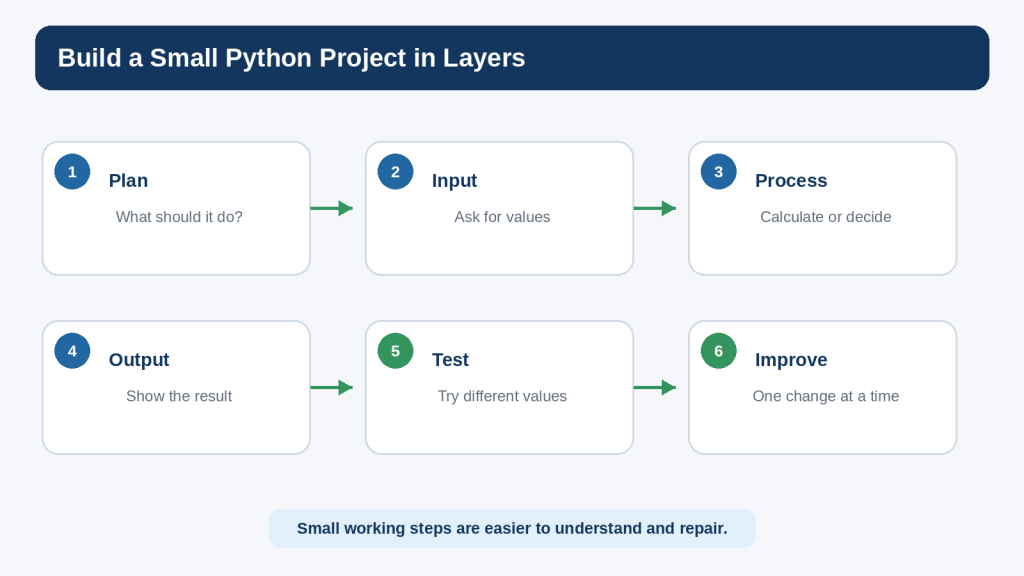
Figure 10. Build a beginner Python project in layers: plan, collect input, process it, show output, test, and improve one step at a time.
Explanation: A small working version gives you a stable base. Add improvements only after the current version behaves as expected.
Use ChatGPT as a Python Learning Assistant
ChatGPT can be useful when you need a focused explanation, a small practice exercise, or help interpreting an error. OpenAI currently distinguishes Chat from Codex: Chat is suitable for conversational questions, while Codex is dedicated to software-development work such as writing or debugging code, running tests and commands, reviewing changes, and working with repositories.
Ask for an Explanation
Example prompt:
I am a complete beginner learning Python. Explain this code line by line. Tell me what each variable, function, operator, and indentation level does. Do not add new features.
Ask for a Hint Instead of the Answer
I am stuck on this Python exercise. Give me one hint only. Do not show the finished code yet.
Hints can preserve the learning process better than immediately replacing your code.
Ask for Focused Troubleshooting
My program should print 15, but I get a TypeError. I will paste the smallest relevant section. Explain the likely cause first and show only the smallest correction.
Ask Why the Correction Works
The correction worked. Explain why my original code failed and why the corrected version works. Use beginner-friendly language.
Ask for a Practice Exercise
Give me a short Python exercise using variables, input, one if statement, and print(). Do not show the answer until I ask.
Do Not Paste Unnecessary Secrets or Private Data
Before sharing code with an online service, remove passwords, tokens, API keys, personal records, confidential file paths, customer information, and other details that are not needed to understand the coding problem.
Do Not Assume Suggested Code Is Correct
AI-generated code can contain syntax mistakes, logic errors, insecure patterns, outdated approaches, unnecessary complexity, or assumptions that do not match your project. Read it, run it in an appropriate test environment, compare important technical details with official documentation, and keep only changes you understand.
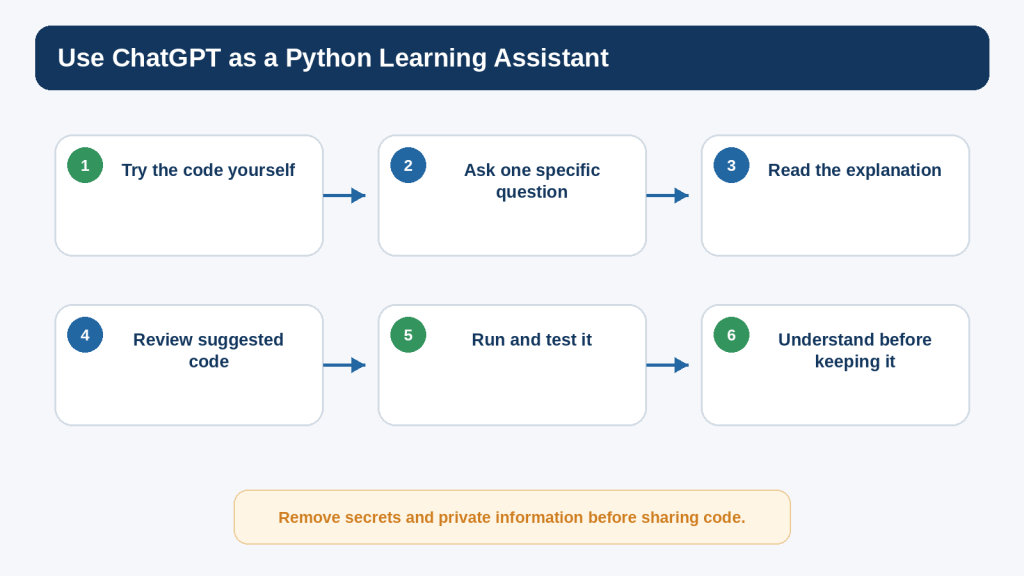
Figure 11. ChatGPT can support Python learning when you ask focused questions, review the suggested code, test it, and understand the change before keeping it.
Explanation: AI assistance is most useful when it strengthens your understanding rather than replacing it. Remove private information before sharing code.
Learn the Basics of Modules, Packages, pip, and Virtual Environments
Python includes a large standard library, and additional third-party packages can extend what your programs can do. You do not need to install packages to understand the core concepts in this article, but beginners should know the basic vocabulary before following package-installation instructions found online.
Modules
A module is a Python file that contains definitions and statements that another Python file can import.
import math
print(math.sqrt(25))
The standard-library math module provides mathematical functions. The import statement makes the module name available to your program.
Third-Party Packages
Third-party packages are created and distributed separately from the Python standard library. They may be available from the Python Package Index, commonly called PyPI, or from other sources.
pip
pip is the reference Python package installer. Do not copy an installation command from an unknown website without first checking which package it will install and where it comes from.
Virtual Environments
The Python Packaging User Guide recommends virtual environments when working with third-party packages. A virtual environment gives a project an isolated Python environment so package installations for one project do not interfere with another.
py -m venv .venv
.venv\Scripts\activate
Those are the current Windows examples in the official packaging guide. Installation commands and platform details can change, so check the current guide when you begin using packages.
Do Not Install Packages Just Because an AI Suggests Them
If ChatGPT or another tool recommends a package, first identify the official project, review its documentation, check its licence, understand why you need it, and consider whether the project appears maintained and appropriate for your purpose.
Protect Privacy and Security While Learning Python
Python can read files, make network requests, automate applications, call external services, and modify information. Those capabilities become powerful quickly, so safe habits should begin before you write advanced programs.
Never Hard-Code Real Secrets into Code You Plan to Share
- passwords
- API keys
- authentication tokens
- database credentials
- private encryption keys
- account recovery codes
- confidential customer information
OWASP treats credentials, API keys, and similar values as secrets that require appropriate management. A placeholder such as YOUR_API_KEY_HERE is enough for most learning examples.
Check More Than the Visible Lines
Secrets can also appear in comments, configuration files, environment files, notebooks, screenshots, copied terminal output, error messages, or version-control history. Removing one visible line does not necessarily remove every copy.
Be Careful with Code That Deletes or Overwrites Files
Before running unfamiliar code that changes files, use a safe test folder and keep backups. Do not give beginner experiments unnecessary access to important documents.
Be Careful with exec() and eval()
Python provides powerful built-in functions such as exec() and eval(). A beginner should not use them with untrusted input. They can execute code or evaluate expressions and can create serious security risks when used incorrectly.
Understand ChatGPT Data Controls
For individual ChatGPT and Codex services, OpenAI states that content may be used to improve models unless the user opts out through the available data controls. OpenAI also states that Temporary Chats do not appear in normal history, do not use or create memories, and are not used for training. Product settings and retention practices can change, so check the current official OpenAI information when privacy matters to your work.
Privacy controls are useful, but the safest rule is still not to share information that is unnecessary for the coding question.
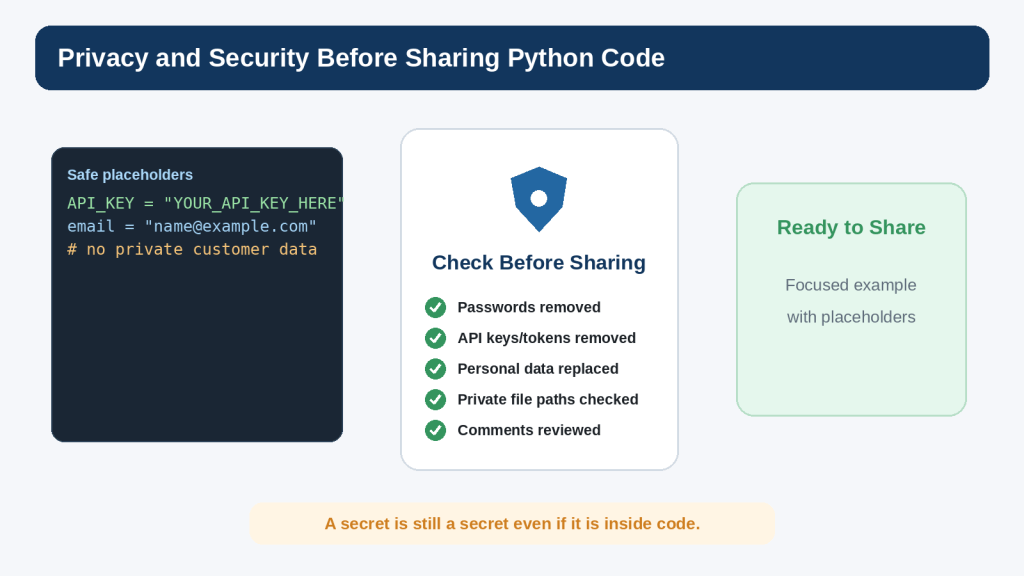
Figure 12. Review Python code for secrets and private information before sharing it with an AI tool, another person, or a public repository.
Explanation: Placeholders let you demonstrate the structure of a problem without exposing real credentials or personal information.
Check Copyright and Licensing Before Reusing Code or Packages
Code being visible online does not automatically mean it can be reused without conditions. Software, documentation, examples, templates, libraries, and other project materials can be protected by copyright and distributed under specific licences.
Python Itself Has a Licence
Python software and documentation are licensed under the Python Software Foundation License Version 2. The Python documentation also states that, starting with Python 3.8.6, examples, recipes, and other documentation code are additionally available under the Zero-Clause BSD licence. Some software incorporated into Python has different licences.
Third-Party Packages Have Their Own Terms
Installing a package does not make its licence disappear. Before using a third-party dependency in a published or commercial project, identify the project’s licence and understand conditions that may apply to redistribution, modification, notices, attribution, source availability, patents, trademarks, or bundled dependencies.
Open Source Does Not Mean No Rules
Open-source software grants permissions under a licence. Different open-source licences have different conditions. Check the specific licence rather than assuming every open-source project works the same way.
AI Assistance Does Not Remove Licensing Responsibility
If an AI tool suggests a library, code fragment, repository, template, or data source, verify the original source and current licence before relying on it. Do not assume that AI-generated or AI-suggested material is automatically copyright-free or commercially permitted.
Keep a Simple Dependency Record
- package or resource name
- official source
- version used
- licence
- date checked
- required notices or attribution
- reason the dependency is needed
Keeping a small record makes later maintenance and licence review much easier.
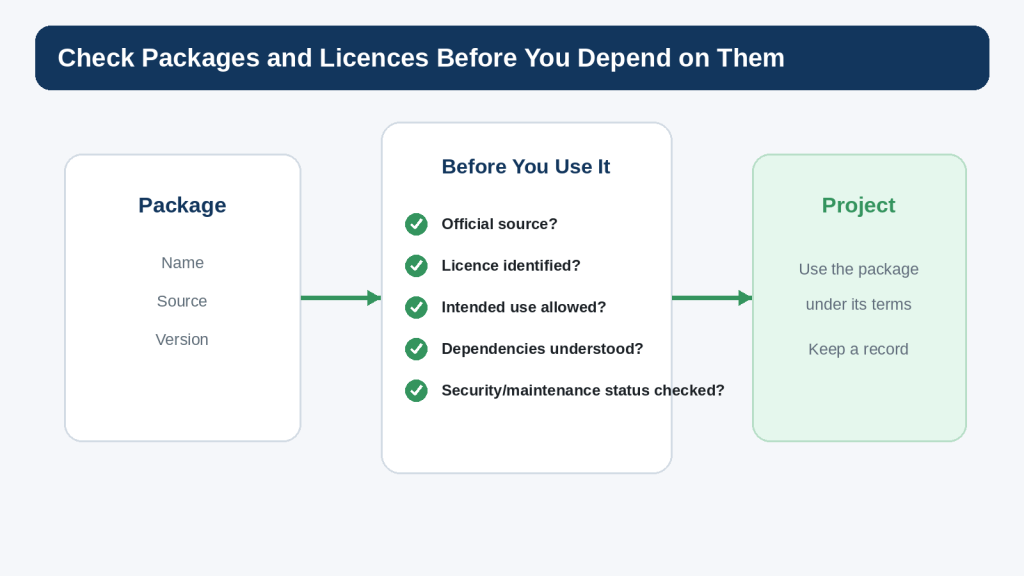
Figure 13. Before depending on a third-party Python package, check its source, licence, intended use, dependencies, and maintenance information.
Explanation: Installing a package does not remove its licence conditions or security implications. Keep a simple record of important dependencies.
Accessibility and Inclusive Beginner Programs
Accessibility is often discussed in the context of websites and graphical interfaces, but even a command-line or text-based Python program can be easier or harder for people to use depending on how prompts and output are designed.
Use Clear Prompts
Ask for one thing at a time and explain the expected format. “Enter your age as a whole number:” is clearer than “Value:”.
Do Not Rely on Colour Alone
If a future terminal tool uses coloured text, do not make colour the only way to communicate an error, warning, or success state. Include meaningful text as well.
Write Understandable Error Messages
Instead of “Invalid,” say what the user can do next, for example “Please enter the minutes as a whole number.”
Avoid Unnecessary Complexity
Simple prompts, predictable output, and understandable choices can make a beginner program easier for many users. More advanced accessibility requirements depend on the interface and purpose of the application.
Benefits and Limitations of Using ChatGPT for Python
Benefits
- Explain unfamiliar syntax at a beginner level
- Create short practice exercises
- Suggest small examples
- Help interpret traceback messages
- Compare two simple approaches
- Ask you questions to test understanding
- Help divide a larger task into smaller steps
Limitation 1: Code Can Be Wrong
A response can contain incorrect syntax, faulty logic, an inappropriate library, an insecure pattern, or a misunderstanding of your goal.
How to Reduce This Limitation: Run the code yourself, test more than one input, and compare important technical details with current official documentation.
Limitation 2: Working Code May Still Be Poor Code
A program can run and still be difficult to maintain, insecure, inaccessible, inefficient, or inappropriate for its intended use.
How to Reduce This Limitation: Ask what the code does, why each part is needed, what assumptions it makes, and what risks or limitations remain.
Limitation 3: Large Generated Projects Can Hide the Learning
Hundreds of lines of generated code may produce an impressive result while leaving a beginner unable to explain or repair it.
How to Reduce This Limitation: Request the smallest useful step, understand it, test it, and then continue.
Limitation 4: Features and Tools Change
Python, ChatGPT, Codex, package versions, and documentation continue to evolve. You do not need to reread every policy before every practice session. Check current official information when you first use a tool, when behaviour changes, when you change plans or features, when you receive an important update notice, and periodically for projects that depend on a specific capability.
Reality: AI can accelerate some parts of coding, but understanding, testing, privacy, security, licensing, and final responsibility still matter.
Common Python Mistakes Beginners Make
Mistake 1: Forgetting Quotation Marks Around Text
name = “Alex”
Mistake 2: Using = When You Mean ==
if age == 18:
print(“Exactly 18”)
Mistake 3: Incorrect Indentation
Statements that belong to an if, loop, or function need consistent indentation.
Mistake 4: Forgetting a Colon
Statements such as if, elif, else, for, while, def, try, and except use a colon before an indented block.
Mistake 5: Mixing Text and Numbers
input() returns text. Convert it when a numeric operation is required.
Mistake 6: Misspelling a Variable
user_name and username are different names.
Mistake 7: Using an Index Outside a List
The first list item is index 0, and the largest positive index is one less than the list length.
Mistake 8: Creating an Infinite while Loop
Make sure something inside or around the loop can eventually make its condition false, unless an intentional break condition controls the loop.
Mistake 9: Changing Too Much at Once
How to Avoid This Mistake: Make one small change, save, run, and inspect the result before moving to the next change.
Mistake 10: Copying Code Without Understanding It
How to Avoid This Mistake: Ask for an explanation and reduce the example until you can describe what each important part does.
Mistake 11: Ignoring Error Messages
The traceback is information, not merely a failure message. Read the exception type and the line Python points to.
Mistake 12: Installing Unknown Packages
Check the official project, source, licence, documentation, and reason for using a package before installing it.
Mistake 13: Sharing Secrets in a Troubleshooting Example
Replace private values with placeholders before sharing code or screenshots.
Mistake 14: Assuming AI Output Is Automatically Safe
AI assistance does not remove the need to test code, review permissions, understand dependencies, and check security implications.
Useful ChatGPT Prompts for Practising Python
The most useful beginner prompts explain your level, goal, relevant code, observed result, and the kind of help you want.
Prompt 1: Explain Code Line by Line
I am a complete beginner learning Python. Explain this code line by line. Define unfamiliar terms and do not add new features.
Prompt 2: Find the Smallest Error
My Python program produces this error. Find the smallest likely cause, explain it first, and show only the correction that is necessary.
Prompt 3: Give Me One Hint
Give me one hint for this exercise. Do not show the answer yet.
Prompt 4: Create a Practice Exercise
Give me a beginner Python exercise using variables, input, one calculation, and print(). Give me the requirements only.
Prompt 5: Test My Understanding
Ask me five beginner questions about this Python code, one at a time. Wait for my answer before explaining.
Prompt 6: Compare Two Approaches
Compare these two beginner Python solutions. Explain what each does and which is easier to understand for this small task.
Prompt 7: Explain a Traceback
Explain this Python traceback in beginner-friendly language. Tell me what the exception type means and which line I should inspect first.
Prompt 8: Review for Privacy and Security
Review this small Python example for obvious exposed secrets, unsafe handling of private data, or risky file operations. Do not claim this guarantees security.
Prompt 9: Simplify Code
Rewrite this example using the simplest Python suitable for a complete beginner while keeping the same basic result. Explain what you removed.
Prompt 10: Review Before I Keep the Change
Before I keep this suggested change, explain what it changes, what assumptions it makes, and what I should test.
A focused prompt is easier to evaluate than a request such as “fix everything.”
Common Myths About Python and AI-Assisted Coding
Myth 1: You Must Memorize Python Before You Can Build Anything
Reality: Learn a small set of common concepts and become comfortable looking up less familiar features when needed.
Myth 2: Python Is Only for Professional Developers
Reality: Python is used in professional systems, but it is also practical for small scripts, learning exercises, automation, data exploration, and many personal projects.
Myth 3: If the Program Runs Once, It Is Correct
Reality: One successful run proves only that one path worked with one set of inputs. Test boundaries, invalid input, and other expected cases.
Myth 4: More Code Means a Better Program
Reality: Extra complexity is useful only when it serves a purpose. Simple code is often easier to understand and maintain.
Myth 5: AI-Generated Code Is Always Correct
Reality: AI-generated code can be wrong, incomplete, insecure, or unsuitable. Review and test important changes.
Myth 6: If ChatGPT Wrote It, Licensing No Longer Matters
Reality: Check third-party code, packages, assets, and suggested dependencies at their original source and review their licence conditions.
Myth 7: Python float Is Exact Decimal Arithmetic
Reality: Binary floating-point arithmetic cannot exactly represent every decimal fraction. This matters when exact decimal behaviour is required.
Myth 8: Installing a Package Is Always Harmless
Reality: Packages execute code and bring dependencies into your environment. Use reputable sources, virtual environments, and appropriate review.
Myth 9: Learning with AI Means You No Longer Need Documentation
Reality: Official documentation remains an important source for syntax, behaviour, version changes, and technical details.
Myth 10: Python Knowledge Means You Are Ready to Build Any Production System
Reality: The beginner foundations are valuable, but production systems can also require architecture, testing, security, deployment, databases, networking, accessibility, privacy, and domain-specific expertise.
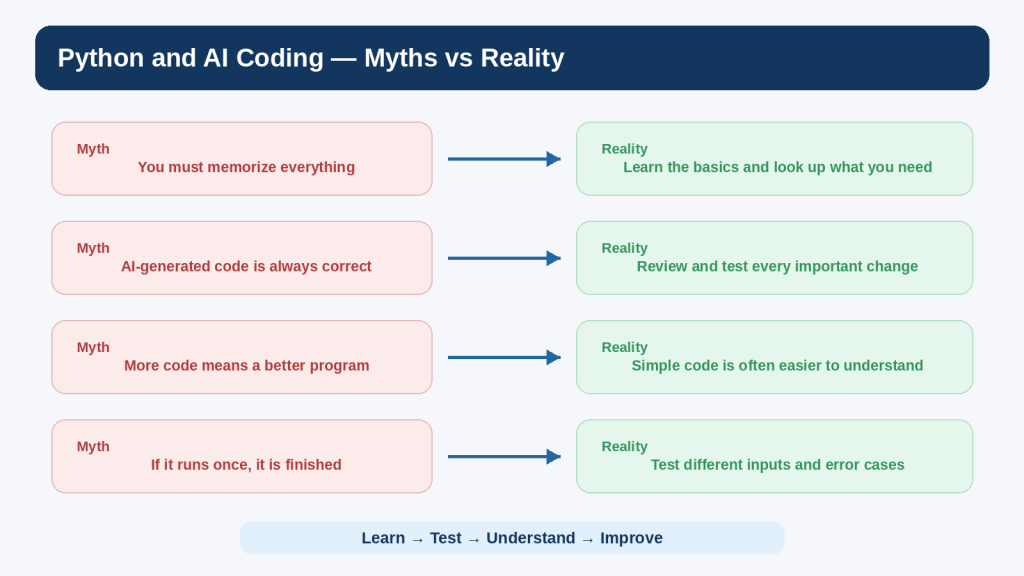
Figure 14. Common myths can make Python and AI-assisted coding seem easier or harder than they really are.
Explanation: Python is approachable when learned gradually. AI can help, but testing, understanding, privacy, security, and licensing still require attention.
Frequently Asked Questions
Is Python difficult for a complete beginner?
Python is commonly used for teaching and beginner programming because small programs can be written with relatively little syntax. Some topics become more complex as projects grow, but you can start productively with print(), variables, input, conditions, loops, lists, and functions.
Which Python version should I install?
Use a current stable Python 3 release from the official Python website unless a course or project specifically requires another supported version. As of August 16, 2026, Python.org lists 3.14.7 as the latest stable Python 3 release.
Do I need a paid code editor?
No. IDLE or another simple editor is enough for the exercises in this article. More advanced editors can be useful later, but they are not required to understand the foundations.
Should I type code or copy and paste it?
Both can be useful. Typing short examples helps you notice punctuation and spelling. Copying can save time for longer examples, but read and modify the code so that you understand what it does.
What is the difference between Python and HTML/CSS?
HTML structures web content, CSS styles it, and Python is a general-purpose programming language that can perform calculations, decisions, loops, file operations, automation, and many other tasks.
Why does input() give me text?
input() returns a string. Use int() or float() when the entered text needs to become a number and is suitable for that conversion.
Why does Python care about indentation?
Indentation defines blocks of code. It tells Python which statements belong to a condition, loop, function, or other compound statement.
Can ChatGPT write Python for me?
It can generate and explain Python code, but generated code should still be reviewed and tested. For a beginner, requesting small examples and explanations is usually more educational than requesting a complete large application.
What is Codex?
OpenAI currently describes Codex as its dedicated software-development experience for writing or debugging code, running tests and commands, reviewing changes, and working with repositories. Availability, interfaces, and plan conditions can change, so check current OpenAI documentation when you want to use it.
Do I need to learn every Python function?
No. Learn common concepts and become comfortable using official documentation. Even experienced developers look up details.
What is pip?
pip is the reference Python package installer. It is used to install and update packages, commonly inside a virtual environment.
Do I need a virtual environment now?
Not for the basic examples in this article. When you begin using third-party packages, the Python Packaging User Guide recommends virtual environments so project dependencies remain isolated.
Can I publish the practice programs from this guide?
You can publish your own practice work, but first remove private information, check any third-party code or packages and their licences, test the program, and make sure you understand what it does. Projects involving sensitive data, accounts, payments, security controls, or other high-impact functions may need professional review.
Can Python automate files on my computer?
Yes, Python can work with files and operating-system functions, but that also means mistakes can overwrite, move, or delete data. Use test folders and backups while learning file automation.
What should I learn after this article?
A logical next step is error-finding and debugging with AI, then deeper practice with files, modules, packages, and small projects. Continue gradually rather than jumping immediately into a large production application.
Key Takeaways
- Python is a general-purpose programming language, and small programs are enough to learn the foundations.
- Use the current stable Python 3 release from the official Python website.
- print() displays output; variables give names to values.
- Strings, integers, floats, and Booleans are common beginner data types.
- input() returns text, so conversion is needed when a number is required.
- Arithmetic operators perform calculations, while comparison operators help form conditions.
- if, elif, and else let a program choose between paths.
- for and while loops repeat work.
- Lists store several related values, and loops can process them one by one.
- Functions package reusable tasks and can accept inputs and return results.
- Errors are part of programming. Read the traceback and investigate the smallest likely cause.
- Build projects in layers: plan, create a working version, test, and improve one thing at a time.
- Use ChatGPT for explanations, hints, exercises, and focused troubleshooting rather than blindly replacing your code.
- AI-generated code can be wrong or inappropriate and should be tested.
- Do not share passwords, API keys, authentication tokens, customer information, or other secrets unnecessarily.
- Use virtual environments when you begin working with third-party packages.
- Check the source and licence of code and packages before relying on them in published or commercial work.
- Keep working copies, licence records, and notes about important dependencies.
The most important beginner habit is simple: understand the change you are making, run the code, check the result, and keep only what you can explain.
Final Tip
Do not measure your progress by how many lines of code you can generate. Measure it by how confidently you can look at a small program and explain what the variables contain, what each condition checks, what each loop repeats, what each function does, and how you would test a change.
25. Read the code before running it.
26. Run it with a simple input.
27. Change one thing.
28. Run it again.
29. Read any error message rather than immediately replacing the code.
30. Use official documentation for important technical details.
31. Ask ChatGPT a focused question when you need an explanation or second pair of eyes.
32. Keep the change only when you understand and accept the result.
That learning habit is more valuable than memorizing large amounts of syntax.
Continue Learning
Article 087 follows Article 086 — HTML and CSS for Beginners with ChatGPT (2026) in the AI Mastery AI Coding series. If you need to review basic ideas about code structure, safe AI-assisted learning, accessibility, privacy, security, or licensing, Article 086 provides useful supporting context.
You can also review Article 084 — What Is AI Coding? Complete Beginner Guide (2026) and Article 085 — How to Ask ChatGPT to Explain Code (2026). These earlier articles help establish the broader AI-coding workflow and the habit of asking for explanations instead of blindly accepting generated code.
The next planned article is Article 088 — How to Find and Fix Coding Errors with AI (2026). It will build directly on the troubleshooting habits introduced here.
Continue practising with small Python files. A five-line program you understand completely is more valuable for learning than a five-hundred-line project you cannot explain.
Sources and References
The following official and authoritative sources were reviewed for the technical, privacy, security, copyright, and licensing information in this article. Information was checked on August 16, 2026. Software versions, product features, policies, and licence conditions can change, so readers should verify current official information when it matters to their project.
- Python Software Foundation — Download Python. Official download and active-release information. Python 3.14.7 was the latest stable release checked on August 16, 2026.
- Python 3.14.7 Documentation — The Python Tutorial. Official tutorial for Python concepts and language features.
- Python 3.14.7 Documentation — An Informal Introduction to Python. Official beginner examples covering numbers, strings, variables, and basic loops.
- Python 3.14.7 Documentation — More Control Flow Tools. Official reference for if statements, for loops, range(), functions, and related control-flow features.
- Python 3.14.7 Documentation — Data Structures. Official reference for lists and other core data structures.
- Python 3.14.7 Documentation — Input and Output. Official reference for program output and file-related input/output concepts.
- Python 3.14.7 Documentation — Errors and Exceptions. Official explanation of syntax errors, exceptions, tracebacks, try, and except.
- Python 3.14.7 Documentation — Modules. Official explanation of Python modules and import behaviour.
- Python 3.14.7 Documentation — Built-in Functions. Official reference for built-in functions such as print(), input(), int(), float(), len(), and type().
- Python 3.14.7 Documentation — IDLE. Official documentation for Python’s Integrated Development and Learning Environment.
- Python Documentation — Using Python on Windows. Current official Windows installation and launch guidance.
- Python Packaging User Guide — pip and Virtual Environments. Official PyPA guidance recommending virtual environments for third-party package installations.
- Python 3.14.7 Documentation — History and License. Official Python Software Foundation licensing information.
- OpenAI Help Center — ChatGPT Work and Codex. Current OpenAI description of Chat, Work, and Codex roles, including Codex for software development.
- OpenAI Help Center — Data Controls FAQ. Current information about ChatGPT data controls and model-improvement settings.
- OpenAI — How Your Data Is Used to Improve Model Performance. Current information about model-improvement use and Temporary Chat behaviour.
- OWASP — Secrets Management Cheat Sheet. Security guidance for passwords, API keys, credentials, and other secrets.
- Open Source Initiative — Approved Licenses. Reference for approved open-source licences and licence terms.
- WIPO — Copyright. General copyright reference for software and other protected works.
Important Note: This article provides general educational information about Python, AI-assisted coding, privacy, security, copyright, and licensing. It is not legal, cybersecurity, or other professional advice. For sensitive, regulated, commercial, or high-impact systems, obtain appropriate professional review.


Leave a Reply