

Estimated reading time: 20 minutes
Last updated: August 8, 2026
AI can help beginners brainstorm and improve YouTube thumbnails, titles, and descriptions while the creator reviews the final result for clarity and accuracy.
Introduction
Finishing a faceless YouTube video is not the end of the publishing process. Before viewers discover the video, you still need three important publishing elements: a thumbnail, a title, and a description.
- A thumbnail is the image viewers see before opening the video.
- A title tells viewers what the video is about.
- A description gives additional information, useful links, credits, disclosures, and other details.
AI tools can help you brainstorm, draft, compare, and improve these elements. They can suggest thumbnail concepts, short thumbnail text, title options, description structures, chapter names, and proofreading improvements. However, AI should not be used to invent results, links, credits, or claims.
A strong thumbnail and title should attract attention without misleading the viewer. A clear description should accurately explain the video and include important information such as relevant links, sources, credits, licence information when needed, chapters when useful, and disclosures when appropriate.
The goal is not to create the most dramatic thumbnail or sensational title. The goal is to create a clear and trustworthy presentation that helps the right viewer understand why the video may be useful.
Before Learning
Before creating a final thumbnail, title, or description with AI, make sure the video itself is mostly finished. You should already know what the video is about, who it is for, the main problem it solves, the most important benefit, the main sections, and whether credits or disclosures may be needed.
Finish the Main Video First
- Script
- Voiceover
- Visuals
- Editing
- Captions
- Final review
- Export
You can brainstorm title and thumbnail ideas earlier, but final versions should match the finished video. If the final edit changes, the publishing materials may need to change as well.
Identify the Main Viewer Benefit
Ask: What will the viewer understand, learn, or accomplish after watching? A realistic benefit is stronger than a guarantee. For example: Learn a simple workflow for arranging visuals, improving narration, adding music and captions, reviewing the finished project, and exporting it.
Write a One-Sentence Video Summary
Write one simple sentence that accurately explains the finished video. This gives AI useful context and reduces the chance that it will invent topics or benefits that are not actually present.
Gather Information for the Description
- Main video summary
- Relevant website and related-video links
- Sources
- Music or stock-media credits
- Affiliate or sponsorship disclosures when applicable
- AI-related disclosure information when applicable
- Chapters or timestamps when useful
Do not invent credits, licences, links, or disclosures. Use the actual information from your project records.
Do Not Start With Clickbait
A better starting question is: What is the clearest truthful reason someone would want to watch this video? That question produces a stronger foundation for AI-assisted brainstorming.
What You’ll Learn
By the end of this guide, you should understand how to create a complete YouTube publishing package for a faceless video using AI as an assistant.
- Understand the different jobs of the thumbnail, title, and description
- Identify the main idea and viewer benefit before using AI
- Create simple thumbnail concepts that remain readable on small screens
- Generate and compare title options
- Avoid exaggerated or misleading wording
- Write a beginner-friendly description
- Add useful links, credits, disclosures, and chapters
- Review AI-generated thumbnails for visual errors and misleading implications
- Protect privacy and check permissions and licences
- Keep the thumbnail, title, description, and actual video consistent
- Perform a final quality check before publishing
The basic workflow is: Understand the Video -> Define the Viewer Benefit -> Create Thumbnail Ideas -> Draft Titles -> Write the Description -> Add Credits and Disclosures -> Review Everything -> Publish.
What Makes a Good YouTube Thumbnail, Title, and Description
A YouTube thumbnail, title, and description should work together. Each has a different job, but all three should describe the same video accurately.
The Thumbnail Should Attract Attention Clearly
- Easy to understand at a glance
- Readable on a small screen
- One clear visual idea
- Strong contrast
- Minimal clutter
- Accurate to the actual video
- No misleading visual claims
The thumbnail does not need to explain the entire lesson. Its job is to communicate the main idea quickly.
Keep Thumbnail Text Short
Instead of placing the full title in the thumbnail, use a short phrase such as “Create Better Thumbnails” or “Edit Faceless Videos.” The full explanation can appear in the title.
The Title Should Explain the Video Clearly
A good beginner-friendly title is usually clear, specific, accurate, and easy to understand. Avoid promises that the video cannot support, such as guaranteed success or instant results.
The Description Should Add Useful Information
The description can explain what the video covers, who it is for, related resources, chapters, credits, sources, and disclosures. It should add context rather than simply repeat the title.
Maintain Consistency Across All Three Elements
If the thumbnail says “5 AI Editing Tools,” the video should actually cover five AI editing tools. If the description promises a specific tutorial step, the video should provide it.
Use AI for Options, Not Automatic Final Decisions
1. Ask AI for several ideas.
2. Remove inaccurate or exaggerated options.
3. Choose the clearest candidates.
4. Compare them with the finished video.
5. Rewrite where necessary.
6. Perform a final human review.
How to Identify the Main Video Idea and Viewer Benefit
Before asking AI to create titles, thumbnail ideas, or a description, define the main idea in simple language.
Start With the Main Topic
Write one short sentence describing the video topic.
Identify the Main Viewer
Decide who the video is designed for. For AI Mastery, this is often a complete beginner who wants practical, step-by-step guidance.
Identify the Main Problem
Ask what difficulty the viewer is trying to solve.
Identify the Main Benefit
Ask what the viewer will realistically be able to understand or do after watching.
Separate Topic From Benefit
The topic describes what the video covers. The benefit describes what the viewer gains. A title may emphasize the topic while short thumbnail text emphasizes the benefit.
Create a Simple Video Brief for AI
- Video topic
- Audience
- Main problem
- Main benefit
- Style
- Words or claims to avoid
Example AI Prompt
Generate 10 clear YouTube title ideas for a beginner video about [topic]. The audience is complete beginners. Keep the titles accurate, simple, and useful. Avoid hype, guarantees, exaggerated claims, fake urgency, and clickbait.
Keep the Promise Realistic
If the video is an introduction, do not call it an advanced masterclass. If it teaches one method, do not claim it covers every method.
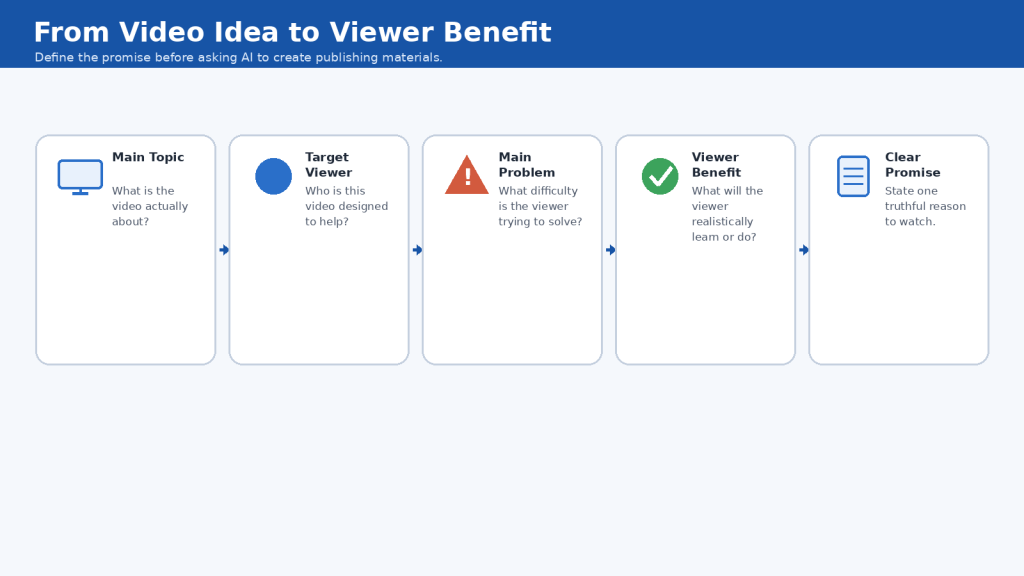
Figure 1. Start with the video topic, identify the viewer and problem, then define the realistic benefit before creating the title, thumbnail, or description.
Explanation: A clear viewer benefit gives AI better context and helps keep all publishing elements accurate and consistent with the finished video.
How to Create YouTube Thumbnail Ideas with AI
AI can be useful for brainstorming thumbnail concepts before you design the final image. Give it enough context to suggest ideas that accurately represent the finished video.
Ask for Concepts Before Generating the Image
Ask for several thumbnail concepts first. Request one main visual idea and only a few words of thumbnail text. This makes it easier to compare meaningful alternatives before spending time on final design.
Choose One Main Idea
A thumbnail should normally communicate one dominant idea quickly, such as a video-editing timeline, a beginner at a computer, or separate assets becoming one finished video.
Create Clearly Different Concepts
- Workspace concept – beginner at a computer
- Timeline concept – close-up of clips, narration, music, and captions
- Before-and-after concept – separate files becoming a finished video
- Simple workflow concept – a few large symbols combining into one result
Keep Thumbnail Text Very Short
- Create Better Thumbnails
- Edit Faceless Videos
- From Clips to Video
- Better Thumbnails with AI
Design for Small Screens
- Use one main subject
- Use large readable text
- Keep text short
- Use strong contrast
- Leave generous spacing
- Avoid tiny interface details
- Keep important elements away from the edges
Use AI-Generated People Carefully
Do not imitate a real person without permission or create a false endorsement. Generic illustrative people are safer when they are not presented as a real expert or celebrity.
Check AI-Generated Screens
AI image generators can create convincing but inaccurate interfaces. For educational thumbnails, use a generic representation rather than pretending an AI-generated interface is an exact screenshot of real software.
Do Not Use Fake Results
Avoid fake earnings, fabricated analytics, invented subscriber counts, false before-and-after comparisons, or anything else that implies results the video does not demonstrate.
Current YouTube Thumbnail Guidance
Current YouTube Help guidance recommends 3840 x 2160 pixels, a minimum width of 640 pixels, common formats such as JPG or PNG, and a 16:9 aspect ratio for custom thumbnails. Technical recommendations can change, so check official Help if an upload fails or your workflow changes.
YouTube Can Test Different Thumbnails and Titles
Eligible creators can currently compare up to three different titles, thumbnails, or title-and-thumbnail combinations in YouTube Studio. Beginners can still compare two or three strong concepts manually.
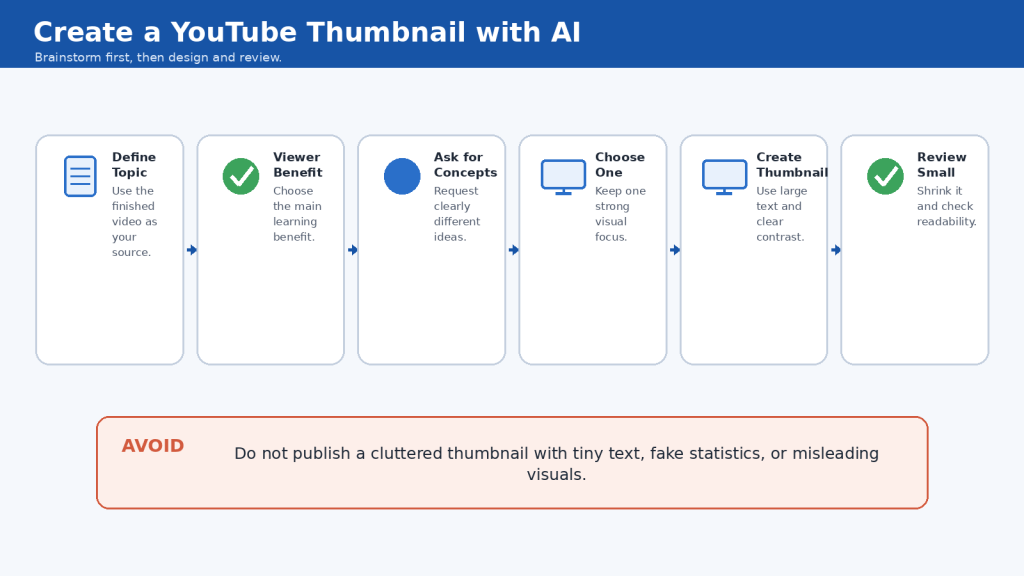
Figure 2. Start with several thumbnail concepts, choose one clear idea, then review the finished design at a small size before publishing.
Explanation: AI can speed up thumbnail brainstorming, but the creator should choose the concept that best represents the actual video and check that the final design remains clear, readable, accurate, and non-misleading.
How to Write YouTube Titles with AI
AI can generate title ideas quickly, but the goal is not to choose the most dramatic option. The best title is clear, accurate, specific, and relevant to the finished video.
Give AI Enough Context
Provide the topic, audience, main problem, viewer benefit, important subjects, preferred tone, and claims to avoid.
Ask for Different Title Styles
- Straightforward
- Step-by-step
- Benefit-focused
- Question-based
- Workflow-focused
Keep the Main Topic Clear
For beginner educational content, clarity is usually more useful than vague curiosity. The viewer should not have to guess what the video covers.
Put Important Words Reasonably Early
YouTube currently allows video titles up to 100 characters. You do not need to use the full limit. Important topic words should appear reasonably early because longer titles may be shortened in some interfaces.
Do Not Stuff the Title With Keywords
Use one or two important topic phrases naturally. Repeating similar keywords makes titles awkward and less readable.
Use the Year When Freshness Matters
Adding a year can be useful for AI tools, software features, or platform policies. Do not update the year without reviewing the actual content for accuracy.
Avoid Unsupported Superlatives and Fake Urgency
- Best
- Ultimate
- Perfect
- Guaranteed
- Fastest
- Watch Before It Is Too Late
- Secret Method Nobody Knows
Use strong claims only when you can reasonably support them.
Do Not Invent Results
Never let AI invent earnings, subscriber counts, view counts, time savings, success rates, or test results.
Compare AI Suggestions Manually
- Is the topic immediately clear?
- Does it match the finished video?
- Is the benefit realistic?
- Is anything exaggerated?
- Does it work with the thumbnail?
- Would a complete beginner understand it?
Example Reusable Prompt
Generate 10 YouTube title options for this video. Keep each title clear, accurate, natural, and within the current 100-character limit. Put the main topic reasonably early. Avoid clickbait, guarantees, unsupported superlatives, fake urgency, invented numbers, and misleading claims.
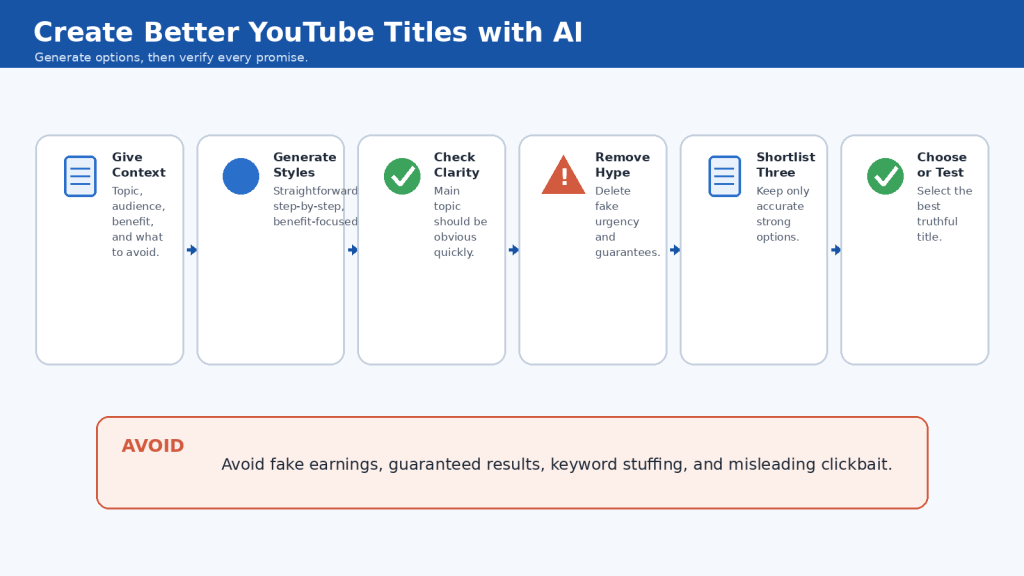
Figure 3. AI can generate and compare title ideas, but the final title should remain clear, accurate, natural, and consistent with the actual video.
Explanation: Use AI to create options rather than to make the final decision automatically. Checking each title against the finished video helps prevent exaggeration, keyword stuffing, invented claims, and misleading promises.
How to Write a YouTube Description with AI
A YouTube description gives viewers more information about the video and can help YouTube understand the topic. Current YouTube guidance allows up to 5,000 characters and recommends unique descriptions for individual videos.
Start With a Clear Video Summary
Use the first one or two sentences to explain what the viewer will learn. Avoid beginning with long promotional messages, unrelated links, or repeated keywords.
Give AI the Finished Video Information
Provide the title, audience, main topic, viewer benefit, important sections, related resources, credits, disclosures, and preferred writing style. Tell AI not to invent links, credits, licences, timestamps, or claims.
Use Main Topic Terms Naturally
Identify one or two main phrases that describe the video and use them naturally in the title and description instead of repeating them mechanically.
Make Every Video Description Unique
You can reuse a small standard footer, but the opening summary and main topic section should describe that specific video.
Organize the Description Into Useful Sections
- About This Video
- What You Will Learn
- Chapters
- Continue Learning
- Sources and Credits
- Disclosure
You do not need every section for every video. Use only what helps the viewer.
Add Related Links Carefully
Check every link before publishing and never allow AI to invent a URL.
Add Chapters When They Help
Use verified timestamps from the finished video. AI can shorten chapter names but should not guess real timing.
Add Credits When Required
Use the actual attribution wording from the applicable licence or permission record.
Add Disclosure Information When Necessary
Depending on the video, you may need affiliate, sponsorship, paid-promotion, or AI-related disclosure. A sentence in the description does not replace YouTube built-in settings when those settings are required.
Final Description Check
- First lines explain the video clearly
- Description matches the finished video
- Important terms appear naturally
- Links are correct
- Chapter timestamps are accurate
- Credits are complete
- Required disclosures are handled
- No invented claims remain
- Spelling and grammar are checke
- Private information is not included
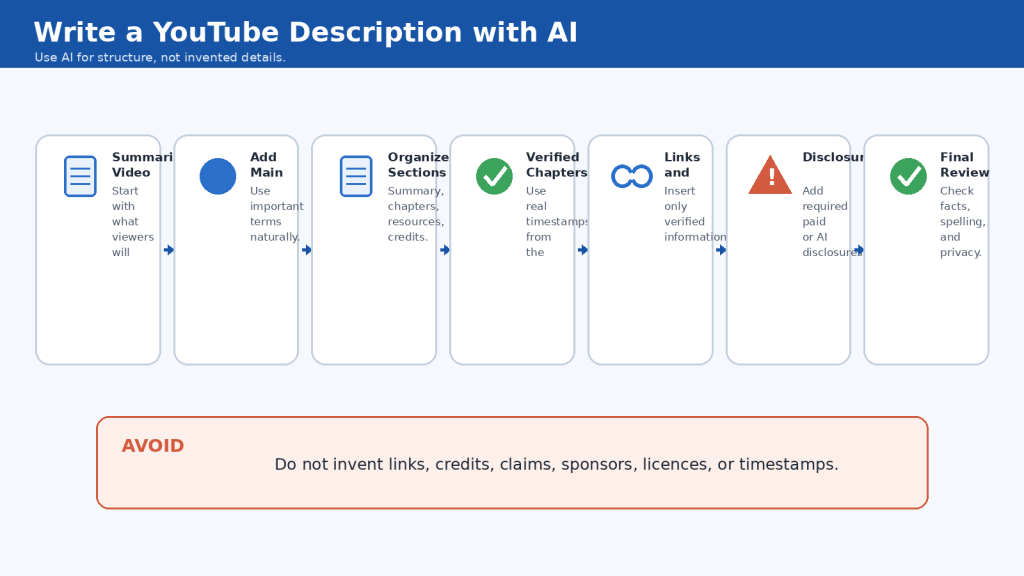
Figure 4. AI can help draft and organize a YouTube description, but links, chapters, credits, disclosures, and factual details should be verified before publication.
Explanation: A useful description starts with a clear summary, adds relevant information in an organized way, and avoids invented details. Human review is especially important for links, timestamps, licensing credits, and disclosures.
How to Create YouTube Chapters and Timestamps with AI Assistance
YouTube chapters divide a longer video into clearly labelled sections and can help viewers find specific topics or return to an important step.
Current Manual Chapter Requirements
- First timestamp starts at 00:00
- At least three timestamps
- Timestamps listed in ascending order
- Each chapter at least 10 seconds long
Create Timestamps From the Finished Video
Editing changes timing, so create or verify chapters using the final exported video rather than the script alone.
Simple Manual Method
1. Open the final exported video.
2. Start at 00:00.
3. Write down the time when each major section begins.
4. Give each section a short descriptive name.
5. Continue until the end.
6. Review every timestamp again.
Let AI Help Shorten Chapter Names
AI can turn long headings into shorter labels while preserving meaning.
Do Not Ask AI to Guess Timestamps
AI does not know exact pause lengths, scene timing, transitions, or editing changes unless you give it reliable timing information.
Add Chapters in YouTube Studio
1. Sign in to YouTube Studio.
2. Select Content.
3. Select the video.
4. Add the timestamps and titles in the Description.
5. Save.
Review Every Chapter After Publishing
Open each chapter and confirm that it starts at the intended point and accurately describes the section.
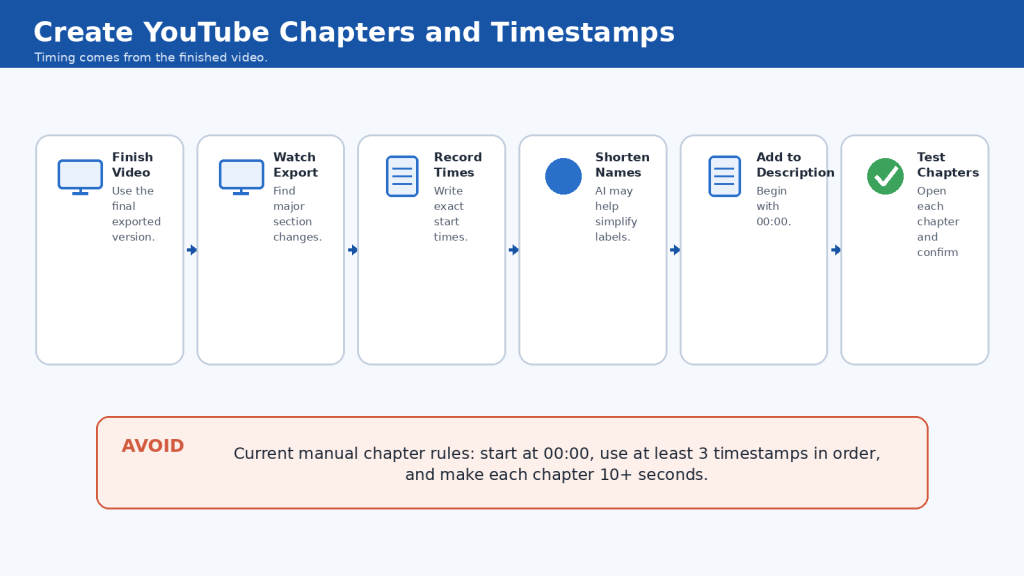
Figure 5. Create chapter times from the finished video, use AI only to help organize or shorten the labels, then test every chapter after adding it to YouTube.
Explanation: AI can assist with chapter wording, but accurate timestamps must come from the final video. Current manual chapter rules require 00:00 first, at least three timestamps in order, and chapters at least 10 seconds long.
How to Add Links, Credits, and Disclosures to the Description
A YouTube description can include website links, related resources, source links, credits, affiliate relationships, sponsorship information, and AI-related disclosure information.
Add Only Useful Links
Include links that genuinely help the viewer, such as your website, related tutorials, playlists, official sources, or resources mentioned in the video.
Check Every Link Before Publishing
1. Open the link.
2. Confirm the destination.
3. Check that the page still exists.
4. Confirm you copied the complete address.
5. Make sure it does not lead somewhere unexpected.
Follow YouTube External Links Policy
Current YouTube policy applies to clickable URLs and other ways creators direct viewers off the platform. Check every destination before publishing.
Be Careful With Affiliate Links
If you may receive a commission from a qualifying action, make the relationship clear when required and follow applicable rules. This article provides general education, not legal advice.
Use YouTube Paid-Promotion Setting When Required
Current YouTube guidance requires creators to select the paid-promotion setting when a video includes qualifying paid product placements, sponsorships, endorsements, or similar commercial relationships.
Add Credits When a Licence Requires Them
Attribution can require a creator name, asset title, source, licence name, licence link, or other wording. Use the actual licence record, not AI guesses.
Do Not Confuse Credit With Permission
Writing “credit to the original creator” does not automatically give permission to use someone else’s work.
Add AI Disclosure When Appropriate
Current YouTube guidance provides an AI use setting for qualifying realistic AI-generated or meaningfully altered content. A description note can add context but does not replace the built-in setting when required.
Preserve Your Records
- Final description
- Links
- Credits
- Affiliate disclosure
- Sponsorship disclosure
- AI disclosure
- Licence records
- Permission records
Final Links, Credits, and Disclosure Check
- Every link opened and checked
- No AI-generated URL accepted without verification
- Affiliate relationships disclosed appropriately
- Paid promotions use the applicable platform setting
- Required licence credits complete
- Credit not confused with permission
- AI disclosure considered based on the finished content
- Real people, voices, and likenesses used responsibly
- Important records saved
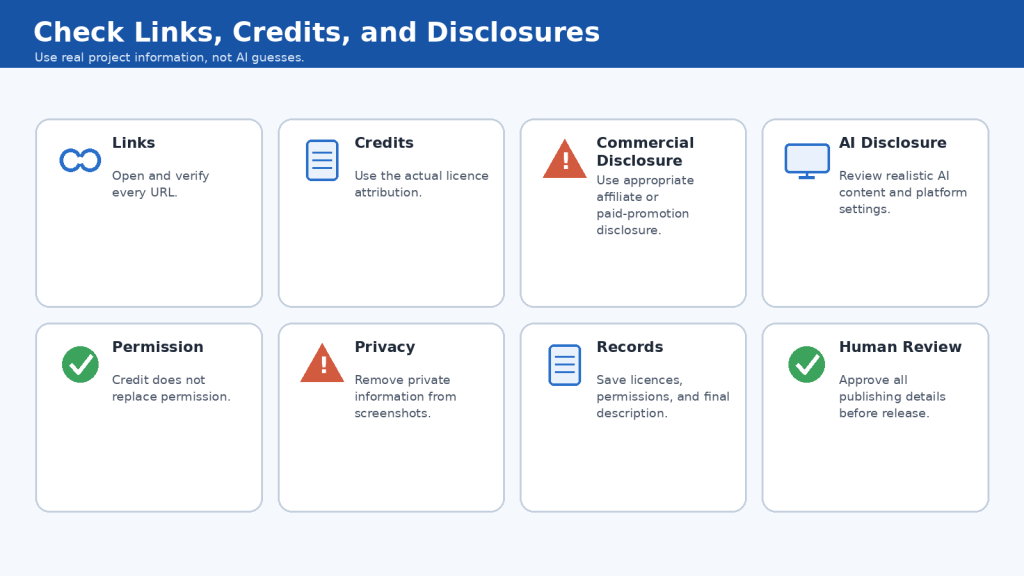
Figure 6. Verify links, follow licence requirements, disclose relevant commercial relationships, and review whether the finished video requires YouTube’s AI-content disclosure setting.
Explanation: Links, credits, and disclosures should be based on real project information rather than AI guesses. Keeping accurate records makes the description easier to maintain.
How to Make Thumbnails Accessible and Easy to Read
A thumbnail should remain understandable even when it appears very small. Good design helps viewers recognize the topic without struggling with tiny text or clutter.
Use Large, Simple Text
Use large lettering, short phrases, simple fonts, and generous spacing. The full explanation belongs in the title.
Use Strong Contrast
Text should stand out clearly from the background. Avoid placing text over a busy area where it disappears into the image.
Do Not Rely on Colour Alone
Use labels, check marks, warning symbols, or other cues so meaning is not communicated only by colour.
Keep Important Elements Large
Make the main person, object, screen, or concept large enough to recognize immediately.
Avoid Tiny Screenshots
A full software interface often becomes unreadable at thumbnail size. Use a simplified interface or zoom into the important area.
Check AI-Generated Hands, Faces, and Objects
Inspect hands, fingers, faces, eyes, computer screens, keyboards, and repeated objects for distortions.
Avoid Unreadable AI-Generated Text
When practical, generate the main visual first and add final thumbnail text separately using a design or image-editing tool.
Test at Small Size and on More Than One Device
Shrink the image significantly and, when practical, preview it on desktop, phone, and tablet.
Thumbnail Accessibility Checklist
- Main idea is obvious
- Text is large and short
- Contrast is strong
- Meaning does not rely only on colour
- Main subject is recognizable
- Design is not cluttered
- Text stays away from edges
- AI-generated text and objects are checked
- Thumbnail remains clear at small size
- Thumbnail matches the actual video
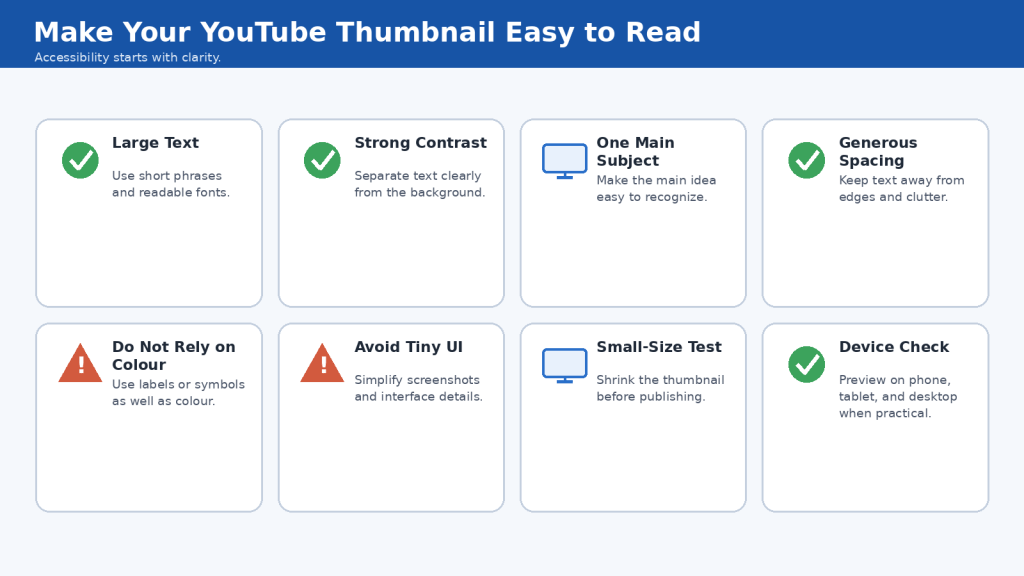
Figure 7. An accessible thumbnail uses large text, strong contrast, one clear visual focus, and enough spacing to remain understandable on smaller screens.
Explanation: Thumbnail accessibility is mainly about clarity. A simple design that remains readable and recognizable at small size helps more viewers understand the video’s topic before clicking.
How to Review AI-Generated Thumbnails for Accuracy and Safety
AI-generated thumbnails can look polished while containing incorrect text, distorted objects, fake interface elements, invented statistics, misleading scenes, or unauthorized use of a real person’s likeness.
Check Whether the Thumbnail Matches the Video
Ask whether the thumbnail represents something the viewer will actually see or learn in the video.
Check AI-Generated Text
Zoom in and inspect every visible word. Add important text separately when possible.
Inspect Hands, Faces, and Objects
Look for extra or missing fingers, duplicated objects, distorted equipment, impossible shapes, or strange facial details.
Check Screens and Software Interfaces
AI-generated interfaces may contain invented buttons and nonsense text. Generic representations are safer than pretending they are exact screenshots.
Check Numbers and Statistics
Never trust generated money, views, subscribers, percentages, dates, or rankings without verification.
Avoid Fake Earnings and Results
Do not use fictional analytics or performance figures as genuine evidence.
Check Real People Carefully
Do not create the false impression that a real person appears, endorses, supports, or participates when they do not.
Disclosure Does Not Replace Permission
AI disclosure does not automatically make misleading impersonation or unauthorized use acceptable.
Check Realistic AI Scenes
A realistic synthetic image is not proof that an event occurred. If viewers could mistake it for reality, review current disclosure requirements and make the illustrative nature clear when appropriate.
Check Private Information
Inspect real screenshots and photographs for email addresses, account names, messages, notifications, file names, payment details, and other private information.
AI Thumbnail Review Checklist
- Thumbnail matches the actual video
- Main claim is accurate
- Visible text is checked
- Numbers are genuine and verified
- Hands, faces, and important objects are not distorted
- Screens do not falsely represent a real interface
- No fake earnings or analytics presented as genuine
- No real person falsely shown as participating or endorsing
- Private information removed
- Realistic AI scenes not presented as proof of an event
- Disclosure considered where applicable
- Thumbnail and title make the same truthful promise
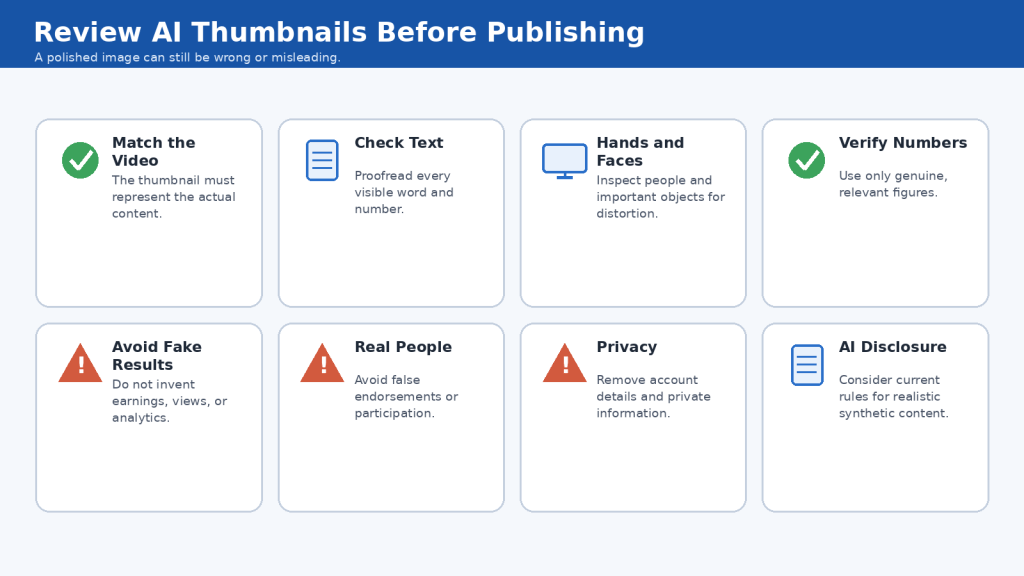
Figure 8. AI-generated thumbnails should be checked for accuracy, visual errors, misleading claims, privacy problems, real-person implications, and appropriate disclosure before publication.
Explanation: A polished AI thumbnail can still contain factual or visual problems. A final human review helps ensure that the image accurately represents the video and does not mislead viewers.
How to Compare and Choose the Best Thumbnail and Title Combination
A thumbnail and title should be judged together. The best combination should make one clear, accurate promise about the video.
Start With Three Strong Options
Reduce brainstorming results to a small shortlist of clearly different thumbnail-title pairs.
Compare Clarity First
Ask whether a complete beginner can understand the subject without solving a puzzle.
Check Repetition
The thumbnail and title should complement each other without repeating the entire same phrase.
Check the Promise
Ask what a viewer would reasonably expect, then compare that expectation with the finished video.
Remove Exaggeration
Reject combinations based on guaranteed results, fake urgency, unsupported superlatives, invented statistics, false earnings, unrelated famous people, or results the video does not demonstrate.
Compare Visual Balance and Mobile Readability
Make sure the thumbnail has one clear focus and the title explains what the image cannot. Check that important title words appear early enough and thumbnail text remains legible at small size.
Use a Simple Scoring Method
- Clarity
- Accuracy
- Beginner friendliness
- Thumbnail readability
- Title readability
- Consistency
- Viewer benefit
Keep Alternative Versions
Save other strong options with descriptive filenames so they can be tested or restored later.
Final Combination Checklist
- Video topic is clear
- Thumbnail and title support the same promise
- Thumbnail does not repeat the full title
- Wording is accurate
- Benefit is realistic
- No fake statistics or guarantees
- Thumbnail readable at small size
- Title understandable to beginners
- Final choice matches the actual video
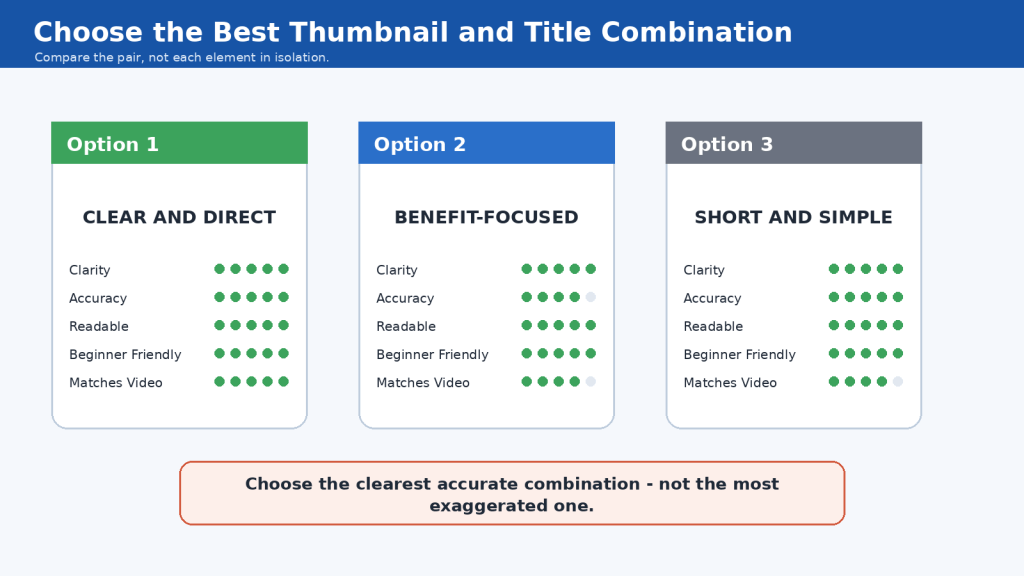
Figure 9. Compare thumbnail and title options together for clarity, accuracy, readability, and consistency with the finished video before choosing the final combination.
Explanation: The strongest combination is not necessarily the most dramatic one. For beginner educational content, a clear and truthful thumbnail-title pair gives viewers a better understanding of what the video actually offers.
How to Use AI to Improve Thumbnails, Titles, and Descriptions Without Losing Accuracy
AI can help refine publishing elements after you create a first draft. The important rule is to improve wording without changing the facts.
Give AI the Original Meaning
Tell AI what must remain unchanged, such as topic, audience, number of steps, year, names, dates, links, and factual meaning.
Ask for Improvement, Not Reinvention
Request shorter or clearer versions without adding new claims or benefits.
Protect Numbers and Specific Details
Tell AI to preserve all numbers exactly, then verify them manually.
Protect Names and Technical Terms
Do not let rewriting change product names, tool names, feature names, file formats, dates, or website names.
Improve Thumbnail Text Carefully
Ask for short alternatives with the same meaning and no hype.
Do Not Let AI Add Clickbait Automatically
Instead of “make this more exciting,” ask for wording that is more engaging while remaining factual, specific, beginner-friendly, and non-clickbait.
Tell AI Not to Alter Links
Preserve every URL exactly as written, then open and verify the final links yourself.
Protect Credits and Disclosures
Do not creatively rewrite attribution or disclosure wording that must remain exact under a licence, contract, platform rule, or law.
Use a Controlled Revision Workflow
1. Start with the approved original.
2. Give AI clear revision boundaries.
3. Generate several alternatives.
4. Compare them with the original.
5. Check every factual detail.
6. Choose or manually combine the best wording.
7. Proofread again.
8. Save the final approved version.
Final Accuracy Check
- Meaning has not changed
- No new claim added
- No number changed
- Dates and names remain correct
- Links remain unchanged
- Credits remain accurate
- Required disclosures remain intact
- No unsupported superlative introduced
- Wording still matches the finished video
- Result remains clear for beginners
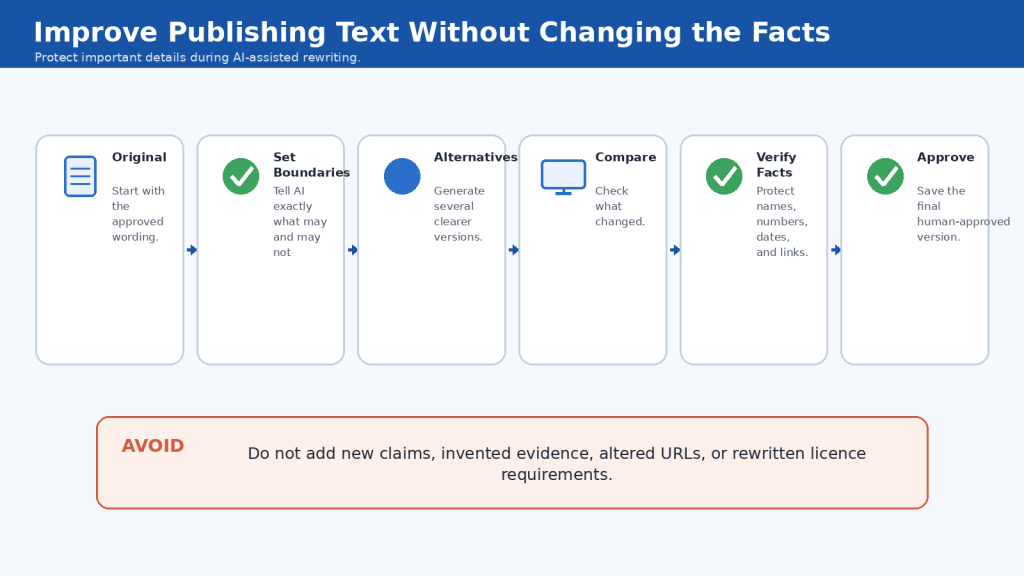
Figure 10. Use AI to improve clarity and readability while protecting facts, numbers, names, links, credits, and disclosures from accidental changes.
Explanation: AI-assisted rewriting is most reliable when you define what may change and what must remain untouched. A final comparison with the original helps catch factual changes before publication.
Common Mistakes When Creating YouTube Thumbnails, Titles, and Descriptions with AI
Mistake 1: Accepting the First AI Suggestion
Reality: AI brainstorming works better when you compare several options.
How to Avoid This Mistake: Ask for multiple clearly different ideas and choose the option that best matches the finished video.
Mistake 2: Asking AI to Make Everything More Clickable
Reality: Engagement prompts can push AI toward hype and fake urgency.
How to Avoid This Mistake: Ask for clear and engaging wording without guarantees, exaggerated claims, or misleading clickbait.
Mistake 3: Making the Thumbnail Too Crowded
Reality: Too many objects compete for attention.
How to Avoid This Mistake: Choose one main visual idea and one short supporting phrase.
Mistake 4: Using Too Much Thumbnail Text
Reality: Long text becomes unreadable at small size.
How to Avoid This Mistake: Keep thumbnail wording short and let the title provide detail.
Mistake 5: Repeating the Exact Same Words in Thumbnail and Title
Reality: Repeating everything wastes space.
How to Avoid This Mistake: Let the thumbnail create quick recognition and the title explain the full topic.
Mistake 6: Letting AI Invent Numbers
Reality: Numbers are factual claims.
How to Avoid This Mistake: Preserve verified numbers exactly and remove numbers AI invented.
Mistake 7: Using Fake Earnings, Views, or Subscriber Counts
Reality: Invented performance figures can mislead viewers.
How to Avoid This Mistake: Use only genuine, relevant, verified figures.
Mistake 8: Using a Misleading Thumbnail
Reality: A thumbnail should not promise something absent from the video.
How to Avoid This Mistake: Compare it with the finished video before publishing.
Mistake 9: Using AI-Generated Text Without Checking It
Reality: Generated image text can be misspelled or nonsensical.
How to Avoid This Mistake: Proofread all text and add important wording separately when practical.
Mistake 10: Using a Real Person’s Likeness to Attract Clicks
Reality: A recognizable person can imply participation or endorsement.
How to Avoid This Mistake: Use permission and avoid false endorsements or impersonation.
Mistake 11: Assuming AI Disclosure Makes Everything Acceptable
Reality: Disclosure does not remove other responsibilities.
How to Avoid This Mistake: Review permission, impersonation, accuracy, privacy, and platform rules separately.
Mistake 12: Letting AI Invent Links or Credits
Reality: AI can generate plausible but false URLs and licence details.
How to Avoid This Mistake: Insert verified links, licence terms, and credits yourself.
Mistake 13: Allowing AI to Guess Chapter Timestamps
Reality: Scripts do not provide exact final timing.
How to Avoid This Mistake: Record chapter times from the finished export.
Mistake 14: Writing a Description Full of Repeated Keywords
Reality: Keyword repetition is difficult to read.
How to Avoid This Mistake: Use important phrases naturally in complete sentences.
Mistake 15: Copying the Same Description to Every Video
Reality: Different videos teach different things.
How to Avoid This Mistake: Write a unique opening summary and topic section for every video.
Mistake 16: Making Unsupported Claims
Reality: Words such as best, fastest, professional, or guaranteed require support.
How to Avoid This Mistake: Remove strong claims unless you can accurately support them.
Mistake 17: Forgetting the Final Combined Review
Reality: Each element can be acceptable alone but inconsistent together.
How to Avoid This Mistake: Review thumbnail, title, description, and finished video as one package.
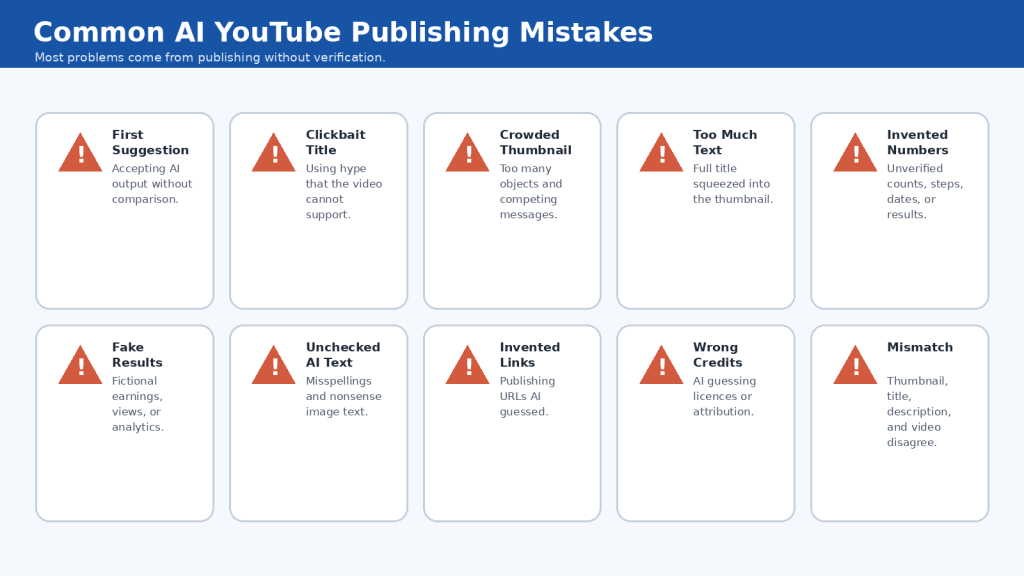
Figure 11. Most AI-assisted YouTube publishing mistakes come from accepting generated content without checking accuracy, readability, permissions, links, claims, and consistency with the finished video.
Explanation: AI can speed up brainstorming and drafting, but thumbnails, titles, descriptions, credits, and disclosures still require human review before publication.
Benefits of Using AI for YouTube Thumbnails, Titles, and Descriptions
AI can make the publishing stage faster and easier, especially when you are working alone and need help moving from a blank page to several useful options.
Faster Brainstorming
Generate thumbnail concepts, short phrases, title styles, description structures, and chapter-name ideas quickly.
More Title Options
Compare straightforward, step-by-step, benefit-focused, question-based, and shorter versions.
Easier Simplification
Turn technical language into clearer beginner-friendly wording.
Better Organization
Organize summaries, chapters, related links, sources, credits, and disclosures.
Faster Rewriting and Proofreading
Shorten titles, remove repetition, improve wording, and check spelling or grammar.
Easier Consistency Checks
Compare the thumbnail, title, and description to see whether they describe the same video.
Easier Version Creation
Prepare two or three accurate alternatives for comparison or testing.
More Time for Final Review
Use saved time for accuracy, permissions, licensing, privacy, disclosure, readability, and final quality control.
The main benefit is assistance, not automation: Ideas -> Options -> Organization -> Rewriting -> Review.
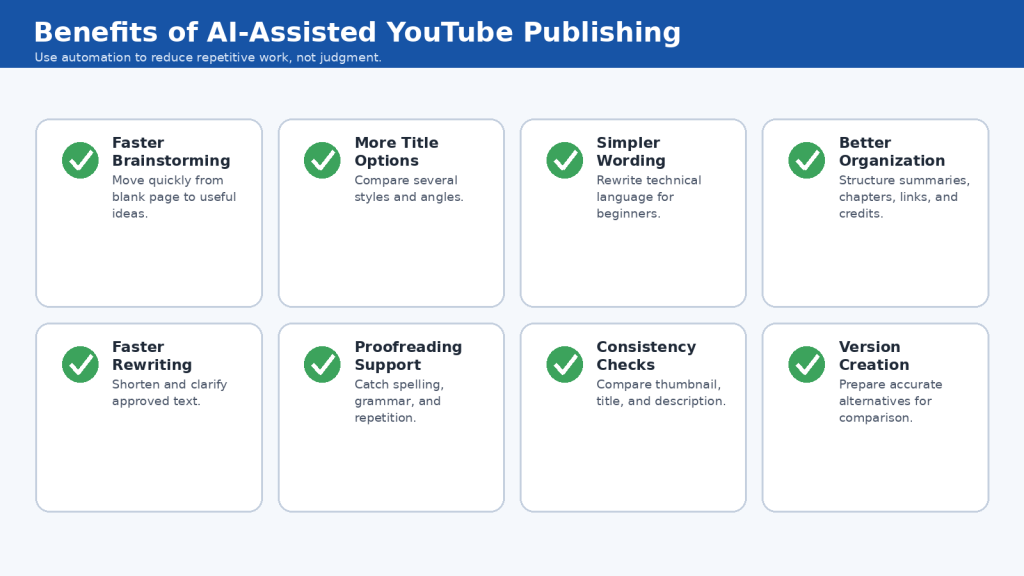
Figure 12. AI can speed up brainstorming, rewriting, comparison, organization, and proofreading while leaving the final publishing decisions to the creator.
Explanation: The strongest benefit of AI is assistance. It can reduce repetitive work and generate useful options, giving you more time to focus on accuracy, readability, permissions, and final quality.
Limitations of Using AI for Thumbnails, Titles, and Descriptions
Limitation 1: AI Can Invent Information
How to Reduce This Limitation: Verify facts, numbers, names, dates, links, credits, and technical details.
Limitation 2: AI Can Make Titles More Dramatic Than Necessary
How to Reduce This Limitation: Use precise prompts that forbid hype, guarantees, and fake urgency.
Limitation 3: AI Does Not Know the Final Video Unless You Tell It
How to Reduce This Limitation: Give AI the final video summary or finished script.
Limitation 4: AI-Generated Thumbnail Text Can Be Wrong
How to Reduce This Limitation: Add important final text separately when practical.
Limitation 5: AI Can Create Visual Distortions
How to Reduce This Limitation: Review the full-size image and regenerate or correct errors.
Limitation 6: AI Can Produce Misleading Realistic Images
How to Reduce This Limitation: Do not present synthetic images as proof of real events or results.
Limitation 7: AI May Create Fake or Unsafe Links
How to Reduce This Limitation: Supply real links and verify every one.
Limitation 8: AI Cannot Reliably Determine Licence Requirements
How to Reduce This Limitation: Use the actual licence or permission terms from the source.
Limitation 9: AI Can Alter Required Credit Wording
How to Reduce This Limitation: Preserve required attribution exactly when needed.
Limitation 10: AI Can Change Important Numbers During Rewriting
How to Reduce This Limitation: Tell AI to preserve numbers exactly and compare the output with the original.
Limitation 11: AI Cannot Know Exact Chapter Timestamps Without Timing Data
How to Reduce This Limitation: Use the final video or reliable timed transcript.
Limitation 12: AI May Not Understand Legal Significance of a Disclosure
How to Reduce This Limitation: Verify important legal or contractual requirements from authoritative sources or professional advice when needed.
Limitation 13: AI Can Encourage Repetitive Publishing
How to Reduce This Limitation: Use a consistent brand style while matching each individual video.
Limitation 14: AI Cannot Guarantee Better Performance
How to Reduce This Limitation: Judge suggestions by clarity, accuracy, and fit – not promises of views or revenue.
Limitation 15: AI May Miss Accessibility Problems
How to Reduce This Limitation: Check contrast, text size, clutter, colour-only meaning, and mobile readability yourself.
Limitation 16: AI Can Miss Privacy Problems
How to Reduce This Limitation: Manually inspect screenshots and photographs.
Limitation 17: AI Cannot Replace Final Human Judgment
How to Reduce This Limitation: Keep final approval with the creator.
Limitation 18: Platform Rules Can Change
How to Reduce This Limitation: Check current official guidance when setting up the workflow, after relevant updates, and periodically.
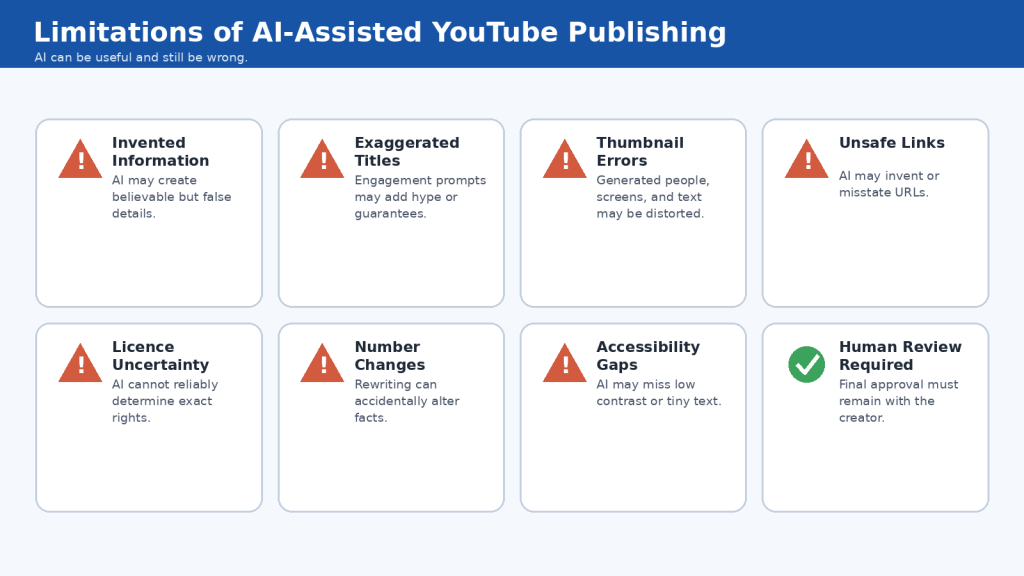
Figure 13. AI can assist with YouTube publishing, but it can still invent facts, exaggerate claims, create visual errors, misunderstand licences, and miss accessibility or privacy problems.
Explanation: The safest workflow uses AI for ideas and drafting while keeping factual verification, permissions, accessibility, and final approval under human control.
Myths About AI YouTube Thumbnails, Titles, and Descriptions
Myth 1: AI Can Automatically Create the Perfect Thumbnail
Reality: AI can create useful starting points, but the final thumbnail still needs human review.
Myth 2: The Most Dramatic Thumbnail Is Always the Best
Reality: The thumbnail should accurately represent the video and help viewers understand what to expect.
Myth 3: Clickbait Is Necessary to Get Views
Reality: A title can be interesting without being misleading.
Myth 4: AI Knows Which Title Will Definitely Get the Most Views
Reality: AI can suggest options but cannot guarantee clicks, views, subscribers, or growth.
Myth 5: More Keywords Always Make a Better Title and Description
Reality: Natural, clear wording is more useful than repeated phrases.
Myth 6: The Thumbnail Should Repeat the Entire Title
Reality: Thumbnail and title can perform different jobs while supporting the same message.
Myth 7: AI-Generated Thumbnail Text Is Ready to Publish
Reality: Important generated text must be checked manually.
Myth 8: A Professional-Looking AI Image Must Be Accurate
Reality: Realistic appearance is not proof of factual accuracy.
Myth 9: Using AI Anywhere Means the Video Always Needs an AI Disclosure
Reality: Not every production-assistance use triggers the same disclosure requirement.
Myth 10: Adding an AI Disclosure Makes Misleading Content Acceptable
Reality: Disclosure does not replace other platform rules, permission, or honesty.
Myth 11: AI Can Safely Invent Links for the Description
Reality: Every link must be verified.
Myth 12: Giving Credit Means You Automatically Have Permission
Reality: Credit and permission are different issues.
Myth 13: AI Can Create Accurate Chapter Timestamps From a Script
Reality: Exact timing comes from the final video or reliable timed information.
Myth 14: You Must Constantly Change Titles and Thumbnails
Reality: Changes should have a clear purpose; eligible creators can test accurate alternatives when useful.
Myth 15: AI Removes the Need for Human Review
Reality: A reliable workflow is AI Generates -> You Compare -> You Verify -> You Correct -> You Approve.
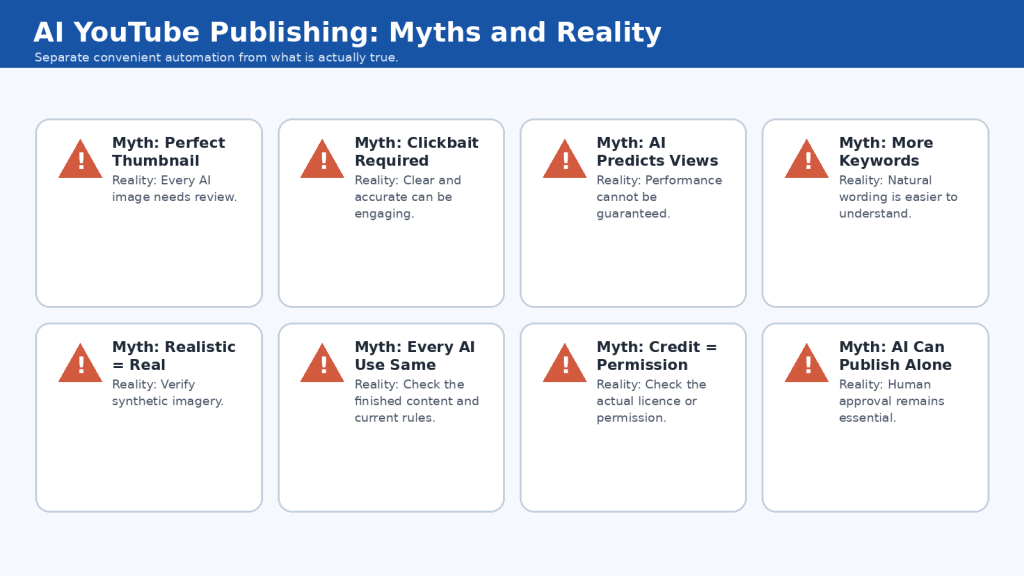
Figure 14. AI can assist with YouTube thumbnails, titles, and descriptions, but it cannot guarantee performance, replace permissions, verify every fact, or remove the need for human review.
Explanation: Understanding these myths helps beginners use AI as a practical publishing assistant rather than treating generated content as automatically accurate, effective, or ready to publish.
Frequently Asked Questions About YouTube Thumbnails, Titles, and Descriptions with AI
Can AI create my YouTube thumbnail for me?
Yes. AI can help with concepts, backgrounds, illustrations, layout ideas, and alternatives, but the final image still needs human review for accuracy, readability, visual errors, permissions, and privacy.
How much text should I put on a thumbnail?
There is no single required number of words. Shorter text is usually easier to read on small screens.
Should the thumbnail and title say the same thing?
Not exactly. They should describe the same video but can perform different jobs.
Can I use AI to write my YouTube title?
Yes. Use AI to create alternatives, then reject invented numbers, fake urgency, unsupported claims, guarantees, and misleading clickbait.
How long can a YouTube title be?
Current YouTube guidance allows up to 100 characters. You do not need to use the entire limit.
Should I put the year in my title?
It can be useful for topics that change over time, but the video should actually be reviewed for that year.
Can AI write the entire YouTube description?
Yes, but provide correct information and verify the final result. Do not let AI invent URLs, timestamps, credits, licences, sponsors, statistics, or claims.
How long can a YouTube description be?
Current YouTube guidance allows up to 5,000 characters.
Can AI create my chapter timestamps?
AI can help with chapter names, but actual times should come from the final video.
What are the basic rules for YouTube chapters?
Current manual chapter guidance requires 00:00 first, at least three timestamps, ascending order, and chapters at least 10 seconds long.
Can I add links to the description?
Yes. Add useful links and verify every destination before publishing.
Can I add affiliate links?
Affiliate links may be used when they comply with applicable rules. Make the relationship clear when required.
Does giving credit mean I have permission?
No. Attribution and permission are separate issues.
Do I need to disclose that AI helped create the thumbnail?
Not necessarily. Ordinary production assistance does not automatically require the same disclosure as qualifying realistic synthetic or meaningfully altered content.
Can I use a real celebrity in an AI thumbnail?
Do not use a real person in a way that falsely suggests participation, endorsement, or authorization.
Can AI guarantee a better click-through rate?
No. AI cannot guarantee views, subscribers, ranking, revenue, or growth.
Should I test different thumbnails and titles?
You can. YouTube currently offers testing for eligible creators, but beginners can also choose the clearest accurate option manually.
What is the most important rule?
The thumbnail, title, description, and actual video should make the same truthful promise.
Key Takeaways
- Start with the finished video, not just the original idea.
- Identify the main topic, target viewer, problem, and realistic benefit before using AI.
- Keep thumbnails simple, readable, accurate, and easy to understand at small size.
- Use short thumbnail text instead of repeating the full title.
- Check AI-generated thumbnails for distorted people, screens, objects, numbers, and text.
- Avoid fake statistics, earnings, analytics, subscriber counts, and unrelated public figures.
- Use AI to generate several title options, then check accuracy and clarity.
- Avoid fake urgency, guarantees, invented numbers, keyword stuffing, and unsupported superlatives.
- Start descriptions with a clear explanation of what viewers will learn.
- Use important topic phrases naturally instead of repeating keywords excessively.
- Create chapter timestamps from the final exported video.
- Open and verify every link before publication.
- Never allow AI to invent URLs, credits, licences, sponsors, statistics, or timestamps.
- Check actual licence requirements for third-party assets.
- Remember that credit does not automatically provide permission.
- Use YouTube paid-promotion or AI-content disclosure settings when required.
- Do not assume every AI use requires the same disclosure.
- Protect private information.
- Preserve original and final publishing records.
- Compare thumbnail, title, description, and finished video together before publishing.
The most important principle is simple: The thumbnail, title, description, and actual video should all make the same truthful promise to the viewer.
Final Tip
Do not try to make every thumbnail, title, or description more dramatic than the last one. Improve one thing at a time: shorter thumbnail text, better contrast, a clearer main subject, a more specific title, a stronger description opening, better chapter names, or more accurate credits.
Keep copies of thumbnail concepts, final thumbnails, title options, descriptions, verified links, chapter timestamps, credits, licences, permissions, and disclosure records. These records make future updates and testing much easier.
Most importantly, remember that the purpose of the thumbnail, title, and description is not simply to attract a click. Their purpose is to help the right viewer understand what the video offers before watching.
Clear, accurate, readable, and trustworthy beats complicated every time.
Continue Learning
- Article 063 – How to Edit Faceless YouTube Videos and Audio: Beginner Guide (2026)
- Article 062 – How to Create Visuals for Faceless YouTube Videos with AI Images, Stock Footage, and Screen Recordings: Beginner Guide (2026)
- Article 061 – How to Create Storyboards and Plan Scenes for Faceless YouTube Videos with AI: Beginner Guide (2026)
- Article 014 – Best AI Image Prompts for Beginners: 50 Examples to Copy and Customize (2026)
- Article 010 – AI Image Generation for Beginners: Complete Guide (2026)
Sources and References
The following official YouTube sources were reviewed for Article 064. They support the guidance about thumbnails, titles, descriptions, chapters, links, paid promotions, AI-generated content, testing, and misleading publishing practices.
Sources reviewed: August 8, 2026
1. YouTube Help – Add custom thumbnails on YouTube
Current custom-thumbnail guidance recommends 3840 x 2160 pixels, a minimum width of 640 pixels, common formats such as JPG or PNG, and a 16:9 aspect ratio. Upload-size limits differ by device.
2. YouTube Help – Thumbnail & title tips
Creator guidance on choosing thumbnails for the intended audience and using readable text when text appears in a thumbnail.
3. YouTube Help – Edit video settings
Video titles currently have a maximum length of 100 characters. Video settings also include title, description, thumbnail, and disclosure controls.
4. YouTube Help – Tips for video descriptions
Video descriptions currently allow up to 5,000 characters. YouTube recommends a unique description for each video and using one or two main topic terms naturally.
5. YouTube Help – Video Chapters
Manual chapters currently require a first timestamp of 00:00, at least three timestamps in ascending order, and chapters at least 10 seconds long.
6. YouTube Help – A/B test titles and thumbnails
Eligible creators can test and compare up to three titles, thumbnails, or combinations in YouTube Studio.
7. YouTube Help – Spam, deceptive practices, & scams policies
YouTube prohibits misleading titles, thumbnails, descriptions, and other practices that deceive viewers about what content contains.
8. YouTube Help – External links policy
External-link rules apply across YouTube, including URLs and other ways creators direct viewers to off-platform destinations.
9. YouTube Help – Add paid product placements, sponsorships & endorsements
Creators must use the paid-promotion setting when a video includes qualifying paid product placements, sponsorships, endorsements, or similar relationships.
10. YouTube Help – Disclosing use of GenAI content
YouTube provides an AI use setting for qualifying AI-generated or meaningfully AI-altered content and distinguishes these cases from ordinary production assistance.
11. YouTube Help – Understanding ‘How this content was made’ disclosures
Explains viewer-facing disclosures such as Made with AI for meaningfully altered or synthetically generated content.
12. YouTube Help – Add tags to your YouTube videos
YouTube says title, thumbnail, and description are more important metadata for discovery than tags, while tags generally play a limited role.
Important Note About Changing YouTube Features and Policies
YouTube can change thumbnail recommendations, title and description limits, chapter requirements, testing features, link rules, paid-promotion settings, AI-disclosure requirements, and the YouTube Studio interface.
- Check relevant official guidance when using a feature for the first time.
- Check when changing your workflow.
- Check when YouTube announces a relevant update.
- Check when a publishing option or interface changes.
- Check when sponsorships, affiliate relationships, realistic AI-generated material, or other special situations apply.
- Review periodically as part of maintaining your channel.
For photographs, music, fonts, templates, stock media, AI-generated assets, and other third-party material, also check the licence or permission conditions provided by the applicable rights holder or service.
This article provides general educational information, not legal advice. Copyright, advertising disclosure, privacy, licensing, endorsement, and other legal requirements can depend on your location and specific circumstances.


Leave a comment