
Estimated reading time: 26 minutes
Last updated: August 6, 2026
Introduction
AI can help prepare a YouTube video script, but the first generated draft is rarely ready to record. It may contain generic wording, repeated ideas, weak transitions, unnatural spoken language, unsuitable examples, unsupported claims, or wording that resembles common online templates.
An original script requires more than changing a few words. The creator must decide what unique value the video provides, how the subject will be explained, which examples will be used, what order helps viewers learn, what tone suits the audience, and which parts must be rewritten or removed.
Article 059 explained how to research the topic, verify important claims, organize source notes, and create an approved outline. Article 060 begins after those steps are complete and focuses on turning verified material into an original, narration-ready script.
- Generate possible hooks
- Organize an approved outline
- Draft individual sections
- Simplify difficult wording
- Suggest transitions
- Identify repetition
- Create alternative explanations
- Convert formal writing into spoken language
AI can assist with these tasks, but the creator remains responsible for accuracy, source meaning, originality, examples, privacy, permissions, licences, disclosure, accessibility, and final approval.
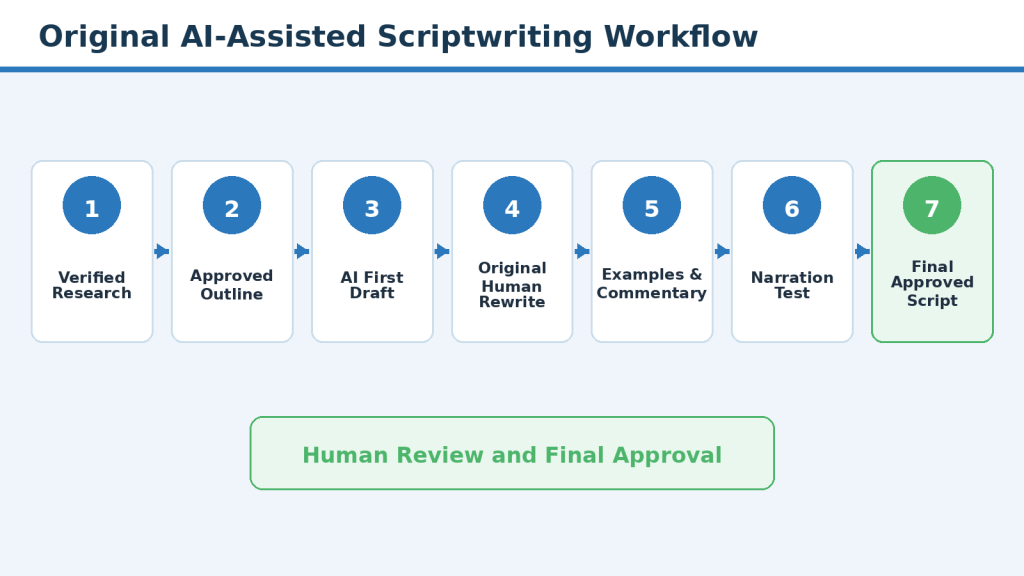
Figure 1. A responsible workflow for turning verified research into an original, narration-ready YouTube script.
Explanation: This workflow shows that AI may assist with drafting, but verified research, original rewriting, narration testing, and final approval remain human responsibilities.
YouTube states that monetized content should be original and authentic. Reused material may be eligible when viewers can recognize meaningful original commentary, substantial changes, education, or entertainment value. A strong script does not guarantee views, subscribers, monetization, or income, but it provides a clearer foundation for narration, visuals, captions, editing, and final review.
Before You Begin
Before drafting, confirm that the research and planning work is complete. You should already have a clear topic, defined audience, one main viewer question, verified notes, an approved outline, important limitations, a narration style, and a basic visual approach.
Confirm the Main Viewer Question
Write the main question at the top of the script document. Every section should help answer it. Remove information that is interesting but does not support the main purpose.
Define the Useful Result
Complete this sentence: After watching this video, the viewer should be able to [specific result]. Keep the result realistic and avoid promises of viral success, guaranteed monetization, quick subscribers, or automatic income.
Identify What Makes the Video Different
Original value may come from a clearer learning order, simpler language, better examples, stronger warnings, audience-specific explanations, original diagrams, or practical checklists. Write one originality statement that guides the complete script.
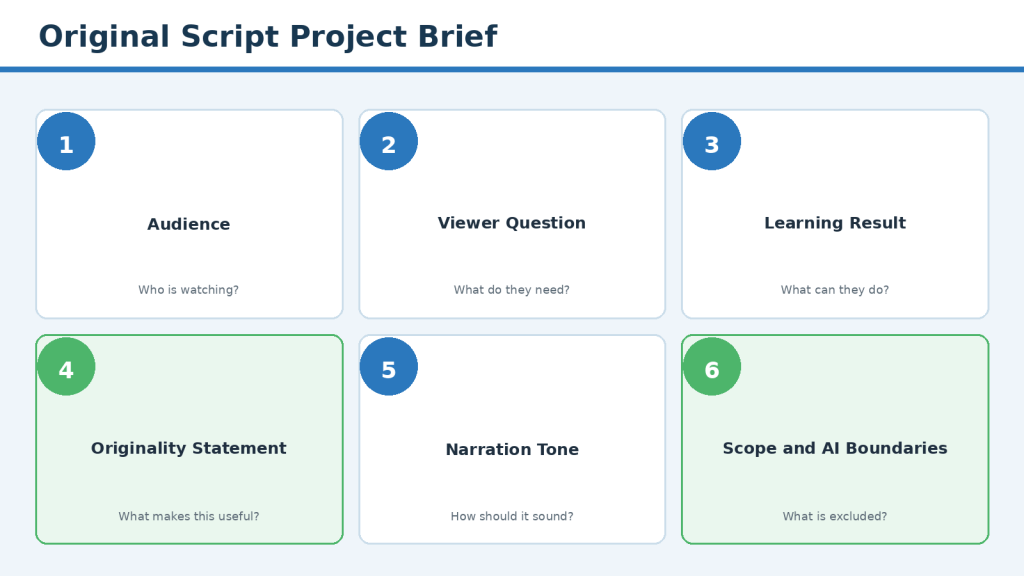
Figure 2. A project brief defines the audience, viewer result, originality angle, tone, scope, and AI boundaries before drafting begins.
Explanation: Preparing these decisions before prompting AI helps keep the script focused, consistent, and suitable for the intended audience.
Choose the Script Type and Tone
- Step-by-step tutorial
- Beginner explanation
- Comparison
- Common-mistakes video
- Myth-versus-reality video
- Checklist
- Case study
- Practical demonstration
- Frequently asked questions
Choose a calm, beginner-friendly, professional, direct, and evidence-based tone. Avoid talking down to beginners, using aggressive sales language, or pretending that one method is always correct.
Prepare the Drafting Instruction
A useful instruction is: Use only the approved outline and verified notes below. Write one beginner-friendly script section at a time. Do not add facts, statistics, policies, examples, sources, or claims. Use natural spoken language, short sentences, and clear transitions. Mark missing information as [NEEDS REVIEW].
Common Mistake: Beginning the script without defining what makes the video useful and different.
How to Avoid This Mistake: Confirm the audience, viewer result, scope, originality statement, tone, approved terminology, and AI boundaries before drafting.
Step 1: Turn the Approved Outline into an Original Teaching Structure
An approved outline shows what the video needs to cover. Before writing full narration, improve the outline so it reflects your own teaching approach rather than a generic AI template.
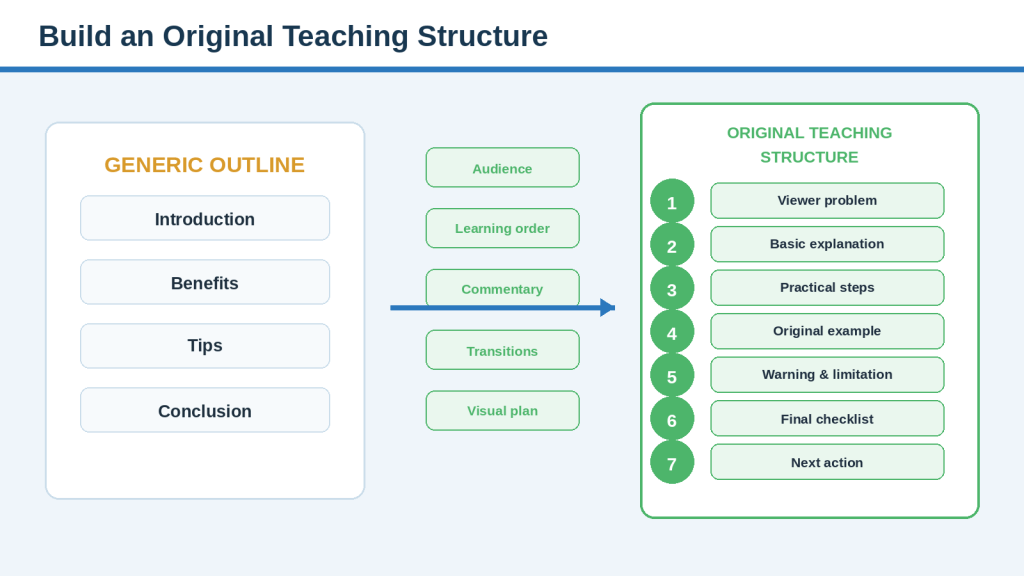
Figure 3. A generic outline becomes an original teaching structure through audience-focused organization, examples, warnings, transitions, and visuals.
Explanation: Originality begins before full narration is written. The creator reorganizes approved information around the viewer’s learning journey.
Start with the Viewer’s Learning Journey
1. Identify the problem.
2. Explain the basic idea.
3. Define unfamiliar terms.
4. Show what is required.
5. Present the steps.
6. Demonstrate an example.
7. Explain mistakes and limitations.
8. Provide a final checklist.
9. Give one useful next action.
Do not organize the script only according to the order in which research was collected. Research notes may be arranged by source; a video should be arranged according to how the audience learns.
Choose the Main Teaching Pattern
- Problem-to-solution
- Before-and-after
- Step-by-step process
- Question-and-answer
Choose one main pattern and a clear teaching angle. For Article 060, the angle is turning verified research into an original, beginner-friendly, narration-ready script through human rewriting and practical review.
Plan Examples, Warnings, and Visuals
Plan original examples before asking AI to draft them. Place warnings beside the relevant action rather than collecting all warnings at the end. Mark outline points as Spoken, Shown on Screen, Both, or Source Note Only.
| Section | Viewer Need | Main Point | Original Example | Warning | Visual |
| Opening | Understand the problem | AI drafts may sound generic | Weak and improved opening | Avoid false promises | Two script cards |
| Rewrite | Learn how to add value | Change explanation and examples | Before-and-after paragraph | Preserve source meaning | Editing marks |
| Narration | Make the script natural | Read aloud and revise | Long versus short sentence | Do not rush | Microphone and timer |
Common Mistake: Treating an AI-generated outline as automatically original because the wording is new.
How to Avoid This Mistake: Reorganize the information around your audience, teaching angle, examples, warnings, learning order, and visual approach before drafting narration.
Step 2: Write a Clear and Original Opening
The opening introduces the viewer’s problem, identifies who the video is for, describes the realistic result, and explains why the viewer should continue. It should be clear rather than dramatic.
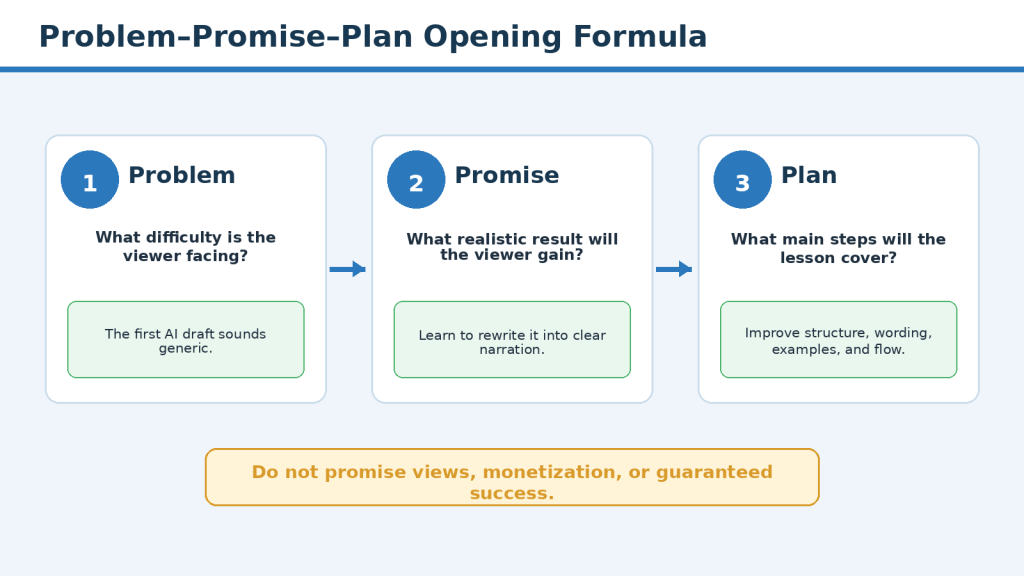
Figure 4. The Problem–Promise–Plan formula creates a clear and truthful opening without hype or guarantees.
Explanation: The formula introduces the viewer’s problem, states a realistic learning result, and previews the main lesson steps.
Use the Problem–Promise–Plan Formula
- Problem: Describe the specific difficulty.
- Promise: State the realistic result the video provides.
- Plan: Briefly explain the main steps.
Example: AI can create a script quickly, but the first draft may sound generic and unnatural. In this video, you will learn how to turn verified notes into an original script that sounds clear when spoken. We will improve the structure, rewrite generic wording, add original examples, and test the narration before approval.
Choose a Truthful Hook
- Problem hook
- Question hook
- Before-and-after hook
- Practical warning hook
- Result hook
Avoid false emergencies, unsupported statistics, invented stories, guaranteed results, and statements unrelated to the lesson. Keep the opening brief and reach useful information quickly.
Compare a Weak and Strong Opening
Weak: In today’s fast-paced digital world, AI is revolutionizing content creation and helping anyone produce amazing videos quickly and easily.
Stronger: AI can produce a YouTube script quickly, but the first draft may sound generic, repetitive, or unnatural. This guide shows complete beginners how to rewrite verified material into a clear script that is ready for narration.
Common Mistake: Using a dramatic or generic AI-generated hook that does not accurately represent the lesson.
How to Avoid This Mistake: Begin with the real problem, give a realistic promise, explain the plan briefly, and rewrite the opening until it sounds natural and specific.
Step 3: Rewrite Generic AI Wording into Original Explanations
Generic wording may be grammatically correct while still sounding like many other videos. Original rewriting means explaining the subject through your own structure, priorities, examples, and teaching approach.
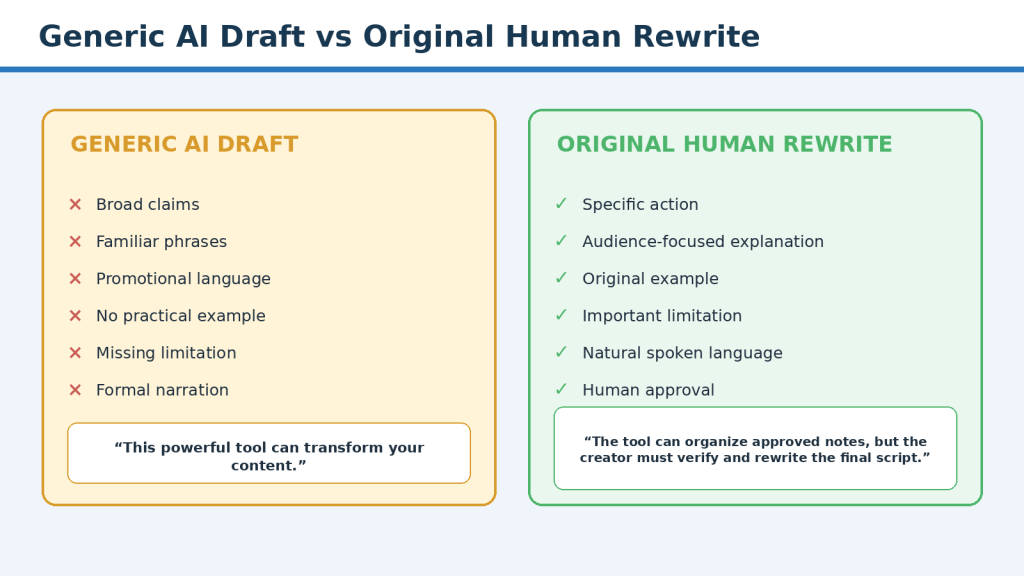
Figure 5. A meaningful rewrite changes the explanation, examples, structure, and audience guidance rather than replacing a few words.
Explanation: Synonym replacement is not enough. The final version should provide specific, audience-relevant value while preserving verified meaning.
Identify Generic Language
- In today’s digital world
- This powerful tool
- Game-changing solution
- Endless possibilities
- Everything you need to know
- Take your content to the next level
- It is important to note
- By following these tips, you can succeed
Ask whether a sentence could appear in hundreds of unrelated videos. When the answer is yes, rewrite it more specifically.
Replace Broad Claims with Specific Meaning
Generic: AI can help creators improve their scripts. Specific: AI can help organize an approved outline, suggest transitions, and simplify difficult sentences. The creator still needs to verify the information and approve the final wording.
Use Actions and Clear Criteria
Replace vague advice such as “make the script engaging” with specific actions: begin with the viewer’s real problem, explain one main idea at a time, use a relevant example, and remove sentences that do not help the viewer understand or complete the task.
Preserve Source Meaning
Simplification must not remove conditions, limitations, regional differences, plan restrictions, or uncertainty. Compare every rewrite with the verified notes and restore any meaning that was lost.
Write for Spoken Language
Formal: Creators should undertake a comprehensive evaluation of generated material. Spoken: Review the complete AI draft before recording it. Use direct subjects, shorter sentences, and familiar words without changing the facts.
Common Mistake: Replacing a few words in an AI draft and treating the result as an original script.
How to Avoid This Mistake: Change the explanation, structure, examples, sentence rhythm, and audience guidance while preserving verified meaning.
Step 4: Add Original Examples, Commentary, and Practical Value
Accurate information may still be difficult for a beginner to apply. Original examples and commentary show what the idea looks like in practice, why it matters, what can go wrong, and what the viewer should do next.
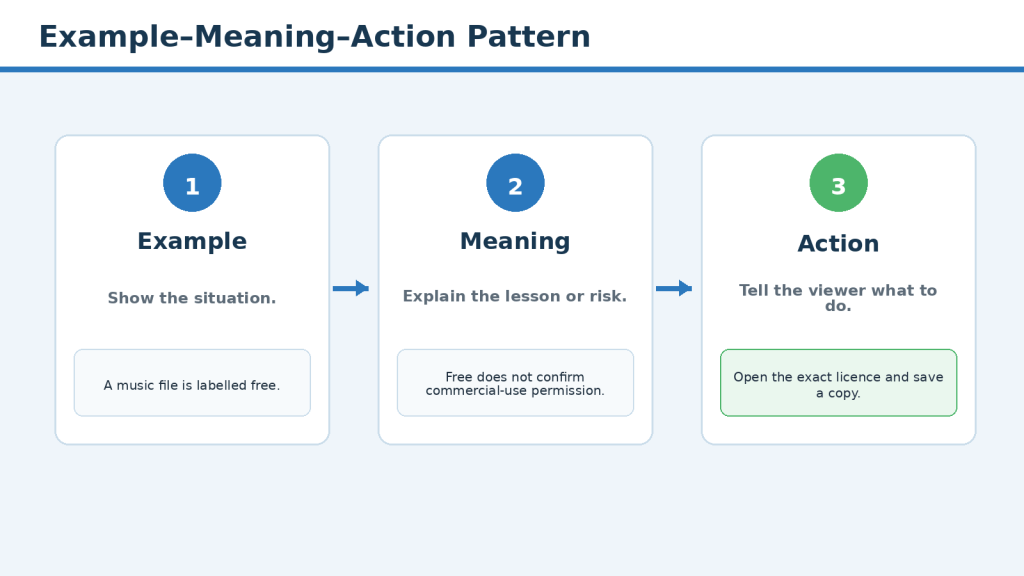
Figure 6. The Example–Meaning–Action pattern turns an example into a clear teaching tool.
Explanation: A focused example should show the situation, explain why it matters, and give the viewer a practical action.
Use the Example–Meaning–Action Pattern
- Example: Show one focused situation.
- Meaning: Explain the lesson, problem, or risk.
- Action: Tell the viewer what to do.
Example: An AI draft recommends music from a “free” website. Meaning: Free does not prove that commercial or monetized use is permitted. Action: Open the licence for the exact track, confirm the planned use, and save a copy with the project records.
Create Audience-Relevant Examples
Use situations complete beginners may realistically encounter, such as rewriting a generic introduction, checking an AI-generated statistic, shortening a long sentence, or replacing an invented company example. Keep each example focused on one main point.
Separate Evidence from Commentary
Use phrases such as “The official guidance explains…” for source-derived information and “In this workflow, I recommend…” for practical recommendations. Do not present personal interpretation as an official requirement.
Protect Privacy and Avoid Fake Results
Do not invent testimonials, subscriber gains, income results, companies, or real-person stories. Clearly label fictional examples when viewers could mistake them for real events. Obtain permission before using another person’s voice, photograph, story, message, or private information.
Common Mistake: Allowing AI to invent realistic stories, statistics, companies, or results to make the script sound convincing.
How to Avoid This Mistake: Create and approve the examples yourself, use only necessary details, label fictional scenarios, and explain the specific lesson each example demonstrates.
Step 5: Make the Script Sound Natural When Spoken
A YouTube script is written to be heard, not only read. A paragraph may look professional on the page but sound formal, repetitive, or difficult during narration.
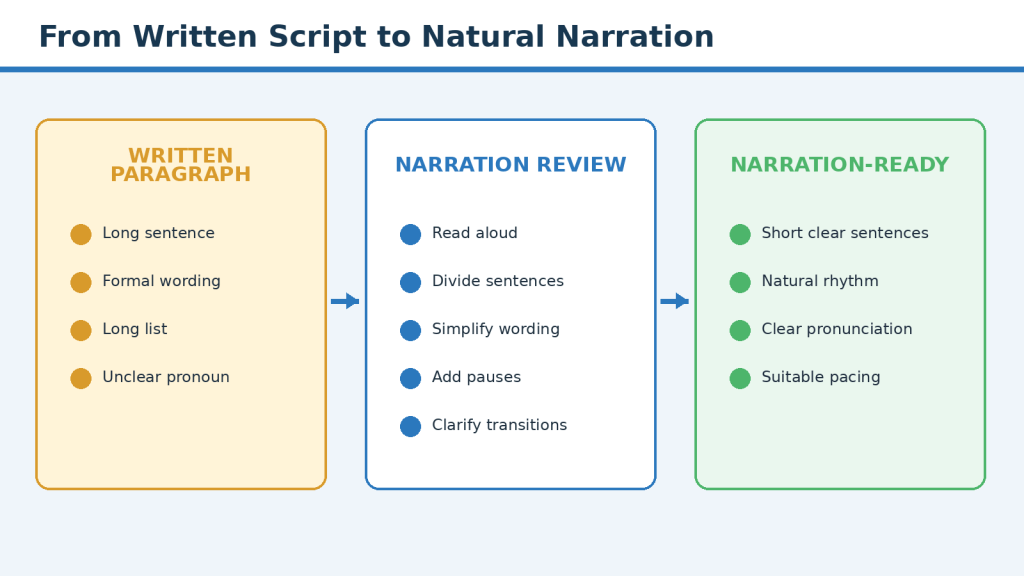
Figure 7. A written paragraph becomes natural narration through shorter sentences, clear wording, pauses, and read-aloud testing.
Explanation: A polished document may still need substantial revision before it is suitable for voice-over production.
Read Every Section Aloud
Mark places where you run out of breath, lose the meaning, change the wording naturally, or need to restart. The version you say naturally may be better than the version written on the page.
Use One Main Idea per Sentence
Before: AI can suggest hooks, transitions, examples, and alternative wording, but because it may produce inaccurate information, generic phrases, invented examples, or unsuitable recommendations, the creator should carefully review all generated material before using it.
After: AI can suggest hooks, transitions, examples, and alternative wording. However, it may also add inaccurate or generic information. Review every suggestion before using it.
Use Clear Signposting and Transitions
- First, define the viewer’s problem.
- The next step is rewriting generic wording.
- Here is a simple example.
- Before recording, complete one final check.
Do not announce every paragraph. Use transitions when they help viewers understand why the next idea follows.
Test with and without Visuals
Listen to the narration without the screen to find unclear references. Then review it with the planned visuals to confirm that text remains visible long enough, scene changes match idea changes, and the narration does not repeat every word on screen.
Common Mistake: Writing a polished document instead of a script designed for spoken narration.
How to Avoid This Mistake: Read every section aloud, shorten difficult sentences, group long lists, clarify transitions, and revise according to how the script sounds.
Step 6: Improve Transitions, Pacing, and Section Flow
Clear paragraphs can still produce a disconnected or uneven video. Transitions connect ideas, pacing controls how quickly information is presented, and section flow determines whether viewers can follow the complete learning journey.
Create a Pacing Map
| Section | Purpose | Approximate Time | Pacing Note |
| Opening | Introduce the problem | 30 seconds | Keep brief |
| Teaching structure | Explain the learning order | 1 minute | Use a diagram |
| Original rewrite | Demonstrate the main method | 2 minutes | Include before-and-after example |
| Examples | Show practical value | 2 minutes | Slow down for comparison |
| Narration test | Test spoken clarity | 2 minutes | Include pauses |
| Final review | Approve the script | 1 minute | Use checklist |
| Conclusion | Summarize and give next action | 30 seconds | No new topic |
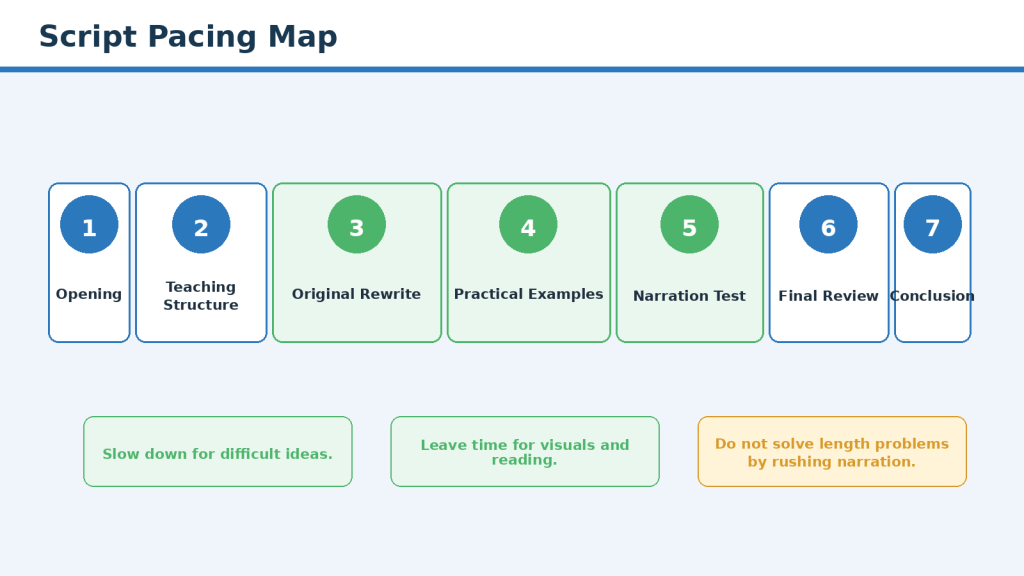
Figure 8. A pacing map helps balance the opening, explanations, examples, warnings, demonstrations, and conclusion.
Explanation: Different sections may need different amounts of time according to their difficulty, importance, and visual requirements.
Time a real narration sample because word-count estimates do not include pauses, demonstrations, technical terms, screen actions, or reading time. Do not solve a long script by making the narration unnaturally fast.
Control Repetition
Repeat essential ideas deliberately when first introduced, during the relevant step, and in the final checklist. Remove accidental recaps and paragraphs that perform the same job.
Allow Time for Visual Understanding
Tables, checklists, software menus, diagrams, and comparisons may require additional viewing time. Change the visual when the main idea changes rather than after every sentence.
Conduct a Full Read-Through
Record total time, slow sections, rushed sections, repeated information, awkward transitions, visual-reading needs, and places where attention may weaken. Revise the complete script rather than correcting paragraphs in isolation.
Common Mistake: Reviewing individual paragraphs without checking whether the complete script moves smoothly and at a suitable pace.
How to Avoid This Mistake: Read the entire script aloud, time the sections, improve transitions, remove accidental repetition, and allow enough time for viewers to understand narration and visuals.
Step 7: Write a Clear Conclusion and Relevant Call to Action
The conclusion should complete the lesson without repeating the entire script. It confirms what the viewer learned, reinforces the central principle, gives one practical next action, and connects to the next production stage.
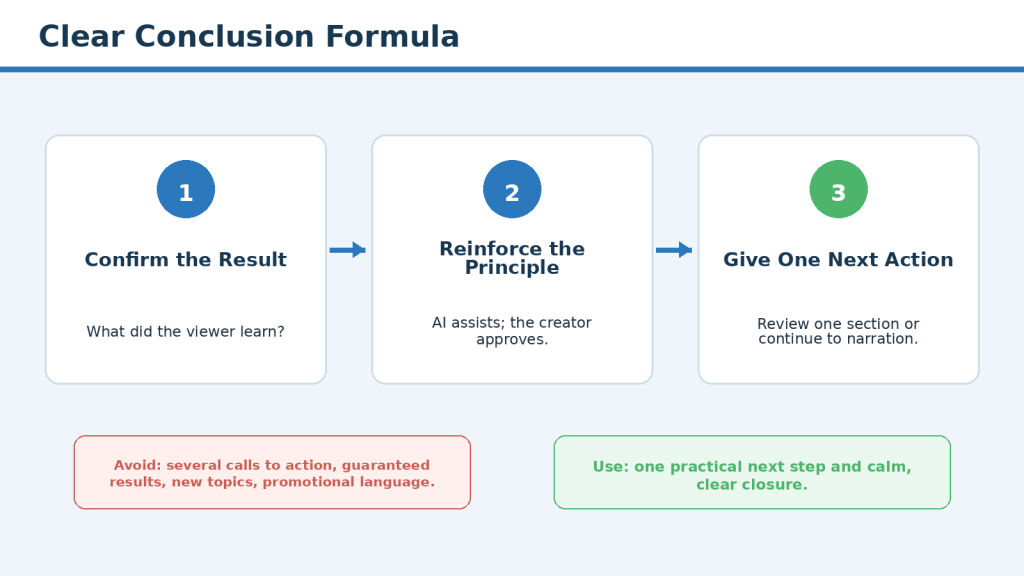
Figure 9. A strong conclusion confirms the learning result, reinforces the central principle, and gives one relevant next action.
Explanation: This approach avoids generic summaries, unsupported success promises, and several competing calls to action.
Return to the Main Viewer Result
Example: You now have a process for turning verified research into a structured YouTube script, rewriting generic AI language, adding original examples, and testing the narration before approval.
Use One Relevant Call to Action
Choose the action that best supports learning, such as reviewing one script section, downloading the checklist, watching the previous research guide, or continuing to the narration lesson. Avoid asking viewers to complete many unrelated actions.
Avoid Unsupported Outcomes
Do not promise views, subscribers, watch time, monetization, sponsorships, income, or viral success. A clearer statement is that an original script provides a stronger foundation for narration, visuals, editing, and viewer understanding.
Common Mistake: Ending with a generic AI summary, unsupported success promise, and several unrelated calls to action.
How to Avoid This Mistake: Confirm the learning result, reinforce the central principle, give one practical next action, and connect the approved script to the next stage of production.
Step 8: Complete the Final Script Review and Approval
Before recording narration or creating final visuals, review the complete script as one production document. It must be accurate, original, clear, suitable for the audience, natural when spoken, consistent with the outline, practical to produce, responsible, and accessible.
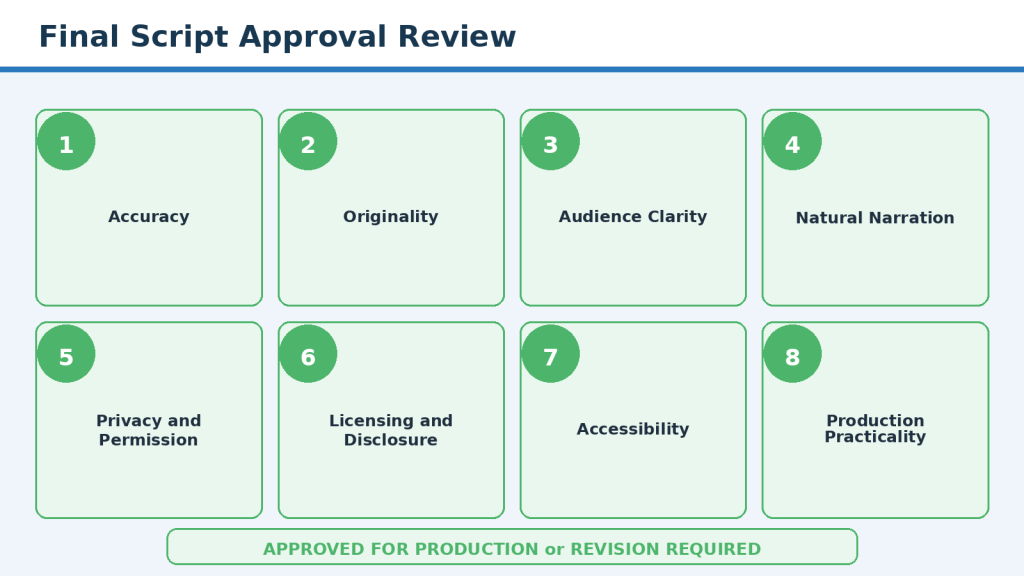
Figure 10. The final approval review checks the complete script before narration and visual production begin.
Explanation: Accuracy, originality, clarity, privacy, permissions, licensing, disclosure, accessibility, and production practicality all require review.
Complete the Accuracy Review
Check every statement that depends on external information, including software features, policies, plan conditions, prices, usage limits, licences, privacy controls, accessibility requirements, disclosure rules, dates, statistics, names, and quotations. Remove unsupported additions and preserve important conditions.
Complete the Originality Review
Confirm that the final version uses your teaching structure, explanations, examples, commentary, comparisons, warnings, visual plan, and wording. Check that it does not copy another creator’s narration, a source’s sentence structure, a distinctive example, or a mass-produced template.
Review Privacy, Permissions, and Licences
Search scripts, screenshots, recordings, and file paths for names, email addresses, photographs, usernames, financial information, private messages, or account identifiers. Confirm rights and licences for photographs, video clips, music, sound effects, fonts, templates, stock assets, AI-generated assets, and brand materials.
Review Accessibility and Production Practicality
Confirm accurate captions, clear narration, suitable pacing, defined terms, readable text, strong contrast, labels beyond colour, verbal explanation of important visuals, and enough time for reading. Revise any scene that depends on unavailable features, unlicensed assets, unsafe recordings, or unrealistic production requirements.
Create the Final Approved Version
1. Save the working draft.
2. Create a clean production copy.
3. Remove unresolved comments and drafting notes.
4. Keep source records in the research file.
5. Separate pronunciation and editing notes from narration.
6. Add the final version date.
7. Mark the file Approved for Production.
8. Protect the approved version from accidental overwriting.
Suggested filename: 060-youtube-script-v1-0-final-approved.docx
Common Mistake: Treating the script as complete as soon as the wording sounds polished.
How to Avoid This Mistake: Review accuracy, originality, privacy, licences, accessibility, narration, visual practicality, and version control before approving one production copy.
Benefits of Using AI to Help Write Original YouTube Scripts
AI can support scriptwriting when the creator remains responsible for research, structure, examples, accuracy, and final wording. The main benefit is reducing repetitive drafting work and providing options for human review.
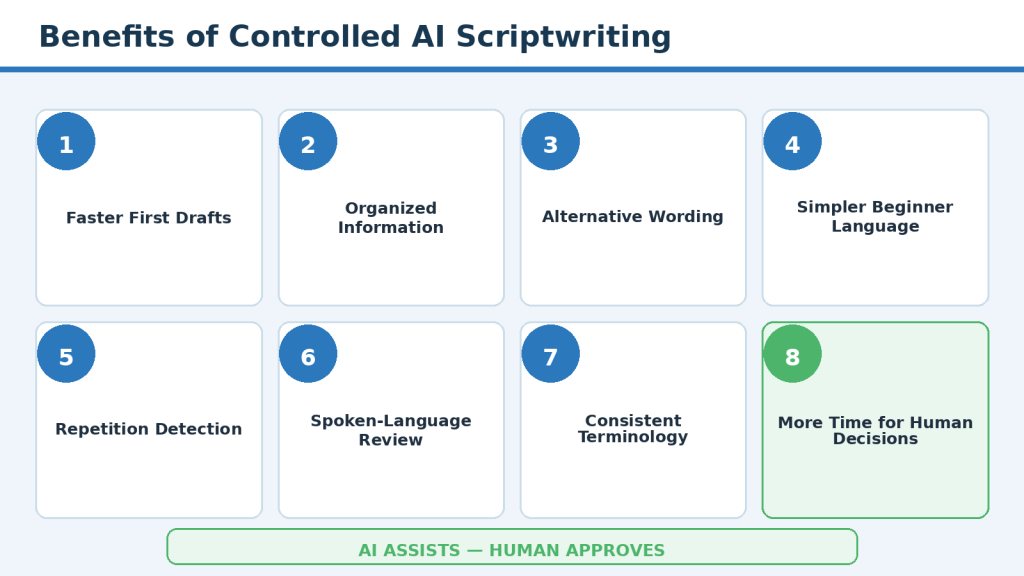
Figure 11. Controlled AI assistance can support drafting, organization, simplification, consistency, and review while preserving human control.
Explanation: AI can reduce repetitive drafting work, but it does not replace research, judgement, original examples, or final responsibility.
Faster First Drafts
Turn an approved outline and notes into a working draft more quickly.
Help Organizing Information
Arrange approved content into openings, steps, examples, transitions, conclusions, and checklists.
Alternative Wording
Offer several ways to explain the same verified idea.
Beginner Simplification
Identify long sentences, difficult vocabulary, unexplained terms, and dense paragraphs.
Repetition Detection
Locate repeated explanations, warnings, examples, and calls to action.
Spoken-Language Editing
Identify formal wording, long lists, unclear pronouns, and abrupt transitions.
Consistent Terminology
Find inconsistent use of approved terms.
Draft Variations
Create alternative hooks, section openings, conclusions, and transitions for comparison.
Section-by-Section Control
Make accuracy, length, tone, and originality easier to review.
More Time for Human Decisions
Allow more attention for sources, examples, permissions, visuals, and accessibility.
Reality: AI can make some drafting and review tasks faster, but it does not automatically make a script accurate, original, natural, or suitable for publication.
Best Use: Treat AI as a drafting and editing assistant while keeping research, judgement, originality, permissions, and final approval under human control.
Limitations of Using AI to Write YouTube Scripts
AI can assist with drafting and editing, but it has important limitations. Understanding them helps creators use the tool more safely and responsibly.
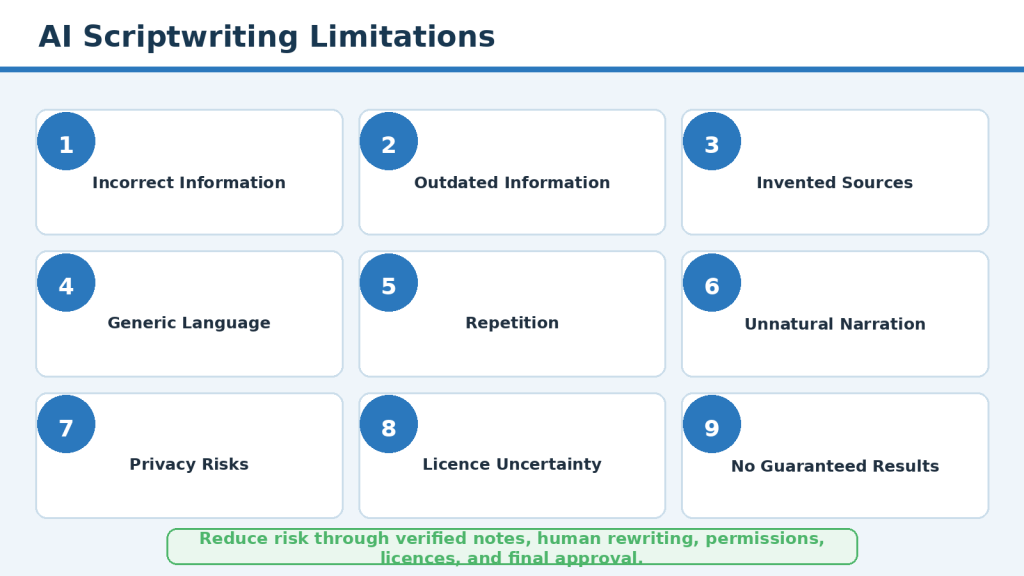
Figure 12. AI scriptwriting limitations require source checking, original rewriting, permission review, licence verification, and human approval.
Explanation: The main risks include incorrect or outdated information, generic language, repetition, privacy problems, licence uncertainty, and unsupported results.
AI May Add Incorrect Information
Begin with verified notes and compare every important claim with approved sources.
AI May Use Outdated Information
Check current official sources for features, prices, plans, policies, and limits.
AI Cannot Judge Source Quality Reliably
Select and approve source types before drafting.
AI May Invent Sources or Quotations
Open every source and confirm the title, publisher, date, link, and wording.
AI Does Not Automatically Create Original Content
Add your own structure, explanations, examples, commentary, warnings, and visual plan.
AI May Copy Supplied Structure
Use factual notes rather than long passages or another creator’s script.
AI May Produce Generic Language
Replace broad expressions with specific actions and audience-relevant examples.
AI May Repeat the Same Idea
Review by main idea, not only by sentence.
AI May Produce Unnatural Spoken Language
Read aloud and test the intended narration voice.
AI Cannot Fully Understand the Audience
Define knowledge level, tone, learning result, and scope.
AI May Oversimplify Important Information
Restore conditions, exceptions, limitations, and uncertainty.
AI May Invent Examples
Create or approve every scenario and clearly identify fiction.
AI Cannot Confirm Privacy Safety
Remove unnecessary personal information and inspect complete recordings.
AI Cannot Obtain Permission
Get consent directly from the person or authorized rights holder.
AI Cannot Confirm Licensing Rights
Review the exact licence for the exact asset and planned use.
AI-Generated Assets Are Not Automatically Unrestricted
Check provider terms, plan conditions, third-party rights, likeness, and disclosure.
AI Cannot Determine Legal Compliance
Seek qualified advice for significant legal, privacy, or commercial risk.
AI Cannot Guarantee Monetization or Viewer Response
Treat performance suggestions as ideas to test, not predictions.
AI May Lose Context in Long Projects
Maintain a short project brief and work one section at a time.
AI Cannot Manage File Versions by Itself
Use clear article-numbered filenames, version dates, folders, and a change log.
AI May Create Accessibility Problems
Review captions, pacing, contrast, text size, visual descriptions, and mobile readability.
AI Features and Conditions May Change
Record the tool and review date and update the script after meaningful changes.
Reality: AI may assist with drafting and review, but the creator remains responsible for accuracy, originality, privacy, consent, licensing, disclosure, accessibility, and final publication decisions.
Common Mistakes When Writing YouTube Scripts with AI
AI can make script drafting faster, but it can also make weak habits easier to repeat. The following mistakes are common when creators move too quickly from an AI-generated draft to production.
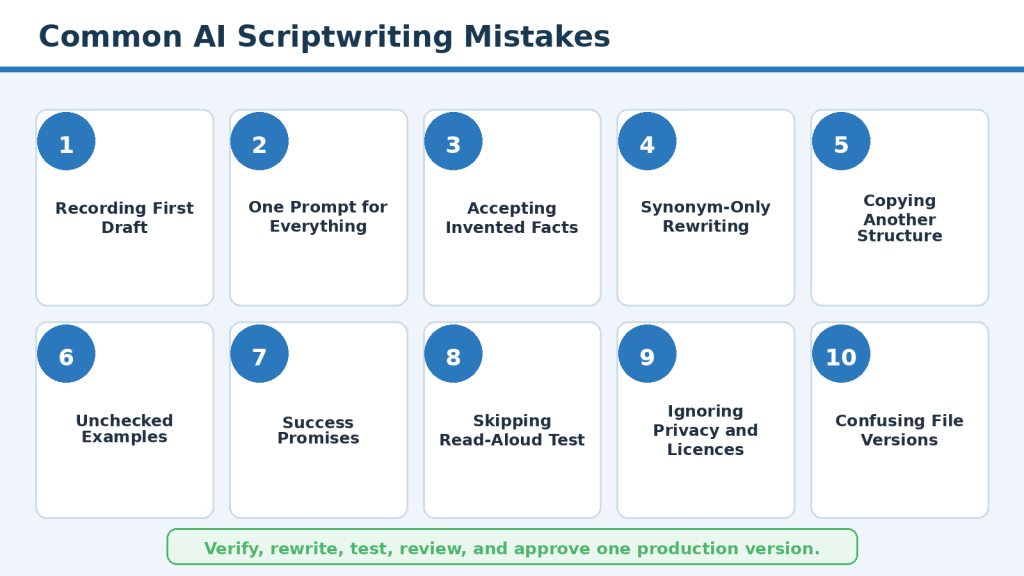
Figure 13. Common mistakes include recording the first draft, accepting invented facts, copying structures, skipping narration tests, and losing version control.
Explanation: A controlled workflow helps prevent mistakes that arise when creators move too quickly from an AI draft to production.
1. Recording the First AI Draft: Treat the first output as raw material and complete all reviews.
2. One Short Prompt for the Entire Script: Prepare the research, outline, tone, examples, and terminology first.
3. Allowing AI to Add Facts: Use only approved notes and remove unsupported additions.
4. Confusing New Wording with Originality: Change the teaching structure, explanations, examples, and visuals.
5. Using Generic AI Phrases: Replace broad wording with specific problems, actions, and limitations.
6. Copying Long Source Passages: Extract short factual notes and keep quotations limited.
7. Copying Another Creator’s Structure: Build the outline from viewer needs and verified research.
8. Using Unchecked AI Examples: Create or approve every example and label fiction.
9. Making Unsupported Success Promises: Describe realistic benefits without guaranteeing performance.
10. Hiding Important Limitations: Explain conditions, risks, and situations where the method may not work.
11. Oversimplifying Source Information: Compare the simplified version with the source meaning.
12. Using Unverified Quotations: Confirm wording, speaker, context, and date.
13. Writing for the Page Instead of the Ear: Read the complete script aloud.
14. Making Narration Unnaturally Fast: Shorten unnecessary material or allow a longer video.
15. Using Too Many Hooks: Choose one truthful hook and begin the lesson.
16. Writing a Long Channel Introduction: Reach the viewer’s problem quickly.
17. Repeating the Same Warning: Explain it fully once and use brief reminders later.
18. Adding Too Many Examples: Keep the strongest example for each main idea.
19. Using Complicated Examples: Use simple fictional situations that explain one point.
20. Using Real People Without Permission: Obtain permission or use a fictional example.
21. Assuming AI Assets Are Automatically Safe: Review terms, licences, likeness concerns, and disclosure.
22. Assuming Royalty-Free Means Unrestricted: Read the licence for the exact asset.
23. Ignoring Privacy in Screen Recordings: Use safe demonstration data and review every frame.
24. Depending on Visuals for Essential Information: Narrate the important action and allow enough viewing time.
25. Using Tiny On-Screen Text: Use large text, strong contrast, short labels, and mobile testing.
26. Using Colour as the Only Meaning: Add labels, icons, shapes, or patterns.
27. Using Too Many Visual Changes: Change scenes when the main idea changes.
28. Reading Every Word on Screen: Summarize the key message and allow reading time.
29. Forgetting to Match the Script and Visual Plan: Review them together before narration and editing.
30. Leaving Production Notes in Narration: Separate narration, visual directions, pronunciation, and editing fields.
31. Changing the Script Without Recording It: Update the approved version and synchronize captions and visuals.
32. Using Confusing Filenames: Use article number, version, purpose, and date.
33. Deleting Earlier Drafts Too Soon: Archive earlier versions and records.
34. Forgetting the Final Source Review: Recheck important current claims before recording or publication.
35. Relying Only on AI for Review: Combine AI review with sources, judgement, narration, and visual testing.
36. Skipping Beginner Feedback: Ask a suitable beginner about order, terms, examples, and pace.
37. Adding Several Calls to Action: Choose one main next action.
38. Introducing a New Topic in the Conclusion: Summarize the lesson and link to the next guide.
39. Treating the Checklist as a Substitute for Judgement: Review the complete viewer experience.
40. Publishing Before Important Problems Are Resolved: Use Revision Required until accuracy, permission, licence, privacy, and accessibility issues are resolved.
Final Reminder: AI can help create and review a script, but it should not control the complete process. The creator remains responsible for research, originality, examples, permissions, narration, visual planning, and approval.
Common Myths About Writing YouTube Scripts with AI
AI scriptwriting is often described in ways that are too simple, too negative, or too promotional. The following myths can mislead beginners.
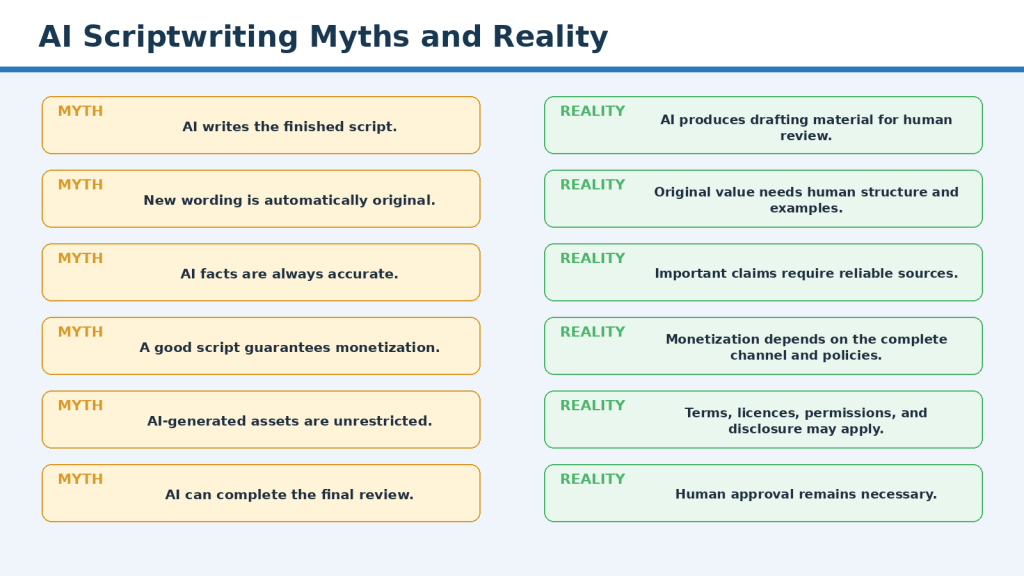
Figure 14. Common myths are corrected by realistic guidance about AI assistance, originality, accuracy, monetization, and human responsibility.
Explanation: AI is useful as a limited assistant, but it cannot guarantee originality, accuracy, monetization, legal compliance, or final readiness.
Myth 1: AI can write a complete YouTube script automatically. Reality: AI can generate a draft, but human verification, rewriting, permission review, and approval remain necessary.
Myth 2: AI-written scripts are automatically original. Reality: Originality comes from human structure, explanations, examples, commentary, and final wording.
Myth 3: Changing a few words makes the script original. Reality: Meaningful rewriting changes the explanation, structure, audience focus, and spoken rhythm.
Myth 4: AI always produces accurate information. Reality: Important claims need reliable and current sources.
Myth 5: A professional-sounding draft is ready to record. Reality: Polished wording can still hide factual, privacy, narration, and licensing problems.
Myth 6: Longer scripts always provide more value. Reality: Value depends on relevance, clarity, accuracy, and usefulness.
Myth 7: Short scripts are always better. Reality: The script must be long enough to explain the subject responsibly.
Myth 8: A dramatic hook is required. Reality: A clear statement of the real problem can be effective and trustworthy.
Myth 9: AI can predict which script will go viral. Reality: Viewer response depends on many factors and cannot be guaranteed.
Myth 10: A good script guarantees monetization. Reality: YouTube reviews the complete channel and content under current policies.
Myth 11: Using AI means the creator has no original role. Reality: The creator makes the core research, structure, example, and approval decisions.
Myth 12: AI should be avoided completely. Reality: AI can be useful for controlled drafting and review tasks.
Myth 13: AI-generated examples are safe to use. Reality: Every example requires review for invented facts, people, companies, and results.
Myth 14: AI-generated assets are automatically copyright-free. Reality: Provider terms, third-party rights, likeness concerns, and disclosure may apply.
Myth 15: Royalty-free means an asset can be used anywhere. Reality: Royalty-free licences may still limit commercial use, editing, redistribution, or attribution.
Myth 16: Public information is always safe to copy. Reality: Public facts may be used, but protected wording and media require care.
Myth 17: Paraphrasing removes the need for sources. Reality: Important factual claims still require verification.
Myth 18: One source is enough for every subject. Reality: Source quantity and type depend on the claim and risk.
Myth 19: AI can confirm whether a licence is valid. Reality: The creator must review the exact licence and rights holder.
Myth 20: AI can obtain permission from a real person. Reality: Consent must come from the person or authorized rights holder.
Myth 21: Faceless videos have no privacy risks. Reality: Screen recordings, files, notifications, and stories may reveal private information.
Myth 22: Synthetic content is proof that an event happened. Reality: Realistic AI content is not evidence of a real event.
Myth 23: Disclosure makes a video look unprofessional. Reality: Clear disclosure supports transparency and may be required.
Myth 24: Accessibility is only about captions. Reality: Accessibility also includes narration, text size, contrast, pacing, visual descriptions, and motion.
Myth 25: Faster narration makes a long script better. Reality: Shorten or divide the content instead of rushing essential information.
Myth 26: Every sentence must be highly engaging. Reality: Most educational narration should be calm, clear, and easy to follow.
Myth 27: Every section needs an example. Reality: Use examples only when they improve understanding.
Myth 28: Every detail must be spoken. Reality: Narrate the key message while suitable detail appears visually.
Myth 29: AI can complete the final review. Reality: Final approval needs human source checking, narration testing, visual review, and judgement.
Myth 30: Once approved, the script never needs updating. Reality: Recheck time-sensitive information when meaningful time has passed.
Myth 31: One prompt can replace the complete workflow. Reality: Research, outlining, rewriting, narration, privacy, licensing, and approval remain separate tasks.
Myth 32: AI scriptwriting requires advanced technical skills. Reality: Beginners need clear instructions and responsible review, not programming expertise.
Myth 33: Originality means never covering an existing topic. Reality: Creators can provide original value through their own explanation and presentation.
Myth 34: The script is the only part that matters. Reality: Narration, visuals, captions, music, editing, and accessibility shape the complete viewer experience.
Myth 35: More AI automation always saves time. Reality: Automation can create more correction work when outputs are repetitive, unsupported, or inconsistent.
Final Reality: AI can be a useful scriptwriting assistant, but it does not replace verified research, original human judgement, permissions, accessibility review, narration testing, or final responsibility.
Original YouTube Scriptwriting Checklist
Use this checklist before approving an AI-assisted YouTube script for narration and production. A checked item means that you reviewed it; it does not mean AI made the decision.
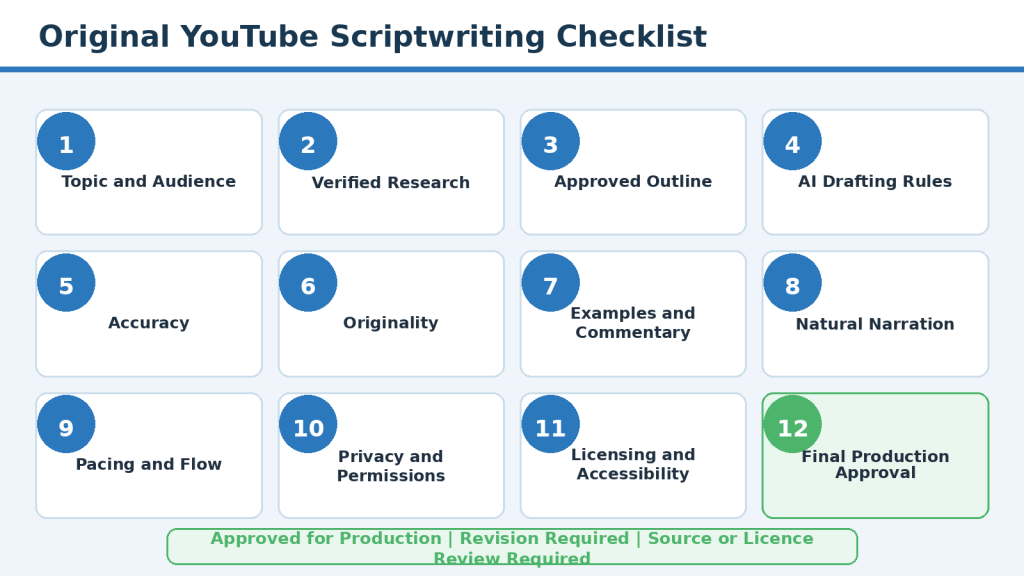
Figure 15. The complete scriptwriting checklist covers research, originality, narration, privacy, licences, accessibility, visuals, and final approval.
Explanation: This visual is a concise review aid. It does not replace the detailed written checklist or human judgement.
Topic and Audience
- One clear viewer question
- Defined intended audience and starting knowledge
- Realistic learning result
- Scope fits the channel and series
- Planned length suits the information
Research and Evidence
- Important claims use suitable sources
- Current features, prices, limits, plans, and policies rechecked
- Quotations verified
- Statistics include date and context
- Source uncertainty identified
- Final source-review date recorded
Approved Outline
- Logical learning journey
- Separate purpose for each section
- Warnings beside relevant actions
- Examples planned where useful
- Conclusion matches opening promise
AI Drafting Rules
- Use only approved notes
- Draft one section at a time
- Do not add facts or sources
- Mark missing information
- Preserve conditions and limitations
- Avoid hype and guarantees
Accuracy and Originality
- Every important claim checked
- No invented source, quotation, number, or feature
- Original structure, explanations, examples, commentary, transitions, and visuals
- No copied narration or distinctive example
Examples and Narration
- Every example teaches one point
- Fiction labelled when needed
- No fake testimonials or results
- Sentences easy to say
- Technical terms defined
- Lists divided into manageable groups
- Read-aloud test completed
Privacy, Permissions, and Licensing
- No unnecessary personal information
- Permission records saved
- Exact asset licences reviewed
- Commercial-use conditions checked
- AI-generated assets not treated as unrestricted
Disclosure and Accessibility
- AI or synthetic disclosure considered
- Sponsorship and affiliate disclosure considered
- Accurate captions
- Clear narration and pacing
- Readable text and strong contrast
- Meaning not dependent only on colour
- Important visuals explained
Production and Version Control
- Visuals support narration
- Scenes are possible to create
- Approved script stored separately
- Narration, captions, visuals, and editing notes use the same version
- Source, prompt, permission, licence, and publication records preserved
Final Approval Status
- Approved for Production
- Revision Required
- Source Update Required
- Permission or Licence Review Required
- Privacy Review Required
Final Tip: Save one clean, approved production script and make all narration, caption, visual, and editing work from that version.
Practical Example: Turn Verified Notes into an Original YouTube Script
This fictional example shows how a complete beginner can turn approved notes into a clear, original, narration-ready section for a video titled “How to Organize Digital Photos Safely.”
Define the Viewer and Result
Audience: Complete beginners with photographs stored across a phone, computer, and cloud service. Main question: How can I organize digital photographs without accidentally losing important files? Result: Create a basic folder system, review duplicates carefully, and prepare a separate backup.
Approved Notes
- A backup should be stored separately from the main collection.
- Files should be checked before duplicates are permanently deleted.
- A consistent folder and filename system can make photographs easier to find.
- Cloud synchronization is not always the same as an independent backup.
- Private photographs should not be uploaded to an unfamiliar service without reviewing privacy settings.
First AI Draft
Removing duplicate photographs is an important part of digital organization. Powerful duplicate-finding tools can instantly locate unnecessary files and free valuable storage space. Simply scan your folders, select all duplicates, and delete them.
Problems Identified
- Promotional wording
- Unsupported speed claim
- Unverified tool capability
- Unsafe automatic-deletion advice
- No limitation
- No practical example
- Risk of data loss
Final Approved Narration
A duplicate photograph may be an unnecessary copy, but it may also be an edited version, a higher-quality original, or a file saved in a different format. Do not delete every matching file automatically.
Imagine that one folder contains three photographs with similar names. One is the original, one is a smaller copy sent through a messaging application, and one has been edited. They may look like duplicates in the file list, but each version may serve a different purpose.
Open the photographs before making a decision. Compare their quality, date, format, and visible content. When you are uncertain, move the files into a temporary review folder instead of deleting them. Remove a copy only after checking the collection and confirming that the separate backup opens correctly.
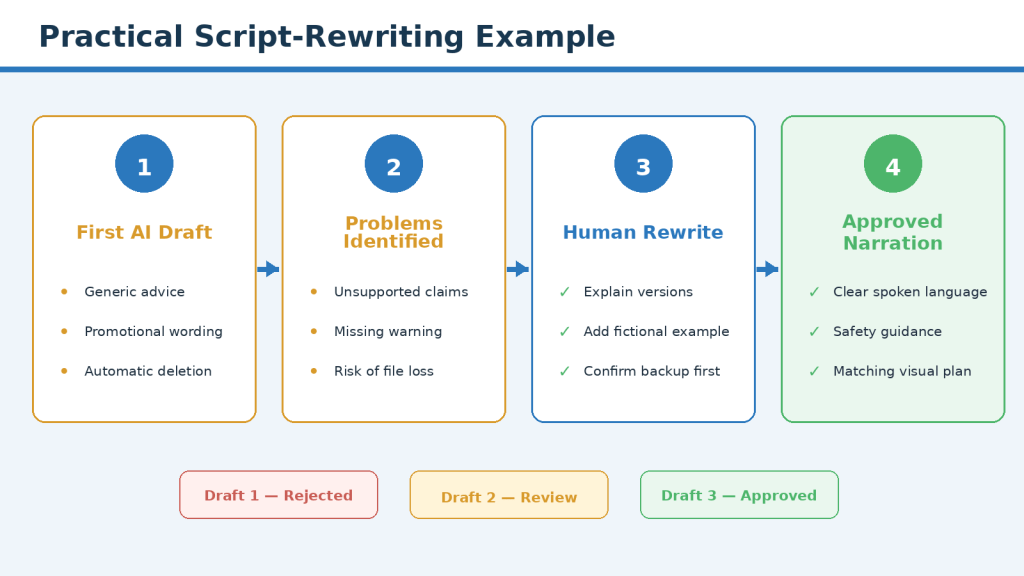
Figure 16. A generic AI paragraph becomes an original, safer, narration-ready script through problem identification, human rewriting, and practical review.
Explanation: The fictional digital-photo example shows how a first AI draft changes through accuracy, originality, safety, narration, and production review.
Visual Plan
| Narration Point | Planned Visual |
| A duplicate may not be unnecessary. | Show three similar fictional photo files with different sizes and formats. |
| One may be edited. | Highlight an Edited label beside one fictional image. |
| Do not delete automatically. | Show a delete button with a warning symbol. |
| Compare the files. | Show quality, date, format, and content check cards. |
| Use a review folder. | Move uncertain files into a folder labelled Review First. |
| Confirm the backup. | Show a separate backup drive with a check mark. |
What This Example Demonstrates
AI produced starting material, but the creator identified unsafe advice, removed generic language, preserved approved facts, added an original fictional example, planned safe visuals, tested the narration, and approved the final version.
Frequently Asked Questions
Can AI write my complete YouTube script?
It can create a first draft, but you still need to verify claims, rewrite generic wording, add original value, review privacy and licences, test narration, and approve the final version.
Is an AI-generated script automatically original?
No. New sentences may still use common structures, phrases, examples, and templates.
How much of an AI draft should I rewrite?
There is no fixed percentage. Rewrite every part that is generic, inaccurate, unclear, unsuitable, or insufficiently original.
Can I keep parts that already sound good?
Yes, when they are accurate, clear, relevant, audience-appropriate, supported, and consistent with the approved outline.
Can I use information from other YouTube videos?
You may identify questions and presentation ideas, but do not copy narration, distinctive wording, examples, complete structure, or visual sequence.
Do I need to cite sources in the spoken script?
Not every sentence needs a spoken citation, but important claims should remain supported in research records and may be linked in the description, article, or source cards.
Should I read source quotations aloud?
Only when exact wording matters and the quotation, context, attribution, and planned use are confirmed.
Can AI simplify official policies?
It may draft a simpler version, but you must compare it with the official source and restore conditions, exceptions, uncertainty, and limitations.
How can I reduce invented facts?
Supply only approved notes, prohibit additions, mark missing information, and compare the output with the notes.
Should I draft the whole script at once?
For long beginner tutorials, one section at a time is usually easier to control and review.
How long should a YouTube script be?
Long enough to explain the topic clearly at a suitable pace. Time a real narration sample.
How many examples should I include?
Use examples where they clarify difficult ideas, decisions, mistakes, limitations, or demonstrations.
Can AI create examples for me?
It can suggest ideas, but the creator should approve every fact, detail, person, company, result, and licence implication.
Should fictional examples be labelled?
Yes, when viewers could mistake them for real events, people, results, or testimonials.
Can I use personal experience?
Yes, when it is accurate, relevant, clearly identified as personal experience, and does not expose other people’s private information.
Can I use an AI-generated voice?
Only when current tool terms and the planned use permit it. Review commercial use, consent, likeness, disclosure, pronunciation, and audio quality.
Do I need to disclose AI help?
Requirements depend on the platform, content type, local rules, sponsorship conditions, and whether viewers could be misled.
Will AI use prevent YouTube monetization?
AI use alone does not decide monetization. The complete channel and content must meet current YouTube requirements; approval is not guaranteed.
Can AI determine whether my script is original enough?
It can flag generic or repeated wording, but it cannot give a definitive originality or legal determination.
Do I need legal advice before every video?
Usually not, but qualified advice may be appropriate for significant copyright, privacy, defamation, health, financial, advertising, or commercial risk.
How can I make the script sound less robotic?
Use shorter sentences, natural transitions, varied sentence length, read-aloud testing, and audience-relevant examples.
Should narration repeat all on-screen text?
No. Narrate the key meaning while allowing detailed information to remain visible long enough.
What should I do when the script is too long?
Remove repetition and material outside the main question. Divide the topic into multiple videos when necessary.
Should I change the script while recording?
Record every meaningful change in the approved script so narration, captions, sources, visuals, and editing notes remain synchronized.
What files should I save?
Keep verified notes, sources, prompts, drafts, the approved script, narration, captions, scene plan, licences, permissions, original assets, and publication records.
When should I recheck sources?
When first using a tool, after plan or feature changes, after policy notices, when a project is delayed, or when the recorded interface differs from the script.
What is the most important final check?
Confirm that the script answers the main viewer question accurately and originally and is safe, natural, accessible, and aligned with one approved version.
Key Takeaways
- Begin with verified research notes and an approved outline.
- Define one viewer question and a realistic learning result.
- Organize the script around the audience’s learning journey.
- Use AI for limited drafting and review tasks.
- Rewrite generic language into specific explanations.
- Add original examples, commentary, comparisons, and practical guidance.
- Preserve source meaning, conditions, and limitations.
- Remove unsupported facts, quotations, prices, policies, and statistics.
- Write for spoken narration and read the complete script aloud.
- Improve transitions, pacing, and visual reading time.
- Protect private information and obtain permission for real people and their work.
- Check licences for every asset and consider required disclosure.
- Support accessibility through captions, clear narration, readable text, contrast, pacing, and visual descriptions.
- Save one clearly labelled approved production script.
- Do not proceed while an important accuracy, privacy, permission, licensing, or accessibility issue remains unresolved.
The central principle is simple: AI may help create and improve the draft, but the creator remains responsible for research, originality, examples, accuracy, narration, permissions, accessibility, and final approval.
Final Thoughts
AI can make YouTube scriptwriting faster, but speed is not the same as quality. The first draft may contain useful ideas, yet the creator must still decide the structure, examples, explanation, source meaning, narration, privacy, permissions, licences, disclosure, accessibility, and final approval.
A strong script does not guarantee views, subscribers, monetization, or income. It provides a clearer foundation for narration, visuals, captions, editing, and the final viewer experience.
Final Tip: Save one clearly labelled approved production script and use that same version for the narration, captions, visuals, editing notes, and final review.
Continue Learning
How to Research and Write Faceless YouTube Video Scripts with AI(2026)
Use this first when the research, verification, notes, or outline are not complete.
How to Choose a Faceless YouTube Niche and Plan Your Channel with AI: Beginner Step-by-Step Guide (2026)
Use this to evaluate possible channel subjects before researching scripts.
How to Create Faceless YouTube Videos with AI: Complete Beginner Step-by-Step Guide (2026)
Use this as the starting guide for the overall channel and workflow.
How to Create AI Videos with ChatGPT: Beginner Step-by-Step Guide (2026)
Learn how ChatGPT can help plan scenes and prompts.
How to Create AI Videos from Text: Beginner Step-by-Step Guide (2026)
Learn how written prompts can become short AI-generated scenes.
How to Add Voice, Music, and Captions to AI Videos: Beginner Step-by-Step Guide (2026)
Learn how to prepare narration, permitted music, sound effects, and captions.
How to Create Storyboards and Plan Scenes for Faceless YouTube Videos with AI: Beginner Guide (2026)
Learn how to turn your finished script into a clear storyboard and scene-by-scene visual plan.
Recommended Learning Order: Complete Article 059 before Article 060. After the script is approved, continue to Article 061 for storyboard and scene planning.
Sources and References
The following official sources were reviewed on August 6, 2026. Software features, platform policies, privacy controls, monetization requirements, and legal guidance may change. Check current information when first using a tool, after meaningful changes, after receiving an update notice, and periodically.
YouTube Channel Monetisation Policies
YouTube explains that monetized content should be original and authentic. Its reused-content guidance allows material from other sources when viewers can recognize meaningful differences created through original commentary, substantial changes, education, or entertainment value. Copyright rules apply separately.
Open official source: YouTube Channel Monetisation Policies
YouTube AI-Generated and Altered-Content Disclosure
YouTube requires disclosure for realistic content that has been meaningfully altered or synthetically generated when viewers could mistake it for something that actually occurred. The AI-use setting is available during upload in YouTube Studio.
Open official source: YouTube AI-Generated and Altered-Content Disclosure
OpenAI Terms of Use
OpenAI’s Terms explain that users are responsible for their inputs and outputs, including having the necessary rights, licences, and permissions. They also explain that output may not be unique and other users may receive similar content.
Open official source: OpenAI Terms of Use
OpenAI Usage Policies
OpenAI’s Usage Policies explain that users remain responsible for complying with applicable laws, professional duties, and ethical responsibilities when using OpenAI services and outputs.
Open official source: OpenAI Usage Policies
OpenAI Data Controls FAQ
OpenAI’s Data Controls let users choose whether new conversations may be used to improve models and provide options for exports, account deletion, and Temporary Chat.
Open official source: OpenAI Data Controls FAQ
OpenAI Privacy Policy
OpenAI’s Privacy Policy explains the categories of personal data it may collect, how data may be used or disclosed, retention practices, controls, and user rights.
Open official source: OpenAI Privacy Policy
Canadian Intellectual Property Office: A Guide to Copyright
The Canadian Intellectual Property Office provides general information about copyright, protected works, ownership, registration, and infringement.
Open official source: Canadian Intellectual Property Office: A Guide to Copyright
Office of the Privacy Commissioner of Canada: Privacy Guide for Businesses
The Office of the Privacy Commissioner explains responsibilities under PIPEDA, including meaningful consent, limiting collection, safeguards, and privacy-breach obligations.
Open official source: Office of the Privacy Commissioner of Canada: Privacy Guide for Businesses
Office of the Privacy Commissioner of Canada: Meaningful Consent
The guidance explains that organizations generally need meaningful consent for collecting, using, and disclosing personal information.
Open official source: Office of the Privacy Commissioner of Canada: Meaningful Consent
W3C Web Accessibility Initiative: Captions
W3C explains that captions provide a synchronized text version of speech and meaningful non-speech audio needed to understand prerecorded video.
Open official source: W3C Web Accessibility Initiative: Captions
W3C Web Accessibility Initiative: Planning Audio and Video Media
W3C guidance helps creators plan captions, transcripts, and descriptions of important visual information for accessible media.
Open official source: W3C Web Accessibility Initiative: Planning Audio and Video Media
Educational and Professional-Advice Notice
This article provides general educational information about AI-assisted scriptwriting, originality, privacy, permissions, licensing, disclosure, accessibility, and YouTube production. It is not legal, financial, copyright, privacy, or other professional advice. Obtain qualified advice when a project involves significant legal, privacy, commercial, or reputational risk.


Leave a comment