

Estimated reading time: 27 minutes
Last updated: August 6, 2026
Introduction
A good faceless YouTube video begins with a useful topic, reliable research, and a clear script. The script controls what the video explains, the order of the information, what the narrator says, which visuals appear, and what viewers should understand or do next.
AI can help generate research questions, organize source notes, build an outline, simplify difficult wording, suggest transitions, and prepare a first draft. It can also produce inaccurate, unsupported, outdated, repetitive, or invented information. The creator must therefore verify important claims and approve every section before production begins.
A responsible scriptwriting process includes a clear audience and purpose, current sources, accurate notes, an original outline, a human-reviewed draft, suitable examples, important limitations, privacy and permission checks, copyright and licensing awareness, accessibility planning, and a final fact-check before narration begins.
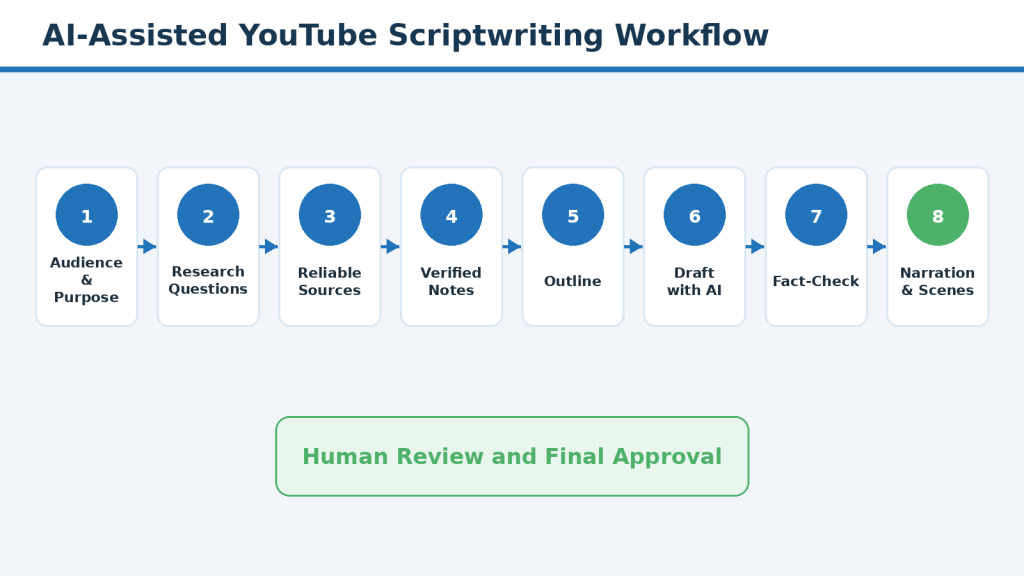
Figure 1. The complete AI-assisted faceless YouTube scriptwriting workflow.
Explanation: A responsible script moves through research, verified notes, outlining, drafting, fact-checking, narration preparation, scene planning, and final approval. AI can support several stages, but human review remains necessary throughout.
YouTube explains that monetized content should be original and authentic. Repetitive or mass-produced material may be treated as inauthentic content. A quickly generated AI script does not automatically provide meaningful original value or guarantee monetization eligibility.
This article provides general educational information. It is not legal, medical, financial, copyright, accessibility-compliance, or other professional advice.
Before You Begin
Before researching and writing the script, identify the channel niche, intended audience, video topic, main viewer question, expected length, narration method, and main visual format. These decisions guide the research and reduce unrelated information.
Define the Video Purpose
Complete this sentence: This video helps [audience] understand or complete [specific topic or task] so they can [useful result]. The statement should describe one main result rather than several unrelated goals.
Identify the Audience
A complete beginner may need definitions, slower demonstrations, clear warnings, familiar examples, and fewer assumptions. An experienced audience may prefer shorter explanations and more advanced detail. Write for the chosen audience consistently.
Choose the Video Type
- Step-by-step tutorial
- Beginner explanation
- Comparison
- Checklist
- Common-mistakes video
- Myth-versus-reality video
- Practical project
- Frequently asked questions
The video type affects the script structure. A tutorial requires ordered steps, while a comparison requires consistent criteria for every option.
Prepare the Script Brief
Before research begins, prepare a short script brief containing the working title, intended audience, main viewer question, video purpose, video type, expected length, narration method, visual format, tone, important warnings, research requirements, and final viewer action.

Figure 2. The essential parts of a beginner video-script brief.
Explanation: A script brief defines the video before research and drafting begin. It helps keep the topic, audience, length, narration, visuals, tone, and final result consistent.
Create a project folder with subfolders for research sources, notes, drafts, narration, images, video clips, licences, captions, thumbnails, exports, and publication records. Use version numbers instead of filenames such as Final Final or Use This One.
Step 1: Turn the Video Topic into Research Questions
Research questions help you decide what information is needed, which facts require verification, which sources are most useful, what should be excluded, and how the script may be organized.
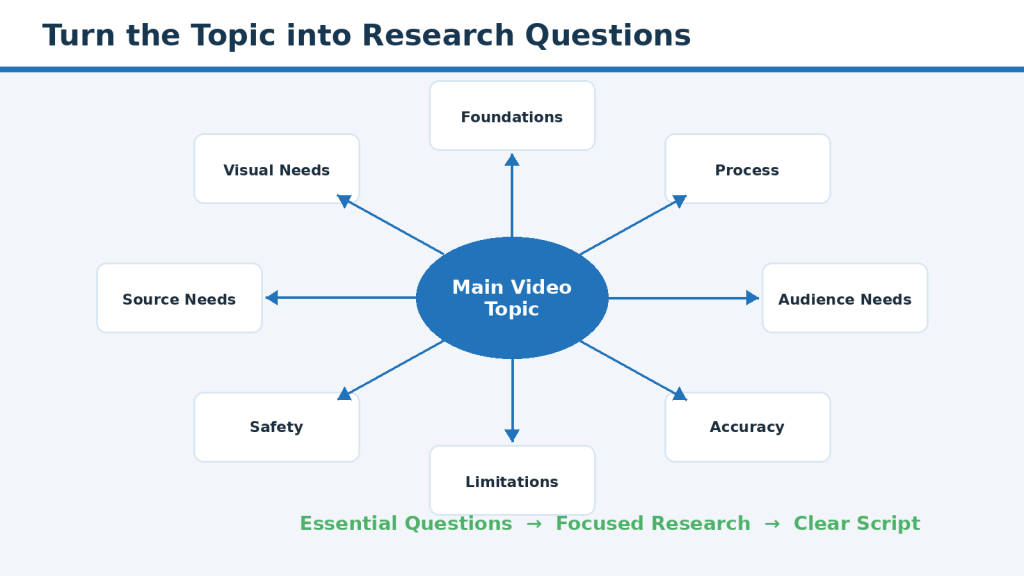
Figure 3. How one video topic becomes a focused research-question map.
Explanation: A broad topic becomes easier to research when it is divided into foundation, process, accuracy, limitation, safety, audience, source, and visual questions.
Begin with the main viewer question, then create smaller questions under these categories:
- Foundation questions: definitions and background
- Process questions: the steps viewers need to follow
- Audience questions: what beginners may not understand
- Accuracy questions: facts, dates, numbers, limits, or policies needing evidence
- Limitation questions: what can vary or fail
- Safety and responsibility questions: privacy, permission, licensing, and harm
- Visual questions: what viewers need to see
- Source questions: which authority is appropriate
Label each question Essential, Helpful, Optional, or Outside Scope. This prevents an interesting but unrelated subject from expanding the script beyond the promised result.
AI may help expand the question list, but it should not answer the questions at this stage. Ask it to suggest categories and mark possible gaps, then review the list yourself.
Common Mistake: Searching immediately without deciding what the video needs to answer.
How to Avoid This Mistake: Create and prioritize the research questions first, then collect only the information required to answer them accurately.
Step 2: Find Reliable and Current Sources
Begin with sources directly responsible for the information. Examples include official product documentation, government websites, standards organizations, original research papers, official policy pages, and actual licence terms.
Different claims require different source types.

Figure 4. Match each type of script claim with the most suitable source.
Explanation: Software features, laws, scientific findings, licences, and platform policies require different source types. Choosing the correct authority improves accuracy and reduces reliance on weak summaries.
- Use official documentation for features, plan conditions, privacy controls, file limits, and platform policies.
- Use government or regulatory sources for laws, public programmes, consumer protections, and official procedures.
- Use original research for scientific findings, methods, limitations, and results.
- Use the actual licence terms for music, footage, images, fonts, templates, voices, and AI-generated assets.
- Use reputable secondary sources for explanation and context, not as automatic proof of an important claim.
Check the publication date, last-updated date, applicable region, device, account, plan, and software version. Information about AI tools, prices, menus, policies, and licences can change quickly.
Confirm that the source supports the exact sentence planned for the script. A page discussing an AI voice does not automatically support a claim that monetized commercial use is permitted.
Rate each source as Strong, Useful, Limited, or Do Not Use.

Figure 5. A simple source-quality ladder for script research.
Explanation: The strongest sources are current, authoritative, and directly support the planned claim. Weak or unverifiable sources should not be used merely because they support a preferred conclusion.
Preserve the title, publisher, link, dates, relevant section, supported point, conditions, and planned script use. Do not depend only on browser history or a search-result snippet.
Common Mistake: Using AI responses, snippets, or popular videos as the main evidence for important claims.
How to Avoid This Mistake: Begin with current official and primary sources, verify the exact claim, and use secondary sources only for suitable explanation and context.
Step 3: Organize Research Notes Before Writing
Create one research document and organize it by research question or planned script section. For every important source, record the title, organization, link, dates, main supported point, conditions, and planned use.
Summarize the source in your own words. Record what the source says, what it does not say, and which conditions matter. Avoid copying long passages into the script.
Keep verified facts separate from recommendations, interpretations, examples, and items that still need verification. Mark time-sensitive information with a note such as RECHECK BEFORE RECORDING.
A claim-evidence table helps verify that every important statement has support.
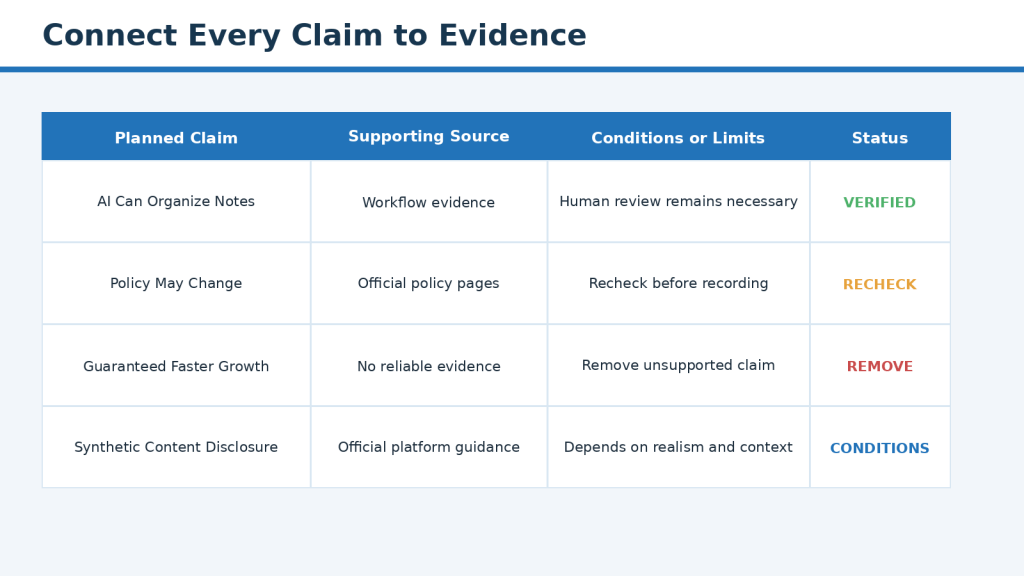
Figure 6. A claim-evidence table for checking important script statements.
Explanation: The table connects each planned statement to a supporting source, records conditions or limits, and shows whether the claim is approved, needs review, or should be removed.
Record exact numbers carefully. Include the source, unit, date, plan, region, and whether the number can change. Remove numbers that are not essential rather than guessing.
Add possible examples, visuals, pronunciations, and research gaps. Preserve sources, permissions, licence records, and approved notes after publication because they may be needed for corrections or updates.
Step 4: Create the Video Outline
The outline connects research to narration. It shows the learning order, essential points, examples, warnings, visuals, transitions, timing, and final viewer action.
Choose a structure suited to the video type. A tutorial normally moves from preparation through ordered steps and final review. A comparison uses the same criteria for every option. A myth video presents the myth, verified reality, and practical correction.
Put information in learning order rather than the order in which you discovered it. Explain a technical term before asking the viewer to use it. Place a warning beside the risky step rather than saving every warning for the conclusion.
A detailed outline may contain a section heading, main point, supporting points, source references, example, warning, visual note, transition, and approximate time.
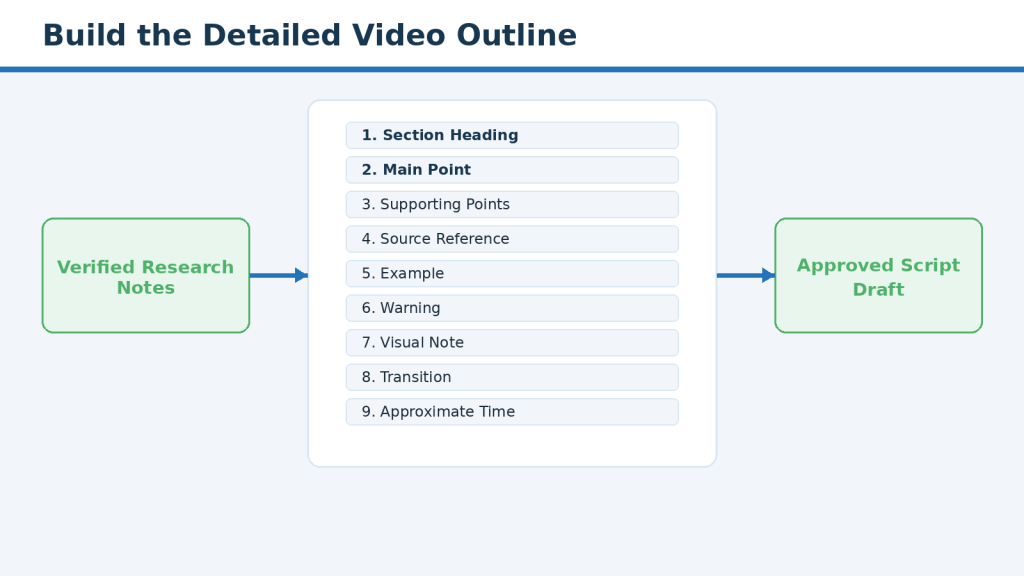
Figure 7. The main parts of a detailed faceless-video outline.
Explanation: A detailed outline organizes verified research into a logical teaching sequence before full narration is written. It also connects each section to examples, warnings, visuals, transitions, and timing.
Use AI to organize verified notes only after the notes are complete. Instruct it not to add facts, numbers, sources, or examples. Review the result against the approved research before drafting the narration.
Step 5: Draft the Script with AI Using Verified Notes
The AI tool should receive the intended audience, video purpose, approved outline, verified research notes, important limitations, required warnings, preferred tone, expected length, and planned visual format.

Figure 8. The information AI needs before drafting a video script.
Explanation: A strong drafting prompt gives AI clear boundaries. It provides verified material, audience information, tone, length, warnings, and an approved structure while prohibiting unsupported facts.
A useful prompt might say: Write a first-draft script for complete beginners using only the approved outline and verified notes. Do not add facts, statistics, prices, policy claims, sources, or examples. Mark missing information as NEEDS REVIEW.
Draft one section at a time. This makes it easier to check facts, control length, correct tone, remove repetition, and stop unsupported additions early.
Write for speaking, not only reading. Use shorter sentences, familiar words, natural pauses, and one main idea at a time. Explain technical terms the first time they appear.
Mark source-dependent claims and time-sensitive details. Add limitations where they matter. Remove hype, guarantees, false urgency, and sales language such as effortless, perfect results, secret method, or instant success.
Common Mistake: Giving AI a title and accepting the complete generated script as finished work.
How to Avoid This Mistake: Provide verified notes and an approved outline, draft in sections, mark source-dependent claims, and treat every AI-generated sentence as material requiring human review.
Step 6: Fact-Check and Rewrite the First Draft
A polished draft can still be wrong. Identify each factual claim and confirm which source supports it, whether the source is current, whether conditions are missing, and whether the wording could mislead a beginner.
Fact-checking confirms whether the information is supported. Rewriting turns the draft into accurate, original, natural narration.

Figure 9. The fact-checking and rewriting cycle for an AI-generated draft.
Explanation: Every important claim should be compared with its original source. Unsupported details are removed, limitations are restored, and the wording is rewritten for clarity and originality.
- Recheck current features, prices, policies, plan limits, laws, and regional availability.
- Verify every number, date, name, quotation, product name, and policy title.
- Compare paraphrases with the original source and preserve cautious wording.
- Separate verified facts from practical recommendations.
- Remove unsupported statistics and invented example details.
- Apply stronger review to health, law, finance, safety, elections, and other high-risk subjects.
- Rewrite the organization, wording, examples, and transitions in the channel’s own style.
Read the revised script aloud. Break long sentences, remove filler, reduce repeated introductions and conclusions, and use consistent terminology. A disclaimer does not make inaccurate or dangerous advice acceptable.
Step 7: Prepare the Script for Narration
A script that reads well on a page may still sound unnatural when narrated.
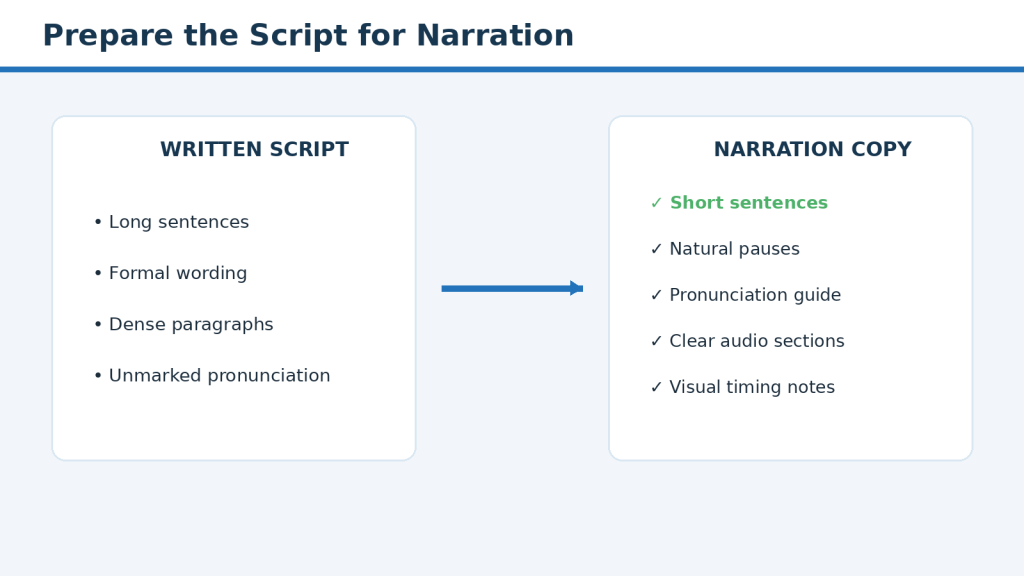
Figure 10. How to convert a written script into natural narration.
Explanation: Narration preparation shortens sentences, adds pauses, checks pronunciation, divides the script into manageable audio sections, and allows enough time for visual demonstrations.
Create a separate narration copy from the fact-checked script. Preserve the main approved script with its source labels and review notes. Divide narration into short sections so one mistake can be replaced without recording the entire video again.
- Use one main idea per sentence.
- Add natural pauses and paragraph breaks.
- Prepare a pronunciation guide for names, abbreviations, technical terms, and places.
- Write numbers and dates in a spoken-friendly form.
- Allow time for screen actions and on-screen reading.
- Test 30 to 60 seconds before producing the full audio.
- Review the audio without reading the script, then review it again with the planned visuals.
When using an AI voice, check commercial-use permission, monetized-use conditions, attribution, voice-cloning restrictions, consent, reuse rights, and what happens after a subscription ends. Never imitate a real person without clear authorization.
Step 8: Turn the Script into a Scene Plan
A scene plan connects narration, visuals, screen actions, on-screen text, captions, timing, source references, and editing notes.

Figure 11. How the approved script becomes a scene-by-scene production plan.
Explanation: The scene plan shows what viewers hear and see during each part of the video. It prevents unrelated visuals, missing demonstrations, timing problems, and unnecessary asset creation.
Create a new scene when the main idea, step, screen action, example, comparison, or warning changes. Give every visual a clear purpose: demonstrate, explain, compare, warn, provide evidence, or show the result.
- Use screen recordings for exact actions.
- Use diagrams for processes and relationships.
- Use tables for comparisons with consistent criteria.
- Use short on-screen text for key terms, steps, and warnings.
- Keep important visuals visible long enough for beginners to understand them.
- Record the source and licence for every external asset.
- Review AI-generated visuals for misspellings, distortion, false interfaces, misleading details, and real-person resemblance.
Protect privacy in every scene. Use demonstration accounts, disable notifications, hide personal files, and review screen recordings frame by frame. Plan accurate captions, strong contrast, large text, verbal explanation of important visuals, and labels in addition to colour.
Step 9: Complete the Final Script Review and Approval
The final review should check accuracy, originality, structure, spoken clarity, visual alignment, privacy, permission, licensing, accessibility, current information, file organization, and final approval.

Figure 12. The final approval checks before narration and editing begin.
Explanation: A script should not enter full production until factual, creative, privacy, licensing, accessibility, narration, and visual checks are complete and one approved version has been identified.
Identify one exact script version for production. Compare it with the approved outline, recheck important claims and current information, confirm source links, and ensure the title matches the actual lesson.
Review originality against source wording, competitor videos, AI drafts, and earlier channel scripts. Confirm that the final version uses original structure, wording, examples, explanations, transitions, and scene planning.
Complete separate privacy, permission, licensing, AI-disclosure, accessibility, and professional-advice reviews. Approve the scene plan and narration test. Lock the approved version and record every later change with a new version number and another accuracy review.
Benefits of a Structured AI-Assisted Scriptwriting Process
- The video remains focused on one clear viewer result.
- Research is organized around useful questions instead of random links.
- Claims are easier to verify and update.
- AI can reduce routine organization and first-draft work.
- Language, examples, pacing, and visuals can be matched to the audience.
- Narration sounds more natural after a spoken-language review.
- The scene plan reduces unused assets and editing confusion.
- Accessibility, privacy, permissions, and licences can be planned before production.
- The creator maintains control of the final message and approval.
Reality: AI can make organization and drafting more manageable, but the strongest benefit appears only when it is used inside a workflow that includes reliable sources, original rewriting, fact-checking, privacy protection, licensing review, accessibility planning, and final human approval.
Limitations of Researching and Writing Scripts with AI
AI can support research organization, outlining, drafting, and editing, but it has important limitations.
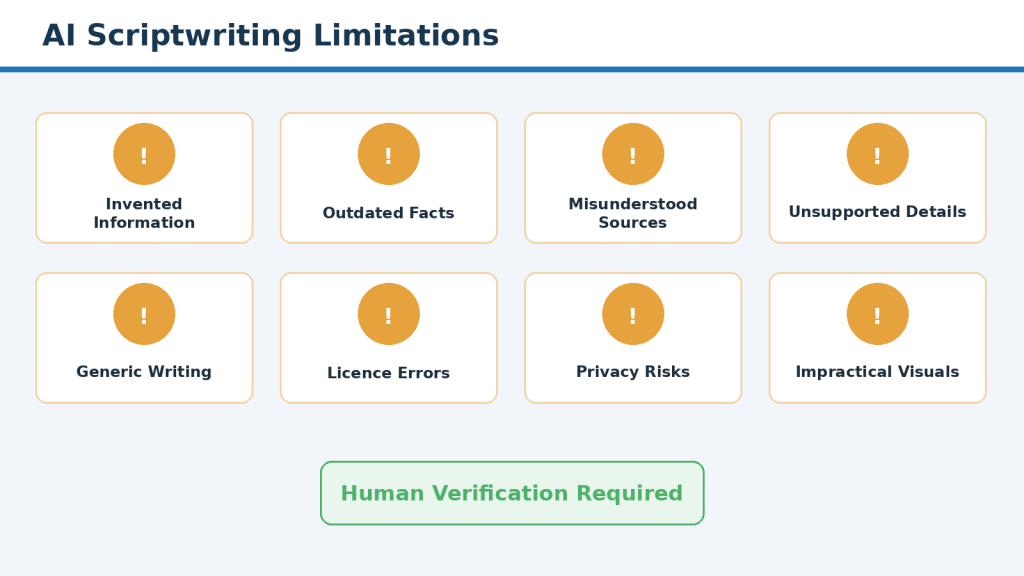
Figure 13. Important limitations of AI-assisted scriptwriting.
Explanation: AI may invent facts, use outdated information, misunderstand sources, create generic wording, miss privacy risks, and suggest unsuitable visuals. Human supervision is required at every important stage.
- It may invent facts, links, studies, quotations, or statistics.
- It may use outdated information or combine different plans and regions.
- It may misunderstand sources, remove conditions, or strengthen uncertain wording.
- It may add unsupported details to examples.
- It may create generic, repetitive, or overly formal scripts.
- It cannot confirm copyright permission, real-person consent, or professional advice.
- It may miss privacy risks and harmful implications.
- It cannot reliably judge narration quality or exact production capacity.
- AI chats are not a dependable project archive.
- A strong script cannot guarantee views, subscribers, monetization, retention, or income.
How to Reduce This Limitation: Use AI only for tasks you can supervise. Preserve the approved brief, notes, sources, outline, drafts, and final files outside the chat, and complete independent human reviews.
Common Mistakes
- Asking AI for a complete script from only a title
- Researching without one main viewer question
- Using AI or search snippets as the evidence
- Saving links without recording the supported claim
- Using old sources for current features or policies
- Treating all sources as equally reliable
- Creating the outline before completing essential research
- Generating the entire script in one response
- Writing for reading instead of speaking
- Using unexplained technical terms
- Making the opening too long or misleading
- Leaving unsupported statistics and invented examples in the draft
- Treating grammar correction as fact-checking
- Ignoring regional, plan, privacy, permission, and licensing differences
- Creating visuals before approving the script and scene plan
- Skipping the narration test
- Using different script versions across the team
- Deleting research and licence records after publication
Final Reminder: The most serious mistakes happen when speed replaces research and review. AI can support the workflow, but every important decision and final approval remains a human responsibility.
Common Myths
Myth: AI can research the entire topic for you
Reality: AI may help organize information, but the creator must review reliable sources.
Myth: A confident AI answer is usually correct
Reality: Confidence is a writing style, not evidence.
Myth: Several links guarantee an accurate script
Reality: The links must be opened, understood, and connected to exact claims.
Myth: AI-generated scripts are automatically original
Reality: Original structure, wording, examples, and visual planning still require human work.
Myth: AI can reliably fact-check its own draft
Reality: The original sources provide the evidence.
Myth: More sources always produce a better script
Reality: Quality and relevance matter more than quantity.
Myth: Longer scripts are more valuable
Reality: The script should be only as long as needed to answer the viewer’s question.
Myth: Every sentence needs a new visual
Reality: Visuals should change when the idea or context changes, not constantly.
Myth: AI-generated assets are automatically copyright-free
Reality: Tool terms, licences, consent, and planned use still matter.
Myth: A disclaimer makes inaccurate advice acceptable
Reality: Accuracy and responsibility remain required.
Myth: Disclosure solves permission and licensing problems
Reality: Disclosure is separate from consent, rights, accuracy, and safety.
Myth: A perfect script guarantees a successful video
Reality: Performance depends on many additional factors.
Faceless YouTube Script Research and Writing Checklist
Use this checklist before approving a faceless YouTube script for narration, visual production, and editing.

Figure 14. Final research and scriptwriting checklist for faceless YouTube videos.
Explanation: The checklist brings together the full workflow, including the brief, research questions, sources, evidence, outline, AI drafting, fact-checking, narration, scenes, privacy, licences, accessibility, and approval.
- The script brief defines the audience, purpose, length, tone, narration, and visuals.
- Research questions cover foundations, process, accuracy, limitations, safety, sources, and visuals.
- Important claims use current authoritative sources.
- The source record includes titles, links, dates, supported points, and conditions.
- The claim-evidence table identifies unsupported or time-sensitive statements.
- The outline follows a logical beginner learning order.
- AI receives only verified notes and clear restrictions.
- The draft is rewritten and fact-checked in original language.
- The narration copy has been tested for pacing and pronunciation.
- The scene plan matches the approved narration.
- Privacy, permission, copyright, licences, AI disclosure, and accessibility have been reviewed.
- One clearly named final script version is approved and backed up.
Final Approval Rule: Do not begin full narration, asset creation, or editing while important facts, permissions, licences, privacy issues, or production questions remain unresolved.
Practical Example: Research and Write a Privacy-Focused Script
This example shows how a complete beginner could move from a video idea to a reviewed faceless YouTube script.

Figure 15. A complete example of researching and writing a privacy-focused video script.
Explanation: The example shows how a broad idea becomes a focused beginner video through audience definition, reliable privacy sources, a claim-evidence table, an approved outline, original rewriting, narration preparation, and scene planning.
The starting topic “AI Privacy” is narrowed to “How to Protect Personal Information When Using AI Tools.” The intended audience is complete beginners using AI for writing, images, documents, or everyday questions.
The main viewer question becomes: What should beginners check before sharing information with an AI tool? The research questions cover personal information, uploaded files, screen recordings, current privacy controls, fictional examples, common mistakes, and the final review before sending or publishing.
The creator uses official privacy and data-control guidance, file-upload information, government privacy education, and current platform disclosure guidance where relevant. A claim-evidence table removes unsupported statements such as “temporary chat guarantees complete anonymity” or “every AI provider handles files in the same way.”
The outline explains the privacy problem, defines personal information, identifies where it may appear, shows how to prepare a safe file and screen recording, checks the output, and ends with a privacy checklist. The draft is written one section at a time and rewritten for natural narration.
A fictional household-bill example demonstrates how names, addresses, account numbers, and payment details can be removed before a document is uploaded. The scene plan shows grey privacy blocks rather than real information. The final review confirms that no private details remain in the script, audio, visuals, or project files.
Final Tip: A useful AI-assisted script is built from verified research and careful human decisions. The prompt is only one part of the process.
Frequently Asked Questions
Can AI write the complete script?
AI can create an outline and first draft, but the creator must research, verify, rewrite, test, plan visuals, and approve the final version.
Should I research before asking AI to write?
Yes. Prepare the purpose, viewer question, research questions, reliable sources, verified notes, and approved outline first.
How many sources are needed?
There is no fixed number. Use enough strong sources to support the important claims accurately.
Can other YouTube videos be sources?
They may identify viewer questions or content gaps, but important claims should be verified through suitable original or authoritative sources.
Should I generate the entire script at once?
Drafting one section at a time is safer for detailed beginner videos.
How long should the script be?
Long enough to answer the main question clearly, including demonstrations, examples, and necessary warnings.
Can AI fact-check its own script?
It can flag possible problems, but the original source provides independent evidence.
Can I use fictional examples?
Yes, provided they are clearly fictional, accurate, privacy-safe, and not presented as real events or guaranteed results.
When is professional review needed?
Use qualified review for important medical, legal, financial, safety, engineering, mental-health, election, or other high-risk information.
Should images be created before the script is finished?
No. Approve the script and scene plan first to avoid unused or contradictory assets.
Can I use an AI voice?
Yes, when the planned use is permitted and pronunciation, pacing, consent, and licence conditions have been checked.
Do I always need AI disclosure?
Disclosure depends on the content, realism, alteration, and current platform rules. Check the rules before publication.
Can a researched script guarantee views?
No. It improves the production foundation but cannot guarantee views, subscribers, retention, monetization, or income.
Key Takeaways
- Begin with a clear audience, purpose, and viewer question.
- Research before drafting.
- Use current primary and authoritative sources for important claims.
- Connect claims to evidence and record conditions.
- Build the detailed outline from verified notes.
- Give AI clear boundaries and draft one section at a time.
- Fact-check every important claim and rewrite the wording originally.
- Prepare a separate narration copy and test it aloud.
- Create the scene plan from the approved script before producing assets.
- Review privacy, permissions, licences, disclosure, accessibility, and professional risks.
- Approve one clearly named final version and preserve the complete project record.
Final Principle: AI should support the scriptwriting workflow, not control it. The creator remains responsible for research, evidence, originality, accuracy, privacy, permissions, licences, accessibility, and final approval.
Final Thoughts
Researching and writing a faceless YouTube script with AI is not a one-prompt task. A responsible workflow combines a script brief, focused questions, reliable sources, organized notes, evidence, an approved outline, a reviewed draft, narration preparation, scene planning, and documented approval.
Do not begin full narration or editing while important questions remain unresolved. Correcting one sentence before production is usually easier than replacing narration, captions, visuals, and edited scenes later.
Preserve sources, drafts, prompts, licences, permissions, scene plans, audio versions, and approval records. These materials may be needed for corrections, updates, or related videos.
Final Tip: Use AI to support work you understand and supervise. Approve the script only after every important claim, example, warning, visual direction, permission, and licence has received careful human review.
Continue Learning
- How to Choose a Faceless YouTube Niche and Plan Your Channel with AI – Learn how to define the audience, compare niche ideas, choose content pillars, plan the first 20 videos, organize playlists, and create a realistic schedule.
- How to Create Faceless YouTube Videos with AI – Review the complete workflow from planning and research through narration, visuals, editing, captions, publishing, and improvement.
- How to Create AI Videos with ChatGPT – Learn how ChatGPT can support video planning, prompt writing, scene organization, and production preparation.
- Text-to-Video for Beginners – Learn how written scene descriptions can be turned into short AI-generated video clips.
- How to Add Voice, Music, and Captions to AI Videos – Learn how to prepare narration, verify rights, add captions, and review accessibility.
- How to Write Original YouTube Video Scripts with AI (2026) – Learn how to turn research into an original, well-structured YouTube script while keeping your own ideas and voice.
Add an internal link to Article 060 after it has been completed and published.
Sources and References
The following official and authoritative sources were reviewed for this article on August 6, 2026:
- OpenAI Help Center – Does ChatGPT Tell the Truth?
- OpenAI Help Center – Data Controls FAQ
- OpenAI – Terms of Use
- OpenAI – Usage Policies
- YouTube Help – YouTube Channel Monetization Policies
- YouTube Help – What Kind of Content Can I Monetize?
- YouTube Help – YouTube Community Guidelines
- YouTube Help – Impersonation Policy
- YouTube Help – Disclosing the Use of Generative AI Content
- YouTube Help – Understanding How This Content Was Made Disclosures
- YouTube Help – Add Subtitles and Captions
- YouTube Help – Use Automatic Captioning
- Canadian Intellectual Property Office – A Guide to Copyright
- W3C Web Accessibility Initiative – WCAG 2.2
- W3C – Planning Accessible Audio and Video
- W3C – Transcripts
Policies, features, licence conditions, privacy controls, and accessibility options may change. Check relevant current official guidance when first using a tool, changing plans or features, receiving an update notice, preparing realistic synthetic content, applying for monetization, or when a permission or licence is unclear.


Leave a comment