
Estimated reading time: 25 minutes
Last updated: August 5, 2026
Featured image. A beginner compares ChatGPT and Claude for common AI tasks.
Introduction
ChatGPT and Claude are two widely used general-purpose AI assistants. Both can explain ideas, write and edit text, search the web, analyze files, work with data, help with code, and support continuing projects. Their core abilities overlap, but the surrounding tools, plan structures, file workflows, visual features, coding products, and customization systems differ.
ChatGPT is generally the broader multimedia workspace. It combines conversation with native image generation and editing, voice, web research, data analysis, custom GPTs, Codex, Projects, scheduled tasks, Work, and Sites. Claude is generally more document- and workflow-centred. It combines conversation with direct office-file creation, Projects and retrieval, Skills, Claude Code, Artifacts, Research, Design, Microsoft 365 integrations, and Cowork.
There is no permanent winner. The better assistant is the one that supports your real tasks, fits your existing applications, provides enough capacity, and requires the least correction after human review.
What You Will Learn
• How ChatGPT and Claude compare for writing, documents, research, coding, images, voice, projects, and custom workflows.
• How their Free, standard paid, and higher-capacity plans differ.
• Which assistant may suit different types of users.
• How to test both services fairly before paying.
• What limitations, privacy risks, and accuracy problems to expect.
ChatGPT vs Claude at a Glance
| Area | ChatGPT | Claude |
| General emphasis | Broad multimodal and creative workspace | Document-, coding-, and knowledge-work-centred workspace |
| Free access | Yes; includes a broad set of limited tools | Yes; includes core chat, files, search, projects, Skills, and Artifacts subject to limits |
| Standard paid plan | Plus: US$20 monthly | Pro: US$20 monthly or US$200 annually in the United States |
| Lower-cost paid tier | Go: US$8 monthly in the United States, with localized prices in some markets | No directly equivalent tier between Free and Pro |
| Higher-capacity plans | Pro: US$200 monthly | Max 5x: US$100; Max 20x: US$200 monthly |
| Native image generation | Yes | No comparable photo or illustration generator |
| Office-file creation | Available through ChatGPT Work and supported tools | Direct DOCX, XLSX, PPTX, PDF, and PNG creation |
| Dedicated coding agent | Codex, included across ChatGPT plans with plan-dependent access | Claude Code, included with Pro and Max |
| Research | Search and Deep Research | Web Search and Research |
| Custom workflows | Projects, custom GPTs, plugins, apps, Tasks | Projects, Skills, plugins, connectors, Cowork |
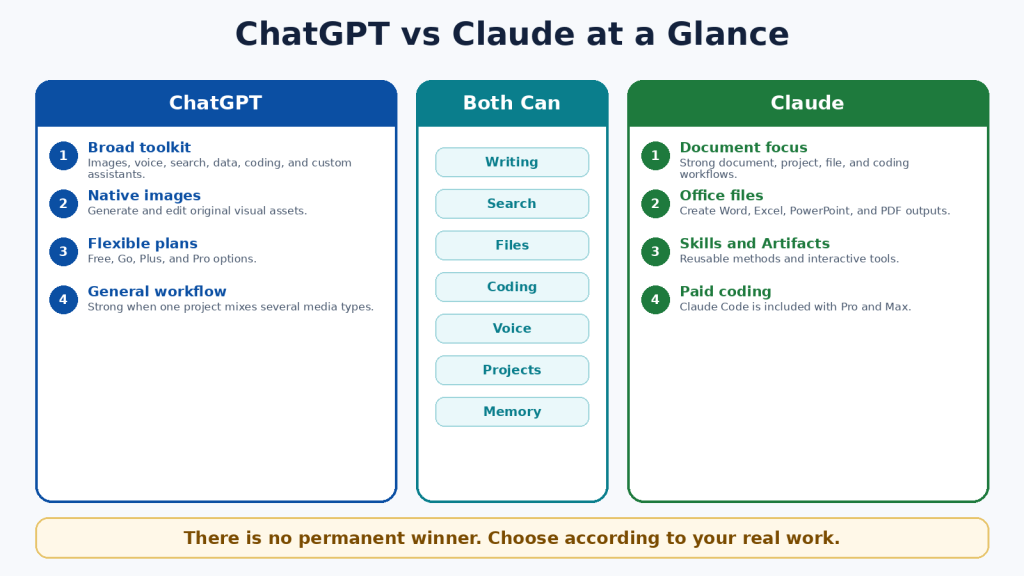
Figure 1. A high-level comparison of the two assistants.
Explanation: ChatGPT provides a broad set of creative and multimodal tools, while Claude emphasizes documents, file creation, coding, and repeatable knowledge workflows.
What Is ChatGPT?
ChatGPT is OpenAI’s conversational AI product. It can answer questions, explain concepts, draft and revise text, analyze files and data, search the web, create and edit images, conduct voice conversations, help with code, and organize continuing work inside Projects.
Main ChatGPT Tools
• ChatGPT Search for current web information with citations.
• Deep Research for multi-source investigations and documented reports.
• ChatGPT Images for native image generation and editing.
• Data analysis for spreadsheets, calculations, tables, charts, and code-backed work.
• Projects for related chats, files, and instructions.
• Custom GPTs for named task-specific assistants on eligible paid plans.
• Codex for software development across desktop, command-line, IDE, web, and cloud workflows.
• ChatGPT Work for longer research and finished documents, spreadsheets, presentations, reports, and Sites.
ChatGPT is particularly useful when one workflow combines several media types. A publisher, for example, can research an article, draft it, analyze a spreadsheet, generate a featured image, create an infographic, and prepare a website deliverable in the same product environment.
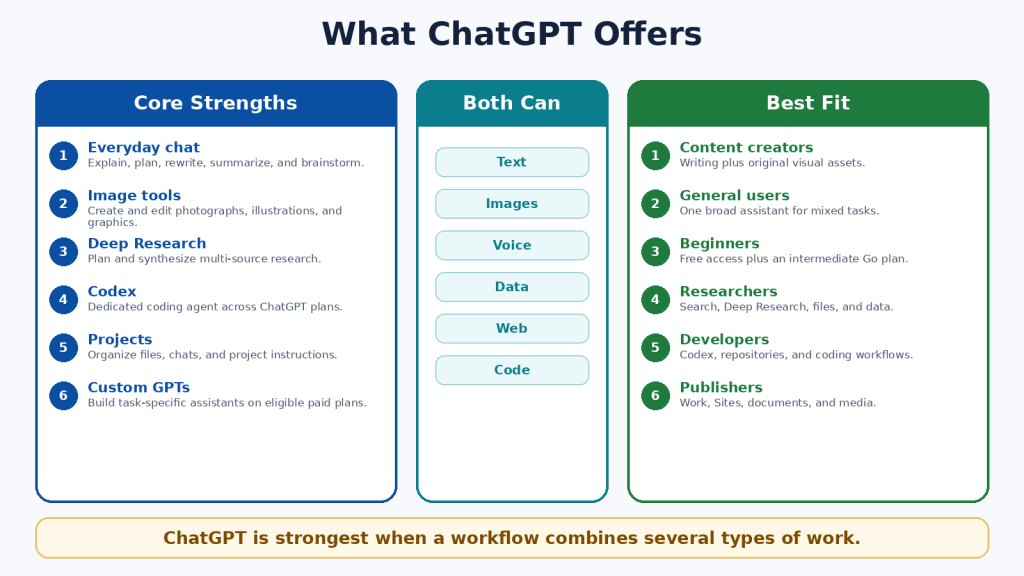
Figure 2. Major ChatGPT capabilities and suitable user groups.
Explanation: ChatGPT is a broad general-purpose assistant whose distinctive advantages include native images, custom GPTs, Codex, Deep Research, Work, and Sites.
What Is Claude?
Claude is Anthropic’s conversational AI product. It can write and edit, analyze files, search the web, conduct Research, create office files, use Projects and retrieval, run code, support voice conversations, and work through specialized products such as Claude Code, Artifacts, Design, Skills, connectors, and Cowork.
Main Claude Tools
• Claude Projects for continuing work with instructions and reference knowledge.
• Retrieval-Augmented Generation for larger project knowledge collections.
• Direct creation of Word, Excel, PowerPoint, PDF, chart, and code files.
• Claude Skills for reusable instructions, templates, examples, and optional scripts.
• Claude Code for terminal, IDE, and repository workflows on Pro and Max.
• Claude Research for multi-stage investigations across the web and connected context.
• Claude Artifacts for interactive tools, code, diagrams, visualizations, and shareable applications.
• Claude Cowork for agentic knowledge work and scheduled workflows.
Claude is particularly useful when the centre of the workflow is a document collection, structured office files, a software repository, or a repeatable professional process.
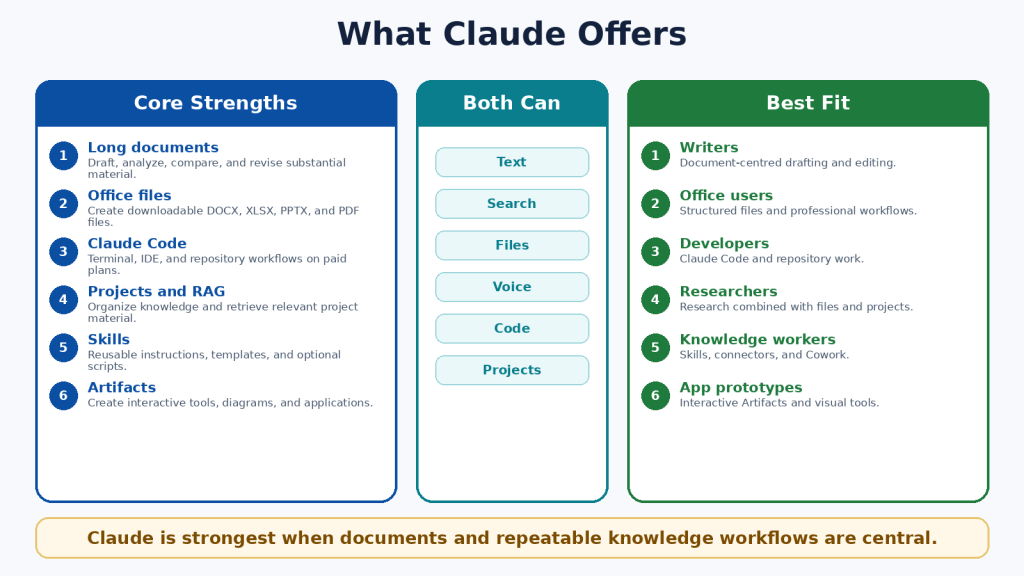
Figure 3. Major Claude capabilities and suitable user groups.
Explanation: Claude combines long-form document work with direct file creation, project retrieval, Skills, Claude Code, Artifacts, Research, and Cowork.
ChatGPT Free vs Claude Free
Both Free plans are useful for learning and occasional work. They should be the starting point for most beginners. Free access is limited, and the available model, message, file, image, coding, and research allowances can change according to demand and product updates.
| Area | ChatGPT Free | Claude Free |
| Best use | Testing ChatGPT and broad everyday tasks | Testing Claude and document-centred tasks |
| Projects | Unlimited number; five files per project | Up to five projects |
| Native images | Limited image generation and editing | No comparable native image generation |
| Coding agent | Codex access is included across plans, with smaller Free limits | Dedicated Claude Code is not included in the individual Free plan |
| Research | Search and limited Deep Research availability | Web Search; Research is a paid feature |
| Upgrade path | Go or Plus | Pro |
A Free-plan comparison should use the same prompts, files, source requirements, and output length. One good response is not enough; test several tasks that represent your normal work.
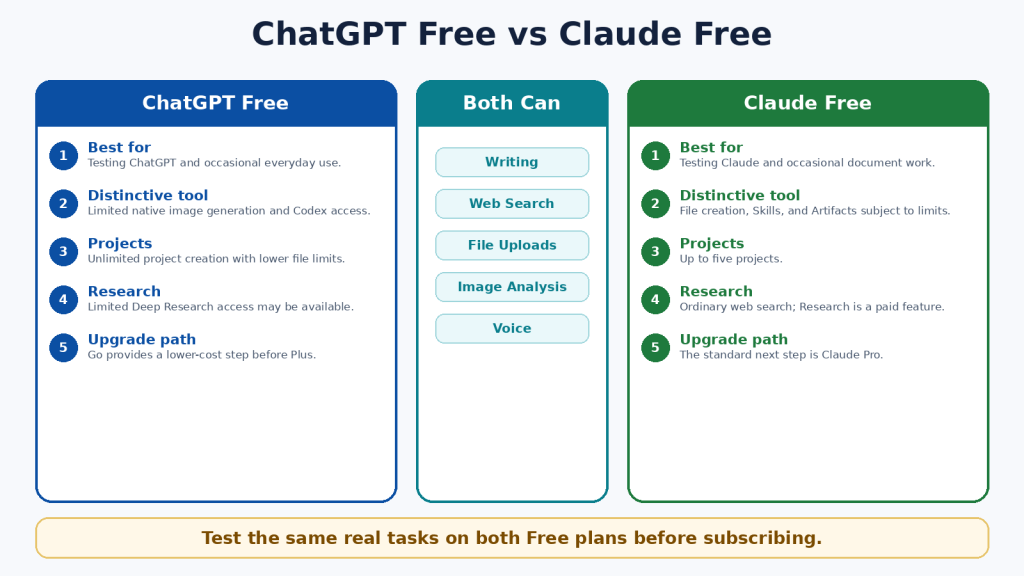
Figure 4. A practical comparison of the two Free plans.
Explanation: Both Free plans support useful everyday work. ChatGPT has a broader multimedia and coding entry point, while Claude provides a strong introduction to documents, file creation, Skills, Projects, and Artifacts.
ChatGPT Plus vs Claude Pro
ChatGPT Plus and Claude Pro are the closest standard paid individual plans. Each costs US$20 monthly in the United States. Claude Pro also offers a US$200 annual option. Actual prices can differ because of currency, tax, region, promotions, or mobile-store billing.
| Area | ChatGPT Plus | Claude Pro |
| Standard US price | US$20 monthly | US$20 monthly or US$200 annually |
| Main emphasis | Advanced general productivity and multimodal creation | Documents, coding, projects, files, and structured workflows |
| Distinctive tools | Native images, custom GPTs, Deep Research, Codex, Tasks, Work | Claude Code, Cowork, Research, Design, Skills, direct office-file creation |
| Best for | Users combining text, images, voice, research, data, and coding | Users centred on documents, repositories, office files, and repeatable processes |
| Unlimited? | No; model and tool limits apply | No; session, weekly, model, and feature limits can apply |
The best value is not determined by the number of listed features. It is determined by whether the plan contains the few tools you actually need, saves meaningful time, and remains available during your normal workload.
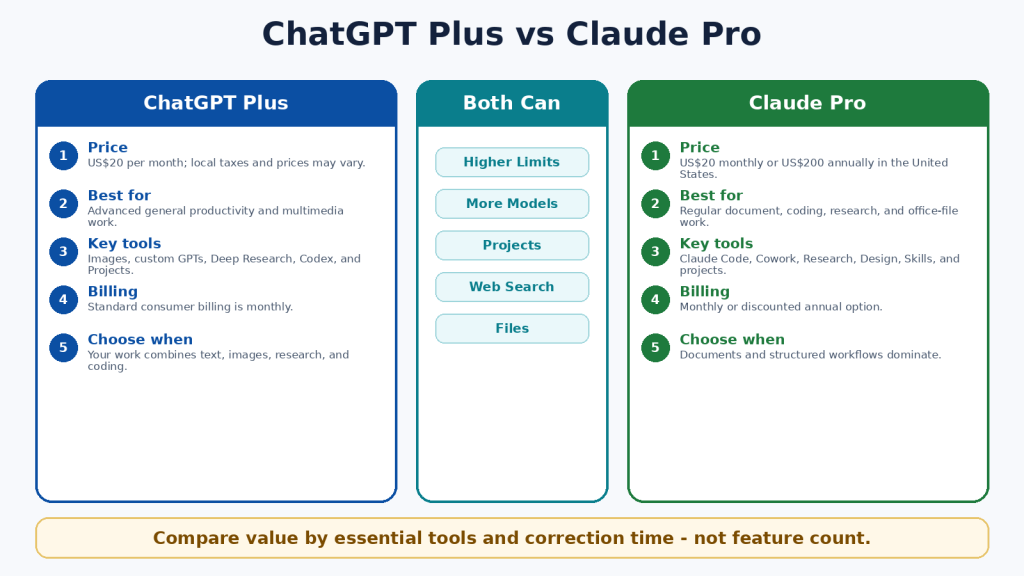
Figure 5. ChatGPT Plus and Claude Pro compared at the standard paid level.
Explanation: Both standard plans provide more access than Free. ChatGPT Plus is stronger for broad multimodal creation; Claude Pro is stronger for document, coding, file, and structured-workflow use.
ChatGPT Pro vs Claude Max
Higher-capacity plans are designed for frequent users who repeatedly reach the standard plan’s limits. ChatGPT Pro is US$200 monthly in the United States. Claude Max is available as Max 5x for US$100 monthly and Max 20x for US$200 monthly.
The 5x and 20x labels compare Claude Max with Claude Pro capacity per session. They do not create a direct measurement against ChatGPT, and they do not promise five or twenty times better answers. Both companies can apply model-specific, feature-specific, safety, and fair-use restrictions.
• Start with the standard paid plan.
• Record which feature or limit interrupts you.
• Measure several normal weeks rather than one unusually large day.
• Upgrade only when interruptions affect valuable work.
• Downgrade when the extra capacity is no longer needed.
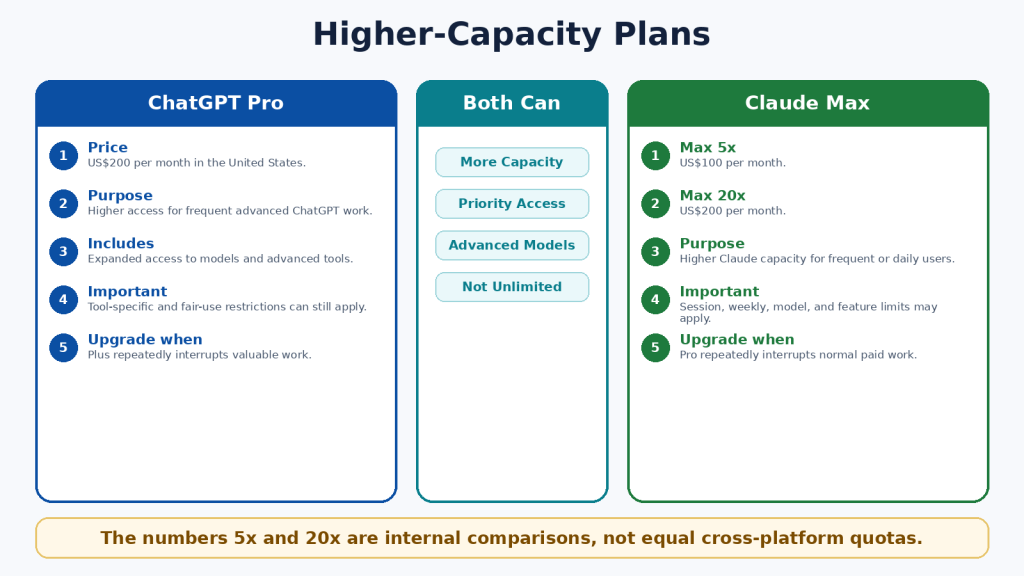
Figure 6. Higher-capacity individual plans and their intended purpose.
Explanation: Higher plans provide more access, not guaranteed accuracy or unrestricted use. The correct tier depends on measured workload.
ChatGPT vs Claude for Writing and Editing
Both assistants can brainstorm, outline, draft, rewrite, shorten, expand, proofread, summarize, translate, and adapt text for different audiences. Writing quality depends heavily on the instructions, source material, selected model, desired length, and human editing.
When ChatGPT May Be Better
• The writing project also requires original images, data, charts, voice, or web research.
• You want to create a custom GPT for a named writing workflow.
• You need scheduled reminders or monitoring connected to publishing work.
• The final deliverable will be created through ChatGPT Work or a Site.
When Claude May Be Better
• The work is long-form and document-centred.
• You want to use project knowledge, Styles, or Skills for a repeatable writing method.
• You need a downloadable Word, PowerPoint, Excel, or PDF deliverable.
• The writing must remain closely connected to a large reference collection.
A Fair Writing Test
Give both assistants the same source material and the same request. Specify the audience, tone, length, headings, examples, required facts, and prohibited claims. Compare factual accuracy, organization, repetition, tone, revision reliability, and the amount of human editing required.
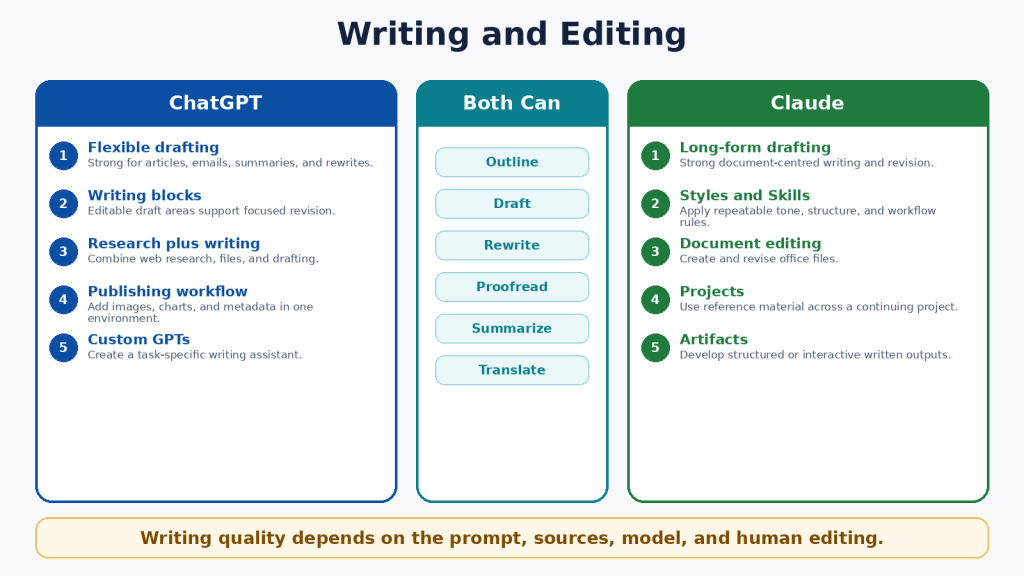
Figure 7. Writing and editing strengths of ChatGPT and Claude.
Explanation: Both can produce strong writing. ChatGPT is well suited to multimedia publishing, while Claude is well suited to long-form document workflows and repeatable writing methods.
ChatGPT vs Claude for Documents and File Analysis
Both assistants can summarize, compare, extract, rewrite, classify, answer questions about files, and analyze structured data. File size, file type, context, page count, visual content, and plan limits all affect the result.
| Area | ChatGPT | Claude |
| Common formats | DOCX, PDF, PPTX, XLSX, XLS, CSV, TSV, TXT, and other supported types | PDF, DOCX, CSV, TXT, HTML, ODT, RTF, EPUB, JSON, XLSX, images, and other supported types |
| Maximum ordinary file size | 512MB per file; text and document files also have a two-million-token cap | 500MB per file, subject to context and processing limits |
| Project file limits | Free 5; Go/Plus 25; Pro 40 | No simple fixed paid-project count; file, context, and retrieval limits apply |
| Visual PDFs | Consumer document retrieval may not interpret every embedded visual | Text and visuals can be analyzed in PDFs under 100 pages |
| Office-file creation | Available through ChatGPT Work and supported tools | Direct creation of DOCX, XLSX, PPTX, PDF, and PNG files |
| Spreadsheet work | Interactive tables, code-backed analysis, calculations, and charts | Code execution, calculations, visualizations, and downloadable office files |
Important File Limitations
• A large upload limit does not guarantee that every page is active in the model context.
• Scanned pages can contain OCR errors.
• Complex tables, tracked changes, comments, macros, and embedded media may be missed.
• A supported extension does not guarantee perfect compatibility.
• Generated files must be opened and tested in the software you will actually use.
Safer Document Prompt
Use a prompt such as: “Answer only from the uploaded files. Cite the filename, page, and section for every important statement. State ‘Not found’ when the answer is absent. Separate exact quotations from interpretation.”
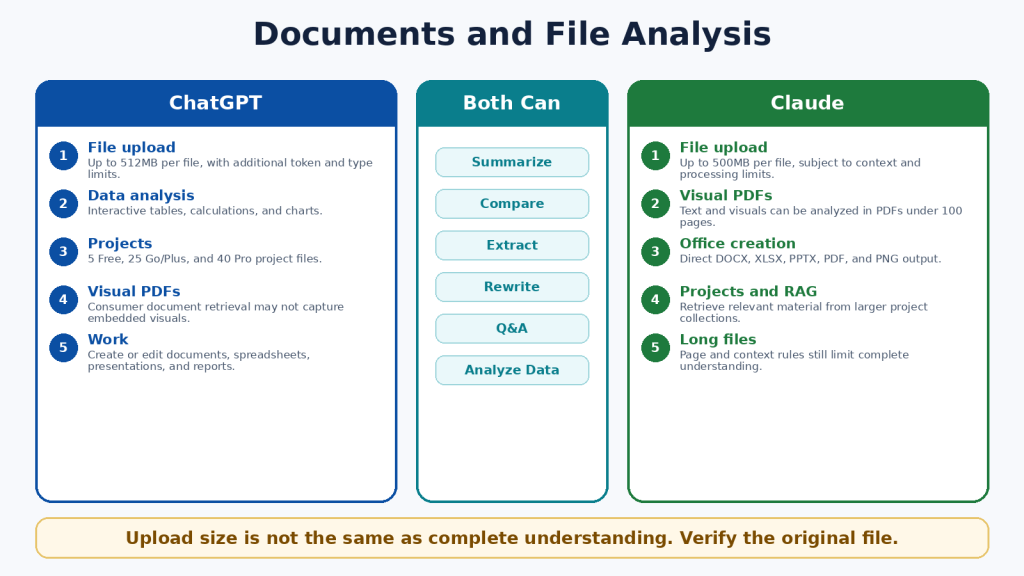
Figure 8. Document and file-analysis differences.
Explanation: ChatGPT provides strong data analysis and broad file workflows. Claude provides visual analysis for eligible shorter PDFs and direct creation of standard office files. Both require verification against the original.
ChatGPT vs Claude for Web Search and Research
Ordinary web search is appropriate for quick current questions. Deeper research tools are appropriate when a question requires several searches, source comparison, uploaded files, connected data, and a structured report.
ChatGPT Search and Deep Research
• Search can provide current answers with citations and a Sources view.
• Deep Research can propose a plan, search several sources, use selected sites, and combine web information with uploaded files and enabled applications.
• Research reports can include headings, tables, citations, source links, and supported downloads.
Claude Web Search and Research
• Web Search provides current answers with citations and source links.
• Research performs multi-stage investigation across the web and eligible connected context.
• Claude can use the findings to create documents, spreadsheets, presentations, PDFs, or Artifacts.
Research Safety
• Prioritize official and primary sources.
• Open every important citation.
• Distinguish the date an event happened from the date an article was published.
• Identify disagreements instead of forcing one conclusion.
• Use qualified professional advice for legal, medical, financial, immigration, and safety decisions.
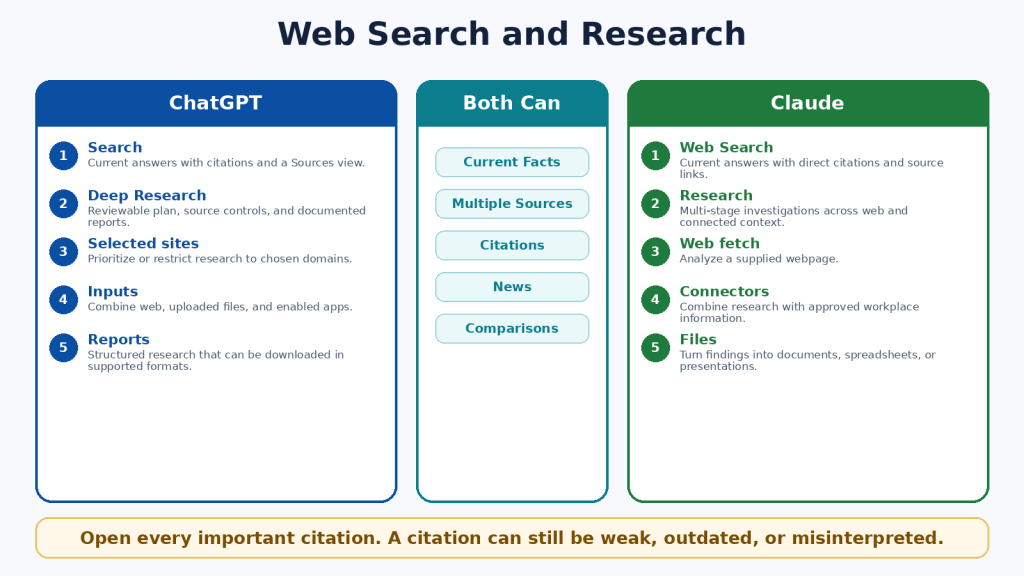
Figure 9. Web search and deeper research compared.
Explanation: ChatGPT emphasizes a visible research plan and source controls. Claude emphasizes conversational multi-stage research connected to documents and workplace context.
ChatGPT vs Claude for Coding and App Creation
Both assistants can explain code, create files, debug errors, write tests, refactor repositories, run commands, and help build applications. Their dedicated coding agents are Codex and Claude Code.
| Area | ChatGPT | Claude |
| Dedicated agent | Codex | Claude Code |
| Individual availability | Included across ChatGPT plans with plan-dependent limits | Included with Claude Pro and Max |
| Interfaces | Desktop, CLI, IDE, web, and remote workflows | Terminal, supported IDEs, and web-based repository workflows |
| Repository work | Read, edit, test, review, and delegate tasks | Read, edit, test, create branches, and prepare pull requests |
| Lightweight apps | ChatGPT Sites where available | Claude Artifacts and interactive tools |
| API billing | Separate from ChatGPT subscriptions | Separate from Claude subscriptions |
Coding Safety Checklist
1. Use version control and create a backup.
2. Work on a separate branch.
3. Ask for a plan before major changes.
4. Review every changed file.
5. Run tests and test invalid inputs.
6. Protect secrets and production credentials.
7. Scan dependencies and obtain security review for important systems.
Code that runs once can still be insecure, inaccessible, slow, or incorrect at the edges. A coding agent is a development tool, not a substitute for engineering responsibility.
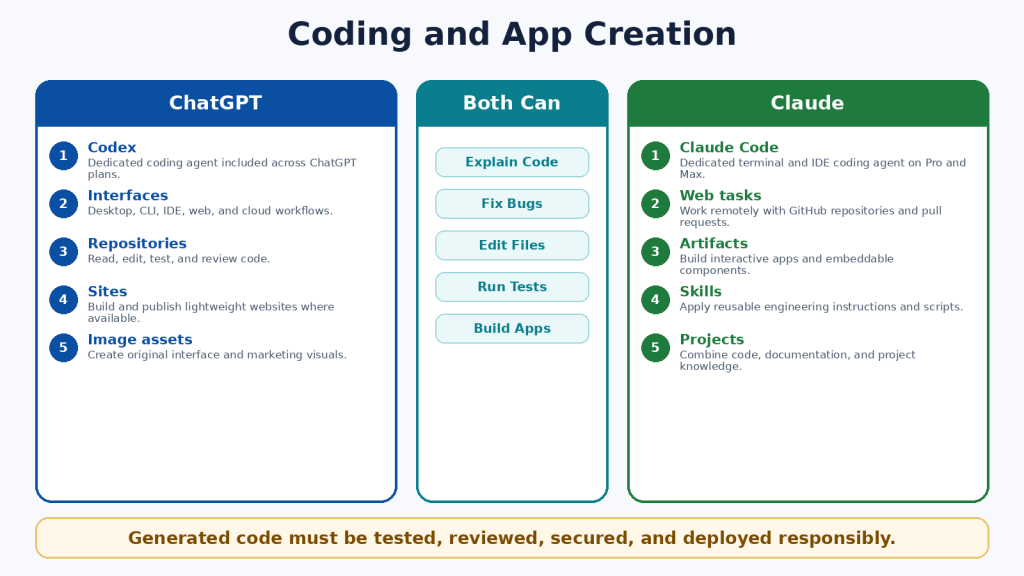
Figure 10. Coding agents and app-creation workflows.
Explanation: Codex has a beginner access advantage because it is included across ChatGPT plans. Claude Code provides a strong paid terminal, IDE, and repository workflow.
ChatGPT vs Claude for Images, Voice, and Multimodal Work
Multimodal AI works with more than typed text. Both assistants can analyze images, screenshots, charts, documents, web sources, and spoken prompts. The clearest difference is that ChatGPT can natively generate and edit photographs, illustrations, and graphics, while Claude focuses on image analysis, diagrams, HTML, SVG, structured visuals, Design, and Artifacts.
ChatGPT Advantages
• Native image generation and editing.
• Different aspect ratios for featured images, social posts, and presentations.
• Image analysis for screenshots, charts, and photographs.
• Real-time voice on supported devices.
• Eligible camera and screen-sharing assistance.
Claude Advantages
• Image and chart analysis.
• Interactive diagrams, HTML, SVG, and custom visual explanations.
• Artifacts and Design for structured or interactive outputs.
• Two-way voice across plans.
• Voice workflows that can use eligible connected tools.
Privacy Warning
Images, audio, video, and shared screens can reveal faces, notifications, addresses, financial details, family information, account names, and background conversations. Crop images, hide notifications, stop sharing before entering passwords, and review current retention and model-improvement settings.
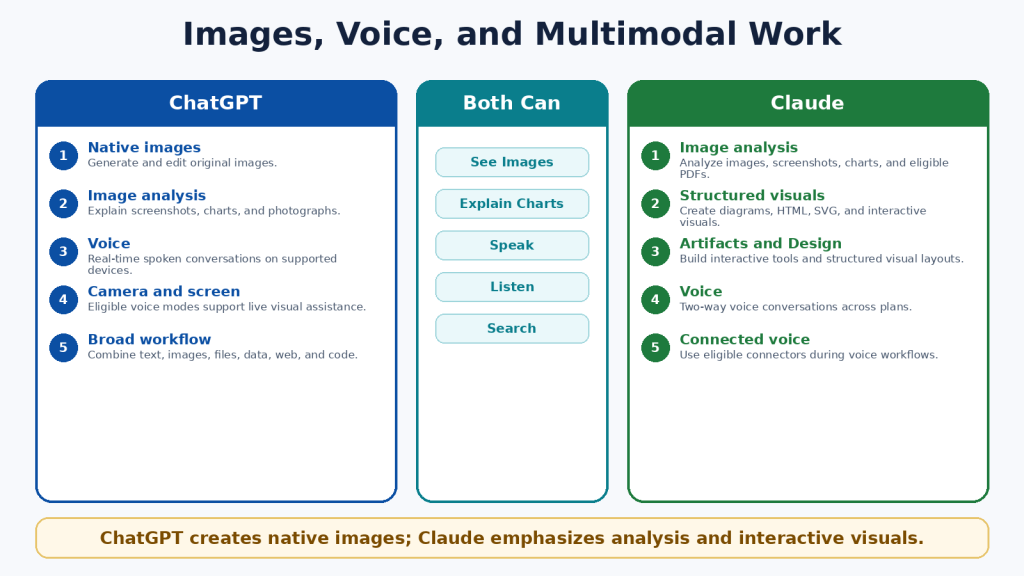
Figure 11. Image, voice, and multimodal differences.
Explanation: ChatGPT is the clear choice for native image creation and editing. Claude is distinctive for structured and interactive visuals, document-based images, and connected voice workflows.
ChatGPT vs Claude for Projects, Memory, and Custom Workflows
Projects, memory, instructions, custom assistants, Skills, plugins, connectors, and scheduled tools help users repeat work without restating every requirement. These terms are not interchangeable.
| Area | ChatGPT | Claude |
| Projects | Unlimited; file limits depend on the plan | Five on Free and unlimited on paid plans |
| Project isolation | Project-only memory is available when selected at creation | Project knowledge and eligible memory remain organized by project context |
| Custom assistant | Custom GPT | No exact equivalent; combine Projects, Skills, Styles, and plugins |
| Reusable method | ChatGPT Skills are mainly available in supported workspace, Codex, and API contexts | Claude Skills are available as reusable instructions, templates, and optional scripts |
| Scheduling | Scheduled Tasks for reminders, summaries, and monitoring | Scheduled Cowork tasks for recurring knowledge work |
| External tools | Plugins and apps | Plugins, connectors, and desktop extensions |
Least-Access Principle
• Connect only the account required for the task.
• Use read-only access when possible.
• Review every requested permission.
• Remove unused plugins and connectors.
• Pause outdated scheduled tasks.
• Keep authoritative records outside AI memory.
Memory is convenient but not a permanent archive. It can omit details, preserve outdated information, or apply context incorrectly. Store approved facts, final documents, dates, and decisions in your own records.
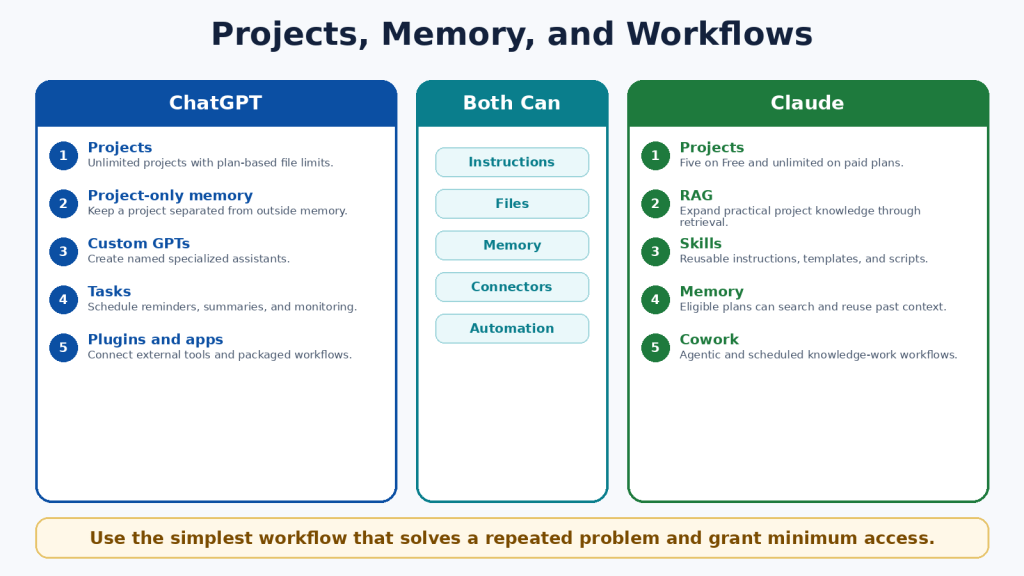
Figure 12. Projects, memory, and workflow tools.
Explanation: ChatGPT emphasizes unlimited projects, project-only memory, custom GPTs, plugins, and scheduled tasks. Claude emphasizes project retrieval, Skills, plugins, Claude Code, and Cowork.
ChatGPT vs Claude for Different Types of Users
| User | Suggested Start | Reason |
| Complete beginner | Test both Free plans | Real tasks provide better evidence than rankings. |
| Student | Both | Compare explanations, files, study tools, and research. |
| Writer or blogger | Claude for documents; ChatGPT for text plus images | The publishing workflow determines the better fit. |
| Researcher | Both | Compare source control, citation accuracy, and connected data. |
| Developer | Codex or Claude Code | Test on the same safe repository. |
| Visual creator | ChatGPT | Native image generation and editing are decisive. |
| Office-file user | Claude may be preferable | Direct office-file creation and Microsoft 365 workflows. |
| Small business | Depends on daily work | ChatGPT for broad media; Claude for structured knowledge work. |
| Heavy professional | Measure before upgrading | High-capacity plans are justified by repeated interruptions. |
Accessibility needs should be tested with the actual device, browser, microphone, screen reader, keyboard, and file format. A feature list cannot show whether the complete workflow is accessible for one person.
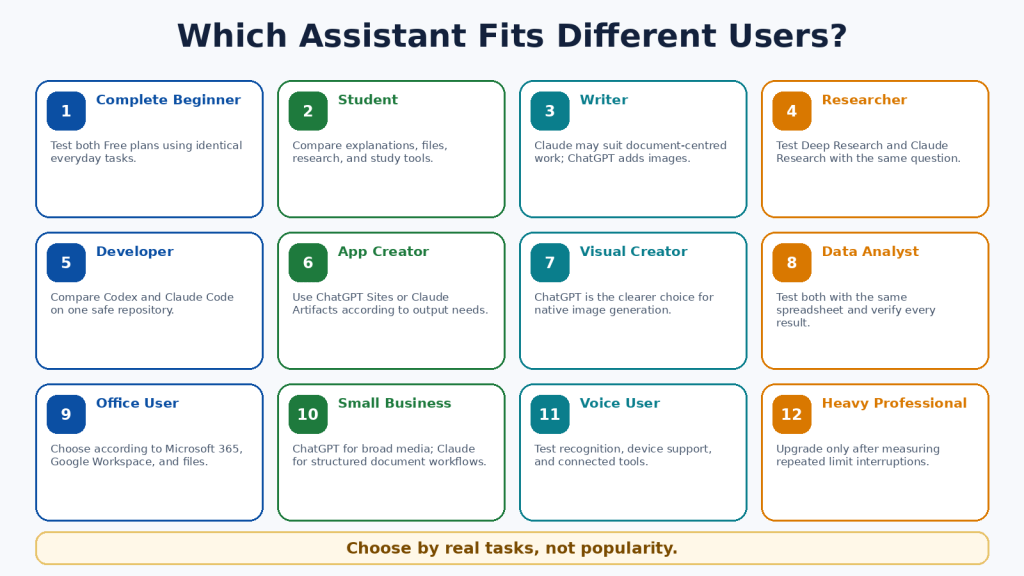
Figure 13. Suggested starting points for different user groups.
Explanation: Different users value different capabilities. The better assistant depends on the actual work, device, integrations, budget, and editing burden.
How to Choose Between ChatGPT and Claude
1. List the five tasks you perform most often.
2. Mark the features that are essential rather than merely interesting.
3. Test both Free plans using identical prompts and files.
4. Check facts, citations, calculations, code, and file interpretation.
5. Record how much editing each result requires.
6. Check compatibility with your actual applications, device, region, and account permissions.
7. Measure usage limits during several normal days or weeks.
8. Choose the lowest-cost plan that reliably supports the work.
Simple Decision Rule
• Choose ChatGPT when native images, broad multimodal work, custom GPTs, scheduled tasks, Codex, Deep Research, Work, or Sites are essential.
• Choose Claude when documents, direct office files, project retrieval, Skills, Claude Code, Research, Artifacts, Microsoft 365, or Cowork are essential.
• Use both Free plans when the answer remains unclear.
• For many users, one paid primary assistant and one Free secondary assistant are sufficient.
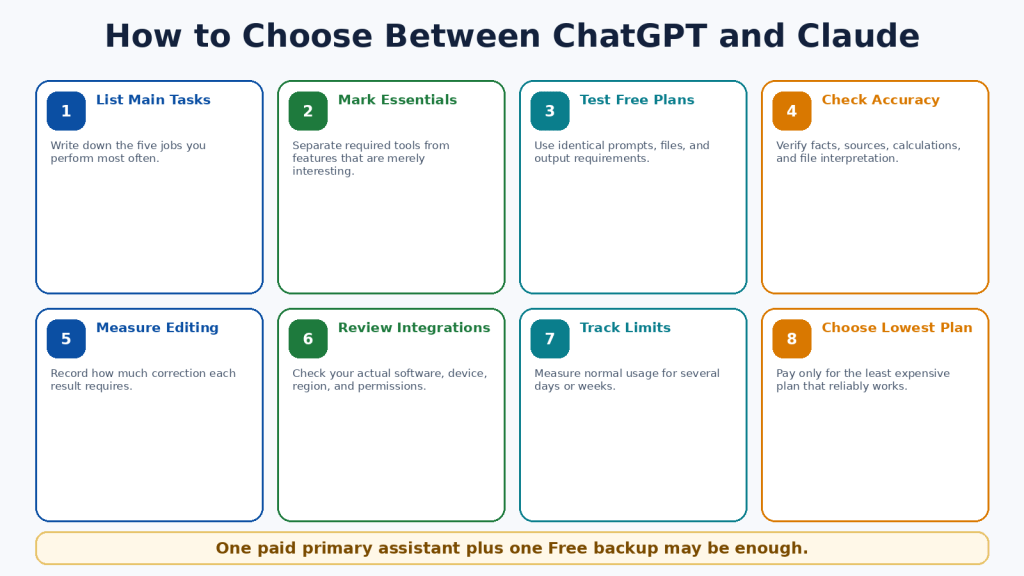
Figure 14. An eight-step decision process.
Explanation: A fair choice begins with real tasks and ends with the lowest-cost plan that works consistently.
Common ChatGPT vs Claude Comparison Mistakes
• Declaring one permanent winner from one response.
• Comparing different plans, models, prompts, files, or source requirements.
• Treating speed, length, confidence, or citations as proof of quality.
• Comparing a native image with a diagram as though they were the same output.
• Assuming a large upload limit means complete understanding.
• Confusing context size with subscription usage.
• Assuming “5x,” “20x,” or “unlimited” mean equal or unrestricted use.
• Upgrading after one unusually large task.
• Assuming a consumer subscription includes API usage.
• Installing too many plugins or connectors.
• Ignoring regional, device, privacy, and retention differences.
• Publishing text, files, images, or code without human review.
The fairest comparison uses equivalent plans, comparable models, identical prompts, the same source material, the same output requirements, and a consistent verification checklist. Measure the time required to reach an approved final result, not merely the time to receive the first answer.
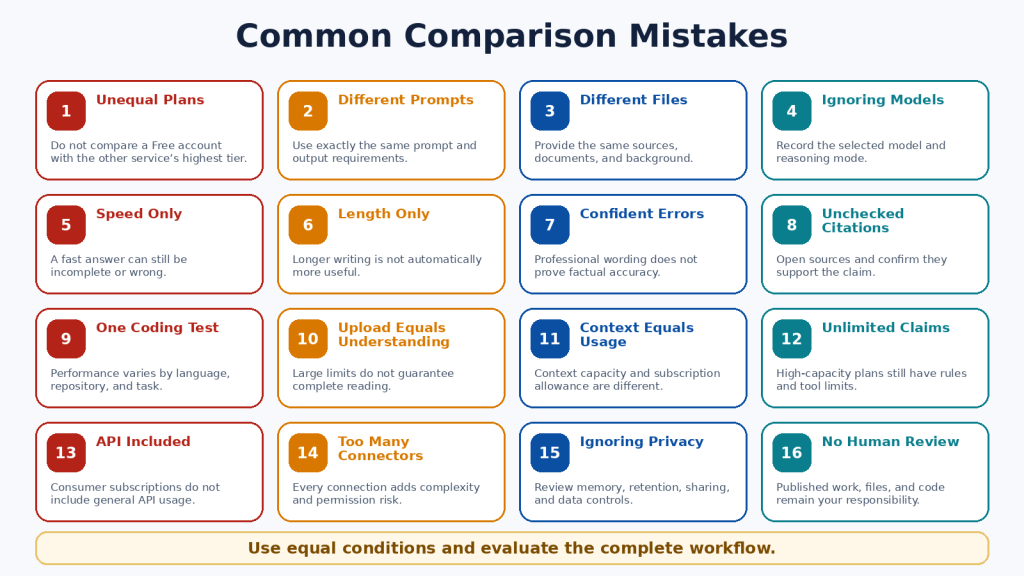
Figure 15. Sixteen common comparison errors.
Explanation: Unfair tests often measure different plans, prompts, files, models, or tools. Equal conditions and verified outcomes provide more useful evidence.
Limitations of ChatGPT and Claude
Neither assistant is completely accurate, unlimited, private for every purpose, or able to complete important work safely without supervision.
Shared Limitations
• Incorrect information, invented citations, and outdated claims.
• Misinterpretation of web sources and uploaded files.
• Context and usage limits.
• Visual, OCR, calculation, and formatting errors.
• Insecure or incomplete code.
• Prompt injection and unintended actions through connected tools.
• Incomplete or outdated memory.
• Privacy, retention, and sharing risks.
• Regional and device differences.
• Service interruptions and capacity errors.
How to Reduce Risk
1. Use authoritative sources and open important citations.
2. Upload only necessary information.
3. Remove private details and review data controls.
4. Use version control, backups, and separate branches for code.
5. Open generated files and test formulas, links, and formatting.
6. Grant the minimum external permissions.
7. Confirm every email, calendar, publishing, or account action in the destination system.
8. Consult a qualified professional for high-stakes decisions.

Figure 16. Shared limitations and safety risks.
Explanation: Both services can make factual, file, visual, coding, privacy, and action errors. The user remains responsible for verification and final decisions.
Frequently Asked Questions
1. Are ChatGPT and Claude free?
Yes. Both provide Free individual plans with usage and tool limits.
2. Which is better for beginners?
Test both Free plans with the same everyday tasks. Choose the service that is clearer, more accurate, and easier to correct.
3. Which is better for writing?
Neither is guaranteed to win. Claude may suit long document workflows; ChatGPT may suit writing combined with images and broader publishing tools.
4. Which is better for images?
ChatGPT, because it can natively generate and edit photographs, illustrations, and graphics.
5. Can Claude analyze images?
Yes. Claude can analyze uploaded images and eligible PDF visuals and can create diagrams, HTML, SVG, and interactive visuals.
6. Which is better for PDFs?
Claude may have an advantage for eligible PDFs under 100 pages containing important embedded visuals. Both can analyze text-based PDFs.
7. Which is better for office files?
Claude provides direct creation of DOCX, XLSX, PPTX, and PDF files. ChatGPT Work can also create and edit documents, spreadsheets, and presentations.
8. Which is better for coding?
Test Codex and Claude Code on the same repository. Codex is included across ChatGPT plans; Claude Code is included with Claude Pro and Max.
9. Which is better for research?
ChatGPT offers strong research planning and source controls; Claude integrates Research closely with projects, files, and connectors.
10. Can I use both?
Yes. One paid primary assistant and one Free backup is often practical.
11. Do I need both paid?
Usually not. Pay for the service containing the essential paid-only capability you use regularly.
12. Are paid plans unlimited?
No. Model, feature, session, weekly, safety, and fair-use restrictions may apply.
13. Is API usage included?
No. OpenAI API and Claude Platform billing are separate from consumer subscriptions.
14. Are they private?
Both provide controls, but no consumer service should automatically receive every confidential file. Review retention, memory, training, connectors, and workplace rules.
15. Can they replace a professional?
No. Use them for general information and preparation, then consult a qualified professional for high-stakes decisions.
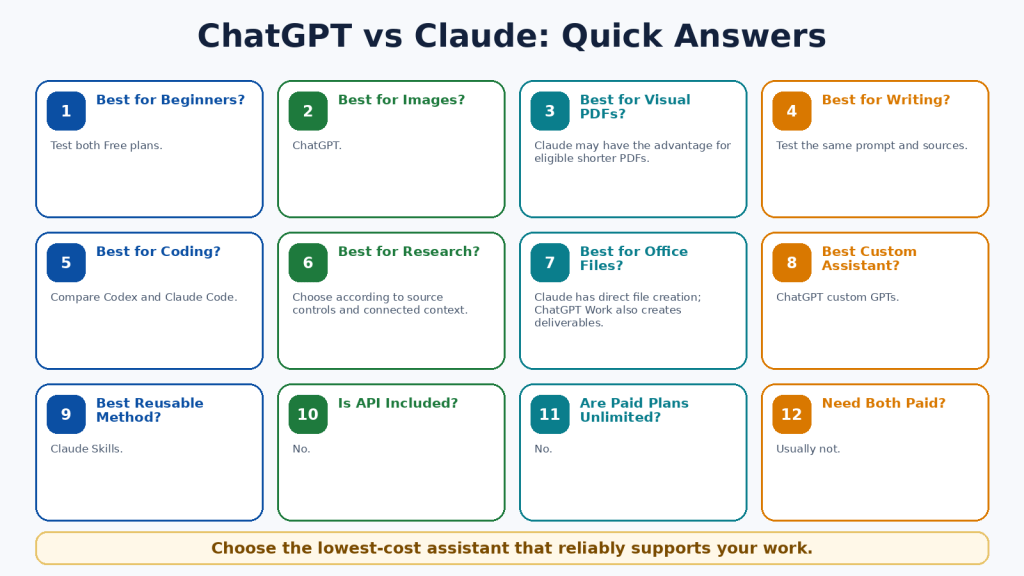
Figure 17. Quick answers to common comparison questions.
Explanation: The answer depends on the user’s required tools, files, research, coding, media, integrations, limits, and budget.
Key Takeaways
• ChatGPT is the broader native multimedia and creative workspace.
• Claude is the stronger document-, project-, file-, coding-, and structured-workflow environment.
• ChatGPT is the clear choice for native image generation and editing.
• Claude has distinctive strengths in direct office-file creation, Skills, Claude Code, project retrieval, Artifacts, and Cowork.
• Both provide capable writing, search, research, files, coding, voice, projects, and memory.
• Both can make serious mistakes and reach limits.
• The standard US paid comparison is ChatGPT Plus versus Claude Pro at US$20 monthly.
• Higher-capacity plans should follow measured need, not curiosity.
• General API billing is separate from consumer subscriptions.
• Most beginners should test both Free plans and use one paid primary assistant only when necessary.
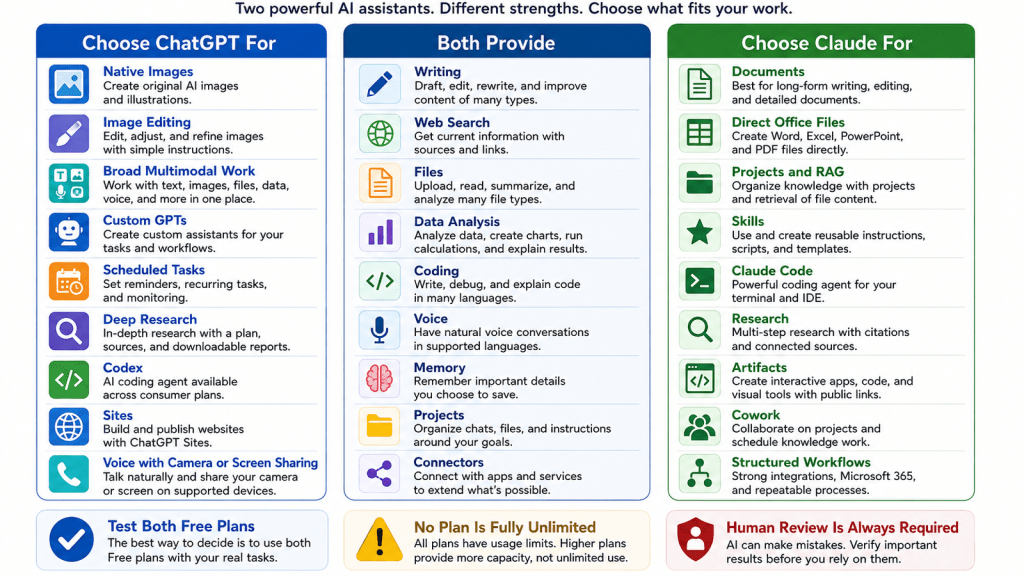
Figure 18. The most important differences and shared capabilities.
Explanation: ChatGPT is strongest for broad multimodal creation. Claude is strongest for document-centred and repeatable knowledge work. Both require human review.
Conclusion
ChatGPT and Claude can both help beginners write, learn, research, analyze files, work with data, code, speak with an AI assistant, and organize continuing projects. The main difference is not whether one can write a paragraph or answer a question. It is the surrounding workflow.
Choose ChatGPT when native images, broad multimodal tools, custom GPTs, scheduled tasks, Codex, Deep Research, Work, or Sites directly support your most frequent work. Choose Claude when documents, direct office-file creation, project retrieval, Skills, Claude Code, Research, Artifacts, Microsoft 365, or Cowork directly support your most frequent work.
Choose both Free plans when you remain uncertain. The most economical arrangement for many people is one paid primary assistant and one Free secondary assistant for comparison and independent checking.
ChatGPT and Claude are tools rather than replacements for human knowledge, judgment, professional responsibility, or creativity. The best assistant is the one that reliably completes your real work, requires fewer corrections, fits your applications, protects information appropriately, and creates more value than it costs.
Continue Learning
• Article 002 — ChatGPT Basics for Beginners: Complete Guide (2026) — Learn ChatGPT’s main features, prompts, files, and everyday workflow.
• Article 003 — Best ChatGPT Prompts for Beginners (2026) — Use practical prompt examples for writing, learning, planning, and productivity.
• Article 022 — How to Summarize Documents with ChatGPT: Beginner Guide (2026) — Learn how to upload, summarize, and verify documents.
• Article 041 — How to Use Gems in Google Gemini (2026) — Compare another approach to reusable task-specific assistants.
• Article 047 — How to Summarize, Analyze, and Compare Documents with Claude: Beginner Guide (2026) — Explore Claude’s document-analysis workflow in detail.
• Article 052 — How to Use Claude for Coding and App Creation: Beginner Guide (2026) — Learn about Claude Code, Artifacts, coding, and app creation.
In WordPress, link each title only after confirming that the related article is published and that its permanent URL is correct.
Sources and References
Product facts in this article were reviewed against official OpenAI and Anthropic documentation on August 5, 2026. Prices, limits, models, tools, and regional availability can change. Recheck important information before publishing or purchasing.
3. ChatGPT Plus
8. ChatGPT Capabilities Overview
9. Using Codex with Your ChatGPT Plan
11. Creating and Editing Documents, Spreadsheets, and Presentations with ChatGPT Work
13. ChatGPT Voice
14. GPTs in ChatGPT
15. Memory FAQ
20. Create and Edit Files with Claude
21. Claude Projects
23. What Are Skills?
24. Use Claude Code with Pro or Max


Leave a comment