
Estimated reading time: 30–35 minutes
Last updated: August 16, 2026
Introduction
Research can become confusing when information comes from many websites, documents, notes, videos, and other sources.
AI can help you collect, summarize, compare, and organize information so it is easier to understand and use.
For example, instead of keeping separate notes about a topic, you could ask an AI tool:
“Organize these notes into main topics, important facts, questions I still need to answer, and sources I should check.”
AI can also help you:
· Turn rough research notes into a clearer structure
· Summarize long information
· Compare different sources
· Create topic lists
· Group related ideas
· Identify missing information
· Create research questions
· Build simple tables or checklists
· Turn research into an outline
· Prepare a short summary for later use
However, AI should not be treated as the final source of truth.
AI can misunderstand information, combine unrelated details, miss important context, or present incorrect information confidently. It may also generate information that was not supported by your original sources.
For important research, you should check the original source, confirm dates and facts, and prefer reliable first-party or authoritative sources when possible.
In this guide, you will learn how to use AI to research a topic, organize information, compare sources, keep track of evidence, avoid common mistakes, protect private information, and decide when additional verification is necessary.
Before You Start
You do not need advanced research skills to use AI for organizing information. You mainly need a clear question, reliable source material, and a way to keep track of what you find.
Before asking AI to help, prepare:
· The topic you want to research
· The main question you want to answer
· Any reliable websites, documents, or notes you already have
· Important dates or facts you need to verify
· The type of result you want, such as a summary, outline, comparison, or checklist
· A place to save your source links and notes
Start with a Clear Research Question
A broad topic can produce broad and confusing results.
For example:
“Tell me about electric cars.”
is much less focused than:
“Compare the main benefits and limitations of electric cars for a beginner who drives mostly in a city.”
A clear research question helps AI organize information around a specific goal.
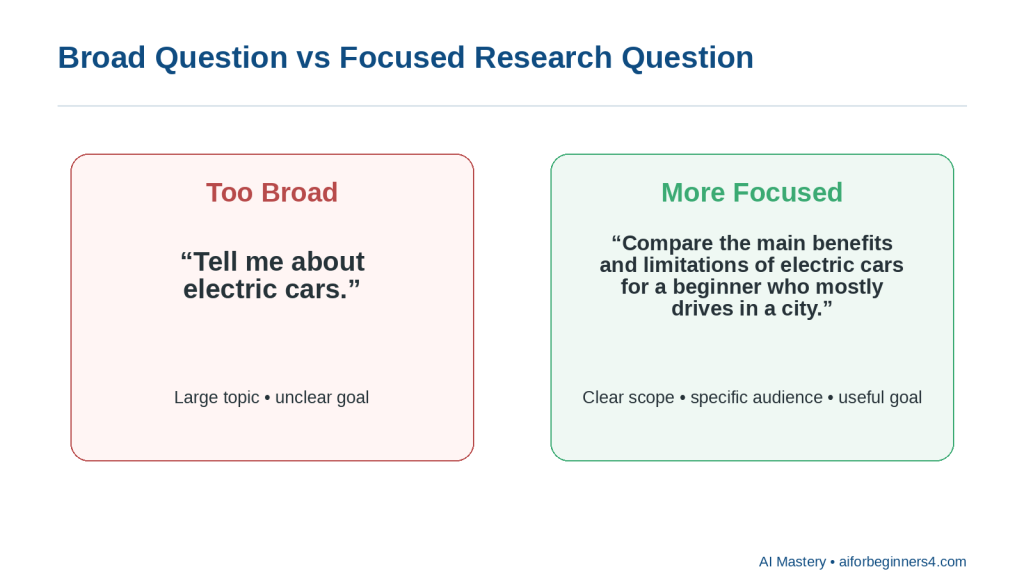
Figure 1. Broad question versus focused research question
Explanation: A focused question gives AI a clearer scope, audience, and purpose than a broad topic.
Use Reliable Sources
When possible, start with official or primary sources.
Examples include:
· Government websites
· Official product or company documentation
· Standards organizations
· Universities
· Research institutions
· Original reports
· Original publishers
AI can help summarize or compare these sources, but it should not replace them.
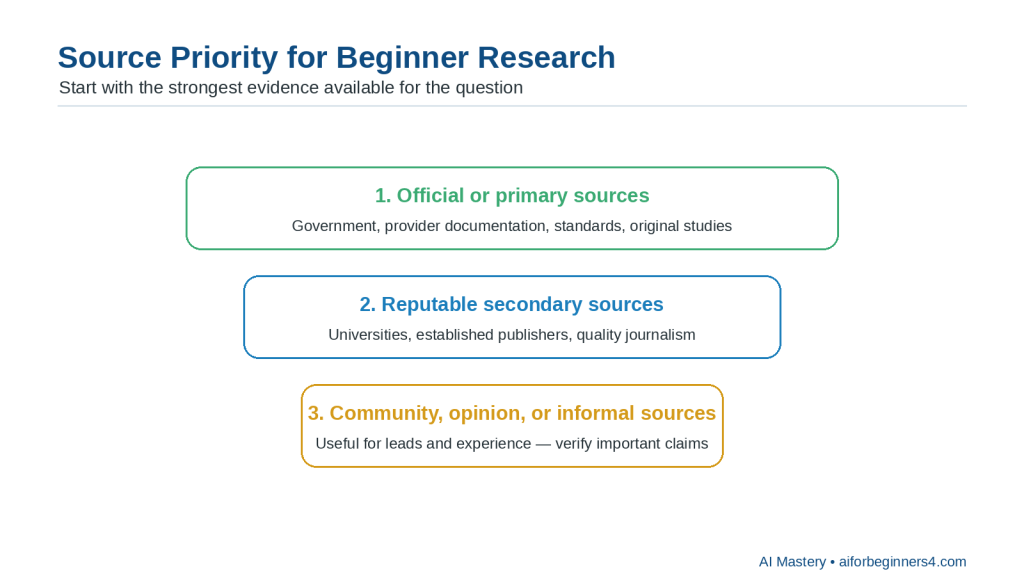
Figure 2. Source priority for beginner research
Explanation: Start with official or primary sources when they are appropriate, then use reputable secondary sources and verify informal sources carefully.
Keep Track of Where Information Came From
When you collect facts, save the source.
A simple research note might include:
· Topic
· Fact or claim
· Source
· Date checked
· Notes
This makes it easier to verify information later.
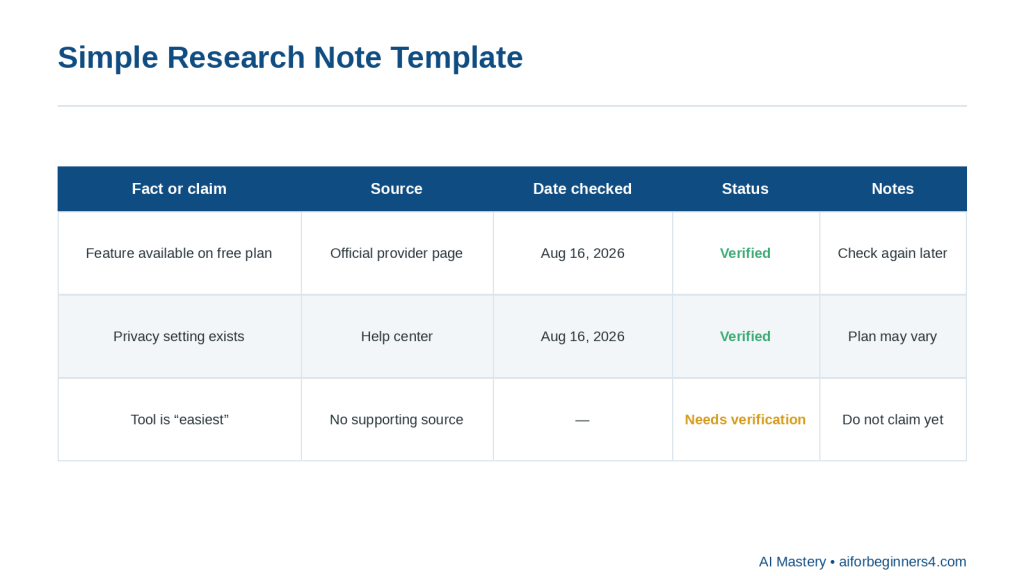
Figure 3. Simple research note template
Explanation: Recording the claim, source, date checked, verification status, and notes makes later checking and updating easier.
Check Dates Carefully
Some information changes quickly.
Examples include:
· Software features
· Prices
· Laws
· Policies
· Product specifications
· AI-tool limits
· Privacy settings
· Platform rules
A source may be accurate but outdated.
Always check when the information was published or last updated.
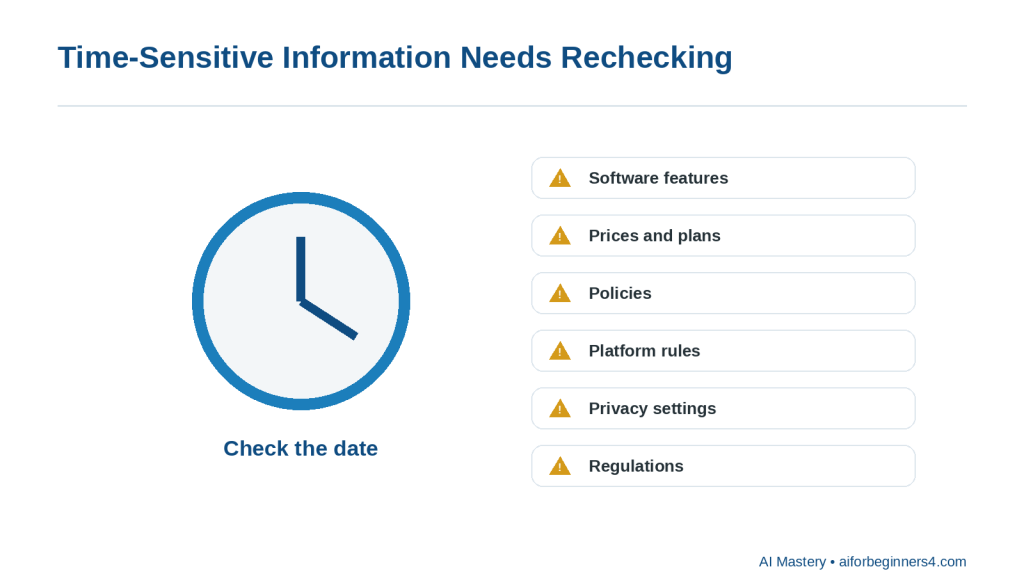
Figure 4. Time-sensitive information needs rechecking
Explanation: Software features, prices, policies, platform rules, privacy settings, and regulations can change, so record and recheck dates.
Protect Private Information
If you are researching using personal files, business documents, customer information, or private notes, remove unnecessary sensitive details before sharing them with an AI tool.
Use placeholders when possible, such as:
· [CLIENT NAME]
· [ACCOUNT NUMBER]
· [PROJECT NAME]
· [PRIVATE DETAIL]
Separate Research from AI Suggestions
AI may suggest ideas that are not directly supported by your sources.
Ask it to distinguish clearly between:
· Information supported by the source
· Its own suggestions
· Information that still needs verification
For example:
“Use only the information in these sources. If something is not supported, mark it as ‘Needs verification.’”
Reality: AI can help you work with research faster, but reliable research still depends on checking the original sources and understanding what the evidence actually supports.
What You’ll Learn
By the end of this guide, you will know how to:
· Turn a broad topic into a clearer research question.
· Use AI to organize information from notes, documents, and websites.
· Ask AI to summarize information without changing the main meaning.
· Compare information from different sources.
· Separate confirmed facts from suggestions or uncertain claims.
· Identify information that still needs verification.
· Group related ideas into categories or themes.
· Turn research into an outline, checklist, table, or summary.
· Keep track of source links and dates.
· Recognize when a source may be outdated.
· Protect private or confidential information while using AI.
· Review AI-generated research for missing context, factual errors, and unsupported claims.
You will also learn how to use AI as a research assistant without treating it as the final authority.
The goal is not to let AI decide what is true. The goal is to use AI to help you organize and understand information while keeping the original sources, evidence, and final judgment under your control.
How AI Can Help with Research and Organization
AI can support several parts of the research process. It can help you narrow a topic, organize source material, compare information, and turn rough notes into a clearer structure.
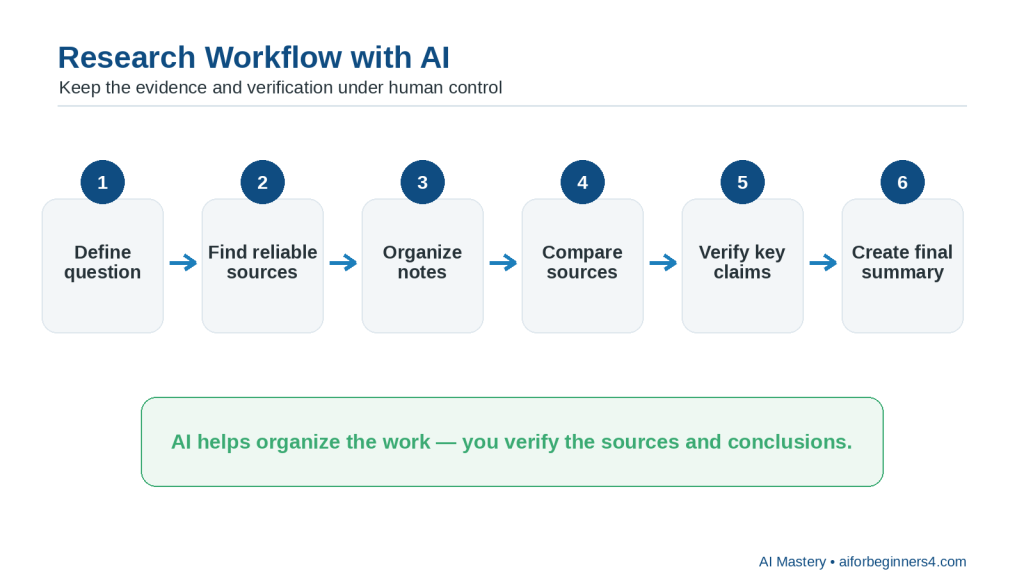
Figure 5. Research workflow with AI
Explanation: A six-step workflow: define the question, find reliable sources, organize notes, compare sources, verify key claims, and create the final summary.
Turn a Broad Topic into Research Questions
If your topic is too broad, AI can help you break it into smaller questions.
For example:
“Help me turn the topic ‘AI tools for beginners’ into five focused research questions.”
AI might suggest questions about:
· Ease of use
· Cost
· Privacy
· Main features
· Limitations
You should review the questions and keep only those that match your real purpose.
Summarize Source Material
AI can help shorten long notes, documents, or passages.
For example:
“Summarize this information in five bullet points. Keep the important facts, dates, and limitations. Do not add anything that is not in the source.”
This can make large amounts of information easier to review.
Compare Multiple Sources
AI can help you compare what different sources say.
For example:
“Compare these three sources. Show where they agree, where they differ, and which claims need more checking.”
A comparison can help you spot conflicting information.
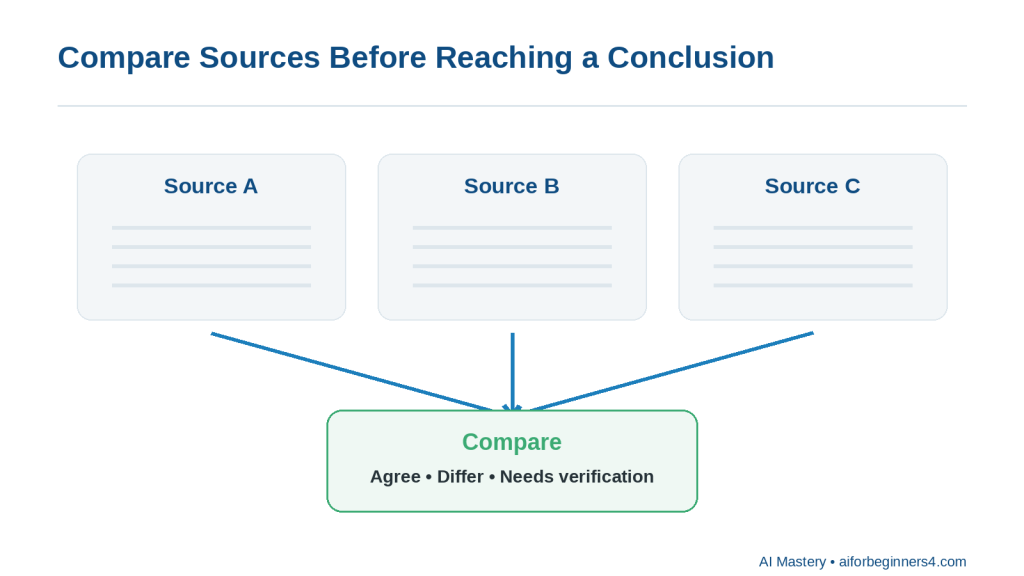
Figure 6. Compare sources before reaching a conclusion
Explanation: Comparing sources can reveal agreements, differences, and claims that still need verification.
Group Related Information
Research notes often become messy because related ideas are scattered across several sources.
You can ask:
“Group these notes into themes and give each theme a clear heading.”
Possible themes might include:
· Benefits
· Limitations
· Costs
· Privacy
· Accessibility
· Common uses
Identify Missing Information
AI can help point out gaps in your research.
For example:
“Review these notes and tell me what important questions are still unanswered. Do not fill in the answers.”
This is useful because it separates missing information from confirmed information.
Turn Research into an Outline
Once you have collected enough information, AI can help organize it into a structure.
For example:
“Turn these research notes into a beginner-friendly article outline. Use only the information in the notes.”
The outline might include:
· Introduction
· Main concepts
· Benefits
· Limitations
· Practical examples
· Safety or privacy considerations
· Conclusion
Create Tables and Checklists
Some research is easier to understand in a table or checklist.
For example:
“Create a comparison table from these notes with columns for tool, main use, limitation, and source.”
or:
“Turn these findings into a checklist of things I should verify before choosing a tool.”
Separate Facts from Opinions
Source material can contain both factual claims and opinions.
You can ask:
“Separate factual statements from opinions or recommendations in these notes.”
You should still review the result because AI may sometimes classify a statement incorrectly.
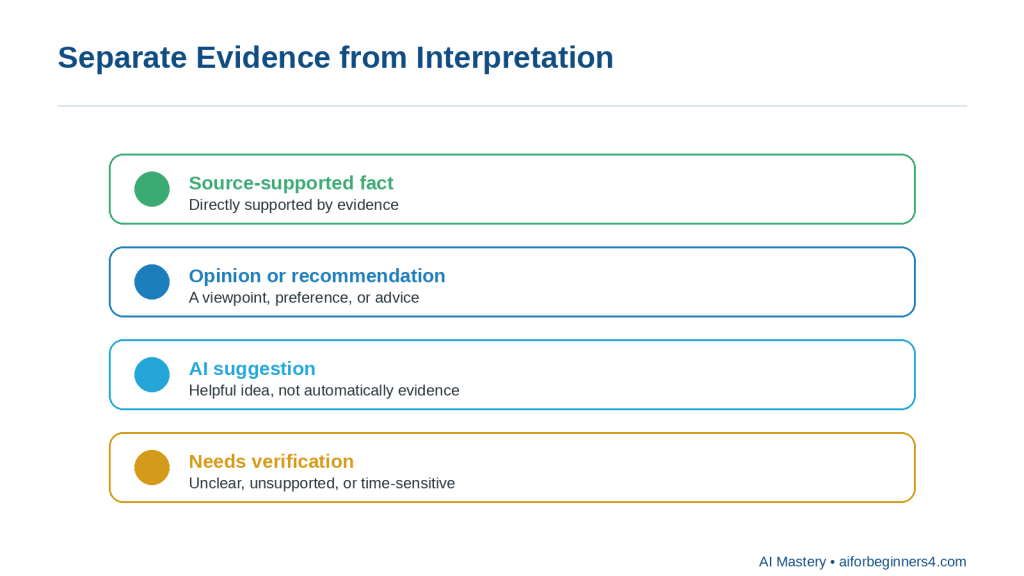
Figure 7. Separate evidence from interpretation
Explanation: Keep source-supported facts separate from opinions, AI suggestions, and information that still needs verification.
Prepare a Short Research Summary
After reviewing and verifying your sources, AI can help create a concise summary.
For example:
“Create a 200-word summary of these verified findings. Include the main conclusion and the most important limitations.”
Reality: AI is especially useful for organizing information, but it does not automatically make the research reliable. The quality of the result still depends on the quality of the original sources and your verification.
Step-by-Step: Research a Topic with AI
A simple research process can help you avoid collecting too much information without knowing what is useful.
Step 1: Define the Topic
Start with a clear topic.
For example:
“AI tools for small business”
is better than:
“AI”
because it gives the research a narrower focus.
Step 2: Turn the Topic into a Research Question
Ask AI to help make the topic more specific.
For example:
“Turn ‘AI tools for small business’ into three focused research questions for a beginner.”
Possible questions might include:
· What types of AI tools can help small businesses?
· What are the main benefits and limitations?
· What privacy or cost issues should a beginner check?
Choose the questions that match your real goal.
Step 3: Decide What Sources You Need
Think about which sources are most suitable for the topic.
For example, you may need:
· Official provider websites
· Government guidance
· Research reports
· Product documentation
· Standards organizations
· Original studies
· Your own notes or documents
For changing information such as prices, features, policies, or legal requirements, current official sources are especially important.
Step 4: Collect the Source Material
Save the useful information together with its source.
For each item, record:
· The main fact or claim
· Source title
· Source link
· Publication or update date when available
· Date you checked it
· Any notes about reliability or limitations
This can prevent you from forgetting where a fact came from.
Step 5: Ask AI to Organize the Information
Once you have several notes or source extracts, ask AI to group them.
For example:
“Organize these research notes into main findings, benefits, limitations, unanswered questions, and sources. Do not add information that is not in the notes.”
Step 6: Compare Conflicting Information
Different sources may not always agree.
You can ask:
“Compare these sources and show where they agree, where they differ, and what needs further verification.”
Do not assume that the most confident-sounding source is automatically correct.
Step 7: Identify Missing Information
Ask AI to show the gaps instead of filling them.
For example:
“Review these notes and list the important questions that are still unanswered. Do not guess the answers.”
This helps you decide what to research next.
Step 8: Verify Important Claims
Return to the original sources and confirm important facts.
Pay special attention to:
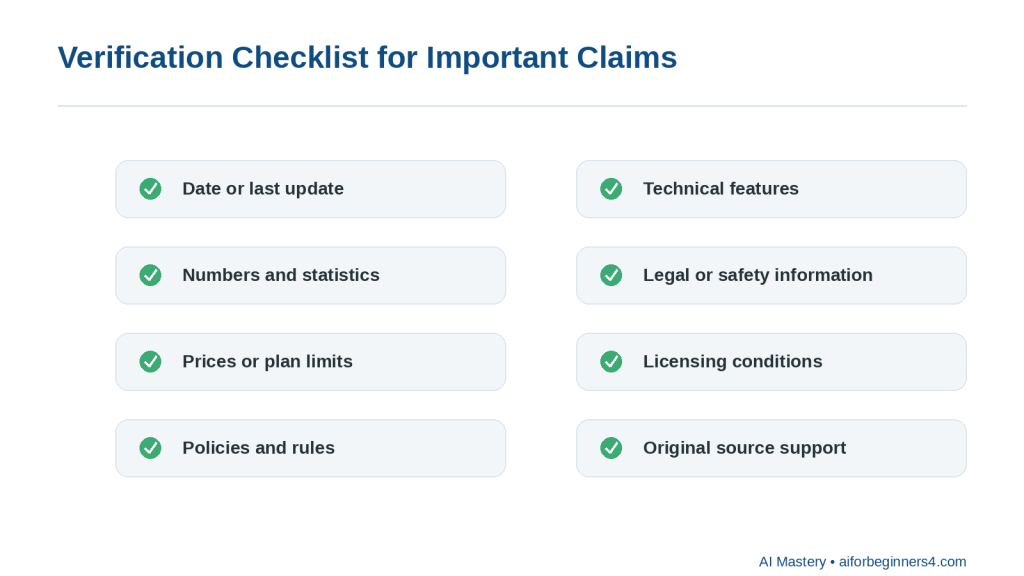
Figure 8. Verification checklist for important claims
Explanation: Before relying on important research, check dates, numbers, prices, policies, features, legal or safety details, licences, and original source support.
· Dates
· Numbers
· Prices
· Policies
· Features
· Limits
· Legal requirements
· Health or safety information
· Licensing conditions
Step 9: Create a Final Research Structure
After verification, ask AI to organize the checked information into the format you need.
For example:
“Turn these verified notes into a beginner-friendly outline with headings, key facts, benefits, limitations, and a short conclusion.”
Step 10: Keep the Sources with the Final Notes
Do not separate your final summary from the evidence behind it.
Keep:
· Source links
· Original notes
· Verified facts
· Important dates
· Any unresolved questions
This makes future updates much easier.
How to Avoid This Mistake: Do not ask AI to research a broad topic and then treat the first response as finished research. Use AI to support the process, but verify important information using reliable sources.
Useful AI Prompts for Research and Information Organization
Reusable prompts can make research faster and more consistent. Replace the bracketed information with your own topic, notes, or sources.
Prompt for Narrowing a Topic
“Help me turn this broad topic into five focused research questions for a beginner: [topic].”
Prompt for Summarizing a Source
“Summarize this source in five bullet points. Keep the important facts, dates, limitations, and warnings. Do not add information that is not in the source.”
Prompt for Comparing Sources
“Compare these sources. Show where they agree, where they differ, and which points still need verification. Do not decide which source is correct unless the evidence clearly supports it.”
Prompt for Organizing Research Notes
“Organize these research notes into clear sections with headings. Group related ideas together and keep the original meaning.”
Prompt for Identifying Missing Information
“Review these research notes and list the important questions that are still unanswered. Do not guess the answers.”
Prompt for Separating Facts from Opinions
“Separate the factual claims, opinions, recommendations, and uncertain statements in these notes. Mark anything unclear as ‘Needs review.’”
Prompt for Creating a Research Table
“Create a table from these notes with columns for topic, main finding, source, date, limitation, and verification status.”
Prompt for Creating an Outline
“Turn these verified research notes into a beginner-friendly outline. Include main points, benefits, limitations, practical examples, and questions that still need checking.”
Prompt for Checking Source Support
“Review this summary against the source material. Identify any statement that is not clearly supported by the sources. Do not correct it automatically—show me what needs review.”
Prompt for Updating Old Research
“Review these notes and identify any information that may have changed since [date]. List what should be checked again using current official sources.”
Prompt for Creating a Short Summary
“Create a short summary of these verified findings. Include the main conclusion, important limitations, and any unresolved questions.”
Prompt for Final Research Review
“Review these research notes for unsupported claims, conflicting information, missing sources, outdated dates, and facts that still need verification.”
Final Check Before Using Any Prompt: Keep the original source material, save the source links, and do not treat an AI-generated summary as verified research until you have checked the important claims yourself.
Practical Example: Organize Research from Several Sources
Suppose you are researching a topic such as:
“Which AI tool is easiest for a complete beginner?”
You collect notes from several official sources and write down:
· Tool A has a free plan
· Tool A can help with writing and summarizing
· Tool B can work with documents
· Tool B has different privacy settings
· Tool C includes web research features
· Some features depend on the plan
· Some information may have changed recently
Your notes are useful, but they are not yet organized.
You could ask AI:
“Organize these research notes into main findings, benefits, limitations, plan-dependent features, privacy considerations, and points that need verification. Do not add information that is not in the notes.”
A clearer result might look like this:
Main Findings
· Several AI tools offer beginner-friendly features.
· Different tools focus on different tasks.
· Some features depend on the user’s plan.
· Privacy settings differ between providers.
Benefits
· Tool A supports writing and summarizing.
· Tool B can work with documents.
· Tool C includes web research features.
Limitations
· The notes do not show which tool is easiest overall.
· Plan availability may affect the comparison.
· Some information may be outdated.
Privacy Considerations
· Tool B has privacy settings that should be reviewed.
· The notes do not provide enough information to compare all providers’ privacy practices.
Needs Verification
· Current plan availability
· Current feature limits
· Current privacy settings
· Whether the free plans still include the listed features
Why This Format Helps
The AI has organized the information without pretending that the notes answer every question.
It also keeps uncertainty visible.
For example, the notes do not prove:
“Tool A is the easiest AI tool for beginners.”
A responsible summary should therefore avoid making that conclusion unless the evidence supports it.
Ask AI to Create a Research Table
You could then ask:
“Create a comparison table using only these notes. Include columns for tool, main use, benefit, limitation, privacy note, and verification status.”
A simple structure might be:
| Tool | Main Use | Benefit | Limitation | Privacy Note | Verification Status |
| Tool A | Writing and summarizing | Free plan mentioned | Ease of use not confirmed | Not specified | Needs current check |
| Tool B | Documents | Works with documents | Plan details not confirmed | Privacy settings mentioned | Needs current check |
| Tool C | Web research | Research features mentioned | Plan limits unknown | Not specified | Needs current check |
Verify Before Reaching a Conclusion
The next step is not to ask AI to choose a winner immediately.
Instead, check the current official sources for:
· Free-plan availability
· Feature limits
· Privacy controls
· Supported file types
· Current access conditions
· Any major recent changes
Only after verifying those details should you make a recommendation.
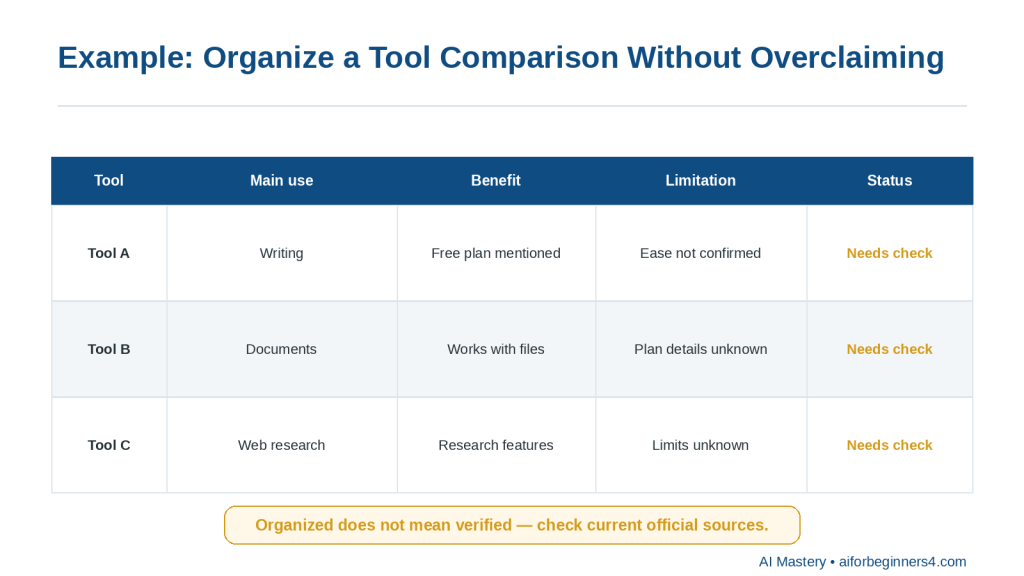
Figure 9. Organize a comparison without overclaiming
Explanation: A comparison table can clearly show what is known, what is missing, and what still needs a current check.
Reality: AI can turn scattered research into a useful structure, but organization is not the same as verification. A clear table can still contain outdated or incomplete information if the original research has not been checked.
Benefits of Using AI for Research and Organization
AI can make research easier to manage when you already have source material but need help sorting, comparing, or summarizing it.
Helps You Start with a Clearer Plan
A broad topic can quickly become overwhelming.
AI can help break it into smaller questions so you know what to look for.
For example:
“Turn this topic into five beginner-friendly research questions: choosing an AI tool for writing.”
This can give your research a clearer direction.
Helps Organize Large Amounts of Information
When notes come from several sources, AI can group related ideas into categories.
For example, it can separate information into:
· Features
· Benefits
· Limitations
· Privacy
· Cost
· Accessibility
· Questions that still need answers
This makes the research easier to review.
Helps Compare Sources
AI can help show where sources agree and where they differ.
For example:
“Compare these three sources and show the main agreements, differences, and unresolved points.”
This can save time when several sources discuss the same topic in different ways.
Helps Identify Research Gaps
AI can point out missing information.
For example:
“Review these notes and list the questions I still need to answer.”
This is useful because it helps you continue the research instead of assuming the work is finished.
Helps Create Consistent Notes
You can ask AI to use the same structure for every source.
For example:
“Summarize each source using these headings: main point, important facts, limitations, source date, and questions to verify.”
This can make different sources easier to compare.
Helps Turn Notes into Useful Formats
AI can convert research into:
· Outlines
· Tables
· Checklists
· Summaries
· Topic groups
· Question lists
· Comparison charts
The best format depends on what you plan to do with the information.
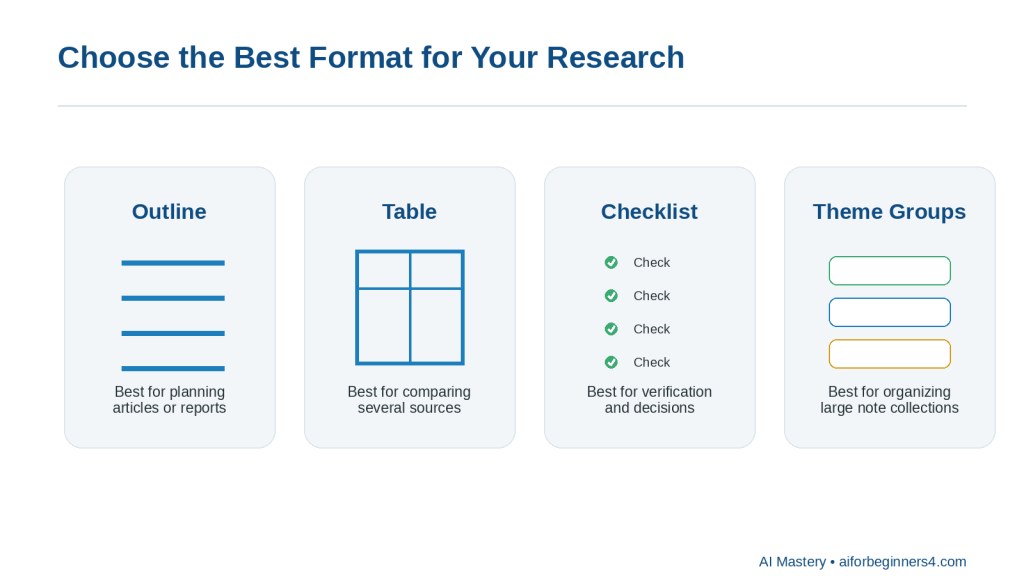
Figure 10. Choose the best format for your research
Explanation: Outlines, tables, checklists, and theme groups each organize research in a different useful way.
Helps Reduce Repetition
Research notes often contain the same point several times.
AI can help remove repeated wording while keeping the important information.
For example:
“Remove duplicate points from these notes but keep every unique fact and source.”
Helps Prepare for Writing
Once the research is verified, AI can help organize it into an article, report, presentation, or study outline.
For example:
“Turn these verified notes into an article outline for complete beginners. Do not add information beyond the notes.”
Makes Future Updates Easier
If your notes clearly show sources, dates, and verification status, it becomes easier to update the research later.
You can quickly see:
· Which facts are old
· Which claims need rechecking
· Which sources are still current
· Which questions remain unresolved
Benefit: AI can reduce the time spent organizing research, but the real value comes from combining that organization with reliable sources and careful verification.
Limitations and Common Mistakes
AI can make research faster and easier to organize, but it can also create misleading results if the information is not checked carefully.
Limitation: AI Can Produce Incorrect Information
AI may provide information that sounds confident even when it is incomplete, outdated, or wrong.
How to Reduce This Limitation: Verify important claims using reliable original or official sources.
Pay extra attention to:
· Dates
· Prices
· Policies
· Technical specifications
· Legal requirements
· Health information
· Financial information
· Licensing terms
Limitation: AI May Combine Different Sources Incorrectly
When several sources are summarized together, AI may accidentally merge details that do not belong together.
How to Reduce This Limitation: Ask AI to keep each source separate before creating a combined summary.
For example:
“Summarize each source separately first. Then compare them in a second section.”
Limitation: AI May Miss Important Context
A short summary may leave out conditions, exceptions, warnings, or limitations.
How to Reduce This Limitation: Ask AI to include important qualifications.
For example:
“Summarize this source, but keep all important limitations, exceptions, and conditions.”
Common Mistake: Treating the AI Response as the Source
AI can explain information, but the AI response itself may not be the original evidence.
How to Avoid This Mistake: Save and cite the original source whenever possible.
Common Mistake: Using Outdated Information
Research about technology, policies, prices, and software can become outdated quickly.
How to Avoid This Mistake: Check the source date and confirm important information using current official sources.
Common Mistake: Asking a Question That Is Too Broad
A prompt such as:
“Research artificial intelligence.”
can produce a very large and unfocused response.
How to Avoid This Mistake: Narrow the topic.
For example:
“Research the main privacy considerations beginners should check before using an AI writing tool.”
Common Mistake: Collecting Information Without Saving Sources
It is easy to forget where a useful fact came from.
How to Avoid This Mistake: Record the source link or reference at the same time you save the fact.
Common Mistake: Assuming All Sources Are Equally Reliable
A personal blog, company marketing page, government document, and original research study do not necessarily have the same level of authority.
How to Avoid This Mistake: Consider who published the information, why it was published, whether evidence is provided, and whether more authoritative sources are available.
Common Mistake: Asking AI to Fill Research Gaps
If information is missing, AI may try to create a plausible answer.
How to Avoid This Mistake: Use instructions such as:
“If the source does not answer the question, write ‘Not found in the source.’ Do not guess.”
Common Mistake: Ignoring Conflicting Sources
Different sources may disagree because:
· One is outdated
· They use different definitions
· They describe different plans or products
· The rules differ by location
· New information has replaced old guidance
How to Avoid This Mistake: Investigate the disagreement rather than choosing whichever answer sounds better.
Common Mistake: Sharing Private Documents Without Review
Research files may contain personal, customer, employee, financial, or confidential business information.
How to Avoid This Mistake: Remove unnecessary sensitive details before uploading or pasting information into an AI tool.
Common Mistake: Losing the Original Research
If you keep only an AI-generated summary, you may later have difficulty checking what the original source actually said.
How to Avoid This Mistake: Preserve the original source files, links, notes, and important versions until the work is complete.
Reality: AI can make research look organized very quickly, but good organization does not prove that the information is current, complete, or correct.
Common Myths About Using AI for Research
AI can help organize and summarize research, but it is important to understand what it can and cannot do.
Myth 1: AI Always Gives Correct Answers
AI can produce information that sounds confident even when it is wrong, outdated, or incomplete.
Reality: Important claims should be checked against reliable original or official sources.
Myth 2: If AI Provides a Source, the Information Must Be Reliable
A source may exist but still be outdated, misunderstood, or unsuitable for the question.
Reality: Open the source yourself and check whether it actually supports the claim.
Myth 3: AI Can Replace Original Sources
AI can summarize a report, webpage, or document, but the summary is not the same as the original evidence.
Reality: Keep and consult the original source when accuracy matters.
Myth 4: A Longer AI Answer Means Better Research
A long response may contain repetition, assumptions, or unsupported details.
Reality: Good research depends more on source quality, verification, and relevance than on response length.
Myth 5: AI Can Automatically Tell Which Source Is Best
AI can compare sources, but it may not fully understand authority, bias, context, or why sources disagree.
Reality: Consider who published the source, when it was published, what evidence it provides, and whether a more authoritative source exists.
Myth 6: AI Can Safely Fill in Missing Information
If your notes contain a gap, AI may produce a plausible answer.
Reality: Missing information should remain clearly marked until it is verified.
A useful instruction is:
“If the answer is not supported by the source, write ‘Not confirmed.’ Do not guess.”
Myth 7: AI Can Decide Which Conflicting Claim Is True
Two sources may disagree for legitimate reasons.
For example:
· They may refer to different dates.
· They may describe different countries.
· They may refer to different product plans.
· One may be outdated.
· They may use different definitions.
Reality: Investigate the reason for the disagreement before reaching a conclusion.
Myth 8: AI Research Does Not Need Updating
Information can change after your research is completed.
This is especially common with:
· AI tools
· Software
· Prices
· Plans
· Policies
· Regulations
· Platform rules
Reality: Record when you checked important information and review time-sensitive claims periodically.
Myth 9: An Organized Summary Is the Same as Verified Research
AI can turn messy notes into an impressive-looking table or report.
Reality: Good formatting does not prove the underlying facts are correct.
Myth 10: AI Can Replace Human Judgment
AI can help you organize information, identify patterns, and suggest questions, but it cannot take responsibility for the conclusion.
Reality: You remain responsible for deciding whether the evidence is reliable, complete, current, and suitable for your purpose.
The best use of AI in research is to help manage information while keeping the evidence, verification, and final conclusions under human control.
When to Use AI and When Human Review Matters Most
AI can help with routine research and information organization, but some topics require much more careful human review.
Good Uses for AI Research Assistance
AI can be helpful for:
· Turning a broad topic into focused questions
· Summarizing source material
· Grouping related notes
· Comparing several sources
· Creating tables or outlines
· Identifying missing information
· Separating confirmed facts from uncertain claims
· Organizing source links and dates
· Preparing a first draft from verified notes
· Highlighting information that may need updating
For these tasks, AI can save time and make information easier to manage.
Use Extra Care with High-Stakes Topics
Some research can affect important decisions.
Examples include:
· Legal matters
· Medical or health information
· Financial decisions
· Employment issues
· Contracts
· Safety guidance
· Regulations
· Privacy requirements
AI may help organize the information, but important conclusions should be checked using current authoritative sources and, when appropriate, qualified professional advice.
Keep the Original Evidence
Do not rely only on the AI-generated summary.
Keep:
· Original documents
· Source links
· Publication dates
· Notes
· Screenshots when useful
· Important versions
· Verification records
This makes it easier to correct errors or update the research later.
Use AI as an Organizer, Not as the Final Authority
A practical workflow is:
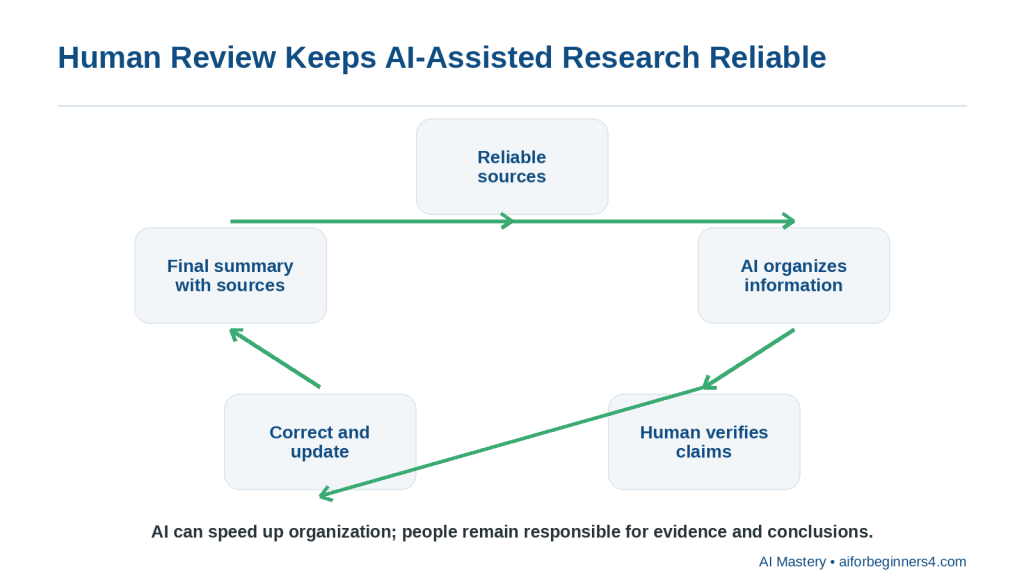
Figure 11. Human review keeps AI-assisted research reliable
Explanation: AI can speed up organization, but people remain responsible for checking evidence, correcting errors, and approving conclusions.
1. Define the research question.
2. Find reliable sources.
3. Save the source information.
4. Use AI to summarize or organize it.
5. Compare the AI output with the originals.
6. Verify important claims.
7. Correct anything unsupported or outdated.
8. Create the final summary or conclusion.
Be Careful with Recommendations
A research summary may lead to a recommendation, but AI should not make the final decision without enough evidence.
For example, if you are comparing software tools, check:
· Current features
· Current prices
· Current plan limits
· Privacy controls
· Licensing conditions
· Accessibility
· Your own needs
Distinguish Evidence from Interpretation
A useful final research document should make it clear which statements are:
· Directly supported by sources
· Your interpretation
· AI-generated suggestions
· Unverified
· Still uncertain
Reality: AI is most valuable when it helps organize and understand evidence. The final responsibility for accuracy, verification, and conclusions remains with the person doing the research.
Privacy, Copyright, and Responsible Research
Research often involves information created by other people or information that may be private. AI can help organize that material, but you should still consider privacy, permission, copyright, and source attribution.
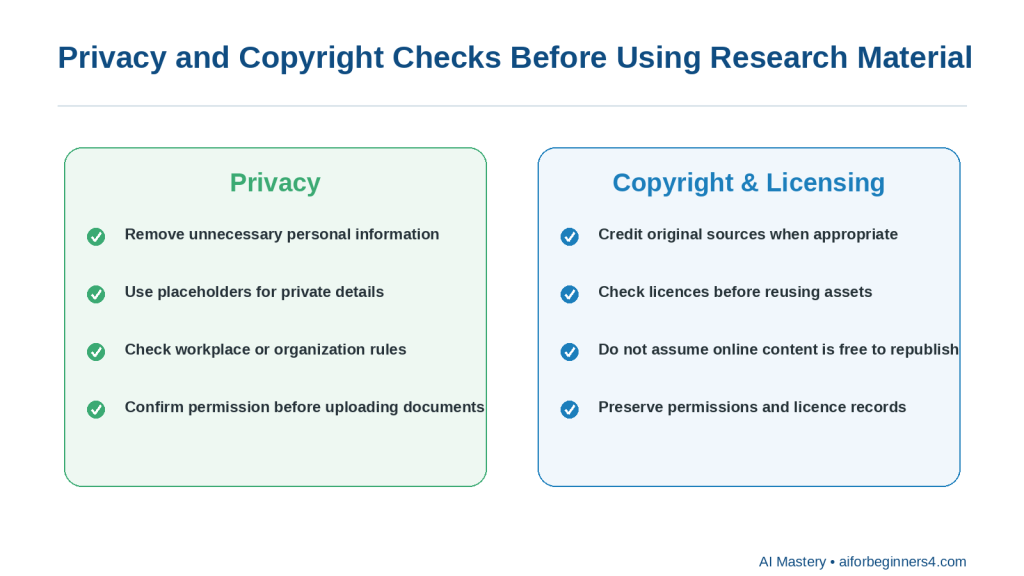
Figure 12. Privacy and copyright checks
Explanation: Protect personal information, confirm permission to upload documents, credit sources when appropriate, and check licences before reusing assets.
Protect Personal Information
Before uploading notes, documents, screenshots, or other research material to an AI tool, remove personal information that is not needed.
The Office of the Privacy Commissioner of Canada recommends limiting the personal information shared with AI tools, reviewing privacy settings, and avoiding unnecessary sharing of other people’s personal data.
You can use placeholders such as:
· [PERSON NAME]
· [CUSTOMER NAME]
· [ADDRESS]
· [ACCOUNT NUMBER]
· [PRIVATE DETAIL]
Do Not Assume You Can Upload Any Document
Having access to a document does not automatically mean you should upload it to an AI service.
Before uploading material, consider:
· Is it confidential?
· Does it contain another person’s private information?
· Does your workplace or organization allow it?
· Do you have permission to share it with the AI service?
· Does the provider’s privacy policy meet your needs?
This is especially important for customer records, employee information, contracts, medical information, financial records, and private business documents.
Respect Copyright
Research sources such as articles, books, photographs, reports, diagrams, videos, and other creative works may be protected by copyright.
The Canadian Intellectual Property Office explains that copyright protects original literary, artistic, dramatic, and musical works and gives copyright owners legal rights over uses such as reproduction and publication.
Do not assume that information found online is automatically free to copy, republish, or use commercially.
Facts and Creative Expression Are Different
You can research facts and ideas, but copying a source’s original wording, images, diagrams, or other protected expression may raise different copyright considerations.
For beginner research, a safer approach is to:
· Read and understand the source
· Record the important facts
· Write the explanation in your own words
· Cite or link to the source when appropriate
· Use only images or other materials you have permission or a suitable licence to use
Copyright rules vary by country and situation, so seek appropriate legal advice when a specific use has important consequences. The Canadian Intellectual Property Office also notes that its copyright guidance is introductory rather than a complete statement of the law.
Keep Source Attribution
When AI summarizes a source, do not remove the record of where the information came from.
Keep:
· Source title
· Author or organization when available
· Source link
· Publication or update date
· Date checked
· Notes about what information came from that source
This makes your research easier to verify and update.
Avoid Plagiarism
Do not use AI simply to rewrite someone else’s work so that it appears to be your own original research.
Instead, use AI to help you:
· Understand the information
· Organize your notes
· Compare sources
· Identify themes
· Create an outline from your own verified research
Then write the final work in a way that accurately represents the sources and gives appropriate credit.
Check Licences for Reusable Material
If you want to reuse:
· Photographs
· Charts
· Illustrations
· Videos
· Music
· Templates
· Stock assets
· Data sets
check the licence and any commercial-use, attribution, modification, or redistribution conditions.
Do not assume that an AI tool’s ability to access or describe an asset means you have permission to republish it.
Preserve Important Research Records
For research that may later be published, keep:
· Original source files
· Source links
· Research notes
· Permissions
· Licences
· AI prompts when useful
· Important draft versions
· Final publication records
These records can help if you later need to verify a fact, update the research, or confirm that you had permission to use an asset.
Reality: AI can help organize research, but it does not automatically give you permission to use someone else’s content or remove your responsibility to protect personal information, verify sources, and respect copyright.
Frequently Asked Questions
Can AI do all of my research for me?
AI can help you find questions to investigate, organize notes, summarize source material, and compare information.
However, it should not replace checking the original evidence.
For important research, verify key facts using reliable sources before reaching a conclusion.
Can AI summarize a long article or report?
Yes.
You can ask:
“Summarize this source in five bullet points. Keep the important facts, dates, limitations, and warnings. Do not add information that is not in the source.”
Then compare the summary with the original source.
Can AI compare two or more sources?
Yes.
You can ask:
“Compare these sources and show where they agree, where they differ, and what still needs verification.”
This can help organize conflicting information.
Can AI tell me which source is more reliable?
It can help identify differences such as:
· Publisher
· Date
· Type of source
· Evidence provided
· Whether the source is official or secondary
But you should still make the final judgment about reliability.
Should I always use official sources?
For information about software features, prices, policies, privacy, licences, regulations, and other changing details, official or primary sources are usually the best starting point.
For broader research, you may also need academic studies, reputable journalism, books, standards organizations, or other appropriate sources.
What should I do if two reliable sources disagree?
Do not force an immediate answer.
Check:
· Publication dates
· Definitions
· Geographic scope
· Product or plan differences
· Whether one source has been updated
· Whether the sources are answering slightly different questions
If the disagreement remains unresolved, state that clearly.
Can AI help me organize research into a table?
Yes.
For example:
“Create a table with columns for source, main claim, date, limitation, and verification status.”
Tables can make comparisons easier to review.
Can AI tell me what information is missing?
Yes.
You can ask:
“Review these notes and list the important questions that are still unanswered. Do not guess the answers.”
This is often more useful than asking AI to fill the gaps.
Can AI help me write an article from my research?
Yes.
After you have verified the research, AI can help create:
· An outline
· Headings
· A first draft
· A summary
· A comparison table
· FAQs
Tell AI to use only the verified notes and sources you provide.
Should I save the original sources after creating the final summary?
Yes.
Keep the original source files, links, notes, and important dates so you can verify or update the research later.
Can I upload confidential research documents to an AI tool?
You should not assume that you can.
Review the document first and consider privacy, permission, workplace rules, contractual obligations, and the provider’s data policies.
Remove unnecessary sensitive information when possible.
Is information generated by AI automatically copyright-free?
No.
AI-generated or AI-assisted output should not automatically be assumed to be free of copyright, licensing, or other legal restrictions.
If your work includes third-party text, images, charts, music, stock assets, or other material, check the applicable permissions and licence conditions.
Do I need to cite sources when AI helped me organize the research?
AI assistance does not remove the need to credit the original sources when attribution is appropriate.
The important point is to preserve where the facts and evidence came from.
How often should I update research?
It depends on the subject.
Stable historical information may change very little, while software features, prices, policies, regulations, and platform rules can change quickly.
Record when you checked important information and review time-sensitive claims periodically.
Is an AI-organized research summary automatically reliable?
No.
AI can make information look clear and well structured even when the source material is incomplete, outdated, or wrong.
Reality: AI can help you manage research more efficiently, but good research still depends on reliable sources, careful verification, and clear records of where the information came from.
Key Takeaways
AI can make research easier to organize, compare, and review, but it does not replace reliable sources or careful verification.
Remember these main points:
· Start with a clear research question.
· Break broad topics into smaller questions.
· Prefer reliable original, official, or authoritative sources when possible.
· Save source links, dates, and notes as you research.
· Ask AI to summarize, compare, group, or structure information rather than simply asking for a final answer.
· Keep different sources separate before combining them.
· Tell AI not to guess missing information.
· Mark unsupported claims as “Needs verification.”
· Check important facts, dates, prices, policies, limits, and legal or safety information against the original source.
· Pay attention to whether information may be outdated.
· Preserve your original research notes and source material.
· Remove unnecessary personal or confidential information before using an AI tool.
· Respect copyright, licences, permissions, and attribution requirements.
· Keep a clear distinction between source-supported facts, your interpretation, AI suggestions, and unresolved questions.
· Use extra care with legal, medical, financial, employment, regulatory, privacy, or other high-consequence topics.
· Review the final research yourself before publishing or relying on it.
The most useful role for AI in research is to help you manage information more efficiently while keeping the evidence, verification, permissions, and final conclusions under human control.
Final Tip
Use AI to organize research, not to replace the research process.
A simple workflow is:
1. Start with a clear question.
2. Find reliable sources.
3. Save the source links and dates.
4. Use AI to summarize or organize the information.
5. Compare the AI output with the original sources.
6. Verify important claims.
7. Mark anything uncertain as “Needs verification.”
8. Keep the final notes together with the source record.
A useful prompt is:
“Organize these research notes into confirmed findings, source-supported facts, limitations, unresolved questions, and items that still need verification. Do not invent missing information.”
This approach helps you get the organizational benefits of AI without losing control of the evidence.
For research that may later be published, also keep the original files, source links, important screenshots, permissions, licences, prompts when useful, and final versions.
The goal is to make research easier to manage while keeping accuracy, evidence, privacy, copyright, and final judgment under your control.
Continue Learning
After you learn how to research and organize information with AI, continue with these related AI Mastery guides:
· Article 077 — AI Productivity for Beginners: Complete Guide (2026) — Review the broader ways AI can help with planning, writing, research, organization, and everyday work.
· Article 078 — How to Create a Daily Plan with ChatGPT (2026) — Learn how to turn tasks, appointments, and priorities into a realistic daily schedule.
· Article 079 — How to Write and Improve Emails with AI (2026) — Learn how to draft, rewrite, shorten, and improve everyday emails with AI.
· Article 080 — How to Prepare Meeting Agendas and Notes with AI (2026) — Learn how AI can help prepare meetings, organize notes, identify action items, and create follow-up summaries.
· Article 082 — How to Create a Personal Study Plan with AI (2026) — Learn how AI can help organize study goals, subjects, review sessions, and progress. Link after Article 082 is published.
· Article 083 — How to Organize Files, Tasks, and Projects with AI (2026) — Learn how AI can help structure ongoing work, files, tasks, and larger projects. Link after Article 083 is published.
These guides build on the same basic approach used in this article: give AI clear instructions, use reliable sources, protect unnecessary private information, verify important claims, and keep final decisions under human control.
Sources and References
The following official sources were reviewed for this guide. AI research features, search tools, privacy practices, copyright guidance, plan availability, and usage limits can change, so readers should check current provider information when first using a feature, after changing plans or accounts, after receiving a policy update, and periodically.
· OpenAI Help Center — Deep Research in ChatGPT. Explains how ChatGPT Deep Research can work across multiple sources and produce reports with citations or source links that readers can open and verify. (OpenAI Help Center)
· OpenAI Help Center — Does ChatGPT Tell the Truth? Explains that ChatGPT can make mistakes and that search and deep research can use current web sources with citations, reinforcing the need to check important information rather than relying only on an AI response. (OpenAI Help Center)
· OpenAI Help Center — Apps in ChatGPT. Explains that apps can support multi-source Deep Research and can provide citations back to original material, subject to plan and workspace configuration.
· Google Gemini Apps Help — Use Deep Research in Gemini Apps. Explains that Gemini Deep Research can use Google Search and, depending on setup and permissions, other sources such as uploaded files and connected Google content.
· Microsoft Support — Get Started with Researcher in Microsoft 365 Copilot. Describes Researcher as a tool for gathering, analyzing, and summarizing information from the web and accessible work content, with structured reports and source citations. (Microsoft Support)
· Office of the Privacy Commissioner of Canada — Privacy and Artificial Intelligence. Provides Canadian privacy information and guidance related to AI technologies and the handling of personal information. (Office of the Privacy Commissioner of Canada)
· Office of the Privacy Commissioner of Canada — Principles for Responsible, Trustworthy and Privacy-Protective Generative AI. Explains privacy principles that organizations developing, providing, or using generative AI should consider, including appropriate handling of personal information. (Office of the Privacy Commissioner of Canada)
· Canadian Intellectual Property Office — A Guide to Copyright. Explains the basic protection provided by Canadian copyright law for original literary, artistic, dramatic, and musical works and discusses rights associated with protected works. (Canadian Intellectual Property Office)
· Canadian Intellectual Property Office — Copyright: Learn the Basics. Provides beginner-oriented information about what copyright protects and considerations for legally using the works of other people. (Canadian Intellectual Property Office)
These sources support the research, source-verification, citation, privacy, copyright, and responsible-use guidance in this article.
AI-generated research reports and summaries should be treated as research assistance rather than proof that every statement is correct. Readers should open important cited sources, verify that they actually support the claim being made, check publication and update dates, and confirm time-sensitive information before relying on it. OpenAI, Google, and Microsoft all currently provide AI-assisted research features that work with multiple sources, but the available features and access conditions differ and may change.
For legal, medical, financial, employment, regulatory, privacy, copyright, or other high-consequence research, this article provides general educational information only and is not a substitute for appropriate professional advice.


Leave a Reply