
Estimated reading time: 30–35 minutes
Last updated: August 16, 2026
Introduction
Meetings are easier to manage when everyone knows what will be discussed, what decisions need to be made, and what should happen afterward.
AI can help you prepare a clear meeting agenda before the meeting and organize your notes after it.
For example, instead of starting with a blank page, you could give an AI tool a few details such as:
· The purpose of the meeting
· The people attending
· The main topics
· The available meeting time
· Questions that need answers
You could then ask:
“Create a 30-minute meeting agenda for a small project team. We need to review progress, discuss two problems, decide the next steps, and assign responsibilities.”
AI can turn those notes into a structured agenda with suggested sections and time blocks.
After the meeting, AI can also help organize rough notes into:
· Main discussion points
· Decisions made
· Action items
· Responsibilities
· Deadlines
· Questions that still need answers
For example, you could ask:
“Organize these meeting notes into a short summary. Separate decisions, action items, owners, and deadlines. Do not invent anything that is not in my notes.”
AI can save time and make meeting information easier to review, but it should not be trusted to decide what actually happened in a meeting. It can misunderstand notes, omit details, or create information that was never discussed.
Always review AI-generated agendas, summaries, action items, names, dates, deadlines, and responsibilities before sharing them with other people.
In this guide, you will learn how to use AI to prepare meeting agendas, organize meeting notes, identify action items, improve clarity, protect confidential information, and avoid common mistakes.
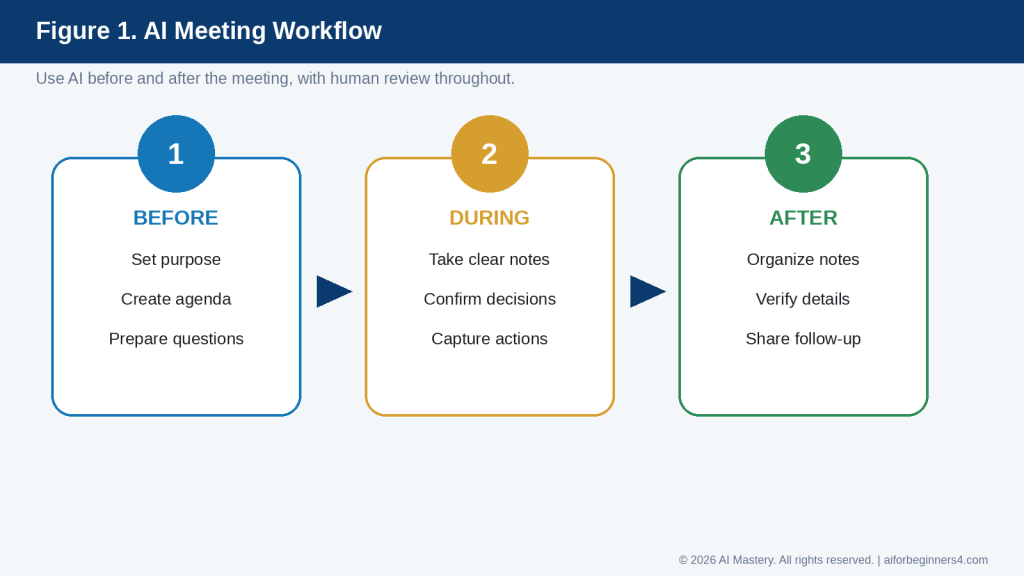
Figure 1. AI meeting workflow: prepare before the meeting, capture clear information during it, and verify the AI-organized output afterward.
Explanation: This workflow shows where AI can help without replacing the people who make decisions and confirm what actually happened.
Before You Start
You do not need special technical skills to use AI for meeting agendas or notes. You mainly need to provide clear information about the meeting.
Before asking AI to help, prepare:
· The purpose of the meeting
· The expected attendees or roles
· The main topics to discuss
· The total meeting time
· Any decisions that need to be made
· Questions that need answers
· Important deadlines or follow-up items
· Any existing notes or documents you want to use
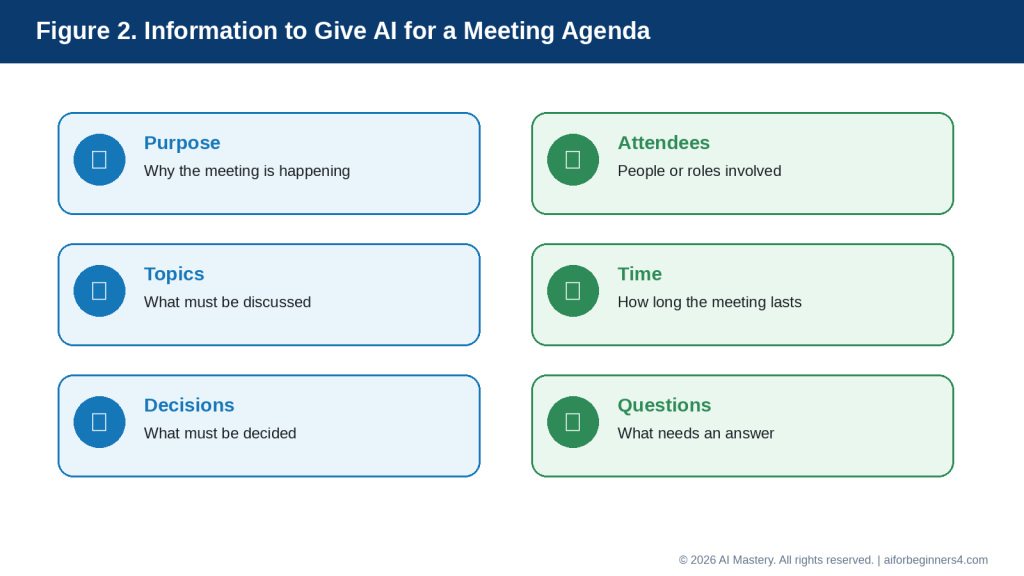
Figure 2. Give AI the meeting purpose, attendees, topics, available time, decisions needed, and important questions.
Explanation: Providing these details gives the AI enough context to create a more focused agenda instead of a generic list of meeting topics.
Decide What the Meeting Needs to Achieve
A useful agenda should have a clear purpose.
For example:
· Review project progress
· Solve a problem
· Make a decision
· Assign responsibilities
· Share updates
· Plan next steps
· Prepare for a deadline
If the purpose is unclear, the agenda may become too broad or include unnecessary topics.
A better prompt would be:
“Create a 45-minute meeting agenda for a project team. The goal is to review progress, solve one scheduling problem, and assign next steps.”
This gives AI a clearer task than simply asking:
“Create a meeting agenda.”
Protect Confidential Information
Meeting notes can contain sensitive information about:
· Employees
· Customers
· Finances
· Contracts
· Health information
· Business plans
· Internal problems
· Personal information
Do not share more information with an AI tool than is necessary.
If possible, replace sensitive details with placeholders such as:
· [EMPLOYEE NAME]
· [CUSTOMER NAME]
· [PROJECT NAME]
· [AMOUNT]
· [CONFIDENTIAL ISSUE]
You can add the correct details yourself later if needed.
Confirm Permission Before Using Recordings or Transcripts
Some AI tools can help summarize meeting recordings or transcripts.
Before recording, uploading, or processing a meeting, make sure you have the appropriate permission and follow any workplace, organizational, contractual, or legal requirements that apply.
Do not assume that recording a meeting is automatically allowed.
Keep the Original Notes
When AI helps organize meeting notes, keep the original notes, transcript, or source material until you have checked the AI-generated summary.
This makes it easier to confirm:
· What was actually said
· Who agreed to each action
· Which deadlines were mentioned
· Whether any important detail was omitted
Reality: AI can organize meeting information, but it should not be treated as the official record until a person has reviewed the result.
What You’ll Learn
By the end of this guide, you will know how to:
· Create a clear meeting agenda with AI.
· Turn a few meeting goals into organized discussion points.
· Add suggested time blocks to an agenda.
· Prepare questions before the meeting.
· Organize rough notes after the meeting.
· Separate discussion points from decisions.
· Identify action items, owners, and deadlines.
· Ask AI to summarize notes without inventing information.
· Review AI-generated meeting summaries for mistakes.
· Protect confidential or sensitive meeting information.
· Use placeholders when real names or private details are not necessary.
· Decide when AI is useful and when human review is especially important.
You will also learn how to keep the agenda focused, make meeting notes easier to scan, and create a useful follow-up summary after the meeting.
The goal is not to let AI decide what happened in a meeting. The goal is to use AI to help organize information that people have already provided, discussed, or agreed on.
How AI Can Help Before, During, and After a Meeting
AI can support several parts of the meeting process. It can help you prepare before the meeting, organize information during or after the meeting, and create a clearer follow-up record.
Before the Meeting: Create the Agenda
Before the meeting starts, AI can help turn a simple list of goals into a structured agenda.
For example:
“Create a 45-minute agenda for a project meeting. We need to review progress, discuss two delays, decide who will handle the next tasks, and confirm the deadline.”
AI can suggest an order such as:
· Welcome and meeting goal
· Progress update
· Problems or delays
· Decisions needed
· Action items
· Next steps
You should review the suggested order and adjust it to fit the real priorities of the meeting.
Before the Meeting: Prepare Questions
AI can also help you think about useful questions.
For example:
“Give me five questions to ask during a project-status meeting about delays, responsibilities, risks, and next steps.”
This can help you prepare before the meeting instead of thinking of every question at the last minute.
During the Meeting: Organize Notes
You can take rough notes during the meeting and organize them later with AI.
For example, your notes might look like:
· Website article delayed
· Images still needed
· Alex checking links
· Final review Thursday
· Publish Friday if approved
You could ask:
“Organize these notes into discussion points, decisions, action items, owners, and deadlines. Do not add any information that is not in the notes.”
After the Meeting: Create a Summary
AI can help turn rough notes into a short summary.
A useful summary may include:
· Meeting purpose
· Main topics discussed
· Decisions made
· Action items
· Assigned responsibilities
· Deadlines
· Open questions
This makes it easier for attendees to see what happened and what needs to happen next.
After the Meeting: Create Action Items
AI can help separate general discussion from specific tasks.
For example:
“Extract only the action items from these meeting notes. Show the task, responsible person, and deadline. If any information is missing, mark it as ‘Not specified’ instead of guessing.”
This is an important instruction because AI should not invent an owner or deadline when one was not recorded.
After the Meeting: Draft a Follow-Up Email
Once the notes are checked, AI can help create a short follow-up message.
For example:
“Write a concise follow-up email summarizing the decisions and action items from this meeting. Use only the information I provide.”
You should review the email before sending it to make sure it accurately reflects what was agreed.
Reality: AI can help structure and summarize meeting information, but it does not know which comments were official decisions unless the notes make that clear. Human review remains necessary.
Step-by-Step: Create a Meeting Agenda with AI
A useful meeting agenda should make the purpose, topics, timing, and expected decisions clear before the meeting begins.
Step 1: State the Meeting Purpose
Start by telling AI why the meeting is happening.
For example:
“The purpose of this meeting is to review project progress, discuss delays, and decide the next steps.”
A clear purpose helps AI keep the agenda focused.
Step 2: Add the Meeting Length
Tell AI how much time is available.
For example:
“Create a 30-minute agenda.”
or:
“Create a 60-minute agenda with time for questions at the end.”
This helps prevent an agenda from becoming too long for the time available.
Step 3: List the Main Topics
Give AI the topics that must be discussed.
For example:
· Project progress
· Current problems
· Upcoming deadline
· Responsibilities
· Next steps
You can ask AI to organize them in a logical order.
Step 4: Identify Decisions That Need to Be Made
Some meetings are mainly for sharing information. Others require decisions.
Tell AI which decisions matter.
For example:
“We need to decide who will complete the final review and whether the deadline should move.”
This helps AI give decision items enough attention.
Step 5: Add Time Blocks
Ask AI to suggest a reasonable amount of time for each section.
For example:
“Divide the 45-minute meeting into time blocks and leave five minutes at the end for questions and action items.”
The time estimates are suggestions. Adjust them if a topic needs more or less discussion.
Step 6: Ask for a Clear Agenda Format
A complete prompt could be:
“Create a 45-minute agenda for a project meeting. The purpose is to review progress, discuss two delays, decide who will handle the remaining tasks, and confirm the deadline. Include suggested time blocks, decisions needed, and five minutes at the end for action items. Keep the agenda simple and professional.”
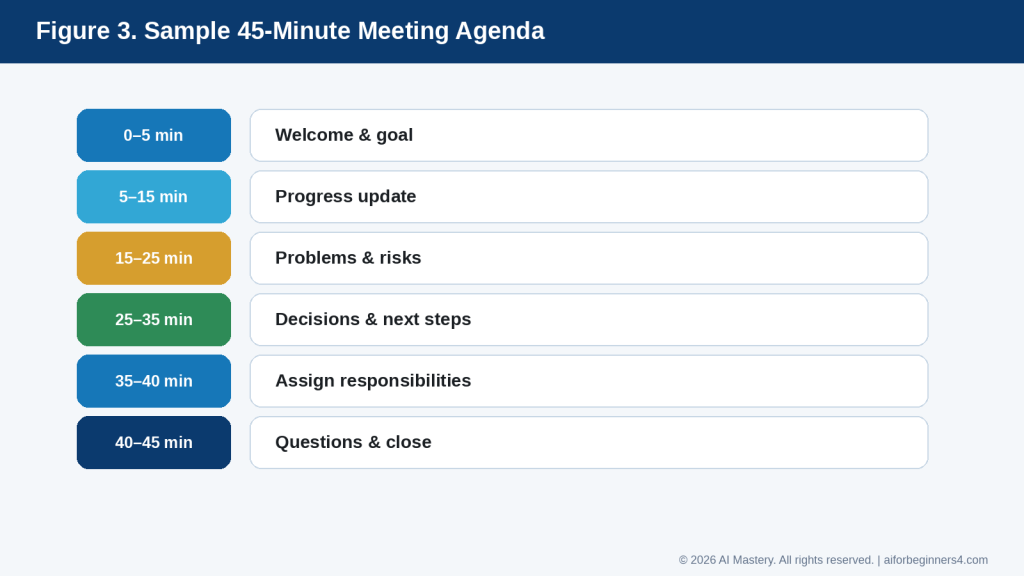
Figure 3. A sample 45-minute meeting agenda with realistic time blocks for updates, problems, decisions, responsibilities, and questions.
Explanation: Time blocks help keep a meeting focused, but the suggested times should be adjusted to match the importance and complexity of each topic.
Step 7: Review the Draft
Before sharing the agenda, check:
· Is the meeting purpose clear?
· Are the most important topics included?
· Is the order logical?
· Are the time blocks realistic?
· Are decisions clearly identified?
· Is there time for questions?
· Is there time to confirm action items?
Step 8: Remove Unnecessary Topics
If the agenda is too long, ask AI to simplify it.
For example:
“Shorten this agenda so it fits into 30 minutes. Keep only the essential discussion points and decisions.”
Step 9: Share the Final Agenda
After reviewing and correcting the draft, share the agenda with attendees using the communication method your organization normally uses.
If the meeting involves confidential or sensitive matters, make sure the agenda does not reveal information to people who should not receive it.
How to Avoid This Mistake: Do not let AI fill the agenda with generic topics just to make it look complete. Every agenda item should have a clear reason for being included.
Step-by-Step: Organize Meeting Notes with AI
After the meeting, AI can help turn rough notes into a clearer record. The important part is to make sure the AI organizes what was actually recorded rather than filling in missing information.
Step 1: Keep the Original Notes
Before editing anything, save the original notes.
This gives you a source to compare against if the AI summary seems incorrect or incomplete.
Your original notes might look like:
· Project behind by three days
· Images still missing
· Sam to finish images Wednesday
· Priya to review links Thursday
· Final approval Friday
· Publish after approval
Step 2: Remove Unnecessary Sensitive Information
Before pasting notes into an AI tool, remove private or confidential details that are not needed for the task.
For example, replace:
“Michael Thompson from ABC Company”
with:
“[CLIENT CONTACT]”
if the real name is not necessary for organizing the notes.
Step 3: Tell AI Exactly How to Organize the Notes
A useful prompt might be:
“Organize these meeting notes into five sections: main discussion points, decisions, action items, responsible person, and deadline. Do not add any information that is not written in the notes. If something is missing, write ‘Not specified.’”
This instruction helps reduce the chance that AI will guess missing information.
Step 4: Paste the Notes
Add the original meeting notes below the prompt.
For example:
“Project behind by three days. Images still missing. Sam to finish images Wednesday. Priya to review links Thursday. Final approval Friday. Publish after approval.”
AI can then organize the information into a clearer format.
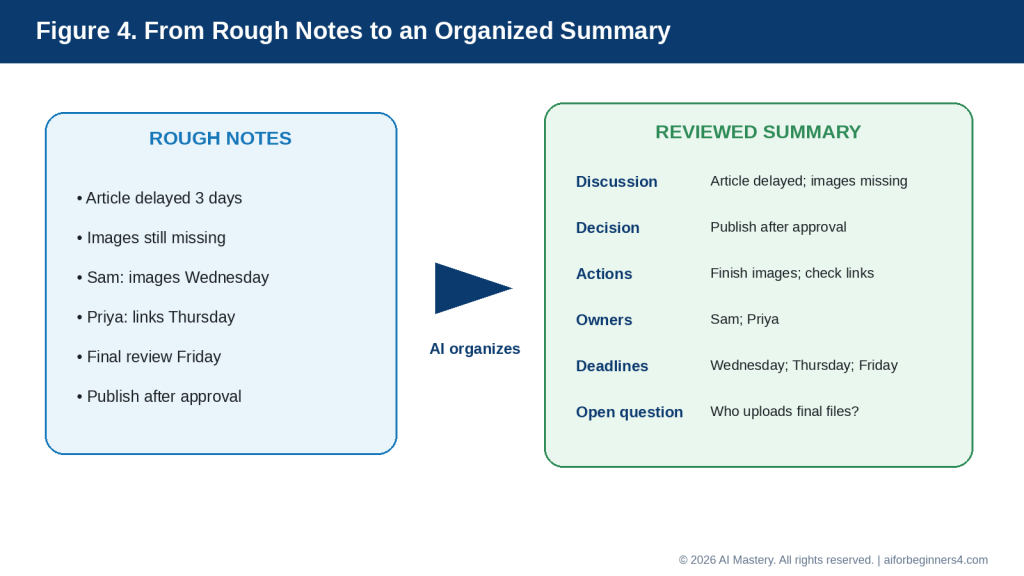
Figure 4. AI can organize rough notes into a structured summary, but the result still needs comparison with the original notes.
Explanation: The organized version is easier to review because it separates what was discussed from decisions, action items, owners, deadlines, and unresolved questions.
Step 5: Check the Decisions
Read the AI-generated “Decisions” section carefully.
A discussion is not always a decision.
For example:
“We talked about moving the deadline.”
does not necessarily mean:
“The deadline was moved.”
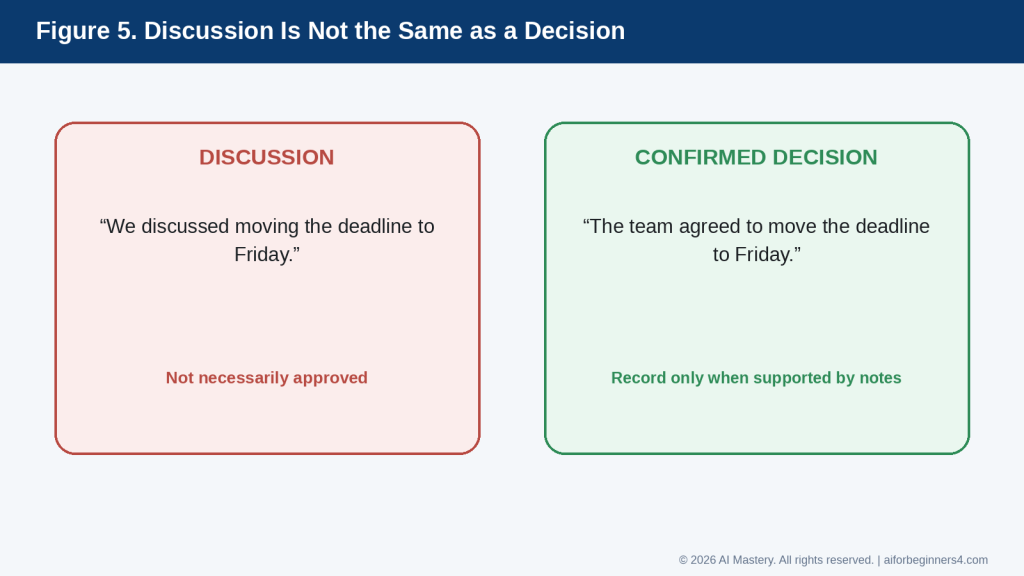
Figure 5. A discussion is not automatically a confirmed decision.
Explanation: This distinction helps prevent AI from turning a suggestion or possibility into an official decision that the meeting participants never approved.
If the notes do not clearly show that a decision was made, correct the summary.
Step 6: Check Action Items
Make sure each action item matches the original notes.
Check:
· What needs to be done
· Who is responsible
· When it is due
If any detail was not recorded, it should remain marked as missing rather than being guessed.
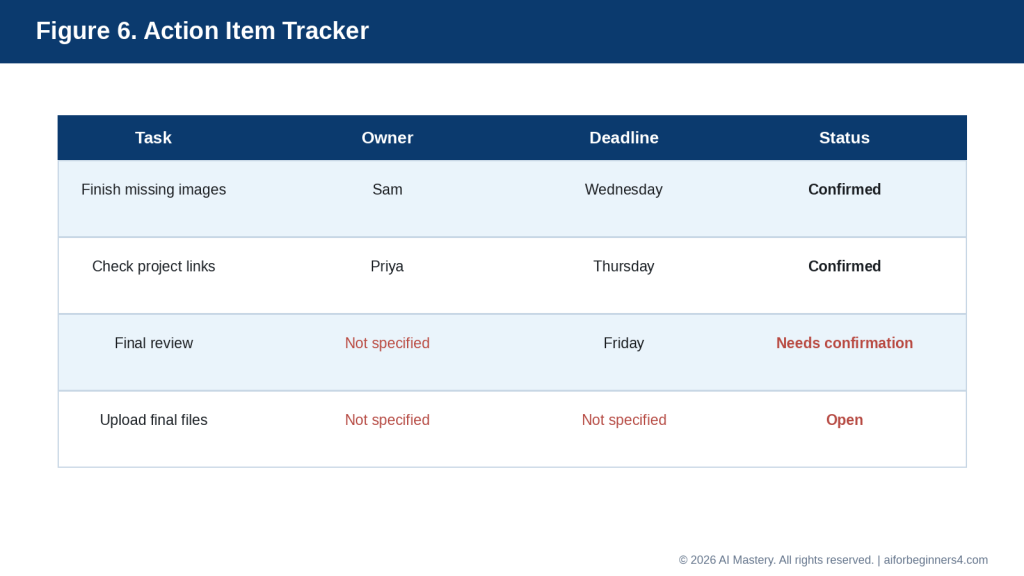
Figure 6. Track each action item with a clear task, confirmed owner, deadline, and status.
Explanation: Missing information should remain visible instead of being guessed. This makes it easier for the team to confirm what still needs clarification.
Step 7: Check Names and Deadlines
Pay special attention to:
· Names
· Dates
· Times
· Deadlines
· Responsibilities
· Numbers
· Project names
These details can create confusion if they are wrong.
Step 8: Ask AI to Simplify the Notes
If the summary is too long, you can ask:
“Shorten this meeting summary. Keep all decisions, action items, owners, deadlines, and unresolved questions.”
Step 9: Approve the Final Version Yourself
Before sending the summary to other people, compare it with the original notes.
Only after checking it should you treat the AI-organized version as the final meeting record.
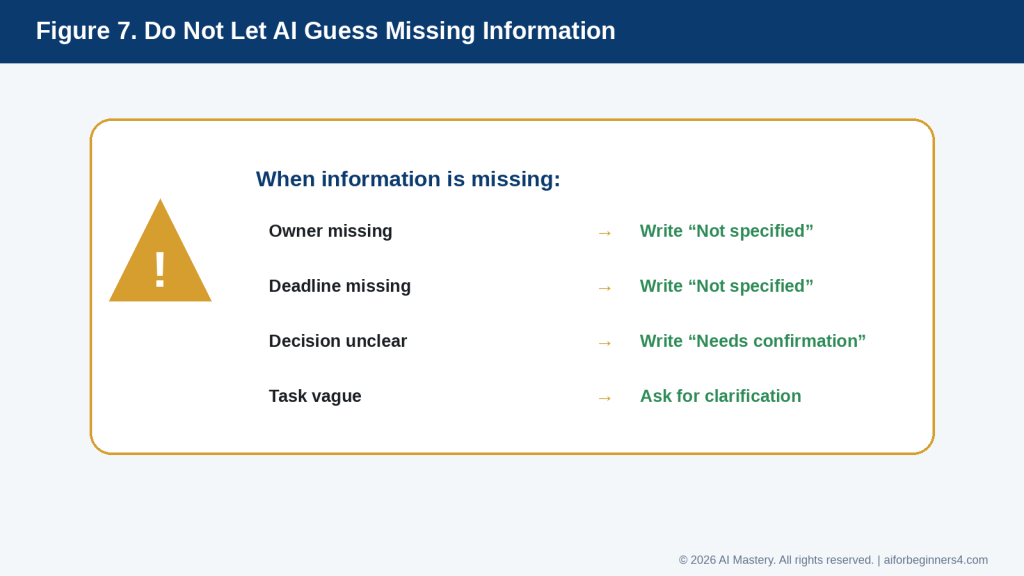
Figure 7. When meeting information is missing, mark it clearly instead of letting AI guess.
Explanation: Using labels such as “Not specified” and “Needs confirmation” protects the accuracy of the meeting record and shows exactly what still needs human follow-up.
How to Avoid This Mistake: Do not assume that a polished summary is automatically accurate. AI can make rough notes look complete even when important information is missing.
Useful AI Prompts for Meeting Agendas and Notes
Reusable prompts can save time when you regularly prepare meetings or organize notes. Replace the bracketed information with the details for your meeting.
Prompt for Creating a Meeting Agenda
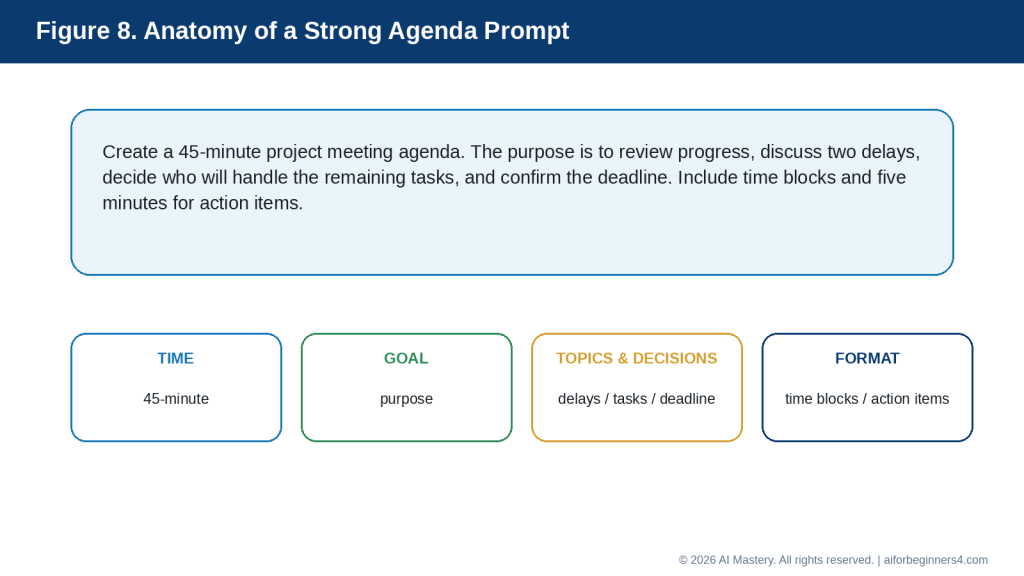
Figure 8. A strong agenda prompt tells AI the meeting length, purpose, important topics or decisions, and the format you want.
Explanation: Clear prompt components help produce a practical agenda that matches the available meeting time and actual goals.
“Create a [30/45/60]-minute meeting agenda for [meeting purpose]. The main topics are [topics]. Include suggested time blocks, decisions that need to be made, and time at the end for questions and action items.”
Prompt for a Short Team Meeting
“Create a simple 30-minute team meeting agenda. Include progress updates, current problems, priorities, and next steps. Keep the agenda focused and easy to follow.”
Prompt for a Project-Status Meeting
“Create a project-status meeting agenda. Cover progress since the last meeting, delays or risks, decisions needed, responsibilities, and upcoming deadlines. Include suggested time blocks.”
Prompt for Preparing Questions
“Give me five useful questions to ask during a meeting about [topic]. Focus on progress, problems, risks, responsibilities, and next steps.”
Prompt for Organizing Rough Notes
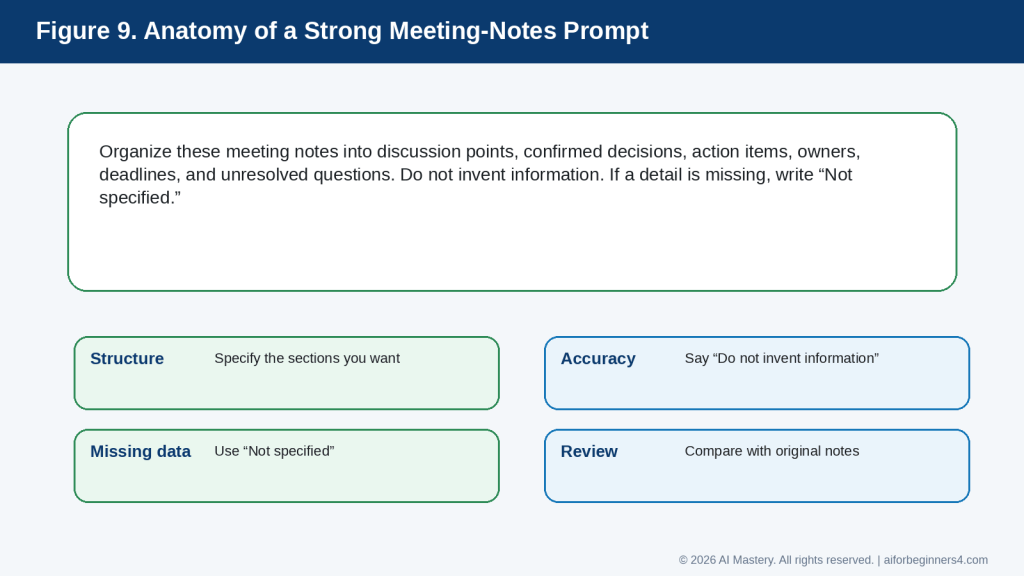
Figure 9. A strong meeting-notes prompt specifies the structure, tells AI not to invent information, and explains how to handle missing details.
Explanation: These instructions reduce the risk that a polished summary will contain unsupported owners, deadlines, or decisions.
“Organize these meeting notes into: main discussion points, decisions, action items, responsible person, deadlines, and unresolved questions. Do not invent any information. If a detail is missing, write ‘Not specified.’”
Then paste your meeting notes below the instruction.
Prompt for Extracting Action Items
“Extract only the action items from these notes. For each one, show the task, responsible person, and deadline. If the owner or deadline is not stated, write ‘Not specified.’”
Prompt for Creating a Short Meeting Summary
“Create a concise meeting summary from these notes. Include the meeting purpose, main topics, decisions, action items, owners, and deadlines. Do not add information that is not in the notes.”
Prompt for Checking Whether Something Was a Decision
“Review these meeting notes and separate confirmed decisions from topics that were only discussed. Do not treat a suggestion or discussion as a decision unless the notes clearly show agreement.”
Prompt for Finding Missing Information
“Review these meeting notes and identify any action items that are missing an owner, deadline, or clear task description. Do not guess the missing details.”
Prompt for Improving Meeting Notes
“Rewrite these meeting notes so they are clearer and easier to scan. Keep all facts, names, dates, decisions, and responsibilities unchanged.”
Prompt for a Follow-Up Email
“Write a short professional follow-up email based only on these reviewed meeting notes. Summarize the confirmed decisions and action items. Keep the tone clear and professional. Do not invent any information.”
Prompt for Simplifying a Long Summary
“Shorten this meeting summary while keeping all confirmed decisions, action items, owners, deadlines, and unresolved questions.”
Prompt for a Final Accuracy Check
“Compare this meeting summary with the original notes. Identify any statement in the summary that is not clearly supported by the notes. Do not correct it automatically—show me what needs review.”
Final Check Before Using Any Prompt: Remove unnecessary sensitive information, keep the original notes, and review the AI-generated result before sharing it with other people.
Practical Example: From Rough Notes to a Clear Meeting Summary
Suppose a small project team finishes a meeting with these rough notes:
· Website article delayed by three days
· Images still missing
· Sam will finish images Wednesday
· Priya will check links Thursday
· Final review Friday
· Publish after approval
· Need to confirm who will upload the final files
These notes contain useful information, but they are not yet organized.
You could ask AI:
“Organize these meeting notes into main discussion points, confirmed decisions, action items, responsible person, deadlines, and unresolved questions. Do not invent any information. If something is missing, write ‘Not specified.’”
A useful result might look like this:
Main Discussion Points
· The website article is three days behind schedule.
· Required images are still missing.
· Link checking and final review still need to be completed.
Confirmed Decisions
· Publication will happen after final approval.
Action Items
· Finish the missing images.
· Check the links.
· Complete the final review.
· Upload the final files after approval.
Responsible People
· Images — Sam
· Link checking — Priya
· Final review — Not specified
· Final upload — Not specified
Deadlines
· Images — Wednesday
· Link checking — Thursday
· Final review — Friday
· Final upload — Not specified
Unresolved Questions
· Who will complete the final review?
· Who will upload the final files?
· What is the exact publication date after approval?
Why This Format Is Useful
The AI has separated different types of information instead of leaving everything in one list.
It also keeps missing information visible instead of guessing.
For example, the original notes do not say who will complete the final review. A responsible summary should therefore show:
“Final review — Not specified”
rather than assigning the task to someone without evidence.
Turn the Reviewed Notes into a Follow-Up Email
After checking the organized summary against the original notes, you could ask:
“Write a short professional follow-up email using only these reviewed meeting notes. Include confirmed action items and deadlines. Clearly identify anything that still needs confirmation.”
A possible email could be:
Subject: Project Meeting — Next Steps
Hello everyone,
Thank you for today’s meeting.
The next steps are:
· Sam will finish the missing images by Wednesday.
· Priya will check the links by Thursday.
· The final review is planned for Friday.
· Publication will take place after final approval.
We still need to confirm who will complete the final review and who will upload the final files.
Please let me know if I have missed or misunderstood anything.
Best regards,
[Your Name]
Check Before Sharing
Before sending the summary or follow-up email, confirm:
· The names are correct.
· The deadlines match the original notes.
· Each action item was actually agreed.
· No discussion point has been turned into a decision.
· No missing owner or deadline has been invented.
· No confidential information has been added unnecessarily.
Reality: AI can make rough notes look organized and professional, but the polished appearance does not prove the summary is accurate. Always compare it with the original meeting record.
Benefits of Using AI for Meeting Agendas and Notes
AI can make meeting preparation and follow-up more organized, especially when you already have the main information but need help turning it into a clear structure.
Helps You Prepare Faster
Starting with a blank agenda can take time.
Instead, you can give AI a few meeting goals and ask it to create a first draft.
For example:
“Create a 30-minute agenda for a team meeting about project progress, current problems, and next steps.”
You can then review and adjust the result rather than building the entire agenda from scratch.
Helps Keep Meetings Focused
A clear agenda can make it easier to stay on topic.
AI can help organize discussion points into a logical order and suggest which topics may need more time.
For example:
· Progress update
· Problems or risks
· Decisions needed
· Action items
· Next steps
You should still decide which topics are most important.
Helps Turn Rough Notes into a Clear Record
Meeting notes are often incomplete, abbreviated, or written quickly.
AI can help reorganize them into sections such as:
· Discussion points
· Decisions
· Action items
· Owners
· Deadlines
· Open questions
This can make the information easier to review and share.
Helps Identify Missing Information
AI can help point out when an action item does not have enough detail.
For example, it may identify that a task has:
· No assigned person
· No deadline
· No clear description
· No confirmed decision
You can ask:
“Show me which action items are missing an owner or deadline. Do not guess the missing information.”
Helps Create Follow-Up Messages
After the notes have been reviewed, AI can help turn them into a short follow-up email or summary.
This can save time when several people need the same information.
Helps Create Consistent Meeting Records
If you use the same format after each meeting, your records can become easier to scan and compare.
For example, you might always use:
· Meeting purpose
· Main discussion
· Decisions
· Action items
· Owners
· Deadlines
· Open questions
AI can help apply that structure consistently.
Helps Reduce Repetition
Long meeting notes can repeat the same point several times.
AI can help shorten the notes while preserving the important information.
For example:
“Remove repetition from these meeting notes but keep all confirmed decisions, responsibilities, and deadlines.”
Helps You Prepare Better Questions
AI can help generate questions before a meeting.
For example:
“Give me five questions to ask about project delays, risks, responsibilities, and next steps.”
This can help you arrive better prepared.
Benefit: AI is most useful when it helps organize information that people have already provided. It can make agendas and notes clearer, but people still need to confirm what was actually discussed, decided, and assigned.
Limitations and Common Mistakes
AI can make meeting preparation and follow-up easier, but it can also create problems if the output is accepted without careful review.
Limitation: AI Can Invent Missing Details
If meeting notes are incomplete, AI may try to fill in gaps.
It might invent:
· A deadline
· A task owner
· A decision
· A reason for a delay
· A meeting date
· A next step
How to Reduce This Limitation: Tell the AI:
“Do not guess missing information. If a detail is not stated, write ‘Not specified.’”
Then compare the result with the original notes.
Limitation: AI May Confuse Discussion with Decision
A topic can be discussed without being approved.
For example:
“We discussed moving the deadline to Friday.”
does not necessarily mean:
“The deadline was moved to Friday.”
How to Reduce This Limitation: Ask AI to separate confirmed decisions from ideas, suggestions, and unresolved topics.
Limitation: AI May Misidentify Responsibilities
If several names appear in the notes, AI may assign the wrong person to a task.
How to Reduce This Limitation: Check every task owner against the original notes before sharing the summary.
Common Mistake: Treating AI Notes as the Official Record
A polished AI summary can look complete even when it contains mistakes.
How to Avoid This Mistake: Keep the original notes or transcript and compare the summary before treating it as final.
Common Mistake: Uploading Sensitive Information Without Review
Meeting notes can contain confidential business, employee, customer, financial, medical, or personal information.
How to Avoid This Mistake: Remove unnecessary sensitive information and use placeholders where possible.
Common Mistake: Recording a Meeting Without Permission
Some AI tools can work with recordings or transcripts, but recording rules can depend on the workplace, organization, contract, and local law.
How to Avoid This Mistake: Confirm permission and applicable requirements before recording, transcribing, or uploading meeting audio.
Common Mistake: Creating an Agenda That Is Too Long
AI may create a detailed agenda that cannot realistically fit into the available time.
How to Avoid This Mistake: Tell AI the exact meeting length and ask it to keep only essential topics.
For example:
“Reduce this agenda so it fits into 30 minutes. Keep the most important decisions and action items.”
Common Mistake: Giving Every Topic Equal Time
Not every agenda item has the same importance.
A five-minute update may be enough for one topic, while a major decision may require much more discussion.
How to Avoid This Mistake: Tell AI which items are most important and adjust the suggested time blocks yourself.
Common Mistake: Failing to Confirm Action Items
A summary may list tasks that sound clear but were never formally assigned.
How to Avoid This Mistake: Check that each action item has:
· A clear task
· A confirmed owner
· A realistic deadline
· Evidence in the original notes
Common Mistake: Forgetting Unresolved Questions
A meeting may end without answering every question.
How to Avoid This Mistake: Ask AI to create a separate “Open Questions” or “Needs Confirmation” section rather than forcing every issue into a decision.
Common Mistake: Sharing the Summary Too Quickly
An AI-generated summary can accidentally misrepresent what someone said or agreed to.
How to Avoid This Mistake: Review sensitive or important meeting notes before distributing them. For high-stakes meetings, consider having another appropriate participant confirm the summary.
Reality: AI can improve structure and readability, but it cannot determine the official meaning of a meeting without reliable source information and human review.
Common Myths About Using AI for Meetings
AI can be useful for meeting preparation and follow-up, but it is important to understand what it can and cannot do.
Myth 1: AI Can Run the Meeting for Me
AI can help prepare an agenda, suggest questions, organize notes, and draft a summary.
Reality: People still need to lead the meeting, make decisions, clarify misunderstandings, and confirm responsibilities.
AI can support the process, but it should not replace human judgment or accountability.
Myth 2: An AI Summary Is Automatically Accurate
A summary can look polished even when it includes mistakes or leaves out important information.
Reality: Always compare the summary with the original notes, transcript, or recording when available.
Check especially:
· Decisions
· Names
· Deadlines
· Responsibilities
· Numbers
· Open questions
Myth 3: If AI Lists It as a Decision, Everyone Agreed
AI may confuse a suggestion, discussion, or possibility with a confirmed decision.
Reality: A decision should only be recorded as confirmed when the source notes clearly support it.
If the notes are unclear, mark the item as:
“Needs confirmation.”
Myth 4: AI Can Guess Missing Owners and Deadlines
AI may be able to suggest what seems logical, but a logical guess is not the same as an agreed assignment.
Reality: If the owner or deadline was not recorded, leave it as “Not specified” until someone confirms it.
Myth 5: I Can Paste Any Meeting Information into an AI Tool
Meeting notes may contain confidential or personal information.
Reality: Review the information first. Remove unnecessary sensitive details and use placeholders where possible.
Myth 6: Recording a Meeting Is Always Fine if AI Is Helping
The fact that an AI tool can process recordings does not automatically mean you have permission to record a meeting.
Reality: Recording, transcription, privacy, and consent requirements can depend on the organization, participants, contract, and applicable law.
Check the relevant rules before recording or uploading meeting audio.
Myth 7: A Longer Agenda Is Better
A detailed agenda may look thorough, but it can make a meeting difficult to finish on time.
Reality: A good agenda includes the topics that actually need discussion, decisions, or action.
Shorter and more focused is often more useful than longer and more detailed.
Myth 8: AI Can Replace Meeting Follow-Up
AI can draft a follow-up message, but it cannot ensure that people actually complete their tasks.
Reality: Action items still need to be communicated, tracked, and confirmed by the people responsible.
Myth 9: AI Knows Which Information Is Most Important
AI can suggest priorities, but it may not understand the real consequences of a deadline, decision, or risk.
Reality: Tell the AI what matters most and review the result yourself.
The best use of AI is to help organize meeting information while keeping people responsible for the decisions, commitments, and final record.
When to Use AI and When Human Review Matters Most
AI can help with routine meeting preparation and note organization, but some meetings require much more careful human review.
Good Uses for AI Meeting Assistance
AI can be helpful for:
· Drafting a simple agenda
· Organizing discussion topics
· Suggesting meeting questions
· Cleaning up rough notes
· Extracting action items
· Creating a short summary
· Identifying missing owners or deadlines
· Drafting a follow-up email
· Simplifying long notes
· Applying a consistent meeting-note format
For these tasks, AI can save time and improve organization.
Use Extra Care with Sensitive Meetings
Some meetings may involve information with legal, financial, employment, medical, contractual, disciplinary, or personal consequences.
Examples include:
· Employee performance meetings
· Contract discussions
· Financial reviews
· Legal matters
· Medical or health-related meetings
· Disciplinary discussions
· Complaints
· Confidential business decisions
· Personal disputes
AI may help organize notes, but important conclusions should be reviewed carefully.
Keep People Responsible for Decisions
AI should not decide:
· Who is responsible for a task
· Whether a decision was final
· Whether a deadline was agreed
· Whether a statement was accurate
· Whether sensitive information should be shared
Those decisions belong to the people involved in the meeting.
Use AI as an Organizer, Not as the Final Authority
A useful approach is:
1. People hold the meeting and make the decisions.
2. Notes are taken during or after the meeting.
3. AI helps organize those notes.
4. A person compares the AI output with the source notes.
5. Corrections are made.
6. The final summary is shared only after review.
Keep Important Source Material
For significant meetings, preserve the original notes, approved transcript, or other authorized source record until the final summary has been checked.
This makes it easier to correct misunderstandings later.
Reality: AI is most useful when it improves structure and clarity. The people involved in the meeting remain responsible for the decisions, assignments, approvals, and final record.
Privacy, Recording, Consent, and Responsible Use
Meeting information can be more sensitive than ordinary notes because it may include personal opinions, employee information, customer details, financial information, internal decisions, or confidential business discussions.
Share Only What the AI Tool Needs
Before pasting meeting notes into an AI tool, remove information that is not necessary for the task.
You can replace sensitive details with placeholders such as:
· [EMPLOYEE NAME]
· [CLIENT NAME]
· [PROJECT NAME]
· [FINANCIAL AMOUNT]
· [CONFIDENTIAL ISSUE]
This can reduce unnecessary exposure of private information.
Be Careful with Recordings and Transcripts
Some meeting tools can record, transcribe, or create AI-generated notes.
Current Google Meet documentation says administrators can require participants to provide explicit consent before features such as recording, transcription, or “Take notes for me” are used. Microsoft Teams also notifies participants when recording or transcription begins, and some administrator settings can require participant agreement.
At the time of this update, OpenAI says ChatGPT Record can transcribe and summarize meetings or voice notes for eligible Plus, Pro, Business, Enterprise, and Edu workspaces, and it is available in the macOS desktop app. OpenAI also tells users to check applicable laws and obtain the right consent before recording other people. Audio files are deleted after transcription, while transcripts and generated summaries follow the retention settings for the related ChatGPT conversation or workspace.
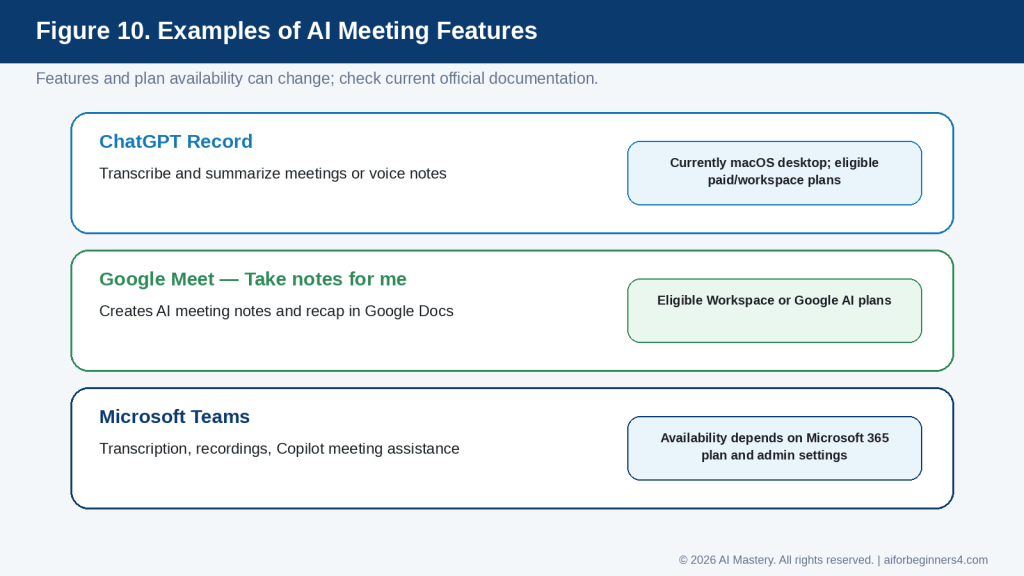
Figure 10. Examples of current AI meeting features from OpenAI, Google, and Microsoft.
Explanation: These tools can help with transcription, notes, summaries, or follow-up, but availability depends on the platform, plan, device, administrator settings, and current provider policies.
Do Not Assume One Consent Rule Applies Everywhere
Privacy and recording requirements can differ by country, province or state, organization, contract, and type of meeting.
For example, Canadian privacy guidance emphasizes meaningful consent for the collection, use, and disclosure of personal information and notes that organizations remain responsible for understanding the specific legal requirements that apply to them.
This article provides general education only and is not legal advice.
Check Where Recordings and Notes Are Stored
Before using an AI meeting feature, check:
· Where the recording or transcript is stored
· Who can access it
· How long it is kept
· Whether it can be shared
· Whether it may be used to improve an AI model
· Whether your organization has separate retention rules
Provider settings and policies can change, so check the current official documentation when first using the feature, when changing plans or workplace accounts, after receiving a policy update, and periodically.
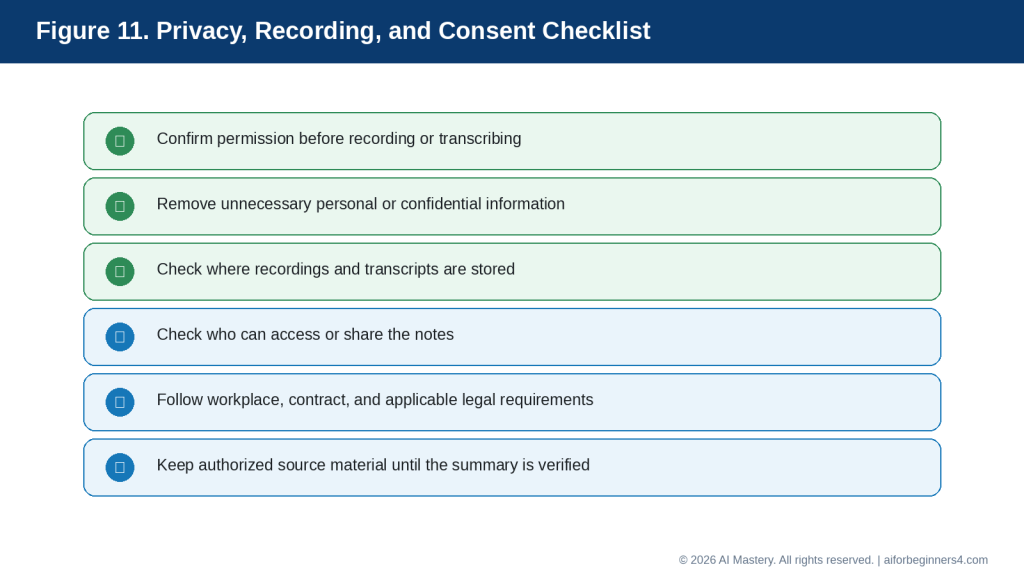
Figure 11. Review privacy, consent, storage, access, and retention before using AI with meeting recordings or transcripts.
Explanation: Meeting data can contain sensitive information about other people, so permission and data-handling rules should be checked before recording, uploading, or sharing it.
Protect Other People’s Information
Do not assume that because you attended a meeting, you have permission to upload every note, transcript, or recording to another service.
Consider whether the material includes:
· Personal information
· Confidential business information
· Customer data
· Employee information
· Financial details
· Health information
· Contract terms
· Information belonging to another organization
Keep the Source Record When Accuracy Matters
If AI creates a summary from a transcript or notes, keep the authorized source material until the summary has been checked.
This is especially important when the meeting includes:
· Important deadlines
· Formal decisions
· Financial commitments
· Contract terms
· Employment matters
· Legal or regulatory issues
Review Before Sharing
Before distributing AI-generated meeting notes, confirm:
· The attendees are identified correctly.
· Decisions are actually confirmed.
· Action items have the correct owners.
· Deadlines are accurate.
· No sensitive information has been added unnecessarily.
· No confidential information is being sent to people who should not receive it.
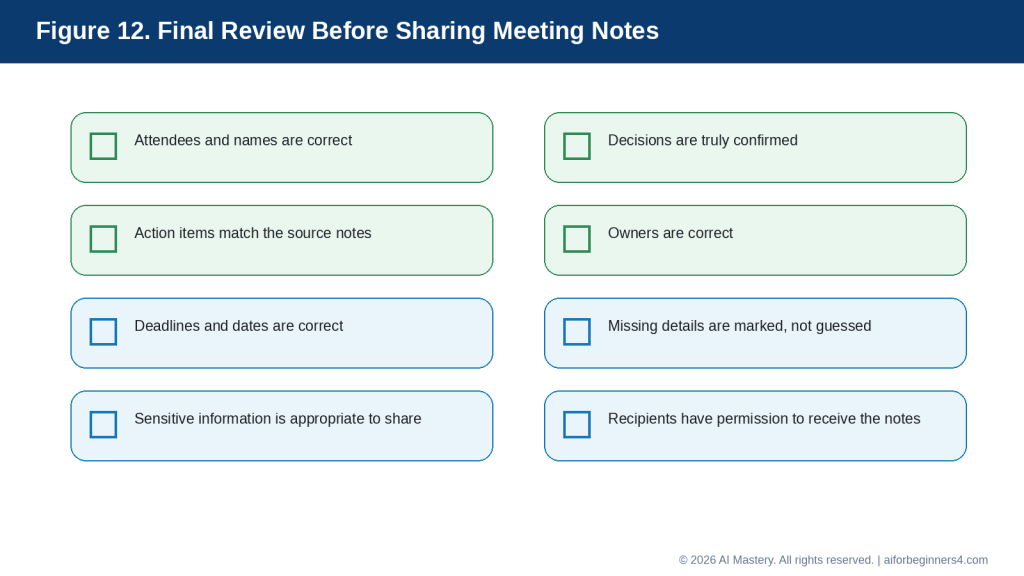
Figure 12. Complete a final human review before sharing AI-organized meeting notes.
Explanation: A final check helps catch errors that may look convincing in a polished AI summary, including incorrect decisions, responsibilities, dates, or sensitive information.
Reality: AI meeting tools can save time, but recording, transcription, privacy, consent, storage, and sharing responsibilities still need human attention.
Frequently Asked Questions
Can AI create a complete meeting agenda for me?
Yes. You can give AI the meeting purpose, available time, main topics, decisions needed, and preferred format, and it can create a first draft.
You should still review the agenda before sharing it because AI may give too much time to minor topics or leave out something important.
Can AI summarize my meeting notes?
Yes. AI can organize rough notes into sections such as:
· Main discussion points
· Decisions
· Action items
· Responsible people
· Deadlines
· Open questions
Tell AI not to invent missing information.
For example:
“Organize these notes into decisions, action items, owners, deadlines, and open questions. If a detail is missing, write ‘Not specified.’”
Can AI tell me what decisions were made?
It can identify statements that appear to be decisions, but it may misunderstand discussion as agreement.
Always compare the result with the original notes or transcript before treating a decision as confirmed.
Can AI identify action items?
Yes. AI can help extract tasks from meeting notes.
You can ask:
“List each action item with the task, responsible person, and deadline. Do not guess missing information.”
This can make follow-up easier.
Can AI create a follow-up email after the meeting?
Yes.
After you have reviewed the meeting notes, you can ask AI to draft a short follow-up email containing the confirmed decisions and action items.
Review the email before sending it.
Can I upload a meeting transcript to an AI tool?
Many AI tools can work with transcripts, but you should first consider privacy, permission, confidentiality, and the rules that apply to your organization or location.
Do not assume that having access to a transcript automatically gives you permission to upload it to another service.
Do I need permission before recording a meeting?
Requirements can vary depending on the location, organization, type of meeting, and applicable rules.
Check the requirements before recording, transcribing, or using an AI meeting-recording feature.
Should I keep my original meeting notes?
Yes, especially when the meeting includes important decisions, deadlines, responsibilities, or sensitive matters.
Keep the original notes or other authorized source material until the AI-generated summary has been checked.
Can AI replace a person who takes meeting minutes?
AI can help organize and summarize information, but it should not automatically be treated as the official record.
Formal or high-stakes meetings may require an approved process, designated note-taker, or specific organizational requirements.
Can AI help prepare questions before a meeting?
Yes.
For example:
“Give me five questions to ask about project progress, risks, deadlines, and responsibilities.”
Review the questions and keep only those that are relevant.
Can AI shorten long meeting notes?
Yes.
You can ask:
“Shorten these notes while keeping all confirmed decisions, action items, owners, deadlines, and unresolved questions.”
Check that important details were not removed.
Is an AI-generated meeting summary automatically accurate?
No.
AI can omit details, misunderstand abbreviations, confuse speakers, or create information that was not recorded.
Always review important summaries before sharing them.
Should I disclose that AI helped prepare the meeting notes?
Requirements can vary by organization, workplace, profession, meeting type, and AI tool.
Follow any applicable policies or disclosure requirements. If AI-generated notes could be mistaken for an official or human-verified record, make sure the status of the notes is clear.
Reality: AI can make meeting preparation and follow-up easier, but the final responsibility for accuracy, privacy, consent, decisions, and distribution remains with the people using the information.
Key Takeaways
AI can help make meeting preparation and follow-up more organized, but the results still need human review.
Remember these main points:
· Start with a clear meeting purpose.
· Tell AI how much time is available for the meeting.
· Include the main topics, decisions needed, and questions that should be answered.
· Ask AI to create realistic time blocks rather than an overly long agenda.
· Keep the original meeting notes, transcript, or other approved source material until the summary has been checked.
· Tell AI not to invent owners, deadlines, decisions, or missing information.
· Separate confirmed decisions from ideas that were only discussed.
· Clearly identify action items, responsible people, deadlines, and unresolved questions.
· Remove unnecessary private or confidential information before using an AI tool.
· Confirm permission and applicable rules before recording or transcribing a meeting.
· Check where recordings, transcripts, and AI-generated notes are stored and who can access them.
· Review names, dates, responsibilities, deadlines, and important facts before sharing the final notes.
· Use extra care with legal, financial, employment, medical, contractual, or other high-consequence meetings.
· Treat AI-generated notes as a draft until an appropriate person has reviewed them.
The most useful AI-generated meeting record is not the one that looks the most polished. It is the one that accurately reflects what was discussed, what was actually decided, who is responsible for each task, and what still needs confirmation.
Final Tip
Keep your meeting workflow simple.
Before the meeting, use AI to help organize the agenda. During the meeting, focus on taking clear notes. After the meeting, use AI to structure those notes into decisions, action items, owners, deadlines, and open questions.
A useful prompt is:
“Organize these meeting notes into confirmed decisions, action items, responsible people, deadlines, and unresolved questions. Do not invent missing information. Mark anything unclear as ‘Needs confirmation.’”
Then compare the AI-generated result with your original notes before sharing it.
For important meetings, do not rely on the polished appearance of an AI summary. Check the facts, responsibilities, deadlines, privacy, consent, and any sensitive information carefully.
The goal is to use AI to reduce the time spent organizing meeting information while keeping people responsible for what was actually discussed, decided, and agreed.
Continue Learning
After you learn how to prepare meeting agendas and organize meeting notes with AI, continue with these related AI Mastery guides:
· Article 077 — AI Productivity for Beginners: Complete Guide (2026) — Review the broader ways AI can help with planning, writing, research, organization, and everyday work.
· Article 078 — How to Create a Daily Plan with ChatGPT (2026) — Learn how to turn tasks, appointments, and priorities into a realistic daily schedule.
· Article 079 — How to Write and Improve Emails with AI (2026) — Learn how to draft, rewrite, shorten, and improve everyday emails with AI.
· Article 081 — How to Research and Organize Information with AI (2026) — Learn how AI can help collect, compare, summarize, and organize information more efficiently. Link after Article 081 is published.
· Article 082 — How to Create a Personal Study Plan with AI (2026) — Learn how AI can help organize study goals, subjects, review sessions, and progress. Link after Article 082 is published.
· Article 083 — How to Organize Files, Tasks, and Projects with AI (2026) — Learn how AI can help structure ongoing work, tasks, and larger projects. Link after Article 083 is published.
These guides build on the same basic approach used in this article: give AI clear instructions, protect unnecessary private information, review the output carefully, and keep people responsible for final decisions and actions.
Sources and References
The following current official sources were reviewed for this guide. AI meeting features, recording options, privacy controls, plan requirements, and administrator settings can change, so readers should check current provider information when first using a feature, after changing plans or workplace accounts, after receiving a policy update, and periodically.
OpenAI Help Center — ChatGPT Record. Current availability, transcription and summary behavior, consent guidance, audio deletion, model-improvement settings, and transcript retention.
OpenAI Help Center — ChatGPT Release Notes. Current ChatGPT feature and availability changes.
Google Meet Help — Take notes for me. AI-generated meeting notes, summaries, sharing, plan requirements, and consent controls.
Google Meet Help — Use Transcripts with Google Meet. Meeting transcription controls, participant visibility, and consent settings.
Microsoft Support — Start, stop, and download live transcripts in Microsoft Teams meetings. Teams transcription permissions, storage, access, and download controls.
Microsoft Support — Start, stop, and find meeting recordings in Microsoft Teams. Teams meeting recording and transcription management.
Microsoft Support — Use Copilot without transcribing or recording a Teams meeting or call. Explains that some Copilot assistance can work without recording or transcription, depending on plan and settings.
Microsoft Support — Generate meeting notes. AI-generated meeting notes and Microsoft’s reminder to verify AI-generated results.
Office of the Privacy Commissioner of Canada — Guidelines for obtaining meaningful consent. Canadian privacy guidance on meaningful consent and organizations’ responsibility to understand applicable legal obligations.
Office of the Privacy Commissioner of Canada — Privacy in the Workplace. Guidance about workplace privacy and meaningful consent.
These sources support the recording, transcription, AI note-taking, consent, privacy, and meeting-management guidance used in this article. The meeting agendas, example notes, prompts, summaries, and follow-up emails in this guide are educational examples and should be reviewed and adapted before being used for a real meeting.
For meetings involving legal, financial, employment, medical, contractual, regulatory, disciplinary, or other high-consequence matters, this article provides general educational information only and is not a substitute for appropriate professional or legal advice.


Leave a Reply