
Estimated Reading Time: 22 minutes
Last Updated: July 2026
What You’ll Learn
By the end of this guide, you’ll be able to:
- Understand what AI image generation is.
- Learn how AI image generators create pictures.
- Understand what a text-to-image prompt is.
- Write clear and effective AI image prompts.
- Discover popular AI image-generation tools.
- Learn how AI-generated images are used in everyday life.
- Understand the benefits and limitations of AI image generation.
- Recognize common myths about AI-generated images.
- Use AI image tools more safely and responsibly.
Introduction
Artificial Intelligence can now create images from simple written instructions. Instead of drawing a picture yourself or searching through hundreds of photographs, you can describe what you want, and an AI image generator can produce a new image within seconds.
For example, you could type:
A friendly robot helping a child study in a bright classroom.
The AI image generator may then create a picture showing a robot, a child, books, desks, and a cheerful learning environment.
The written instruction you give to the AI is called a prompt. A prompt may be very short, or it may include details about the subject, background, colours, lighting, camera angle, and artistic style.
AI-generated images can be used for:
- Blog posts and websites.
- Social media graphics.
- Presentations.
- Educational materials.
- Product ideas.
- Invitations and greeting cards.
- Stories and creative projects.
- Marketing materials.
You do not need to be an artist, photographer, or graphic designer to begin. The most important skill is learning how to describe your idea clearly.
In this beginner-friendly guide, you will learn what AI image generation is, how it works, how to write useful prompts, where AI-generated images are used, and what limitations and safety concerns you should understand.
Before reading this guide, you may find it helpful to read What Is Artificial Intelligence? A Beginner’s Guide (2026), What Is Machine Learning? A Beginner’s Guide (2026), What Is Deep Learning? A Beginner’s Guide (2026), and What Is Generative AI? A Beginner’s Guide (2026). These guides explain the basic technologies that make AI image generation possible.
What Is AI Image Generation?
AI image generation is the process of using Artificial Intelligence to create pictures from written instructions.
You describe the image you want, and the AI image generator creates a new picture based on your description.
For example, you could enter this prompt:
An elderly man learning to use a laptop with help from a friendly robot in a bright living room.
The AI may create an image containing:
- An elderly man sitting beside a laptop.
- A friendly robot providing assistance.
- A comfortable living room.
- Warm lighting and a helpful atmosphere.
The written instruction is called a prompt. The clearer and more detailed the prompt is, the easier it is for the AI to understand what kind of image you want.
The most common form of AI image generation is called text-to-image generation.
This process can be understood simply:
Written prompt → AI image generator → Generated image
The user writes the description, the AI processes the words, and a new image is produced.
AI image generators can create many types of visual content, including:
- Realistic photographs.
- Digital paintings.
- Cartoons.
- Illustrations.
- Logos and icons.
- Fantasy scenes.
- Product concepts.
- Educational diagrams.
- Social media graphics.
The generated image is not usually taken directly from one existing photograph. Instead, the AI creates a new arrangement of colors, shapes, objects, lighting, and visual styles based on patterns it learned during training.
However, AI-generated images are not always perfect. The AI may misunderstand part of the prompt or create unusual details, such as incorrect hands, distorted text, missing objects, or unrealistic backgrounds.
Users can usually improve the image by changing the prompt and generating another version.
AI Image Editing
Some AI image tools can also edit an existing photograph or illustration.
You may be able to ask the AI to:
- Remove an unwanted object.
- Replace the background.
- Add a new person or object.
- Change colours.
- Improve lighting.
- Expand the edges of an image.
- Turn a photograph into a cartoon or painting.
- Repair damaged or unclear areas.
For example, you could upload a photograph of a garden and ask the AI to remove a chair, add colorful flowers, and change the scene from daytime to sunset.
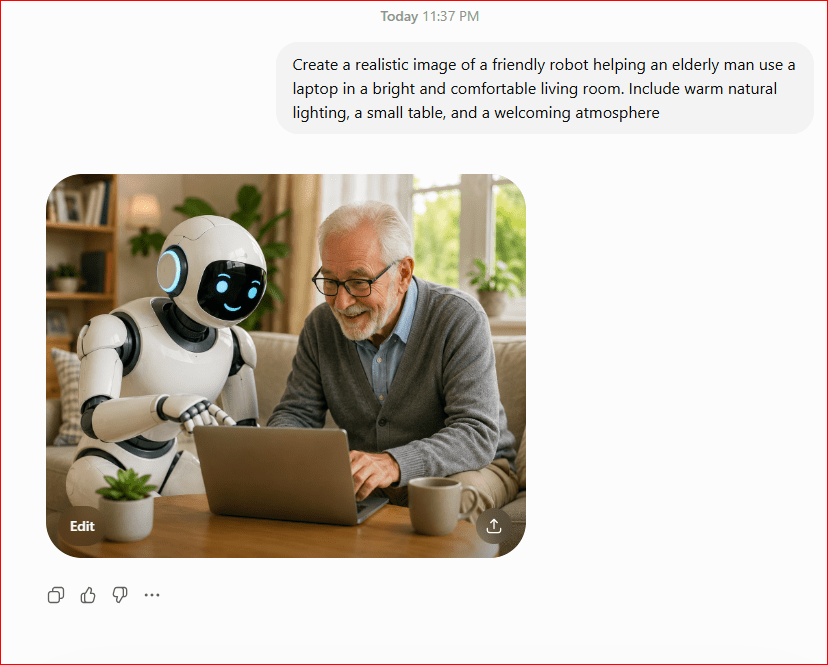
Figure 1. An AI-generated image created from a written text prompt.
This example demonstrates the basic text-to-image process. A written description tells the AI which people, objects, setting, lighting, and mood should appear. The AI then combines these instructions to create a new image. Changing the wording of the prompt may produce a different result.
How Does AI Image Generation Work?
AI image generation works by turning written instructions into visual content.
The process may appear instant, but several steps happen behind the scenes.
Step 1: The AI Reads the Prompt
The process begins when you type a prompt describing the image you want.
For example:
Create a realistic photograph of a small wooden cabin beside a peaceful lake at sunset.
The AI examines important words and phrases, including:
- Small wooden cabin.
- Peaceful lake.
- Sunset.
- Realistic photograph.
These details help the AI understand the subject, location, lighting, mood, and visual style.
Step 2: The AI Connects Words with Visual Ideas
During training, the AI studied a very large number of images and their descriptions.
From this training, it learned relationships between words and visual features.
For example, it may learn that:
- The word lake is often connected with water, reflections, and shorelines.
- The word sunset is often connected with orange, red, pink, and purple skies.
- The word cabin is often connected with wood, windows, roofs, forests, or mountains.
- The word realistic usually means the image should look similar to a photograph.
The AI uses these learned patterns to decide which visual elements should appear.
Step 3: The AI Starts with Visual Noise
Many modern AI image generators begin with a random pattern that looks similar to television static or colored noise.
At first, there is no clear picture.
The AI gradually changes this random pattern by removing unnecessary noise and adding visual details that match the prompt.
You can compare this process to watching a blurry image slowly become clearer.
Step 4: The Image Becomes More Detailed
The AI repeatedly improves the picture.
It may gradually add:
- The shape of the cabin.
- Trees and mountains.
- Reflections in the water.
- Clouds in the sky.
- Sunset colors.
- Shadows and lighting.
- Small details such as windows, doors, and rocks.
Each step brings the image closer to the written description.
Step 5: The Final Image Is Produced
After the AI completes the process, it displays the finished image.
Many AI image generators produce several versions from the same prompt. Each version may have different colours, angles, backgrounds, or details.
The user can then:
- Choose the best version.
- Generate another image.
- Change the prompt.
- Add more details.
- Ask the AI to edit part of the image.
- Download or save the final result.
The same prompt may create a different image each time because the AI begins with a different random pattern.
An Everyday Comparison
Imagine giving instructions to an artist.
You might say:
Please draw a peaceful beach with palm trees, blue water, and a small boat during sunrise.
The artist listens to your description and uses their knowledge of beaches, boats, colours, lighting, and composition to create the picture.
An AI image generator follows a similar process, but it uses learned mathematical patterns instead of human experience and artistic judgment.
The AI does not imagine, feel, or understand the scene like a human artist. It calculates which visual details are most likely to match the words in the prompt.
.
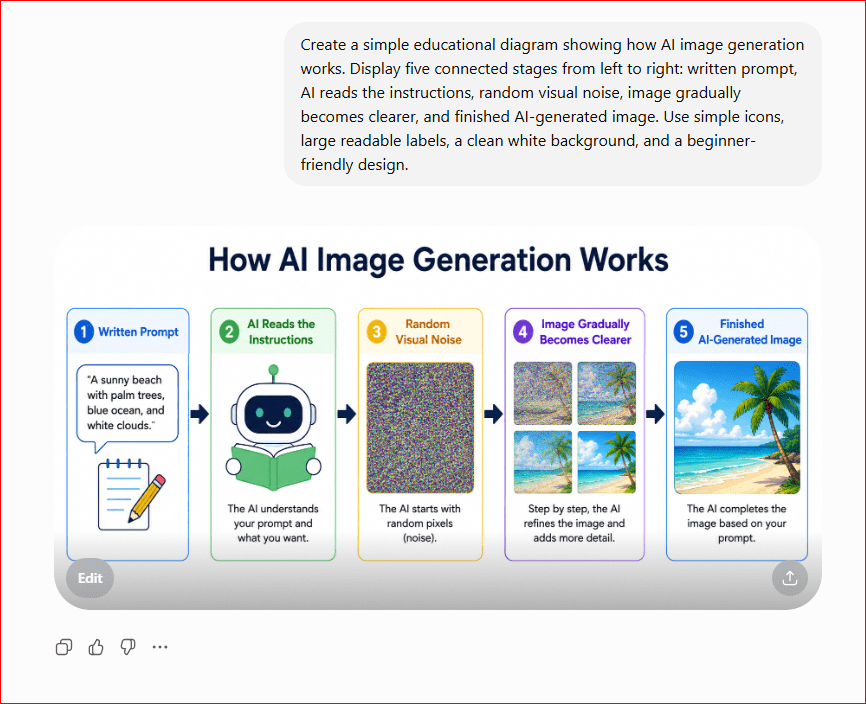
Figure 2. The basic process of creating an AI-generated image from a written prompt.
This diagram shows the main stages of AI image generation. The user begins by writing a prompt. The AI analyzes the instructions, connects the words with learned visual patterns, and gradually changes random noise into a finished picture. The process happens quickly, but the final result depends greatly on the clarity and detail of the prompt.
What Is an AI Image Prompt?
An AI image prompt is the written instruction you give to an AI image generator.
The prompt tells the AI what kind of image you want it to create. It may describe the main subject, location, colours, lighting, mood, artistic style, and other visual details.
For example, a simple prompt might be:
Create an image of a cat sitting beside a window.
The AI understands that the main subject is a cat and that the scene should include a window.
However, the prompt does not explain:
- What the cat looks like.
- What kind of room it is in.
- Whether the image should look realistic or artistic.
- What time of day it is.
- What mood the image should create.
Because the instructions are limited, the AI must make many decisions by itself.
Simple Prompt
A simple prompt contains only the basic idea.
For example:
A dog running through a park.
This prompt may produce a suitable image, but the result could be very different from what you imagined.
The AI may choose the dog’s breed, color, size, background, weather, lighting, and image style without additional instructions.
Detailed Prompt
A detailed prompt gives the AI more information.
For example:
A happy golden retriever running through a green city park on a sunny spring morning, realistic photography, natural lighting, flowers in the background, wide-angle view.
This prompt explains:
- Main subject: A golden retriever.
- Action: Running.
- Location: A city park.
- Time and weather: A sunny spring morning.
- Style: Realistic photography.
- Lighting: Natural lighting.
- Background: Green grass and flowers.
- Camera view: Wide-angle view.
Detailed prompts usually give the user more control over the final result.
However, a prompt does not need to be extremely long. The best prompts are clear, specific, and focused on the most important details.
Main Parts of an AI Image Prompt
A useful AI image prompt may include several parts.
Main Subject
The main subject is the person, animal, object, or place that should appear in the image.
Examples include:
- A friendly robot.
- A family eating dinner.
- A red sports car.
- A mountain cabin.
- A bowl of fresh fruit.
Action or Activity
Explain what the subject is doing.
Examples include:
- Walking through a forest.
- Reading a book.
- Cooking in a kitchen.
- Driving along a coastal road.
- Working on a laptop.
Setting or Background
Describe where the scene takes place.
Examples include:
- In a modern office.
- Beside a peaceful lake.
- Inside a bright classroom.
- On a busy city street.
- In a garden filled with flowers.
Image Style
Tell the AI what visual style you want.
Examples include:
- Realistic photography.
- Watercolor painting.
- Cartoon illustration.
- Digital art.
- Pencil drawing.
- 3D animation.
- Vintage poster.
Lighting
Lighting can change the appearance and mood of an image.
Examples include:
- Soft natural lighting.
- Bright studio lighting.
- Warm sunset lighting.
- Dramatic shadows.
- Colourful neon lighting.
Mood or Atmosphere
Describe how the image should feel.
Examples include:
- Peaceful.
- Cheerful.
- Professional.
- Mysterious.
- Exciting.
- Relaxing.
View or Composition
You may also tell the AI how the scene should be shown.
Examples include:
- Close-up view.
- Wide-angle view.
- View from above.
- Eye-level view.
- Subject centered in the image.
- Plenty of empty space for text.
A Simple Prompt Formula
Beginners can use this basic structure:
Subject + action + setting + style + lighting + mood
For example:
A retired man learning to use a computer in a comfortable home office, realistic photography, warm natural lighting, friendly and encouraging atmosphere.
You do not need to include every part in every prompt. Add only the details that are important to the image you want.
Why Clear Prompts Matter
A vague prompt gives the AI more freedom to make its own decisions.
A clear prompt gives you more control.
Compare these two examples:
Vague prompt:
Create a picture of a house.
Clear prompt:
Create a realistic photograph of a small white house with a red roof, surrounded by green trees, during a bright summer afternoon.
The second prompt is more likely to produce an image that matches the user’s idea.
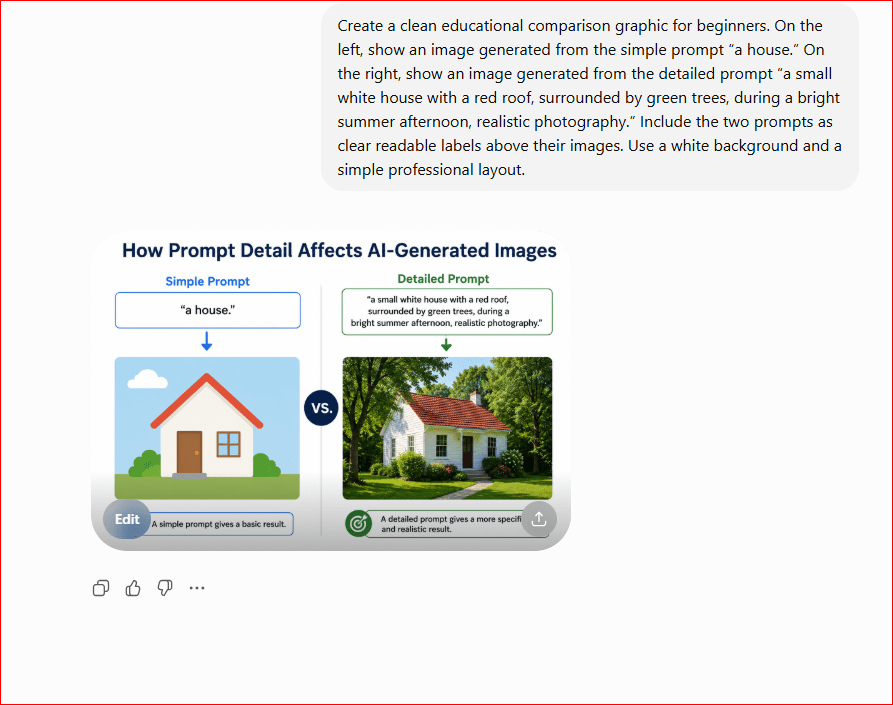
Figure 3. A comparison between a simple AI image prompt and a detailed prompt.
How to Write a Good AI Image Prompt
This comparison shows how additional details can give the user more control over an AI-generated image. The simple prompt allows the AI to choose most of the visual elements. The detailed prompt provides clearer instructions about the house, roof, surroundings, lighting, and image style.
Writing a good AI image prompt means giving the AI clear instructions about what you want to see.
You do not need to use complicated technical language. A useful prompt simply describes the most important visual details in a clear and organized way.
Start with the Main Subject
Begin by identifying the main person, animal, object, or place.
For example:
A woman using a laptop.
This gives the AI a basic subject, but it still leaves many details undecided.
You can make the subject clearer by adding more information:
A retired woman using a laptop at a wooden desk.
The second prompt gives the AI a better understanding of the person and the setting.
Describe the Action
Explain what the subject is doing.
Examples include:
- Reading a book.
- Preparing a meal.
- Walking through a garden.
- Teaching a class.
- Working on a computer.
- Playing with a dog.
- Driving a car.
Compare these prompts:
An elderly man in a kitchen.
An elderly man preparing a healthy breakfast in a modern kitchen.
The second prompt creates a clearer scene because it includes an action.
Add the Setting
Describe where the scene takes place.
The setting may include:
- A comfortable living room.
- A modern office.
- A peaceful beach.
- A busy city street.
- A bright classroom.
- A mountain village.
- A small family kitchen.
For example:
A young student reading a book.
You could improve it by writing:
A young student reading a book in a quiet school library.
The additional setting helps the AI create a more complete background.
Choose the Image Style
The style tells the AI how the image should look.
Common styles include:
- Realistic photography.
- Cartoon illustration.
- Digital painting.
- Watercolor painting.
- Pencil drawing.
- 3D animation.
- Vintage poster.
- Children’s book illustration.
- Professional product photography.
For example:
A small cottage beside a lake, watercolor painting.
The words watercolor painting tell the AI to create an artistic image rather than a realistic photograph.
Describe the Lighting
Lighting can change the mood and appearance of the image.
Useful lighting descriptions include:
- Soft natural lighting.
- Bright daylight.
- Warm sunset lighting.
- Morning sunlight.
- Dramatic studio lighting.
- Candlelight.
- Colourful neon lighting.
- Soft light coming through a window.
For example:
A family eating dinner in a comfortable dining room, warm evening lighting.
The lighting helps create a welcoming and peaceful atmosphere.
Add the Mood
The mood describes how the image should feel.
Examples include:
- Friendly.
- Cheerful.
- Peaceful.
- Professional.
- Exciting.
- Mysterious.
- Relaxing.
- Hopeful.
- Elegant.
For example:
A teacher helping a student in a bright classroom, friendly and encouraging atmosphere.
The mood helps the AI decide how the people, colors, lighting, and expressions should appear.
Select the Camera View or Composition
The composition describes how the subject should be positioned inside the image.
You can use instructions such as:
- Close-up view.
- Wide-angle view.
- Full-body view.
- View from above.
- Eye-level view.
- Subject centred.
- Background slightly blurred.
- Empty space on the left for text.
- Horizontal website-banner layout.
- Square social media layout.
For example:
A bowl of fresh fruit on a kitchen table, close-up view, soft natural lighting, background slightly blurred.
These instructions help control how the final image is framed.
Use a Simple Prompt Structure
Beginners can follow this structure:
Main subject + action + setting + style + lighting + mood + composition
For example:
A retired man learning to use a laptop in a comfortable home office, realistic photography, warm natural lighting, friendly and encouraging atmosphere, eye-level view.
This prompt explains:
- Who should appear.
- What the person is doing.
- Where the scene takes place.
- How the image should look.
- What lighting should be used.
- What mood the image should create.
- How the scene should be framed.
You do not need to include every part in every prompt. Include only the details that are important to your idea.
Be Specific, but Avoid Unnecessary Details
A prompt should be clear, but it does not need to become a long paragraph.
Too few details may produce an unpredictable result. Too many unrelated details may confuse the AI.
For example:
Too vague:
A business meeting.
Clearer prompt:
Four business professionals discussing a project around a conference table in a modern office, realistic photography, bright natural lighting, professional atmosphere.
The clearer prompt provides enough information without becoming unnecessarily complicated.
Put Important Details Near the Beginning
Many AI image generators pay close attention to the first part of the prompt.
Place the most important subject and action near the beginning.
For example:
A friendly white robot teaching two children how to use a computer in a bright classroom, colorful educational illustration.
The robot and children are introduced first because they are the main focus.
Use Descriptive Words
Descriptive words help the AI understand the appearance of the scene.
Instead of writing:
A garden.
Try:
A colorful flower garden with roses, tulips, green grass, and a stone pathway during a sunny spring morning.
Useful descriptive words may explain:
- Size.
- Color.
- Age.
- Material.
- Shape.
- Weather.
- Season.
- Emotion.
- Style.
- Condition.
For example:
A small old wooden boat floating on calm blue water during a misty morning.
Explain What You Do Not Want Carefully
Some AI image generators support negative prompts. A negative prompt tells the AI which elements should not appear.
Examples include:
- No text.
- No watermark.
- No people in the background.
- No distorted hands.
- No extra objects.
- No blurry details.
A complete instruction might be:
A professional photograph of a modern home office with a laptop, notebook, and coffee cup, soft natural lighting, no people, no visible text, no watermark.
Not every AI image generator handles negative instructions in the same way. Sometimes it is better to focus on clearly describing what you do want.
Generate More Than One Version
The first image may not perfectly match your idea.
Many AI image tools can create several versions from the same prompt. Review each result and choose the image that best fits your needs.
Look for problems such as:
- Missing objects.
- Unusual faces.
- Incorrect fingers or hands.
- Distorted backgrounds.
- Unreadable text.
- Objects appearing in the wrong place.
- Colors that do not match your instructions.
Generating several options gives you a better chance of finding a suitable image.
Improve the Prompt Step by Step
Prompt writing is often a process of testing and improving.
Suppose your first prompt is:
A robot in an office.
The image may be too general.
You could improve it:
A friendly white robot working at a laptop in a modern office.
Then improve it again:
A friendly white robot working at a laptop in a modern office, realistic photography, soft daylight coming through large windows, professional and welcoming atmosphere, eye-level view.
Each version gives the AI more direction.
Change One Detail at a Time
When an image is close to what you want, avoid rewriting the entire prompt immediately.
Change one or two details at a time.
For example:
- Change the background.
- Adjust the lighting.
- Change the clothing color.
- Request a wider view.
- Remove an unwanted object.
- Add empty space for a website title.
- Change the style from realistic to cartoon.
This makes it easier to understand which instruction improved the result.
Check the Final Image Carefully
Before using an AI-generated image, examine it closely.
Check:
- Faces and hands.
- Words and signs.
- Clothing and objects.
- Background details.
- Shadows and reflections.
- Logos and brand names.
- Cultural or historical accuracy.
- Whether the image matches the intended audience.
AI-generated images can appear realistic while still containing small mistakes. Careful review is especially important when the image will be used on a website, in educational material, or for business purposes.
Example: Building a Prompt Step by Step
Basic idea:
A man using a computer.
Add the person:
A retired man using a computer.
Add the setting:
A retired man using a computer in a comfortable home office.
Add the style and lighting:
A retired man using a computer in a comfortable home office, realistic photography, warm natural lighting.
Add the mood and composition:
A retired man using a computer in a comfortable home office, realistic photography, warm natural lighting, friendly and confident atmosphere, eye-level view, horizontal composition.
The final prompt gives the AI much clearer instructions while remaining easy to understand.
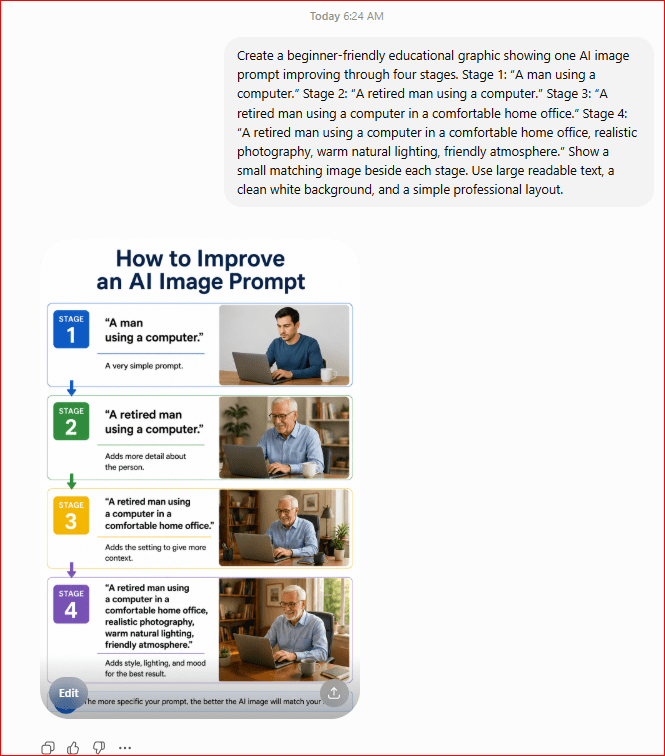
Figure 4. Building a clearer AI image prompt by adding useful details step by step.
This example demonstrates how a basic idea can be improved by adding information about the subject, setting, style, lighting, and mood. Each added detail gives the AI more direction and increases the chance of producing an image that matches the user’s idea.
Popular AI Image Generation Tools
Many AI image generators are available today. Some are built into chat assistants, while others are included in graphic-design platforms or specialized creative services.
These tools may produce different results even when they receive the same prompt. One tool may be better for realistic photographs, while another may be better for illustrations, posters, product concepts, or artistic images.
There is no single tool that is best for every person or every project. The right choice depends on what you want to create, how much control you need, and how easy you want the tool to be.
ChatGPT Images
ChatGPT allows users to create images by describing what they want in ordinary language.
For example, you could write:
Create a realistic image of a retired man learning Artificial Intelligence at a laptop in a bright home office.
After the image is created, you can continue the conversation and request changes such as:
- Make the room brighter.
- Change the shirt color.
- Add a notebook to the desk.
- Create a wider version for a website.
- Remove an unwanted object.
- Turn the image into a cartoon illustration.
This conversational approach makes ChatGPT suitable for beginners because users can improve an image by simply explaining what they want changed. OpenAI also supports generating original images, creating variations, adjusting composition, and refining existing visual ideas through follow-up instructions.
Best for:
- Complete beginners.
- Blog images.
- Educational illustrations.
- Social media graphics.
- Posters and simple designs.
- Creating and editing images through conversation.
Google Gemini
Google Gemini can generate images from written prompts and help users refine the result through follow-up requests.
For example:
Create a colorful illustration of a friendly robot teaching a beginner how to use Artificial Intelligence.
You may then ask Gemini to change the background, adjust the style, add objects, or create another version.
Gemini is useful for people who already use Google products and want to create images through a conversational AI assistant. Google also provides image-generation features in some of its productivity applications, although availability can depend on the account, plan, country, and product being used.
Best for:
- General image creation.
- Educational graphics.
- Creative ideas.
- Google-product users.
- Creating and refining images through conversation.
Adobe Firefly
Adobe Firefly is a collection of generative AI tools designed for creative work.
It can help users:
- Generate images from written prompts.
- Add or remove parts of an image.
- Replace backgrounds.
- Expand an image beyond its original borders.
- Create text effects.
- Generate design elements.
- Edit images using written instructions.
Firefly is available as a standalone service and is also connected with several Adobe creative applications. This makes it useful for people who want to generate an image and then continue editing it in a professional design program.
For example:
Create a professional photograph of a modern home office with a laptop, notebook, indoor plant, and soft natural lighting.
Best for:
- Graphic design.
- Marketing materials.
- Photo editing.
- Professional creative projects.
- Adobe Creative Cloud users.
Canva AI Image Generator
Canva includes AI image-generation tools inside its design platform.
Users can create an image from a prompt and place it directly into:
- Social media posts.
- Presentations.
- Posters.
- Invitations.
- Website graphics.
- YouTube thumbnails.
- Flyers.
- Blog images.
Canva’s Magic Media can turn a text prompt into an image and lets users choose styles and image proportions. Because the image is created inside Canva, users can immediately add headings, icons, shapes, colors, and other design elements.
For example:
Create a clean illustration of a person learning AI at home, blue and white colour theme, friendly modern style.
Best for:
- Beginners.
- Social media content.
- Blog graphics.
- Presentations.
- Posters and flyers.
- People who want image generation and design tools in one place.
Microsoft Copilot and Bing Image Creator
Microsoft provides AI image-generation features through Copilot and Bing Image Creator.
Users can describe an image in natural language and create photographs, illustrations, cartoons, artwork, and other visual styles. Copilot can also help refine or edit an image using follow-up instructions.
For example:
Create a cheerful illustration of an older beginner attending an online Artificial Intelligence lesson.
Microsoft’s image tools may be convenient for people who already use Windows, Microsoft Edge, Bing, or Microsoft 365.
Best for:
- Everyday image creation.
- Presentation graphics.
- School and personal projects.
- Microsoft-product users.
- Beginners looking for a simple text-to-image tool.
Midjourney
Midjourney is a specialized AI tool for creating highly detailed and artistic images.
A user provides a text prompt describing the desired image. Midjourney then generates several visual options that the user can review and refine.
For example:
An ancient library filled with glowing books, cinematic lighting, detailed fantasy illustration.
Midjourney also supports image prompts, style references, editing tools, and other controls that can influence the appearance of the final result. It can be used through its website, and some features are also available through Discord.
Midjourney can produce impressive results, but beginners may need time to learn its prompts, settings, and controls.
Best for:
- Artistic images.
- Fantasy scenes.
- Concept art.
- Detailed illustrations.
- Creative professionals.
- Users who want greater control over visual style.
Which AI Image Generator Is Best for Beginners?
For someone creating their first AI image, ChatGPT, Canva, Gemini, Microsoft Copilot, or Bing Image Creator may be easier starting points.
These tools allow users to enter prompts in ordinary language without learning many technical settings.
Canva may be especially useful when the image will be placed inside a poster, social media post, or presentation.
ChatGPT or Gemini may be more suitable when the user wants to create an image through conversation and request several changes.
Adobe Firefly may be a better choice for users who want stronger editing tools or already work with Adobe products.
Midjourney may suit users who want highly artistic results and are willing to spend more time learning creative controls.
The Same Prompt Can Produce Different Results
Consider this prompt:
A peaceful mountain cabin beside a lake at sunrise, realistic photography.
Different tools may create:
- Different cabin designs.
- Different mountains.
- Different lighting.
- Different colors.
- Different camera angles.
- Different levels of realism.
This does not necessarily mean one result is wrong. Each AI tool interprets the prompt using its own technology, training, settings, and creative rules.
It is often helpful to test the same prompt in more than one tool and compare the results.
Important Note About Plans and Limits
Some AI image generators provide limited access without payment, while others require a subscription or offer additional features through paid plans.
Image limits, available tools, editing options, and subscription rules can change. Before choosing a service, check its current official information and terms.
Beginners should start with one simple tool rather than opening accounts with many different services. Learn how to write clear prompts, generate several versions, and improve the results. After gaining experience, it becomes easier to compare other tools.
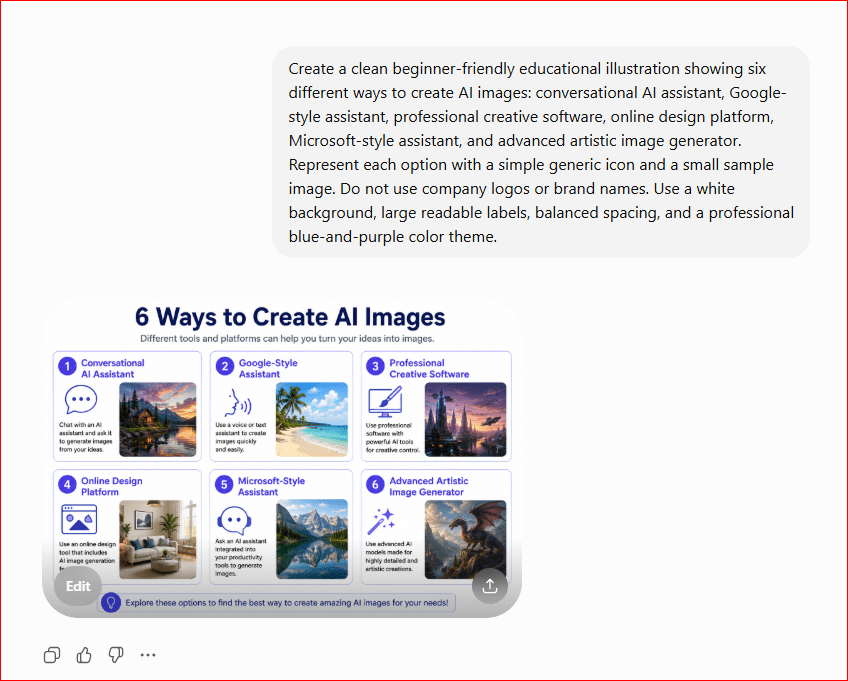
Figure 5. Different types of AI image-generation tools available to beginners.
This illustration shows that AI image generators are available in several forms. Some work like conversational assistants, some are built into graphic-design platforms, and others provide advanced artistic controls. The best tool depends on the user’s experience, project, preferred workflow, and desired image style.
What Can AI Image Generation Be Used For?
AI image generation can be used for many personal, educational, creative, and business purposes.
It can help people create visual content more quickly, especially when they do not have professional drawing, photography, or graphic-design skills.
However, the final image should always be reviewed carefully before it is published or shared.
Blog Posts and Websites
AI-generated images can make articles and webpages more attractive and easier to understand.
They may be used as:
- Featured images.
- Section illustrations.
- Tutorial graphics.
- Website banners.
- Background images.
- Simple educational diagrams.
- Images for landing pages.
For example, a beginner writing an article about online learning could use this prompt:
A retired man attending an online Artificial Intelligence lesson at home, realistic photography, bright natural lighting, friendly atmosphere, horizontal website layout.
The generated image could be used near the beginning of the article.
When creating website images, it is helpful to request a horizontal composition and enough empty space around the main subject.
Social Media Content
AI images can be used to create visual content for platforms such as Facebook, Instagram, Pinterest, Linked In, and X.
Examples include:
- Educational posts.
- Motivational graphics.
- Promotional images.
- Announcements.
- Holiday greetings.
- Event graphics.
- Quote backgrounds.
- Product previews.
For example:
A cheerful illustration of a small business owner using Artificial Intelligence to create social media content, modern flat-design style, blue and purple colors, square layout.
After creating the image, the user can add text, a logo, or other design elements using Canva or another graphic-design tool.
Educational Materials
Teachers, students, parents, and bloggers can use AI-generated images to explain ideas visually.
Images may be created for:
- Lessons.
- Worksheets.
- Presentations.
- Study guides.
- Flashcards.
- Children’s learning materials.
- Historical scenes.
- Scientific illustrations.
- Language-learning exercises.
For example, a teacher could request:
A colorful educational illustration showing the water cycle with clouds, rain, rivers, evaporation, and the sun, simple labels, suitable for children.
AI can help create the basic visual, but educational facts and labels should always be checked for accuracy.
Presentations
AI-generated images can make presentations more engaging.
They can be used for:
- Title slides.
- Section backgrounds.
- Concept illustrations.
- Business examples.
- Training materials.
- Classroom presentations.
- Community events
For example:
A professional illustration of a team discussing an Artificial Intelligence project in a modern office, clean corporate style, horizontal composition, empty space on the left for presentation text.
The empty space allows the presenter to add a title without covering the main subject.
Marketing and Advertising
Businesses can use AI-generated images to explore marketing ideas and create promotional visuals.
Possible uses include:
- Social media advertisements.
- Email banners.
- Product campaigns.
- Website promotions.
- Seasonal offers.
- Poster concepts.
- Brand mood boards.
- Advertising ideas.
For example:
A professional promotional image of a modern travel bag beside a passport and sunglasses on a clean airport bench, realistic product photography, bright lighting, empty space for advertising text.
Businesses should check the rules of the AI tool before using generated images commercially. They should also avoid creating images that copy protected brands, characters, artwork, or living artists too closely.
Product Ideas and Concept Images
AI image generation can help people visualize a product before it is manufactured.
It may be used to explore ideas for:
- Furniture.
- Clothing.
- Packaging.
- Electronics.
- Home decorations.
- Toys.
- Jewelry.
- Vehicles.
- Website designs.
For example:
A modern reusable water bottle with a built-in digital temperature display, blue and silver design, professional product photography, white studio background.
The result is a concept image, not a technical manufacturing plan. Engineers, designers, and manufacturers still need to confirm whether the product can be built safely and realistically.
Stories and Creative Writing
Writers can use AI-generated images to visualize characters, settings, and important scenes.
Images may be created for:
- Short stories.
- Children’s books.
- Fantasy worlds.
- Comic concepts.
- Poetry.
- Character ideas.
- Book covers.
- Storyboards.
For example:
A curious young explorer entering a glowing underground library filled with ancient books, detailed children’s-book illustration, warm magical lighting.
Writers should keep the appearance of characters consistent across multiple images by repeating important details in every prompt.
Invitations and Greeting Cards
AI-generated images can be used for personal occasions such as:
- Birthdays.
- Weddings.
- Anniversaries.
- Graduations.
- Baby showers.
- Religious celebrations.
- Holiday greetings.
- Thank-you cards.
For example:
An elegant birthday card background with blue flowers, gold decorations, soft lighting, empty space in the center for a message.
The image can then be placed into Canva or another design program, where the user can add the event details.
YouTube Thumbnails
AI image generators can help create attention-grabbing images for YouTube videos.
A useful thumbnail image should usually include:
- One clear main subject.
- Strong facial expressions when appropriate.
- Bright lighting.
- Good contrast.
- A simple background.
- Empty space for a short title.
For example:
A surprised older beginner looking at an AI-generated picture on a laptop screen, bright studio lighting, colorful background, wide YouTube-thumbnail layout, empty space on the right for text.
Text is often added afterward in Canva because AI image generators may create misspelled or distorted words.
Logos and Brand Concepts
AI can help generate ideas for logos, symbols, colour combinations, and brand styles.
For example:
A simple modern logo concept showing a human brain combined with digital circuits, blue and purple colour palette, clean flat-vector style, white background.
AI-generated logo ideas should be treated as starting points.
Before using a logo professionally, check that it does not resemble an existing trademark. A final logo may also need to be recreated as a clean vector file by a designer.
Personal and Family Projects
People can use AI image generation for enjoyable personal projects.
Examples include:
- Family calendars.
- Custom wallpapers.
- Recipe illustrations.
- Hobby projects.
- Home-decoration ideas.
- Garden designs.
- Travel posters.
- Family greeting cards.
- Personalized story images.
For example:
A peaceful backyard garden with raised vegetable beds, colorful flowers, a small seating area, and a stone pathway, realistic landscape design.
The image can help a homeowner visualize possible ideas before making changes.
Restoring and Editing Images
Some AI tools can improve or modify existing pictures.
They may help users:
- Remove unwanted objects.
- Repair damaged areas.
- Improve lighting.
- Sharpen unclear details.
- Replace a background.
- Add missing space around an image.
- Colorize an old black-and-white photograph.
- Create a different artistic version.
AI editing should be used carefully with important family photographs. Always keep the original file because AI may accidentally change faces, clothing, objects, or historical details.
Creating Several Ideas Quickly
One of the most useful applications of AI image generation is creating several visual ideas in a short time.
For example, a blogger preparing a featured image could generate:
- A realistic version.
- A cartoon version.
- A digital-painting version.
- A simple educational illustration.
- A clean professional version.
The blogger can then compare the options and select the image that best matches the article and audience.
Important Reminder
AI-generated images should not automatically be treated as accurate photographs of real events.
A realistic-looking image may show a scene that never happened.
Users should avoid presenting AI-generated images as genuine evidence, news photography, historical records, medical results, or proof of an event.
When necessary, clearly state that an image was created or edited using Artificial Intelligence.
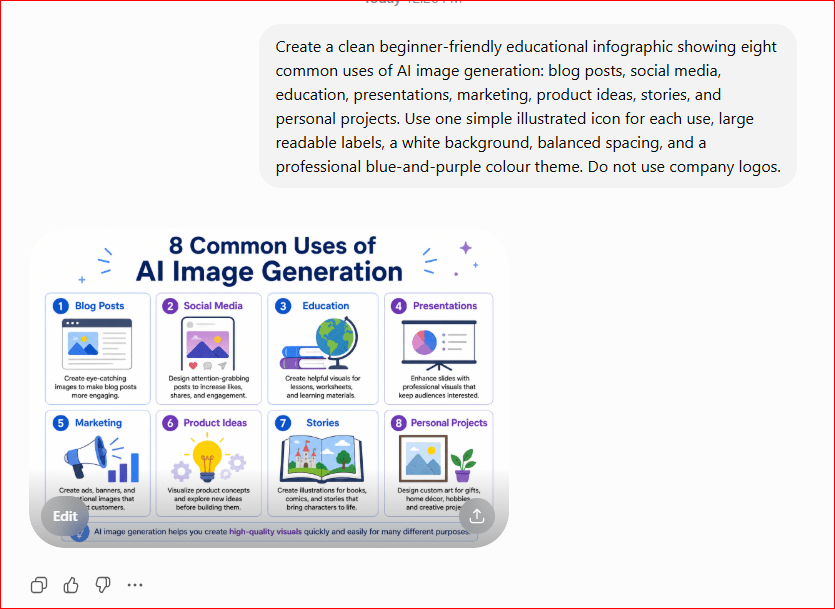
Figure 6. Common personal, educational, creative, and business uses of AI image generation.
This infographic shows that AI-generated images can support many different activities. They can help beginners create visual content for websites, lessons, presentations, marketing, stories, product concepts, and personal projects. The final image should still be checked for mistakes, accuracy, and suitability before it is used.
Benefits of AI Image Generation
AI image generation offers many benefits for beginners, creators, students, teachers, bloggers, and businesses.
It can make visual content easier to create, reduce the time needed to develop ideas, and help people communicate concepts that may be difficult to explain with words alone.
Saves Time
Traditional image creation may require photography, drawing, graphic-design software, or searching through stock-image websites.
AI image generators can produce several visual ideas within seconds.
For example, a blogger preparing an article about online learning could quickly generate:
- A realistic home-learning scene.
- A cartoon classroom illustration.
- A simple educational graphic.
- A website banner.
- A social media image.
This allows the user to compare several options before choosing the best one.
Helps Beginners Create Visual Content
A person does not need advanced drawing or design skills to begin using an AI image generator.
The main requirement is the ability to describe an idea clearly.
For example:
A friendly robot helping an older beginner learn Artificial Intelligence at home, colorful digital illustration, warm and encouraging atmosphere.
The AI handles much of the visual creation process while the user provides the idea and instructions.
Makes Ideas Easier to Visualize
Sometimes an idea is clear in your mind but difficult to explain to another person.
AI image generation can turn that idea into a visual example.
This may be useful when planning:
- A room design.
- A garden.
- A product.
- A logo concept.
- A website layout.
- A book character.
- A marketing campaign.
- A presentation.
The generated image can help other people understand the idea more quickly.
Encourages Creativity
AI image generators can help users explore new styles, settings, colors, and visual concepts.
A person can test several versions of the same idea.
For example, the prompt:
A small cabin beside a lake.
could be created as:
- Realistic photography.
- Watercolor painting.
- Pencil drawing.
- Children’s-book illustration.
- Fantasy artwork.
- Vintage travel poster.
- 3D animation.
Trying different styles may lead to creative ideas that the user had not considered before.
Produces Several Versions Quickly
AI image tools can usually generate more than one image from the same prompt.
Each version may have a different:
- Camera angle.
- Background.
- Color combination.
- Lighting style.
- Facial expression.
- Object arrangement.
- Level of detail.
Users can compare the results and select the image that best matches their needs.
Supports Learning and Education
Visual examples can make difficult subjects easier to understand.
AI-generated images may support lessons about:
- Science.
- History.
- Geography.
- Technology.
- Language learning.
- Art.
- Business.
- Everyday life.
For example, a teacher could generate an illustration showing how solar panels collect energy from sunlight.
However, educational images should always be checked carefully because AI may create incorrect labels, inaccurate objects, or misleading details.
Reduces Dependence on Stock Images
Stock-image websites contain many useful photographs, but it may be difficult to find an image that matches a very specific idea.
An AI image generator can create a customized scene based on the user’s instructions.
For example, it may be difficult to find a stock photograph showing:
A retired beginner learning Artificial Intelligence with help from a friendly robot in a bright Canadian home office.
An AI image generator can attempt to create that exact combination.
Users must still review the image and check the tool’s usage rules before publishing it.
Allows Easy Experimentation
AI image generation makes it easier to test ideas without completing a full design project.
A user can quickly change:
- The background.
- The clothing.
- The lighting.
- The color theme.
- The image style.
- The position of the subject.
- The size or shape of the image.
- The mood of the scene.
This allows people to explore several possibilities before spending more time or money on a final design.
Supports Different Image Sizes and Layouts
Many AI image tools can create images for different purposes.
Examples include:
- Square images for social media.
- Horizontal images for websites.
- Vertical images for posters or Pinterest.
- Wide images for presentation slides.
- Banner images for webpages.
- Portrait images for characters.
Users should mention the desired composition in the prompt.
For example:
A professional illustration of a person learning AI at a laptop, horizontal website-banner layout, subject on the right, empty space on the left for a title.
Can Help Small Businesses
Small businesses may use AI-generated images to explore marketing ideas without immediately hiring a photographer or designer for every early concept.
Possible uses include:
- Social media posts.
- Product mock-ups.
- Advertising ideas.
- Website banners.
- Email graphics.
- Seasonal promotions.
- Presentation visuals.
- Brand mood boards.
AI images should not replace professional photography or design in every situation. Important campaigns, product images, packaging, and logos may still require experienced professionals.
Supports Personalization
AI image prompts can be adjusted for a particular audience, event, or message.
For example, the same educational concept could be presented as:
- A colorful image for children.
- A simple diagram for beginners.
- A professional image for business users.
- A large-print design for older adults.
- A friendly illustration for social media.
Personalization can make visual content more relevant and easier for the intended audience to understand.
Helps Overcome Creative Blocks
Sometimes a person knows they need an image but does not know where to begin.
AI image generation can provide a starting point.
A user might ask:
Create four visual ideas for a beginner-friendly article about Artificial Intelligence.
The results may help the user choose a direction, improve the prompt, or develop a completely new idea.
Can Improve Accessibility
AI-generated visuals can help make information easier to understand for people who prefer visual learning.
They may also support:
- Simple illustrations for difficult topics.
- Step-by-step diagrams.
- Clear visual examples.
- Large and uncluttered designs.
- Images designed for a particular reading level.
However, accessibility also requires proper alt text, readable contrast, clear labels, and simple layouts. The image alone is not enough.
Works Best with Human Judgment
The greatest benefit of AI image generation is not that it replaces people.
Its real value is that it helps people create, explore, and communicate ideas more efficiently.
The user still needs to:
- Write the prompt.
- Review the result.
- Identify mistakes.
- Choose the best image.
- Confirm that the image is suitable.
- Edit the final design.
- Check copyright and usage rules.
- Decide whether the image should be published.
AI image generation works best as a creative assistant rather than a replacement for human judgment.
Limitations of AI Image Generation
AI image generation is powerful, but it is not perfect.
An image may look impressive at first glance while still containing mistakes, misleading details, or problems that make it unsuitable for publication.
Understanding these limitations helps beginners use AI image generators more safely and responsibly.
Images May Contain Strange Details
AI image generators sometimes create objects that look unusual or physically impossible.
Common problems may include:
- Extra fingers or missing fingers.
- Unnatural hands or feet.
- Uneven eyes or facial features.
- Objects joined together incorrectly.
- Clothing that changes shape.
- Incorrect shadows or reflections.
- Buildings with impossible doors or windows.
- Background objects that appear distorted.
For example, an image of a family eating dinner may look realistic until you notice that one person has an extra hand or that a fork appears to pass through the table.
Always examine the entire image carefully, including small background details.
AI May Misunderstand the Prompt
The AI may not interpret your instructions exactly as you intended.
For example, you might request:
A woman holding a red umbrella beside a blue car.
The AI may create:
- A blue umbrella.
- A red car.
- No car at all.
- More than one person.
- The woman standing inside the car.
- An incorrect arrangement of the objects.
The user may need to rewrite the prompt, move important instructions to the beginning, or generate several versions.
Text Inside Images May Be Incorrect
AI image generators often have difficulty creating accurate written text.
A sign, label, book cover, poster, or product package may contain:
- Misspelled words.
- Random letters.
- Missing words.
- Repeated characters.
- Unreadable symbols.
- Incorrect numbers.
For example, asking the AI to create a shop sign that says AI Mastery may produce text that looks similar but is spelled incorrectly.
A better approach is often to create the image without text and add the correct wording later in Canva, PowerPoint, TextMaker, or another design program.
Results Can Be Inconsistent
The same prompt may produce a different image each time.
The AI may change:
- The person’s face.
- Clothing colors.
- Hairstyle.
- Background.
- Lighting.
- Object placement.
- Camera angle.
- Artistic style.
This can be a problem when creating several images for the same character, story, course, or advertising campaign.
To improve consistency, repeat the important details in every prompt. You may also use reference-image features when the tool provides them.
Even then, perfect consistency is not guaranteed.
AI Does Not Truly Understand the Scene
An AI image generator does not understand people, objects, emotions, culture, or physical reality in the same way humans do.
It recognizes visual patterns and uses those patterns to generate an image.
Because of this, the AI may create:
- Unsafe product designs.
- Impossible machinery.
- Incorrect body positions.
- Unrealistic architecture.
- Inaccurate historical clothing.
- Misleading scientific diagrams.
- Objects that could not work in real life.
A realistic-looking image is not proof that the scene is correct or possible.
Educational Images May Be Inaccurate
AI-generated educational diagrams may contain errors.
For example, the AI may:
- Place labels in the wrong position.
- Show an incorrect number of objects.
- Misrepresent a scientific process.
- Create an inaccurate map.
- Mix details from different historical periods.
- Show unsafe equipment or procedures.
Teachers, students, and bloggers should verify educational images before using them.
Important diagrams may need to be recreated manually or reviewed by someone knowledgeable about the subject.
Bias and Stereotypes May Appear
AI systems learn from large collections of existing images and descriptions.
These materials may contain social, cultural, occupational, gender, age, or racial stereotypes.
For example, an AI tool may repeatedly show:
- Certain jobs as belonging mainly to men or women.
- Business leaders from only one background.
- Older adults as weak or unable to use technology.
- Families in only one traditional form.
- Particular cultures through inaccurate clothing or settings.
Users should review whether the generated image represents people fairly and appropriately.
Prompts can be improved by describing the people, age groups, abilities, cultures, and settings that should be represented.
Copyright and Ownership Can Be Complicated
Rules for using AI-generated images may depend on:
- The AI tool.
- The user’s subscription plan.
- The image content.
- The country where the image is used.
- Whether the image is used personally or commercially.
- Whether protected characters, logos, artwork, or brands appear.
Users should not assume that every AI-generated image can automatically be used for any purpose.
Before publishing or selling an image:
- Read the tool’s current usage terms.
- Avoid copying protected characters or brands.
- Avoid requesting an exact copy of another creator’s work.
- Check whether commercial use is permitted.
- Keep records of the prompt and tool used.
- Seek professional advice when ownership is important.
AI May Create Images That Resemble Existing Work
An AI-generated image may unintentionally resemble an existing photograph, illustration, logo, character, or artistic style.
This is especially important when creating:
- Logos.
- Book covers.
- Product packaging.
- Advertising materials.
- Clothing designs.
- Artwork for sale.
A generated image should be reviewed before commercial use.
Logos and brand symbols may also require a trademark search before they are adopted by a business.
Images Can Be Used to Mislead People
AI can create realistic pictures of events that never happened.
It may be possible to generate false images of:
- Public events.
- Natural disasters.
- Products.
- Buildings.
- News stories.
- Historical scenes.
- People in places they never visited.
These images can confuse or deceive viewers when they are presented as real photographs.
Users should not use AI-generated images as false evidence or present fictional scenes as genuine events.
When an image could reasonably be mistaken for a real photograph, it may be appropriate to state that it was generated or edited using Artificial Intelligence.
Privacy Can Be a Concern
Some AI tools allow users to upload personal photographs for editing.
Before uploading an image, consider whether it contains:
- Children.
- Private family members.
- Home addresses.
- Vehicle license plates.
- Identification documents.
- Medical information.
- Confidential business material.
- Customer information.
- School or workplace details.
Do not upload sensitive or confidential images unless you understand how the service handles uploaded content.
Always review the tool’s privacy settings and terms.
AI Images May Not Represent a Real Product
AI can create attractive product concepts, but the result may include impossible or misleading features.
For example, an AI-generated travel bag may show:
- Zippers that do not open.
- Handles attached incorrectly.
- Compartments that could not exist.
- Materials that cannot be manufactured.
- A size that does not match the real product.
Businesses should not use an AI-generated product image in a way that misleads customers about what they will receive.
Actual products should normally be shown using accurate photographs or clearly identified concept images.
High-Quality Results May Require Practice
Although AI image generators are easy to begin using, creating a precise and professional image may require several attempts.
The user may need to learn how to control:
- Prompt wording.
- Image style.
- Lighting.
- Composition.
- Aspect ratio.
- Background.
- Character consistency.
- Editing instructions.
- Negative prompts.
The first result is rarely the final result.
Good AI image creation usually involves generating, reviewing, correcting, and trying again.
Some Features May Cost Money
Certain AI image tools offer limited access, while advanced features may require payment.
Possible limitations include:
- A restricted number of images.
- Lower image quality.
- Slower generation.
- Watermarks.
- Limited editing tools.
- Restricted commercial usage.
- Fewer image sizes.
- Subscription requirements.
Plans, prices, limits, and features may change. Users should check the current terms before subscribing.
Beginners should avoid paying for several tools at once. It is usually better to learn one tool first.
Large Images May Lose Quality
Some AI tools create images at a limited resolution.
An image may look good on a computer screen but become blurry when it is:
- Printed as a large poster.
- Enlarged for a banner.
- Cropped heavily.
- Used in a high-resolution design.
An image may need to be regenerated at a larger size or improved using an image-up scaling tool.
Up scaling can improve sharpness, but it cannot always repair incorrect details.
Editing One Part May Change Another Part
When you ask an AI tool to change one object, it may unexpectedly modify other parts of the image.
For example, asking the AI to change a shirt from blue to red might also alter:
- The person’s face.
- The background.
- The lighting.
- The position of the hands.
- Nearby objects.
Keep the original image before making edits so that you can return to it if the result becomes worse.
AI Cannot Replace Professional Judgment
AI image generation can help with ideas, drafts, and simple visual projects, but it cannot replace professional expertise in every situation.
Professional help may still be necessary for:
- Brand identity.
- Medical illustrations.
- Engineering diagrams.
- Legal evidence.
- Architectural plans.
- Product photography.
- Safety instructions.
- Major advertising campaigns.
- Historically accurate materials.
AI can support the creative process, but a qualified person must remain responsible for the final result.
Human Review Is Always Necessary
Before publishing an AI-generated image, check:
- Does it match the prompt?
- Are the faces, hands, and objects correct?
- Is any visible text accurate?
- Could the image mislead viewers?
- Does it contain a protected logo or character?
- Is it respectful and appropriate?
- Is it suitable for the intended audience?
- Is the image quality high enough?
- Are you permitted to use it for your purpose?
- Should it be labeled as AI-generated?
The safest approach is to treat AI-generated images as drafts that require human inspection.
AI can create the picture, but the user remains responsible for deciding whether the image is accurate, appropriate, and safe to publish.
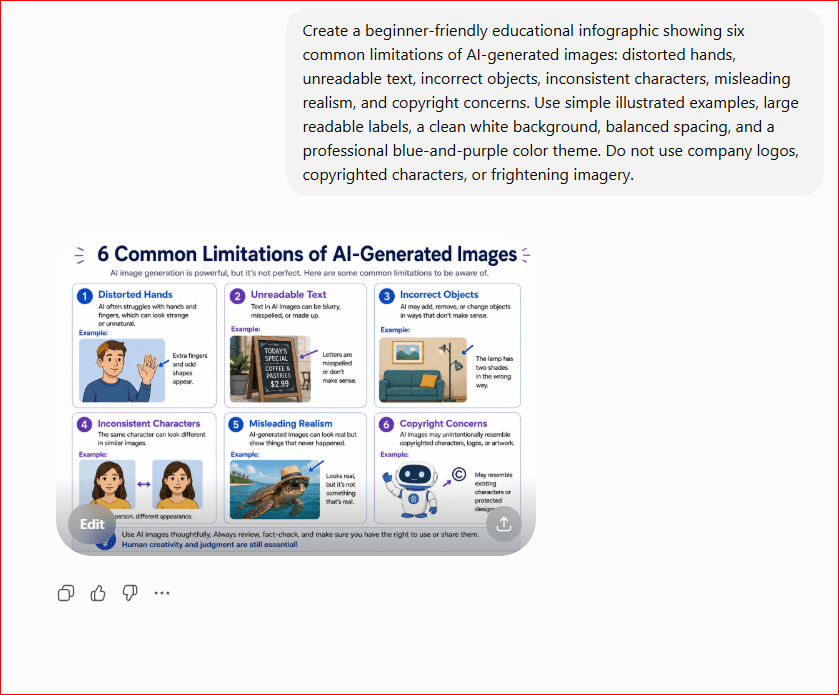
Figure 7. Common limitations and problems that users should check in AI-generated images.
This infographic highlights several weaknesses of AI image generation. Images may contain distorted details, unreadable words, inaccurate objects, inconsistent characters, or misleading scenes. Careful human review is necessary before an AI-generated image is published, shared, printed, or used for business.
Common Myths About AI Image Generation
AI image generation is becoming more popular, but many people still misunderstand what these tools can and cannot do.
Learning the facts helps beginners use AI-generated images more safely, realistically, and responsibly.
Myth 1: AI Image Generators Understand Pictures Like Humans
Reality: AI image generators do not see, imagine, or understand pictures in the same way humans do.
They recognize patterns learned from large collections of images and descriptions. They then use mathematical calculations to create visual details that are likely to match the prompt.
An AI tool may create a realistic-looking kitchen without truly understanding how the appliances work or whether every object is positioned correctly.
Myth 2: AI Images Are Always Accurate
Reality: An AI-generated image may look convincing while still containing incorrect details.
Possible mistakes include:
- Distorted hands.
- Incorrect shadows.
- Impossible buildings.
- Unreadable signs.
- Historically inaccurate clothing.
- Objects that could not work in real life.
Realistic appearance does not guarantee factual or physical accuracy.
Myth 3: The First Generated Image Will Be Perfect
Reality: The first result often needs improvement.
Users may need to:
- Rewrite the prompt.
- Add more details.
- Remove unclear instructions.
- Generate several versions.
- Correct objects or colours.
- Adjust the image style.
- Edit the final image manually.
Creating a useful AI image is usually a process of generating, reviewing, and improving.
Myth 4: Longer Prompts Always Produce Better Images
Reality: A longer prompt is not automatically better.
A good prompt should be clear, specific, and focused. Too many unnecessary or conflicting details may confuse the AI.
For example, this prompt may be too complicated:
A realistic, cartoon, watercolor, black-and-white, colorful photograph of a modern ancient house during day and night.
The instructions conflict with one another.
A clearer prompt would be:
A small stone cottage beside a lake at sunset, realistic photography, warm natural lighting.
Clarity is more important than length.
Myth 5: AI Image Generators Simply Copy Existing Pictures
Reality: AI image generators usually create new visual arrangements based on patterns learned during training rather than selecting and displaying one existing image.
However, generated results may sometimes resemble existing artwork, photographs, characters, logos, or visual styles.
Users should still review images carefully, especially before using them commercially.
Myth 6: Every AI-Generated Image Is Free to Use
Reality: Usage rights depend on the tool, account type, content, local laws, and intended purpose.
An image may create problems if it contains:
- A protected character.
- A company logo.
- A recognizable trademark.
- A copied product design.
- A famous person’s likeness.
- Artwork that closely resembles another creator’s work.
Users should read the tool’s current terms and check whether commercial use is permitted.
Myth 7: AI Can Create Perfect Written Text Inside Images
Reality: Many AI image generators still have difficulty producing accurate text.
Words may be:
- Misspelled.
- Repeated.
- Reversed.
- Incomplete.
- Replaced with random symbols.
- Difficult to read.
For important titles, labels, dates, or prices, it is usually safer to generate the picture without text and add the correct wording afterward using Canva or another design tool.
Myth 8: AI Images Are Real Photographs
Reality: An AI-generated image may look like a photograph even though the people, objects, and event never existed.
For example, an AI tool could create a realistic picture of a city, product, meeting, or natural disaster that never occurred.
AI-generated images should not be presented as genuine news photographs, historical evidence, product proof, or documentation of real events.
When viewers could mistake an image for reality, it may be appropriate to identify it as AI-generated.
Myth 9: AI Image Generation Requires Professional Design Skills
Reality: Complete beginners can create images using ordinary language.
A simple prompt such as:
A peaceful garden with colorful flowers and a wooden bench, realistic photography, soft morning light. may be enough to produce a useful starting image.
Design knowledge can improve the final result, but it is not required to begin.
Myth 10: AI Will Replace Every Artist and Designer
Reality: AI may change how some creative tasks are completed, but it cannot replace every artist, photographer, illustrator, or designer.
Professional creative work often requires:
- Original ideas.
- Human emotion.
- Cultural understanding.
- Brand knowledge.
- Client communication.
- Technical skill.
- Ethical judgment.
- Consistency across a project.
- Responsibility for the final result.
AI is most useful as a tool that supports human creativity rather than replacing it completely.
Myth 11: More Detail Always Gives More Control
Reality: Adding useful details can improve a prompt, but too many instructions may produce a crowded or confusing image.
A prompt should focus on the most important elements:
- Main subject.
- Action.
- Setting.
- Image style.
- Lighting.
- Mood.
- Composition.
The user can add or change smaller details after reviewing the first result.
Myth 12: AI Can Create Any Image Without Restrictions
Reality: AI image tools usually have rules that limit certain types of content.
A tool may refuse requests involving harmful, deceptive, illegal, private, or otherwise restricted material.
Different platforms may apply different safety rules, and these rules may change over time.
Users should respect the platform’s policies and avoid trying to create misleading or harmful images.
Myth 13: AI-Generated Product Images Can Replace Real Product Photos
Reality: AI can help create product concepts, backgrounds, or advertising ideas, but it may not represent the real product accurately.
An AI-generated product may show:
- Features the real item does not have.
- Incorrect colours or materials.
- Impossible parts.
- A misleading size.
- Accessories that are not included.
Businesses should not use AI images in a way that gives customers a false impression of the actual product.
Myth 14: AI Images Do Not Need Human Review
Reality: Every AI-generated image should be inspected before it is published, printed, sold, or shared.
The user should check:
- Faces and hands.
- Written text.
- Background details.
- Accuracy.
- Image quality.
- Bias or stereotypes.
- Copyright concerns.
- Whether the image could mislead viewers.
- Whether it suits the intended audience.
The AI creates the image, but the person using it remains responsible for the final decision.
Myth 15: Expensive AI Tools Always Produce the Best Results
Reality: A paid tool may offer more images, higher resolution, faster generation, or advanced editing features, but price alone does not guarantee a better image.
The quality of the result also depends on:
- The clarity of the prompt.
- The type of image requested.
- The selected style.
- The tool’s strengths.
- The user’s review and editing.
- The number of versions generated.
Beginners can often learn the basic skills using a simple tool before deciding whether a paid service is necessary.
Understanding these myths helps users develop realistic expectations. AI image generators are powerful creative assistants, but they still require clear instructions, careful review, responsible use, and human judgment.
Frequently Asked Questions About AI Image Generation
What Is AI Image Generation?
AI image generation is the process of using Artificial Intelligence to create pictures from written instructions.
The user describes what they want to see, and the AI generates an image based on the words in the prompt.
For example:
Create a realistic photograph of a small wooden cabin beside a peaceful lake at sunset.
The AI may create a new image containing the cabin, lake, trees, reflections, and sunset lighting.
What Is an AI Image Prompt?
An AI image prompt is the written instruction given to an AI image generator.
A prompt may describe:
- The main subject.
- The action.
- The setting.
- The image style.
- The lighting.
- The mood.
- The camera view.
- The image layout.
Clear and specific prompts usually produce more suitable results.
Do I Need Drawing or Graphic-Design Skills?
No. Complete beginners can create AI images using ordinary language.
You do not need to know how to draw, take professional photographs, or use advanced design software.
However, basic knowledge of colour, layout, lighting, and composition can help you create better images.
How Long Does It Take to Generate an AI Image?
Many AI image generators can create an image within seconds or a few minutes.
The exact time may depend on:
- The AI tool.
- The complexity of the prompt.
- The number of images requested.
- The image size.
- Internet speed.
- Current demand on the service.
- Whether the user has a free or paid plan.
Creating the first image may be quick, but improving it may require several attempts.
Why Does the AI Ignore Part of My Prompt?
An AI tool may misunderstand, overlook, or combine some instructions incorrectly.
This can happen when:
- The prompt contains too many details.
- Instructions conflict with one another.
- The most important subject is not clearly identified.
- Several people or objects are described.
- The prompt uses vague language.
- The requested scene is unusually complicated.
Try simplifying the prompt and placing the most important details near the beginning.
For example:
A friendly white robot helping an elderly man use a laptop in a bright home office.
After the main scene is correct, add smaller details one at a time.
Why Do AI-Generated Hands Sometimes Look Strange?
Hands are difficult for AI image generators because they can appear in many positions, angles, and shapes.
The AI may create:
- Extra fingers.
- Missing fingers.
- Fingers joined together.
- Unnatural hand positions.
- Hands mixed with nearby objects.
AI image technology continues to improve, but users should still inspect hands, faces, and small details carefully.
Can AI Image Generators Create Accurate Written Text?
Sometimes, but the text may still contain mistakes.
AI-generated words may be misspelled, incomplete, repeated, or replaced with random symbols.
For important wording, it is usually better to:
Generate the image without text.
Open the image in Canva or another design program.
Add the correct title, label, date, or message manually.
This gives you better control over spelling, font, size, and placement.
Can I Edit an Existing Photograph with AI?
Yes. Some AI image tools allow users to upload and edit an existing photograph.
Depending on the tool, you may be able to:
- Remove an object.
- Replace the background.
- Change colors.
- Improve lighting.
- Expand the image.
- Add an object.
- Repair a damaged area.
- Convert the photograph into an illustration.
Always keep the original file because AI editing may unexpectedly change faces, objects, or background details.
Can I Use AI-Generated Images on My Website?
AI-generated images may be used on websites when the tool’s terms and applicable rules permit that use.
They may be suitable for:
- Featured images.
- Article illustrations.
- Website banners.
- Educational graphics.
- Social media promotions.
- Background images.
Before publishing, check that the image:
- Does not contain distorted details.
- Does not include protected logos or characters.
- Is suitable for your audience.
- Has sufficient quality.
- Does not mislead readers.
- Includes appropriate alt text in WordPress.
Can I Use AI-Generated Images for Business?
Commercial use may be allowed, but the rules depend on the AI service, account plan, image content, and applicable laws.
Before using an image commercially:
- Review the tool’s current terms.
- Confirm whether commercial use is permitted.
- Avoid protected characters and logos.
- Avoid misleading product representations.
- Check whether the image resembles an existing brand or artwork.
- Keep a record of the prompt and tool used.
- Obtain professional advice when ownership is important.
An AI-generated image should not be assumed to be legally risk-free simply because the user created the prompt.
Who Owns an AI-Generated Image?
Ownership rules are complicated and may differ between countries and AI services.
Important factors may include:
- The tool’s terms.
- The amount of human creative work involved.
- Whether the image contains protected material.
- How the image will be used.
- The laws of the country involved.
For simple personal projects, this may not create a major problem. For logos, products, advertising campaigns, books, or images sold commercially, users should review the relevant terms and obtain legal advice when necessary.
Are AI-Generated Images Copyright-Free?
Not automatically.
An AI-generated image may still create concerns if it contains or closely resembles:
- A protected character.
- A company logo.
- A recognizable product.
- Existing artwork.
- A photograph.
- A trademark.
- A celebrity or other real person.
Users should review images carefully before publishing, selling, or using them commercially.
Can I Ask AI to Copy a Famous Artist’s Style?
Some AI tools may accept style-related prompts, while others may limit requests involving living artists or protected work.
A safer approach is to describe general visual qualities instead of requesting an exact imitation.
For example, instead of naming a particular artist, you could request:
A colorful landscape painting with visible brushstrokes, soft natural light, and a peaceful atmosphere.
This describes the desired appearance without asking for a direct copy of one person’s work.
Are AI-Generated Images Real?
No. AI-generated images are created by software and may show people, objects, places, or events that never existed.
Even when the image looks like a photograph, it should not automatically be treated as evidence of a real event.
Users should never present a fictional AI-generated image as genuine news, historical proof, medical evidence, or documentation of something that actually happened.
Should I Label an Image as AI-Generated?
Labelling may be appropriate when viewers could mistake the image for a real photograph or when transparency is important.
For example, disclosure may be useful for:
- News-related content.
- Educational materials.
- Historical scenes.
- Product concepts.
- Realistic fictional people.
- Before-and-after demonstrations.
- Heavily edited photographs.
A simple statement may say:
This image was created using Artificial Intelligence.
The exact requirement may depend on the platform, purpose, and applicable rules.
Can AI Generate Images of Real People?
Some AI tools can create or edit images involving real people, but this requires care.
Users should not create deceptive, harmful, embarrassing, or unauthorized images of another person.
Extra caution is needed with:
- Children.
- Private individuals.
- Public figures.
- Sensitive situations.
- Political or news-related content.
- Advertising endorsements.
- Images that could damage someone’s reputation.
A realistic AI image should never be used to falsely suggest that a person did, said, supported, or attended something that did not happen.
Is It Safe to Upload Personal Photographs?
Before uploading a personal photograph, review the service’s privacy terms and consider what the image contains.
Avoid uploading photographs that reveal:
- Identification documents.
- Financial information.
- Medical records.
- Home addresses.
- Vehicle license plates.
- Confidential business material.
- Private information about children.
- Customer or employee information.
Only upload images that are safe and appropriate for the service being used.
Can AI Images Be Used for School Assignments?
AI-generated images may be useful for presentations, diagrams, stories, and educational projects.
However, students should follow the school’s rules regarding Artificial Intelligence.
They should also:
- Check the image for accuracy.
- Identify AI-generated content when required.
- Avoid presenting fictional images as real evidence.
- Verify educational labels and facts.
- Give credit when the teacher or institution requires it.
AI should support learning rather than replace the student’s own effort.
What Is the Best AI Image Generator for Beginners?
The best tool depends on the user’s needs.
A beginner may prefer a tool that:
- Accepts ordinary conversational instructions.
- Produces images without complicated settings.
- Allows follow-up changes.
- Offers simple editing.
- Works inside a familiar design platform.
- Provides clear usage information.
It is usually better to learn one tool properly before paying for or testing several different services.
Why Does the Same Prompt Create Different Images?
AI image generators often begin with a random visual pattern.
Because the starting pattern changes, the same prompt may produce different:
- Faces.
- Backgrounds.
- Colors.
- Camera angles.
- Lighting.
- Object positions.
- Artistic details.
This variation can be useful because it gives the user several creative options.
How Can I Keep a Character Consistent Across Several Images?
Character consistency can be difficult.
To improve it:
- Repeat the same physical description in every prompt.
- Keep the clothing and colours consistent.
- Use the same style and lighting.
- Describe the character’s age, hairstyle, and important features.
- Use a reference image when the tool allows it.
- Change only the action or background.
- Save successful prompts for later use.
Even with these steps, the character may change slightly between images.
What Should I Do When the Image Is Almost Correct?
Do not rewrite the entire prompt immediately.
Change one or two details at a time.
For example:
- Remove the extra chair.
- Change the shirt from blue to green.
- Make the background brighter.
- Move the subject to the right.
- Add empty space for a title.
- Use a wider composition.
Small changes make it easier to improve the image without losing the parts that already work.
Do AI Image Generators Replace Photographers and Designers?
No. AI tools can help create concepts, drafts, illustrations, and simple visual content, but professional photographers and designers provide skills that AI cannot reliably replace.
Professionals contribute:
- Creative direction.
- Brand consistency.
- Technical knowledge.
- Accurate product representation.
- Client communication.
- Ethical judgment.
- Cultural understanding.
- Responsibility for the final work.
AI image generation is most effective as an assistant within the creative process.
What Is the Most Important Rule for Beginners?
Never publish the first image without checking it carefully.
Review:
- Faces.
- Hands.
- Written words.
- Objects.
- Backgrounds.
- Shadows.
- Accuracy.
- Image quality.
- Copyright concerns.
- Whether the image could mislead viewers.
A strong prompt is important, but careful human review is even more important.
Key Takeaways
Remember these important points:
- AI image generation uses Artificial Intelligence to create pictures from written instructions.
- The written instruction given to the AI is called a prompt.
- Clear and specific prompts usually produce better results than vague instructions.
- A useful image prompt may include the subject, action, setting, style, lighting, mood, and composition.
- AI image generators can create realistic photographs, illustrations, cartoons, paintings, product concepts, educational graphics, and many other visual styles.
- Popular AI image tools include ChatGPT, Google Gemini, Adobe Firefly, Canva, Microsoft Copilot, Bing Image Creator, and Midjourney.
- AI-generated images can be used for blog posts, websites, social media, presentations, lessons, marketing, stories, invitations, and personal projects.
- AI image generation can save time, support creativity, help beginners create visual content, and make ideas easier to understand.
- The first generated image may not be perfect. Users often need to improve the prompt, generate more versions, or edit the result.
- AI-generated images may contain distorted hands, incorrect objects, unreadable text, unusual backgrounds, or unrealistic details.
- A realistic-looking AI image is not proof that the people, product, place, or event is real.
- AI-generated educational diagrams, historical scenes, and product images should always be checked for accuracy.
- Images should not be used to deceive people or falsely represent real events, products, or individuals.
- Copyright, commercial-use, and ownership rules may depend on the tool, subscription, image content, country, and intended use.
- Users should avoid creating or publishing images that copy protected characters, logos, trademarks, or another creator’s work too closely.
- Personal photographs and confidential images should be uploaded only after reviewing the tool’s privacy rules.
- Important written text should usually be added afterward in Canva or another design program because AI-generated lettering may contain mistakes.
- Every image should be checked carefully before it is published, printed, shared, or used for business.
- AI image generation works best as a creative assistant rather than a replacement for photographers, artists, designers, teachers, or other professionals.
- The user remains responsible for deciding whether the final image is accurate, appropriate, respectful, and safe to use.
What’s Next?
Congratulations! You have completed this beginner’s guide to AI image generation.
You now understand what AI image generation is, how it turns written prompts into pictures, and how clear instructions can improve the final result.
You have also learned:
- How AI image prompts work.
- How to write better prompts.
- Which AI image tools are popular.
- How AI-generated images can be used.
- The benefits and limitations of AI image generation.
- Common myths about AI-created images.
- Why every image should be reviewed before it is published.
AI image generation is one of the most practical ways for beginners to experience Artificial Intelligence.
With a simple written description, you can create visual ideas for blog posts, presentations, social media, education, marketing, stories, and personal projects.
However, successful image creation requires more than pressing a button. You still need to write clear prompts, check the result carefully, correct mistakes, and decide whether the image is suitable for your audience.
The next step is to practice with a simple AI image generator.
Begin with an easy prompt, such as:
Create a friendly illustration of a complete beginner learning Artificial Intelligence on a laptop at home, bright natural lighting, simple modern style.
Generate several versions and compare the results.
Then try changing one detail at a time:
- Change the image style.
- Add a different background.
- Adjust the lighting.
- Move the subject.
- Request a wider layout.
- Add empty space for a title.
This simple practice will help you understand how prompt wording affects the final image.
After learning the basics, you will be ready to explore more detailed guides about individual AI image tools, including ChatGPT Images, Canva AI, Adobe Firefly, Microsoft Copilot, Google Gemini, and Midjourney.
Final Tip for Beginners
Do not try to create the perfect image with one prompt.
Start with a simple idea, generate the first image, review the result, and improve it step by step.
For example, instead of beginning with a very long prompt, start with:
A retired man learning Artificial Intelligence on a laptop at home.
Then add useful details:
A retired man learning Artificial Intelligence on a laptop in a bright home office, realistic photography, warm natural lighting, friendly and confident atmosphere, horizontal composition.
After generating the image, check what needs improvement.
You might ask the AI to:
- Make the room brighter.
- Change the clothing colour.
- Remove an unwanted object.
- Add a notebook to the desk.
- Move the person to the right.
- Add empty space for a website title.
- Create a wider version.
- Change the style from realistic to illustration.
Save prompts that produce good results. They can become useful templates for future blog images, presentations, social media graphics, and other projects.
Most importantly, never assume that an image is correct simply because it looks realistic.
Check faces, hands, written words, objects, backgrounds, shadows, and small details before publishing it.
The best results come from combining clear instructions, repeated practice, careful review, and human judgment.
AI can generate the image, but you remain responsible for deciding whether it is accurate, appropriate, and ready to use.
Continue Learning
Ready to continue your AI journey?
Explore these beginner-friendly guides to strengthen your understanding of Artificial
Intelligence and learn how to use AI tools more confidently:
- What Is Artificial Intelligence? A Beginner’s Guide (2026)
- ChatGPT Basics for Beginners — Complete Guide (2026)
- Best ChatGPT Prompts for Beginners (2026)
- Create a ChatGPT Account — Step-by-Step Beginner Guide (2026)
- What Is Machine Learning? A Beginner’s Guide (2026)
- What Is Deep Learning? A Beginner’s Guide (2026)
- What Is Generative AI? A Beginner’s Guide (2026)
- How ChatGPT Works — Explained Simply
- What Are Large Language Models? A Beginner’s Guide (2026)
- Prompt Engineering for Beginners
- How to Create AI Images with ChatGPT
- Canva AI Image Generator for Beginners — Coming Soon
- Adobe Firefly for Beginners — Coming Soon
- Midjourney for Beginners — Coming Soon
→ Explore More AI Tutorials
New beginner-friendly AI tutorials will be added regularly. Check back for practical examples, step-by-step instructions, and simple explanations of important Artificial Intelligence tools and concepts.
Thank you for reading. Keep experimenting with prompts, review every generated image carefully, and enjoy discovering how Artificial Intelligence can help turn your ideas into visual content.


Leave a Reply