
Estimated reading time: 12–15 minutes
Last updated: August 15, 2026
Introduction
A daily plan helps you decide what needs to be done, what should be done first, and how much time you may need for each task. For beginners, the difficult part is often not making a list—it is turning a long or confusing list into a realistic plan.
ChatGPT can help you organize your day by taking the tasks you provide and arranging them into a clearer schedule. You can tell ChatGPT what you need to do, when you are available, which tasks are most important, and whether you want breaks included.
For example, instead of simply writing:
“Pay bills, make two phone calls, work on my website, buy groceries, and exercise.”
you could ask ChatGPT:
“Help me create a realistic daily plan from 9:00 a.m. to 5:00 p.m. I need to pay bills, make two phone calls, work on my website for two hours, buy groceries, and exercise for 30 minutes. Include breaks and put the most important tasks first.”
Clear and specific instructions generally help ChatGPT produce more useful responses. OpenAI recommends clearly describing the task, providing relevant context, and refining the prompt when necessary.
ChatGPT can suggest a plan, but it does not know everything about your day unless you tell it. You should review the result and adjust times, priorities, travel time, appointments, health needs, family responsibilities, and other personal circumstances before following the schedule.
In this guide, you will learn how to give ChatGPT the information it needs, create a practical daily plan, adjust that plan when circumstances change, and avoid common planning mistakes.
Before You Start
You do not need special technical skills to create a daily plan with ChatGPT. You mainly need a clear idea of what you want to accomplish and enough information about your available time.
Before asking ChatGPT to organize your day, prepare:
· The tasks you need to complete
· Any fixed appointments or deadlines
· The approximate time you have available
· Your most important tasks
· Tasks that can wait until another day
· Breaks, meals, travel time, or other commitments you want included
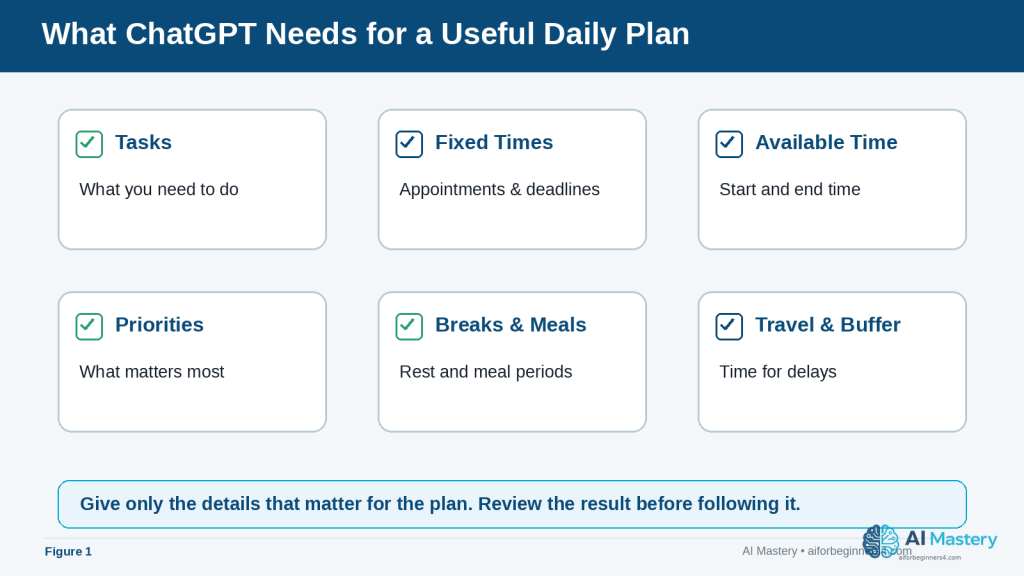
Figure 1. A useful daily plan starts with tasks, fixed times, available time, priorities, breaks, meals, travel, and buffer time.
Explanation: Providing the information that affects the schedule gives ChatGPT a better basis for organizing the day while keeping unnecessary personal details out of the prompt.
The more useful context you provide, the easier it is for ChatGPT to produce a plan that fits your situation. OpenAI recommends using clear, specific prompts and providing enough context for ChatGPT to understand the request.
Protect Your Personal Information
You may need to provide some personal context when planning your day, but avoid entering unnecessary sensitive information.
For example, instead of writing:
“Dr. Smith at 123 Main Street is treating me for [medical condition] at 2:00 p.m.”
you could simply write:
“Medical appointment from 2:00 p.m. to 3:00 p.m.”
ChatGPT only needs the information required to organize the schedule.
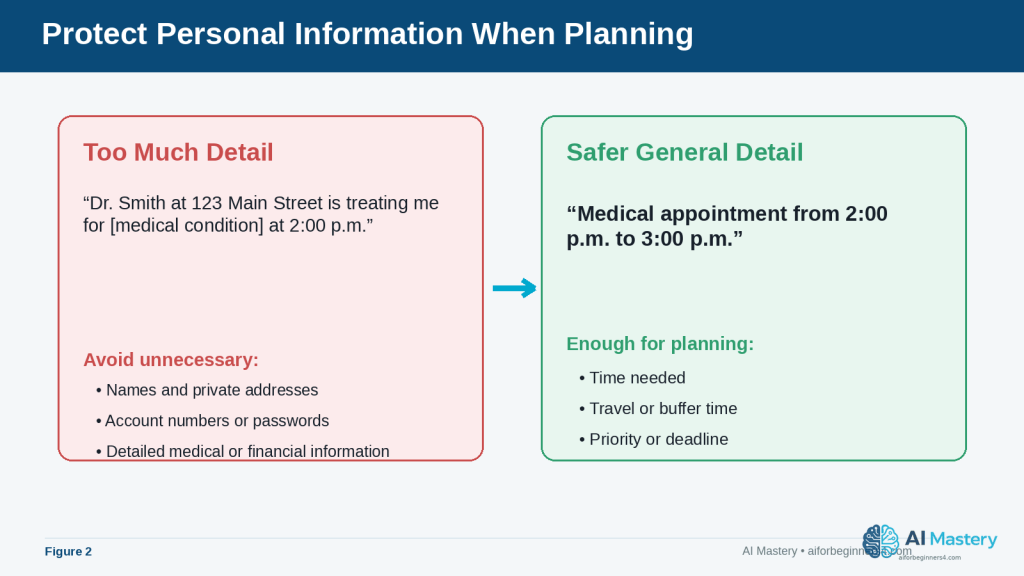
Figure 2. Share only the personal information that is necessary for planning, and use general descriptions when specific details are not needed.
Explanation: A time and general appointment label are often enough for scheduling. Names, addresses, passwords, account numbers, or sensitive details usually add risk without improving the plan.
ChatGPT also provides Data Controls that let users manage how their conversations may be used to improve OpenAI’s models. These settings can change over time, so readers should check the current options in ChatGPT’s Settings > Data Controls when privacy settings are important to them.
Do Not Expect ChatGPT to Know Your Entire Schedule
ChatGPT should not be treated as automatically knowing every appointment, responsibility, deadline, or change in your day.
Tell it the information that matters for the plan.
For example:
“Create my plan from 8:00 a.m. to 6:00 p.m. I have an appointment from 11:00 a.m. to noon and need 30 minutes of travel time before and after it.”
This is much more useful than simply asking:
“Plan my day.”
ChatGPT may also use saved memories or information from previous conversations when relevant settings are enabled, but you should still provide important current-day information rather than assuming it will be remembered correctly. OpenAI allows users to review, change, or turn off memory features in ChatGPT settings.
Reality: ChatGPT can help organize your information, but you remain responsible for checking the schedule and deciding whether the suggested plan is practical and appropriate for your day.
What You’ll Learn
By the end of this guide, you will know how to:
· Give ChatGPT the information it needs to help organize your day.
· Turn an unordered task list into a clearer daily schedule.
· Tell ChatGPT which tasks are most important.
· Add appointments, breaks, meals, travel time, and other fixed commitments.
· Estimate how much time to allow for different tasks.
· Ask ChatGPT to make a busy schedule more realistic.
· Adjust your plan when something unexpected happens.
· Create reusable prompts for morning planning.
· Use ChatGPT Scheduled Tasks for suitable reminders and recurring tasks when the feature is available.
· Review AI-generated schedules for mistakes or unrealistic assumptions.
· Protect unnecessary personal or sensitive information when using AI for planning.
You will also learn when ChatGPT is useful for daily planning and when you should rely on a calendar, reminder app, task manager, or your own judgment instead.
The goal is not to let AI control your day. The goal is to use ChatGPT as an organizing assistant that helps you turn your priorities into a plan you can review and change.
How ChatGPT Can Help You Plan Your Day
ChatGPT can take a simple list of tasks and help turn it into a more organized plan. This is useful when you know what you need to do but are unsure what to do first or how to fit everything into the time available.
For example, you might start with this unordered list:
· Reply to emails
· Buy groceries
· Work on an important project
· Call the bank
· Exercise
· Prepare dinner
ChatGPT can help group these tasks, suggest an order, and assign approximate time blocks.
Prioritize Important Tasks
You can tell ChatGPT which tasks are urgent or important.
For example:
“Help me organize these tasks for today. Working on my project is the highest priority. Calling the bank must be done before 4:00 p.m. The other tasks are flexible.”
This gives ChatGPT more useful information than simply providing a task list.
Create Time Blocks
A time block is a period reserved for a particular activity.
For example:
· 9:00–10:30 a.m. — Important project
· 10:30–10:45 a.m. — Break
· 10:45–11:15 a.m. — Emails
· 11:15–11:30 a.m. — Call the bank
Time blocks can make a long list feel easier to manage because each task has a suggested place in the day.
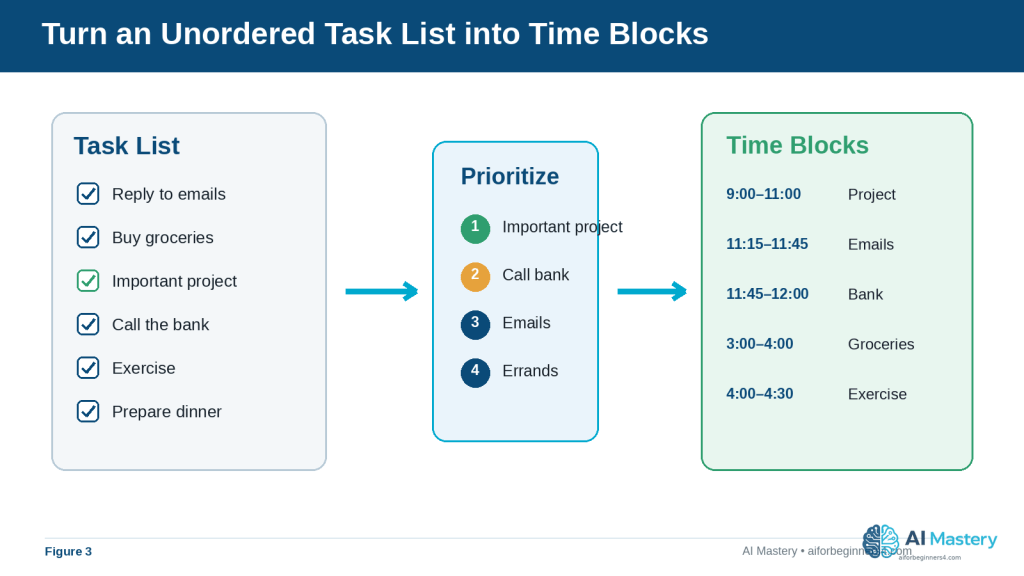
Figure 3. ChatGPT can help turn an unordered task list into priorities and suggested time blocks.
Explanation: The schedule becomes easier to scan when important work is identified first and each activity receives a realistic place in the day.
Include Breaks and Buffer Time
A plan that fills every minute of the day is usually difficult to follow.
You can ask ChatGPT to include:
· Short breaks
· Lunch or meal periods
· Travel time
· Extra time between appointments
· Buffer time for unexpected delays
For example:
“Create a schedule from 9:00 a.m. to 5:00 p.m. Include a 15-minute break in the morning, a one-hour lunch, and at least 15 minutes of free time between major tasks.”
Break Large Tasks into Smaller Steps
A task such as “work on my website” may be too broad to schedule effectively.
ChatGPT can help divide it into smaller actions, such as:
· Review the article draft
· Prepare images
· Add the article to WordPress
· Check links
· Preview the page
· Publish or save the draft
Smaller tasks make it easier to estimate the time required and see what progress you have made.
Adjust the Plan When Your Day Changes
Daily plans often change.
If an appointment runs late or an unexpected task appears, you can give ChatGPT the updated information.
For example:
“My appointment took one hour longer than expected. It is now 2:00 p.m. I still need to finish my project, buy groceries, and exercise. Reorganize the rest of my day without making the schedule too busy.”
ChatGPT can then suggest a revised plan.
Reality: A ChatGPT schedule is a suggestion, not a fixed timetable. Task durations may be inaccurate, unexpected events can occur, and some priorities require your own judgment. Review the plan and change anything that does not fit your real circumstances.
Step-by-Step: Create a Daily Plan with ChatGPT
You can create a useful daily plan with ChatGPT by giving it your tasks, available time, priorities, and fixed commitments.
Step 1: Write Down Everything You Need to Do
Start by listing the tasks you want to complete.
For example:
· Answer important emails
· Work on a website article
· Call the bank
· Buy groceries
· Exercise
· Prepare dinner
Do not worry about putting them in the correct order yet.
Step 2: Add Your Available Time
Tell ChatGPT when your day begins and when you want your planned activities to end.
For example:
“Plan my tasks between 9:00 a.m. and 6:00 p.m.”
This gives ChatGPT a clear time window to work with.
Step 3: Add Fixed Appointments
Next, include anything that already has a set time.
For example:
“I have an appointment from 1:00 p.m. to 2:00 p.m. and need 30 minutes of travel time before and after it.”
Fixed commitments should normally be added before flexible tasks because they cannot easily be moved.
Step 4: Identify Your Priorities
Tell ChatGPT which tasks are most important.
For example:
“My website article is my highest-priority task today. I also need to call the bank before 4:00 p.m.”
This helps ChatGPT avoid giving equal importance to every item.
Step 5: Ask for Breaks and Realistic Time Blocks
You can ask ChatGPT not to overload the schedule.
For example:
“Include lunch, two short breaks, and some buffer time between major tasks. Do not schedule every minute.”
This can make the plan easier to follow.
Step 6: Send the Complete Prompt
A complete beginner-friendly prompt could look like this:
“Help me create a realistic daily plan from 9:00 a.m. to 6:00 p.m. I need to answer important emails, work on my website article for about two hours, call the bank before 4:00 p.m., buy groceries, exercise for 30 minutes, and prepare dinner. I have an appointment from 1:00 p.m. to 2:00 p.m. and need 30 minutes of travel time before and after it. My website article is the highest priority. Include lunch, short breaks, and some buffer time. Do not make the schedule too busy.”
Step 7: Review the Suggested Schedule
Read the plan carefully before using it.
Check:
· Are the most important tasks scheduled early enough?
· Are appointments placed at the correct times?
· Is enough travel time included?
· Are task durations realistic?
· Are there enough breaks?
· Is the day too crowded?
· Is anything important missing?
If something looks wrong, tell ChatGPT what needs to change.
Step 8: Ask ChatGPT to Revise It
You do not need to accept the first version.
For example:
“Move grocery shopping to later in the afternoon, give me another 30 minutes for the website article, and add a longer break after my appointment.”
ChatGPT can then create a revised version.
How to Avoid This Mistake: Do not ask ChatGPT to plan your day using only a short instruction such as “Organize my day” when you have important deadlines or fixed appointments. Include enough detail for the plan to reflect your actual situation.
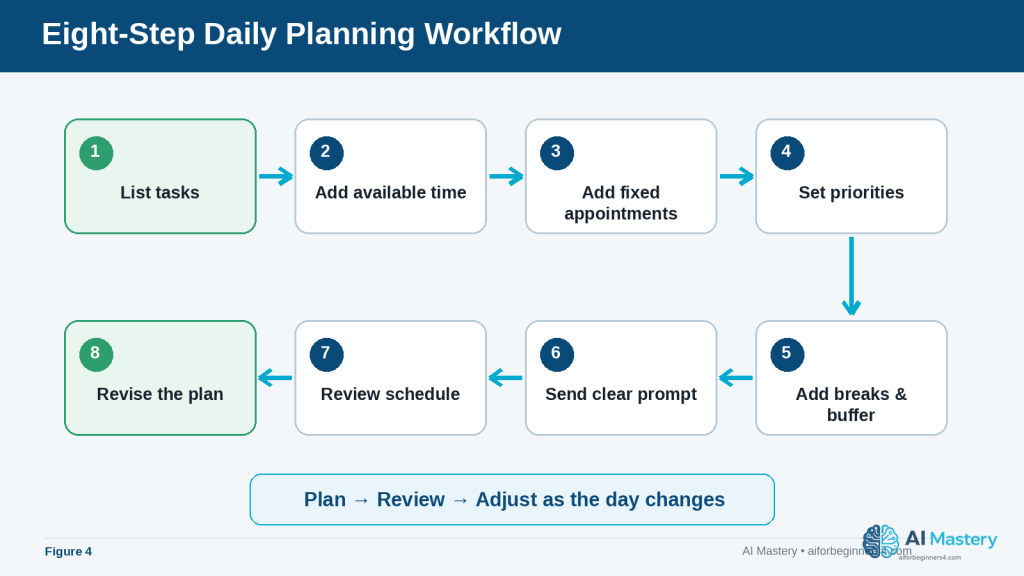
Figure 4. An eight-step workflow moves from listing tasks through creating, reviewing, and revising the daily plan.
Explanation: Using the same sequence each day makes it easier to remember fixed commitments, priorities, breaks, and the final review before following the schedule.
Useful ChatGPT Prompts for Daily Planning
Once you understand the basic process, you can save time by reusing simple prompts and changing only the details that matter for that day.
Basic Daily Planning Prompt
“Help me create a realistic plan for today from 9:00 a.m. to 5:00 p.m. My tasks are: [insert tasks]. My most important task is [insert priority]. Include lunch, short breaks, and some buffer time.”
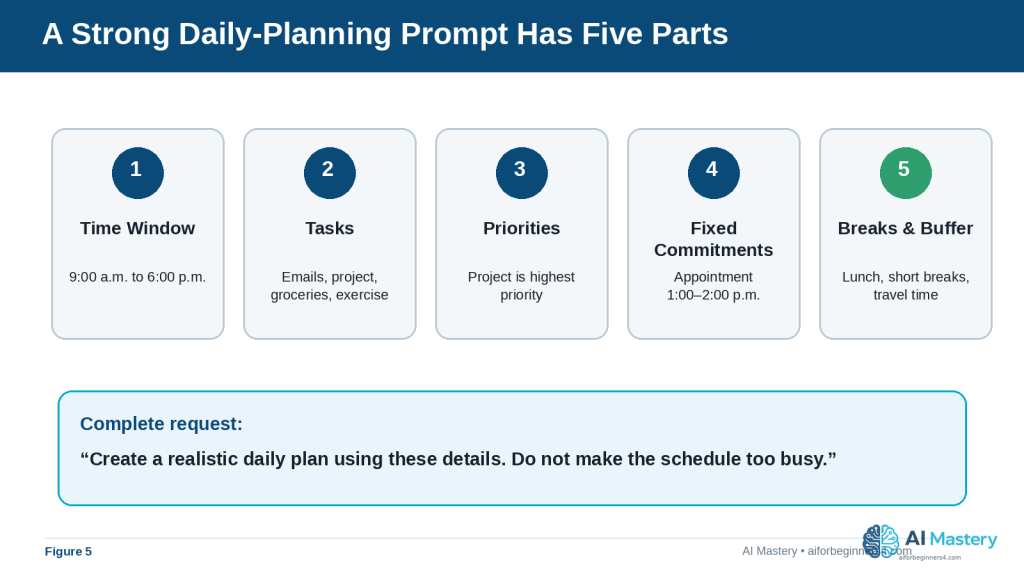
Figure 5. A strong daily-planning prompt combines the time window, tasks, priorities, fixed commitments, and breaks or buffer time.
Explanation: These five pieces of context reduce ambiguity and make the first suggested schedule easier to review and revise.
Prompt for a Busy Day
“I have too many tasks today. Help me decide what should be done today, what can wait, and what should be removed from the schedule. My available time is [insert hours]. These are my tasks: [insert tasks].”
This type of prompt can be useful when your list is longer than the time available.
Prompt for Prioritizing Tasks
“Organize these tasks into high, medium, and low priority. Explain briefly why each task belongs in that group. Then create a realistic schedule for the high-priority tasks first.”
You should still review the suggested priorities because ChatGPT may not understand the real consequences of delaying a task unless you explain them.
Prompt for Planning Around Appointments
“Create my daily schedule around these fixed appointments: [insert appointments and times]. I also need to complete these flexible tasks: [insert tasks]. Include travel time and breaks.”
Prompt for a Short Work Session
“I have only two hours available. Help me choose the most useful tasks from this list and create a focused two-hour plan: [insert tasks]. Include one short break.”
This can be helpful when you have limited time and cannot complete everything.
Prompt for Breaking Down a Large Task
“I need to complete this task: [describe task]. Break it into small, manageable steps and estimate a reasonable amount of time for each step. Then place the steps into my daily schedule.”
Time estimates from ChatGPT are only suggestions. Adjust them if you know a task normally takes you longer or shorter.
Prompt for Replanning After an Interruption
“My original plan has changed. It is now [time]. I still need to complete these tasks: [insert remaining tasks]. My new available time ends at [time]. Reorganize the rest of my day and remove lower-priority tasks if necessary.”
Prompt for an End-of-Day Review
“At the end of the day, help me review what I completed, what I did not finish, and what should move to tomorrow. Here is what happened today: [insert summary].”
This can help you learn whether you regularly schedule too much or underestimate how long certain activities take.
Final Check Before Using Any Prompt: Replace the example information with your actual tasks, times, and priorities. Avoid including unnecessary sensitive personal information.
Practical Example: Turn a Busy Task List into a Realistic Day
Suppose you have the following tasks:
· Work on an important project for two hours
· Reply to emails
· Call the insurance company before 4:00 p.m.
· Buy groceries
· Exercise for 30 minutes
· Prepare dinner
· Attend an appointment from 1:00 p.m. to 2:00 p.m.
· Allow 30 minutes of travel time before and after the appointment
You could give ChatGPT this prompt:
“Create a realistic daily plan from 9:00 a.m. to 6:00 p.m. My highest-priority task is working on my project for two hours. I also need to reply to emails, call the insurance company before 4:00 p.m., buy groceries, exercise for 30 minutes, and prepare dinner. I have an appointment from 1:00 p.m. to 2:00 p.m. and need 30 minutes of travel time before and after it. Include lunch, short breaks, and some buffer time. Do not make the schedule too crowded.”
A reasonable plan might look like this:
· 9:00–11:00 a.m. — Work on the important project
· 11:00–11:15 a.m. — Short break
· 11:15–11:45 a.m. — Reply to important emails
· 11:45 a.m.–12:00 p.m. — Call the insurance company
· 12:00–12:30 p.m. — Lunch
· 12:30–1:00 p.m. — Travel to appointment
· 1:00–2:00 p.m. — Appointment
· 2:00–2:30 p.m. — Travel home
· 2:30–3:00 p.m. — Buffer time or rest
· 3:00–4:00 p.m. — Grocery shopping
· 4:00–4:30 p.m. — Exercise
· 4:30–5:00 p.m. — Free time or unfinished tasks
· 5:00–6:00 p.m. — Prepare dinner
Why This Plan Works
The most important task is scheduled early, when there is less risk that later interruptions will push it aside.
The phone call is scheduled before its deadline.
The fixed appointment and travel time are protected.
Breaks and buffer time are included instead of filling every minute.
Flexible tasks such as grocery shopping and exercise are placed around the fixed commitments.
How to Improve the Plan
If the suggested schedule does not fit your real situation, tell ChatGPT exactly what needs to change.
For example:
“I need one hour for grocery shopping plus 20 minutes of driving. Move exercise to the evening and give me another 30 minutes for emails.”
ChatGPT can then revise the plan using the new information.
Reality: Even a well-organized AI-generated schedule can become unrealistic if tasks take longer than expected. Treat the plan as a flexible guide and update it when your day changes.
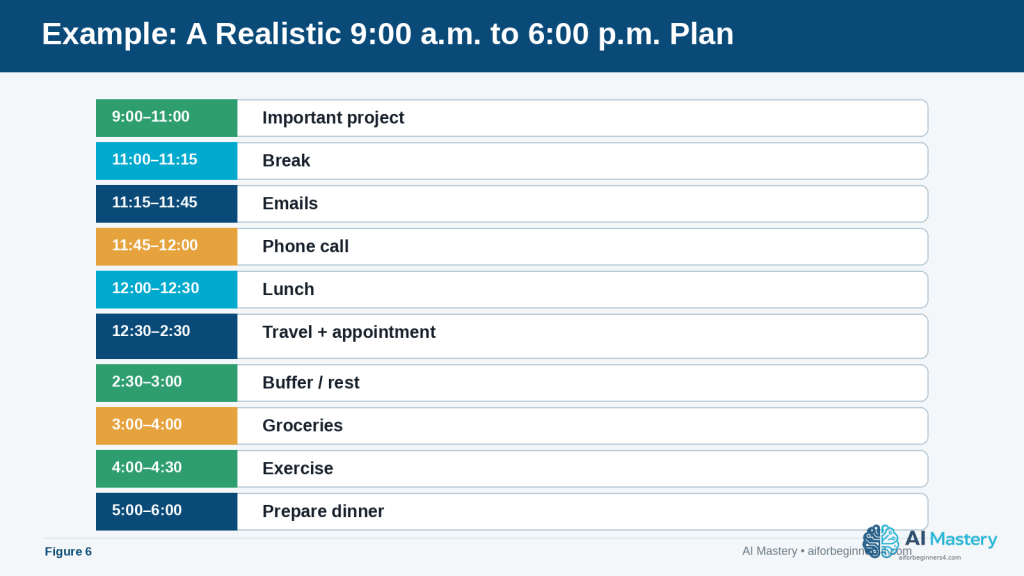
Figure 6. A realistic daily plan protects priority work, fixed appointments, travel time, meals, breaks, and buffer time.
Explanation: The example leaves some flexibility instead of filling every minute, which makes it easier to adjust when real activities take longer than expected.
Benefits of Using ChatGPT for Daily Planning
ChatGPT can be useful when you already know what you need to do but want help turning your ideas into a clearer plan.
Helps You Organize a Long Task List
A long list can feel difficult to manage. ChatGPT can help group tasks, identify priorities, and place them into a suggested order.
Instead of looking at ten unrelated tasks, you can see them arranged into a more structured day.
Helps You Decide What to Do First
When several tasks seem important, ChatGPT can help compare them using information you provide about:
· Deadlines
· Importance
· Time required
· Fixed appointments
· Dependencies between tasks
· Tasks that can be postponed
You still make the final decision about what matters most.
Saves Planning Time
Creating a schedule manually can take time, especially when several appointments and tasks need to fit together.
ChatGPT can quickly suggest a first version that you can then review and adjust.
Makes It Easier to Reorganize Your Day
If something changes, you do not have to rebuild the entire plan yourself.
You can tell ChatGPT what happened and ask it to reorganize the remaining tasks.
For example:
“My appointment finished one hour late. It is now 3:00 p.m. Please reorganize my remaining tasks between 3:00 p.m. and 7:00 p.m.”
Helps Break Large Tasks into Smaller Steps
Large tasks can be easier to start when they are divided into smaller actions.
For example, instead of:
“Work on website”
ChatGPT could help turn it into:
· Review the article
· Prepare images
· Upload the article
· Add links
· Preview the page
· Make corrections
This can make progress easier to see and manage.
Can Help You Build a Consistent Routine
You can reuse the same basic planning prompt each morning and change only the tasks, appointments, and priorities.
Over time, you may also notice which activities regularly take longer than expected. You can then adjust future plans to make them more realistic.
Benefit: ChatGPT is most useful as a flexible planning assistant. It can help organize information and suggest a schedule while leaving you in control of the final decisions.
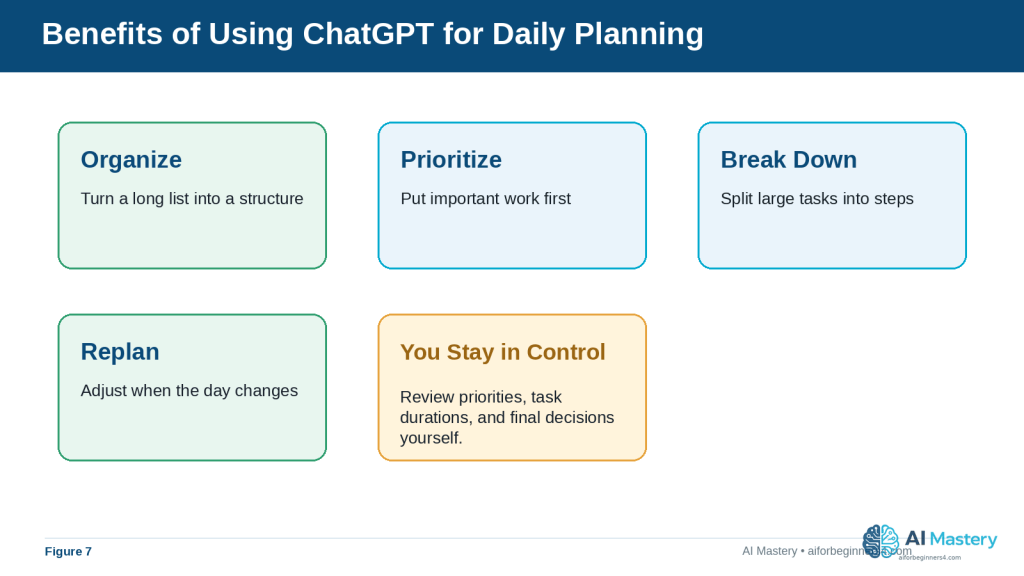
Figure 7. ChatGPT can help organize, prioritize, break down, replan, and reuse daily-planning routines.
Explanation: These benefits are most useful when the suggested plan remains subject to your own judgment about priorities, time, and real-world constraints.
Limitations and Common Mistakes
ChatGPT can help organize a day, but it does not automatically know whether a schedule is realistic for your personal situation. Understanding its limitations can help you use it more effectively.
Limitation: Time Estimates May Be Inaccurate
ChatGPT may suggest that a task will take 30 minutes when it normally takes you an hour.
This can happen because the AI does not know your working speed, experience, travel conditions, or how complicated the task really is.
How to Reduce This Limitation: Tell ChatGPT how long similar tasks usually take you.
For example:
“Email usually takes me about 45 minutes, grocery shopping takes 90 minutes including travel, and I need at least two hours for my project.”
Limitation: ChatGPT Does Not Know Every Important Detail
A schedule may look good but still be unsuitable because ChatGPT was not told about:
· Travel time
· Family responsibilities
· Business hours
· Deadlines
· Energy levels
· Meal times
· Accessibility needs
· Other personal commitments
How to Reduce This Limitation: Include the details that genuinely affect your schedule without sharing unnecessary private information.
Limitation: Plans Can Become Outdated Quickly
An unexpected phone call, traffic delay, urgent task, or appointment change can make the original plan impractical.
How to Reduce This Limitation: Treat the schedule as flexible. Give ChatGPT the new situation and ask it to reorganize the remaining time.
Common Mistake: Scheduling Too Many Tasks
A long task list does not mean everything needs to be completed in one day.
Trying to fit too much into the schedule can leave little room for delays and make the plan difficult to follow.
How to Avoid This Mistake: Ask ChatGPT to separate tasks into:
· Must do today
· Should do today if time allows
· Can wait until another day
Common Mistake: Giving Every Task the Same Priority
Answering an unimportant email may appear beside an urgent deadline even though the two tasks are not equally important.
How to Avoid This Mistake: Tell ChatGPT which tasks have deadlines, which are essential, and which can be postponed.
Common Mistake: Forgetting Travel and Transition Time
Moving from one activity to another often takes time.
For example, a one-hour appointment may require:
· Time to prepare
· Travel to the appointment
· Waiting time
· Travel home
How to Avoid This Mistake: Include realistic transition and travel time when describing your day.
Common Mistake: Following the AI Schedule Without Reviewing It
ChatGPT may misunderstand a task, place something at an inconvenient time, or produce a schedule that looks organized but is not practical.
How to Avoid This Mistake: Read the entire schedule before using it. Check times, priorities, appointments, breaks, and deadlines.
Common Mistake: Sharing More Personal Information Than Necessary
A daily schedule can contain sensitive information about appointments, locations, family members, work, or finances.
How to Avoid This Mistake: Use general descriptions whenever detailed personal information is not necessary.
For example, “appointment at 2:00 p.m.” is often enough. You usually do not need to include the person’s name, address, account information, or reason for the appointment.
Reality: The best daily plan is not necessarily the most detailed one. A useful plan should be realistic, flexible, easy to understand, and simple enough to follow.
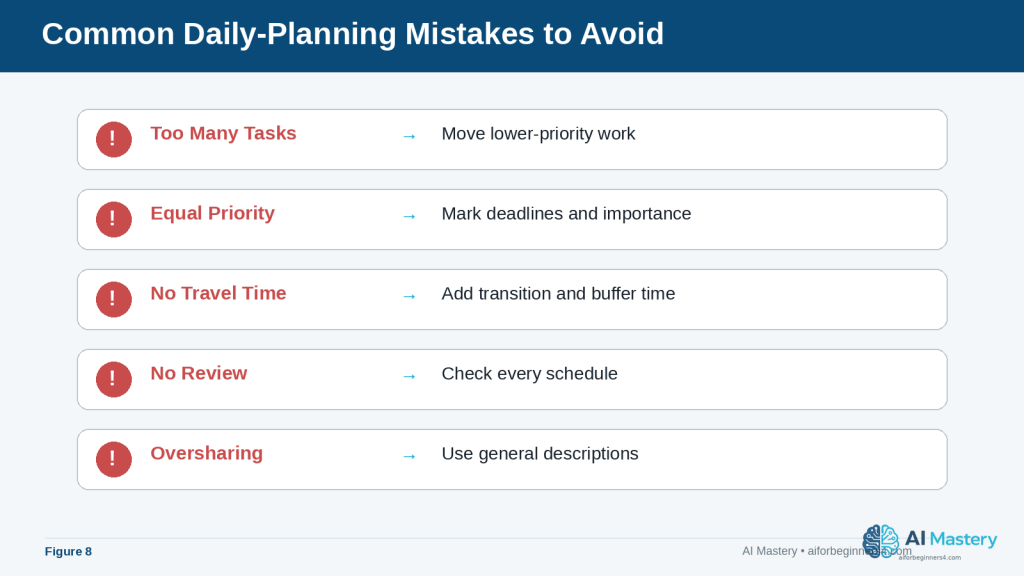
Figure 8. Common planning mistakes include scheduling too much, ignoring priorities or travel time, skipping review, and sharing unnecessary private information.
Explanation: A quick mistake check can prevent a neat-looking schedule from becoming unrealistic, inconvenient, or unnecessarily revealing.
Common Myths About Using ChatGPT for Daily Planning
Daily planning with AI is useful, but beginners can easily expect more from ChatGPT than it is designed to provide.
Myth 1: ChatGPT Will Automatically Know Everything I Need to Do
ChatGPT does not automatically know every appointment, deadline, errand, family responsibility, or priority in your day.
Reality: You need to provide the important information that affects the schedule.
A better prompt is:
“Plan my day from 9:00 a.m. to 5:00 p.m. I have an appointment at 1:00 p.m., need one hour of travel time, and must complete my report before 4:00 p.m.”
Myth 2: The First Schedule ChatGPT Creates Will Be Perfect
The first response may be helpful, but it may also contain unrealistic task durations, too many activities, or inconvenient timing.
Reality: Daily planning usually works better as a conversation. Review the first plan, explain what does not work, and ask ChatGPT to revise it.
For example:
“Give me more time for the project and remove the least important afternoon task.”
Myth 3: ChatGPT Can Decide What Is Most Important for Me
ChatGPT can help compare priorities, but it does not fully understand the personal consequences of every decision.
Reality: You should decide which responsibilities, deadlines, appointments, and personal needs are most important.
Tell ChatGPT your priorities instead of expecting it to determine them without enough context.
Myth 4: A Detailed Schedule Is Always Better
A schedule divided into very small time blocks can look organized but become difficult to follow.
Reality: Some people work better with broader blocks such as:
· Morning — Important project
· Early afternoon — Appointments and errands
· Late afternoon — Emails and smaller tasks
· Evening — Personal time
The best level of detail depends on how you prefer to work.
Myth 5: If I Miss One Task, the Whole Plan Has Failed
Daily schedules often change because real life is unpredictable.
Reality: A missed or delayed task does not mean the plan was useless. Update the remaining tasks and create a revised schedule.
For example:
“It is now 3:30 p.m. I did not finish my morning project. Help me reorganize the rest of the day and move anything nonessential to tomorrow.”
Myth 6: ChatGPT Cannot Remind Me About Tasks
ChatGPT is mainly useful for helping you plan and organize your day, but some users can also use Scheduled Tasks to receive reminders and have ChatGPT perform certain tasks later.
For example, you may be able to ask: “Remind me tomorrow morning to call the insurance company.” Or: “Every weekday morning, remind me to review my daily priorities.”
Reality: ChatGPT Scheduled Tasks can support one-time and recurring tasks, reminders, daily briefings, and monitoring. Availability and active-task limits depend on the current ChatGPT plan and may change over time. For important commitments, use the planning system that is most reliable for you and confirm that the task and notifications were created correctly.
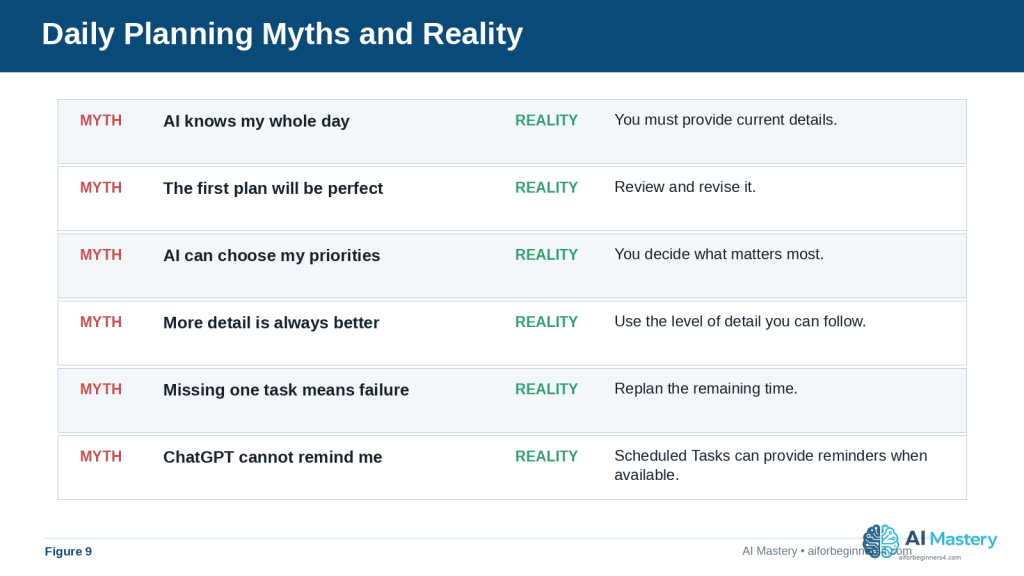
Figure 9. Daily-planning myths can create unrealistic expectations about what ChatGPT knows, decides, remembers, or schedules automatically.
Explanation: The reality is more practical: provide current details, make your own priority decisions, review the result, replan when needed, and use Scheduled Tasks when available for suitable reminders.
When to Use ChatGPT, a Calendar, or a Task Manager
ChatGPT can help you think through your day, but it is not always the best tool for every planning job. Different tools are useful for different purposes.
Use ChatGPT for Planning and Organizing
ChatGPT is especially useful when you need help:
· Turning a long task list into a manageable plan
· Deciding what to do first
· Breaking a large task into smaller steps
· Creating time blocks
· Reorganizing your day after plans change
· Comparing different ways to use your available time
For example, you might ask:
“I have six tasks but only four hours. Help me decide what to complete today and what should move to tomorrow.”
Use a Calendar for Fixed Appointments
A calendar is usually better for events that happen at a specific date and time, such as:
· Medical appointments
· Meetings
· Classes
· Travel
· School events
· Important deadlines
Calendars can also provide notifications or reminders, depending on the app and settings you use.
Use ChatGPT Scheduled Tasks or Reminder Tools for Things You Must Not Forget
When Scheduled Tasks are available for your account, ChatGPT can create one-time or recurring reminders and can also check for changes and notify you when there is a meaningful update. A calendar or dedicated reminder app may still be preferable for important appointments or obligations you want to manage in one place.
· Make a phone call
· Take something with you
· Pay a bill
· Submit a form
· Leave for an appointment
Important: Always confirm that a scheduled task or reminder was created successfully and that the notification settings you need are enabled. Do not rely on memory alone for important commitments.
Use a Task Manager for Ongoing Projects
A task-management app can be useful when work extends over several days or weeks.
For example, a project such as “Publish a new website article” may contain several separate tasks:
· Finish the draft
· Review facts
· Prepare images
· Add the article to WordPress
· Check links
· Preview the page
· Publish
A task manager can help you keep track of what is finished and what still needs attention.
Use the Tools Together
You do not have to choose only one system.
A practical workflow could be:
1. Keep fixed appointments in your calendar.
2. Keep longer projects and unfinished work in a task list.
3. Give ChatGPT the tasks and appointments that matter for today.
4. Ask ChatGPT to suggest a realistic daily plan.
5. Add important time-sensitive items to ChatGPT Scheduled Tasks, your calendar, or another reliable reminder system when appropriate.
6. Review the plan during the day and adjust it when circumstances change.
Reality: ChatGPT can help with planning and, when Scheduled Tasks are available, some reminders and recurring work. Calendars and task managers can still be better for fixed appointments and longer projects. Use the tools together when that makes your system easier to manage.
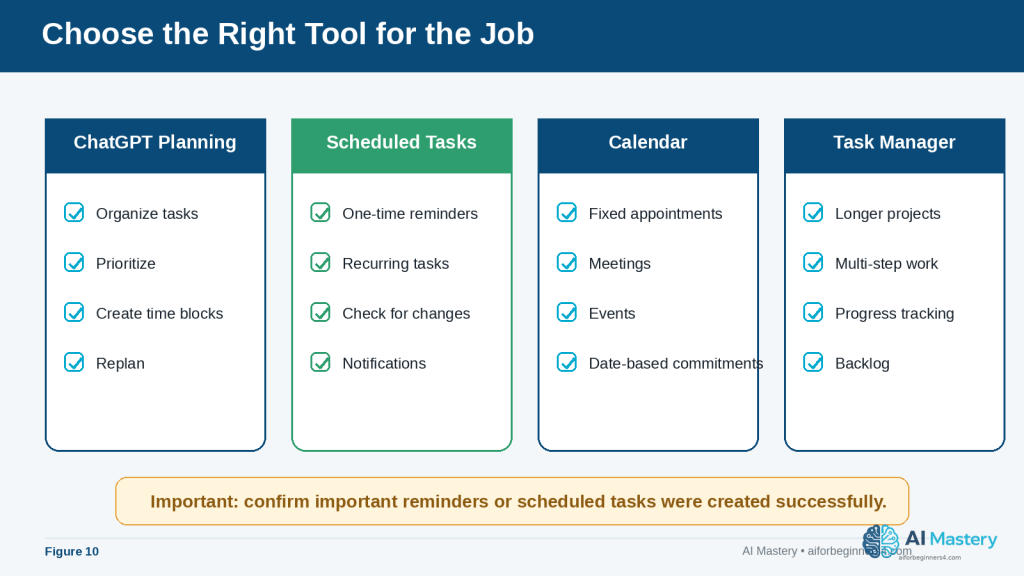
Figure 10. ChatGPT planning, Scheduled Tasks, calendars, and task managers each serve different planning needs.
Explanation: Using each tool for the work it handles best can make a planning system clearer and more reliable than trying to force every responsibility into one tool.
How to Make Your Daily Plan More Realistic
A schedule can look neat on the screen and still be difficult to follow in real life. A realistic plan should leave enough time for delays, interruptions, breaks, and tasks that take longer than expected.
Start with Fewer Priorities
Instead of treating every task as equally important, identify the few things that matter most.
For example:
“My three most important tasks today are finishing my report, calling the bank, and attending my appointment. Everything else is optional.”
This helps ChatGPT build the schedule around the tasks that should not be missed.
Be Realistic About Task Duration
If you already know how long something normally takes, tell ChatGPT.
For example:
“I usually need about 90 minutes to review an article, not 30 minutes.”
Your own experience is often more reliable than an AI-generated estimate.
Add Buffer Time
Buffer time is extra unscheduled time placed between activities.
It can help when:
· A phone call takes longer than expected
· Traffic delays your trip
· A website or computer problem slows you down
· An appointment starts late
· You need a short rest before beginning the next task
For example:
“Leave at least 15 minutes of buffer time between major activities.”
Avoid Filling Every Minute
A schedule from 9:00 a.m. to 5:00 p.m. does not need eight hours of scheduled activity.
Leaving some open time can make the plan easier to follow and reduce the need to reorganize everything after one delay.
You could ask:
“Use only about 75% of my available time and leave the rest open for delays or unexpected tasks.”
The exact percentage is not important. The goal is simply to avoid creating an overly crowded plan.
Consider Your Energy, Not Just Your Available Time
Some tasks require more concentration than others.
If you work better on difficult tasks in the morning, tell ChatGPT:
“Schedule my most demanding work before lunch and leave easier administrative tasks for the afternoon.”
If you prefer a different routine, describe that instead.
ChatGPT should adapt to your preferences rather than assuming everyone works best at the same time.
Separate Must-Do Tasks from Optional Tasks
A useful daily plan can include two levels:
· Must do today: Tasks with important deadlines or consequences
· If time allows: Useful tasks that can move to another day
For example:
“Create my plan with a main schedule and a separate ‘if time allows’ list.”
This prevents lower-priority work from crowding out essential tasks.
Replan Instead of Trying to Catch Up
If the day falls behind, trying to complete every delayed task can make the remaining schedule unrealistic.
Instead, you can tell ChatGPT:
“It is now 4:00 p.m. I am 90 minutes behind. Keep only the essential tasks for today and move the rest to tomorrow.”
This can be more practical than compressing every remaining activity into a smaller amount of time.
Final Tip for Realistic Planning: Build your schedule around your real available time, priorities, and working habits—not around the largest number of tasks you can fit onto a page.
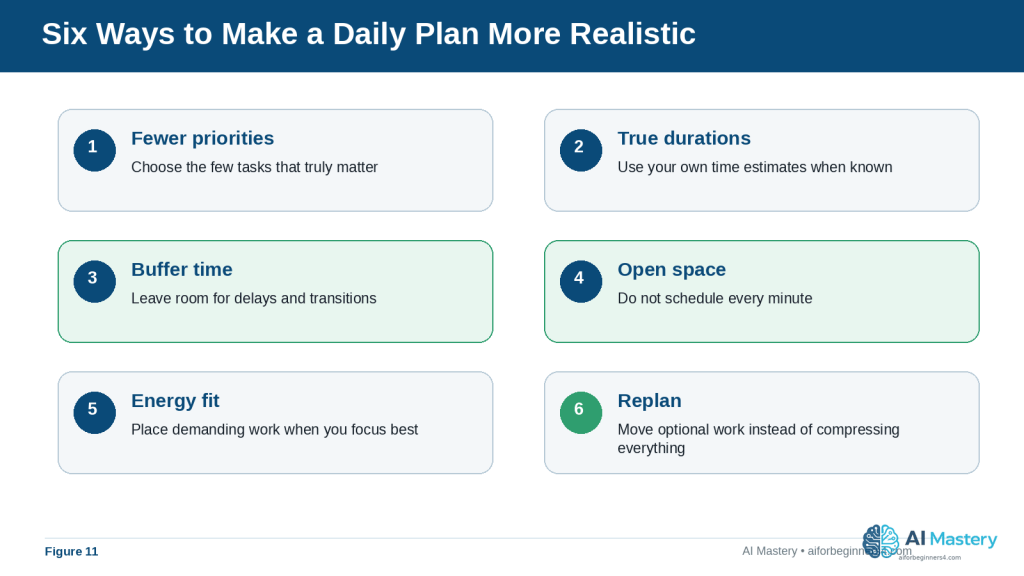
Figure 11. Realistic planning uses fewer priorities, honest time estimates, buffer time, open space, energy awareness, and replanning.
Explanation: These adjustments help the schedule match the way the day actually works instead of creating an overfilled timetable that quickly becomes outdated.
Frequently Asked Questions
Can ChatGPT create my entire daily schedule for me?
Yes. You can give ChatGPT your tasks, appointments, available hours, priorities, and preferred break times, and it can suggest a complete schedule.
You should still review the result before following it. ChatGPT may estimate task duration incorrectly or misunderstand which activities matter most.
Do I need to give ChatGPT exact times for every task?
No. Exact times are most useful for fixed commitments such as appointments, meetings, or deadlines.
For flexible tasks, you can simply tell ChatGPT approximately how long they take or let it suggest a time block.
For example:
“I need about two hours for my project sometime before 3:00 p.m.”
Can ChatGPT help if I have too many tasks?
Yes. You can ask it to separate your tasks into:
· Must do today
· Should do today
· Can wait until later
You can also ask it to remove lower-priority activities when your available time is limited.
Can I change the schedule after ChatGPT creates it?
Yes. You can continue the same conversation and explain what changed.
For example:
“My morning appointment was cancelled. Use the extra hour for my project and move grocery shopping earlier.”
ChatGPT can then suggest an updated schedule.
Can ChatGPT plan more than one day?
Yes. You can ask it to organize several days or an entire week.
However, longer plans usually contain more assumptions and are more likely to change. Review each day as it approaches rather than assuming the original weekly schedule will remain suitable.
Can ChatGPT remind me when it is time to do a task?
Yes, when Scheduled Tasks are available for your account. ChatGPT can create one-time and recurring tasks and send notifications. For important appointments or deadlines, confirm that the task was created correctly, make sure the notification settings you need are enabled, and consider keeping the commitment in a calendar or another reliable reminder system as well.
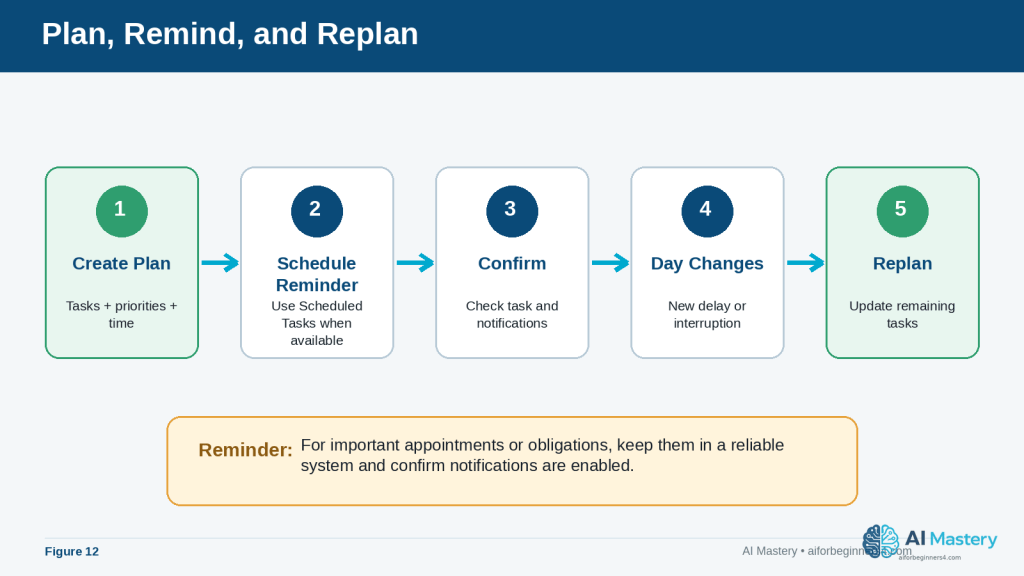
Figure 12. A practical workflow can combine daily planning, Scheduled Tasks, notification checks, and replanning when circumstances change.
Explanation: Scheduled reminders can support the plan, but important commitments still need confirmation and a reliable backup system when appropriate.
Should I enter private information when creating my plan?
Only provide information that is necessary for the planning task.
For example, “appointment from 2:00 p.m. to 3:00 p.m.” may be enough. You normally do not need to provide account numbers, detailed medical information, private addresses, passwords, or other unnecessary sensitive information.
Is an AI-generated daily plan always accurate?
No. ChatGPT can misunderstand instructions, underestimate how long activities take, or create a schedule that does not match your real circumstances.
Always check the plan before relying on it.
Can I reuse the same daily-planning prompt?
Yes. A reusable prompt can make daily planning faster.
You can save a simple template such as:
“Create a realistic plan for today from [start time] to [end time]. My fixed commitments are [appointments]. My tasks are [tasks]. My three highest priorities are [priorities]. Include meals, breaks, and buffer time. Put unfinished optional tasks in a separate list.”
Then replace the bracketed information each day.
Key Takeaways
ChatGPT can make daily planning easier by helping you turn an unorganized list of tasks into a clearer and more realistic schedule.
Remember these main points:
· Start by listing the tasks you actually need to complete.
· Tell ChatGPT your available start and end times.
· Add fixed appointments, deadlines, travel time, meals, and other commitments.
· Identify your highest-priority tasks instead of treating everything as equally important.
· Give realistic estimates when you already know how long tasks usually take.
· Ask ChatGPT to include breaks and buffer time rather than filling every minute.
· Break large projects into smaller, manageable steps.
· Review every AI-generated schedule before using it.
· Reorganize the plan when unexpected events change your day.
· Move lower-priority tasks to another day when there is not enough time.
· Avoid sharing unnecessary sensitive or private information.
· Use ChatGPT Scheduled Tasks, calendars, reminders, and task managers together when each tool is better suited to a particular job.
The purpose of daily planning with ChatGPT is not to create a perfect timetable. It is to help you make clearer decisions about what deserves your time and create a plan that you can adjust as the day changes.
Final Tip
Start with a simple daily-planning prompt rather than trying to create a complicated system immediately.
For example:
“Help me plan today from 9:00 a.m. to 5:00 p.m. My most important tasks are [tasks]. My fixed appointments are [appointments]. Include breaks and leave some extra time for delays.”
Use the plan for a few days and notice what works and what does not. If you regularly need more time for certain tasks, tell ChatGPT. If you prefer difficult work in the morning or need longer breaks, include that information too.
A useful daily plan should gradually become more realistic because it reflects how you actually spend your time.
The best use of ChatGPT is not to let it control your schedule. Use it to help organize your choices, then make the final decisions yourself.
Continue Learning
After you learn how to create a daily plan with ChatGPT, the next step is to use AI for other everyday productivity tasks.
Continue with these AI Mastery guides:
· AI Productivity for Beginners: Complete Guide (2026) — Review the broader ways AI can help with planning, organizing, writing, research, and everyday work.
· How to Write and Improve Emails with AI (2026) — Learn how to draft, rewrite, shorten, and improve emails with AI.
· How to Prepare Meeting Agendas and Notes with AI (2026) — Learn how AI can help organize meetings and turn notes into useful summaries and action items. Link after Article 080 is published.
· How to Research and Organize Information with AI (2026) — Learn how to collect, organize, compare, and review information more efficiently. Link after Article 081 is published.
· How to Create a Personal Study Plan with AI (2026) — Learn how to use AI to organize subjects, study sessions, goals, and review periods. Link after Article 082 is published.
· How to Organize Files, Tasks, and Projects with AI (2026) — Learn how AI can help you structure larger projects and ongoing responsibilities. Link after Article 083 is published.
These articles build on the same basic principle used in daily planning: give the AI clear information, review its suggestions carefully, and keep the final decisions under your control.
Sources and References
The following official OpenAI resources were reviewed for this guide. ChatGPT features, menus, Scheduled Tasks, privacy controls, memory, limits, and availability can change, so readers should check current official information when first using a feature, after changing plans or settings, when receiving an important update notice, and periodically.
· OpenAI Help Center — Prompt Engineering Best Practices for ChatGPT: Explains that useful prompts should be clear and specific, include enough context, and can be improved through iterative refinement.
· OpenAI Help Center — Data Controls FAQ: Explains ChatGPT Data Controls, including model-improvement choices, Temporary Chat, data export, and related privacy settings.
· OpenAI Help Center — Memory FAQ: Explains how ChatGPT memory can use helpful context when enabled and how users can review, change, or turn memory off.
· OpenAI Help Center — Scheduled Tasks in ChatGPT: Explains one-time and recurring tasks, reminders, monitoring, notification settings, and current usage limits.
· OpenAI Help Center — How Your Data Is Used to Improve Model Performance: Explains how consumer-service content may be used to improve models and how users can opt out through Data Controls.
· OpenAI Help Center — What Is ChatGPT: FAQ: Describes ChatGPT as an AI assistant for everyday tasks including planning, writing, studying, coding, and working with files and images.
These sources support the ChatGPT-specific prompting, privacy, memory, Scheduled Tasks, and capability information used in this article. The scheduling examples and productivity suggestions are educational examples rather than guarantees that a particular schedule will work for every reader.

