
Estimated Reading Time: 20 minutes
Last Updated: August 15, 2026
Before Learning
AI productivity means using artificial intelligence to help you complete everyday tasks more efficiently. It can assist with writing, summarizing, organizing information, planning projects, brainstorming ideas, researching topics, managing documents, and preparing routine work.
You do not need programming skills or advanced technical knowledge to begin. Most beginner AI productivity tasks can be completed by describing what you need in ordinary language and then reviewing the AI-generated result carefully.
Before using AI for productivity, remember several important points:
· AI can make mistakes or provide outdated information.
· Important facts should be checked before you rely on them.
· Avoid uploading confidential, private, or sensitive information unless you understand how the AI service handles that information.
· Review AI-generated writing before sending, publishing, or sharing it.
· Check licences and usage conditions when AI generates or helps modify images, music, documents, templates, or other creative material.
· Do not assume that AI-generated content is automatically copyright-free or approved for commercial use.
· Keep important source files and original documents when AI is used to summarize, rewrite, translate, or analyze them.
· Use AI as an assistant rather than allowing it to make important decisions without your review.
In this guide, you will learn a simple beginner workflow for using AI to save time while maintaining accuracy, privacy, organization, and human oversight.
The goal is not to automate everything. The goal is to identify suitable tasks where AI can reduce repetitive work, help you organize information, or give you a useful starting point while you remain responsible for the final result.
What You’ll Learn
By the end of this guide, you will know how to:
· Identify everyday tasks where AI can genuinely save time.
· Use AI to help write, rewrite, summarize, and organize information.
· Brainstorm ideas and create simple plans with AI assistance.
· Use AI to help with emails, documents, notes, checklists, and routine work.
· Create clearer prompts that give AI enough context to help effectively.
· Review AI-generated results for mistakes, missing information, or unsupported claims.
· Protect private, confidential, and sensitive information when using AI tools.
· Decide which tasks are suitable for AI assistance and which still require direct human judgment.
· Organize AI-generated work so you can find prompts, source files, and final versions later.
· Check licences and usage conditions when AI assists with creative or commercial work.
· Avoid common productivity mistakes such as over-automating tasks or trusting AI output without review.
· Build a simple, repeatable AI productivity workflow that you can use for everyday tasks.
Introduction
AI productivity tools can help beginners complete many everyday tasks more efficiently, but they are most useful when you give them a clear purpose and review the results carefully.
You can use AI to help with tasks such as:
· Writing and rewriting text.
· Summarizing long documents.
· Organizing notes and information.
· Creating checklists and simple plans.
· Brainstorming ideas.
· Preparing first drafts of emails or documents.
· Comparing options.
· Extracting key information from text.
· Creating tables or structured outlines.
· Simplifying difficult explanations.
· Preparing study notes or practice questions.
The important point is that AI should support your work rather than replace your judgment.
For example, if you ask AI to summarize a long document, it may save you time by creating a shorter version. However, you should still compare important information with the original document before relying on the summary.
The same principle applies to other productivity tasks. AI can help create a first draft, organize information, suggest ideas, or reduce repetitive work, but you remain responsible for checking accuracy, privacy, permissions, and the final result.
A practical beginner workflow is:
1. Decide what task you want help with.
2. Give the AI clear instructions and enough context.
3. Review the result carefully.
4. Correct or refine the output when necessary.
5. Save the useful result together with important source files or prompts.
This simple process can help you use AI more efficiently without treating its output as automatically correct or complete.
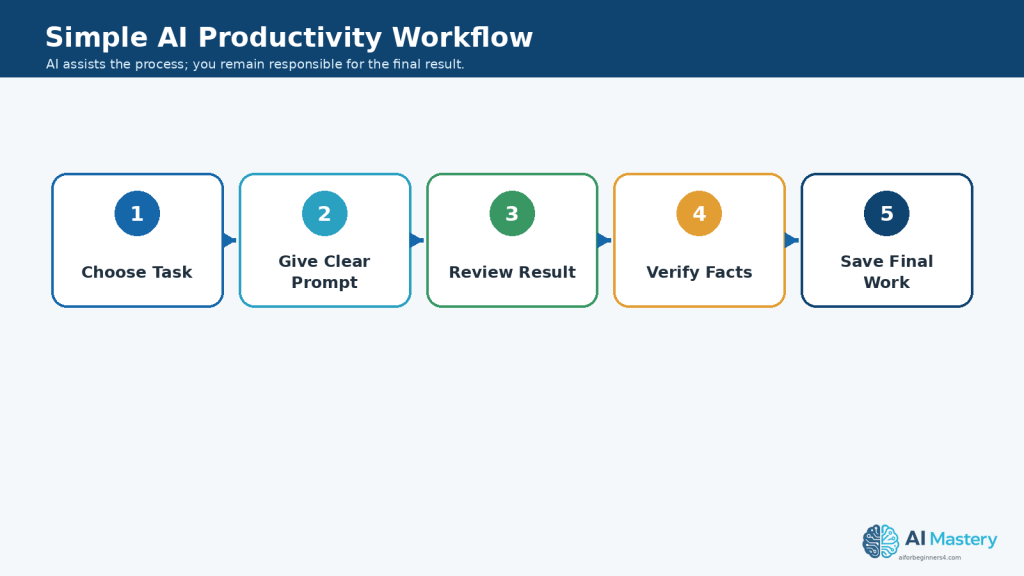
Figure 1. A simple AI productivity workflow moves from choosing one task through prompting, reviewing, verifying, and saving the final work.
Explanation: Reusing the same basic sequence makes AI-assisted work easier to review and helps keep human judgment in the process.
What Is AI Productivity?
AI productivity means using artificial intelligence to help you complete useful tasks more efficiently.
The goal is not simply to do more work. It is to reduce unnecessary effort, organize information more clearly, and spend less time on repetitive tasks while keeping human review and judgment in the process.
AI can support productivity in several ways:
· Drafting text.
· Rewriting difficult or unclear writing.
· Summarizing long information.
· Organizing notes.
· Creating checklists.
· Brainstorming ideas.
· Preparing outlines.
· Comparing information.
· Extracting important details.
· Turning unstructured information into tables or lists.
· Explaining unfamiliar topics in simpler language.
· Suggesting next steps for a project.
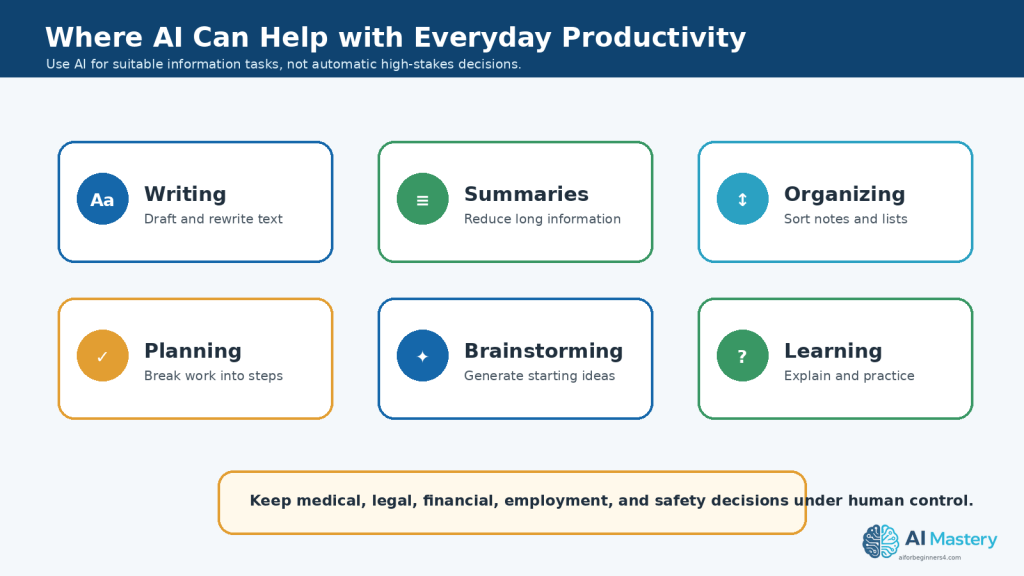
Figure 2. AI can support everyday productivity through writing, summarizing, organizing, planning, brainstorming, and learning.
Explanation: These are practical information tasks where AI can provide a useful starting point while the user remains responsible for the final result.
AI Works Best as an Assistant
AI is most useful when you treat it as a helper rather than an automatic replacement for your own thinking.
For example, you might ask AI to:
“Create a simple checklist for preparing a weekly household budget.”
The AI can give you a useful starting point. You can then remove unnecessary items, add information that applies to your situation, and check that the final checklist is accurate.
Productivity Does Not Mean Automating Everything
Not every task should be given to AI.
Tasks involving important personal, legal, medical, financial, safety, employment, or business decisions may require additional professional knowledge or careful human judgment.
AI can still help organize questions, summarize information, or prepare a draft, but important decisions should not be made solely because an AI system suggested them.
Practical Example
Suppose you have several pages of meeting notes and need to prepare a short action list.
Instead of reading the notes repeatedly, you could ask:
Prompt:
“Review these meeting notes and create a short action list. Separate each action into task, responsible person, and deadline. Do not invent information that is not included in the notes.”
You would then compare the AI-generated list with the original notes before using or sharing it.
This is a practical example of AI productivity: using AI to reduce repetitive work while keeping the original information and human review at the centre of the process.
Step 1: Identify Tasks Where AI Can Save Time
Before using AI, decide which parts of your work are repetitive, time-consuming, or difficult to organize.
AI is often most useful for tasks that involve working with information rather than making important decisions for you.
Suitable beginner tasks can include:
· Drafting a first version of an email.
· Summarizing a long document.
· Rewriting difficult text in simpler language.
· Turning notes into a checklist.
· Organizing information into categories.
· Brainstorming ideas for a project.
· Creating an outline before writing.
· Extracting names, dates, or action items from text.
· Comparing information you provide.
· Creating practice questions from study notes.
· Suggesting different ways to organize a task.
Look for Repetitive Work
A useful question to ask is:
“What task do I repeat that takes time but still needs my final review?”
For example, you may regularly:
· Turn meeting notes into action items.
· Rewrite similar messages.
· Summarize reports.
· Organize lists.
· Prepare weekly plans.
· Convert unstructured notes into a clearer format.
These are often good places to test AI assistance.
Do Not Start with High-Risk Decisions
For your first AI productivity tasks, avoid giving AI complete control over decisions that could have serious consequences.
Examples include:
· Medical decisions.
· Legal decisions.
· Financial decisions.
· Employment decisions affecting another person.
· Safety-critical instructions.
· Decisions involving confidential or highly sensitive information.
AI may help you organize questions or understand general information, but important decisions should be checked with appropriate qualified sources or professionals when necessary.
Start Small
Choose one simple task that you already understand well.
This makes it easier to judge whether the AI result is useful and accurate.
For example, instead of asking:
“Organize my entire business for me.”
you could begin with:
“Turn these project notes into a checklist of tasks. Keep the original meaning and do not add information that is not in my notes.”
Practical Example
Suppose you have a long list of household tasks written in no particular order.
You could ask:
Prompt:
“Organize these household tasks into four groups: urgent, this week, this month, and optional. Do not remove any tasks or add new ones.”
The AI can help structure the information, but you should still review the categories and move any task that does not fit your priorities.
Starting with small, clearly defined tasks makes it easier to learn what AI can do well and where your own judgment is still needed.
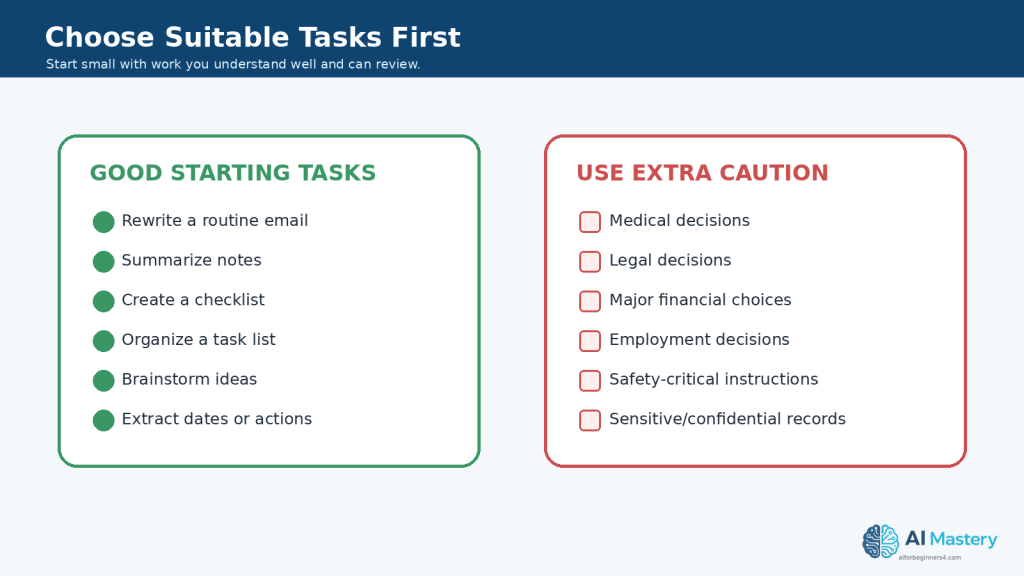
Figure 3. Start with low-risk tasks you understand well, and use extra caution for high-stakes decisions or sensitive information.
Explanation: Beginning with simple, reviewable work makes it easier to judge whether the AI result is genuinely useful.
Step 2: Give AI Clear Instructions
AI usually gives better results when you clearly explain what you want it to do.
A short prompt such as:
“Help me with this.”
does not provide enough information.
A more useful prompt explains the task, the type of result you want, and any important limits.
Include the Main Task
Start by telling the AI exactly what you want.
For example:
“Summarize this document.”
or:
“Rewrite this paragraph in simpler language.”
or:
“Turn these notes into a checklist.”
Add Useful Context
Give enough background for the AI to understand the situation.
For example:
“Rewrite this explanation for a complete beginner who has never used AI before.”
The extra context helps the AI choose more appropriate language.
Explain the Format You Want
You can also tell the AI how to organize the answer.
For example:
Prompt:
“Turn these meeting notes into a checklist. Use bullets for the tasks and include the responsible person and deadline when they are mentioned.”
You could also request:
· A short summary.
· A table.
· A numbered procedure.
· A checklist.
· An outline.
· A list of key points.
· A beginner-friendly explanation.
Add Important Limits
Tell the AI what it should not do.
For example:
Prompt:
“Summarize this document in five bullet points. Use only information from the document. Do not invent missing details.”
Clear limits can reduce unwanted additions, although you should still review the result.
Improve the Prompt When Necessary
Your first prompt does not need to be perfect.
If the result is too long, you can say:
“Make this shorter and keep only the most important points.”
If it is too technical:
“Rewrite this using simpler language for a beginner.”
If information is missing:
“Review the original text again and include any important deadlines that were omitted.”
This back-and-forth process is often called refining the prompt.
Practical Example
Suppose you have several pages of notes from a project.
Instead of asking:
“Organize this.”
you could ask:
Prompt:
“Organize these project notes into four sections: completed tasks, tasks still to do, deadlines, and questions that need answers. Use only information from the notes and do not invent missing details.”
After receiving the result, compare it with the original notes.
Clear instructions help AI produce a more useful starting point, but the final result still needs your review.
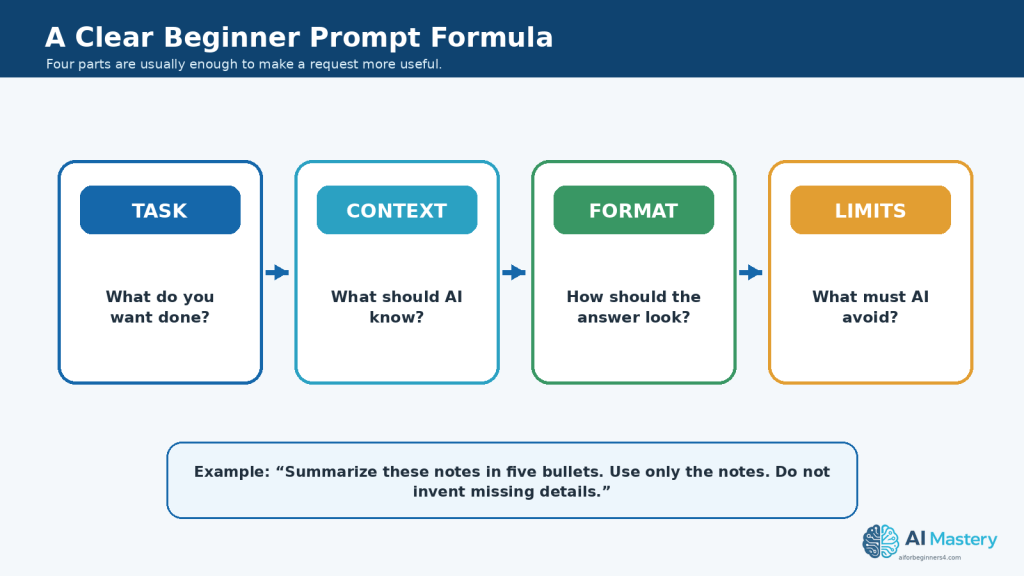
Figure 4. A useful beginner prompt usually explains the task, relevant context, desired format, and important limits.
Explanation: Clear instructions reduce ambiguity and make it easier to review whether the AI followed the request correctly.
Step 3: Use AI to Write and Rewrite Everyday Text
Writing is one of the most common productivity tasks where AI can provide useful assistance.
AI can help you create a first draft, improve existing writing, simplify difficult wording, change the tone, or reorganize text.
You can use AI to help with:
· Emails.
· Letters.
· Reports.
· Notes.
· Instructions.
· Checklists.
· Short descriptions.
· Project updates.
· Social media drafts.
· Personal reminders.
· Simple business documents.
Create a First Draft
If you know what you want to say but are not sure how to begin, AI can create a starting draft.
For example:
Prompt:
“Write a polite email asking a company for an update on an order that has not arrived. Keep the message short and professional.”
Review the result and add any missing information such as the order number, date, or contact details.
Rewrite Existing Text
You can also give AI text that you have already written and ask it to improve the wording.
For example:
Prompt:
“Rewrite this message so it is clearer and more professional. Keep the original meaning and do not add new information.”
This can be useful when a message feels repetitive, unclear, or difficult to read.
Simplify Difficult Writing
AI can help turn technical or complicated wording into simpler language.
For example:
Prompt:
“Rewrite this explanation for a complete beginner. Use short sentences and explain any technical terms.”
Afterward, compare the rewritten version with the original to make sure important meaning was not lost.
Change the Tone Carefully
You can ask AI to adjust the tone of a message.
For example:
Prompt:
“Rewrite this email so it sounds polite, calm, and professional without changing the facts.”
Possible tone requests include:
· Professional.
· Friendly.
· Formal.
· Simple.
· Concise.
· Neutral.
· Beginner-friendly.
Be careful when changing tone in sensitive messages. Make sure the final wording still reflects what you actually intend to say.
Review Before Sending or Publishing
Do not send AI-generated writing automatically.
Check:
· Names.
· Dates.
· Numbers.
· Addresses.
· Links.
· Factual claims.
· Tone.
· Missing information.
· Statements the AI may have invented.
· Private or confidential information.
Protect Private Information
Before pasting text into an AI tool, consider whether it contains information that should remain private.
Depending on the task, you may be able to remove or replace:
· Full names.
· Account numbers.
· Addresses.
· Phone numbers.
· Customer information.
· Employee information.
· Confidential business details.
· Medical or financial information.
For example, instead of including a real customer name, you could replace it with:
[Customer Name]
and add the correct information yourself after reviewing the draft.
Practical Example
Suppose you wrote this message:
“My order still not here and I need know what happened please tell me.”
You could ask:
Prompt:
“Rewrite this as a polite and professional customer-service email. Keep it short and do not invent an order number or delivery date.”
AI might help create a clearer draft, but you should still add the correct order details and review the final message before sending it.
Using AI for writing can save time, especially when you already know the message you want to communicate and use AI to help organize or improve the wording.
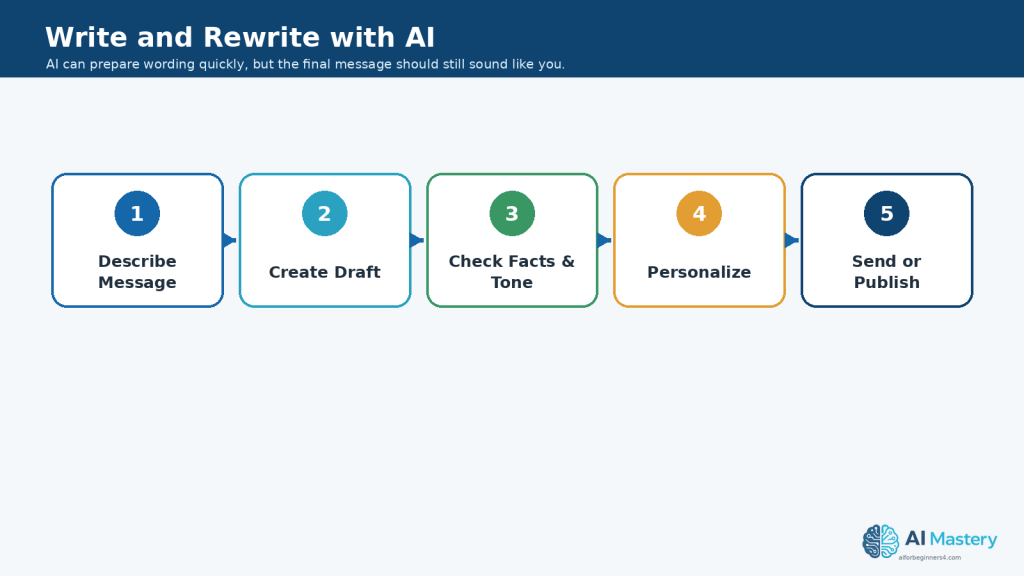
Figure 5. Use AI writing as a draft-and-review process rather than sending the first generated version automatically.
Explanation: Checking facts, tone, personal details, and meaning before sending helps turn a fast draft into dependable communication.
Step 4: Use AI to Summarize and Organize Information
AI can help reduce long information into a shorter form and organize scattered notes into a clearer structure.
This can be useful when you have:
· Long documents.
· Meeting notes.
· Research notes.
· Articles.
· Instructions.
· Project updates.
· Study material.
· Lists of ideas.
· Customer feedback.
· Personal notes.
Summarize Long Information
You can ask AI to create a shorter version of a document or passage.
For example:
Prompt:
“Summarize this text in five bullet points. Keep the most important facts and do not add information that is not in the original.”
A summary can help you understand the main points more quickly, but it should not automatically replace the original source.
Ask for Different Types of Summaries
You can change the summary depending on what you need.
For example:
Short summary:
“Summarize this document in one paragraph.”
Key points:
“List the five most important points from this document.”
Beginner explanation:
“Explain the main ideas from this document in simple language for a beginner.”
Action summary:
“Summarize this meeting and list only the decisions, tasks, deadlines, and unanswered questions.”
Organize Unstructured Notes
AI can also help turn messy notes into categories.
For example:
Prompt:
“Organize these notes into the following sections: ideas, tasks, deadlines, questions, and completed items. Do not remove or invent information.”
This can save time when information has been collected from several conversations, meetings, or brainstorming sessions.
Extract Specific Information
Instead of summarizing everything, you can ask AI to find particular details.
For example:
Prompt:
“Review this text and list every date, deadline, person responsible, and action item mentioned.”
This can be useful for project notes, reports, instructions, or meeting records.
Ask for a Table When It Improves Clarity
Structured information may be easier to review in a table.
For example:
Prompt:
“Turn these project notes into a table with the columns Task, Person Responsible, Deadline, and Status. Leave a field blank if the information is not provided.”
Asking the AI to leave missing information blank helps reduce the risk that it will fill gaps with invented details.
Compare the Result with the Original
AI summaries can:
· Leave out important information.
· Misunderstand a sentence.
· Combine separate ideas incorrectly.
· Change the meaning of a detail.
· Miss dates, numbers, or conditions.
· Present an interpretation as if it were stated directly.
For important information, compare the AI-generated result with the original source.
Keep the Original Document
Do not delete the source simply because AI created a shorter version.
Keep the original document together with:
· The AI summary.
· Important prompts.
· Your corrected version.
· The final document you actually use.
This makes it easier to verify information later.
Practical Example
Suppose you have three pages of meeting notes.
You could ask:
Prompt:
“Review these meeting notes and create four sections: Decisions Made, Action Items, Deadlines, and Questions Still Open. Use only information in the notes. If a responsible person or deadline is not stated, write ‘Not specified’ rather than guessing.”
After receiving the result, compare each important task and deadline with the original notes.
AI can make long or disorganized information easier to review, but the original source remains important whenever accuracy matters.
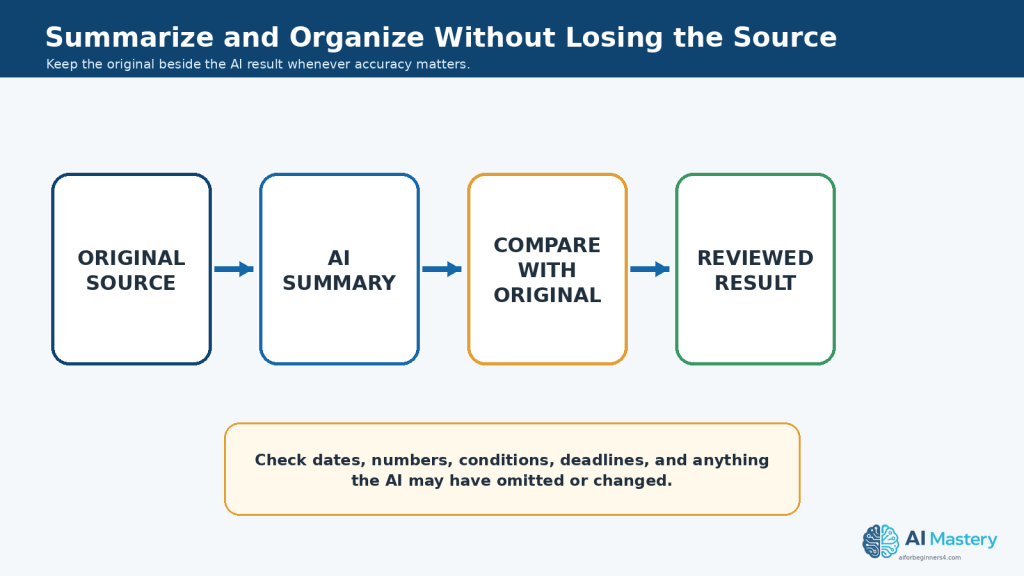
Figure 6. Keep the original source beside an AI summary and compare important details before relying on the shorter version.
Explanation: Dates, numbers, conditions, deadlines, and other important facts can be omitted or changed during summarization, so the source remains essential.
Step 5: Use AI to Brainstorm Ideas and Create Simple Plans
AI can be useful when you know the general goal but are not sure how to begin.
It can help you generate ideas, compare possible approaches, organize a project into smaller tasks, and create a simple starting plan.
Brainstorm Several Ideas
Instead of asking AI for one answer immediately, ask for several options.
For example:
Prompt:
“Give me 10 beginner-friendly ideas for using AI to save time with everyday office tasks. Keep each idea practical and explain it in one sentence.”
You can then review the suggestions and choose the ones that are realistic for your situation.
Give AI Clear Limits
Broad brainstorming prompts can produce ideas that are too complicated or irrelevant.
Add useful limits such as:
· Beginner-friendly.
· Low cost.
· No coding required.
· Suitable for a small project.
· Can be completed this week.
· Uses tools you already have.
· Avoids confidential information.
For example:
Prompt:
“Give me five simple ideas for organizing a weekly work schedule with AI. The ideas should be suitable for a beginner and should not require programming or paid automation software.”
Turn an Idea into a Plan
After choosing an idea, ask AI to break it into smaller tasks.
For example:
Prompt:
“Create a simple step-by-step plan for organizing my digital files. Start with the easiest tasks and keep the plan suitable for a beginner.”
AI might suggest stages such as reviewing files, creating folders, renaming important documents, removing duplicates, and creating a regular backup routine.
Review the plan and change anything that does not fit your situation.
Ask for a Checklist
A checklist can make a plan easier to follow.
For example:
Prompt:
“Turn this project plan into a checklist. Keep the tasks in a practical order and do not add any tasks that are not supported by the plan.”
You can mark each item as you complete it.
Break Large Projects into Smaller Parts
Large projects can feel difficult because several tasks are mixed together.
AI can help divide them into manageable parts.
For example, instead of asking:
“Help me create a website.”
you could ask:
Prompt:
“Break a beginner website project into smaller stages such as planning, writing content, preparing images, building pages, reviewing, and publishing. Keep the explanation simple.”
You can then work through one stage at a time.
Review Priorities Yourself
AI can suggest priorities, but it may not understand your actual deadlines, responsibilities, available time, budget, or personal circumstances.
If you ask AI to prioritize tasks, treat the result as a suggestion.
For example:
Prompt:
“Suggest a possible priority order for these tasks based on the deadlines I provide. Explain why you placed each task in that position. Do not invent deadlines.”
Review the order before following it.
Practical Example
Suppose you want to prepare a short beginner tutorial but do not know how to organize the work.
You could ask:
Prompt:
“Create a simple project plan for producing a beginner tutorial. Include planning the topic, researching information, writing the draft, checking facts, preparing visuals, proofreading, and publishing. Put the tasks in a logical order.”
AI can provide an organized starting plan.
You can then adjust the steps according to your actual tools, deadlines, sources, and publishing requirements.
Using AI for brainstorming and planning can reduce the time spent staring at a blank page, but you should still decide which ideas are useful and which tasks deserve the highest priority.
Step 6: Use AI to Create Checklists, Schedules, and Task Lists
AI can help turn a goal, project, or group of notes into a clearer list of tasks.
This can be useful when you need to organize work but are not sure what order to follow.
Create a Simple Checklist
A checklist can help you avoid forgetting important steps.
For example:
Prompt:
“Create a beginner-friendly checklist for preparing a short presentation. Include planning, research, writing, visuals, proofreading, practice, and final review.”
Review the checklist and remove anything that does not apply to your project.
Turn Notes into Tasks
If you already have notes, AI can convert them into a clearer task list.
For example:
Prompt:
“Turn these project notes into a task list. Keep every task that is mentioned, combine obvious duplicates, and do not add tasks that are not supported by the notes.”
Afterward, compare the task list with the original notes.
Organize Tasks by Priority
You can ask AI to suggest a possible priority order when you provide enough information.
For example:
Prompt:
“Organize these tasks into High, Medium, and Low priority using the deadlines and importance information I provide. Do not invent deadlines or assume priorities that are not stated.”
Review the result yourself because AI may not understand all of your real-world responsibilities.
Create a Simple Schedule
AI can also help arrange tasks across several days or weeks.
For example:
Prompt:
“Create a five-day work plan for these tasks. I have two hours available each day. Put urgent tasks first and leave some time for final review.”
A schedule like this can provide a useful starting point, but you should adjust it if tasks take longer than expected.
Break Large Tasks into Smaller Actions
A task such as:
“Prepare the monthly report.”
may be easier to manage when divided into smaller actions.
You could ask:
Prompt:
“Break ‘Prepare the monthly report’ into small, practical steps for a beginner. Include gathering information, checking the data, writing the report, proofreading, and final review.”
This can make a large task feel more manageable.
Add Deadlines Only When You Know Them
Be careful when asking AI to create schedules from incomplete information.
If a real deadline is not provided, ask the AI not to invent one.
For example:
Prompt:
“Create a task table with Task, Deadline, Priority, and Status. If no deadline is provided, write ‘Not specified.’”
This helps keep known information separate from assumptions.
Review the Workload
AI may create a schedule that looks organized but is unrealistic.
Check whether:
· Too many tasks are assigned to one day.
· Important tasks have enough time.
· Breaks or review time are included.
· Deadlines are correct.
· Tasks are placed in a logical order.
· Dependencies are respected.
· You have enough time for unexpected problems.
Practical Example
Suppose you need to finish a small project by Friday.
You could provide your task list and ask:
Prompt:
“Organize these tasks from Monday to Friday. I have about three hours available each day. Put tasks with real deadlines first, keep dependent tasks in the correct order, and leave time on Friday for final review. Do not invent missing deadlines.”
AI can prepare a draft schedule.
You can then adjust it based on how long each task actually takes and any responsibilities the AI does not know about.
Using AI to create checklists and task plans can improve organization, but the final schedule should reflect your real priorities, deadlines, available time, and responsibilities.
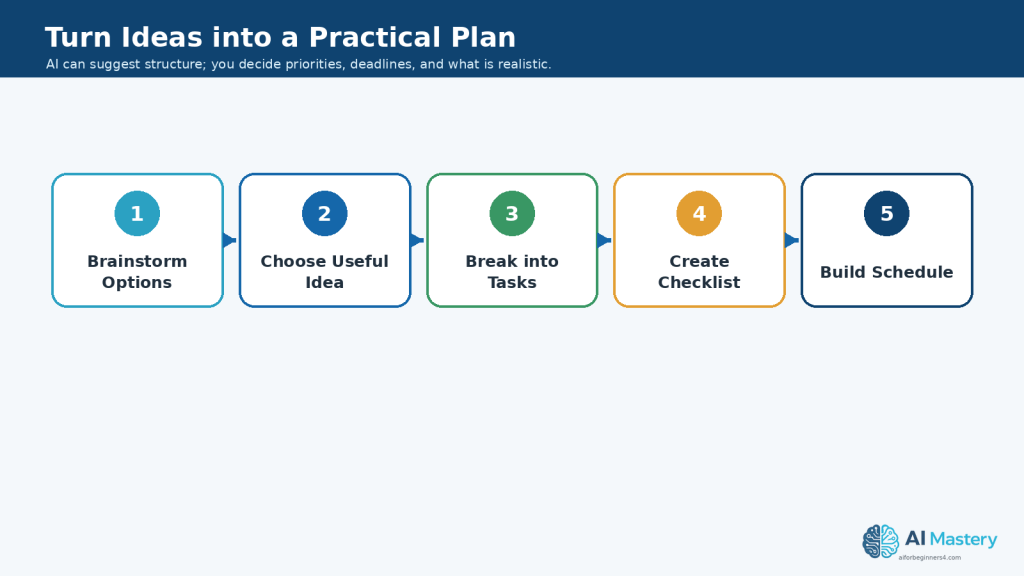
Figure 7. AI can help turn a broad idea into smaller tasks, a checklist, and a draft schedule.
Explanation: The structure can save planning time, but priorities, deadlines, available time, and workload still need human review.
Step 7: Use AI to Compare Information and Options
AI can help organize differences between several options so they are easier to review.
This can be useful when comparing:
· Software tools.
· Products or services.
· Project ideas.
· Documents.
· Plans.
· Courses.
· Features.
· Work methods.
· Different versions of written material.
The goal is to organize information more clearly, not to let AI make an important decision for you.
Provide the Information You Want Compared
For reliable comparisons, give the AI the information you want it to use.
For example:
Prompt:
“Compare these three software options using only the information I provide. Create a table with Features, Advantages, Limitations, and Cost Information. Write ‘Not provided’ when information is missing.”
This helps separate known information from assumptions.
Choose Your Comparison Criteria
Tell the AI which factors matter to you.
For example, you could compare tools based on:
· Ease of use.
· Features.
· Price.
· Free-plan limitations.
· Export options.
· Commercial-use conditions.
· Privacy features.
· Accessibility.
· Customer support.
· Device compatibility.
The criteria should match the decision you are actually trying to make.
Ask for a Comparison Table
Tables can make several options easier to scan.
For example:
Prompt:
“Compare these four AI tools in a table. Use the columns Tool, Main Purpose, Beginner Friendliness, Free Option, Main Limitation, and Best Use. Use only the information I provide.”
You can then review the table and correct anything that does not match your source information.
Separate Facts from Suggestions
AI sometimes presents recommendations as though they are facts.
You can reduce this problem by asking it to separate them.
For example:
Prompt:
“First list the factual differences between these options. Then provide a separate section called Possible Considerations. Do not choose a winner for me.”
This makes it easier to distinguish documented information from AI-generated suggestions.
Be Careful with Current Information
Information about software plans, prices, features, limits, privacy policies, and commercial-use conditions can change.
If your decision depends on current information, verify important details with the official provider before acting on the comparison.
Do not rely on an old AI-generated comparison for information that may have changed.
Do Not Let AI Make High-Stakes Decisions for You
AI can help organize information related to important decisions, but it should not be the only basis for decisions involving areas such as:
· Medical treatment.
· Legal matters.
· Investments or major financial decisions.
· Employment decisions affecting another person.
· Safety-critical choices.
For these situations, use appropriate qualified sources or professional advice when needed.
Practical Example
Suppose you are choosing between three AI writing tools.
You could collect information from each provider and ask:
Prompt:
“Using only the information below, compare these three AI writing tools in a table. Include Ease of Use, Main Features, Free-Plan Limits, Export Options, Privacy Information Provided, and Commercial-Use Information. Write ‘Not stated’ when the source does not provide an answer. Do not recommend a winner.”
The resulting table can save time by organizing the information.
You can then verify the important details with the official providers and decide which option best fits your own needs.
AI can make comparisons easier to read, but the final decision should remain based on accurate information, your priorities, and your own judgment.
Step 8: Use AI to Help with Research and Learning
AI can help beginners understand unfamiliar topics, organize research questions, explain difficult concepts, and create study materials.
However, AI should not be treated as the original source of important facts.
Use AI to Explain Difficult Topics
You can ask AI to explain a subject in simpler language.
For example:
Prompt:
“Explain cloud storage for a complete beginner. Use simple language and give one practical example.”
You can also ask follow-up questions when something is unclear.
For example:
“Explain the difference between cloud storage and a local hard drive using a simple comparison.”
Ask AI to Create Research Questions
Before researching a topic, AI can help you identify what you need to investigate.
For example:
Prompt:
“I am researching AI tools for small businesses. Give me 10 questions I should investigate before comparing the tools.”
The questions might cover areas such as:
· Main features.
· Ease of use.
· Pricing.
· Privacy.
· Commercial-use conditions.
· Accessibility.
· Export options.
· Support.
· Limitations.
· Suitable use cases.
You can then research the answers using appropriate reliable sources.
Use AI to Organize Research Notes
If you collect information from several sources, AI can help organize your notes.
For example:
Prompt:
“Organize these research notes into Features, Benefits, Limitations, Privacy, Pricing, and Questions Still Unanswered. Do not add facts that are not in my notes.”
This can make large amounts of information easier to review.
Ask AI to Create Study Materials
AI can help turn your own study material into:
· Flashcards.
· Practice questions.
· Short quizzes.
· Key-point summaries.
· Vocabulary lists.
· Study checklists.
· Beginner explanations.
For example:
Prompt:
“Using only these study notes, create 10 beginner practice questions. Put the answers at the end.”
Verify Important Facts
AI-generated explanations can contain mistakes, outdated information, or unsupported claims.
For important information, check reliable original sources such as:
· Official product documentation.
· Government websites.
· Standards organizations.
· Universities or educational institutions.
· Original research publications.
· Official company policies.
· Reputable professional organizations.
When information can change frequently, such as prices, software features, laws, policies, or platform rules, check the current source rather than relying only on an AI answer.
Ask for Sources, but Verify Them
You can ask AI to suggest sources or references, but do not assume every citation it provides is real or accurate.
Check:
· Whether the source actually exists.
· Whether the link leads to the correct page.
· Whether the source supports the claim.
· Whether the information is current.
· Whether the source is authoritative for the subject.
Practical Example
Suppose you want to learn about password managers.
You could begin with:
Prompt:
“Explain what a password manager is for a complete beginner. Then give me five questions I should research before choosing one.”
AI can help you understand the basic idea and organize your research.
You should then verify important matters such as security features, supported devices, pricing, privacy policies, and account-recovery options using the current official information from the providers you are considering.
AI can make learning and research more organized, but reliable sources remain essential whenever accuracy matters.
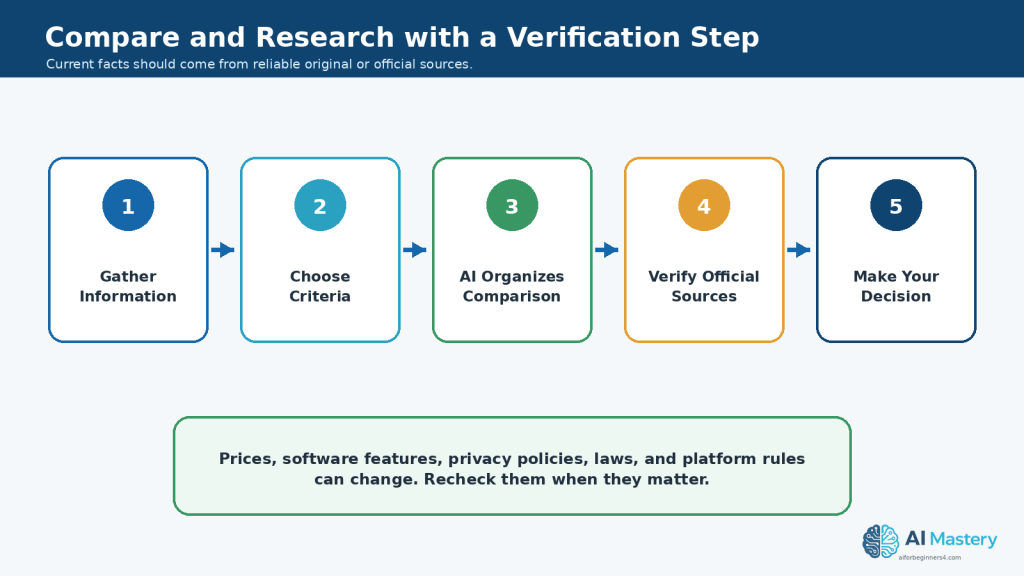
Figure 8. Use AI to organize comparisons and research notes, then verify important current facts with reliable original or official sources.
Explanation: This is especially important for changing information such as software features, prices, privacy policies, laws, and platform rules.
Step 9: Protect Privacy and Sensitive Information When Using AI
AI productivity can save time, but you should think carefully before uploading private, confidential, or sensitive information to an AI tool.
A useful rule is:
If the information would cause a problem if it were exposed, shared, or stored unexpectedly, review the tool’s privacy options before uploading it.
Check the Information Before You Upload It
Before pasting text or uploading a file, look for information such as:
· Full names.
· Home addresses.
· Phone numbers.
· Email addresses.
· Account numbers.
· Passwords.
· Login information.
· Banking or payment details.
· Medical information.
· Employee records.
· Customer information.
· Confidential business information.
· Private contracts or internal documents.
· Photographs or recordings of other people.
Not every AI task requires the original personal information.
Remove Unnecessary Personal Details
When possible, replace sensitive details with neutral placeholders.
For example, instead of:
“Write a reply to John Smith at 125 Example Street about account number 123456.”
you could use:
“Write a polite reply to [Customer Name] about an account issue. Do not invent any personal details.”
You can add the real information yourself after reviewing the draft.
Use Only the Information the Task Requires
Avoid giving an AI tool more information than it needs.
If you want AI to improve the wording of a letter, it may not need:
· The recipient’s full address.
· Your bank details.
· Identification numbers.
· Private attachments.
· Information about unrelated people.
Providing less information can reduce unnecessary privacy exposure.
Review the AI Tool’s Privacy Settings
AI services can have different policies for:
· Storing conversations.
· Using uploaded content.
· Training or improving models.
· Retaining files.
· Deleting chats.
· Business or organizational accounts.
· Sharing information with connected services.
These policies can change.
Check the current official privacy information when you first begin using an AI tool, when you change plans or features, when the provider announces an important policy update, and periodically as part of your normal review.
Be Careful with Workplace Information
If you are using AI for work, your employer may have rules about what information can be entered into external AI services.
Before uploading company information, check whether your organization permits it.
This is especially important for:
· Customer records.
· Internal reports.
· Contracts.
· Financial information.
· Employee information.
· Proprietary documents.
· Unreleased products.
· Security information.
Get Permission When Other People Are Involved
If a task includes another person’s:
· Photograph.
· Voice.
· Video.
· Private correspondence.
· Personal records.
· Confidential information.
make sure you have appropriate permission before uploading or using that material.
Do not use AI to imitate or clone another person’s voice, image, or identity without appropriate consent.
Review the Final Output for Private Information
AI may repeat information that you provided earlier in the conversation.
Before sending, publishing, or sharing the result, check that it does not contain:
· Private names.
· Account details.
· Confidential notes.
· Internal instructions.
· Hidden personal information.
· Information that was intended only for the drafting process.
Practical Example
Suppose you want AI to rewrite a customer-service email that contains a customer’s name, address, telephone number, and account number.
Instead of uploading all of that information, you could first replace it with:
· [Customer Name]
· [Address]
· [Phone Number]
· [Account Number]
Then use this prompt:
Prompt:
“Rewrite this customer-service email so it is clear, polite, and professional. Keep all placeholders exactly as written and do not invent any missing information.”
After reviewing the draft, you can restore the correct information in the final document if appropriate.
Protecting privacy does not mean you cannot use AI for productivity. It means giving the tool only the information it actually needs and keeping control over sensitive details.
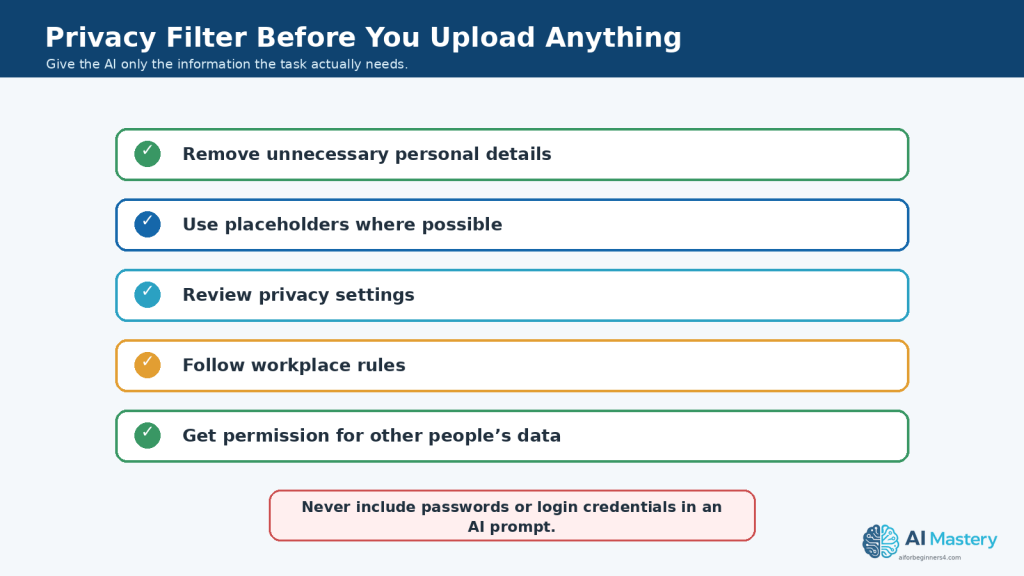
Figure 9. Apply a privacy filter before uploading information to an AI tool.
Explanation: Removing unnecessary personal details and checking the service or workplace rules can reduce avoidable privacy exposure.
Step 10: Organize and Save Your AI-Assisted Work
AI can save time during a task, but good organization is what makes the work useful later.
If you do not save your prompts, source files, corrected drafts, and final versions clearly, you may have difficulty finding the right information when you need to update, verify, or reuse the work.
Keep the Original Source
When AI helps with a document, summary, rewrite, comparison, or plan, keep the original source whenever possible.
For example, you might save:
· The original document.
· The prompt you used.
· The first AI-generated result.
· Your corrected version.
· The final approved version.
This makes it easier to compare changes and check important information later.
Use Clear Filenames
Avoid filenames such as:
document1.docx
or:
final-final-new.docx
Use names that explain what the file contains.
For example:
project-notes-original.docx
project-notes-ai-summary.docx
project-notes-reviewed-summary.docx
project-notes-final.docx
Clear filenames reduce confusion when several versions exist.
Save Useful Prompts
If a prompt works well, keep a copy of it.
For example:
Prompt:
“Summarize these meeting notes into Decisions, Tasks, Deadlines, and Questions. Use only information from the notes and write ‘Not specified’ when information is missing.”
You can reuse or adapt the prompt for similar work later.
A simple prompt library could include categories such as:
· Writing.
· Summarizing.
· Planning.
· Research.
· Checklists.
· Comparing information.
· Editing.
· Learning.
Keep Versions When the Work Is Important
For important projects, avoid overwriting every earlier version.
You might keep:
· Version 1 — Original draft
· Version 2 — AI-assisted revision
· Version 3 — Human-reviewed version
· Final — Approved version
This creates a simple record of how the work changed.
Record Important Sources and Permissions
If your project includes external material, keep records of:
· Source links.
· Research references.
· Image licences.
· Music licences.
· Stock-media licences.
· Permission from other people.
· Commercial-use conditions.
· Publication dates.
· Final exported files.
This is especially useful when content may be published, shared publicly, or used commercially.
Separate Drafts from Final Files
Create a clear distinction between unfinished AI-generated material and content that has been reviewed.
For example, you could use folders such as:
· Sources
· AI Drafts
· Reviewed
· Final
· Licences and Permissions
This reduces the chance of accidentally sharing an unfinished or unverified AI draft.
Keep a Clean Final Copy
After completing the work, save a clean version that does not contain:
· Drafting notes.
· AI instructions.
· Unresolved placeholders.
· Private information that should have been removed.
· Old comments.
· Unapproved changes.
The clean copy should be the version you actually send, publish, or archive.
Practical Example
Suppose you use AI to help prepare a report.
A simple folder might contain:
· report-source-data.xlsx
· report-original-draft.docx
· report-ai-rewrite.docx
· report-reviewed.docx
· report-final.docx
· report-prompts.txt
· sources-and-permissions.docx
This organization makes it easier to confirm what information was used, what AI changed, and which version is ready to share.
Good file organization turns AI from a one-time convenience into a repeatable productivity system.
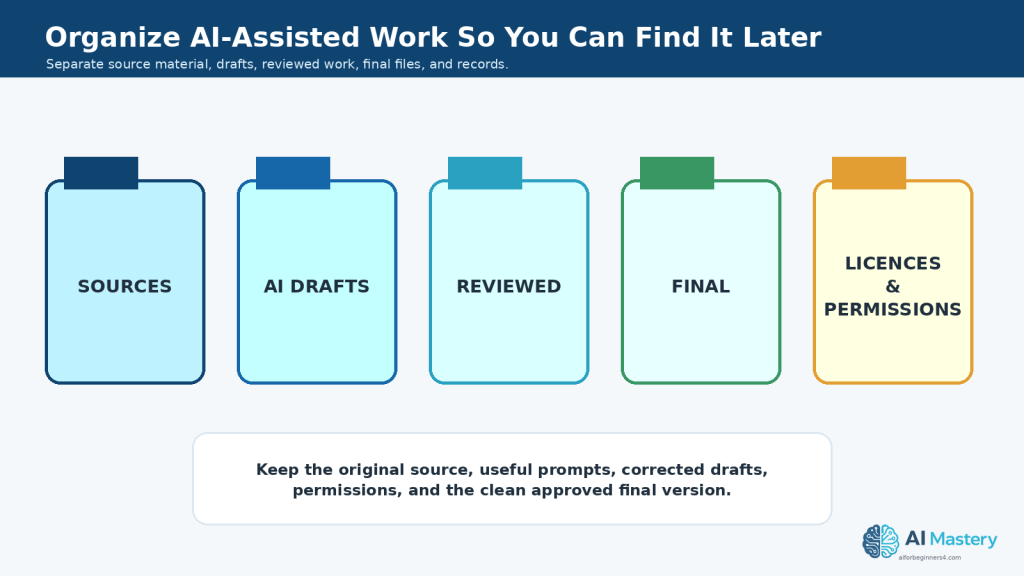
Figure 10. Separate source files, AI drafts, reviewed versions, final files, and licence or permission records.
Explanation: Clear folders and filenames make it easier to verify earlier work, update a project, and avoid sharing an unfinished draft.
Step 11: Review and Verify AI-Generated Work Before Using It
AI can produce useful drafts quickly, but speed does not guarantee accuracy.
Before sending, publishing, sharing, or relying on AI-assisted work, review the result carefully.
Check Important Facts
Look for information that could be wrong, outdated, incomplete, or unsupported.
Check items such as:
· Names.
· Dates.
· Prices.
· Statistics.
· Addresses.
· Product features.
· Software instructions.
· Laws or policies.
· Technical specifications.
· Quotations.
· Sources and references.
If an important fact matters to your decision or publication, verify it using an appropriate reliable source.
Compare with the Original Source
When AI summarizes, rewrites, translates, or analyzes information you provided, compare important parts with the original.
Check whether the AI:
· Removed an important condition.
· Changed the meaning.
· Combined unrelated points.
· Missed a deadline.
· Changed a number.
· Added information that was not present.
· Presented an assumption as a fact.
For example, if an original document says:
“The application should be submitted by Friday when possible.”
an AI summary should not change this to:
“The application must be submitted by Friday.”
Those statements do not mean exactly the same thing.
Check for Invented Information
AI can sometimes produce information that sounds confident even when it is incorrect or unsupported.
This is sometimes called an AI hallucination.
For example, AI may invent:
· A source.
· A quotation.
· A feature.
· A date.
· A policy.
· A person.
· A statistic.
· A product specification.
Do not assume that detailed wording means the information is correct.
Review Links and References
If AI provides links, citations, or references, check them before using them.
Confirm that:
· The source exists.
· The link works.
· The page is relevant.
· The source actually supports the claim.
· The information is current enough for your purpose.
For important research, prefer original or authoritative sources when available.
Check the Tone and Meaning
Accuracy is not only about facts.
Review whether the final writing:
· Says what you intended.
· Uses an appropriate tone.
· Avoids misleading wording.
· Does not exaggerate results.
· Clearly separates facts from opinions or suggestions.
· Does not make promises you cannot support.
Check Numbers and Calculations Separately
If AI provides calculations, totals, percentages, or conversions, verify them independently when accuracy matters.
Even a well-written explanation can contain a numerical error.
Check for Missing Information
Sometimes AI produces a polished answer that leaves out an important detail.
Ask yourself:
· Is anything essential missing?
· Were all requested items included?
· Were important exceptions preserved?
· Were all deadlines included?
· Were warnings or limitations removed?
· Does the final result still answer the original task?
Use a Final Review Prompt
AI can help with part of the review process, although your own review is still necessary.
For example:
Prompt:
“Review this draft for possible inconsistencies, missing information, unclear wording, and unsupported claims. Do not rewrite it yet. List the issues you find.”
You can then decide which changes should actually be made.
Practical Example
Suppose AI creates a summary of a project report.
Before sending the summary to someone else, compare the important points with the original report.
Check:
· Project dates.
· Costs.
· Tasks.
· Responsibilities.
· Problems.
· Decisions.
· Deadlines.
If the AI summary says that a task is complete but the original report says it is still in progress, correct the summary before sharing it.
AI can reduce the time required to create a first draft, but careful human review is what turns that draft into dependable work.
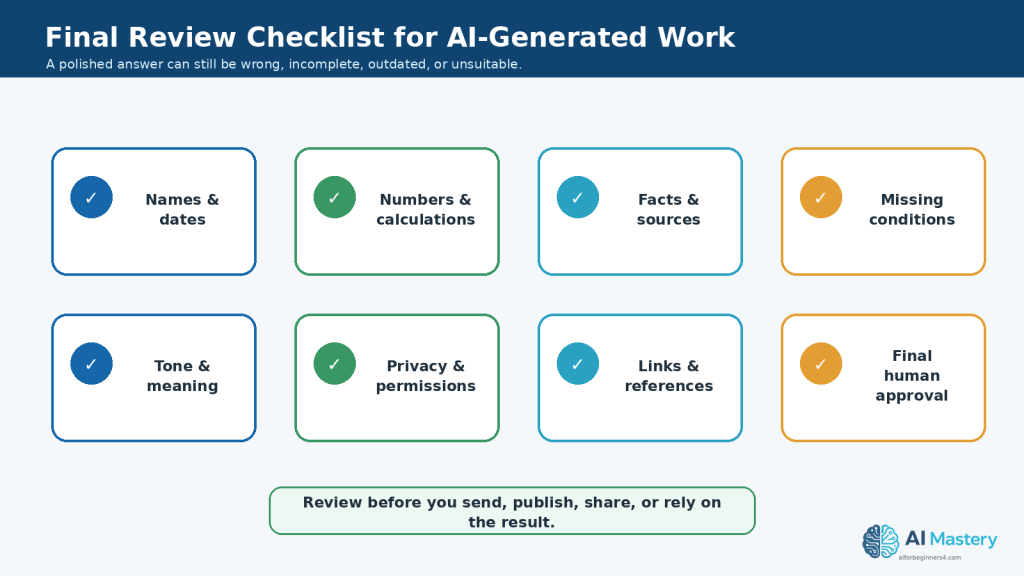
Figure 11. Review facts, numbers, sources, missing details, tone, privacy, links, and final approval before using AI-generated work.
Explanation: A polished response can still contain errors or omissions, so a structured final check helps catch problems before sharing or publishing.
Step 12: Build a Simple, Repeatable AI Productivity Workflow
Once you have tried several AI productivity tasks, the next step is to create a simple workflow you can reuse.
A repeatable workflow reduces confusion and helps you remember the important checks for accuracy, privacy, and final review.
Use the Same Basic Process
A practical beginner workflow is:
1. Choose the task. Decide exactly what you want AI to help with.
2. Prepare the information. Remove unnecessary private or confidential details.
3. Write a clear prompt. Explain the task, context, format, and important limits.
4. Review the first result. Check whether the AI understood your request.
5. Refine the result. Ask for corrections, simpler wording, a different format, or missing information when necessary.
6. Verify important information. Compare facts with reliable sources or original documents.
7. Edit the final version yourself. Make sure the wording and decisions reflect what you actually intend.
8. Save the important files. Keep useful prompts, sources, licences, permissions, reviewed drafts, and the final version.
Create Reusable Prompt Templates
If you perform the same type of task regularly, save a prompt template.
For example:
Meeting Notes Template:
“Review these meeting notes and organize them into Decisions, Action Items, Responsible Person, Deadline, and Questions Still Open. Use only information in the notes. Write ‘Not specified’ when information is missing.”
You can reuse the structure with different notes.
Keep Templates Simple
You do not need a complicated prompt library.
A small collection of useful prompts might include:
· Summarize a document.
· Rewrite text clearly.
· Create a checklist.
· Organize meeting notes.
· Compare several options.
· Create a project plan.
· Simplify technical information.
· Review a draft for errors.
· Extract dates and action items.
Update a template when you discover wording that produces better results.
Decide Where Human Review Is Required
Some parts of your workflow should always remain under human control.
For example:
AI can help with:
· Drafting.
· Organizing.
· Summarizing.
· Brainstorming.
· Formatting ideas.
· Identifying possible issues.
You should remain responsible for:
· Final factual verification.
· Important decisions.
· Privacy.
· Permissions.
· Licensing.
· Professional judgment.
· Final approval.
· Publishing or sending the work.
Do Not Automate a Bad Process
AI can make an existing process faster, but that does not necessarily make the process better.
Before automating or repeating a task, ask:
· Is this task actually necessary?
· Is the information accurate?
· Are there unnecessary steps?
· Does a person need to review the result?
· Could automation create additional privacy or accuracy risks?
Improving the process first can be more useful than simply making a poor process run faster.
Practical Example
Suppose you prepare a weekly project update.
Your repeatable workflow might be:
1. Collect the week’s project notes.
2. Remove unnecessary confidential information.
3. Ask AI to organize the notes into Completed Work, Work in Progress, Problems, and Next Steps.
4. Compare the result with the original notes.
5. Correct missing or inaccurate information.
6. Rewrite any unclear sections.
7. Add information that only you know.
1st Save the reviewed final update.
The following week, you can reuse the same prompt and workflow.
A simple repeatable system can make AI productivity more useful over time while still keeping human review at the centre of the process.
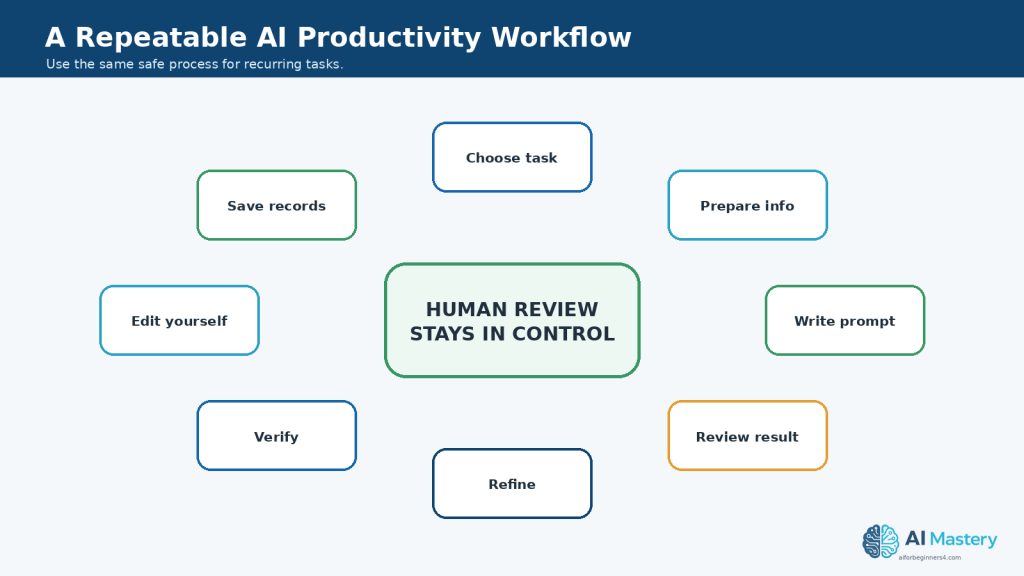
Figure 12. A repeatable AI productivity workflow keeps human review at the centre from the first task through verification and record keeping.
Explanation: Saving reusable prompts and repeating the same safe process can improve consistency without handing important judgment to the AI.
Common Mistakes to Avoid When Using AI for Productivity
AI can improve productivity, but beginners can lose time or create new problems when it is used without a clear process.
Common mistakes include:
· Asking AI to complete a task without giving enough context.
· Giving AI a very broad instruction instead of one specific task.
· Trusting the first answer without reviewing it.
· Using AI-generated facts without checking reliable sources.
· Allowing AI to invent missing information.
· Uploading private, confidential, or sensitive information unnecessarily.
· Forgetting to check licences, permissions, or commercial-use conditions.
· Sending or publishing AI-generated writing without proofreading it.
· Using outdated AI-generated information about software, prices, policies, or regulations.
· Asking AI to make important decisions that require human judgment.
· Automating a task before deciding whether the task is actually necessary.
· Saving only the final AI output and losing the original source or prompt.
· Keeping so many drafts that it becomes unclear which version is approved.
· Using AI for every small task even when completing the task directly would be faster.
· Assuming that more complicated prompts always produce better results.
How to Avoid These Mistakes
Start with one clearly defined task and give the AI only the information it needs.
Before using the result:
· Compare important details with the original source.
· Verify facts that matter.
· Remove incorrect or unnecessary information.
· Check privacy and confidentiality.
· Review licences and permissions when external assets are involved.
· Make sure the wording reflects what you actually intend.
· Save the original source and reviewed final version.
· Keep useful prompts when you expect to repeat the task.
Do Not Spend More Time Managing AI Than Doing the Task
AI should reduce unnecessary effort.
If you spend 20 minutes repeatedly rewriting prompts for a task that you could complete correctly in five minutes yourself, AI is probably not improving productivity for that task.
Use AI where it provides a practical benefit.
Practical Example
Suppose you need to turn six short meeting notes into a simple task list.
A common mistake would be to spend a long time creating a complicated prompt with many unnecessary instructions.
A simpler prompt might be:
Prompt:
“Turn these meeting notes into a task list. Include the responsible person and deadline when stated. Write ‘Not specified’ when information is missing. Do not invent details.”
Review the result against the original notes and make any necessary corrections.
Effective AI productivity is not about using AI as much as possible. It is about using it carefully where it genuinely makes the work easier.
Benefits of Using AI for Productivity
AI can provide practical benefits when it is used for suitable tasks and the results are reviewed carefully.
Faster First Drafts
AI can help you get started when you are facing a blank page.
It can create a first draft of:
· Emails.
· Reports.
· Checklists.
· Plans.
· Summaries.
· Instructions.
· Outlines.
· Notes.
You can then review and improve the draft instead of starting completely from scratch.
Less Time Spent on Repetitive Work
AI can help reduce repetitive information-handling tasks such as:
· Reorganizing notes.
· Rewriting similar messages.
· Extracting action items.
· Summarizing long text.
· Changing information into a different format.
· Creating routine checklists.
This can leave more time for tasks that require your judgment or attention.
Easier Organization
AI can help turn unstructured information into clearer formats.
For example, it can change a page of notes into:
· Categories.
· Tasks.
· Deadlines.
· Questions.
· Tables.
· Checklists.
You still need to review the organization, but the initial sorting can be faster.
Help with Difficult Writing
AI can assist when you know what you want to say but are unsure how to express it clearly.
It can help:
· Simplify difficult wording.
· Shorten long paragraphs.
· Improve organization.
· Adjust tone.
· Remove repetition.
· Create a clearer structure.
The final wording should still be reviewed to make sure it represents your intended meaning.
Support for Brainstorming
AI can suggest several possible ideas quickly.
This can be useful for:
· Project topics.
· Article ideas.
· Presentation ideas.
· Questions to research.
· Ways to organize a task.
· Possible approaches to a problem.
You decide which suggestions are useful.
Help Breaking Down Large Tasks
A large project can feel difficult when it is viewed as one task.
AI can help divide it into smaller actions.
For example:
Prompt:
“Break this project into small beginner-friendly tasks. Put the tasks in a logical order and explain what should be completed first.”
This can make the project easier to understand and manage.
Faster Learning Support
AI can help explain unfamiliar terms or processes in simpler language.
You can ask for:
· Beginner explanations.
· Examples.
· Comparisons.
· Practice questions.
· Short summaries.
· Step-by-step explanations.
Important information should still be verified with reliable sources when accuracy matters.
Reusable Workflows
Once you find a prompt and process that works well, you can reuse it.
For example, the same meeting-notes prompt can be used every week with different notes.
This can make repeated tasks more consistent.
Better Starting Structure
AI is particularly useful when information exists but lacks organization.
It can provide an initial structure that you can review and improve rather than requiring you to organize everything manually.
Practical Example
Suppose you receive several pages of project notes every Friday and need to prepare a weekly update.
Without AI, you might manually read the notes several times and copy information into different sections.
With AI assistance, you could use:
Prompt:
“Organize these project notes into Completed Work, Work in Progress, Problems, Deadlines, and Next Steps. Use only information from the notes and write ‘Not specified’ when necessary.”
You would then compare the result with the original notes, correct any mistakes, and prepare the final update.
The benefit is not that AI completes the entire responsibility for you. The benefit is that it can reduce some of the repetitive organizing work so you can spend more time reviewing and improving the final result.
Limitations of Using AI for Productivity
AI can save time, but it also has limitations that beginners should understand.
AI Can Be Wrong
AI may produce incorrect, incomplete, outdated, or misleading information.
This can happen even when the answer sounds confident.
For important work, verify:
· Facts.
· Dates.
· Names.
· Numbers.
· Policies.
· Prices.
· Technical instructions.
· Sources.
· Quotations.
AI Can Miss Important Context
AI only knows the information you provide and any context available to the tool.
It may not understand:
· Your real priorities.
· Workplace rules.
· Personal circumstances.
· Unspoken expectations.
· Important background information.
· Recent changes that are not available to it.
This means a well-written answer may still be unsuitable for your situation.
AI Output Can Be Generic
AI-generated writing can sometimes sound repetitive, vague, or similar to other AI-generated material.
A first draft may need editing to make it:
· More specific.
· More useful.
· More natural.
· More appropriate for your audience.
· More consistent with your own style.
AI May Invent Missing Details
When information is incomplete, AI may sometimes fill gaps instead of clearly saying that the information is missing.
For example, if meeting notes do not include a deadline, AI might incorrectly suggest one.
You can reduce this risk by writing:
“If information is missing, write ‘Not specified’ instead of guessing.”
You should still review the result.
Privacy Can Be a Concern
Some productivity tasks contain private or confidential information.
Uploading that information to an AI service without reviewing its privacy settings or your organization’s rules may create unnecessary risk.
Remove information that the AI does not need.
AI Does Not Remove Licensing Responsibilities
Using AI to create, rewrite, edit, or organize content does not automatically give you permission to use every included asset.
You may still need to check rights for:
· Images.
· Music.
· Video clips.
· Fonts.
· Templates.
· Stock media.
· AI-generated voices.
· Reference material.
Licensing conditions can vary between tools and can change over time.
AI Can Create More Work
AI is not productive when you spend more time correcting its output than completing the task yourself.
This may happen when:
· The task is extremely simple.
· The prompt is unclear.
· The source information is poor.
· The AI repeatedly misunderstands the goal.
· Extensive factual checking is required.
· The result needs major rewriting.
In these cases, completing the task manually may be faster.
Too Much Dependence Can Reduce Judgment
If you automatically ask AI what to do for every task, you may become less likely to evaluate the problem yourself.
AI should help you think and work more efficiently, not replace your ability to:
· Make decisions.
· Check information.
· Understand your work.
· Recognize mistakes.
· Apply experience.
· Take responsibility for the final result.
AI Tools and Features Can Change
AI tools can change their:
· Features.
· Limits.
· Plans.
· Privacy settings.
· File-upload options.
· Model availability.
· Commercial-use conditions.
· Connected-app features.
Instructions that work today may not work exactly the same way later.
For an important workflow, check the current official information when a relevant feature or policy changes.
How to Reduce These Limitations
Use AI as an assistant rather than an automatic authority.
To reduce problems:
· Give clear instructions.
· Provide only necessary information.
· Ask AI not to invent missing details.
· Verify important facts.
· Compare summaries and rewrites with the original source.
· Review privacy before uploading sensitive material.
· Check licences and permissions.
· Keep human approval before sending or publishing.
· Stop using AI for a task when it creates more work than it saves.
AI productivity works best when the tool handles suitable repetitive or organizational work while you remain responsible for accuracy, judgment, privacy, and the final decision.
Common Myths About Using AI for Productivity
Several common myths can make beginners expect too much from AI or use it in ways that create unnecessary problems.
Myth 1: AI Will Always Save Time
Reality: AI can save time on suitable tasks, but not every task becomes faster with AI.
If you spend a long time correcting the output, rewriting prompts, or checking mistakes, completing the task yourself may be more efficient.
Use AI where it provides a practical benefit.
Myth 2: AI Answers Are Automatically Correct
Reality: AI can produce incorrect, incomplete, outdated, or unsupported information.
Even a detailed and confident answer should be reviewed when accuracy matters.
Verify important facts using reliable sources.
Myth 3: A Longer Prompt Is Always Better
Reality: A prompt needs enough information to explain the task clearly, but unnecessary instructions can make it harder to understand.
A useful prompt usually explains:
· What you want done.
· Important context.
· The format you want.
· Any important limits.
Clear prompts are more important than complicated prompts.
Myth 4: AI Can Make Important Decisions for Me
Reality: AI can organize information, compare options, and suggest possible considerations, but important decisions still require human judgment.
This is especially important for decisions involving:
· Health.
· Legal matters.
· Finances.
· Employment.
· Safety.
· Confidential business information.
Use qualified professional advice when appropriate.
Myth 5: Anything I Upload to AI Is Automatically Private
Reality: AI services can have different policies for storing, processing, retaining, or using information.
Do not assume that every AI tool handles information in the same way.
Check the current privacy information for the service you use and avoid uploading unnecessary confidential or sensitive information.
Myth 6: AI-Generated Content Is Automatically Copyright-Free
Reality: Copyright, licensing, and commercial-use conditions can depend on the AI tool, source material, asset type, and intended use.
Check the applicable terms when AI work includes:
· Images.
· Music.
· Video.
· Voices.
· Fonts.
· Templates.
· Stock media.
· Other third-party material.
Myth 7: AI Can Replace All Repetitive Work Automatically
Reality: Some repetitive tasks can be assisted or automated, but they may still require review.
For example, automatically creating weekly summaries may save time, but someone should still check that important information was not omitted or misunderstood.
Automation should include appropriate human review.
Myth 8: I Need Advanced Technical Skills to Use AI Productively
Reality: Many useful AI productivity tasks can be completed with ordinary language.
Beginners can start with simple activities such as:
· Rewriting an email.
· Summarizing notes.
· Creating a checklist.
· Organizing tasks.
· Brainstorming ideas.
· Simplifying difficult text.
Advanced features can be learned later if they become useful.
Myth 9: More AI Tools Mean Better Productivity
Reality: Using many different AI tools can create more complexity.
You may need to manage:
· Several accounts.
· Different privacy policies.
· Different file limits.
· Separate subscriptions.
· Multiple interfaces.
· Different licences.
It is often better to learn a small number of useful tools well before adding more.
Myth 10: AI Productivity Means Doing Everything Faster
Reality: Productivity is not only about speed.
A productive workflow should also help you maintain:
· Accuracy.
· Quality.
· Privacy.
· Organization.
· Appropriate permissions.
· Clear responsibility.
· Reliable final results.
The best AI productivity workflow is one that saves useful time without reducing the quality or reliability of your work.
Frequently Asked Questions
What Is the Easiest Way to Start Using AI for Productivity?
Start with one simple task that you already understand well.
Good beginner examples include:
· Rewriting an email.
· Summarizing notes.
· Creating a checklist.
· Organizing a task list.
· Brainstorming ideas.
· Simplifying difficult text.
Starting small makes it easier to judge whether the AI result is actually useful.
Do I Need to Learn Complicated Prompts?
No.
A useful beginner prompt usually needs four things:
· The task.
· Relevant context.
· The format you want.
· Any important limits.
For example:
Prompt:
“Summarize these meeting notes into Decisions, Tasks, Deadlines, and Questions. Use only information in the notes and do not invent missing details.”
You can refine the prompt if the first result needs improvement.
Can AI Write My Emails for Me?
AI can help create a first draft or improve wording.
However, review the message before sending it.
Check:
· Names.
· Dates.
· Facts.
· Tone.
· Attachments.
· Private information.
· Any promises or commitments.
The final message should reflect what you actually intend to communicate.
Can AI Summarize Important Documents?
Yes, AI can help summarize documents, but important information should be checked against the original.
A summary may omit details, misunderstand conditions, or change the meaning of a statement.
Keep the original document whenever accuracy matters.
Can AI Organize My Daily Tasks?
Yes.
You can provide a task list and ask AI to:
· Group similar tasks.
· Suggest a possible priority order.
· Create a checklist.
· Break large tasks into smaller steps.
· Arrange tasks into a draft schedule.
You should still review the result because AI may not understand all of your deadlines, responsibilities, or priorities.
Is It Safe to Upload Private Documents to an AI Tool?
That depends on the tool, account type, privacy settings, organizational rules, and the information inside the document.
Before uploading sensitive material:
· Remove unnecessary personal information.
· Check the provider’s current privacy information.
· Review workplace rules if the document belongs to an employer.
· Avoid uploading confidential material when the task can be completed without it.
Use only the information the AI actually needs.
Should I Trust Information Provided by AI?
Not automatically.
AI can make mistakes or provide outdated information.
Verify important facts using reliable sources, especially when the information involves:
· Software features.
· Prices.
· Policies.
· Laws.
· Technical instructions.
· Health.
· Finance.
· Safety.
Can AI Make Decisions for Me?
AI can help organize information and suggest possible options, but important decisions should remain under human control.
For high-stakes matters, use appropriate qualified sources or professional advice when necessary.
Can AI Help Me Learn New Skills?
Yes.
You can ask AI to:
· Explain difficult terms.
· Give beginner examples.
· Create practice questions.
· Summarize study notes.
· Break a process into smaller steps.
· Suggest questions for further research.
Important factual information should still be checked with reliable sources.
Should I Save My Prompts?
Save prompts that work well for tasks you expect to repeat.
A small prompt library can save time for recurring activities such as:
· Meeting summaries.
· Email drafting.
· Project planning.
· Checklists.
· Research organization.
· Document rewriting.
You can improve the templates as you gain experience.
Do I Need Many Different AI Tools?
No.
Beginners often benefit more from learning a small number of useful tools well.
Adding many tools can create extra accounts, subscriptions, privacy policies, file limits, and workflows to manage.
Choose tools based on the tasks you actually need to complete.
Will AI Automatically Make Me More Productive?
No.
AI improves productivity only when it reduces useful work without creating larger problems.
If a task takes longer because you must repeatedly correct AI errors, rewrite prompts, or verify unreliable information, doing the task manually may be faster.
The best approach is to use AI selectively for tasks where it provides a clear practical benefit.
Key Takeaways
AI productivity is most useful when it helps you complete suitable tasks more efficiently without removing human review and responsibility.
Remember these main points:
· Start with one simple task that you already understand.
· Use AI for practical activities such as writing, summarizing, organizing, planning, brainstorming, and creating checklists.
· Give clear instructions that explain the task, context, format, and important limits.
· Ask AI not to invent missing information when accuracy matters.
· Review every important AI-generated result before using, sending, or publishing it.
· Compare summaries, rewrites, and extracted information with the original source.
· Verify important facts using reliable and current sources.
· Remove unnecessary private, confidential, or sensitive information before uploading material to an AI tool.
· Review the AI service’s current privacy settings and your organization’s rules when workplace information is involved.
· Check licences, permissions, and commercial-use conditions for images, music, video, voices, fonts, templates, and other external assets.
· Use AI to suggest plans or priorities, but keep important decisions under human control.
· Save useful prompts so you can reuse them for recurring tasks.
· Keep original source files, reviewed drafts, permissions, licences, and final versions organized.
· Separate unfinished AI drafts from approved final documents.
· Do not assume that using more AI tools automatically improves productivity.
· Stop using AI for a task when correcting or managing the AI takes more time than completing the task directly.
· Check current official information when AI tools, software features, prices, privacy policies, or usage conditions change.
A good AI productivity workflow is not about automating everything. It is about using AI selectively to reduce repetitive work while maintaining accuracy, privacy, organization, appropriate permissions, and human judgment.
Final Tip
Do not try to use AI for every task.
Start with one or two repetitive activities where AI clearly saves time, such as summarizing notes, drafting routine messages, organizing information, or creating checklists.
As you become more comfortable, save the prompts and workflows that work well so you can reuse them.
The most productive approach is usually simple:
· Give clear instructions.
· Review the result.
· Verify important information.
· Protect private information.
· Save the final approved version.
AI is most useful when it reduces unnecessary work while you remain in control of the final result.
Continue Learning
If you want to continue improving your AI productivity skills, these AI Mastery guides are useful next steps:
· How to Summarize Documents with ChatGPT: Beginner Guide (2026) — Learn how to reduce long documents into shorter summaries while checking important information against the original.
· How to Create Tables and Charts with ChatGPT: Beginner Guide (2026) — Learn how AI can help organize information into clearer tables and visual formats.
· How to Translate Documents with ChatGPT: Beginner Guide (2026) — Learn how to translate documents while reviewing meaning, formatting, privacy, and accuracy.
· How to Rewrite and Simplify Documents with ChatGPT: Beginner Guide (2026) — Learn how to make difficult or complicated writing clearer and easier to understand.
· How to Proofread and Edit Documents with ChatGPT: Beginner Guide (2026) — Learn how AI can help find writing problems while keeping human review in the editing process.
· How to Format Documents with ChatGPT: Beginner Guide (2026) — Learn how to organize headings, lists, spacing, and other document elements more clearly.
· How to Use Gemini Deep Research: Beginner Guide (2026) — Learn how to use Gemini for more structured research tasks and review the information it gathers.
· How to Summarize, Analyze, and Compare Documents with Claude: Beginner Guide (2026) — Learn how Claude can assist with several common document-productivity tasks.
Sources and References
The following official sources were reviewed for the AI accuracy, risk-management, privacy, data-control, and responsible-use guidance discussed in this article. AI tools, account settings, privacy practices, and service terms can change, so readers should check the current official information when first using a tool, when changing plans or features, after an important policy update, and periodically.
· National Institute of Standards and Technology (NIST) — Artificial Intelligence Risk Management Framework: Generative Artificial Intelligence Profile: Generative Artificial Intelligence Profile: NIST provides a cross-sector framework for identifying and managing risks associated with generative AI and for incorporating trustworthiness considerations into AI use and evaluation.
· Office of the Privacy Commissioner of Canada — Principles for Responsible, Trustworthy and Privacy-Protective Generative AI Technologies: Canadian privacy regulators emphasize privacy protection, transparency, accuracy, appropriate oversight, and careful handling of personal information when organizations develop or use generative AI. The guidance also recommends reasonable steps to check the accuracy of AI outputs when they may affect people or be used publicly.
· OpenAI — ChatGPT Data Controls and Privacy Settings: OpenAI provides privacy and data controls for ChatGPT, including options related to temporary chats, memory, connected apps, and managing or deleting data. These controls illustrate why users should review the settings of the particular AI service they use rather than assuming every service handles information in the same way.
· Google — Gemini Apps Privacy Hub: Google explains how Gemini Apps can process information from chats, saved information, activity, permissions, and other Google services, and provides controls for managing some of that information.
· Anthropic — Privacy Center: Anthropic provides separate privacy information for consumer Claude accounts and commercial customers, together with links to its privacy policy, terms, usage policy, and related controls.
Important: This guide provides general educational information about using AI for productivity, privacy, accuracy, licensing, and responsible use. It is not legal, medical, financial, employment, or other professional advice. When a task involves important personal information, professional decisions, copyrighted material, confidential business information, or other high-impact matters, verify the applicable requirements and use qualified professional advice when appropriate.

