Estimated reading time: 40–45 minutes
Last updated: August 16, 2026
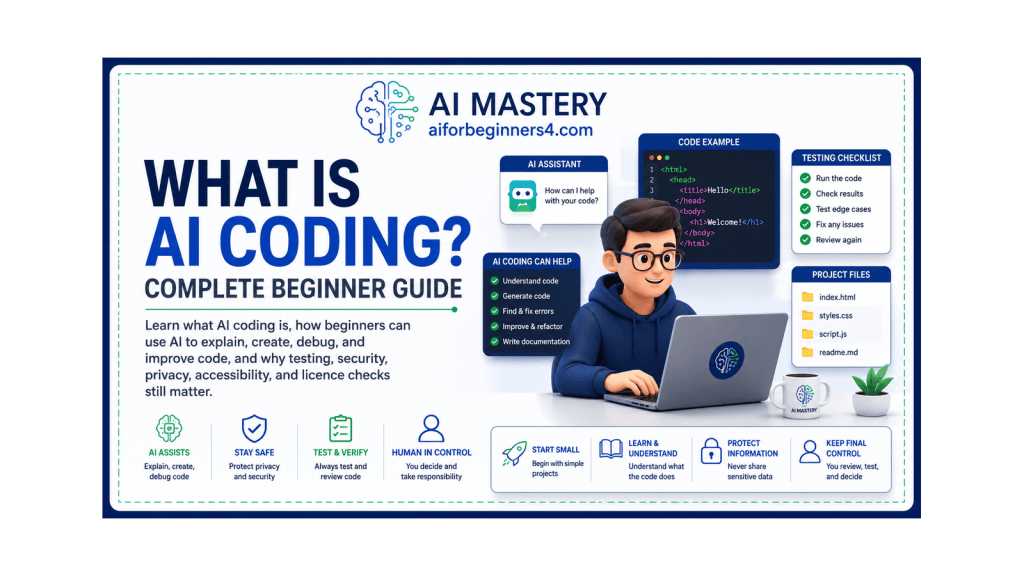
Featured image. AI-assisted coding can help beginners understand, test, and improve small coding projects while keeping human review in control.
Introduction
Coding means writing instructions that tell a computer what to do.
Traditionally, people learn programming languages such as HTML, CSS, JavaScript, or Python and then write the code themselves.
AI coding adds another type of help.
With an AI coding tool, you can describe what you want in normal language and ask the AI to:
· Explain code
· Suggest code
· Create small examples
· Help find errors
· Rewrite or improve code
· Explain unfamiliar programming terms
· Help plan a simple website or app
· Suggest possible next steps in a coding project
For example, instead of knowing exactly how to write a webpage button, a beginner might ask:
“Create a simple HTML button that says ‘Learn More’ and explain each line of the code.”
The AI can provide an example and explain how it works.
This can make coding easier to explore because you do not always need to know the exact programming command before you begin.
However, AI coding does not mean that you can safely accept every piece of generated code without checking it.
AI-generated code can:
· Contain errors
· Use outdated methods
· Create security problems
· Misunderstand your instructions
· Produce code that works differently from what you expected
· Include unnecessary or inefficient code
· Suggest libraries, packages, or functions that are unsuitable or do not exist
You should therefore treat AI as a coding assistant rather than as an automatic replacement for understanding, testing, and reviewing code.
For beginners, AI coding can be especially useful for learning because you can ask questions such as:
“What does this code do?”
“Explain this error message in simple language.”
“Show me a basic example.”
“Why does this code not work?”
“Explain the difference between HTML and Python.”
The important goal is not simply to make AI produce code for you.
The goal is to gradually understand what the code does, test it carefully, learn from mistakes, and know when additional help or expert review is needed.
In this guide, you will learn what AI coding is, how it works, what beginners can use it for, its benefits and limitations, common mistakes, safety and privacy considerations, and how to begin learning AI-assisted coding without needing previous programming experience.
Before You Start
You do not need previous programming experience to begin learning AI-assisted coding.
You mainly need:
· A clear idea of what you want to create or understand
· A willingness to test code carefully
· A basic place to write or run code
· Patience when something does not work
· A habit of asking AI to explain its suggestions
Start with Small Projects
Beginners should avoid starting with a large or complicated application.
A better first project might be:
· A simple webpage
· A basic calculator
· A short Python script
· A button or form
· A small checklist app
· A simple text-processing task
Small projects make it easier to understand what each part of the code does.
Ask AI to Explain the Code
Do not ask only:
“Write the code.”
Instead, ask:
“Write a simple example and explain each part in beginner-friendly language.”
This helps you learn while using AI.
Work with One Change at a Time
If you ask AI to create many features at once, it can be difficult to understand which part caused a problem.
For example, instead of asking for:
“Create a complete website with login, payments, database, contact form, animations, and admin dashboard.”
start with:
“Create a simple webpage with a heading, paragraph, and button.”
Then add features gradually.
Learn the Basic Terms
You do not need to memorize everything before starting, but it helps to understand a few common terms.
Examples include:
· Code — instructions written for a computer
· Programming language — a language used to write code
· Bug — an error or problem in the code
· Debugging — finding and fixing problems
· File — a saved piece of code or data
· Folder — a place used to organize files
· Browser — software such as Chrome or Edge that displays webpages
· Editor — software used to write and edit code
You will learn more terms naturally as you continue.
Keep Copies of Working Code
Before making a major change, save the version that already works.
For example:
· project-v01
· project-v02
· project-working-backup
This makes it easier to return to an earlier version if a new change causes problems.
Do Not Paste Sensitive Information into Code Prompts
Avoid sharing unnecessary:
· Passwords
· API keys
· Account credentials
· Private customer information
· Personal identification details
· Confidential company code
· Private database information
Use placeholders instead.
For example:
YOUR_API_KEY_HERE
rather than a real secret key.
Be Prepared to Test Everything
AI-generated code should be tested before you rely on it.
Check:
· Does it run?
· Does it produce the expected result?
· Does it behave correctly with different inputs?
· Does it show errors?
· Does it expose private information?
· Does it create unexpected changes?
Use a Safe Learning Environment
For beginner practice, work on test files and small projects rather than important live systems.
Do not experiment directly on:
· A live business website
· Important production databases
· Customer systems
· Financial systems
· Critical workplace software
unless you understand the risks and have appropriate permission and support.
Reality: AI can make coding easier to explore, but learning is safer and more useful when you start small, save working versions, protect sensitive information, and test every important change.
What You’ll Learn
By the end of this guide, you will know how to:
· Understand what AI coding means.
· Recognize the difference between traditional coding and AI-assisted coding.
· Use AI to explain unfamiliar code.
· Ask AI to create simple coding examples.
· Use AI to help identify and explain errors.
· Break a coding project into smaller steps.
· Ask for code changes without rebuilding the whole project.
· Review AI-generated code before using it.
· Test code in a safer learning environment.
· Keep working versions and backups.
· Avoid sharing passwords, API keys, and other sensitive information.
· Recognize common mistakes beginners make with AI coding.
· Understand when AI assistance is useful and when human review matters more.
· Use AI to support learning rather than simply copy code you do not understand.
You will also learn why working code is not automatically safe, secure, efficient, or suitable for a real project.
The goal is to use AI as a coding assistant while gradually building enough understanding to check what the code does, test important changes, recognize problems, and ask better questions.
How AI Coding Works
AI coding tools help by interpreting your instructions and generating or explaining code based on what you ask.
You usually do not need to know the exact programming command before starting.
Instead, you describe the result you want.
For example:
“Create a simple webpage with a heading, a paragraph, and a blue button.”
The AI may then generate code that could include HTML and CSS.
You can also ask:
“Explain what each part of this code does.”
This makes AI useful both for creating code and for learning how code works.
You Describe the Goal
The process often starts with a normal-language instruction.
For example:
“Create a simple Python program that asks for a name and then displays a welcome message.”
The AI converts that request into code.
A clearer prompt usually produces a more useful result.
AI Generates a Suggested Solution
The AI may provide:
· Code
· Explanations
· File suggestions
· Setup instructions
· Possible improvements
· Warnings or limitations
The result should be treated as a draft rather than automatically correct code.
You Test the Code
After receiving the code, run it in an appropriate test environment.
Check whether:
· It starts correctly
· It produces the expected result
· Buttons or links work
· Calculations are correct
· Error messages appear
· Unexpected behavior occurs
If something fails, copy the relevant error message and ask AI to explain it.
For example:
“This code gives me this error: [error message]. Explain the error in beginner-friendly language and show the smallest change needed to fix it.”
AI Can Help Debug Problems
Debugging means finding and fixing errors.
AI can help you understand:
· Error messages
· Missing punctuation
· Incorrect variable names
· Wrong file paths
· Logic problems
· Basic syntax mistakes
For example:
“Explain why this Python code does not work. Do not rewrite the whole program unless necessary.”
This can make troubleshooting easier because you can focus on one problem at a time.
You Can Ask for Changes
Once the basic code works, you can ask for small improvements.
For example:
“Keep the existing code but change the button text from ‘Submit’ to ‘Send Message.’”
or:
“Add a second paragraph below the heading without changing the rest of the page.”
Small changes are easier to understand and test than replacing the entire project repeatedly.
AI Can Explain Existing Code
You do not need to create code from scratch.
You can paste a small piece of code and ask:
“Explain this code line by line for a complete beginner.”
AI can help describe:
· What the code is doing
· Which language is being used
· What each line or section means
· Which parts can be changed
· Where a possible problem may exist
AI Coding Is Usually an Iterative Process
You normally do not give one prompt and receive a perfect finished project.
A more realistic process is:
1. Describe a small goal.
2. Ask AI for an example.
3. Review the code.
4. Test it.
5. Ask questions.
6. Fix problems.
7. Add one improvement.
8. Test again.
This repeated process is often more useful than asking AI to build everything at once.
AI Does Not Actually “Understand” Your Project Like a Human Developer
AI can work with the instructions and code you provide, but it may miss:
· Your real business requirements
· Security risks
· Hidden dependencies
· Existing project rules
· Accessibility requirements
· Performance problems
· Future maintenance needs
That is why review and testing remain important.
Reality: AI coding works best as a back-and-forth process. You describe the goal, AI suggests code, you test it, and then you refine the result while checking that each change actually works.
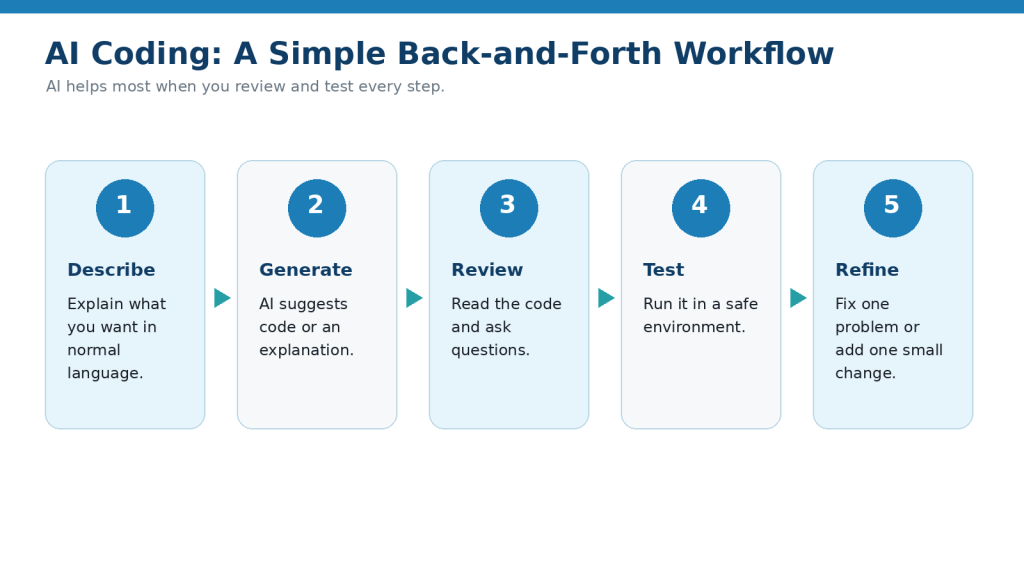
Figure 1. AI coding works best as a repeated workflow of describing, generating, reviewing, testing, and refining.
Explanation: This workflow keeps the beginner involved instead of treating AI-generated code as automatically correct.
What Beginners Can Use AI Coding For
AI coding can help with many small learning and project tasks. Beginners do not need to start by building a complete app.
A better approach is to use AI for simple, focused tasks and gradually increase the difficulty.
Learn Basic Programming Concepts
AI can explain beginner concepts such as:
· Variables
· Functions
· Loops
· Conditions
· Lists
· Files
· HTML elements
· CSS styles
· JavaScript events
For example:
“Explain what a variable is using a simple everyday example and then show me a small Python example.”
You can ask follow-up questions until the explanation makes sense.
Create Simple Webpages
AI can help beginners create basic webpages using HTML and CSS.
For example:
“Create a simple webpage with a heading, short paragraph, image placeholder, and button. Explain the HTML and CSS separately.”
You can then change one part at a time.
Create Small Python Programs
Python is commonly used for beginner programming exercises and many automation or data tasks.
You might ask AI to create:
· A simple calculator
· A unit converter
· A number-guessing game
· A basic to-do list
· A text counter
· A program that sorts a short list
For example:
“Create a beginner Python program that adds two numbers entered by the user. Explain every line.”
Explain Code You Found or Received
If you see code you do not understand, AI can help explain it.
For example:
“Explain this code in simple language. Tell me what each section does and identify anything I should not change until I understand it.”
This is useful when learning from tutorials or reviewing an existing project.
Help Find Coding Errors
AI can help investigate error messages.
You can provide:
· The relevant code
· The exact error message
· What you expected to happen
· What actually happened
For example:
“This Python program should display a total, but I receive this error. Explain why and show me the smallest correction.”
Giving AI the exact problem usually works better than saying only:
“My code does not work.”
Improve Readability
Code can work while still being difficult to understand.
You can ask:
“Make this beginner code easier to read without changing what it does. Explain every change.”
AI may suggest:
· Clearer variable names
· Better spacing
· Short comments
· Simpler structure
· Removal of unnecessary repetition
Review the revised code to confirm that its behavior did not change unexpectedly.
Add Small Features
Once a project works, AI can help add one feature at a time.
For example:
“Keep the existing calculator working and add a Reset button. Show only the changed code and explain where it belongs.”
This can be easier to understand than receiving a completely rewritten project.
Create Practice Exercises
AI can also act as a coding tutor.
For example:
“Give me five beginner Python exercises about variables. Do not show the answers until I ask.”
You can then attempt each exercise yourself.
Review Your Own Code
You can ask AI to review a small program you wrote.
For example:
“Review this beginner Python code. Identify errors, unclear parts, and possible improvements, but explain the problems before rewriting anything.”
This helps you understand what needs improvement instead of simply replacing your work.
Create Simple Automation Ideas
AI can help explain how a repetitive computer task might be automated.
For example:
“Explain how Python could rename a group of files using a consistent pattern. Do not provide code that deletes files.”
For file-related automation, test on copies first so mistakes do not affect important originals.
Help Plan a Small App
Before writing code, AI can help break an idea into parts.
For example:
“I want to create a simple personal expense tracker. Break the project into beginner-friendly stages before writing any code.”
The stages might include:
· Decide what information to store
· Create the basic interface
· Add expense entry
· Display saved entries
· Add totals
· Test different inputs
Planning first can reduce confusion later.
Help You Learn from Working Examples
If AI provides working code, do not stop after copying it.
Ask questions such as:
· Why does this line exist?
· What happens if I remove it?
· Which part controls the button?
· Which value can I safely change?
· What does this function do?
· How could I make this example simpler?
These questions turn AI-generated code into a learning exercise.
Reality: Beginners can use AI for explanations, examples, debugging, small projects, and practice, but the greatest learning benefit comes from understanding and testing the code rather than simply copying it.
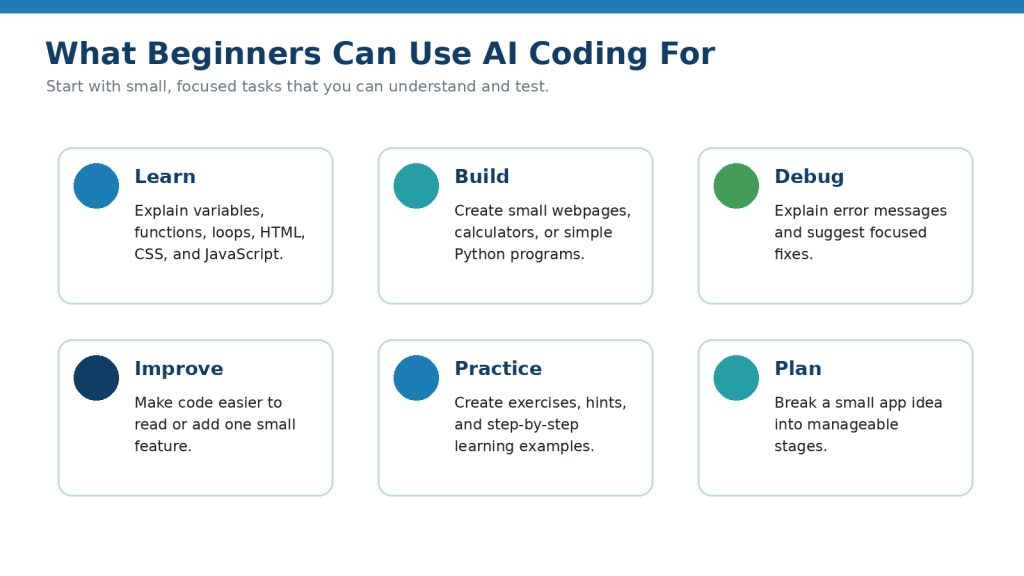
Figure 2. Common beginner uses for AI coding include learning, building small projects, debugging, improving code, practising, and planning.
Explanation: AI can support many coding tasks, but each task should remain small enough for the learner to understand and test.
Step-by-Step: Create Your First Simple Project with AI
A small project is one of the easiest ways to understand how AI-assisted coding works.
For this example, you will create a very simple webpage with:
· A heading
· A short paragraph
· A button
The goal is not to build a complete website. The goal is to learn the basic AI coding workflow.
Step 1: Describe What You Want to Build
Start with a simple goal.
For example:
“Help me create a basic webpage for a complete beginner. It should have one heading, one paragraph, and one button.”
Avoid asking for many features at once.
Step 2: Ask AI to Explain Which Languages Are Needed
Before requesting the code, ask:
“Which coding languages do I need for this simple webpage? Explain why each one is used.”
For a basic webpage, AI may explain that:
· HTML provides the content and structure.
· CSS controls the appearance.
· JavaScript can add interactive behavior when needed.
For this first example, HTML and a small amount of CSS may be enough.
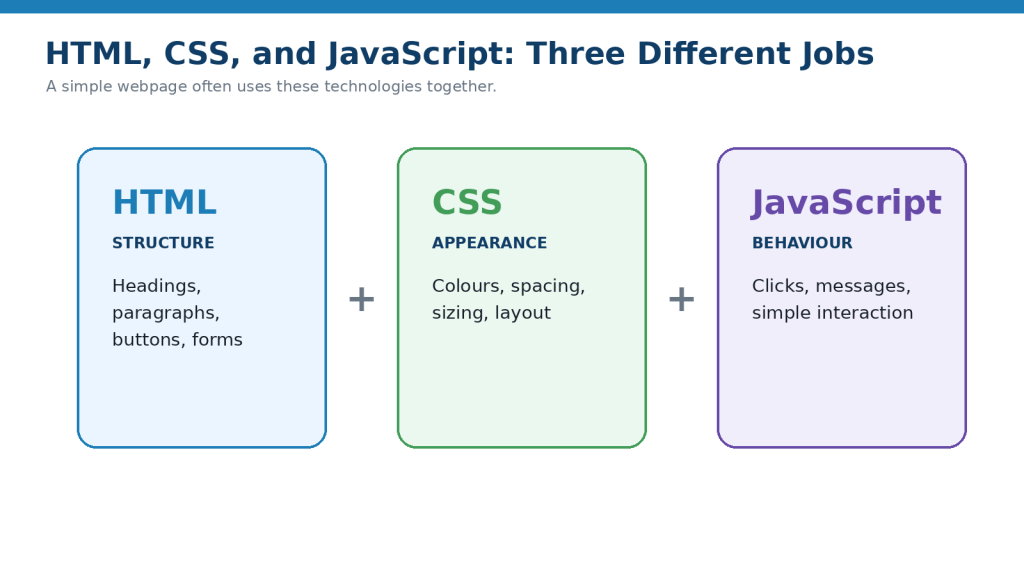
Figure 3. HTML provides structure, CSS controls appearance, and JavaScript adds interactive behaviour.
Explanation: Understanding the different roles of these technologies makes it easier to ask AI for the right kind of help.
Step 3: Ask for the Smallest Working Example
Use a prompt such as:
“Create the smallest beginner-friendly HTML example with a heading, paragraph, and button. Keep everything in one file for now and explain each section.”
Keeping the first project small makes it easier to understand.
Step 4: Save the Code in a Test File
Save the code as an HTML file.
For example:
my-first-page.html
Make sure the filename ends in:
.html
Use a test folder rather than placing the file inside an important live website.
Step 5: Open the File in a Browser
Open the HTML file in a web browser.
You should see the webpage that the code created.
Check:
· Is the heading visible?
· Is the paragraph visible?
· Is the button visible?
· Does the page look approximately as expected?
At this stage, the button may not perform an action. That is acceptable if you only asked AI to display it.
Step 6: Ask AI to Explain the Code
Do not move on immediately.
Ask:
“Explain this code line by line for a complete beginner. Tell me which line creates the heading, paragraph, and button.”
Try to connect what you see in the browser with the code that created it.
Step 7: Make One Small Change Yourself
Try changing something simple.
For example, change:
Welcome
to:
Welcome to My First Webpage
Save the file and refresh the browser.
You should see the new heading.
This demonstrates an important coding idea: changing the code changes the result.
Step 8: Ask AI for One Improvement
Now add one small improvement.
For example:
“Keep the webpage the same, but make the button slightly larger and easier to read. Explain the CSS you add.”
Avoid asking AI to redesign the entire project.
Step 9: Test the Change
Save the updated code and refresh the page.
Check whether:
· The original content still appears
· The new change works
· Nothing else was accidentally changed
If something is wrong, do not immediately replace everything.
Ask:
“The button change caused this problem: [describe the problem]. Show me the smallest correction.”
Step 10: Save a Working Version
When the page works correctly, save a copy.
For example:
my-first-page-v01.html
Then you can experiment without losing the working version.
Step 11: Add Simple Interactivity Later
When you are comfortable with the basic page, you could ask AI to add a small JavaScript feature.
For example:
“When the button is clicked, display the message ‘Thanks for visiting.’ Keep the code beginner-friendly and explain what JavaScript is doing.”
Test the new feature before adding anything else.
Step 12: Review What You Learned
After completing the project, ask yourself:
· What does HTML do?
· What does CSS do?
· Which code created the heading?
· Which code created the button?
· Which change affected the appearance?
· Did I understand the changes AI suggested?
· Did I test the project after each change?
If you cannot explain part of the code, ask AI to explain it again in simpler language.
A Good Beginner Workflow
For future projects, repeat the same pattern:
1. Define one small goal.
2. Ask which technologies are needed.
3. Request a simple example.
4. Read the explanation.
5. Save the code.
6. Run or open it.
7. Test the result.
8. Make one small change.
9. Test again.
10. Save a working version.
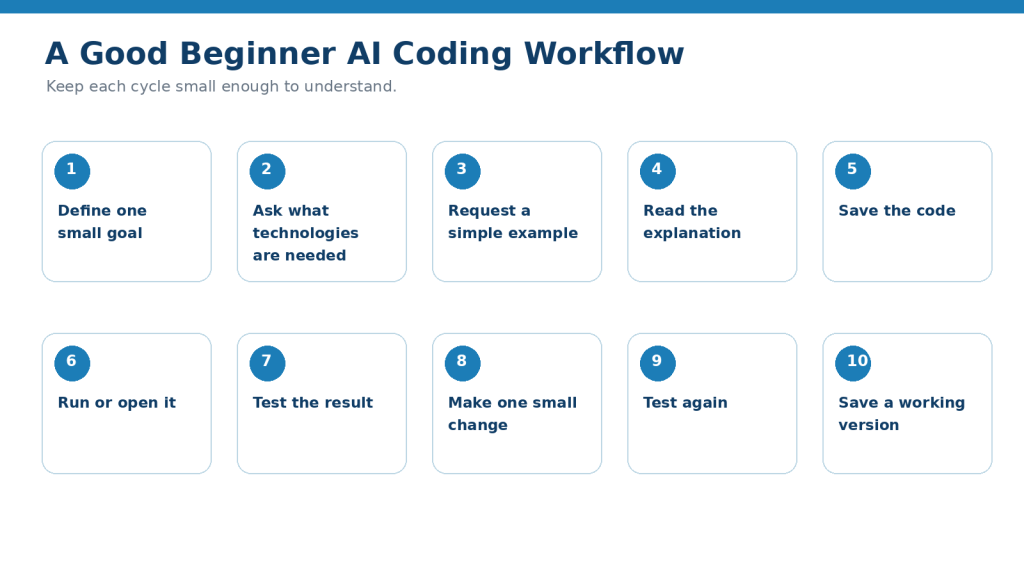
Figure 4. A beginner-friendly coding workflow moves from one small goal through explanation, testing, one change, and a saved working version.
Explanation: Repeating this cycle helps reduce confusion and makes it easier to recover when a later change causes a problem.
How to Avoid This Mistake: Do not keep adding features to code you already know is broken. Fix and understand the current problem before adding another feature.
Reality: Your first AI-assisted coding project does not need to be impressive. A small project that you understand and can modify yourself is more useful for learning than a large project you cannot explain.
Useful AI Prompts for Beginner Coding
Clear prompts can make AI coding assistance easier to understand and safer to use. Replace the bracketed information with your own programming language, code, or project.
Prompt for Explaining a Programming Concept
“Explain [coding concept] to a complete beginner. Use simple language, one everyday example, and a very small code example.”
For example:
“Explain what a Python variable is to a complete beginner.”
Prompt for Creating a Small Coding Example
“Create the smallest beginner-friendly example of [task] using [programming language]. Explain every important line and avoid unnecessary features.”
Prompt for Explaining Existing Code
“Explain this code line by line for a complete beginner. Tell me what each section does and identify anything that may be difficult to understand.”
Then paste only the code you are comfortable sharing.
Prompt for Finding an Error
“This code is producing this error: [exact error message]. Explain the likely cause in simple language and show the smallest correction needed. Do not rewrite the entire program unless necessary.”
Providing the exact error message is usually more useful than saying only:
“My code does not work.”
Prompt for Comparing Expected and Actual Results
“My code should [expected result], but instead it [actual result]. Review the relevant code and explain what may be causing the difference.”
Prompt for Simplifying Code
“Make this beginner code easier to read without changing what it does. Explain every change you make.”
Afterward, test the revised version to confirm that its behavior has not changed unexpectedly.
Prompt for Adding One Feature
“Keep the existing code working and add only this feature: [feature]. Show me what changed and explain where the new code belongs.”
This is usually easier to understand than asking AI to rewrite the whole project.
Prompt for Reviewing Code Before Testing
“Review this code for obvious errors, missing parts, and beginner mistakes. Do not assume it is correct. Explain what I should check before running it.”
Prompt for Learning from Your Own Code
“I wrote this code myself. Review it as a tutor. First explain what I did correctly, then identify problems and give me hints before showing a complete solution.”
This keeps the focus on learning.
Prompt for Creating Practice Exercises
“Create five beginner exercises about [topic]. Start easy and gradually increase the difficulty. Do not show the answers until I ask.”
Prompt for Getting Hints Instead of Answers
“Help me solve this coding problem without giving me the complete answer immediately. Give me one hint at a time.”
This can help you practice problem-solving.
Prompt for Understanding an Error Message
“Explain this error message in beginner-friendly language: [error]. Tell me what it usually means and what I should check first.”
Prompt for Planning a Small Project
“I want to create [small project]. Break it into beginner-friendly stages before writing any code. Keep the first version as simple as possible.”
Prompt for Identifying What Technologies Are Needed
“I want to build [project]. Explain which programming languages, tools, or files may be needed and what each one does. Keep the explanation suitable for a complete beginner.”
Prompt for Reviewing a Proposed Change
“I want to make this change: [change]. Explain which part of the existing code will probably be affected before giving me the modified code.”
This helps you understand the project instead of blindly replacing code.
Prompt for Checking Security Basics
“Review this beginner code for obvious security or privacy problems. Pay special attention to passwords, API keys, user input, private information, and anything that should not be exposed. Explain each concern in simple language.”
A basic AI review is not a substitute for professional security review when the project handles important or sensitive information.
Prompt for Checking Accessibility in a Simple Webpage
“Review this HTML and CSS for basic accessibility issues. Check headings, labels, button text, image alt text, keyboard use, and readable structure. Explain the problems before suggesting changes.”
Prompt for Creating Comments
“Add short comments to this beginner code only where they genuinely help explain what the code does. Do not add a comment to every line.”
Too many comments can make simple code harder to read.
Prompt for Reviewing Before Publishing or Sharing
“Review this project before I share or publish it. Identify unfinished code, test data, private information, API keys, broken links, obvious errors, accessibility issues, and anything that still needs human review.”
Prompt for Asking AI Not to Guess
“If you are uncertain about a function, library, command, or programming feature, say that it needs verification instead of inventing an answer.”
This instruction can reduce the risk of relying on plausible-sounding but incorrect coding information.
Final Check Before Using Any Prompt: Never assume generated code is correct because it looks professional. Read the explanation, test the code, protect sensitive information, keep a working backup, and verify important technical or security claims using reliable documentation.
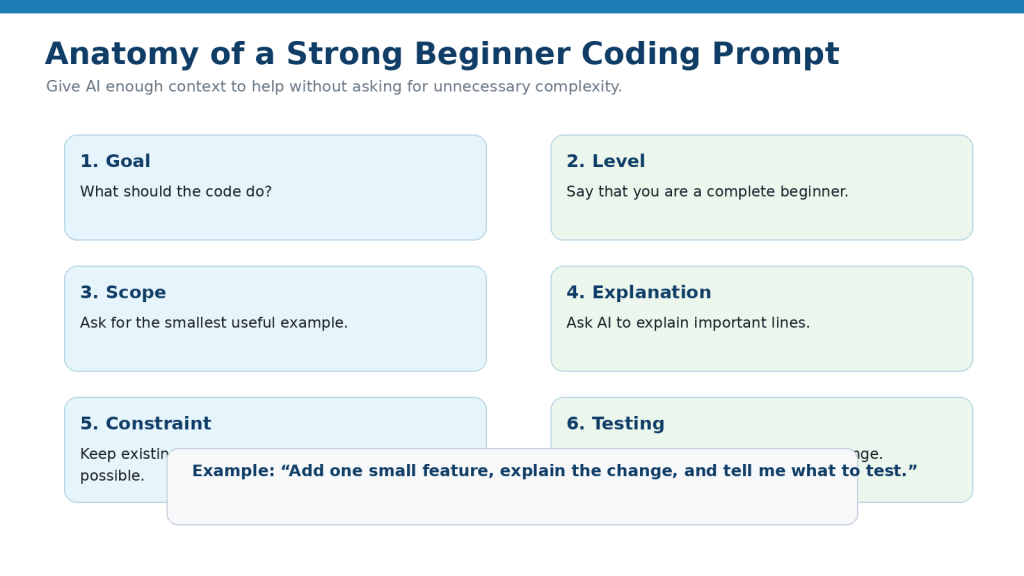
Figure 5. A strong coding prompt states the goal, skill level, scope, explanation needed, constraints, and testing expectations.
Explanation: Giving AI clear boundaries can reduce unnecessary changes and make the response easier for a beginner to understand.
Practical Example: Build and Improve a Simple Webpage with AI
Suppose you want to create a very simple webpage but have never written code before.
Your goal is to create a page with:
· A heading
· A short introduction
· A button
· A simple background colour
· A message that appears when the button is clicked
Instead of asking AI to create a complete website immediately, build the page in small stages.
Stage 1: Create the Basic Page
Start with:
“Create a very simple HTML webpage for a complete beginner. Include one heading, one paragraph, and one button. Keep everything in one file and explain each section.”
AI may provide HTML code containing the basic page structure.
Your first task is not to improve it.
Your first task is to:
1. Save the code.
2. Open it in your browser.
3. Confirm that the heading appears.
4. Confirm that the paragraph appears.
5. Confirm that the button appears.
If those parts work, save a copy of the working file.
For example:
first-webpage-v01.html
Stage 2: Understand the Code
Before adding another feature, ask:
“Explain the code line by line. Tell me which part creates the heading, paragraph, and button.”
Try to identify those elements yourself.
For example, you may learn that an HTML heading can look like:
<h1>My First Webpage</h1>
You do not need to memorize every HTML element immediately. The important point is to begin recognizing how the visible page relates to the code.
Stage 3: Change the Text Yourself
Change the heading from:
My First Webpage
to:
Welcome to My Website
Save the file and refresh the browser.
If the new heading appears, you have successfully edited the code yourself.
Stage 4: Ask AI to Improve the Appearance
Now ask for one visual change:
“Keep the current webpage structure. Add simple CSS that gives the page a light background and makes the button easy to read. Explain every style you add.”
Review the new code before replacing your working version.
Then save it as:
first-webpage-v02.html
Open it in the browser and check that the original content still works.
Stage 5: Add a Simple Button Action
Once the page still works, you can ask:
“Keep the existing page and add simple JavaScript so that clicking the button displays ‘Thanks for visiting.’ Explain the JavaScript in beginner-friendly language.”
Test the button.
Ask yourself:
· Does the message appear?
· Does the rest of the page still work?
· Did AI change anything you did not request?
Stage 6: Troubleshoot a Problem
Suppose the button does nothing.
Instead of asking AI to rebuild the whole webpage, provide the relevant code and say:
“The webpage displays correctly, but clicking the button does nothing. Review the code and explain the smallest change needed to fix the button.”
This keeps the troubleshooting focused.
Stage 7: Ask AI to Review the Finished Example
After the webpage works, ask:
“Review this small webpage for beginner mistakes. Check the HTML structure, basic accessibility, button text, and whether anything unnecessary was added. Explain the issues before changing the code.”
This gives you another opportunity to learn from the project.
Stage 8: Save the Working Version
When you are satisfied, save a clearly named version such as:
first-webpage-working-v03.html
Keep earlier versions until you are sure you no longer need them.
What This Example Teaches
This small project demonstrates the basic AI coding cycle:
1. Describe the goal.
2. Generate a small example.
3. Understand the code.
4. Test it.
5. Make one change.
6. Test again.
7. Fix problems.
8. Save a working version.
The same approach can later be used for larger coding projects.
What Not to Do
Avoid jumping directly from this simple page to asking:
“Now turn this into a full online store with accounts, payments, customer data, and an admin system.”
Those features introduce much greater complexity, security, privacy, and maintenance requirements.
Build your skills gradually and seek appropriate technical review when a project becomes important, public, or responsible for sensitive information.
Reality: AI can help a complete beginner build a small working project quickly, but the real learning happens when you understand what changed, test each version, investigate problems, and gradually take more control of the code yourself.
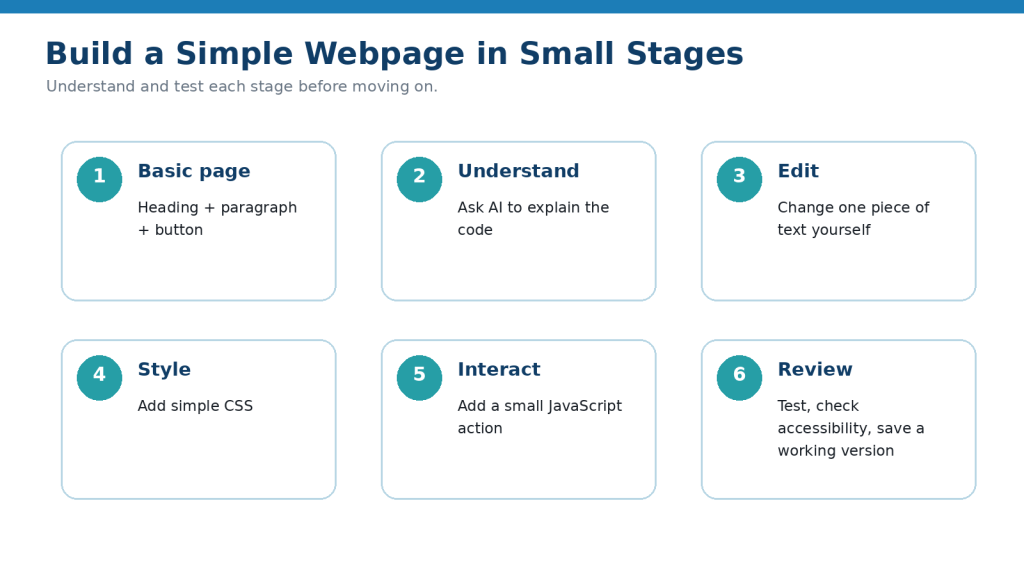
Figure 6. Build a simple webpage in stages: basic page, understanding, editing, styling, interaction, and final review.
Explanation: Adding one stage at a time makes it easier to understand what changed and identify the cause of problems.
Benefits of Using AI for Coding
AI can make coding easier to learn and more efficient to explore, especially when you are working on small projects and asking focused questions.
Helps Beginners Get Started Faster
A blank code editor can feel intimidating.
AI can give you a small starting example based on a normal-language request.
For example:
“Create a beginner Python program that asks for a name and displays a greeting.”
This gives you something concrete to study and test.
Helps Explain Difficult Concepts
Programming terms can be confusing when you first encounter them.
AI can explain ideas such as:
· Variables
· Functions
· Loops
· Conditions
· Errors
· HTML elements
· CSS rules
· JavaScript events
You can also ask for a simpler explanation if the first one is too technical.
Helps You Understand Error Messages
Coding errors often contain unfamiliar technical language.
AI can help translate an error message into simpler terms and suggest what to check.
For example:
“Explain this error message as if I am a complete beginner and tell me what I should check first.”
This can make debugging less frustrating.
Helps You Learn by Asking Follow-Up Questions
With a traditional tutorial, you may have to search elsewhere when something is unclear.
With AI, you can ask:
· Why is this line needed?
· What happens if I remove it?
· Can you explain this more simply?
· Show me another example.
· What mistake did I make?
· Give me a hint instead of the answer.
This allows the explanation to adapt to what you are currently learning.
Helps Break Projects into Smaller Steps
A project can feel difficult when you think about everything at once.
AI can break it into smaller stages.
For example:
“Break a simple to-do list app into beginner-friendly stages before writing the code.”
This helps you focus on one part at a time.
Helps Create Practice Exercises
AI can create extra exercises when you want more practice.
For example:
“Give me five beginner exercises about Python variables. Do not show the answers yet.”
You can then try the exercises yourself and ask for help only when needed.
Helps Make Small Changes More Quickly
When you already have working code, AI can help with focused changes.
For example:
“Keep this webpage the same but make the button larger.”
or:
“Add one new item to this menu without changing the existing items.”
Small, controlled changes can reduce the amount of code you need to rewrite manually.
Helps Explain Existing Code
AI can help you learn from code written by someone else or from an earlier version of your own project.
You can ask:
“Explain this code section by section and tell me what each part controls.”
This can make unfamiliar code easier to understand.
Helps Improve Code Readability
AI can suggest clearer:
· Variable names
· Formatting
· Comments
· Structure
· Repeated sections
For example:
“Make this code easier for a beginner to read without changing what it does.”
You should still test the revised version.
Helps with Early Project Planning
Before writing code, AI can help you think through:
· What the project should do
· Which features are essential
· Which features can wait
· Which files may be needed
· What should be tested
Planning before coding can reduce unnecessary complexity.
Helps You Learn at Your Own Pace
You can repeat questions, ask for simpler examples, or request more practice without needing to move at someone else’s speed.
For example:
“I still do not understand loops. Explain them again using a simple shopping-list example.”
This can be useful when you need another explanation before moving forward.
Helps Reduce Repetitive Work
For small, well-understood coding tasks, AI can help generate repetitive code or suggest patterns.
However, you should still review the result, especially if the code affects important data, files, users, or security.
Benefit: AI can make coding more approachable by helping with explanations, examples, debugging, practice, planning, and small code changes. Its greatest value for beginners comes when you use those capabilities to understand the code rather than simply copying the output.
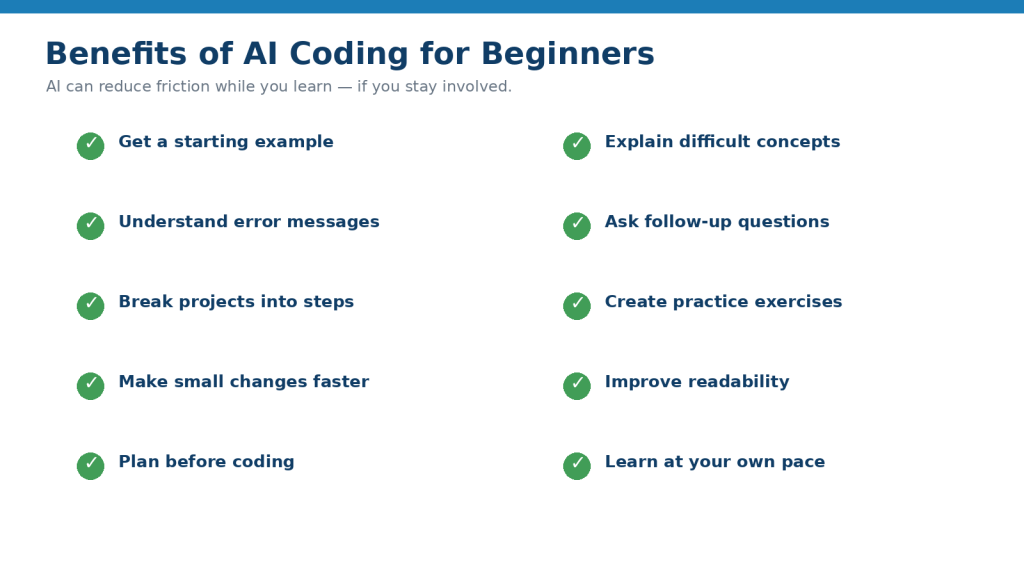
Figure 7. AI coding can help beginners start, learn concepts, understand errors, practise, plan, and make small improvements.
Explanation: The benefit comes from reducing friction while keeping the learner involved in understanding and testing.
Limitations and Common Mistakes
AI can make coding easier to begin, but it can also create problems when generated code is accepted without understanding, testing, or review.
Limitation: AI Can Generate Incorrect Code
AI-generated code may contain:
· Syntax errors
· Logic errors
· Incorrect calculations
· Missing functions
· Invalid commands
· Code that does not behave as requested
How to Reduce This Limitation: Test the code yourself and check whether the result matches what you expected.
If something fails, provide the exact error and ask AI to explain the smallest correction.
Limitation: AI May Use Outdated Methods
Programming languages, libraries, frameworks, and tools change over time.
AI may suggest:
· Old commands
· Deprecated features
· Outdated installation instructions
· Older library versions
· Methods that are no longer recommended
How to Reduce This Limitation: Check important technical instructions against current official documentation.
Limitation: Code Can Work but Still Be Insecure
A program may run correctly while still containing security problems.
Examples include:
· Exposed passwords
· Hard-coded API keys
· Unsafe handling of user input
· Weak authentication
· Poor access controls
· Insecure database queries
· Sensitive information displayed in error messages
How to Reduce This Limitation: Never assume that working code is secure code. Projects involving accounts, payments, customer information, private records, or public websites may require experienced security review.
Limitation: AI May Invent Libraries, Functions, or Commands
AI can sometimes suggest a package, function, command, or feature that sounds believable but is incorrect or does not exist.
How to Reduce This Limitation: Verify unfamiliar technical details using the official documentation for the programming language, library, framework, or service.
Limitation: AI May Rewrite More Than Necessary
You may ask AI to fix one small problem and receive a completely rewritten program.
This can:
· Remove working features
· Introduce new errors
· Make the code harder to understand
· Create unnecessary differences between versions
How to Reduce This Limitation: Ask for the smallest change needed.
For example:
“Fix only this error. Keep the rest of the working code unchanged.”
Common Mistake: Copying Code Without Understanding It
A beginner may copy AI-generated code simply because it appears to work.
How to Avoid This Mistake: Ask:
· What does each section do?
· Which part can I safely change?
· Why is this function needed?
· What happens if this line is removed?
Try to understand the important parts before adding more features.
Common Mistake: Adding Too Many Features at Once
A project may become difficult to troubleshoot when many features are introduced together.
How to Avoid This Mistake: Add one small feature, test it, save a working version, and then continue.
Common Mistake: Replacing Working Code Without Saving It
An AI-generated revision may accidentally break something that previously worked.
How to Avoid This Mistake: Save a known working version before major changes.
For example:
· project-v01-working
· project-v02-test
· project-v03-working
Common Mistake: Giving AI an Incomplete Error Report
Saying:
“My program is broken.”
does not provide much information.
How to Avoid This Mistake: Include:
· The relevant code
· The exact error message
· What you expected
· What actually happened
· What you changed immediately before the problem started
This gives AI more useful context.
Common Mistake: Sharing Passwords or API Keys
Beginners may paste an entire configuration file or code example into an AI tool without noticing that it contains credentials.
How to Avoid This Mistake: Replace real secrets with placeholders such as:
YOUR_API_KEY_HERE
Never publish or share credentials that should remain private.
If a secret has already been exposed, follow the provider’s instructions for revoking or replacing it.
Common Mistake: Testing on Important Live Systems
Trying unreviewed code directly on a live website, real database, or important business system can create serious problems.
How to Avoid This Mistake: Test first in a separate development, staging, or practice environment when possible.
Common Mistake: Ignoring Error Messages
Error messages often contain useful clues.
How to Avoid This Mistake: Read the message carefully and ask AI:
“Explain this error in simple language and tell me what I should check first.”
Common Mistake: Assuming Longer Code Is Better
AI may generate a large solution for a small problem.
How to Avoid This Mistake: Ask:
“Can this be done more simply for a beginner?”
Simpler code is often easier to understand, test, and maintain.
Common Mistake: Installing Packages Without Checking Them
AI may suggest installing a library or package.
Before doing so, check:
· The exact package name
· Its official documentation
· Whether it is still maintained
· Whether you actually need it
· Whether there are security concerns
Do not install unfamiliar software only because AI suggested it.
Common Mistake: Ignoring Accessibility
A webpage may look correct while still being difficult for some people to use.
How to Avoid This Mistake: Review issues such as:
· Heading structure
· Image alt text
· Form labels
· Button names
· Keyboard access
· Readable text
· Colour contrast
Accessibility should be considered during development rather than only after the project is finished.
Common Mistake: Trusting AI Security Advice Without Verification
Security is a specialized area, and apparently small mistakes can have serious consequences.
How to Avoid This Mistake: Use current official documentation and appropriate professional review for important systems.
Common Mistake: Publishing Test Information
Code may still contain:
· Test names
· Sample email addresses
· Debug messages
· Temporary passwords
· Local file paths
· Placeholder content
· Development settings
How to Avoid This Mistake: Review the project carefully before publishing or sharing it.
Reality: AI can help you create and fix code more quickly, but working code is not automatically correct, secure, current, accessible, or suitable for real users. Testing, verification, backups, and human review remain essential.
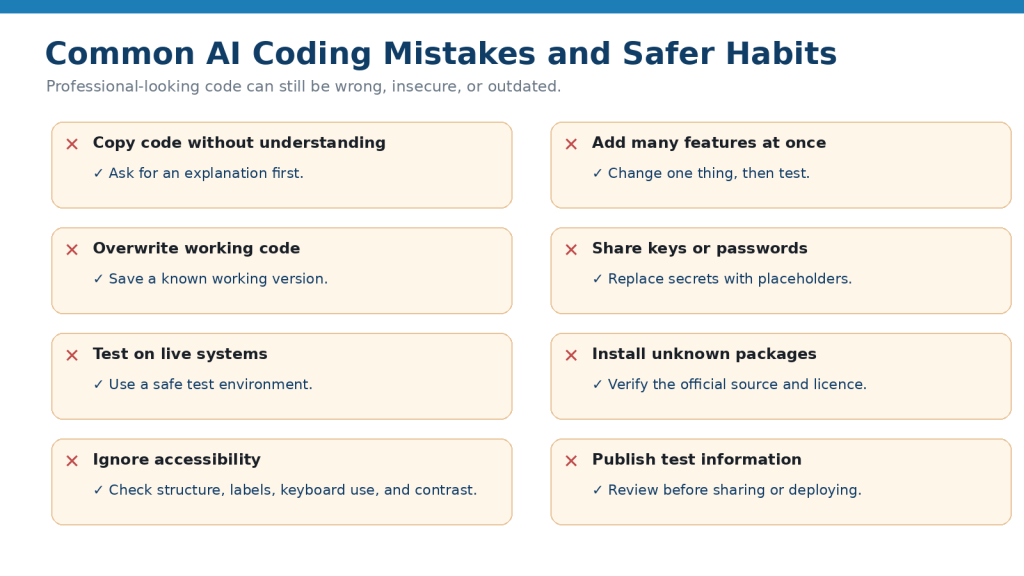
Figure 8. Common AI coding mistakes can be reduced with simple safer habits.
Explanation: Backing up working code, testing one change at a time, protecting secrets, checking packages, and reviewing accessibility can prevent many beginner problems.
Common Myths About AI Coding
AI coding can make programming more approachable, but beginners should not assume that AI removes the need to learn, test, or review code.
Myth 1: AI Can Build Anything Perfectly from One Prompt
AI can generate impressive-looking code, but a large project usually requires many rounds of testing, correction, and refinement.
Reality: Start with a small goal, test it, and add features gradually.
Myth 2: If the Code Runs, It Must Be Correct
Code can run without producing the correct result.
For example, a calculator might display an answer while using the wrong formula.
Reality: Test whether the program produces the expected result, not only whether it starts successfully.
Myth 3: Working Code Is Automatically Secure
A webpage or application may appear to work while still exposing passwords, mishandling user data, or allowing unsafe input.
Reality: Functionality and security are different. Important systems may require additional security review.
Myth 4: AI Always Uses the Latest Coding Methods
Programming tools and documentation change.
AI may sometimes suggest an older command, library, or method.
Reality: Check important or unfamiliar technical instructions against current official documentation.
Myth 5: Beginners Do Not Need to Learn Coding Anymore
AI can write code, but you still need enough understanding to know:
· What the code is supposed to do
· Whether the result is correct
· What changed
· Where errors may be occurring
· Whether private information is exposed
Reality: AI can reduce some of the difficulty of getting started, but understanding remains important.
Myth 6: More Generated Code Means a Better Solution
A long solution may contain unnecessary features or complexity.
Reality: For beginners, a smaller solution that you understand is often more useful.
Myth 7: AI Can Always Fix Its Own Mistakes
If AI generated an error, asking it to fix the code may help, but it can also introduce another problem.
Reality: Test every correction rather than assuming the new version is correct.
Myth 8: AI Knows Which Package or Library Is Safe to Install
AI may suggest unfamiliar software packages or dependencies.
Reality: Verify the exact package using its official documentation and trusted software sources before installing it.
Myth 9: AI Can Replace Testing
AI can suggest test cases, but it cannot guarantee that every important situation has been checked.
Reality: You still need to run the program and test expected, unexpected, and incorrect inputs where appropriate.
Myth 10: AI Coding Is Only for Professional Programmers
Beginners can use AI to:
· Learn programming concepts
· Understand examples
· Create small projects
· Explain errors
· Practice coding
· Explore simple ideas
Reality: AI coding can be useful at many skill levels, provided the user understands its limitations.
Myth 11: AI Can Safely Change a Large Project Without Context
AI may not know about every file, dependency, design decision, or requirement in an existing project.
Reality: Provide relevant context and make important changes gradually.
Myth 12: AI-Generated Code Is Automatically Free of Copyright or Licence Concerns
Code may involve third-party libraries, frameworks, packages, examples, or other material that has licence conditions.
Reality: Check applicable licences, attribution requirements, and commercial-use conditions when they matter.
Myth 13: AI Can Replace Professional Developers for Every Project
AI can help with learning and development tasks, but complex applications may involve:
· Security
· Databases
· Payments
· User accounts
· Accessibility
· Privacy
· Performance
· Legal or regulatory requirements
· Long-term maintenance
Reality: Important or complex systems may still require experienced developers, security specialists, accessibility experts, or other appropriate professionals.
Myth 14: If AI Explains the Code Clearly, the Explanation Must Be Correct
A confident explanation can still contain errors.
Reality: Verify important technical information, especially when it affects security, data, production systems, or significant decisions.
The most useful approach is to treat AI as a coding assistant and learning partner while keeping testing, verification, security, and final technical decisions under human control.
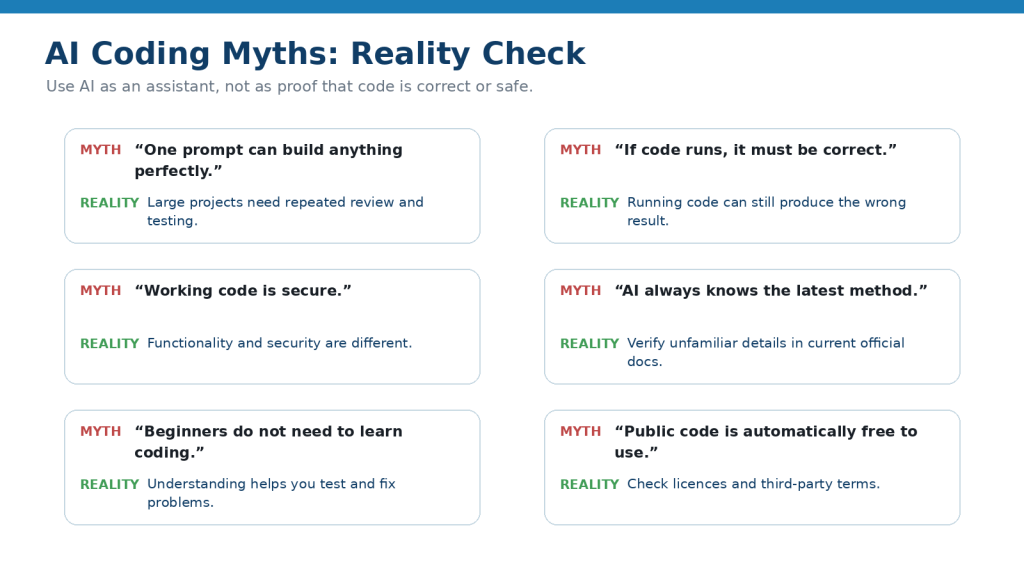
Figure 9. Common AI coding myths can sound convincing, but each needs a practical reality check.
Explanation: The central lesson is that AI assistance does not replace understanding, testing, current documentation, security review, or licence checks.
When AI Can Help and When Human Review Matters Most
AI can help with many beginner coding tasks, but some situations require more careful human review.
Good Uses for AI Coding Assistance
AI can be helpful for:
· Explaining unfamiliar code
· Creating small examples
· Suggesting beginner exercises
· Breaking a project into smaller steps
· Explaining error messages
· Helping identify simple bugs
· Suggesting clearer variable names
· Improving code readability
· Adding small features
· Creating test ideas
· Reviewing basic accessibility issues
· Summarizing what a code section does
These tasks are useful for learning and early development.
Use Extra Care with Security-Sensitive Code
Some code can affect:
· User accounts
· Passwords
· Authentication
· Payments
· Customer data
· Private records
· Databases
· Access permissions
· APIs
· Business systems
AI can help explain these areas, but important security decisions should not rely only on generated code.
For higher-risk systems, use current official documentation and appropriate experienced review.
Human Review Matters for Production Systems
A production system is a website, app, or service that real users depend on.
Before publishing or deploying code, check:
· Does it work correctly?
· Is sensitive information protected?
· Are errors handled safely?
· Are permissions correct?
· Is the code accessible?
· Are dependencies current and appropriate?
· Are backups available?
· Is important data protected?
· Have important changes been tested?
Do not treat a successful local test as proof that a system is ready for public use.
Be Careful with Payments and Financial Features
Payment systems introduce additional security, privacy, and compliance responsibilities.
If a project handles:
· Credit cards
· Bank information
· Subscriptions
· Purchases
· Refunds
· Financial records
use the official documentation and security requirements of the payment provider and obtain appropriate technical or professional review when necessary.
Do not create your own payment-security system based only on AI-generated code.
Be Careful with Personal or Sensitive Data
Applications that collect information about users require more care.
Examples include:
· Names
· Email addresses
· Addresses
· Health information
· Financial information
· Location data
· Account credentials
AI may help create forms or database examples, but privacy and security requirements depend on the project, location, and type of information involved.
Human Review Matters for Accessibility
AI can identify some basic accessibility problems, but automated checks do not find every issue.
Important websites and applications should also be reviewed for practical usability, including:
· Keyboard navigation
· Form labels
· Heading structure
· Alternative text
· Focus behavior
· Readable contrast
· Clear instructions
· Error messages
Accessibility requirements may also depend on applicable laws, standards, contracts, or organizational policies.
Review Third-Party Dependencies
Modern software often uses:
· Libraries
· Packages
· Frameworks
· Plugins
· APIs
· Open-source components
Before adding something suggested by AI, verify:
· That it actually exists
· Its official source
· Whether it is maintained
· Its current documentation
· Its licence
· Known security considerations
· Whether it is appropriate for your project
Human Judgment Matters When AI Is Uncertain
AI may sometimes give several possible solutions.
If it is not clear which one is correct, do not choose only because one answer sounds more confident.
Instead:
1. Check the official documentation.
2. Test the smallest safe example.
3. Compare the result with your requirements.
4. Ask an experienced person when the consequences are important.
Know When to Ask for Professional Help
Consider experienced technical help when a project involves:
· Real customer data
· Payments
· Authentication
· Business-critical systems
· Public production databases
· Complex security requirements
· Regulatory requirements
· Significant accessibility obligations
· Large existing codebases
· Systems where failure could cause serious harm or loss
Reality: AI is most useful as a coding assistant. The more important, complex, public, or security-sensitive a project becomes, the more important testing, current official documentation, and qualified human review become.
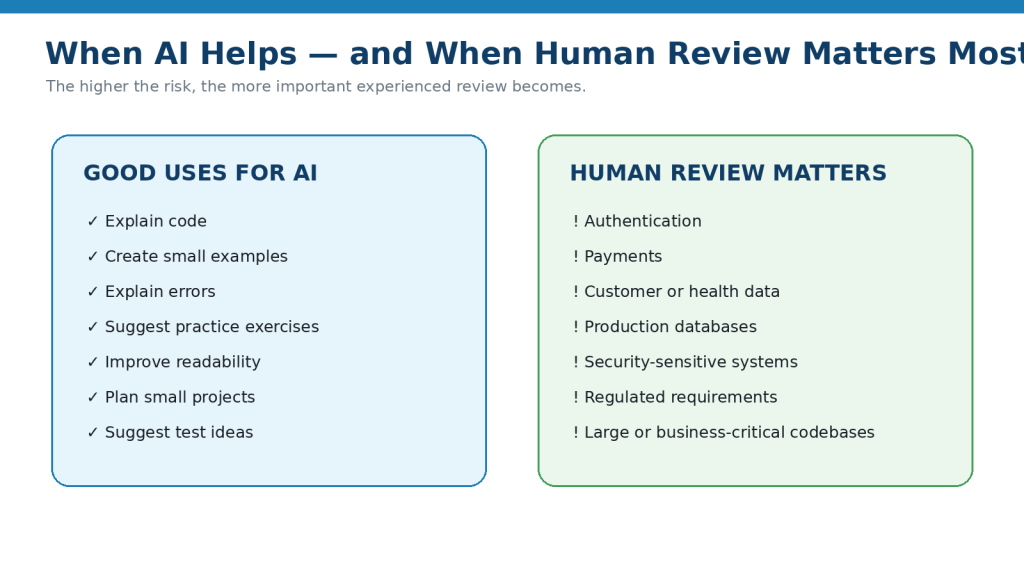
Figure 10. AI is useful for routine learning tasks, while security-sensitive and production work needs stronger human review.
Explanation: Risk should determine the level of review. Small learning examples need less oversight than systems involving accounts, payments, private data, or critical services.
Privacy, Security, Licensing, and Responsible AI Coding
Coding projects can contain sensitive information, third-party software, private data, and security settings. AI can help with the work, but you still need to protect information and check whether you have permission to use the code, libraries, and other materials involved.
Never Share Passwords or Secret Keys
Code and configuration files may contain information such as:
· Passwords
· API keys
· Access tokens
· Database credentials
· Private URLs
· Authentication secrets
Do not paste real secrets into an AI prompt unless you have specifically confirmed that doing so is appropriate for the service and your situation.
For learning examples, replace secrets with placeholders such as:
YOUR_API_KEY_HERE
or:
YOUR_PASSWORD_HERE
If a real secret is accidentally exposed, do not simply delete it from the prompt or code and assume the problem is solved.
Follow the provider’s instructions for revoking, rotating, or replacing the exposed credential.
Check Code Before Sharing It
A code file may contain private information even when you do not notice it immediately.
Before uploading or pasting code into an AI tool, look for:
· Names
· Email addresses
· Customer details
· Internal server names
· Account information
· File paths containing personal names
· Private comments
· Test credentials
· Confidential business information
Remove anything that is not necessary for the coding question.
Use Test Data When Possible
When learning or troubleshooting, use fictional information instead of real customer or personal data.
For example, use:
example@example.com
rather than a real customer email address.
For financial or personal records, use made-up sample values whenever possible.
Be Careful with User Input
If your program accepts information from users, that input should not automatically be trusted.
Examples include:
· Text entered into forms
· Uploaded files
· Search boxes
· Login information
· URL parameters
· Data sent to an API
Poor handling of user input can create security problems.
For important or public systems, use current security guidance and appropriate technical review rather than relying only on an AI-generated solution.
Do Not Put Secret Keys Directly in Public Code
A beginner may be tempted to write something like:
API_KEY = “my-real-secret-key”
inside the program.
If that file is later shared, uploaded, or published, the secret may be exposed.
Ask AI:
“Show me a safer beginner-friendly way to keep an API key outside the main source code. Do not include a real key.”
Then verify the method using the official documentation for the service you are using.
Check Third-Party Libraries and Packages
AI may suggest installing:
· Libraries
· Packages
· Frameworks
· Plugins
· Extensions
Before installing something unfamiliar, verify:
· The exact name
· The official source
· Whether it is still maintained
· Whether it is appropriate for your project
· Its licence
· Any important security information
Do not install a package simply because the name looks convincing.
Understand Software Licences
Code and software components may have licence conditions.
For example, an open-source library may allow reuse but still have requirements concerning:
· Copyright notices
· Attribution
· Distribution
· Modification
· Source-code availability
· Commercial use
The exact requirements depend on the licence.
Do not assume that code is automatically free to use for any purpose because it is publicly available or because AI suggested it.
Do Not Assume AI-Generated Code Has No Legal Issues
AI-generated code should not automatically be treated as free from copyright, licensing, trademark, patent, or other legal considerations.
Your project may also contain third-party:
· Code
· Libraries
· Templates
· Fonts
· Images
· Icons
· APIs
· Data
· Documentation
Check the applicable licence and usage conditions before publishing or using important projects commercially.
Preserve Important Licence Records
For projects you may publish or use commercially, keep records such as:
· Library names
· Version numbers
· Licence files
· Source links
· Copyright notices
· Permission records
· Third-party asset information
These records can make future updates and compliance checks easier.
Review AI-Generated Code for Accessibility
For websites and apps, accessibility should be considered while the project is being created.
Check areas such as:
· Heading structure
· Alternative text for meaningful images
· Form labels
· Keyboard operation
· Button and link names
· Colour contrast
· Error messages
· Instructions
AI can help identify some problems, but automated review should not be treated as proof that a website or app is fully accessible.
Be Careful with Real People’s Data
If your project handles information about real people, use extra care.
Examples include:
· Customer information
· Student records
· Employee information
· Medical information
· Financial information
· Account details
Only collect and use information that is appropriate for the project, and follow applicable privacy requirements and organizational policies.
Keep Backups and Version History
Before an important AI-generated change, save a working version.
For example:
· project-v01-working
· project-v02-before-ai-change
· project-v03-tested
This makes it easier to recover if a later change causes problems.
Review Before Publishing
Before publishing or deploying a project, check for:
· Exposed passwords or API keys
· Test accounts
· Private information
· Debug messages
· Temporary files
· Broken links
· Unnecessary permissions
· Unverified dependencies
· Missing licence information
· Accessibility problems
· Known errors
For an important public project, additional technical or security review may be appropriate.
Reality: AI can help create code quickly, but it does not remove your responsibility to protect secrets and personal information, test security-sensitive features, respect software licences, check accessibility, and review the project before publishing it.
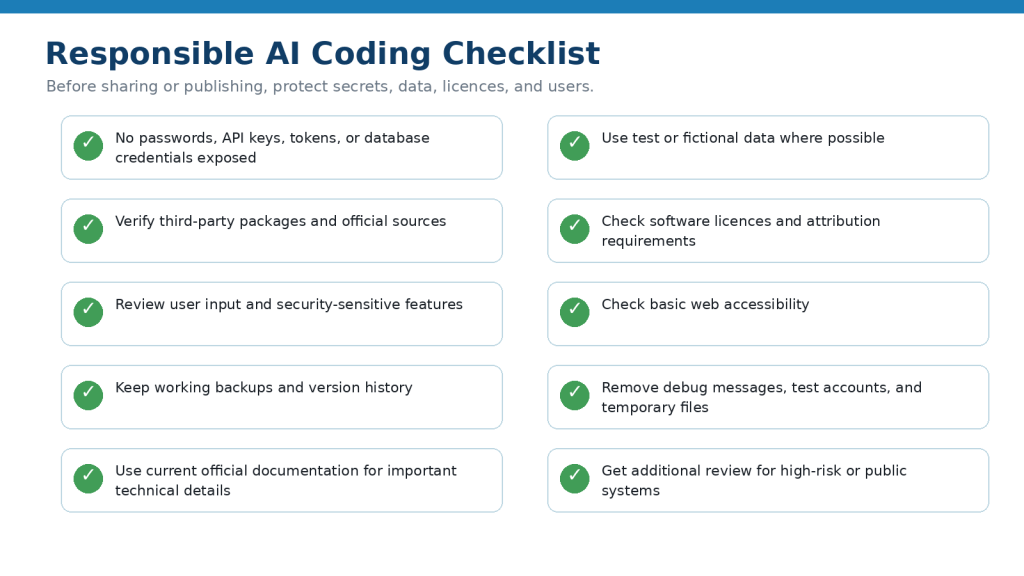
Figure 11. Responsible AI coding includes protecting secrets, verifying dependencies, checking licences, reviewing accessibility, and removing test information before publishing.
Explanation: A pre-publication checklist helps beginners remember risks that may not be obvious from whether the code simply runs.
Frequently Asked Questions
Do I need to know coding before using AI for coding?
No.
AI can help complete beginners learn basic concepts, create small examples, and understand errors.
However, gradually learning what the code does will make it easier to recognize mistakes and make safer changes.
Can AI write an entire program for me?
Yes, AI can sometimes generate a complete small program.
For beginners, it is usually better to build projects in smaller stages so you can understand and test each part.
Large applications may require experienced technical review.
Which programming language should a beginner start with?
It depends on what you want to create.
For example:
· HTML and CSS are useful for learning basic webpage creation.
· JavaScript can add interaction to webpages.
· Python is commonly used for beginner programming, automation, data tasks, and many other purposes.
You do not need to learn several languages at the same time.
Can AI explain code I do not understand?
Yes.
You can ask:
“Explain this code line by line for a complete beginner.”
For longer code, ask AI to explain one section at a time.
Can AI fix coding errors?
AI can often help identify possible causes of errors and suggest corrections.
Provide:
· The relevant code
· The exact error message
· What you expected
· What actually happened
Test any suggested correction yourself.
What should I do if AI keeps giving me broken code?
Reduce the size of the problem.
Instead of asking AI to rewrite the entire project:
1. Return to the last working version.
2. Identify the specific problem.
3. Provide the relevant code and error.
4. Ask for the smallest possible correction.
5. Test the change.
Should I copy and paste AI-generated code directly?
You can use generated code as a starting point, but do not assume it is correct.
Review and test it first.
For important projects, also check security, privacy, accessibility, dependencies, and licences.
Is AI-generated code always secure?
No.
Code can work correctly while still containing security problems.
Security-sensitive projects involving accounts, payments, databases, private data, or public services may require experienced review.
Can AI create websites?
Yes.
AI can help create HTML, CSS, JavaScript, and other website code.
A beginner should start with a small test webpage before attempting a complex public website.
Can AI create apps?
AI can help plan and create parts of an app, and some tools can assist with larger application projects.
However, real applications may involve databases, authentication, security, privacy, hosting, testing, and maintenance.
The more complex the app becomes, the more important technical review becomes.
Can AI help me learn Python?
Yes.
You can ask AI to:
· Explain Python concepts
· Create simple examples
· Give practice exercises
· Explain errors
· Review your code
· Give hints instead of answers
For example:
“Teach me Python variables with one simple example and then give me three exercises.”
Can AI help with HTML and CSS?
Yes.
AI can explain webpage structure, styles, layouts, buttons, headings, images, and other beginner concepts.
Test your webpage in a browser after each important change.
What is debugging?
Debugging means finding and fixing problems in code.
AI can assist by explaining error messages and suggesting possible causes, but you still need to test whether the correction actually solves the problem.
What is an API key?
An API key is a credential that can allow software to access a service.
It should normally be treated as sensitive information.
Do not publish or unnecessarily share real API keys.
What is a software library?
A library is reusable code created to help developers perform certain tasks without building everything from scratch.
Before using an unfamiliar library suggested by AI, verify its official source, documentation, maintenance status, security information, and licence.
Is code found online automatically free to use?
No.
Code, libraries, examples, templates, and other software may have copyright or licence conditions.
Check the applicable licence before reusing material, especially in commercial projects.
Can I use AI-generated code commercially?
Possibly, but you should not assume every generated project is automatically cleared for commercial use.
Check:
· The AI provider’s current terms
· Third-party software licences
· Libraries and dependencies
· Templates or assets
· Applicable legal requirements
Important commercial projects may require professional review.
Should I keep old versions of my code?
Usually, keeping working versions is helpful while developing a project.
If a new AI-generated change causes a problem, you can return to the earlier version.
Can AI replace a professional developer?
Not for every project.
AI can help with learning, prototypes, explanations, and many coding tasks, but complex systems may still require experienced developers, security specialists, accessibility experts, or other professionals.
What is the safest way for a beginner to use AI coding?
A useful beginner process is:
1. Start with a small project.
2. Ask AI to explain the code.
3. Test it.
4. Save a working version.
5. Add one change at a time.
6. Test again.
7. Protect passwords and private information.
8. Verify unfamiliar technical information using official documentation.
Reality: AI can make coding much easier to begin, but learning, testing, verification, backups, security, and careful review remain important.
Key Takeaways
AI can make coding easier to learn, explain, and troubleshoot, but it should not replace testing, verification, or basic understanding.
Remember these main points:
· Start with small coding projects.
· Ask AI to explain the code it creates.
· Add one feature or change at a time.
· Test every important change.
· Keep a working backup before major edits.
· Use exact error messages when asking for debugging help.
· Do not assume code is correct because it runs.
· Do not assume working code is secure.
· Protect passwords, API keys, tokens, and private information.
· Use fictional or test data when possible.
· Check unfamiliar libraries, packages, commands, and APIs against current official documentation.
· Review third-party licences and commercial-use conditions.
· Consider accessibility when creating websites or apps.
· Test important projects in a safe development or staging environment before publishing.
· Use extra care with payments, authentication, databases, customer information, and other sensitive systems.
· Ask for experienced technical or security review when a project becomes important, public, complex, or high risk.
· Treat AI-generated code as a starting point that still needs human review.
The most useful role for AI coding is to help you learn, experiment, understand problems, and build projects more efficiently while keeping testing, security, licensing, privacy, and final technical decisions under human control.
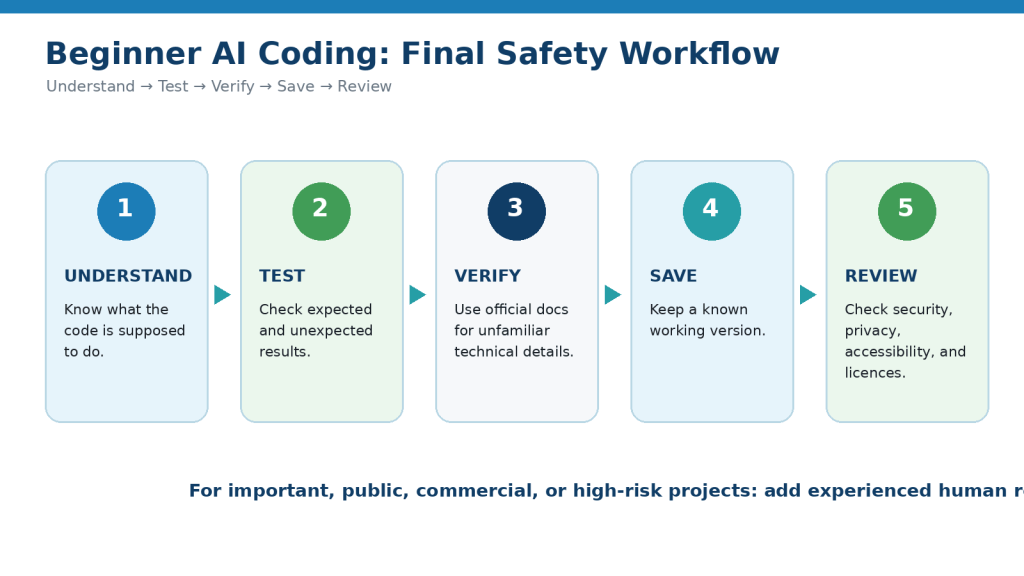
Figure 12. The final safe-coding workflow is Understand, Test, Verify, Save, and Review.
Explanation: This simple sequence summarizes the habits beginners should repeat before relying on AI-generated code.
Final Tip
Use AI to help you understand coding, not only to produce code.
A simple beginner workflow is:
1. Choose one small goal.
2. Ask AI for the simplest possible example.
3. Ask it to explain the code.
4. Run or open the project.
5. Check whether it behaves as expected.
6. Make one small change.
7. Test again.
8. Save a working version.
9. Verify unfamiliar technical details using official documentation.
10. Ask for experienced help when security, payments, private data, or other high-risk features are involved.
A useful prompt is:
“Help me make the smallest safe change to this code. Explain what will change before showing the code, keep the rest of the working project unchanged, and tell me what I should test afterward.”
This approach helps you learn from each change instead of repeatedly replacing code you do not understand.
The goal is not to make AI write as much code as possible. The goal is to gradually become more confident at understanding, testing, and improving the code you use.
Continue Learning
After you understand the basics of AI-assisted coding, continue with these related AI Mastery guides:
· Article 052 — How to Use Claude for Coding and App Creation: Beginner Guide (2026) — Learn how Claude can assist with explaining code, creating small projects, debugging, and app-development tasks.
· Article 081 — How to Research and Organize Information with AI (2026) — Learn how to research technical information, compare sources, verify claims, and keep reliable records.
· Article 083 — How to Organize Files, Tasks, and Projects with AI (2026) — Learn how to organize coding project files, versions, tasks, backups, and project stages.
· Article 085 — Next AI Coding Guide — Continue building practical AI coding skills in the next article in the AI Coding series. Link after Article 085 is published.
As you continue through the AI Coding series, keep using the same basic approach: start small, understand what the code does, save working versions, test every important change, verify unfamiliar technical information, protect sensitive data, and use additional human review when a project becomes important or high risk.
Sources and References
The following official and authoritative sources were reviewed for this guide. AI coding tools, programming languages, software libraries, security guidance, licences, accessibility standards, privacy practices, and provider terms can change, so readers should check current documentation when first using a tool, after major updates, before publishing an important project, and periodically.
· OpenAI — How ChatGPT and Our Foundation Models Are Developed. OpenAI lists coding among the tasks ChatGPT can assist with. This supports the article’s explanation that conversational AI can be used for coding assistance while users still need to evaluate the results.
· GitHub Docs — Best Practices for Using GitHub Copilot. GitHub recommends understanding suggested code before implementing it and reviewing suggestions for functionality, security, readability, and maintainability. This supports the article’s repeated recommendation to understand and review AI-generated code instead of copying it blindly.
· GitHub Docs — GitHub Copilot Code Suggestions. GitHub documents how Copilot can provide code suggestions while a developer types and can respond to natural-language descriptions of what the developer wants to do.
· Google Cloud — Gemini Code Assist Overview. Google documents that Gemini Code Assist can provide code completions, generate functions or code blocks, create unit tests, and assist with debugging, understanding, and documenting code in supported development environments.
· Python Software Foundation — Python Documentation. The official Python documentation provides the current language documentation, tutorial, library reference, language reference, and setup information. It is an appropriate source for verifying Python syntax, functions, and language behavior instead of relying only on an AI response.
· MDN Web Docs — Web Development Documentation. MDN provides documentation and learning material for web technologies including HTML, CSS, JavaScript, accessibility, privacy, and security. It is a useful reference when checking AI-generated beginner webpage code.
· OWASP — Secrets Management Cheat Sheet. OWASP provides security guidance for protecting secrets such as API keys and other credentials, including their storage, management, auditing, and rotation. This supports the article’s warning not to expose passwords, API keys, access tokens, or database credentials in code or AI prompts.
· OWASP — Secure Coding Practices and OWASP Top 10. OWASP maintains security guidance and awareness material covering important software and web-application security risks. These sources support the article’s warning that code can function correctly while still containing security weaknesses.
· W3C Web Accessibility Initiative — WCAG 2.2. WCAG 2.2 provides internationally recognized recommendations for making web content more accessible. W3C guidance covers areas relevant to beginner coding projects, including text alternatives, headings, labels, forms, keyboard use, and other accessibility considerations.
· Open Source Initiative — OSI Approved Licenses. The Open Source Initiative explains that open-source software is distributed under licences and maintains a list of approved licences. This supports the article’s recommendation to check the actual licence rather than assuming publicly available code can be used without conditions.
· Canadian Intellectual Property Office — Intellectual Property Rights in Software in Canada and A Guide to Copyright. CIPO provides guidance about intellectual-property protection relating to software and introductory information about Canadian copyright. These sources support the article’s recommendation to consider copyright and licensing when using software, code, and other third-party materials.
· Office of the Privacy Commissioner of Canada — Privacy and Artificial Intelligence. The Privacy Commissioner provides current Canadian guidance about AI and personal information. This supports the recommendation to minimize unnecessary personal information when using AI coding tools or building projects that handle information about real people.
· OpenAI — Terms of Use. OpenAI’s current terms state that, as between the user and OpenAI and to the extent permitted by applicable law, the user retains rights in input and owns output. Provider terms do not remove the need to consider third-party code, libraries, licences, intellectual-property rights, or other applicable requirements in a finished software project.
These sources support the article’s guidance on AI coding assistance, testing, debugging, security, privacy, accessibility, software licensing, technical verification, and responsible use.
AI coding tools can generate useful code quickly, but official GitHub guidance specifically recommends understanding and reviewing AI suggestions before implementation, while security organizations such as OWASP provide separate guidance for protecting applications and secrets.
For programming-language syntax, libraries, frameworks, APIs, security requirements, accessibility requirements, and software licences, check the current documentation that applies to the specific technology being used. Python, MDN, W3C, OWASP, and OSI maintain dedicated documentation for these areas.
For important commercial, security-sensitive, privacy-sensitive, regulated, or legally significant software projects, this article provides general educational information only and is not a substitute for appropriate technical, security, accessibility, privacy, or legal advice.
 AI Mastery