
Estimated reading time: 25–30 minutes
Last updated: August 16, 2026
Introduction
Python programs often need to work with more than one value at a time. A shopping list may contain several products. A quiz may contain several questions. A program may need a fixed pair of coordinates or a group of settings that should stay together. Python provides several sequence types for this purpose, and two of the most useful for beginners are lists and tuples.
A list is an ordered, mutable collection. “Mutable” means its contents can be changed after the list is created. A tuple is also an ordered sequence, but it is immutable: you do not replace, add, or remove its items in place. Python’s official documentation identifies list, tuple, and range as the three basic sequence types, with many common operations shared between lists and tuples.
This guide builds on the Python foundations from Article 087 and the project-and-debugging habits from Articles 088 and 089. You will create small examples, run them yourself, and use ChatGPT as a focused learning assistant rather than treating generated code as automatically correct.
You do not need to memorize every method or rule. The goal is to understand the main patterns well enough to read a small collection, change it when appropriate, troubleshoot common mistakes, and decide when a list or tuple fits your program.
What You’ll Learn
By the end of this guide, you will be able to:
- create lists and tuples
- read items by index
- use positive and negative indexes
- select ranges with slicing
- replace list items
- add and remove list items
- sort and reverse lists
- loop through sequences
- work with nested lists
- understand list assignment and copying
- create one-item tuples correctly
- pack and unpack tuples
- compare lists and tuples
- convert between lists and tuples
- use ChatGPT for focused explanations and troubleshooting
- protect private information when sharing code
- build a small beginner project using both a list and a tuple
Before Learning
You will get the most from this article if you already understand a few basic Python ideas: variables, strings, numbers, `print()`, simple `if` statements, `for` loops, and how to run a `.py` file. If any of those ideas still feel unfamiliar, review Article 087 before continuing.
Keep a small practice file open while you read. Type the examples yourself when possible, save the file, run it, and change one value at a time. This turns the tutorial into active practice rather than passive reading.
- Use fictional practice data rather than real personal information.
- Save a working copy before making a large change.
- Do not paste passwords, API keys, customer records, or confidential information into an AI conversation.
- Treat AI-generated code as a suggestion to review and test.
What Is a Python List?
A Python list groups several values inside square brackets. Items are separated with commas. Lists preserve order, so each item has a position, and lists are mutable, so their contents can be changed.
fruits = [“apple”, “banana”, “orange”]
print(fruits)
The variable `fruits` refers to one list containing three strings. Lists commonly hold items of the same general kind, although Python permits mixed types.
mixed = [“Alex”, 25, True, 19.99]
Mixed lists are valid, but beginners should use them only when the structure makes sense. A clear data design is easier to understand than a collection with unrelated values.
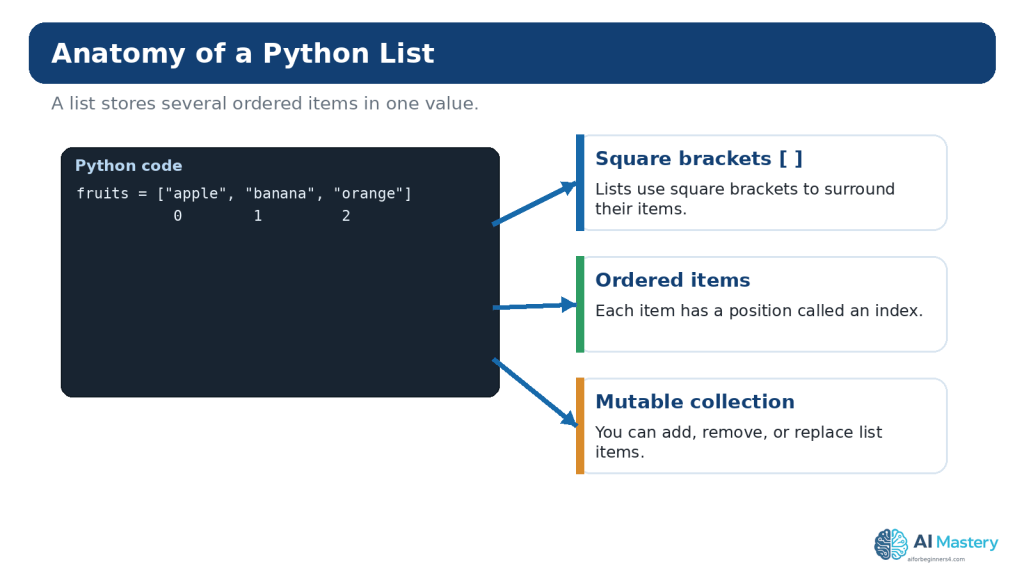
Figure 1. A Python list stores multiple ordered items inside square brackets, and each item has an index position.
Explanation: Lists are useful when a program needs a collection that can change. The first item normally has index 0, not 1.
Read List Items with Indexes
Each item in a list has an index. Python starts counting at 0. In the list below, `”apple”` is at index 0, `”banana”` is at index 1, and `”orange”` is at index 2.
fruits = [“apple”, “banana”, “orange”]
print(fruits[0])
print(fruits[1])
Output:
apple
banana
Negative indexes count backward from the end. `-1` refers to the last item, `-2` to the second-last item, and so on.
print(fruits[-1])
Output:
orange
Common Beginner Mistake: Starting at Index 1
A beginner may assume the first item is `fruits[1]`. That actually selects the second item. When the exact position matters, write the indexes beside a short practice list until zero-based indexing becomes familiar.
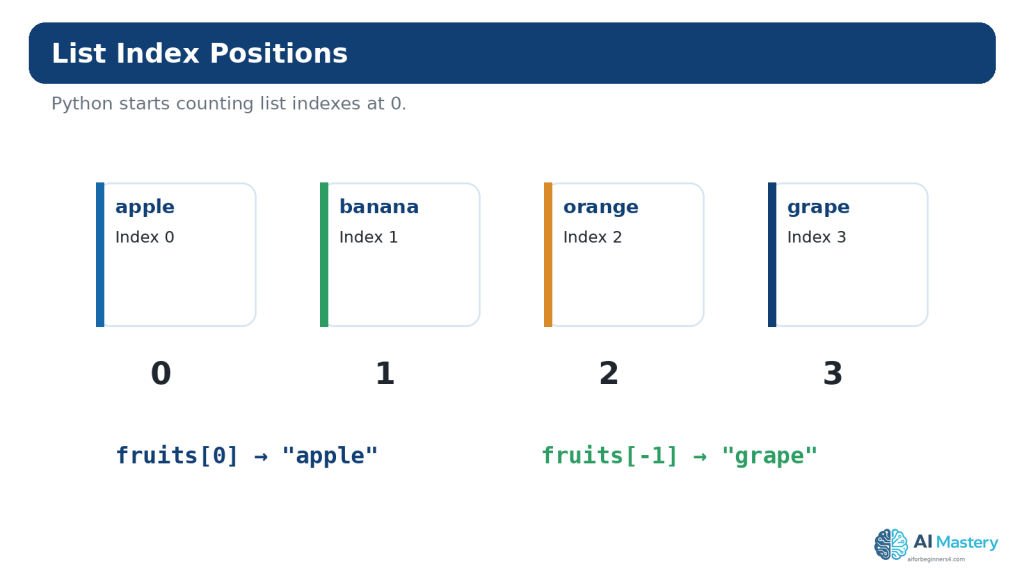
Figure 2. List indexes begin at 0, while negative indexes can count backward from the end of the list.
Explanation: Understanding index positions prevents many beginner errors. `fruits[0]` selects the first item, while `fruits[-1]` selects the last.
Change Items in a List
Because lists are mutable, you can replace an item by assigning a new value to an index.
colors = [“red”, “blue”, “green”]
colors[1] = “yellow”
print(colors)
Output:
[“red”, “yellow”, “green”]
Only the item at index 1 changed. The other items remained in the same positions.
Change More Than One Item with a Slice
A slice can also appear on the left side of an assignment. This is more advanced than replacing one item, so practise ordinary index assignment first.
numbers = [1, 2, 3, 4]
numbers[1:3] = [20, 30]
print(numbers)
Output:
[1, 20, 30, 4]
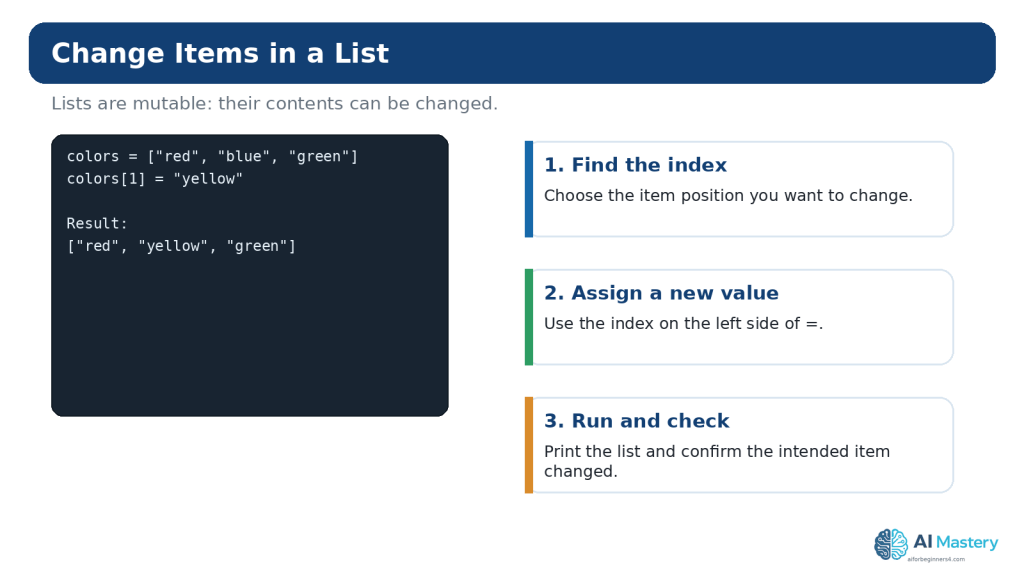
Figure 3. A list item can be replaced by assigning a new value to a specific index.
Explanation: Lists are mutable, so changing one item does not require creating an entirely new list. Check the index carefully before assigning the replacement.
Add Items to a List
Use append() to Add One Item at the End
tasks = [“email client”, “review notes”]
tasks.append(“buy groceries”)
print(tasks)
`append()` adds one object to the end of the list. This is one of the most common list methods for beginners.
Use insert() to Add at a Specific Position
tasks.insert(1, “call supplier”)
The first argument is the index where the new item should be inserted. Existing items at that position and later positions move to the right.
Use extend() to Add Several Items
tasks.extend([“prepare report”, “backup files”])
`extend()` adds the items from another iterable to the end of the list. This differs from `append()`, which adds its argument as one item.
Remove Items from a List
Use remove() When You Know the Value
fruits = [“apple”, “banana”, “orange”]
fruits.remove(“banana”)
`remove()` deletes the first matching value. If the value is not present, Python raises an error.
Use pop() When You Know the Position
fruits = [“apple”, “banana”, “orange”]
removed = fruits.pop(1)
print(removed)
print(fruits)
`pop()` removes and returns an item. Without an index, it removes the final item.
Use del for Index-Based Deletion
del fruits[0]
The `del` statement can remove an item or a slice. Beginners should choose the operation that makes the intention clearest rather than trying to use every possible form.
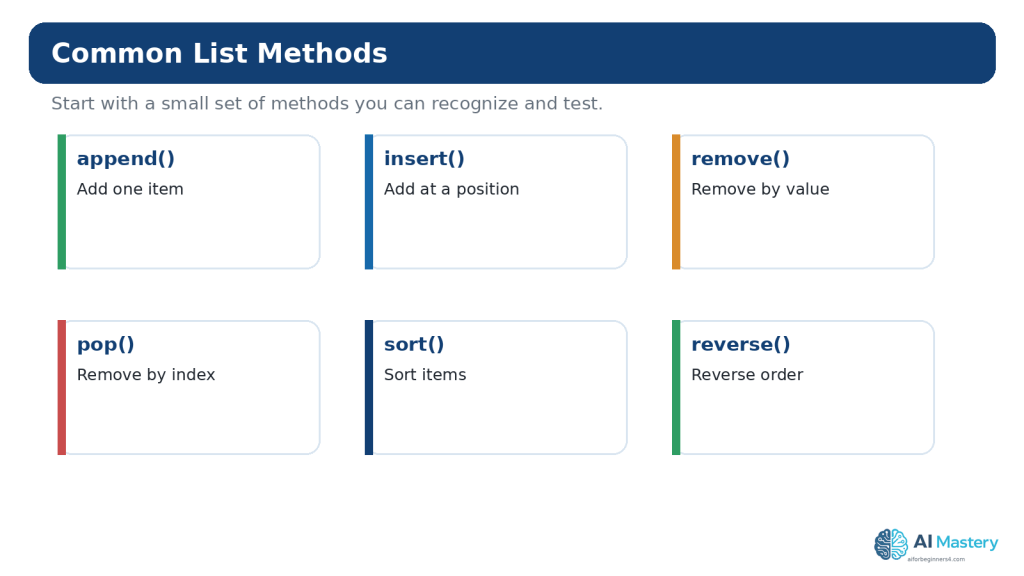
Figure 4. Common list methods let you add, remove, reorder, and sort items without rebuilding the list manually.
Explanation: Beginners do not need to memorize every list method. Learn a few common operations and look up the others when a real task requires them.
Use List Slicing
Slicing selects part of a sequence. The common form is `sequence[start:stop]`. The start position is included; the stop position is excluded.
numbers = [10, 20, 30, 40, 50, 60]
print(numbers[1:4])
Output:
[20, 30, 40]
Index 1 begins at 20. The slice continues through index 3 and stops before index 4.
Leave Out the Start or Stop
print(numbers[:3]) # first three items
print(numbers[3:]) # from index 3 to the end
Use a Step
print(numbers[::2])
The third slice value is the step. A step of 2 selects every second item. Keep this as an optional extension until ordinary slicing feels comfortable.
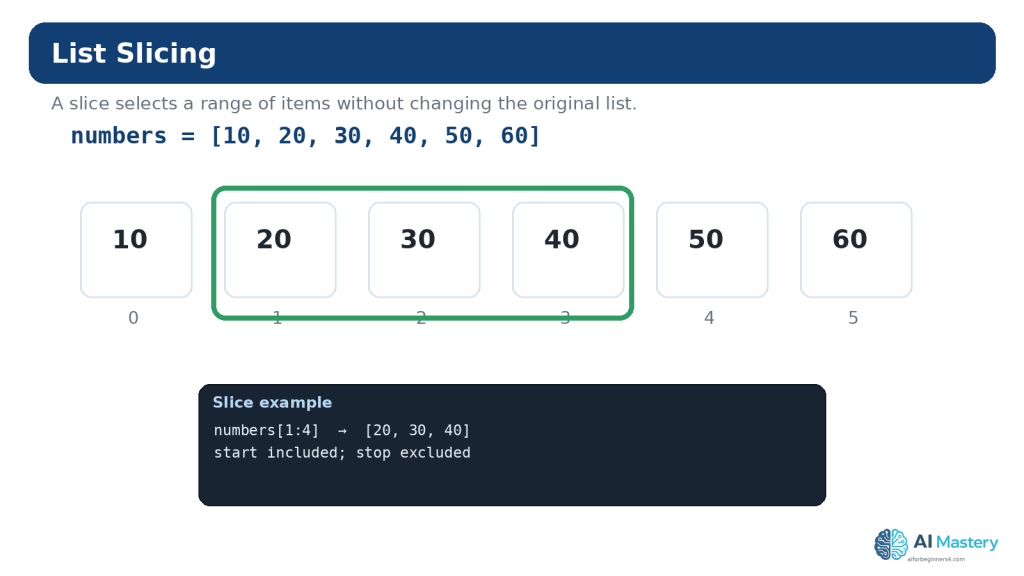
Figure 5. A list slice uses start and stop positions to select a range, with the stop position excluded.
Explanation: Slicing is useful for working with part of a list. Test small examples until the start-inclusive, stop-exclusive rule feels familiar.
Loop Through a List
A `for` loop can process each list item in order.
fruits = [“apple”, “banana”, “orange”]
for fruit in fruits:
print(fruit)
The variable `fruit` receives one item at a time. The indented statement runs once for each item.
Use enumerate() When You Need an Item Number
for index, fruit in enumerate(fruits):
print(index, fruit)
`enumerate()` is useful when both the item and its position matter. For user-facing numbered menus, you can begin the displayed count at 1 with `enumerate(fruits, start=1)` while remembering that the underlying list still uses zero-based indexes.
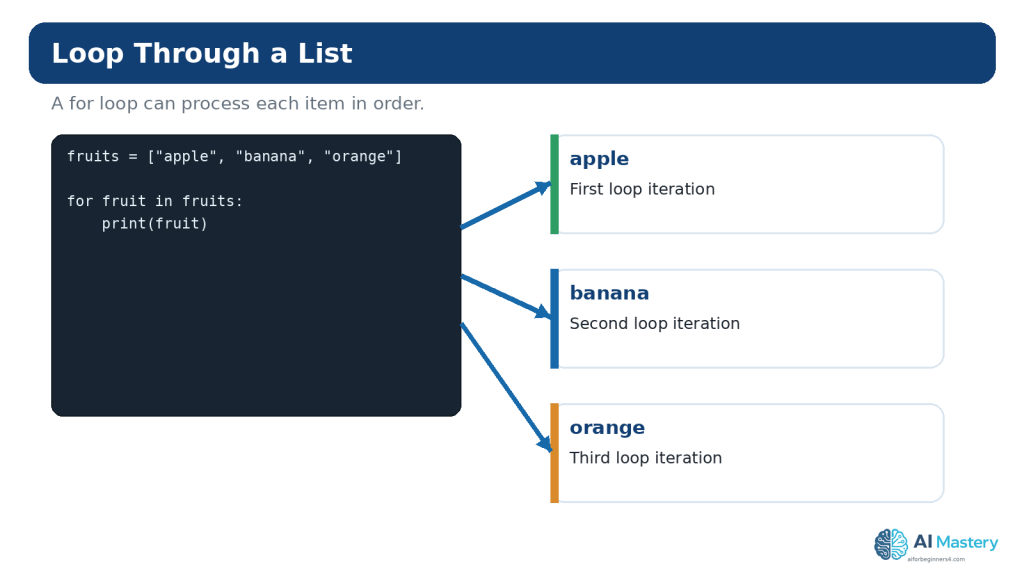
Figure 6. A `for` loop can work through the items in a list one at a time.
Explanation: Loops are especially useful when the same action should be applied to every item. Keep the loop body small while learning so you can see what repeats.
Check Membership and Length
Use `in` to check whether a value appears in a sequence.
fruits = [“apple”, “banana”, “orange”]
if “banana” in fruits:
print(“Banana is on the list.”)
Use `len()` to count the number of items:
print(len(fruits))
Output:
3
These operations work with both lists and tuples because they are common sequence operations.
Sort and Reverse a List
The `sort()` method changes the list itself. For simple text or numbers, it can place items into ascending order.
names = [“Sam”, “Alex”, “Mina”]
names.sort()
print(names)
Output:
[“Alex”, “Mina”, “Sam”]
For numbers:
scores = [88, 72, 95, 81]
scores.sort(reverse=True)
print(scores)
The `reverse()` method simply reverses the current order rather than sorting by value.
sort() vs sorted()
`list.sort()` modifies a list and returns `None`. The built-in `sorted()` function creates a new sorted list from an iterable. This difference matters when you want to preserve the original order.
scores = [88, 72, 95]
new_scores = sorted(scores)
print(scores)
print(new_scores)
Work with Nested Lists
A list can contain other lists. A simple table-like structure can therefore be represented as a list of rows.
students = [
[“Alex”, 85],
[“Sam”, 92],
[“Mina”, 88]
]
To access Sam’s name:
print(students[1][0])
The first index selects the second inner list. The second index selects the first item inside that inner list.
Reality: Nested Lists Are Useful but Can Become Hard to Read
For a very small exercise, nested lists are appropriate. As data becomes more complex, dictionaries, classes, tables, or other structures may communicate meaning more clearly. Do not keep adding index levels just because Python allows it.
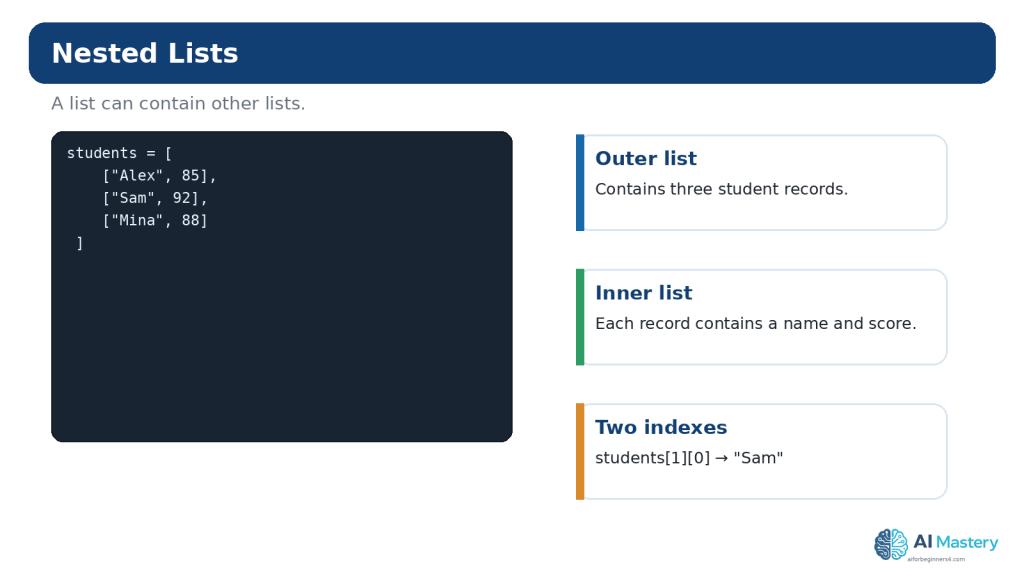
Figure 7. Nested lists let one list contain other lists, which can represent rows, records, or grouped information.
Explanation: Nested structures are useful but can become difficult to read when overused. Start with a simple two-level example and confirm each index separately.
Copy Lists Safely
One of the most important mutable-object lessons is that assignment does not necessarily create an independent list.
original = [1, 2, 3]
other = original
other[0] = 99
print(original)
Output:
[99, 2, 3]
Both names refer to the same list object, so changing the list through `other` is visible through `original`.
Create a Shallow Copy
original = [1, 2, 3]
other = original.copy()
other[0] = 99
print(original)
print(other)
Now the top-level lists are separate. The official `copy` module documentation distinguishes shallow copies from deep copies. Deep copying becomes relevant when mutable objects are nested inside other mutable objects, but beginners should first understand the simpler shared-reference problem.
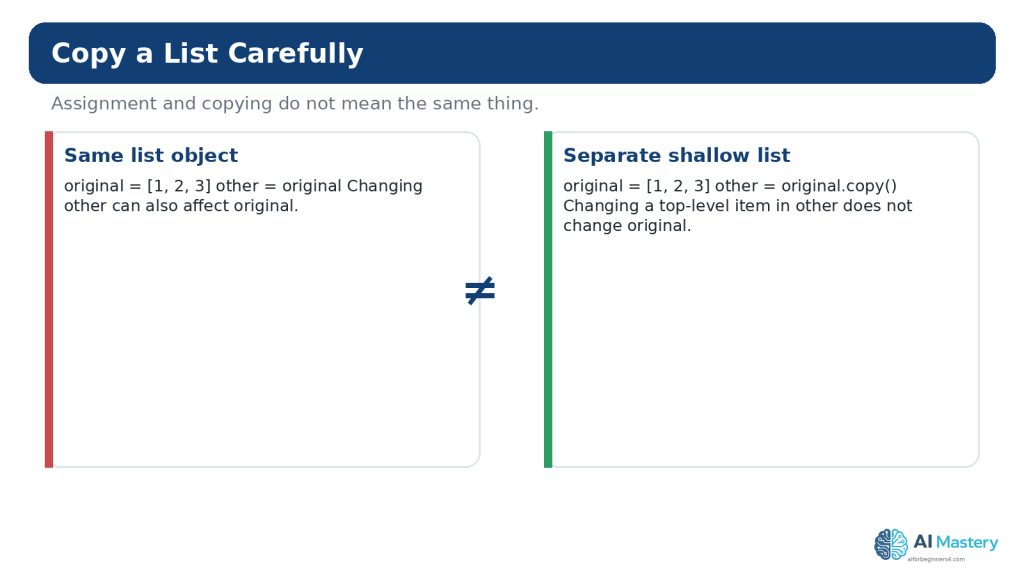
Figure 8. Assigning one list variable to another shares the same list, while `copy()` creates a separate shallow list.
Explanation: This distinction explains a common beginner surprise: two variable names can refer to the same mutable list. Use a real copy when you need independent top-level changes.
What Is a Python Tuple?
A tuple is an ordered sequence commonly written as comma-separated values inside parentheses. Unlike a list, a tuple is immutable.
point = (10, 20)
colors = (“red”, “green”, “blue”)
You can index and slice a tuple much like a list:
print(colors[0])
print(colors[1:])
However, this does not work:
colors[0] = “yellow”
Python raises a `TypeError` because tuple items cannot be replaced in place.
Create a One-Item Tuple Correctly
A one-item tuple needs a comma:
single = (5,)
Without the comma, `(5)` is simply the integer 5 inside grouping parentheses.
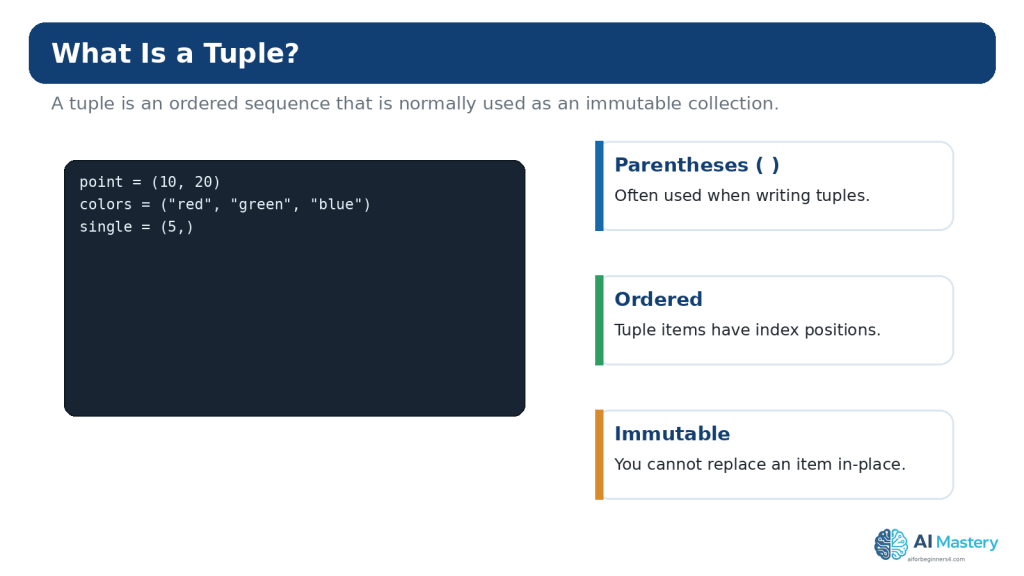
Figure 9. Tuples are ordered sequences that are commonly written with parentheses and cannot be changed item by item after creation.
Explanation: The comma is especially important for a one-item tuple: `(5,)` is a tuple, while `(5)` is simply the number 5 inside parentheses.
Tuple Packing and Unpacking
Python can pack several values into a tuple and unpack them into separate variables.
person = (“Alex”, 25, “London”)
name, age, city = person
print(name)
print(age)
print(city)
This is convenient when several values belong together and the structure is small and predictable.
The Number of Variables Matters
Trying to unpack three values into two ordinary variables raises a `ValueError`. Python also supports starred unpacking for more flexible patterns, but that can wait until the basic form is comfortable.
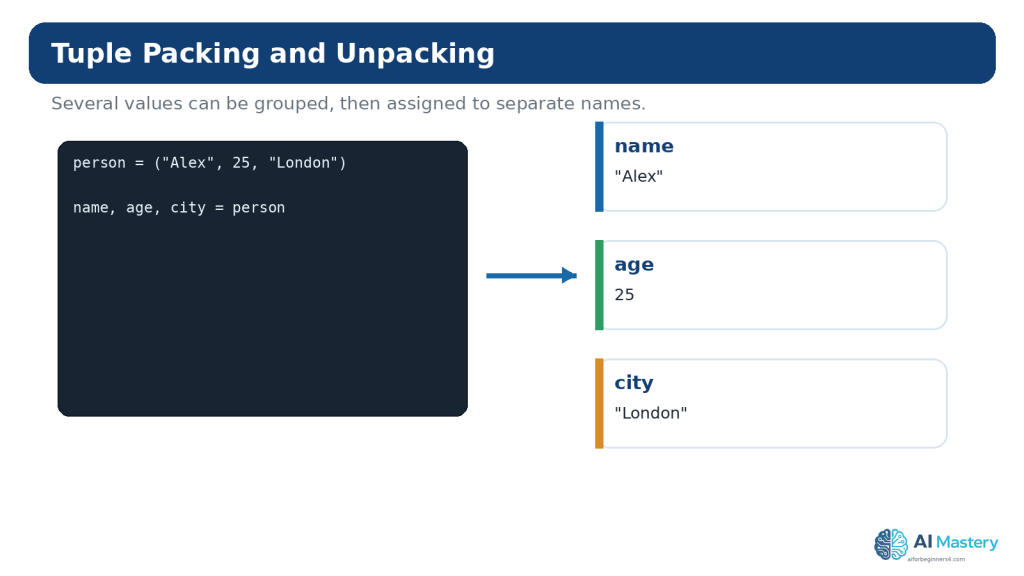
Figure 10. Tuple unpacking assigns the items of a tuple to separate variables in one statement.
Explanation: The number of variables normally needs to match the number of values being unpacked. This makes small fixed groups of related values convenient to work with.
Lists vs Tuples: Which Should a Beginner Use?
Lists and tuples share indexing, slicing, membership checks, `len()`, iteration, and many other sequence operations. The clearest beginner distinction is mutability.
- Use a list when items may be added, removed, reordered, or replaced.
- Consider a tuple when a small group of values should remain together without item-by-item changes.
- Use whichever type communicates the meaning of the program more clearly.
Examples that naturally fit a list include a to-do list, shopping list, queue of filenames, or scores that may change. Examples that may fit a tuple include coordinates, RGB color components, or a fixed group of settings returned together.
Immutability does not mean that every object contained inside a tuple becomes immutable. A tuple can contain a mutable object such as a list, and that inner list may still change. Beginners should avoid complicated mixed structures until the basic rule is clear.
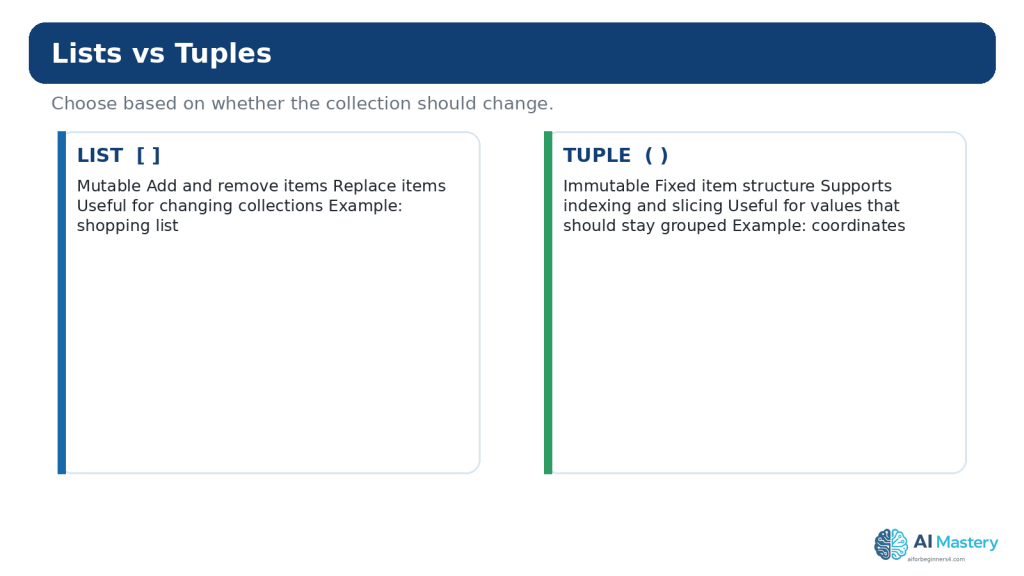
Figure 11. Lists and tuples are both ordered sequences, but lists can be changed while tuples are immutable.
Explanation: Neither type is universally better. Choose a list when the collection needs to change, and consider a tuple when the grouped values should remain fixed.
Convert Between Lists and Tuples
The built-in `tuple()` constructor can create a tuple from a list:
colors = [“red”, “green”, “blue”]
fixed_colors = tuple(colors)
print(fixed_colors)
The built-in `list()` constructor can create a list from a tuple:
point = (10, 20)
editable_point = list(point)
print(editable_point)
Conversion does not automatically make a design better. Use it when the program genuinely needs a different sequence behavior.
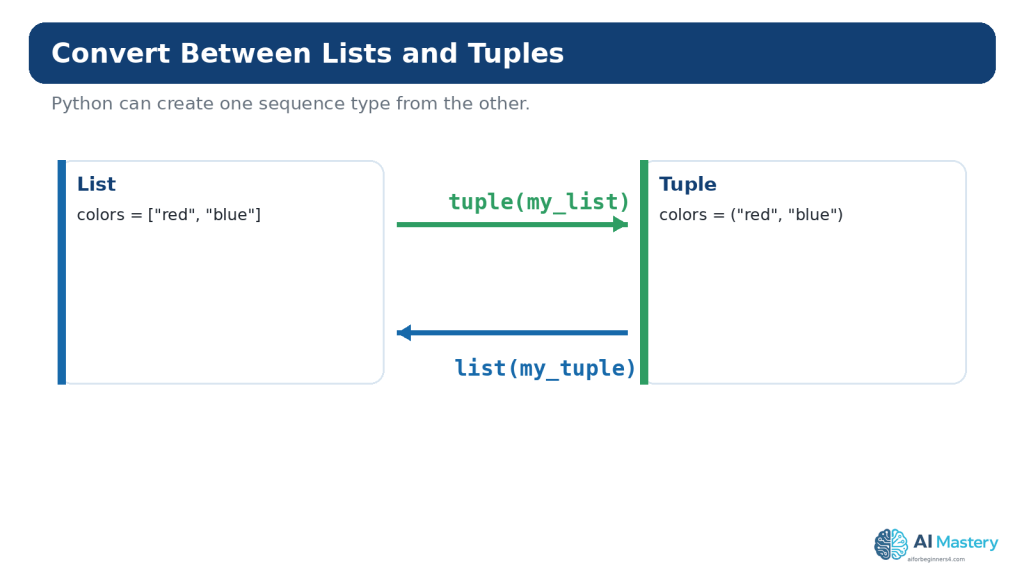
Figure 12. The `tuple()` and `list()` constructors can convert between list and tuple representations.
Explanation: Conversion is useful when a task changes from an editable collection to a fixed sequence, or when an API returns a sequence type that you want to work with differently.
A Brief Introduction to List Comprehensions
Python list comprehensions provide a concise way to create lists from other iterables. The official Python tutorial presents them as a common way to build new lists from expressions or conditions.
squares = [number * number for number in range(1, 6)]
print(squares)
Output:
[1, 4, 9, 16, 25]
For a complete beginner, the equivalent ordinary loop may be easier to understand at first:
squares = []
for number in range(1, 6):
squares.append(number * number)
Learn the longer form first if it makes the logic clearer. Shorter code is not automatically better code.
Use ChatGPT to Learn Lists and Tuples
ChatGPT can be useful for focused explanations, small examples, practice exercises, and troubleshooting. OpenAI currently provides Codex as its dedicated software-development experience, while ChatGPT can also provide conversational coding help. Product features can change, so check current official guidance when a workflow depends on a particular feature.
Ask for an Explanation at Your Level
I am a complete Python beginner. Explain this list code line by line. Tell me what each index means and what the list contains after each line. Do not add advanced features.
Ask for a Hint Before the Full Answer
I am practising Python lists. My program should remove the second item, but I want to solve it myself. Give me one hint only. Do not show the final code yet.
Ask AI to Compare a List and Tuple
Compare a Python list and tuple for storing three fixed coordinates. Explain which is clearer for this example and why. Keep the explanation beginner-friendly.
Ask for Focused Troubleshooting
My Python list code gives IndexError: list index out of range. I will paste a small example. Explain why the index is invalid and show the smallest correction.
After receiving a suggestion, run the code yourself. Confirm that the output matches the explanation and that the change does not create a new problem.
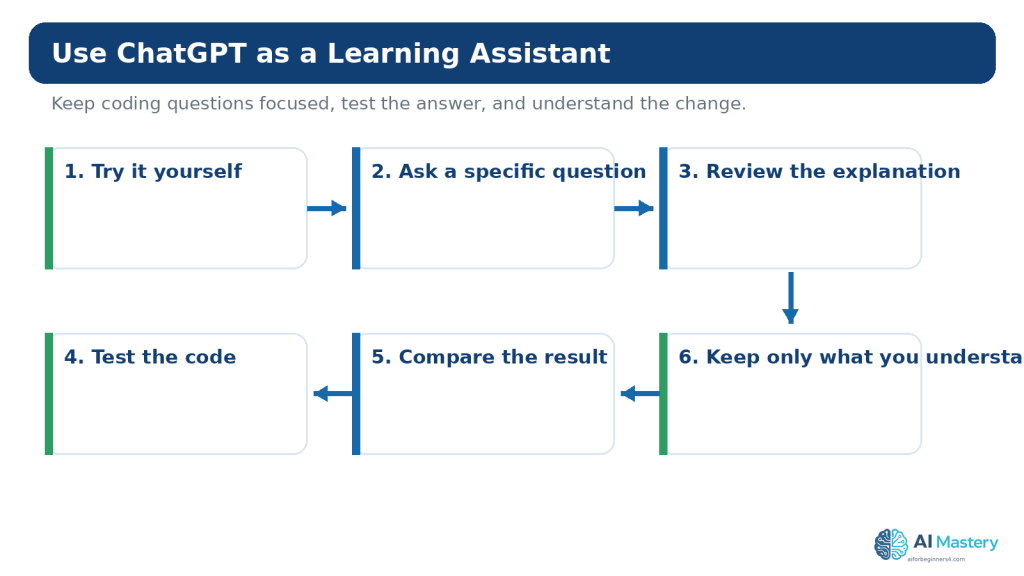
Figure 13. A useful AI-assisted learning workflow combines focused questions with your own review and testing.
Explanation: AI can explain list and tuple code, suggest examples, and help diagnose errors, but you should still run the code yourself and verify that it behaves as expected.
Protect Privacy and Secrets When Asking for Coding Help
A list or tuple may contain real information. Before sharing code with an online AI service, replace sensitive values with safe placeholders.
- passwords and authentication tokens
- API keys
- customer names and account details
- private email addresses and phone numbers
- confidential business information
- private file paths or internal URLs when they are not necessary to the question
customers = [“Example Customer A”, “Example Customer B”]
api_key = “YOUR_API_KEY_HERE”
For personal ChatGPT accounts, OpenAI provides Data Controls that can disable use of new conversations for model improvement. Temporary Chats are not used to train models, do not appear in normal history, do not create memories, and are deleted from OpenAI systems after 30 days, though they may be reviewed for abuse. These controls are useful, but they do not make it appropriate to paste secrets into a conversation.
Features, privacy controls, and retention practices can change. Check current official information when you first use a relevant feature, change plans or settings, receive an important policy notice, or periodically review your workflow.
Copyright, Licensing, and Reused Code
Small language examples such as basic list creation are common learning material, but larger code samples, libraries, templates, datasets, and other assets can have copyright or licence conditions. Finding code online does not automatically grant unrestricted reuse.
- Check the original source of third-party code.
- Read the licence that applies to the specific project or library.
- Preserve notices or attribution when the licence requires it.
- Do not assume code suggested by AI is automatically copyright-free or commercially permitted.
- Keep a record of licences and permissions for important third-party components.
For an important commercial project, legal question, or unusual licence situation, obtain appropriate professional advice rather than relying only on an AI response.
Mini Project: Build a Simple Packing List
This small project uses a tuple for fixed trip details and a list for packing items that can change. It is deliberately simple so that you can concentrate on the sequence concepts.
Step 1: Create the Fixed Trip Details
trip = (“Toronto”, 3)
Step 2: Create the Editable Packing List
packing = [“shirt”, “charger”, “toothbrush”]
Step 3: Add an Item
packing.append(“book”)
Step 4: Remove an Item
if “book” in packing:
packing.remove(“book”)
Step 5: Sort the Packing List
packing.sort()
Step 6: Display Everything
destination, days = trip
print(“Destination:”, destination)
print(“Days:”, days)
print(“Packing list:”)
for item in packing:
print(“-“, item)
Step 7: Test Small Changes
1. Run the program as written.
2. Add another packing item.
3. Remove an existing item.
4. Try removing a value that is not present while using the membership check.
5. Change the trip tuple and confirm unpacking still works.
6. Add one intentional index mistake, observe the error, then restore the correct code.
This project is small, but it demonstrates a useful design idea: use the structure that matches the behavior of the information. The trip details are treated as a fixed pair, while the packing list is designed to change.
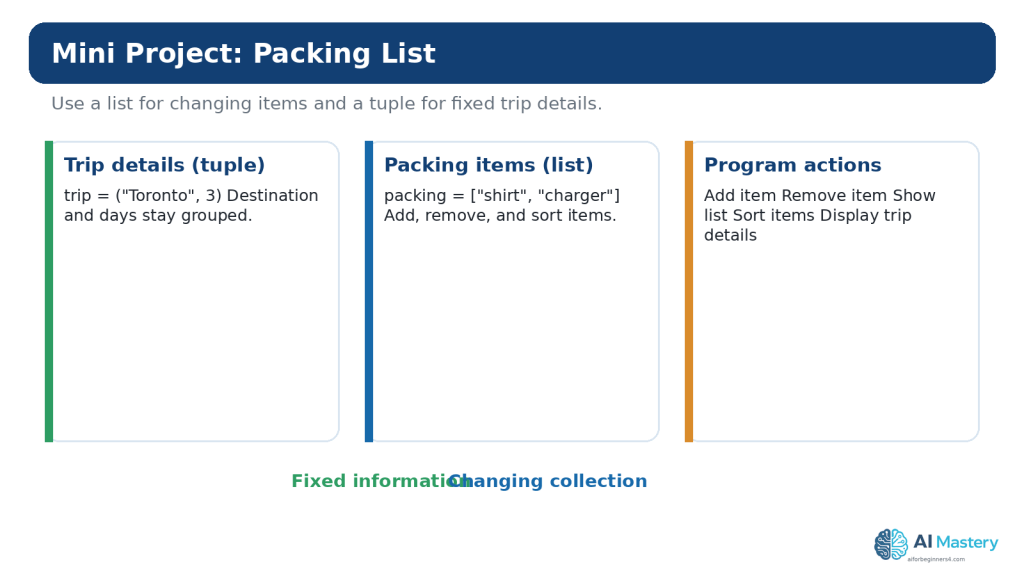
Figure 14. A small packing-list project demonstrates when a tuple and a list can be useful in the same program.
Explanation: The tuple groups fixed trip details, while the list stores items the user may add, remove, or sort. Combining simple concepts in one project helps reinforce the difference between the two sequence types.
Common Beginner Mistakes
Mistake 1: Forgetting That Indexes Start at 0
If a list has three items, the valid positive indexes are 0, 1, and 2. Trying to access index 3 produces an `IndexError`.
Mistake 2: Confusing append() and extend()
`append()` adds its argument as one item. `extend()` adds items from an iterable. Print the result after each method until the difference is clear.
Mistake 3: Expecting remove() to Use an Index
`remove(value)` searches for a matching value. `pop(index)` removes by position and returns the removed item.
Mistake 4: Expecting sort() to Return the Sorted List
`list.sort()` changes the list in place and returns `None`. If you want a new sorted list while keeping the original, use `sorted()`.
Mistake 5: Modifying a List While Iterating Over It
Removing items from the same list you are currently looping through can produce confusing results because item positions shift. For beginner exercises, build a separate result list or iterate over a copy when appropriate.
Mistake 6: Assuming Assignment Copies a List
`other = original` creates another reference to the same list. Use `copy()` or another appropriate copying approach when you need a separate list.
Mistake 7: Trying to Change a Tuple Item
A tuple is immutable. If the values genuinely need to change, a list may be the clearer structure, or you can create a new tuple.
Mistake 8: Forgetting the Comma in a One-Item Tuple
Use `(5,)`, not `(5)`, when you need a tuple containing one item.
Mistake 9: Copying AI-Generated Code Without Running It
A response can look convincing and still contain an invalid index, wrong method, or misunderstanding of your intended structure. Run and test the code.
Mistake 10: Putting Sensitive Data in Practice Collections
Use fictional names, placeholder keys, and non-sensitive sample values when sharing code for troubleshooting.
Benefits and Limitations of Using ChatGPT for This Topic
Benefits
- Explain indexing in simpler language.
- Generate small practice exercises.
- Compare two approaches.
- Help identify an off-by-one index error.
- Explain an exception message.
- Turn a large example into smaller steps.
- Quiz you on list and tuple concepts.
Limitations
- Suggested code may be wrong.
- The response may misunderstand which collection behavior you need.
- A short answer may hide an important side effect, such as mutating a list.
- AI review does not replace running the code.
- AI cannot guarantee that third-party code is appropriately licensed for your project.
How to Reduce This Limitation: Keep prompts focused, show the smallest relevant code, describe the expected result and actual result, and test the proposed change yourself.
Useful ChatGPT Prompts for Practice
1. I am learning Python lists. Give me five very small exercises, one at a time, starting with indexing and ending with a simple loop. Wait for my answer before showing the solution.
2. Explain the difference between append(), extend(), insert(), remove(), and pop() using one short list. Show the list after each operation.
3. I keep confusing zero-based indexes. Give me a four-item list and quiz me on positive and negative indexes.
4. Review this list code for an IndexError. Explain the exact invalid index and show only the smallest correction.
5. Explain why `other = original` does not create an independent list. Use a visual analogy and a three-line code example.
6. Compare a list and tuple for storing latitude and longitude. Explain the tradeoff without claiming one type is always better.
7. Give me a beginner tuple-unpacking exercise. Do not show the answer until I try it.
8. Rewrite this list comprehension as an ordinary for loop and explain each step.
9. Review this small packing-list program for beginner mistakes. Do not redesign it. Check indexes, list methods, tuple unpacking, and error handling.
10. Ask me ten beginner questions about Python lists and tuples, one question at a time, and explain each answer after I respond.
Common Myths About Lists, Tuples, and AI Coding
Myth: Lists and Tuples Are Basically the Same
Reality: They share many sequence operations, but their mutability differs. That difference affects how you design and modify data.
Myth: A Tuple Is Always Faster, So You Should Always Use It
Reality: Performance is rarely the most important beginner decision. Choose the structure that communicates whether the collection should change.
Myth: You Need to Memorize Every List Method
Reality: Learn the common operations and use official documentation when you need something less familiar.
Myth: If Code Runs, the Data Structure Must Be Correct
Reality: Code can run while using a confusing or inappropriate design. Readability and intended behavior still matter.
Myth: ChatGPT Knows Which Collection You Need Without Context
Reality: A useful recommendation depends on whether values change, how they are used, and what the program is trying to represent.
Myth: AI-Generated Code Does Not Need Testing
Reality: Important code and information should still be checked. OpenAI also warns that model output can contain mistakes.
Frequently Asked Questions
How many items can a Python list contain?
Python does not impose a tiny beginner-level item limit. Practical limits depend on available memory and what the program is doing. For learning, keep lists small enough that you can inspect the contents easily.
Can a list contain another list?
Yes. That creates a nested list. Use nested structures when they make the data clearer, not simply to make the code look advanced.
Can a tuple contain a list?
Yes. The tuple itself cannot have its item references replaced, but a mutable object stored inside it can still change. This is one reason the word “immutable” needs to be understood carefully.
Can I sort a tuple?
A tuple has no in-place `sort()` method because it is immutable. The built-in `sorted()` function can read the tuple and return a new list containing the items in sorted order.
Why does Python start indexes at 0?
Zero-based indexing is part of Python’s sequence model and is common in programming languages. As a beginner, the most useful response is to practise until the pattern becomes automatic rather than fighting the convention.
Should I use a list or tuple for coordinates?
A tuple can communicate that a small coordinate group is intended to stay together without item-by-item changes, but a list may be appropriate if your program needs to modify those values in place. Context matters.
Do I need list comprehensions now?
No. They are useful and common, but ordinary loops are often easier to understand initially. Learn the logic first; concise syntax can come later.
Can ChatGPT fix list errors for me?
It can often suggest likely causes and corrections, especially when you provide a small example and exact error message. You should still run the correction yourself and compare it with reliable documentation when the detail matters.
How should I show Python code in WordPress?
Use a WordPress Code block rather than a normal paragraph or Custom HTML block when the goal is to display source code. WordPress.com currently supports language selection and syntax-highlighting options in its enhanced Code block.
Can I upload my .py practice file to WordPress?
The AI Mastery tutorial does not require readers to download a `.py` file. The article can show the code directly in Code blocks. If you later decide to distribute example files, review WordPress file-type support and security implications first.
Key Takeaways
- Lists and tuples are ordered sequence types.
- Lists are mutable; tuples are immutable.
- Python list and tuple indexes begin at 0.
- Negative indexes count from the end.
- Slicing selects a range and excludes the stop position.
- Use append(), insert(), extend(), remove(), and pop() according to the operation you actually need.
- Use loops to process sequence items one at a time.
- Assignment does not make an independent copy of a list.
- Use tuple packing and unpacking for small, fixed groups of related values.
- Choose the sequence type based on meaning and behavior, not on a simplistic “one is better” rule.
- Use ChatGPT for explanation and focused troubleshooting, but review and test suggested code.
- Do not share secrets or unnecessary personal information in coding examples.
- Check licences before reusing substantial third-party code or assets.
Final Tip
Do not try to learn lists and tuples by memorizing a table of methods. Build tiny programs that use the operations repeatedly. Create a list, print it, change one item, append something, remove something, loop through it, and then rebuild a similar example without looking at the earlier code.
When something goes wrong, print the list or tuple and check the exact index or value involved. Most beginner collection errors become much easier to understand when you can see the data before and after the operation.
Continue Learning
Article 090 builds directly on
Article 087 — Python for Complete Beginners with ChatGPT (2026),
Article 088 — How to Find and Fix Coding Errors with AI (2026),
Article 089 — How to Build a Simple Beginner Project with AI Coding Tools (2026).
The next useful AI Coding topic can build on collections by introducing dictionaries, which store values using keys instead of relying only on numeric positions.
Sources and References
The following official sources were reviewed for the Python, OpenAI, and WordPress information in this article. Information was checked on August 16, 2026. Software features, policies, and documentation can change, so readers should check current official guidance when it matters to their project.
1. Python Software Foundation — Python 3.14.7: An Informal Introduction to Python. Open official source — Official tutorial introduction to Python lists, indexing, slicing, concatenation, and basic sequence behavior.
2. Python Software Foundation — Data Structures. Open official source — Official tutorial for list methods, list comprehensions, tuples, sets, dictionaries, looping techniques, and sequence comparisons.
3. Python Software Foundation — Built-in Types. Open official source — Authoritative reference for sequence types, common sequence operations, lists, tuples, indexing, membership, and slicing.
4. Python Software Foundation — Errors and Exceptions. Open official source — Official tutorial for common Python syntax and runtime errors used in the troubleshooting guidance.
5. Python Software Foundation — copy — Shallow and Deep Copy Operations. Open official source — Official reference explaining shallow and deep copying for mutable objects.
6. OpenAI — ChatGPT Work and Codex. Open official source — Current OpenAI guidance distinguishing conversational ChatGPT help, Work, and Codex for software-development tasks.
7. OpenAI — Data Controls FAQ. Open official source — Current information about training controls and Temporary Chat, including 30-day deletion of Temporary Chats.
8. OpenAI — How Your Data Is Used to Improve Model Performance. Open official source — Current explanation of model-improvement settings for personal ChatGPT and Codex use.
9. WordPress.com — Display Code Snippets. Open official source — Current instructions for using the WordPress Code block to display source-code examples in posts.
10. WordPress.com — Enhanced Code Block. Open official source — Current WordPress.com guidance for language selection, syntax highlighting, filenames, copy buttons, and line numbers in Code blocks.
11. Open Source Initiative — OSI Approved Licenses. Open official source — Official OSI reference explaining that approved open-source licences permit software use, modification, and sharing according to licence terms.
12. WIPO — Copyright Protection of Computer Software. Open official source — Official WIPO reference explaining that copyright protection applies to computer software in most countries and is addressed by international treaties.
13. OWASP — Secrets Management Cheat Sheet. Open official source — Authoritative security guidance on protecting and managing secrets such as passwords, tokens, and keys.
Important Note: This article provides general educational information about programming, privacy, and licensing. It is not legal, cybersecurity, or other professional advice. For sensitive, commercial, or high-risk projects, use appropriate professional review.

