

Estimated Reading Time: 24 minutes
Last Updated: August 4, 2026
Introduction
Claude can help beginners create new writing and improve text that already exists. You can use it to turn an idea into a first draft, organize rough notes, simplify difficult explanations, adjust tone, shorten or expand content, and proofread an approved version.
Writing and rewriting are related but different tasks. Writing begins with a goal, audience, outline, and source material. Rewriting begins with existing text and a clear decision about what should change and what must remain unchanged.
The safest approach is to treat every Claude response as a draft. Clear instructions reduce errors, but they do not replace human judgment. Important facts, dates, names, quotations, conditions, warnings, links, and responsibilities should be checked before the result is sent, submitted, shared, or published.
This guide explains a controlled beginner workflow for writing and rewriting with Claude. It includes reusable prompts, practical examples, common mistakes, privacy checks, and a final review process.
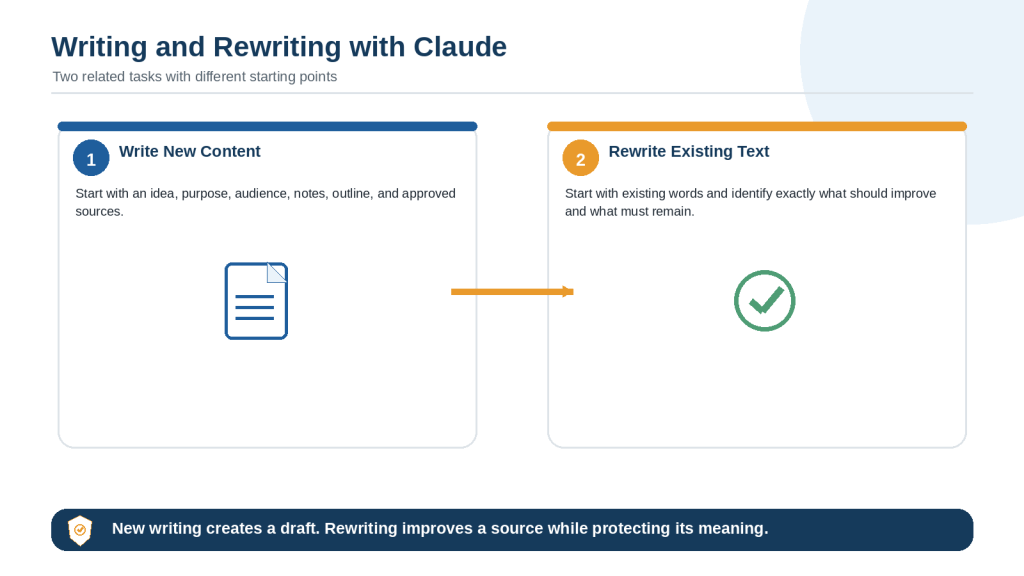
Figure 1. The main difference between writing new content and rewriting existing text with Claude.
Explanation: Writing creates a new draft from instructions and source material. Rewriting improves existing text while protecting its purpose, meaning, facts, conditions, and approved wording.
Prepare the Writing Task Before You Begin
A good result starts before the first prompt. Gather the information Claude needs and remove anything that is irrelevant, private, or unconfirmed.
Define the Purpose
Explain what the finished text should accomplish. A purpose may be to teach a beginner, request information, summarize a decision, introduce a service, document a process, or prepare a neutral report.
Purpose: Create a beginner-friendly explanation that helps readers understand the topic and follow the recommended steps safely.
Identify the Audience
State who will read the content and what they already know. The same subject should be explained differently to a complete beginner, a customer, a manager, a student, or a technical specialist.
Separate Facts, Ideas, and Missing Information
• Confirmed facts may appear as factual statements.
• Ideas to consider are optional and should not be presented as approved decisions.
• Missing information should be labelled rather than guessed.
Use only the confirmed information below. Treat items under Ideas as suggestions, not facts. Write [Information Needed] where an essential detail is missing.
Set Source and Privacy Rules
Tell Claude whether it may use only the supplied material or whether current research is permitted. Remove unnecessary personal information, passwords, confidential records, customer details, and private business data before sharing the source.
How to Write New Content with Claude: Step-by-Step
Step 1: Define the exact task.
Name the content type, such as an article section, email, report, checklist, proposal, or social post.
Step 2: State the purpose and audience.
Explain what the text must accomplish and who will read it.
Step 3: Provide the main points.
List the facts, arguments, examples, actions, and warnings that must appear.
Step 4: Identify the permitted source.
Tell Claude whether to use your notes only or approved current sources.
Step 5: Choose the structure.
Specify headings, paragraph length, lists, tables, word range, and required sections.
Step 6: Approve an outline.
For long content, review the order and identify missing information before drafting.
Step 7: Draft in stages.
Write one section at a time so each part can be reviewed before the next begins.
Step 8: Complete a final review.
Check facts, sources, privacy, tone, formatting, and completeness.
Complete Writing Prompt Example
Task: Write a 700-word beginner-friendly guide section.
Purpose: Explain the process clearly and help the reader avoid common mistakes.
Audience: Adults with no previous experience.
Source: Use only the approved notes below.
Structure: Short introduction, four H3 subsections, one numbered workflow, and a final checklist.
Tone: Clear, calm, practical, and professional.
Limits: Do not invent facts, statistics, prices, quotations, or guarantees. Mark missing details as [Information Needed].
Review: List statements that require human verification after the draft.
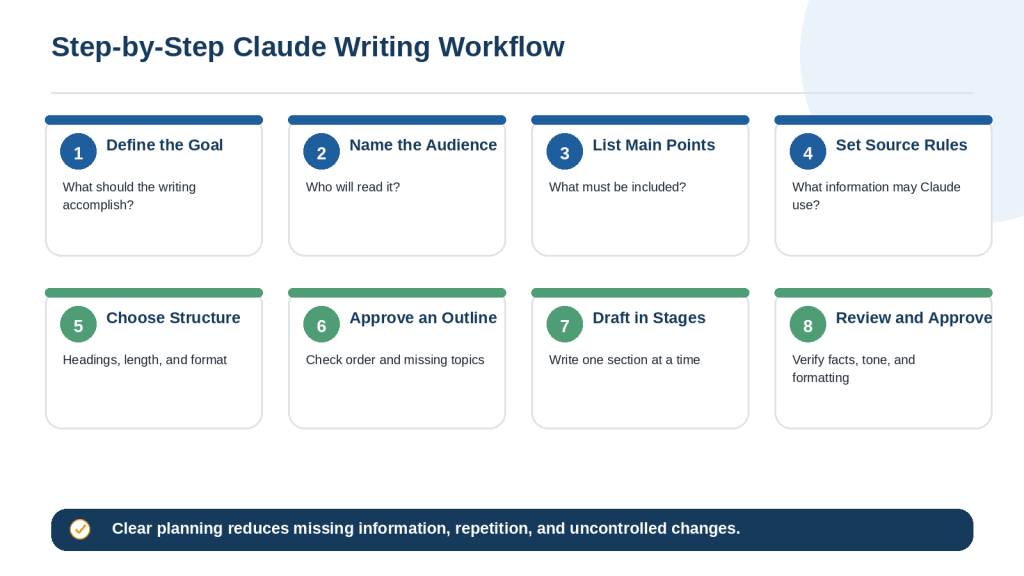
Figure 2. A step-by-step workflow for creating new written content with Claude.
Explanation: Planning the goal, audience, source, structure, and review process before drafting makes long writing easier to control and verify.
How to Rewrite Existing Text with Claude: Step-by-Step
Step 1: Save the original.
Keep an unchanged copy so removed or altered information can be restored.
Step 2: Identify the exact problem.
Name the issue: grammar, clarity, tone, length, structure, repetition, or formatting.
Step 3: List protected information.
Protect names, dates, amounts, deadlines, warnings, conditions, quotations, and required actions.
Step 4: Choose the rewrite level.
Decide whether you need proofreading, light editing, structural editing, simplification, or a full rewrite.
Step 5: Define the audience and tone.
Explain how the revised text should sound and who will read it.
Step 6: Limit the permitted source.
Prevent Claude from silently adding outside information unless research is approved.
Step 7: Compare the two versions.
Review added, removed, and changed information paragraph by paragraph.
Step 8: Approve and save separately.
Restore incorrect changes and save the approved version under a new filename.
Complete Rewriting Prompt Example
Rewrite the text below for clarity and simplicity. Preserve every confirmed fact, name, date, amount, warning, condition, quotation, heading, and required action. Use shorter sentences and one main idea per paragraph. Keep the same level of certainty. Use only the supplied text. Do not add outside information or promises. After the revision, list any meaningful changes that require review.
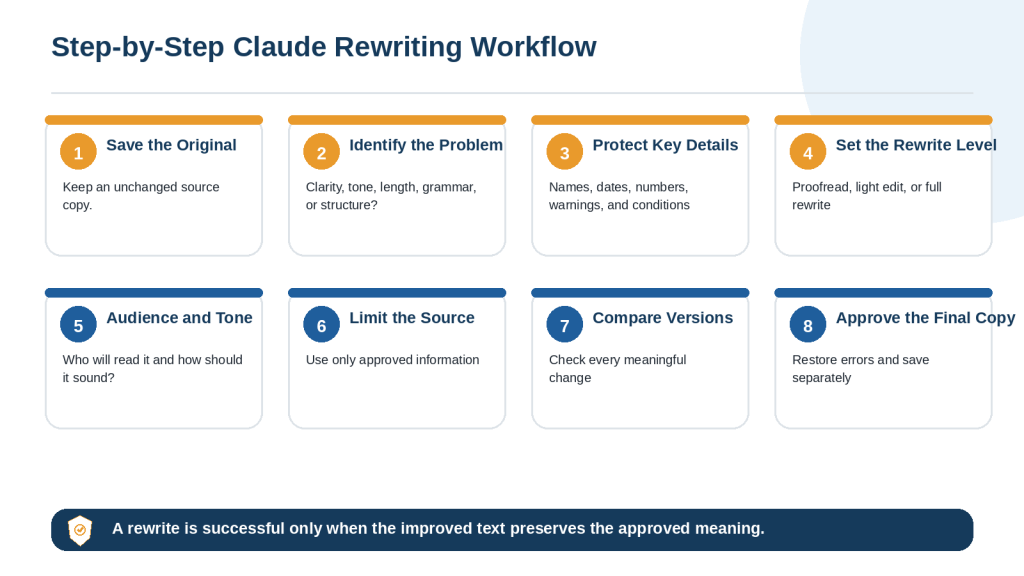
Figure 3. A step-by-step workflow for rewriting existing text with Claude while preserving important information.
Explanation: A controlled rewriting process protects the source, limits the requested change, and requires a side-by-side comparison before approval.
How to Turn Notes and Outlines into a First Draft with Claude
Rough notes often mix confirmed facts, possible ideas, unanswered questions, and repeated fragments. Organize them before asking Claude to create a polished draft.
1. Remove private or irrelevant details.
2. Group notes under temporary headings.
3. Label confirmed facts, ideas, and missing information.
4. Ask Claude to create an outline first.
5. Review the outline for order and gaps.
6. Draft one approved section at a time.
7. Compare the draft with the notes.
Prompt Example
Organize the notes below into three groups: Confirmed Facts, Ideas to Consider, and Information Needed. Then create a proposed outline. Do not write the full draft until the outline has been approved. Do not convert an idea into a confirmed fact or invent missing details.
When the outline is approved, use a second prompt that defines the audience, tone, length, and required formatting. Keep the original notes available during review.
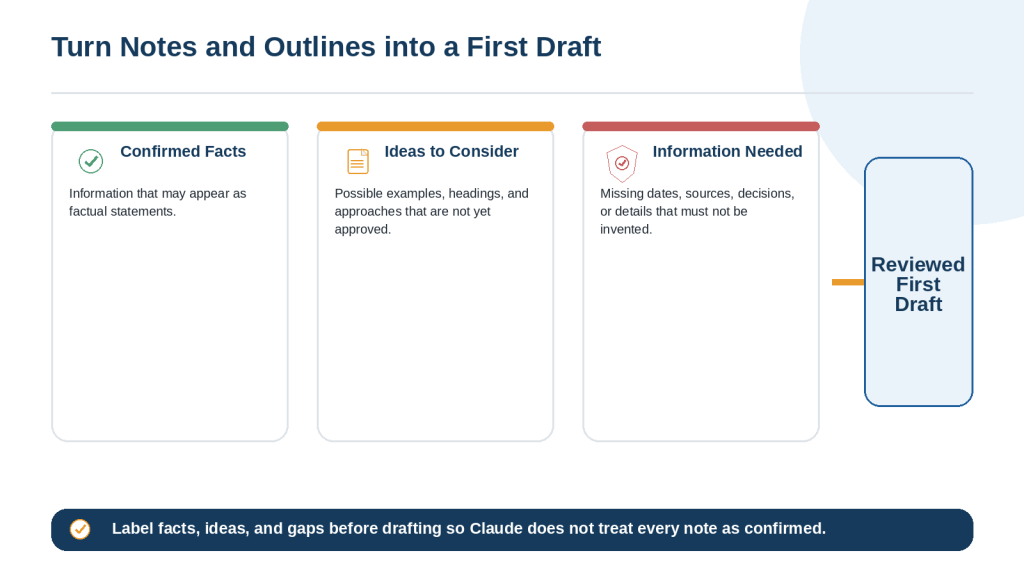
Figure 4. A controlled process for turning rough notes and an outline into a first draft with Claude.
Explanation: Separating facts, ideas, and missing information reduces the risk that Claude will present an unapproved suggestion or invented detail as confirmed information.
How to Rewrite Text for Clarity and Simplicity
Clear writing uses familiar words, manageable sentence length, logical paragraph order, and enough explanation for the intended reader. Simplification should improve understanding without weakening the facts or removing important conditions.
• Shorten sentences that contain several separate ideas.
• Define technical terms when they first appear.
• Use one main idea per paragraph.
• Replace vague references with clear nouns.
• Remove repetition while preserving distinct facts.
• Keep warnings, exceptions, and source qualifications.
Prompt Example
Rewrite this section for a complete beginner. Use short sentences, define technical terms, and keep one main idea per paragraph. Preserve every fact, warning, condition, example, and word that affects certainty. Do not make the claim stronger or more definite.
Before and After Example
Before: Applicants who satisfy the eligibility criteria may, depending on available funding and final approval, receive an award of up to $1,500.
After: Eligible applicants may receive up to $1,500. Funding must be available, and the application requires final approval.
The revised version is easier to read because the long sentence is divided, but it keeps may, up to, available funding, and final approval.
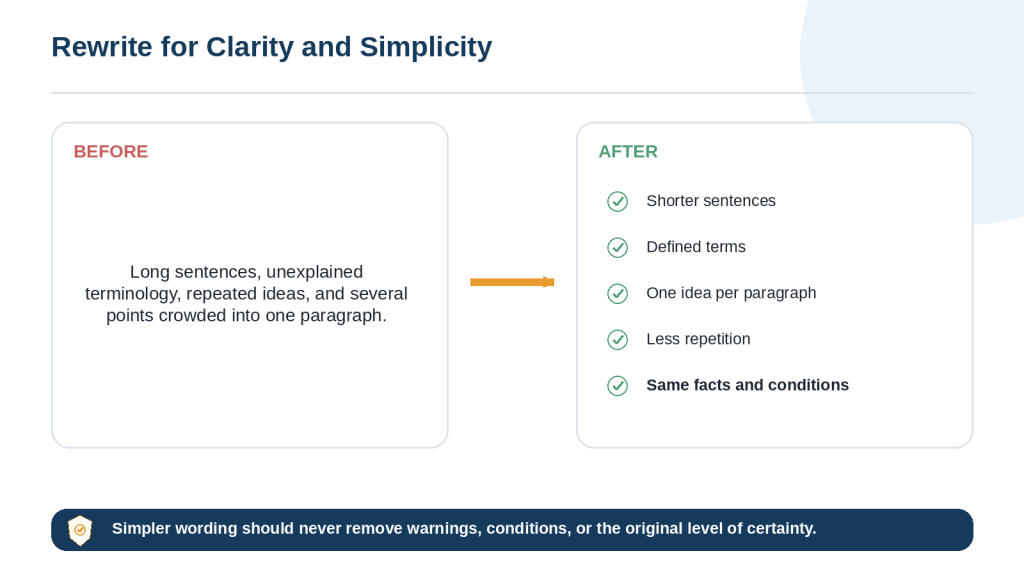
Figure 5. The main changes Claude can make when rewriting difficult text for clarity and simplicity.
Explanation: Clearer writing uses shorter sentences and defined terms while preserving the source facts, warnings, conditions, and level of certainty.
How to Change the Tone of Writing with Claude
Tone describes how writing sounds to the reader. Claude can make a message more professional, friendly, formal, calm, direct, neutral, or encouraging. The facts and requested action should remain stable.
Protect the Message
• Purpose and main request
• Confirmed facts and deadlines
• Level of urgency
• Responsibilities and next actions
• Level of certainty
• Warnings and conditions
Prompt Example
Rewrite the message using a calm, polite, and professional tone. Preserve the facts, request, deadline, urgency, responsibility, and level of certainty. Do not add an apology, admission, promise, threat, or guarantee.
Review New Language Carefully
A friendly rewrite may add an apology. A confident rewrite may turn a possibility into a promise. A direct rewrite may sound demanding. Compare the revised message with the original and remove any new commitment or change in meaning.
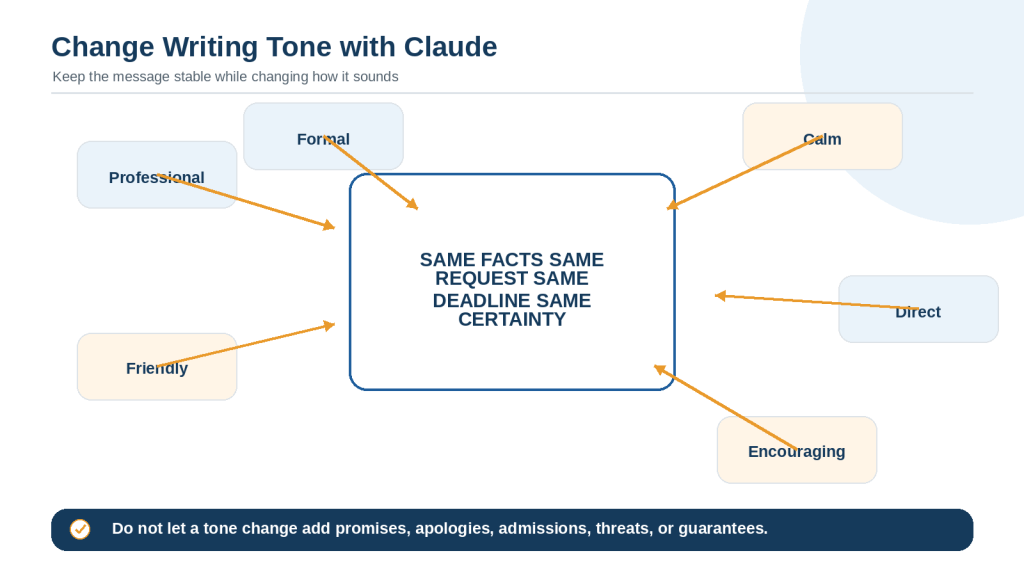
Figure 6. Claude can change the tone of writing while preserving its facts, purpose, request, urgency, and level of certainty.
Explanation: Tone options change how the message sounds, not what it means. Important requests, conditions, deadlines, and responsibilities should remain unchanged.
How to Shorten or Expand Writing with Claude
Shorten Writing Safely
Tell Claude what may be removed and what must remain. Remove repeated explanations, minor background detail, and unnecessary examples before removing evidence, warnings, conditions, deadlines, or required actions.
Reduce this section by approximately 25 percent. Remove repetition and minor background information first. Preserve every confirmed fact, date, warning, condition, source, and required action. List any important information removed.
Expand Writing Safely
Expansion should add useful explanation, definitions, examples, transitions, or approved evidence. It should not create fake statistics, quotations, prices, customer experiences, or research findings.
Expand this section to approximately 500 words using the approved notes. Add definitions, explanation, and one clearly labelled hypothetical example. Do not invent facts, statistics, quotations, prices, research findings, or personal experiences.
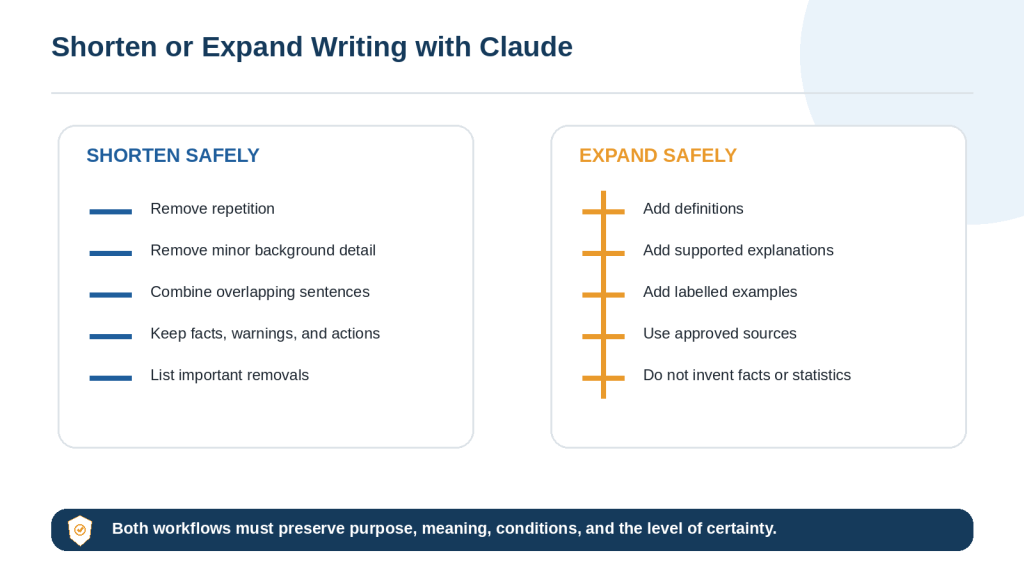
Figure 7. Claude can shorten or expand writing while preserving its purpose, facts, conditions, and level of certainty.
Explanation: Safe shortening removes repetition before essential content. Safe expansion adds supported explanation rather than invented factual detail.
How to Proofread and Edit Writing with Claude
Proofreading and editing are different levels of revision. Define the level before Claude begins.
Proofreading
Proofreading corrects spelling, grammar, punctuation, capitalization, spacing, and duplicated words. It should not reorganize paragraphs or replace clear wording unnecessarily.
Correct only spelling, grammar, punctuation, capitalization, spacing, and duplicated words. Do not change facts, meaning, tone, headings, paragraph order, lists, quotations, links, or wording that is already clear.
Editing
Editing may improve clarity, paragraph structure, transitions, tone, consistency, and flow. Because it involves broader changes, compare the result with the original carefully.
Edit the text for clarity, organization, consistency, and flow. Preserve the facts, examples, conditions, warnings, headings, and intended voice. Explain any change that could affect meaning.
Final Human Check
• Names, dates, amounts, and units
• Quotations and source references
• Words that affect certainty
• Headings, numbered steps, and bullets
• Links, filenames, and document formatting
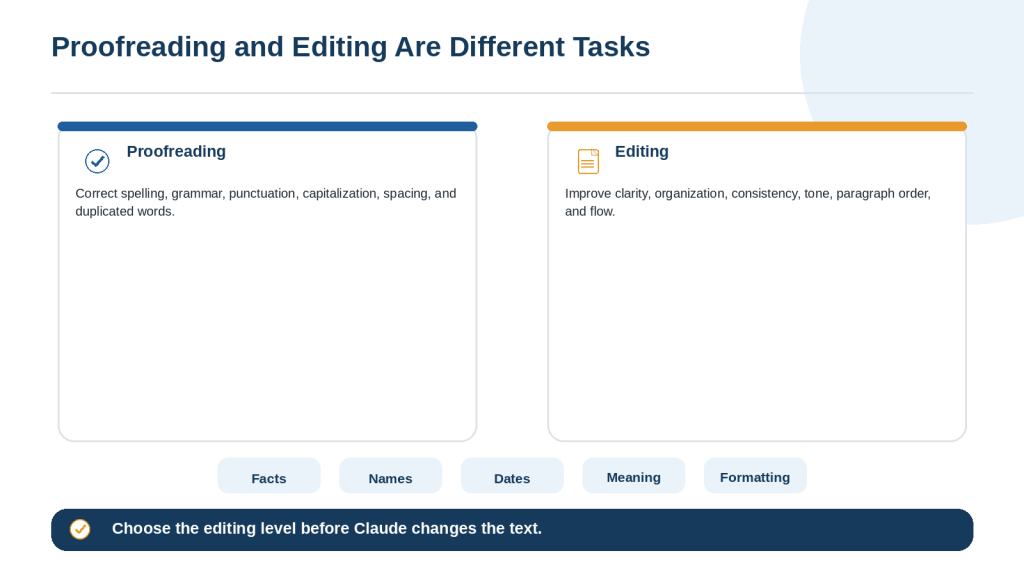
Figure 8. Proofreading corrects surface errors, while editing improves clarity, structure, consistency, and flow.
Explanation: Choosing the correct editing level prevents a simple proofreading request from becoming an unnecessary full rewrite.
How to Improve a Claude Draft with Follow-Up Prompts
The first draft may be useful without being ready to use. A focused follow-up prompt tells Claude what is already correct, identifies the exact problem, requests one change, and limits the revision to the affected content.
Use the Keep-Problem-Change Formula
Keep: Identify approved content.
Problem: Explain exactly what is wrong and where it appears.
Change: Describe the required correction.
Limits: State what must not change.
Final check: Explain what Claude should verify after revising.
Example
Keep the approved title, introduction, headings, examples, and conclusion. The section titled Protect Your Information is too technical for beginners. Rewrite only that section using shorter sentences, define every technical term, and add one simple example. Preserve the warning and confirmed facts. Do not change any other section. Confirm the revised section is under 250 words.
Correct one type of problem at a time. Fix factual errors before tone, style, or formatting. When only one paragraph needs improvement, name the paragraph or heading instead of regenerating the complete document.
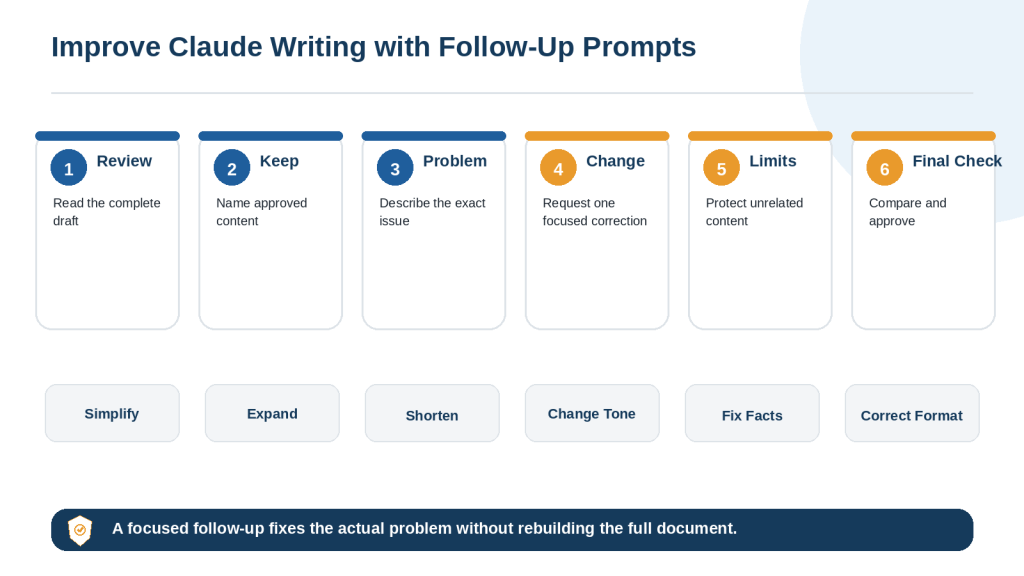
Figure 9. A focused follow-up prompt identifies approved content, the exact problem, the required change, and the limits of the revision.
Explanation: Follow-up prompts allow one part of a draft to be improved while protecting sections, facts, and wording that have already been approved.
How to Compare Claude’s Revised Text with the Original
Never review an important revision by reading only the new version. Place the original and revised text side by side and compare one paragraph or section at a time.
Check High-Risk Details
• Names and organization titles
• Dates, deadlines, times, and time zones
• Numbers, amounts, percentages, units, and currencies
• Conditions, exceptions, warnings, and limitations
• Requests, responsibilities, promises, and commitments
• Direct quotations, citations, links, and filenames
• Headings, list order, tables, and formatting
Watch the Level of Certainty
Words such as may, might, could, usually, approximately, up to, at least, if eligible, and subject to approval carry important meaning. A rewrite should not change possibility into certainty or advice into a requirement.
Comparison Prompt
Compare the original and revised versions. Create a table with Location, Original Wording, Revised Wording, Type of Change, Possible Effect on Meaning, and Review Required. Focus on facts, names, dates, amounts, certainty, conditions, warnings, requests, promises, quotations, citations, headings, lists, links, and filenames. Do not make additional revisions.
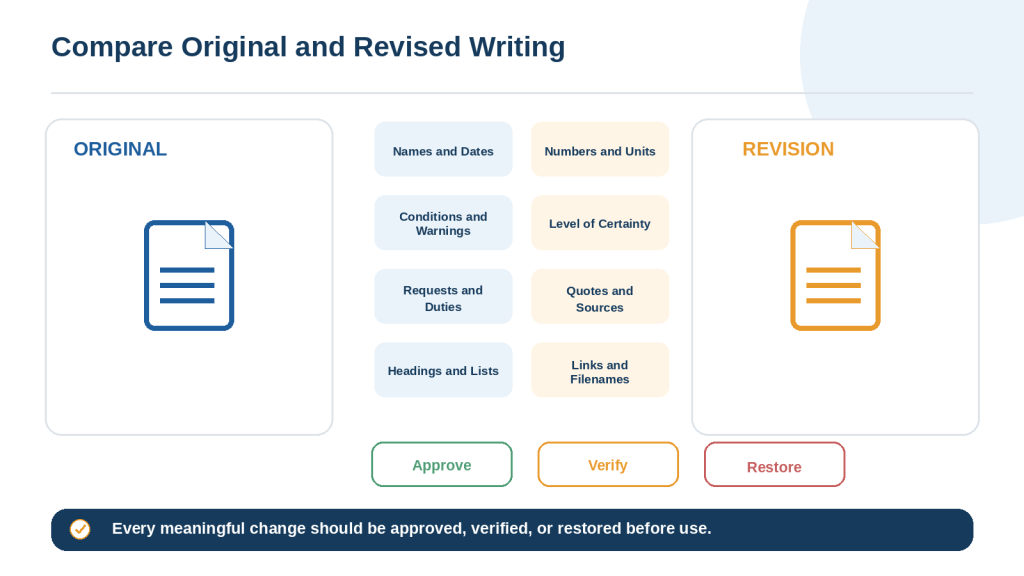
Figure 10. Comparing the original and revised versions helps identify changes to facts, certainty, conditions, structure, and approved wording.
Explanation: Each meaningful change should be approved, independently verified, or restored before the revised text is used.
Common Writing and Rewriting Mistakes with Claude
Mistake 1: Asking Claude to make it better
State the exact problem: clarity, grammar, tone, length, structure, or repetition.
Mistake 2: Providing too little context
Explain the purpose, audience, source, format, and important limits.
Mistake 3: Failing to identify the audience
State what the reader already knows and which terms require explanation.
Mistake 4: Writing from missing information
Use [Information Needed] instead of allowing Claude to guess.
Mistake 5: Mixing facts and ideas
Label confirmed facts, suggestions, and unanswered questions separately.
Mistake 6: Using unapproved sources
Tell Claude to use supplied material only unless research is approved.
Mistake 7: Drafting a long article before approving the outline
Review the structure first and draft one section at a time.
Mistake 8: Combining too many tasks
Separate research, drafting, revision, proofreading, and formatting.
Mistake 9: Giving conflicting instructions
Resolve priorities before sending the prompt.
Mistake 10: Failing to protect key details
Preserve names, dates, amounts, warnings, conditions, and required actions.
Mistake 11: Treating rewriting as proofreading
Specify the editing level and limit unnecessary changes.
Mistake 12: Allowing simplification to remove meaning
Protect words that affect certainty and eligibility.
Mistake 13: Changing tone without protecting the message
Prevent new apologies, promises, admissions, threats, or guarantees.
Mistake 14: Expanding without source limits
Permit explanations and labelled examples, not invented facts.
Mistake 15: Shortening without priorities
Remove repetition before essential facts and warnings.
Mistake 16: Rebuilding the full draft for a small problem
Rewrite only the affected paragraph or section.
Mistake 17: Accepting every suggested edit
Treat edits as proposals and reject changes that reduce accuracy or natural voice.
Mistake 18: Reviewing only the revised version
Compare both versions side by side.
Mistake 19: Failing to verify current claims
Check changing prices, features, rules, and instructions using current official sources.
Mistake 20: Uploading unnecessary private information
Redact personal, confidential, and credential information first.
Mistake 21: Asking for exact imitation of a living writer
Describe general qualities such as concise, warm, or analytical instead.
Mistake 22: Failing to check citations and quotations
Open the source and confirm the claim, date, page, and exact quotation.
Mistake 23: Ignoring formatting
Protect headings, lists, captions, links, filenames, and tables.
Mistake 24: Using the first draft without review
Complete a factual, editorial, privacy, and formatting review.
Mistake 25: Failing to save approved versions
Keep the original, important revisions, and final approved copy.
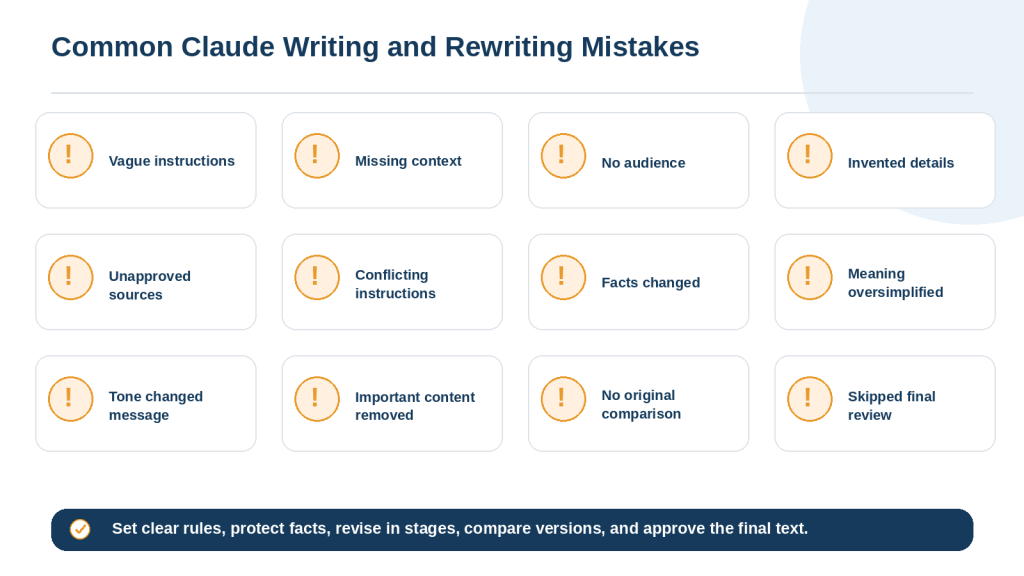
Figure 11. Common Claude writing mistakes usually result from vague instructions, missing source limits, unprotected facts, or insufficient review.
Explanation: Clear source rules, protected facts, staged drafting, focused corrections, and side-by-side comparison reduce common writing errors.
How to Protect Privacy When Writing and Rewriting with Claude
Writing tasks may involve emails, applications, reports, customer records, workplace documents, or personal notes. Share only the minimum information necessary for the task.
Remove Unnecessary Personal Information
• Full names and home addresses
• Personal email addresses and telephone numbers
• Dates of birth and identification numbers
• Bank, credit-card, and account information
• Medical, school, employment, or customer records
• Signatures and confidential business details
Replace identifying details with neutral labels such as Customer A, [Address Removed], or [Reference Number].
Never Include Credentials
• Passwords
• One-time verification codes
• API keys and access tokens
• Security answers and recovery codes
• Private server or database credentials
Review Emails and Documents
Copy only the relevant text from an email thread. Before uploading a document, review comments, tracked changes, hidden text, document properties, embedded files, signatures, and revision history.
Privacy Instruction
Use only the information necessary for this task. Do not repeat, infer, or expose personal or confidential information unnecessarily. Replace names, addresses, contact details, account numbers, and identifiers with neutral labels when they are not required. Do not include passwords, access keys, or authentication information. Treat the result as a draft until it has been reviewed.
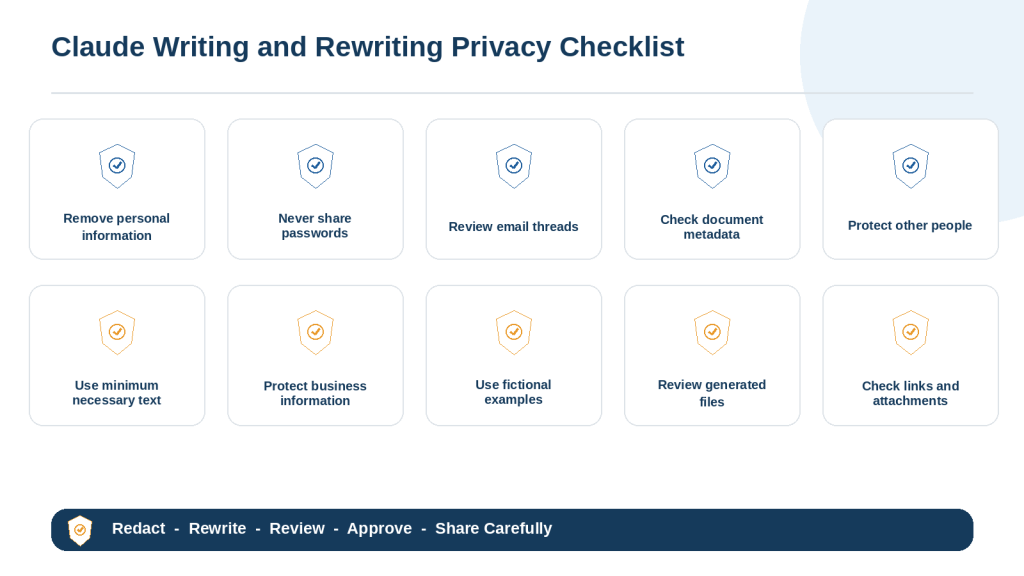
Figure 12. Essential privacy checks before using Claude to write, rewrite, edit, or create files.
Explanation: Privacy-safe writing starts with data minimization and redaction, followed by a review of generated files, links, attachments, and recipients.
Frequently Asked Questions About Writing and Rewriting with Claude
Can Claude write complete articles?
Yes. For a long article, define the audience and purpose, approve an outline, draft one section at a time, verify facts, and inspect the final document.
Can Claude rewrite text without changing its meaning?
It can be instructed to preserve meaning, but the revised version must still be compared with the source.
Can Claude correct only grammar and spelling?
Yes. Request light proofreading and prohibit changes to tone, structure, facts, headings, and paragraph order.
Can Claude make writing sound more professional?
Yes. Protect the facts, request, deadline, urgency, and certainty while changing the tone.
Can Claude simplify technical writing?
Yes. Identify the beginner audience, preserve correct terms, define them, and verify the technical meaning afterward.
Can Claude shorten to a word count?
Yes. Use a realistic range and explain what should be removed first and what must remain.
Can Claude expand an outline?
Yes, when the source supports the requested length. Prohibit invented facts, statistics, quotations, and experiences.
Can Claude preserve my voice?
Ask for minimal changes and preserve vocabulary, sentence style, and level of formality where the original is clear.
Should I paste the complete document?
Not always. Use the smallest necessary section or a redacted copy.
Can Claude add current information while rewriting?
Treat rewriting and research as separate stages so current facts are verified and added deliberately.
How do I stop invented details?
Tell Claude not to guess and to use [Information Needed] for missing information.
How do I see what changed?
Request a change table and compare the source and revision side by side.
What should I do when Claude rewrites too much?
Restore the original where it is clear and limit the correction to the named paragraph or section.
Should I ask for several versions?
Alternatives can help with tone, but choose one version and review it rather than mixing them without checking consistency.
Can Claude help with school or professional documents?
It can support planning, explanation, editing, and feedback, subject to the rules of the school, employer, client, or organization.
Should I trust a polished draft?
No. Professional wording can still contain incorrect facts, missing conditions, privacy problems, or unsupported claims.
How many revisions are needed?
Continue until the purpose, facts, structure, tone, privacy, formatting, and required approvals are complete.
Should I save every version?
Keep at least the original, important revisions, and approved final copy.
Can Claude create downloadable documents?
Claude can create supported files when that capability is available, but each generated file should be opened and inspected before use.
What is the best writing prompt?
A useful prompt defines the task, purpose, audience, source, format, tone, limits, and review requirements.
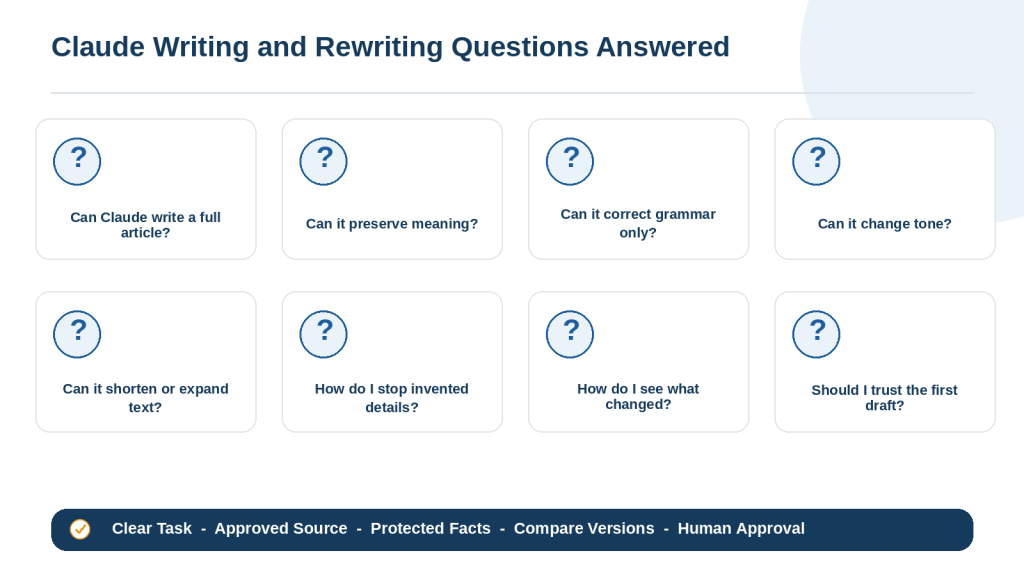
Figure 13. Common beginner questions about using Claude to create, rewrite, shorten, expand, and proofread written content.
Explanation: Claude can assist at many writing stages, but every task still needs clear limits, approved sources, comparison, and final human approval.
Key Takeaways
1. Define the exact writing or rewriting task.
2. Identify the intended audience and purpose.
3. Provide approved source material and label missing information.
4. Separate confirmed facts from ideas and possible examples.
5. Specify the required structure, length, tone, and format.
6. Protect names, dates, numbers, warnings, conditions, and required actions.
7. Distinguish proofreading from broader editing.
8. Use outlines and staged drafting for long work.
9. Use focused follow-up prompts instead of rebuilding approved content.
10. Compare the revised version with the original.
11. Protect privacy and exclude passwords or credentials.
12. Verify changing information with current reliable sources.
13. Inspect generated files, links, captions, and formatting.
14. Save the original and approved versions separately.
15. Treat every Claude response as a draft until a human approves it.
Reusable Writing Prompt Formula
Task: What Claude should write.
Purpose: What the content should accomplish.
Audience: Who will read it.
Source: Which notes, files, or sources Claude may use.
Main points: What must be included.
Format: Headings, paragraphs, lists, length, and file type.
Tone: How the writing should sound.
Limits: What Claude must preserve, avoid, or mark as missing.
Review: What should be checked after drafting.
Reusable Rewriting Prompt Formula
Task: How the text should be rewritten.
Problem: What is unclear, unsuitable, incorrect, or incomplete.
Audience: Who will read it.
Source: Use only the supplied text unless research is approved.
Preserve: Facts, names, dates, warnings, conditions, headings, and approved wording.
Change: The exact improvements required.
Format and length: The required structure and target range.
Limits: What Claude must not add, remove, promise, or assume.
Review: Compare the revision with the original and identify meaningful changes.
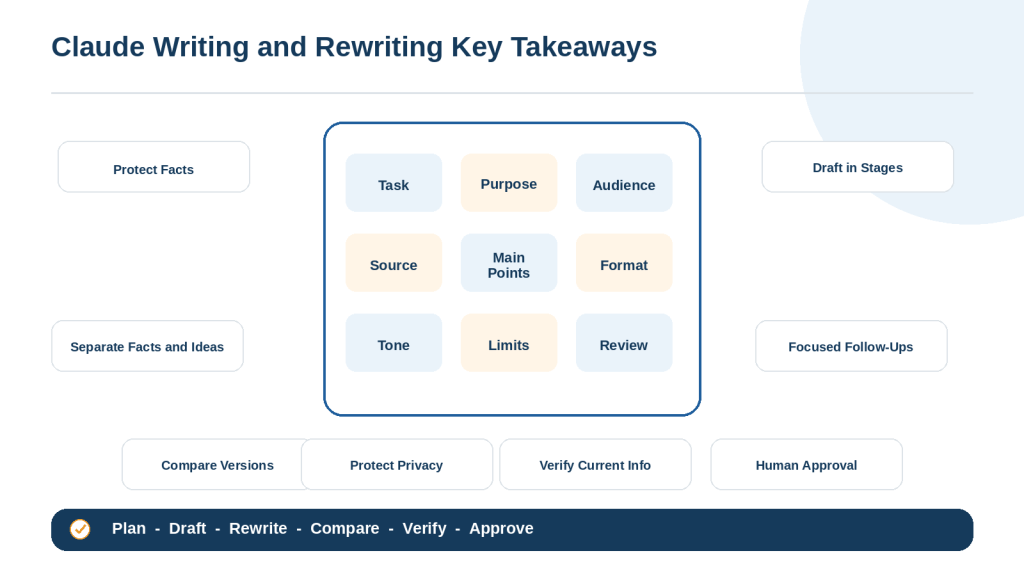
Figure 14. The essential steps for writing and rewriting safely and effectively with Claude.
Explanation: Strong prompts define the task, purpose, audience, source, format, tone, and limits. Safe use also requires privacy protection, verification, version comparison, and human approval.
Conclusion
Claude can help beginners create new writing, organize notes, improve existing text, simplify difficult explanations, adjust tone, shorten or expand content, and proofread approved drafts.
The strongest results begin with a clear task, audience, source, structure, tone, and set of limits. Large projects are easier to control when the outline is approved first and each section is drafted and reviewed separately.
When rewriting, protect names, dates, amounts, warnings, conditions, quotations, responsibilities, and words that affect certainty. A sentence is not improved when clearer wording changes the original meaning.
Treat the first response as a draft. Compare important revisions with the original, verify current facts using reliable sources, protect private information, inspect the final formatting, and save the approved version separately.
Claude can make writing faster and easier to manage, but the user remains the final writer and reviewer.
Continue Learning
Claude AI for Beginners: Complete Guide (2026)
Learn what Claude is, how to access it, its main tools, limitations, and beginner safety practices.
Best Claude Prompts for Beginners: 50 Examples to Copy and Customize (2026)
Explore practical Claude prompts for writing, learning, research, documents, spreadsheets, coding, Projects, Artifacts, and file creation.
Prompt Engineering for Beginners: Complete Guide (2026)
Learn how context, audience, examples, formats, and limits improve instructions for AI assistants.
How to Rewrite and Simplify Documents with ChatGPT: Beginner Guide (2026)
Compare another structured workflow for simplifying documents while preserving facts, warnings, conditions, and the original purpose.
Sources and References
Source Review Date: August 4, 2026
The following official Claude and Anthropic resources were reviewed for this article. Product features, interfaces, supported files, account plans, and privacy controls may change. Check the latest official guidance before publishing current instructions.
1. Get Started with Claude – Claude Help Center
2. Introduction to Prompt Design – Claude Help Center
3. My Prompt Is Not Giving Me a Helpful Answer – Claude Help Center
4. Claude’s Response to My Prompt Is Too Brief – Claude Help Center
5. Claude Is Providing Incorrect or Misleading Responses – Claude Help Center
6. Upload Files to Claude – Claude Help Center
7. Create and Edit Files with Claude – Claude Help Center
8. Use Claude for Word – Claude Help Center
9. What Are Projects? – Claude Help Center
10. How Can I Create and Manage Projects? – Claude Help Center
11. What Are Artifacts and How Do I Use Them? – Claude Help Center
12. Publish and Share Artifacts – Claude Help Center
13. Who Can View Sensitive Data Entered into Claude Chats? – Claude Help Center

