
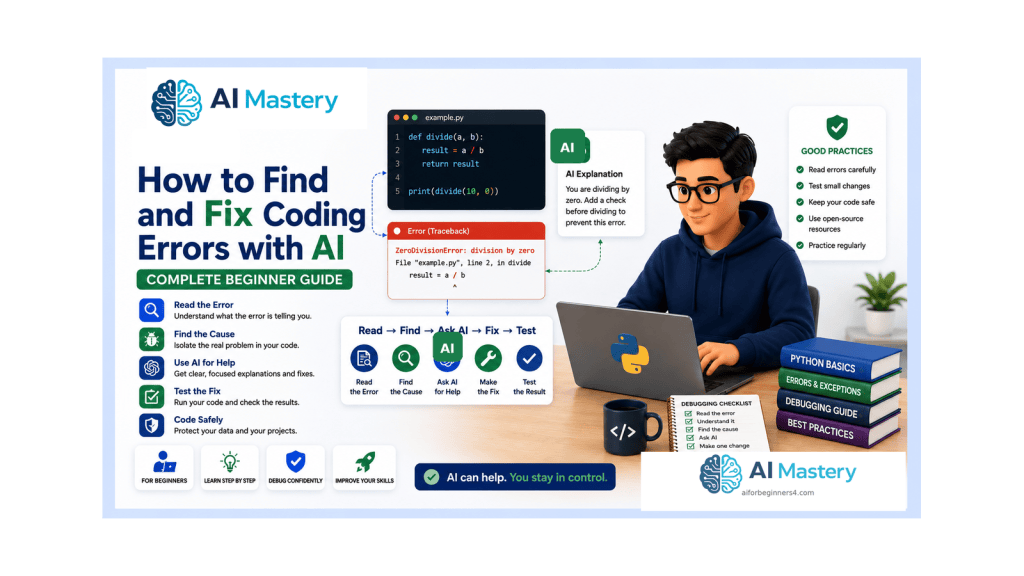
Estimated reading time: 35–40 minutes
Last updated: August 16, 2026
Introduction
Every programmer encounters errors. A missing colon, a misspelled variable, the wrong type of value, an unexpected input, a missing file, or a calculation that produces the wrong answer can stop a program or make it behave incorrectly. Beginners often see the error message itself as the problem. A better habit is to treat the message as evidence that can help you find the cause.
This guide builds directly on the beginner Python foundations covered in Article 087. You do not need to be an experienced programmer. You only need to understand a few basic ideas such as variables, input, conditions, loops, lists, and functions so that you can follow the examples and recognize what the program is trying to do.
Python is especially useful for learning debugging because it usually reports errors with an exception name, a message, and a traceback that points toward the code involved. The official Python tutorial distinguishes syntax errors from exceptions that occur while otherwise valid code is being executed. Python 3.14 also includes continued improvements to error messages and user-facing diagnostics, which can make some mistakes easier to identify than in older releases.
AI tools can make the debugging process easier to understand when they are used carefully. You can ask ChatGPT to explain a traceback in plain language, identify likely causes, compare the expected and actual result, or suggest a small test. OpenAI currently describes Codex as its dedicated software-development experience for writing or debugging code, running tests and commands, reviewing changes, and working with repositories. Product interfaces and plan conditions can change, so current official information should be checked when a particular feature matters.
The goal is not to ask AI to replace the entire program whenever something goes wrong. The goal is to learn a repeatable process: reproduce the problem, read the evidence, isolate the smallest likely cause, make one deliberate correction, test again, and keep the change only when you understand the result.
This article also covers privacy, security, licensing, and responsible use. Code can contain passwords, API keys, customer information, private file paths, confidential comments, or third-party dependencies. Those details should be reviewed before code is shared with an online service or published.
By the end of the guide, you should be able to approach a coding error more calmly and systematically, use AI as a focused debugging assistant, and know when a problem requires more testing, official documentation, or professional review.
What You’ll Learn
the difference between syntax errors, exceptions, logic errors, and warnings
how to read a Python traceback
why the last line of a traceback is usually an important starting point
how to reproduce a bug before trying to fix it
how to check the most recent code change first
how to isolate a problem in a smaller example
how to recognize common Python exceptions
how to fix simple syntax and indentation mistakes
how to investigate runtime exceptions
how to find logic errors when no exception appears
how temporary print() statements can reveal variable values
how to use a debugger and breakpoints at a beginner level
how to ask ChatGPT for focused debugging help
how to use expected result, actual result, and relevant code in an AI prompt
how to test a correction so that it does not create a new problem
how basic regression testing works
how package, version, and virtual-environment problems can cause errors
how to protect passwords, API keys, personal information, and confidential data before sharing code
why third-party packages and copied code still require source and licence checks
the main limitations of AI-assisted debugging
The examples use Python because it follows naturally from Article 087 and provides clear beginner error messages. The debugging habits themselves also apply to many other programming languages.
Before Learning
This article is easiest to follow if you already understand the basic Python ideas introduced in Article 087: running a .py file, variables, strings and numbers, input(), if statements, loops, lists, and functions. You do not need advanced Python knowledge.
Create a Safe Practice Folder
Use a folder containing only practice files and fictional information. Do not learn destructive file operations by experimenting on important personal documents. If you later practise code that writes, renames, moves, or deletes files, use a separate test folder and keep backups.
Keep a Working Copy
Before changing a program that currently works, save a working version. For example, keep calculator-working.py before experimenting with calculator-test.py. This gives you a simple way to return to a known-good state.
Use Current Python Documentation
As of August 16, 2026, the official Python documentation is for Python 3.14.7. Error messages and interpreter features can improve over time, so an old screenshot from an older tutorial may not look exactly like what you see today. Use current official documentation when the exact behaviour matters.
Use Fictional Information in Examples
Replace real names, emails, file paths, credentials, tokens, and customer details with safe placeholders. A debugging question rarely requires the real secret or private record. The code structure is usually enough.
What Is a Coding Error?
The word error is used broadly, but several different situations can produce a problem. Knowing which kind of problem you are looking at helps you choose the next step instead of changing code randomly.
Syntax Errors
A syntax error means Python cannot parse the code according to the language rules. Common causes include a missing colon, unmatched parentheses or quotation marks, or an invalid arrangement of tokens.
if age >= 18
print(“Adult”)
The missing colon after the condition prevents the code from being parsed correctly.
Exceptions
An exception occurs while the program is running. The code can be syntactically valid but fail when it attempts an operation that cannot be completed.
print(10 / 0)
The expression is valid Python, but division by zero raises ZeroDivisionError.
Logic Errors
A logic error is different because the program can run without raising an exception and still produce the wrong result.
price = 10
quantity = 3
total = price + quantity
print(total)
If the goal was to calculate a purchase total, the program should multiply price by quantity. It runs, but the result 13 is logically wrong for that goal.
Warnings
Warnings are messages about conditions that deserve attention but do not necessarily stop the program. Python has a warnings system for categories such as deprecations and suspicious runtime situations. A warning should be investigated rather than automatically suppressed.
Before changing the code, first ask: is this a syntax error, a runtime exception, a logic error, or a warning?
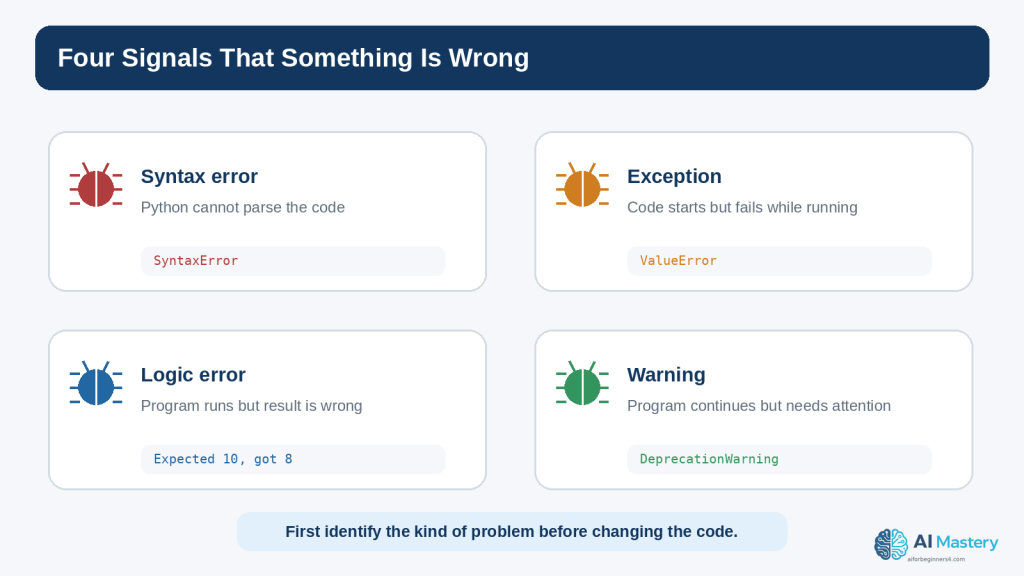
Figure 1. Coding problems can appear as syntax errors, runtime exceptions, logic errors, or warnings.
Explanation: Identifying the kind of problem helps you choose the right debugging step instead of changing code randomly.
Read the Error Message Before Asking AI
A beginner can save a great deal of time by reading the error message before asking for help. The traceback is not decorative text. It tells you where Python was executing code and what exception was raised.
Start with the Last Line
The final line normally contains the exception type and a short message. For example:
ZeroDivisionError: division by zero
The exception type is ZeroDivisionError. The message explains that a division operation used zero as the denominator.
Then Find the Relevant File and Line
A traceback can include one or several stack frames. In a small beginner program, look for the line mentioning your .py file and the line number. That is usually the first code location to inspect.
File “calculator.py”, line 8, in <module>
result = total / count
This does not automatically prove that line 8 is the root cause. For example, count may have received a bad value earlier. But it tells you where the exception became visible.
Read Upward for Context
When functions call other functions, the traceback can contain several frames. The official Python traceback tools and debugger documentation describe the stack information used to understand the path that led to the failure. Beginners do not need to memorize stack terminology, but they should learn that the traceback is a trail rather than a single sentence.
Do Not Delete the Error Message Too Quickly
When asking for help, keep the exact exception type and enough of the traceback to understand the problem. You can remove unrelated personal paths, usernames, tokens, or private data, but do not paraphrase an error so heavily that important details disappear.
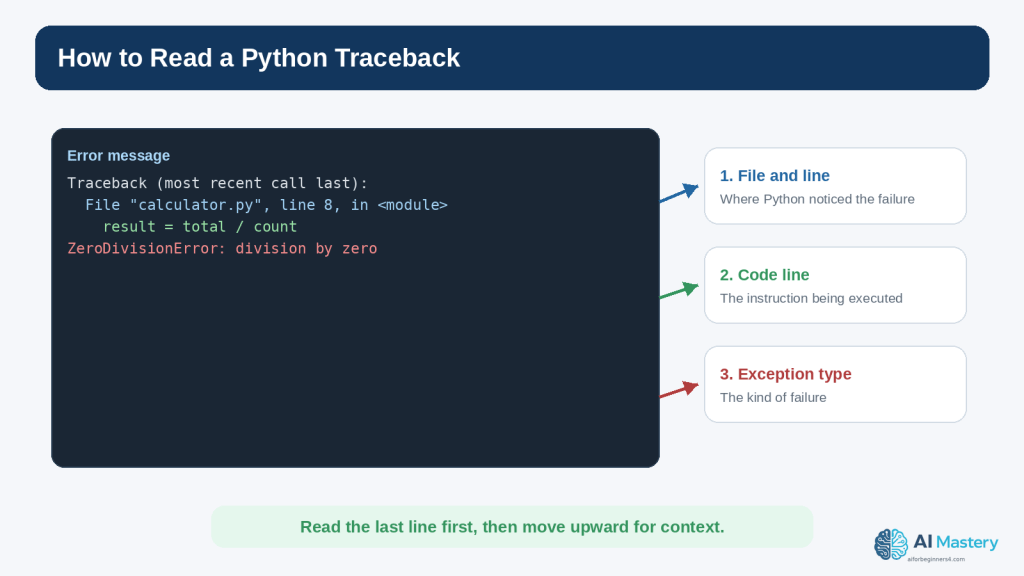
Figure 2. A Python traceback shows where the failure became visible and names the exception that occurred.
Explanation: Start with the final exception line, then move upward to find the relevant file, line, code, and call context.
Use a Step-by-Step Debugging Workflow
Debugging is easier when you follow the same order every time. A repeatable workflow reduces guessing and makes it easier to explain the problem to another person or an AI assistant.
Step 1: Reproduce the Problem
Run the program again using the same input or steps. Confirm that the problem happens consistently. If it appears only sometimes, record the exact conditions that make it appear.
Step 2: Read the Evidence
If there is a traceback, read the exception type, message, file, and line number. If there is no exception, write down the expected result and the actual result.
Step 3: Check the Last Change
Many beginner bugs are introduced by the most recent edit. Compare the current code with the last working version. Look for a changed variable name, missing punctuation, altered operator, moved indentation, or changed file path.
Step 4: Reduce the Problem
If the program is long, isolate the smallest part that still demonstrates the problem. A ten-line example is easier to reason about than a five-hundred-line file.
Step 5: Make One Small Correction
Do not accept a complete rewrite when the evidence points to one small mistake. Fix the most likely confirmed cause first.
Step 6: Run the Program Again
Test the original failing case. If the exception disappears, confirm that the result is now correct rather than merely different.
Step 7: Keep or Undo the Change
Keep the correction only when it solves the problem without damaging behaviour you still need. If the change makes the situation worse, return to the working copy and reassess the evidence.
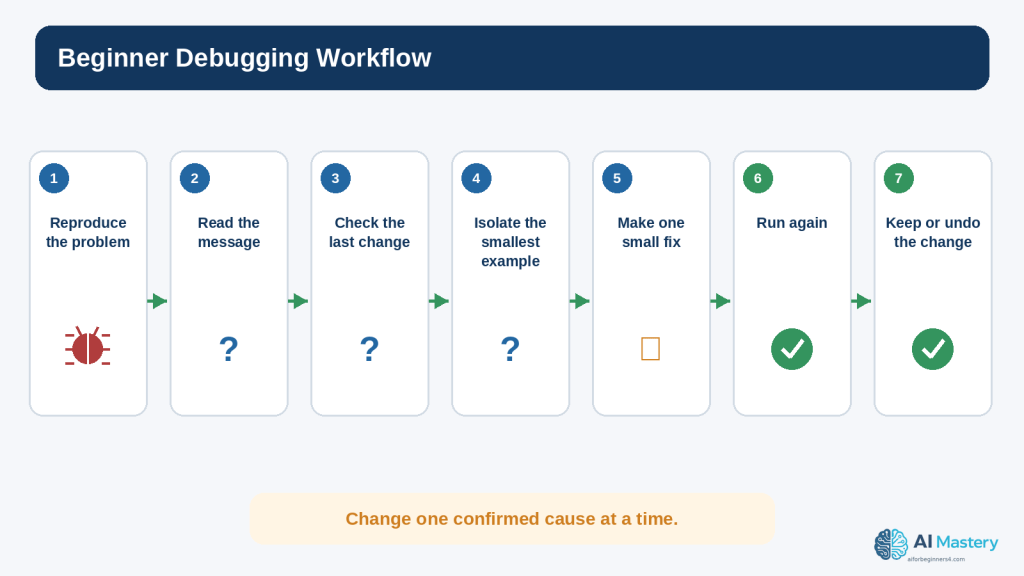
Figure 3. A repeatable debugging workflow reduces guessing and makes each correction easier to verify.
Explanation: Reproduce, read, isolate, change one thing, test again, and keep only the change you understand.
Common Python Errors Beginners See
Python includes many built-in exception types. You do not need to memorize all of them, but recognizing common names helps you know what to inspect first.
SyntaxError
Python could not parse the code. Check punctuation, parentheses, quotation marks, colons, and the location indicated by the message.
IndentationError
The indentation does not match the structure Python expects. Check spaces at the beginning of the affected line and the surrounding block.
NameError
A name was used before it was defined, or the spelling/capitalization does not match.
user_name = “Alex”
print(username)
user_name and username are different names.
TypeError
An operation received a value of an inappropriate type.
age = “25”
print(age + 1)
The variable age contains text. Converting appropriate input to int can be part of the correction.
ValueError
The general type may be appropriate, but the particular value cannot be used in the requested conversion or operation.
age = int(“twenty-five”)
ZeroDivisionError
A division or remainder operation used zero as the denominator.
IndexError
A sequence index does not exist.
names = [“Alex”, “Sam”]
print(names[2])
The valid indexes are 0 and 1, so index 2 is outside this two-item list.
KeyError
A dictionary lookup requested a key that is not present.
FileNotFoundError
The program attempted to open a file that could not be found at the specified path.
ModuleNotFoundError
Python could not find the imported module in the environment being used. This can involve a missing package, the wrong virtual environment, a misspelled import, or a project-file naming conflict.
AttributeError
The program tried to use an attribute or method that the object does not provide. Check the object type and the spelling of the method or attribute.
The exception name narrows the search, but it does not replace reading the surrounding code and values.
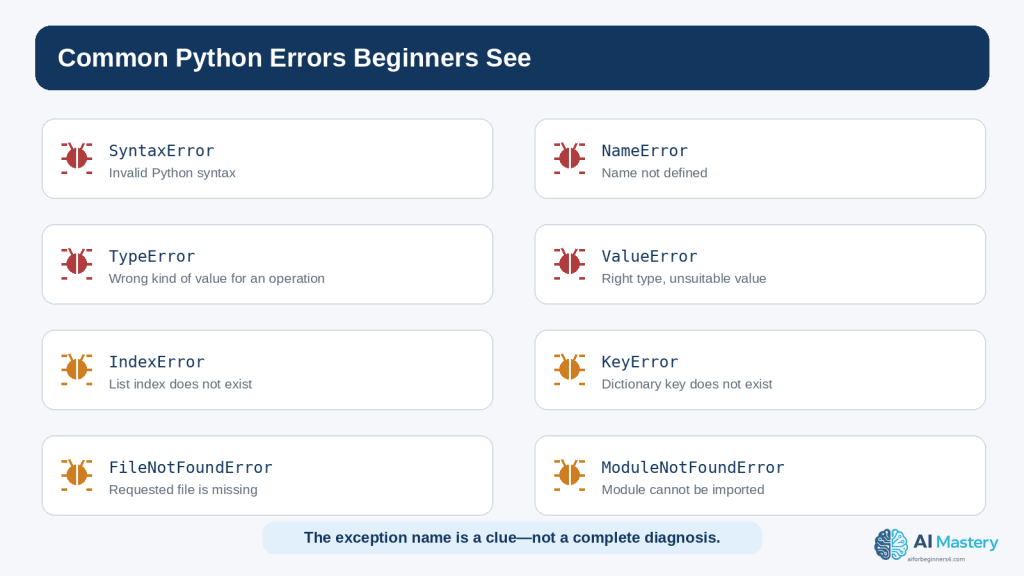
Figure 4. Common Python exception names provide clues about what kind of information or operation should be checked.
Explanation: The exception name narrows the search, but the surrounding code and runtime values still determine the real cause.
Find and Fix Syntax and Indentation Errors
Syntax and indentation errors are often the easiest beginner errors to fix because Python usually stops before the program runs and points to a nearby location.
Check the Line Before the Highlighted Location
Sometimes the parser notices the problem only after it reaches the next line. A missing closing parenthesis or quote on the previous line can make the following line look suspicious even though the real mistake started earlier.
Check Colons
if score >= 70:
print(“Pass”)
Compound statements such as if, elif, else, for, while, def, try, and except use colons in the appropriate places.
Check Matching Pairs
opening and closing parentheses: ( )
opening and closing square brackets: [ ]
opening and closing braces: { }
matching quotation marks
Check Indentation as Structure
if age >= 18:
print(“Adult”)
print(“Finished”)
The indented print belongs to the if block. The final line is outside that block. Indentation changes the structure of the program, not only its appearance.
Ask AI for the Smallest Correction
I am a beginner. This Python code gives a SyntaxError. Explain the likely cause in simple language and show only the smallest correction. Do not rewrite the program.
This wording encourages an explanation rather than a large replacement.
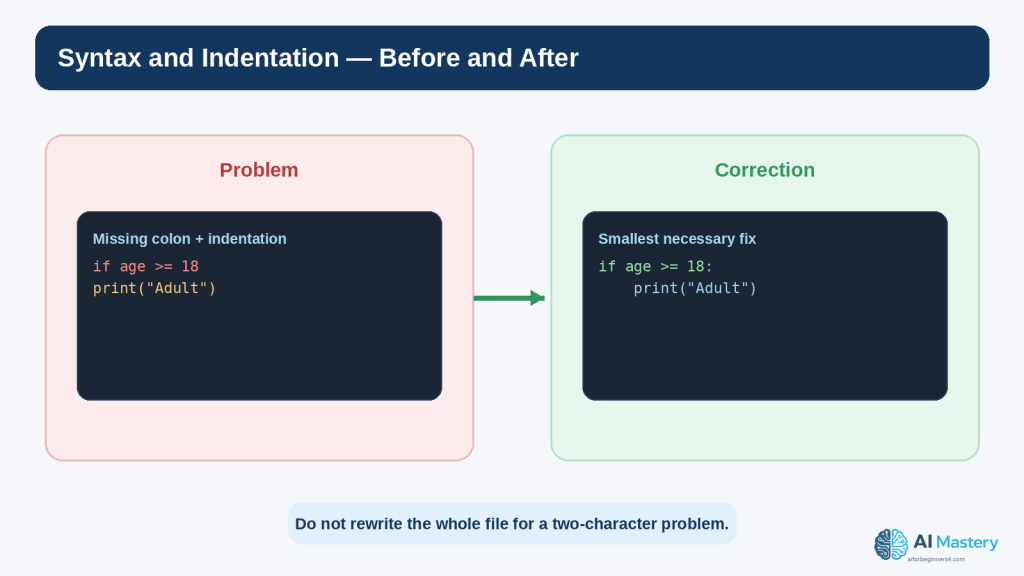
Figure 5. Small syntax and indentation mistakes can often be fixed without rewriting the rest of the program.
Explanation: Compare the broken and corrected lines carefully and make the smallest necessary change.
Find and Fix Runtime Exceptions
Runtime exceptions require you to inspect both the code and the values that reached the failing line. The same line can work for one input and fail for another.
Example: ValueError from User Input
age = int(input(“Enter your age: “))
print(age + 1)
If the user enters 25, the conversion works. If the user enters twenty-five, int() cannot convert that text and raises ValueError.
Example: ZeroDivisionError
total = 100
count = 0
average = total / count
The line is syntactically correct. The runtime value of count creates the problem.
Inspect the Values Used by the Failing Line
Ask what each variable contains immediately before the exception. If the line divides total by count, print or inspect both values. If the line indexes a list, check the list length and index. If the line opens a file, check the path.
Do Not Hide Every Exception with a Broad except
A beginner may try to make the error disappear by writing except Exception around a large block. That can hide the useful traceback and make real bugs harder to detect. Catch specific exceptions only when you have a reason to handle them and can respond appropriately.
try:
age = int(input(“Enter your age: “))
except ValueError:
print(“Please enter a whole number.”)
This example handles one expected conversion failure. It is not a substitute for understanding unrelated exceptions.
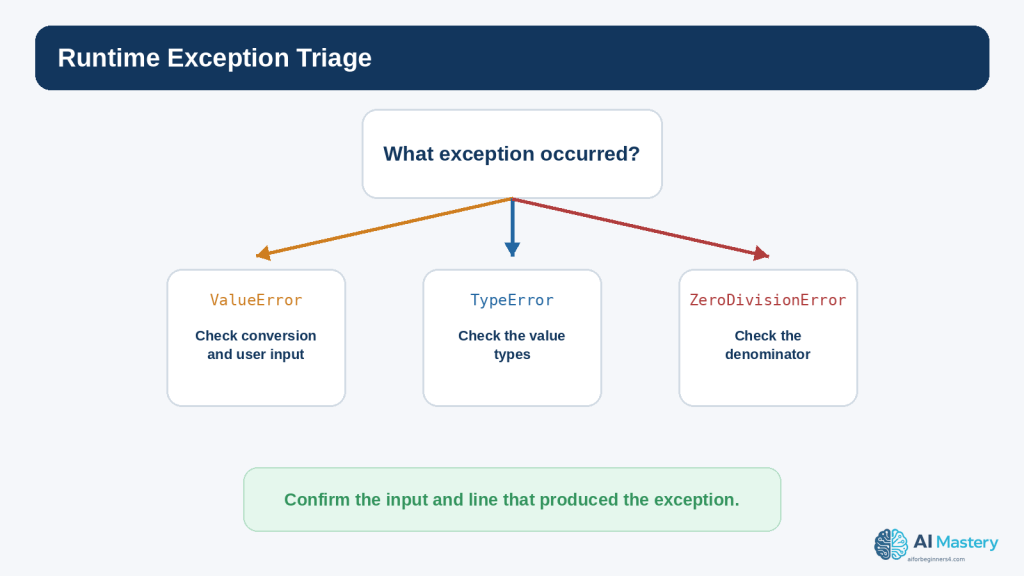
Figure 6. Runtime exceptions become easier to diagnose when you connect the exception type to the values used by the failing line.
Explanation: Check the actual inputs and variable values before deciding how the program should handle the situation.
Find Logic Errors When No Exception Appears
Logic errors can be harder than exceptions because Python may have no reason to complain. The instructions are valid; they simply do not implement the intended rule.
Write Down the Expected Result
Before changing the program, state what should happen. For example: price 10 × quantity 3 should produce 30.
Compare the Actual Result
price = 10
quantity = 3
total = price + quantity
print(total)
The program produces 13. The difference between expected 30 and actual 13 points toward the calculation.
Check Operators and Conditions
Common logic mistakes include using + instead of *, using > instead of >=, checking the wrong variable, placing a calculation inside the wrong branch, or updating a value at the wrong time.
Use Small Test Cases
Choose values that make the correct answer easy to predict. A program that calculates discounts, for example, should be tested with values clearly below, exactly at, and above the threshold.
Ask AI to Compare Expected and Actual Behaviour
This program runs without an exception, but I expected 30 and got 13. Explain the most likely logic error. Show only the line that should change and explain why.
Providing both results is much more useful than saying “the code is wrong.”
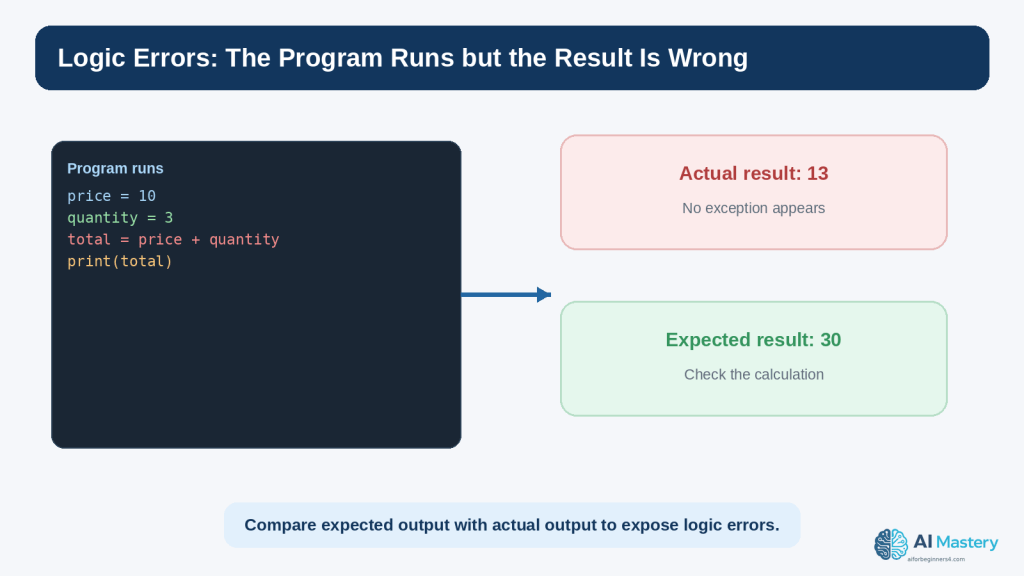
Figure 7. Logic errors may produce a normal-looking result even when the program is doing the wrong calculation.
Explanation: Write down the expected result and compare it with the actual output so that you can investigate the relevant rule or operator.
Use Temporary print() Statements to Inspect Values
One of the simplest debugging techniques is to temporarily print values at important points. This helps you see what the program actually knows instead of relying on assumptions.
Print a Variable Before the Failing Line
print(“count:”, count)
average = total / count
If the output shows count: 0, the cause of ZeroDivisionError becomes clearer.
Print a Type When Values Look Similar
print(type(age), age)
The value 25 and the string “25” can look similar on the screen but behave differently in arithmetic. type() can reveal the distinction.
Use Labels in Debug Output
A label such as print(“total:”, total) is easier to interpret than print(total) when several values are being checked.
Remove Temporary Debugging Output
After the issue is understood, remove or convert temporary debugging prints into appropriate logging if the program genuinely needs ongoing diagnostic information. Python includes a standard logging system for structured application messages.
Do Not Print Secrets
Never debug an authentication problem by printing a real password, API key, token, private customer record, or other sensitive value into a console, screenshot, log file, or AI conversation. OWASP guidance emphasizes careful secrets management and secure logging practices because logs and diagnostics can become another source of information leakage.
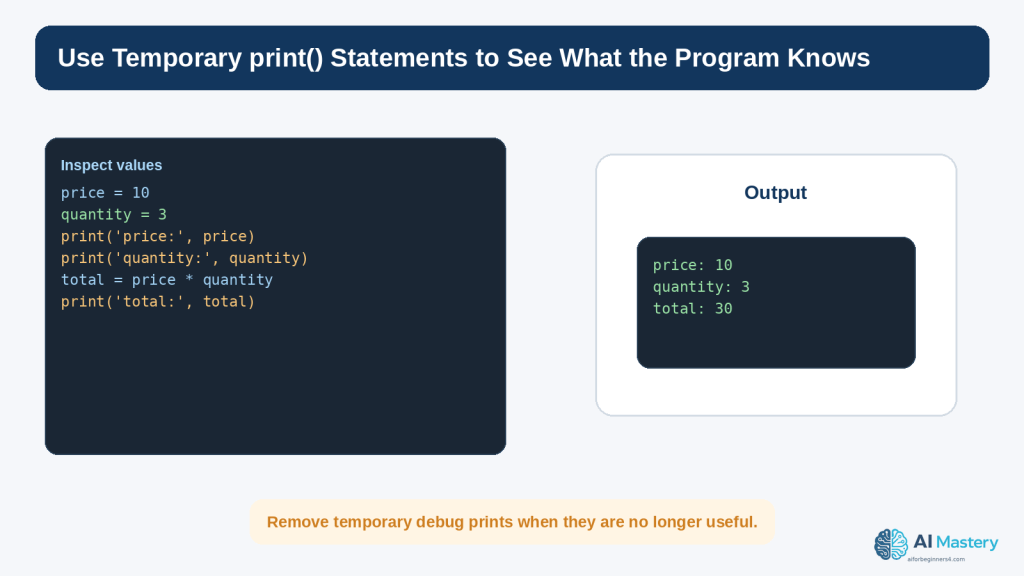
Figure 8. Temporary print() statements can reveal the values Python is using at important points in the program.
Explanation: Label debug output clearly, inspect the important values, and remove temporary diagnostics when they are no longer needed.
Ask AI Better Debugging Questions
AI assistance is much more useful when the prompt contains enough evidence to understand the problem and not so much unrelated material that the key details are lost.
Use This Five-Part Formula
Skill level: tell the assistant you are a beginner if you want beginner language
Goal: describe what the program should do
Relevant code: provide the smallest section that demonstrates the problem
Actual problem: include the exception or wrong result
Help wanted: ask for an explanation, likely cause, smallest correction, or test plan
Weak Prompt
Fix my Python.
This gives almost no context and encourages a broad answer.
Better Prompt
I am a beginner learning Python. My program should divide a total by the number of items, but I get ZeroDivisionError. Here is the relevant code and traceback. Explain the cause in simple language and show only the smallest correction. Then tell me one test I should run.
This request identifies the goal, observed failure, relevant evidence, desired explanation level, correction scope, and test requirement.
Ask the AI to Explain Before Changing Code
Do not rewrite the code yet. First explain what the traceback means and which value I should inspect.
This can keep the learning process focused on diagnosis rather than replacement.
Ask for Uncertainty
List the two most likely causes based on the code I provided. Tell me what evidence would distinguish them.
This encourages the assistant to treat debugging as a process of testing hypotheses rather than pretending that one guess is certainly correct.
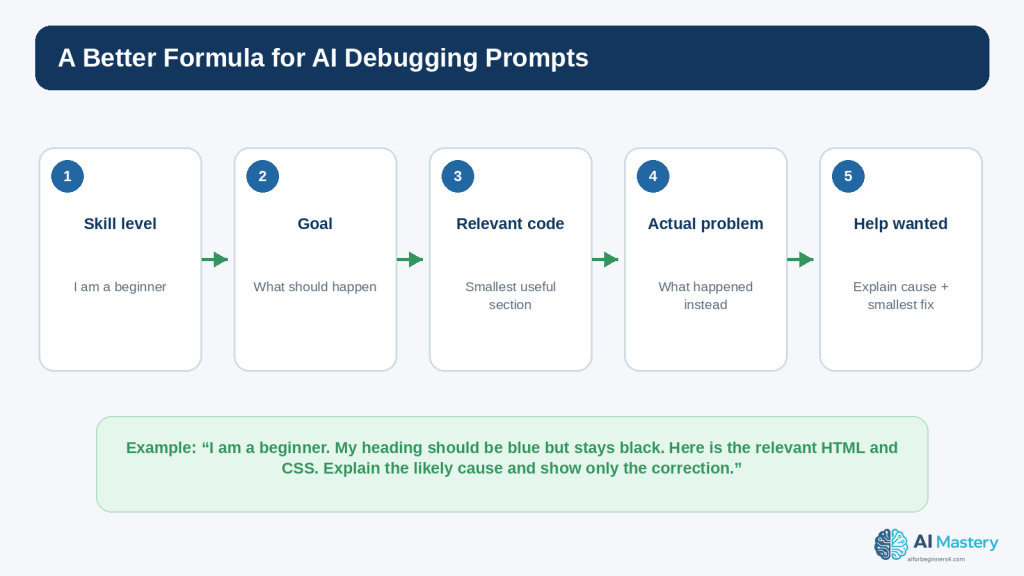
Figure 9. A focused AI debugging prompt explains your level, goal, relevant code, observed problem, and the kind of help you want.
Explanation: Specific context makes the response easier to evaluate and reduces the temptation to replace the entire program.
Use ChatGPT and Codex Without Giving Up the Debugging Process
OpenAI currently distinguishes Chat, Work, and Codex. Chat can be useful for conversational explanations and focused questions. Codex is the dedicated software-development experience for writing or debugging code, running tests and commands, reviewing changes, and working with repositories. Availability and interfaces can change, so the current OpenAI Help Center should be checked when a specific capability matters.
Good Uses for a Beginner
explain a traceback
identify a likely typo
compare expected and actual behaviour
explain what a proposed fix changes
suggest small test cases
simplify an error message
review a short code section for obvious problems
help create a minimal reproducible example
Risky Use: Accepting a Large Rewrite Without Review
A large replacement can make the original problem disappear while introducing new logic, dependencies, security assumptions, or behaviour you did not ask for. Smaller corrections are easier to inspect and test.
Ask for a Diff-Style Explanation
Show me the original line, the corrected line, and one sentence explaining why the change fixes this error. Do not change anything else.
This makes the proposed change easier to compare.
Keep the Human Testing Loop
1. Describe the exact problem.
2. Review the assistant’s explanation.
3. Inspect the suggested change.
4. Make one small change.
5. Run the program yourself.
6. Test the original failing case.
7. Test one nearby case.
8. Keep the change only when you understand and accept the result.
AI does not turn an untested guess into a verified fix. The program still needs to be run and checked.
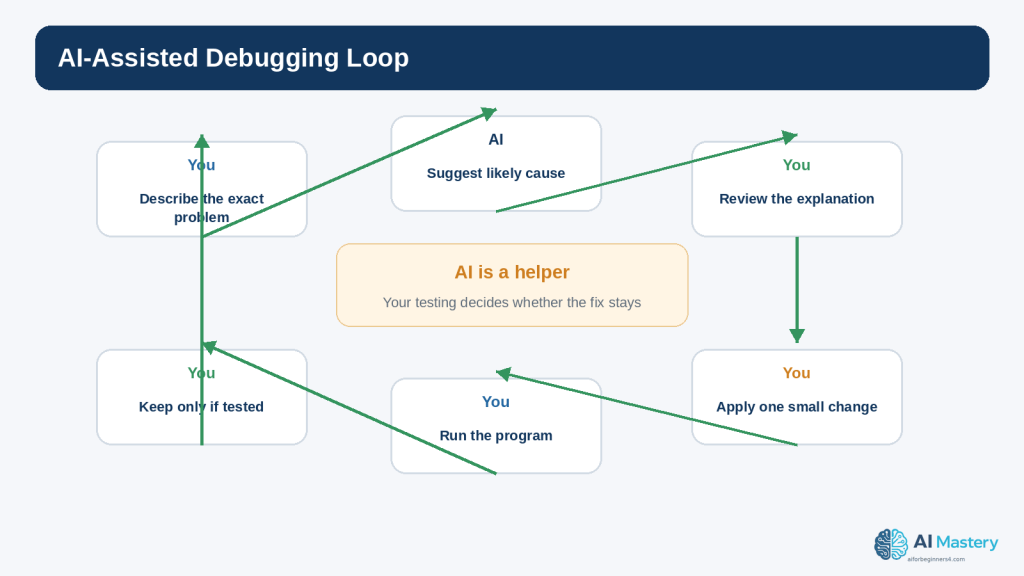
Figure 10. AI-assisted debugging still depends on your own review, testing, and decision about whether a proposed fix should stay.
Explanation: Use AI to generate explanations and hypotheses, but let evidence from the running program determine the result.
Use a Debugger When print() Is Not Enough
As programs become larger, repeated print() statements can become inconvenient. Python includes pdb, an interactive source-code debugger that supports breakpoints, stepping through code, inspecting stack frames, and evaluating expressions in the current context.
What Is a Breakpoint?
A breakpoint tells the debugger to pause execution at a particular point so that you can inspect the program before it continues.
def divide(total, count):
breakpoint()
return total / count
When execution reaches breakpoint(), Python can enter the debugger in an appropriate environment. You can then inspect variables such as total and count before the division happens.
What Does Step Mean?
Stepping allows you to run the program one line or one call at a time so you can observe how values and control flow change. The exact debugger commands are more advanced than this article requires, but the concept is important: debugging tools let you watch the program rather than guess what happened.
When a Beginner Should Use a Debugger
the error depends on several steps
a variable changes unexpectedly
a function receives the wrong value
the code path is not the one you expected
temporary print statements are becoming too numerous
Do Not Expose Sensitive Values While Inspecting
Debuggers can display the contents of variables. Use the same privacy and security discipline you would use with logs or screenshots. Do not capture or share sensitive values unnecessarily.
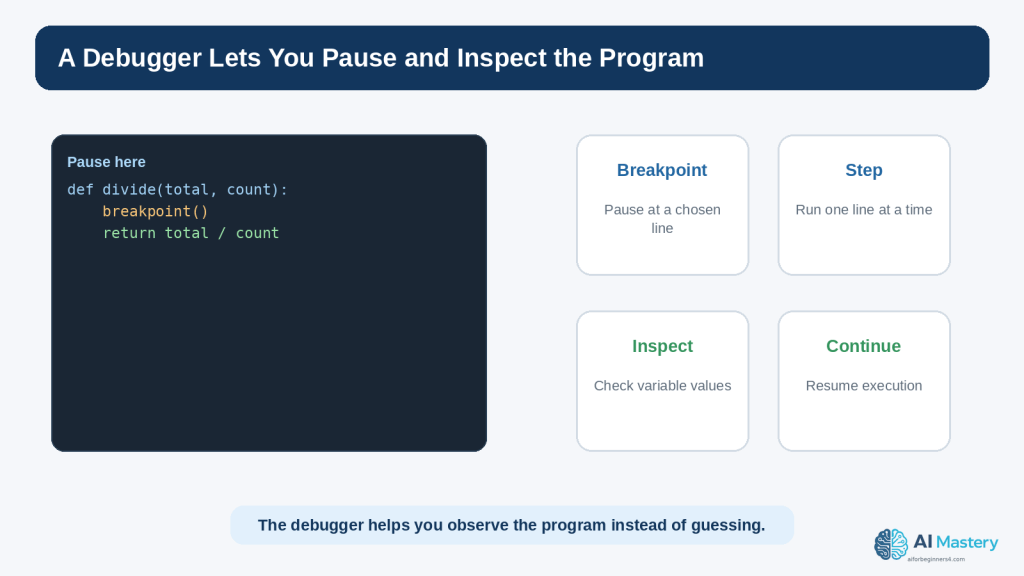
Figure 11. A debugger lets you pause execution and inspect program state instead of relying only on guesses or print statements.
Explanation: Breakpoints and stepping become useful when a problem depends on several lines, functions, or changing values.
Test the Fix So You Do Not Create a New Bug
A correction is not complete just because the original exception disappeared. A change can fix one case and break another. Testing the surrounding behaviour is therefore part of debugging, not a separate optional activity.
Retest the Original Failure
Use the same input or steps that produced the bug. Confirm that the original problem is actually resolved.
Test Nearby Cases
If the bug involved an age threshold of 18, test 17, 18, and 19. If it involved a list index, test an empty list, one-item list, and normal list when those cases are relevant.
Test Invalid Input
If users can enter values, test clearly invalid input so the program does not fail unexpectedly. OWASP guidance recommends validating untrusted input according to the expected type, format, length, range, and business rules.
Use Automated Tests as Projects Grow
Python’s unittest module provides tools for constructing and running tests. Beginners do not need a large test suite immediately, but even one small automated test can preserve the behaviour that a bug fix is supposed to protect.
import unittest
class TestMath(unittest.TestCase):
def test_total(self):
self.assertEqual(10 * 3, 30)
This tiny example is only a demonstration. Real tests should call the actual function or code being tested rather than redoing the same expression separately.
Understand Regression Testing
A regression is a previously working behaviour that stops working after a change. Regression testing means checking that a fix or new feature did not reintroduce an old problem or break something that used to work.
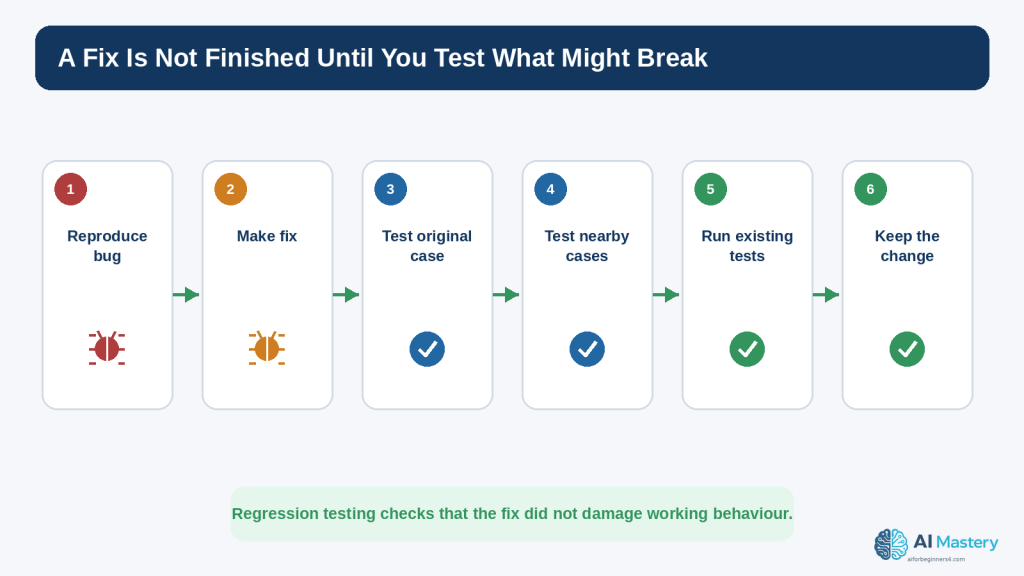
Figure 12. A fix should be tested against the original failure and nearby cases so that a new regression is not introduced.
Explanation: Testing after the correction is part of debugging because a change can solve one case while breaking another.
Protect Privacy and Security While Debugging
Debugging often involves copying code, error messages, logs, screenshots, or configuration details. Those materials can contain sensitive information even when the visible problem seems unrelated.
Remove Secrets Before Sharing Code
passwords
API keys
authentication tokens
private keys
database credentials
session identifiers
private URLs
customer or employee records
payment or health information
confidential business data
Replace these values with placeholders such as YOUR_API_KEY_HERE or name@example.com.
Check File Paths and Usernames
Tracebacks can include local file paths. A path may expose a real name, company name, project code name, or internal directory structure. Keep only the parts necessary for diagnosis.
Check Comments and Logs
A code comment or log line may contain information that is not visible in the main program output. OWASP secure-code-review and secrets-management guidance treats source code, logs, and configuration as places where sensitive values can leak.
Understand ChatGPT Data Controls
OpenAI’s current Data Controls FAQ states that signed-in users can turn off “Improve the model for everyone” so new conversations are not used to improve models. OpenAI also states that Temporary Chats are not used to train models, do not appear in normal history, do not create memories, and are deleted from its systems after 30 days, although they may be reviewed to monitor abuse. These settings can change, so check current official information when the details matter.
Privacy controls reduce certain uses of conversation data, but they do not make it appropriate to paste passwords or unnecessary sensitive information. Data minimization remains the safer habit.
Be Careful with Error Messages in Public
Do not automatically post a complete production traceback, environment dump, or log file to a public forum. Review it first for secrets, personal information, internal system details, and customer data.
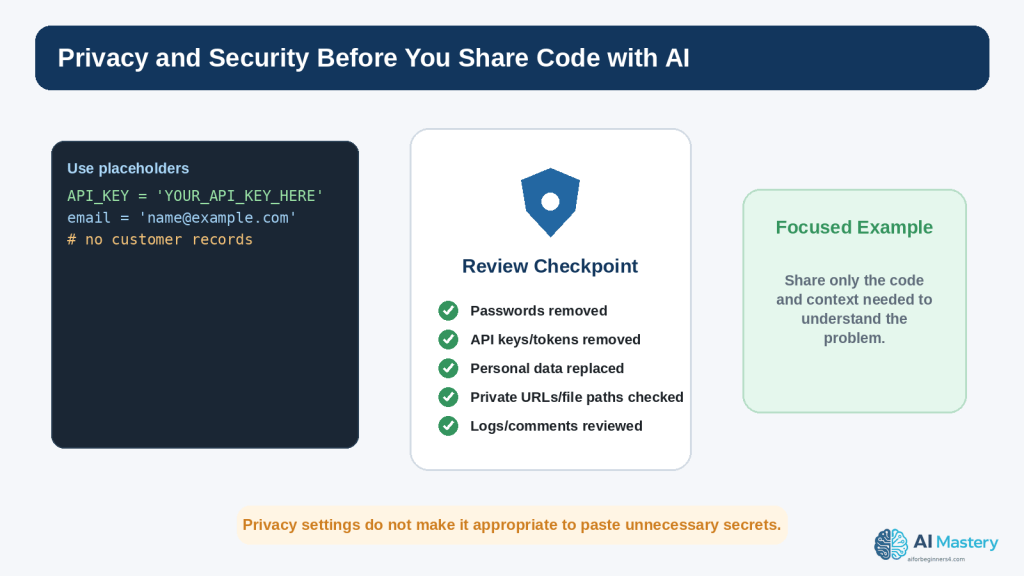
Figure 13. Review code, tracebacks, logs, and screenshots for sensitive information before sharing them with an AI service or publishing them.
Explanation: Privacy settings are useful, but the safer habit is to avoid sharing secrets and unrelated private information in the first place.
Troubleshoot Package, Version, and Environment Errors
Some coding errors are not caused by the line you wrote. They come from the environment in which the program is running, the package versions installed there, or the difference between one Python interpreter and another.
ModuleNotFoundError
import requests
If Python reports ModuleNotFoundError, possible causes include a missing package, an inactive virtual environment, using a different Python interpreter than expected, a misspelled module name, or a local file that shadows a package name.
Check Which Python Is Running
On Windows, current Python packaging guidance commonly uses commands such as py –version and virtual environments created with py -m venv .venv. The exact command can vary by installation. Confirm that the environment where you installed a package is the same environment running the program.
Use Virtual Environments for Third-Party Packages
The Python Packaging User Guide recommends virtual environments for third-party packages. A virtual environment isolates project installations so one project’s package versions are less likely to interfere with another project.
Do Not Install a Package Solely Because an AI Suggested It
Before installing a dependency, confirm the package name at its official project source, understand why it is needed, review its maintenance and security context when appropriate, and check its licence. A plausible-looking package name can still be wrong or unsuitable.
Check Version Compatibility
A code example may target a different Python or library version. Read current release notes and documentation when a method, parameter, or behaviour differs from what the AI or an old tutorial described.
Keep Dependency Records
For real projects, record important package versions and dependencies so that the environment can be reproduced. Modern Python packaging provides mechanisms for declaring dependencies and reproducible environments, but the exact tool choice depends on the project.
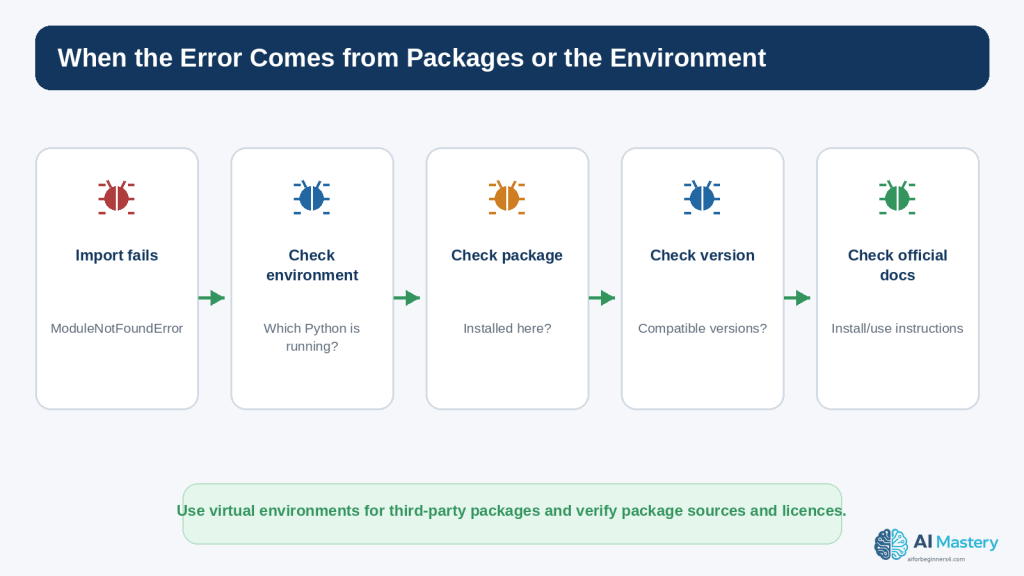
Figure 14. Some errors come from the Python environment or third-party packages rather than from the visible code line.
Explanation: Confirm the active interpreter, virtual environment, package installation, version compatibility, official source, and licence before making larger changes.
Copyright and Licensing When a Debugging Answer Adds Code
Debugging assistance can introduce third-party packages, copied snippets, templates, or other materials. Finding code online or receiving a recommendation from an AI system does not automatically establish that the code is unrestricted or commercially permitted.
Check the Original Source
If a suggested fix says to install a library or copy code from a project, locate the official project and identify the licence that applies. The Open Source Initiative maintains a list of approved open-source licences, but different licences can impose different conditions.
Open Source Still Has Terms
Open-source software allows use, modification, and sharing under the terms of the relevant licence. Conditions can include preserving notices, providing source under certain circumstances, or other obligations depending on the licence.
Keep a Simple Record
package or code name
official source
version checked
licence
date checked
attribution or notice requirements
notes about modifications
This record becomes useful when a project is published, shared, sold, or maintained over time.
AI Assistance Does Not Remove Your Responsibility
Do not assume that a suggestion is automatically copyright-free, licence-compatible, secure, or suitable for commercial use. Verify important dependencies and reused materials at their original source.
This section provides general educational information and is not legal advice.
Common Beginner Debugging Mistakes
Mistake 1: Changing Many Things at Once
If you change the calculation, variable names, file path, and input handling together, you may not know which change fixed or broke the program.
How to Avoid This Mistake: Make one deliberate correction, run the program, and record the result before changing something else.
Mistake 2: Ignoring the Exact Error Message
Replacing “ValueError: invalid literal for int()” with “it does not work” removes useful evidence.
How to Avoid This Mistake: Keep the exception type and relevant message when asking for help.
Mistake 3: Copying a Fix Without Understanding It
A copied fix can appear to work while introducing behaviour you do not understand.
How to Avoid This Mistake: Ask what changed, why it fixes the problem, and what tests you should run.
Mistake 4: Catching Every Exception
A broad except block can hide useful failures and make debugging harder.
How to Avoid This Mistake: Catch only expected exceptions you know how to handle, and let unexpected errors remain visible during development.
Mistake 5: Assuming the Highlighted Line Is Always the Root Cause
The line where an exception appears may be using a bad value created earlier.
How to Avoid This Mistake: Trace the important values backward to where they came from.
Mistake 6: Testing Only the Case That Failed
A correction can repair one input and break another.
How to Avoid This Mistake: Retest the original failure and nearby or boundary cases.
Mistake 7: Sharing Full Logs or Code Without Reviewing Them
Logs, stack traces, comments, and configuration files can contain secrets or private details.
How to Avoid This Mistake: Redact unnecessary sensitive information before sharing.
Mistake 8: Installing Unverified Packages
A package suggested as a quick solution may be unnecessary, outdated, incompatible, or from the wrong source.
How to Avoid This Mistake: Verify the package at its official source and check its licence and compatibility before installing it.
Mistake 9: Treating a Warning as Noise
Some warnings indicate deprecated behaviour or a situation that may become a future failure.
How to Avoid This Mistake: Read the warning, identify why it was issued, and decide whether the code should change.
Mistake 10: Deleting the Working Version
When experimentation replaces the only working copy, you lose an easy comparison point.
How to Avoid This Mistake: Keep a known-good copy or use version control as your projects grow.
Benefits and Limitations of Using AI for Debugging
Benefit: Faster Explanation of Error Messages
A beginner can ask for an exception or traceback to be translated into plain language without searching through several unrelated pages.
Benefit: Generating Small Test Ideas
AI can suggest boundary cases, invalid inputs, and simple examples that you can run yourself.
Benefit: Comparing Two Versions
You can provide a working and broken version and ask which differences are most likely to matter.
Benefit: Narrowing a Large Problem
An assistant can help you create a smaller reproducible example when the original project is difficult to inspect.
Limitation: The Diagnosis Can Be Wrong
AI can confidently propose a cause that does not match the actual runtime environment or missing context. The suggested fix must be tested.
Limitation: It May Rewrite Too Much
A large replacement can hide the original lesson and create new dependencies or behaviour.
How to Reduce This Limitation: Ask for the smallest correction and request an explanation of each changed line.
Limitation: It Cannot See Information You Did Not Provide
If the problem depends on a hidden configuration file, environment variable, package version, operating system, or user input, the assistant may infer incorrectly.
How to Reduce This Limitation: Provide relevant version, environment, expected result, actual result, and a minimal code example without exposing sensitive data.
Limitation: Passing Tests Do Not Prove Everything
A few successful tests provide evidence, not absolute proof. Important systems can require broader automated testing, security review, performance testing, accessibility review, and domain expertise.
Limitation: Product Features Change
OpenAI product capabilities, interfaces, plan conditions, and limits can change. Check official documentation when your workflow depends on a specific current feature.
Useful AI Debugging Prompts for Beginners
Prompt 1: Explain a Traceback
I am a beginner. Explain this Python traceback in simple language. Tell me what the exception type means, which line I should inspect first, and what value I should check. Do not rewrite the code yet.
Prompt 2: Find the Smallest Likely Cause
This code worked before my last change. Compare the working and broken versions and identify the smallest difference most likely to cause the error. Explain your reasoning before suggesting a correction.
Prompt 3: Find a Logic Error
The program runs without an exception. I expected 30 but got 13. Here is the relevant code. Find the most likely logic error and show only the line that should change.
Prompt 4: Ask for One Hint
Give me one debugging hint only. Do not show the corrected code yet.
Prompt 5: Generate Test Cases
The fix appears to work. Give me five small test cases, including one boundary case and one invalid input, that I can run to check it.
Prompt 6: Review a Proposed Fix
Explain exactly what this proposed change does, what assumptions it makes, and what could still go wrong. Do not suggest new features.
Prompt 7: Check for Exposed Secrets
Review this small code example for obvious exposed passwords, API keys, tokens, personal data, or private file paths. Do not claim that this guarantees security.
Prompt 8: Simplify a Debugging Example
Reduce this problem to the smallest beginner-friendly example that still reproduces the same error. Keep the exception visible.
Prompt 9: Compare Two Error Messages
Compare these two tracebacks and explain what changed between them. Tell me whether the second error is likely a new problem or the next issue revealed after the first fix.
Prompt 10: Ask for Official Documentation
Tell me which official Python documentation page is most relevant to this exception or feature. Summarize what I should verify there instead of relying only on your answer.
Common Myths About Debugging with AI
Myth 1: Good Programmers Do Not Get Errors
Reality: Errors and debugging are normal parts of programming. Skill comes from diagnosing problems effectively, not from never making mistakes.
Myth 2: The Error Message Tells You Exactly How to Fix the Code
Reality: An error message identifies a failure and provides clues. The root cause may be earlier in the program or depend on runtime values.
Myth 3: If AI Gives a Fix, the Bug Is Solved
Reality: A suggestion becomes a credible fix only after you understand the change and test the relevant behaviour.
Myth 4: If the Program Runs, It Is Correct
Reality: Logic errors can produce wrong answers without raising exceptions.
Myth 5: Bigger Changes Fix Bugs Faster
Reality: Small, isolated changes are usually easier to understand and verify.
Myth 6: More Error Handling Always Makes Code Safer
Reality: Catching exceptions without understanding them can hide failures and make problems harder to detect.
Myth 7: Temporary Chat Means It Is Fine to Share Secrets
Reality: Privacy controls are useful, but passwords, private keys, API tokens, and unnecessary sensitive data should still be withheld.
Myth 8: A Package Recommended by AI Is Automatically Safe and Licensed for My Use
Reality: Verify packages, source, versions, security context, and licence terms at the original project source.
Myth 9: Unit Tests Prove a Program Has No Bugs
Reality: Tests provide evidence for the cases they cover. Uncovered inputs, environments, integrations, and security issues may still exist.
Myth 10: Debugging Means Staring at the Code Until the Answer Appears
Reality: Good debugging uses evidence: reproduce the problem, inspect messages and values, isolate the case, form a hypothesis, test it, and compare the result.
Frequently Asked Questions
What should I do first when Python shows an error?
Read the final line of the traceback for the exception type and message, then find the relevant file and line. Check the most recent change before rewriting anything.
What is the difference between a bug and an exception?
Bug is a broad term for a defect in a program. An exception is a specific runtime event Python reports. A bug can cause an exception, but a logic bug may produce the wrong result without an exception.
Why does the traceback show several files and lines?
Functions and libraries can call one another. The traceback records the call path that led to the exception. In a beginner project, focus first on frames that refer to your own code while keeping the surrounding context in mind.
Should I always use try and except to stop crashes?
No. Handle exceptions that you expect and can respond to meaningfully. During development, unexpected exceptions are valuable because the traceback exposes problems that need investigation.
Can ChatGPT fix any coding error?
No. It can help explain and suggest possibilities, but it may lack the real environment, inputs, configuration, dependencies, or context. Important fixes must be tested in the actual program.
What should I paste into ChatGPT when I have an error?
Share the smallest relevant code, the exact exception or wrong result, what you expected, and necessary version or environment information. Remove passwords, API keys, personal data, private URLs, and other unnecessary sensitive details.
What is Codex?
OpenAI currently describes Codex as its dedicated software-development experience for writing or debugging code, running tests and commands, reviewing changes, and working with repositories. Check current OpenAI documentation for availability and plan conditions.
What is a breakpoint?
A breakpoint pauses execution at a chosen location so you can inspect variable values and program state before continuing.
When should I use print() versus a debugger?
Temporary print() statements are excellent for small beginner programs. A debugger becomes more useful when the program has several functions, changing state, or a path that is difficult to observe with a few prints.
How do I know if a fix is correct?
Retest the original failing case, test nearby or boundary cases, and verify that previously working behaviour still works. For larger projects, add automated tests where appropriate.
Why do I get ModuleNotFoundError even after installing a package?
You may have installed the package into a different Python environment from the one running the script. Check the active interpreter and virtual environment, package name, and official installation instructions.
Can I ignore warnings?
Not automatically. Read the warning and determine why it was issued. Some warnings signal deprecated or questionable behaviour that can become a future problem.
Should I post a complete traceback publicly?
Review it first. Tracebacks and logs can reveal usernames, local paths, project names, configuration, or sensitive data. Share only what is needed for diagnosis.
Do I need to learn every exception type?
No. Learn the common ones and become comfortable looking up unfamiliar exceptions in the official Python documentation.
What should I learn after this article?
The next planned article is Article 089 — How to Build a Simple Beginner Project with AI Coding Tools (2026). It will use the coding and debugging habits from Articles 084–088 in a small project workflow.
Key Takeaways
- Errors are normal evidence during programming, not proof that you cannot code.
- Identify whether you are dealing with a syntax error, runtime exception, logic error, or warning.
- Read the last line of a Python traceback first, then find the relevant file and line.
- Check the most recent change before rewriting the program.
- Reduce large problems to the smallest example that still reproduces the issue.
- Make one correction at a time and test after each change.
- Common exception names such as SyntaxError, NameError, TypeError, ValueError, ZeroDivisionError, IndexError, FileNotFoundError, and ModuleNotFoundError provide useful clues.
- Logic errors require comparing expected and actual behaviour because no exception may appear.
- Temporary print() statements can reveal variable values and types.
- A debugger can pause execution and let you inspect the program when print() is no longer enough.
- Use AI prompts that include your skill level, goal, relevant code, exact problem, and the help you want.
- Ask for explanations and small corrections rather than accepting large rewrites blindly.
- Test the original failing case and nearby cases after every fix.
- Automated tests can help prevent regressions as projects grow.
- Remove passwords, API keys, tokens, personal information, and other sensitive data before sharing code or logs.
- ChatGPT privacy controls are useful but do not replace data minimization.
- Use virtual environments for third-party packages and confirm which Python environment is actually running.
- Verify package sources, versions, and licences before depending on them.
- AI debugging can speed up explanations, but it can also be wrong. Your own testing remains essential.
The most useful debugging habit is simple: read the evidence, change the smallest thing you can justify, run the program again, and keep only the change you understand.
Final Tip
When an error appears, resist the urge to paste the entire project into an AI tool and ask for a complete replacement. First write down three things: what you expected, what actually happened, and the exact error message or wrong result. Then identify the smallest relevant code section.
1. Reproduce the problem.
2. Read the traceback or compare expected and actual output.
3. Check the last change.
4. Inspect the important values.
5. Ask for focused help only when needed.
6. Make one small correction.
7. Run the original failing case again.
8. Test at least one nearby case.
9. Remove temporary debugging output and sensitive information.
10. Keep the fix only when you can explain why it works.
This process may feel slower than replacing the code immediately, but it builds the skill that matters most: being able to diagnose and verify your own programs.
Continue Learning
Article 088 belongs to the AI Mastery AI Coding series. It follows Article 087 — Python for Complete Beginners with ChatGPT (2026), where you learned the Python concepts used throughout these examples.
If you need additional background, review Article 084 — What Is AI Coding? Complete Beginner Guide (2026), Article 085 — How to Ask ChatGPT to Explain Code (2026), and Article 086 — HTML and CSS for Beginners with ChatGPT (2026). Together, these articles establish the foundations for understanding code, asking useful AI questions, and testing changes responsibly.
The next planned article is Article 089 — How to Build a Simple Beginner Project with AI Coding Tools (2026). It will combine planning, code generation, explanation, debugging, testing, and responsible-use habits in one small project.
Do not rush into a large production application. A short program you can debug confidently is a stronger foundation than a large generated project you cannot explain.
Sources and References
The following official and authoritative sources were reviewed for the technical, privacy, security, licensing, and product-information statements in this article. Information was checked on August 16, 2026. Python versions, AI product features, policies, security guidance, package versions, and licence conditions can change, so readers should verify current official information when it matters to their project.
- Python 3.14.7 Documentation — Main Documentation. Official documentation for Python 3.14.7, current on August 16, 2026.
- Python Tutorial — Errors and Exceptions. Official explanation of syntax errors, exceptions, tracebacks, try, except, and related error handling.
- Python Standard Library — Built-in Exceptions. Official reference for built-in exception classes such as TypeError, ValueError, IndexError, KeyError, and FileNotFoundError.
- Python Standard Library — traceback. Official interface for extracting, formatting, and printing stack traces.
- Python Standard Library — pdb. Official documentation for Python’s interactive source-code debugger, breakpoints, stepping, and stack inspection.
- Python Standard Library — unittest. Official unit-testing framework used for constructing and running tests.
- Python Standard Library — logging. Official reference for Python’s flexible event-logging system.
- Python Logging HOWTO. Official tutorial guidance for using Python logging.
- Python Standard Library — warnings. Official documentation for warning categories and warning control.
- What’s New in Python 3.14. Official summary of Python 3.14 features, including improved error messages and debugging-related improvements.
- Python Packaging User Guide — pip and Virtual Environments. Official PyPA guidance recommending virtual environments for third-party package installations.
- Python Packaging User Guide — Dependency Specifiers. Official specification describing how Python project dependencies and version constraints are declared.
- OpenAI Help Center — ChatGPT Work and Codex. Current OpenAI guidance distinguishing Chat, Work, and Codex, with Codex dedicated to software-development tasks such as debugging and testing.
- OpenAI Help Center — Data Controls FAQ. Current guidance for the Improve the model for everyone setting and Temporary Chat behaviour.
- OpenAI — Privacy Policy. Current privacy-policy reference for personal-data handling in OpenAI services.
- OWASP — Secure Code Review Cheat Sheet. Security guidance for reviewing code for vulnerability patterns and security issues.
- OWASP — Secrets Management Cheat Sheet. Security guidance for passwords, API keys, credentials, and other secrets.
- OWASP — Input Validation Cheat Sheet. Security guidance for validating untrusted input.
- Open Source Initiative — Approved Licenses. Reference for approved open-source licences and their identities.
- Python Software Foundation — Python 3.14.7 Release. Official release page confirming Python 3.14.7, released August 5, 2026.
Important Note: This article provides general educational information about debugging, Python, AI-assisted coding, privacy, security, and licensing. It is not legal, cybersecurity, or other professional advice. Sensitive, regulated, financial, medical, safety-critical, or production systems may require qualified professional review.

