

Estimated Reading Time: 7 minutes
Last Updated: July 2026
What You’ll Learn
By the end of this guide, you’ll be able to:
- Understand what ChatGPT is and how it works.
- Navigate the ChatGPT interface with confidence.
- Write your first prompt.
- Learn what ChatGPT can help you with.
- Avoid common beginner mistakes.
- Get better results from your conversations.
Introduction
ChatGPT is an AI chatbot developed by OpenAI that can understand questions and generate human-like responses. It can help you write content, learn new skills, generate computer code, brainstorm ideas, translate languages, solve problems, and much more.
Whether you’re a student, professional, business owner, or simply curious about artificial intelligence, ChatGPT can become a valuable everyday assistant. Its simple interface makes it easy for beginners to start using AI without any technical knowledge.
What Can ChatGPT Do?
ChatGPT can help you with many everyday tasks, including:
- Answering questions
- Writing emails and letters
- Summarizing long documents
- Brainstorming ideas
- Learning new skills
- Explaining difficult concepts
- Creating social media content
- Writing computer code
- Translating languages
- Planning trips and schedules
Understanding the ChatGPT Interface
The ChatGPT interface is designed to be simple and user-friendly. Once you sign in, you’ll see several important areas that help you interact with ChatGPT efficiently.
Chat Box
The Chat Box is where you type your questions, requests, or instructions. Simply enter your prompt and press Enter or click the send button to receive a response.
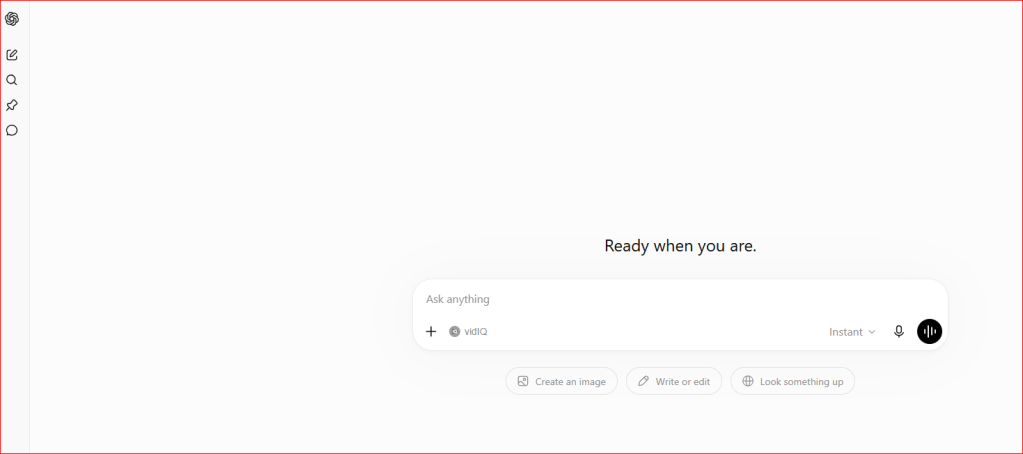
Figure 1. The ChatGPT message box.
Conversation History
The Conversation History appears on the left side of the screen. It automatically saves your previous chats, allowing you to return to earlier conversations whenever you need them.
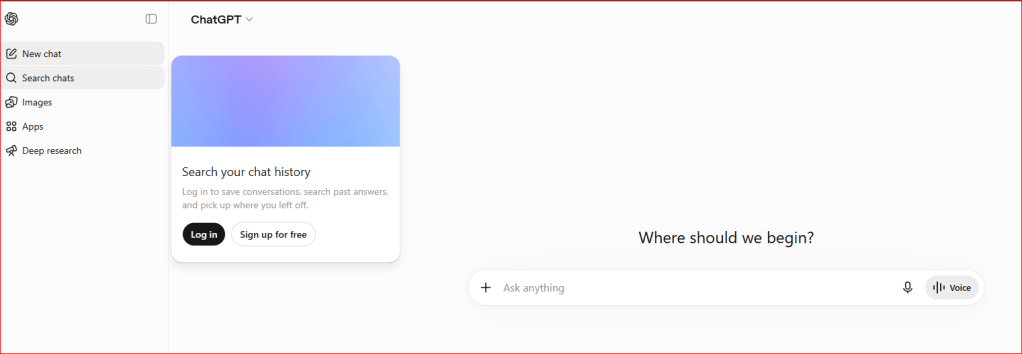
Figure 2. The ChatGPT conversation history.
Model Selector
Depending on your account, you may be able to choose different AI models. Some models are optimized for speed, while others provide more advanced reasoning or support additional features.
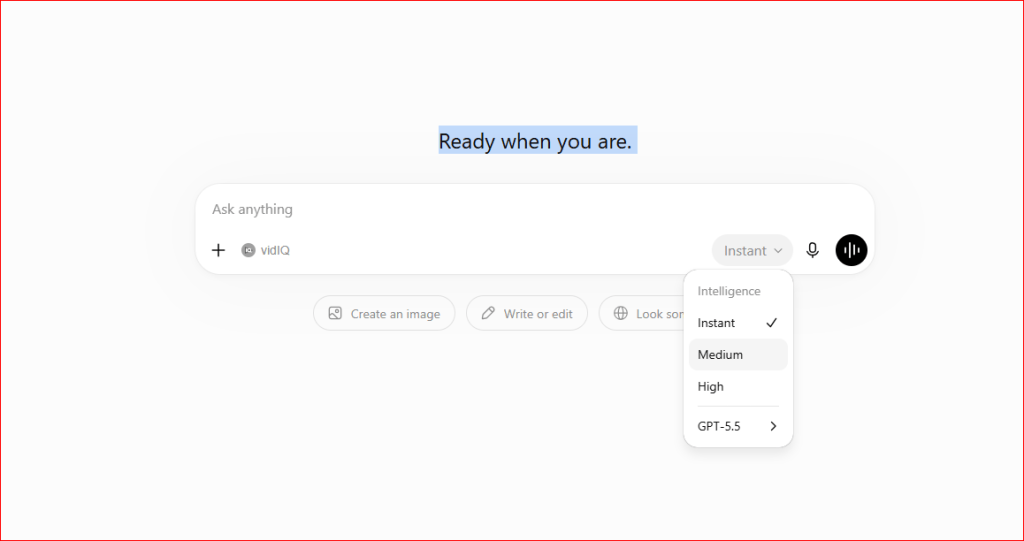
Figure 3. Selecting a ChatGPT model.
Attachments
ChatGPT allows you to upload files and images so it can analyze documents, answer questions about uploaded content, summarize files, or help with editing.
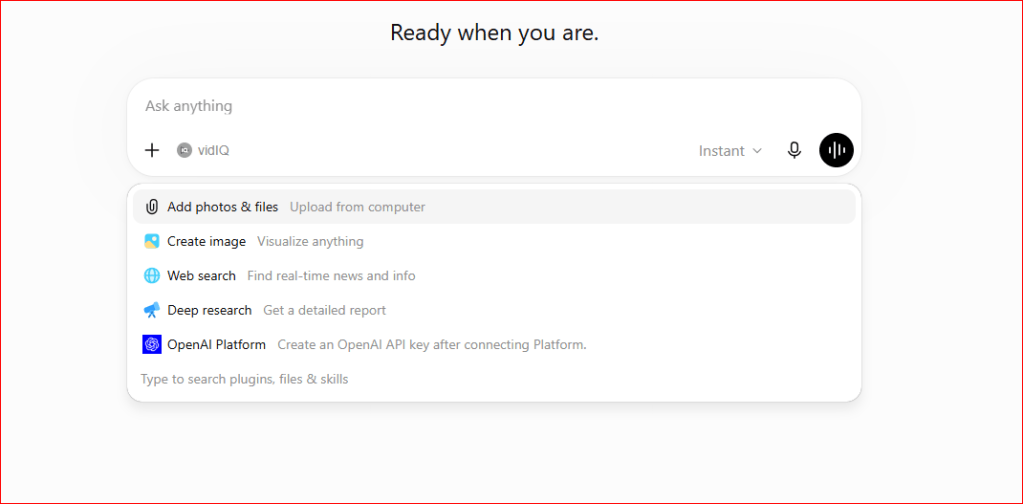
Figure 4. Uploading a file to ChatGPT.
Writing Your First Prompt
A prompt is simply the instruction or question you give ChatGPT. The clearer your prompt, the better the response will usually be.
The more specific your prompt is, the more accurate and helpful ChatGPT’s response is likely to be. Including details, context, or your desired format often leads to better results.
Here are a few examples:
- Explain photosynthesis in simple words.
- Write a professional email requesting a meeting.
- Summarize this article.
- Create a weekly meal plan.
- Help me learn Microsoft Excel.
Tips for Better Results
Follow these simple tips to get more accurate and helpful responses:
- Be clear and specific.
- Provide enough context.
- Ask follow-up questions.
- Request examples when needed.
- Ask ChatGPT to simplify complex answers.
- Experiment with different prompts to see what works best.
Common Mistakes Beginners Make
Many new users make the same mistakes when using ChatGPT. Avoiding them will help you get better results.
- Asking vague or incomplete questions.
- Expecting perfect answers every time.
- Sharing sensitive personal information.
- Copying AI-generated content without reviewing it.
- Providing very little context.
Frequently Asked Questions
Can ChatGPT make mistakes?
Yes. ChatGPT can occasionally provide incorrect or outdated information. Always verify important facts before relying on them.
Can ChatGPT browse the internet?
Some versions of ChatGPT can browse the web, while others rely on previously learned knowledge. Available features depend on your subscription and the model you are using.
Is ChatGPT safe?
Yes. ChatGPT is safe to use when you avoid sharing passwords, financial information, or other sensitive personal data.
Final Thoughts
Learning the basics of ChatGPT is the first step toward using artificial intelligence effectively. As you become more familiar with the interface and learn how to write better prompts, you’ll be able to communicate more effectively with AI, complete tasks more efficiently, and continue learning with confidence.
Whether you’re using ChatGPT for work, education, creativity, or everyday tasks, practicing regularly will help you get the best results.
Next Lesson
Best ChatGPT Prompts for Beginners (2026)
Learn how to write prompts that produce more accurate, detailed, and useful responses from ChatGPT.

