
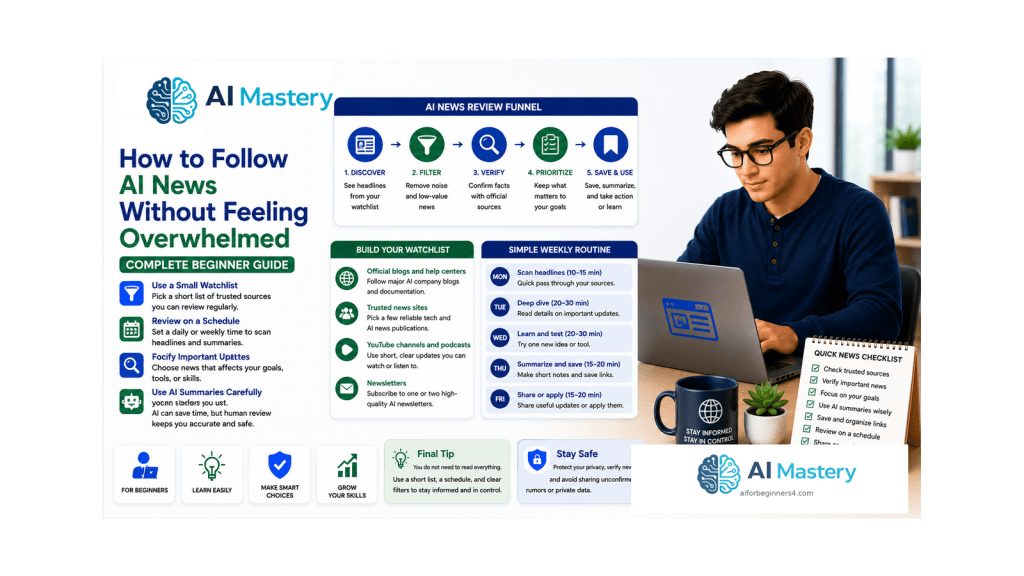
Estimated reading time: 25–30 minutes
Last updated: August 16, 2026
Introduction
Artificial intelligence changes quickly. New models, product features, partnerships, safety announcements, pricing changes, policy updates, and demonstrations can appear every week. For a complete beginner, this can make AI news feel less like useful information and more like a never-ending stream that must be followed constantly.
You do not need to keep up with everything. A better goal is to build a small, repeatable system that tells you what matters to you, where to check it, what to ignore, and when to stop reading.
This guide focuses on that system. It does not depend on any single headline being current forever. Instead, you will learn how to follow official sources, create a personal watchlist, use a short daily or weekly routine, save only useful updates, and use AI tools carefully when you want help summarizing a long announcement.
The official information channels themselves change over time. OpenAI maintains ChatGPT and model release notes, Google publishes a dedicated AI news page, Anthropic maintains a newsroom, and Microsoft publishes Copilot news and release notes. These are examples of first-party sources that can help you confirm what a company has actually announced.
The purpose of following AI news is not to become the fastest person to hear every rumor. It is to understand the changes that can affect your tools, learning, website, work, or decisions without allowing news consumption to take over your time.
What You’ll Learn
- why AI news can feel overwhelming even when individual stories are short
- how to decide which AI topics actually matter to you
- how to build a small list of trusted first-party sources
- how to separate announcements from actual availability
- how to use a 10-minute daily scan or a 30-minute weekly review
- how to keep a simple AI news log without creating another complicated system
- how to control notifications and reduce repeated coverage
- how to use ChatGPT or another AI assistant to summarize public information while still checking the original source
- how to avoid privacy mistakes when sharing material with an AI service
- how to recognize common beginner mistakes, myths, benefits, and limitations
- how to create a sustainable routine that you can continue as AI changes
Before You Start
You do not need paid news subscriptions, advanced research tools, or dozens of social-media accounts to follow AI news effectively. A browser, a simple notes document, and access to the official websites for the AI tools you care about are enough to begin.
Choose one place for your saved notes. This could be a TextMaker document, a plain text file, a spreadsheet, a notebook, or another system you already use. Avoid creating a complicated news database before you know whether you need one.
Decide whether you prefer a short daily scan or one scheduled weekly review. Beginners who already feel overloaded may find a weekly review easier to maintain. The routine matters more than the exact day or time.
- Choose one note-taking location.
- Choose one review schedule.
- Start with no more than three to five primary sources.
- Follow only topics connected to your current goals.
- Treat rumors as optional, not required reading.
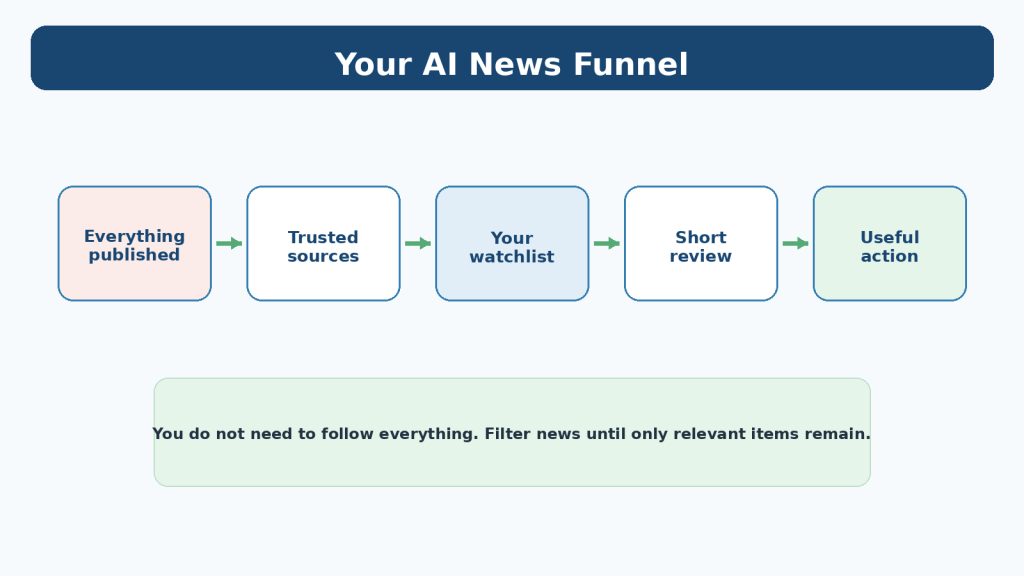
Figure 1. AI news should be filtered from everything published down to the small number of updates that are relevant to your goals.
Explanation: Filtering prevents repeated coverage and irrelevant stories from consuming your time.
Why AI News Feels Overwhelming
AI news is unusually repetitive. One product announcement may appear as an official blog post, several news articles, social-media posts, videos, opinion pieces, newsletters, and follow-up discussions. Reading all of them can create the feeling that ten different events happened when many of the items are discussing the same underlying announcement.
The pace also creates pressure to react immediately. A headline may say that a new model or feature has launched, but that does not necessarily mean the feature is available on your account, in your country, on your plan, or on every device at the same time.
Another source of overload is mixing very different kinds of information together. A major policy change may genuinely require attention, while a benchmark discussion, rumor, demonstration, funding story, or speculative prediction may have no effect on what you are currently trying to accomplish.
The solution is filtering. Instead of asking, “What happened in AI today?” ask, “What changed that affects the tools or goals I currently care about?” That smaller question is easier to answer and usually produces more useful information.
Choose What You Actually Need to Follow
Before choosing news sources, create a short personal watchlist. Your watchlist is not a list of websites. It is a list of topics that deserve your attention.
For an AI Mastery beginner, a practical watchlist might include the AI tools you actively use, important changes to pricing or plan limits, privacy or data-control changes, major model releases that affect your workflow, and new capabilities connected to the skills you are learning.
Keep the list small. If you are learning ChatGPT, AI images, WordPress, and AI video, you do not also need to follow every research paper, enterprise partnership, chip announcement, robotics demonstration, and startup funding round unless one of those areas supports a real goal.
- Tools you actively use.
- Features you are waiting for.
- Pricing, limits, privacy, or policy changes that could affect you.
- Skills you are learning now.
- Major industry changes that genuinely change what beginners can do.
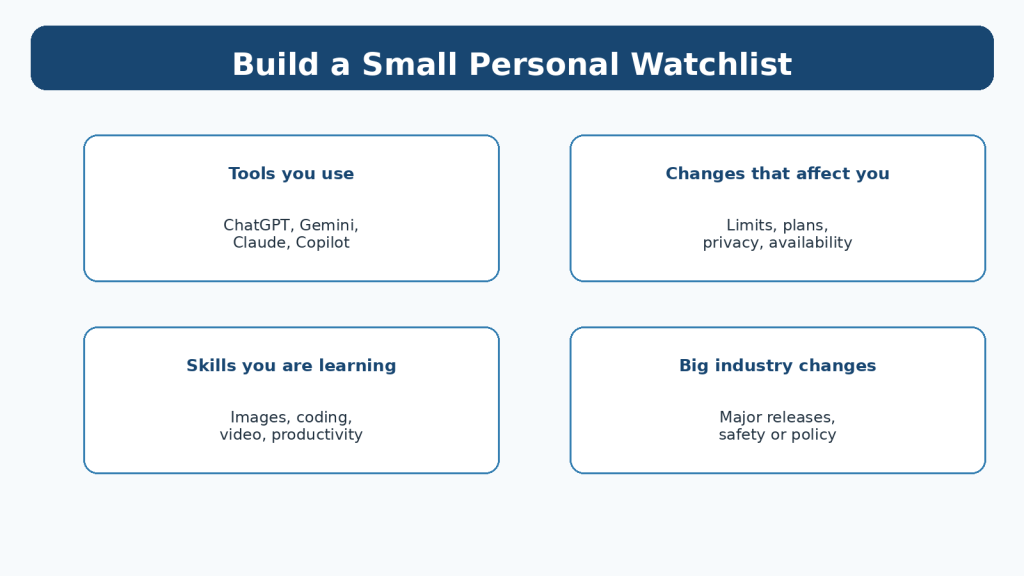
Figure 3. A small personal watchlist helps you follow the tools, changes, skills, and major developments that actually affect you.
Explanation: A watchlist turns a broad subject such as AI into a manageable set of personal priorities.
Build a Small Trusted Source List
Start with first-party sources. These are pages maintained by the company or organization responsible for the product or policy. For product changes, official release notes and documentation normally provide the clearest starting point because they can specify what changed and may include plan, platform, region, or rollout details.
For example, OpenAI maintains separate ChatGPT and model release-note pages. Google maintains an official AI news page and broader Innovation & AI publication hub. Anthropic maintains a newsroom, and Microsoft maintains a Copilot blog and release-note collection.
You do not need to visit all of these every day. Follow only the providers connected to your watchlist. If you do not use a particular product, its release notes may not need a place in your regular routine.
Independent journalism can add context, comparisons, criticism, and reporting that a company will not provide about itself. Use it after you understand the original announcement, especially when a story involves competition, business claims, public policy, safety, lawsuits, or other contested issues.
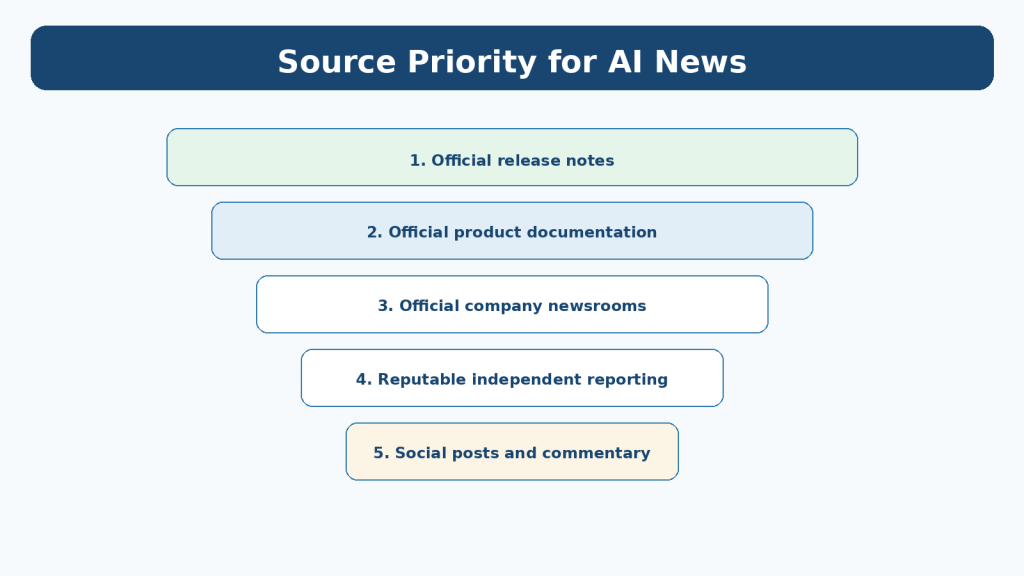
Figure 2. Use a source priority system so important product details are checked against first-party information before you rely on commentary.
Explanation: First-party sources are the best starting point for product facts, while independent reporting can add context afterward.
Use a Simple Source Priority System
When several versions of the same story appear, use a source priority system rather than reading them in the order an algorithm shows them.
For a product update, begin with the release notes or official documentation. Then read the official announcement if you need more explanation. After that, use independent reporting when you need context, comparison, or outside verification.
Social posts can help you discover that something happened, but they are a poor final source for important details. Screenshots can be cropped, old posts can be recirculated, and short comments often leave out conditions or limitations.
A useful beginner rule is: discover broadly, confirm narrowly. You can hear about an update anywhere, but important decisions should be based on the clearest original or authoritative source available.
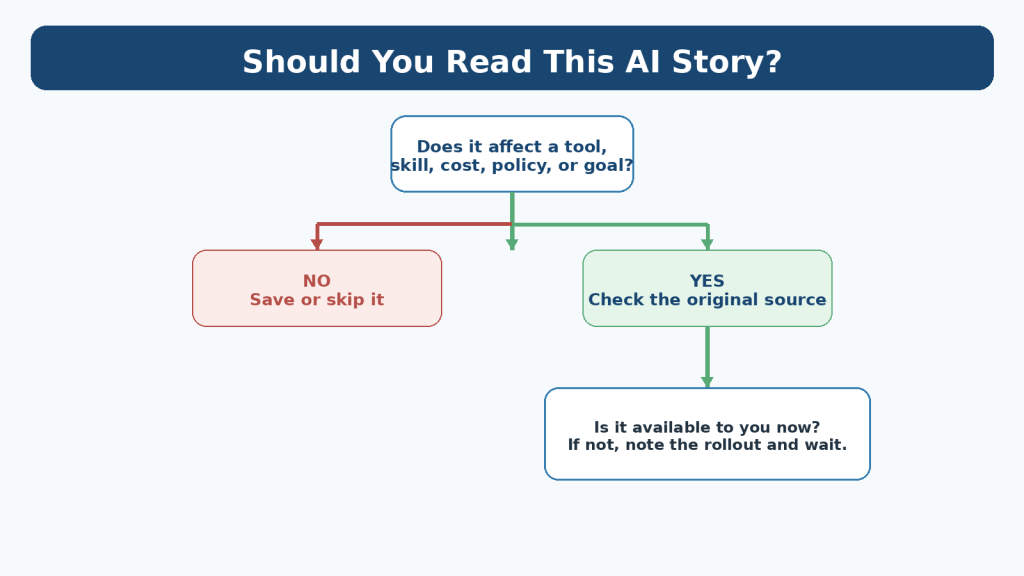
Figure 4. A quick triage question can help you decide whether an AI story deserves more of your time.
Explanation: Triage helps you stop early when a story does not affect a current goal or cannot be confirmed.
Understand Announcement, Rollout, and Availability
One of the most common sources of confusion is treating an announcement as proof that a feature is already available to everyone.
An announcement can describe something that begins rolling out that day, reaches only selected plans, is limited to a region, requires a particular app version, or becomes available gradually. Company wording can also change after publication as a rollout expands.
When an update matters to you, check four things: what was announced, when the announcement was published or updated, who is eligible, and whether you can actually see the feature in your own account or official product documentation.
Do not change your workflow simply because a headline says a feature exists. Confirm that it is available to you and test it first.
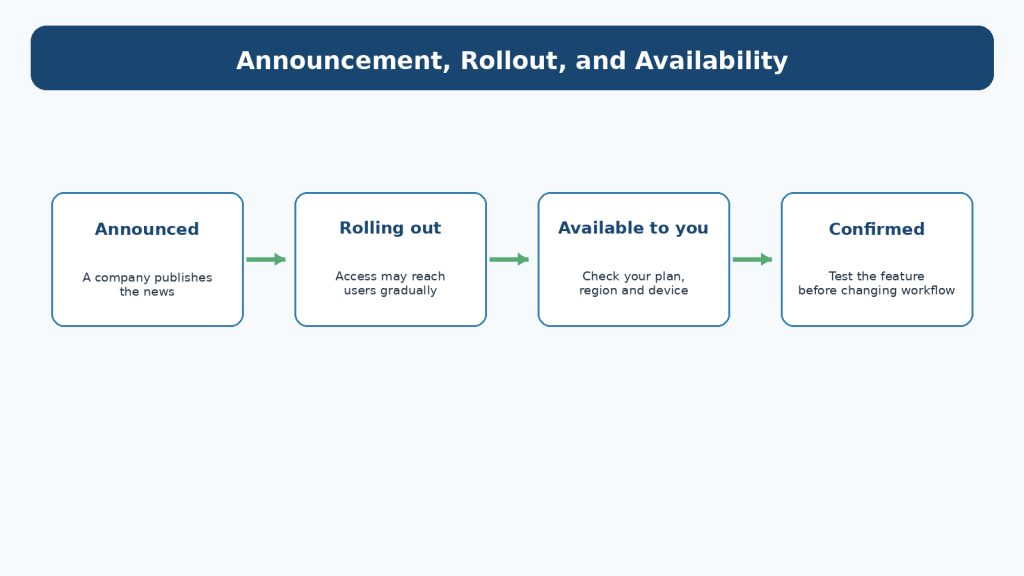
Figure 7. An announcement can come before a feature reaches your account, so check rollout and availability before changing your workflow.
Explanation: Product announcements can describe staged rollouts, so availability should be confirmed before you rely on a feature.
Create a 10-Minute Daily Scan
A daily routine should be short enough that you can stop without feeling unfinished. Ten minutes is enough for a basic scan.
Set a timer. Open only the official sources connected to your current watchlist or one trusted summary source. Scan headings rather than reading every item. Open only updates that appear relevant to your tools, plans, privacy, or current learning goals.
Save one or two items at most. If nothing matters, save nothing. A quiet day is a successful result because the purpose of the routine is filtering, not collecting.
At the end of ten minutes, stop. Anything truly important will still be available during your weekly review.
1. Scan headlines for about two minutes.
2. Open only relevant first-party sources.
3. Save no more than a few useful items.
4. Write one short note about why each saved item matters.
5. Stop when the timer ends.
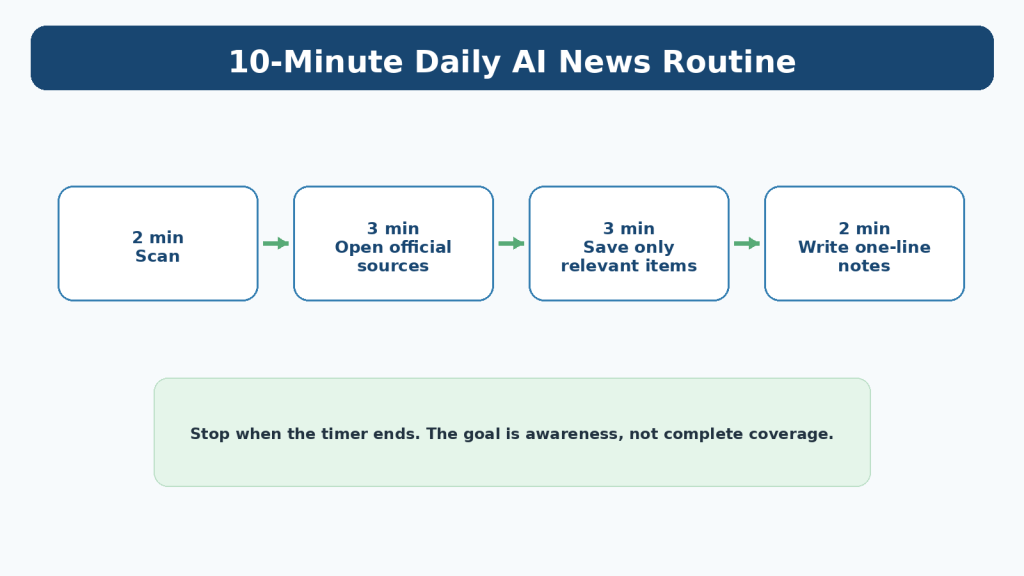
Figure 5. A ten-minute daily scan can provide awareness without turning AI news into an all-day activity.
Explanation: A fixed time limit keeps a daily scan useful and prevents it from becoming endless browsing.
Create a 30-Minute Weekly Review
A weekly review is often the easiest system for beginners because it reduces interruption. Choose one day and use a single 30-minute session.
Start with the items you saved during the week. Remove duplicates. Open the original source for anything important. Check whether the information changed after the initial announcement. Then update your short news log and choose only one or two actions for the next week.
An action might be testing a new feature, updating an article that describes an old interface, checking a privacy setting, or simply noting that a tool has changed. Many stories require no action at all.
The weekly review is also a good time to delete sources that repeatedly add noise without helping you make decisions.
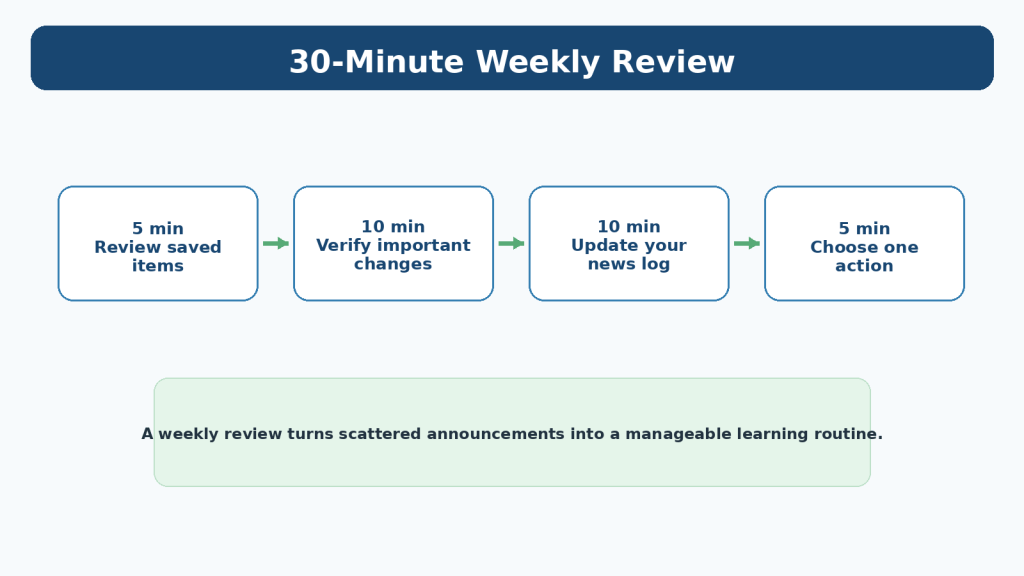
Figure 6. A weekly review turns saved items into verified notes and a small number of useful actions.
Explanation: Weekly review gives you time to remove duplicates and check whether early rollout details changed.
Keep a Simple AI News Log
A news log turns scattered headlines into a record you can actually use. Keep it short enough that maintaining the log does not become another burden.
For each important item, record the date, what changed, why it matters to you, the official source, and any action you decided to take. One sentence per field is usually enough.
A log is especially useful when you maintain tutorials or a website. Months later, you can see when you first noticed a feature change and whether an older article might need review.
Do not copy entire articles into the log. Save the source link and write your own concise note.
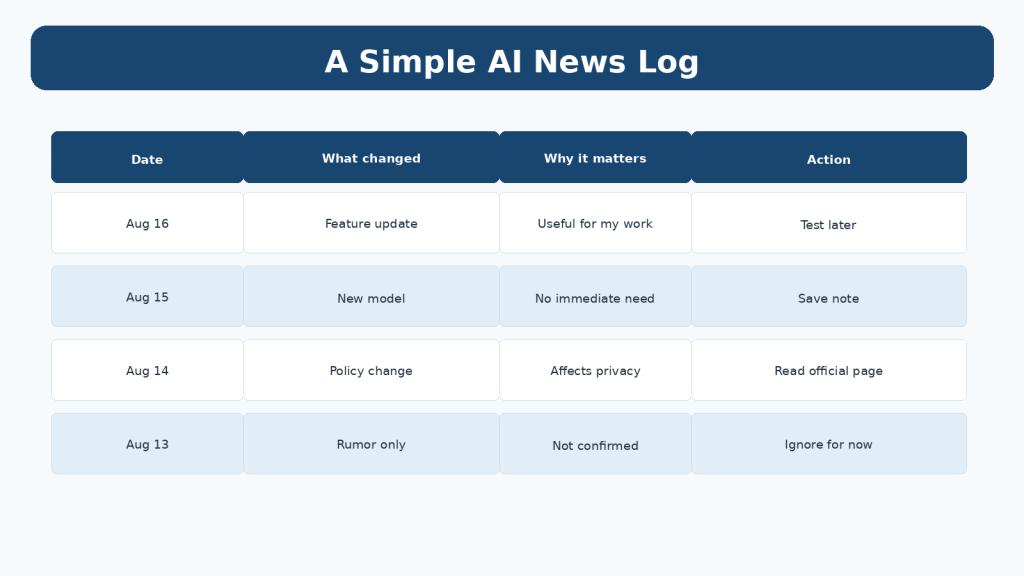
Figure 8. A short AI news log records what changed, why it matters, and whether you need to take action.
Explanation: Short notes are easier to review later than folders full of copied articles and screenshots.
Control Notifications and Social Media
Notifications create the impression that every update is urgent. Most are not.
Keep alerts for genuinely important sources and reduce the rest. A weekly newsletter, official release-note page, or scheduled review is often more useful than dozens of real-time notifications.
If a social-media account repeatedly posts rumors, recycled announcements, or dramatic claims without useful sourcing, mute or unfollow it. You do not lose important knowledge by removing low-value repetition.
Your information system should serve your goals. You should not feel responsible for responding to every notification that another platform chooses to send.
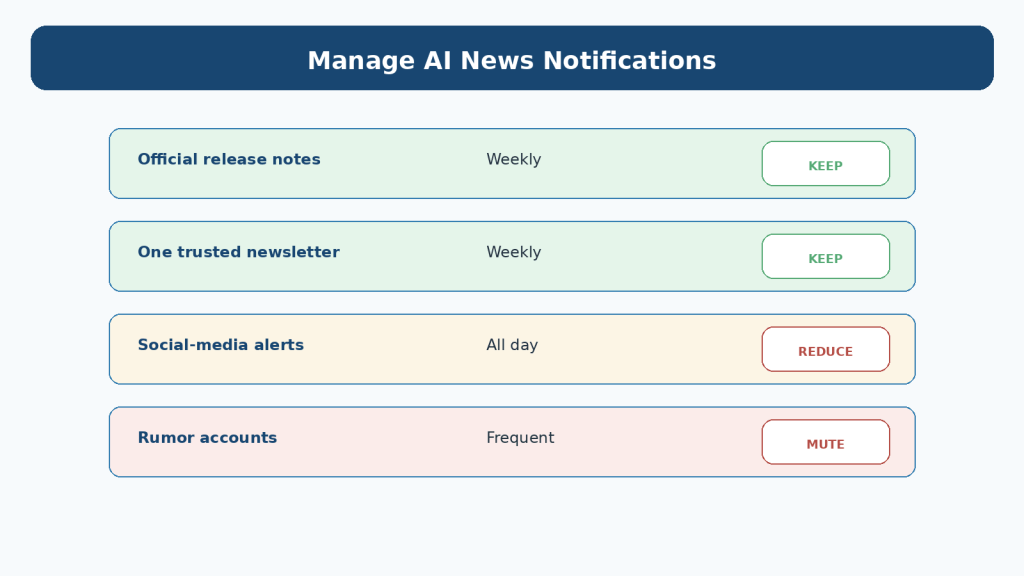
Figure 9. Reduce notifications that create repeated noise and keep only the alerts that support your review routine.
Explanation: Fewer alerts reduce interruption while still allowing important information to reach your scheduled review.
Use AI to Summarize Long Announcements Carefully
AI assistants can reduce reading time when an official announcement is long. For example, you can provide a public article or a short excerpt and ask for the three to five changes most relevant to a beginner.
However, a summary is not the original source. An AI assistant may omit a condition, misunderstand a rollout detail, combine separate points, or present an interpretation as if it were explicitly stated.
Use AI for compression, then return to the original source for details that affect your money, account access, privacy, publishing decisions, or workflow.
Example prompt
Summarize this public AI product announcement for a complete beginner. Give me: (1) what changed, (2) who the change applies to, (3) whether availability appears immediate or gradual, (4) anything I should verify in the original source, and (5) one sentence on whether this matters to a beginner. Do not add claims that are not supported by the text.
A safer summary workflow
Paste only material that is appropriate to share. Ask for a short summary. Open the original source again. Check dates, plan restrictions, availability language, privacy implications, and any details that could affect a decision. Then write your own note in plain language.
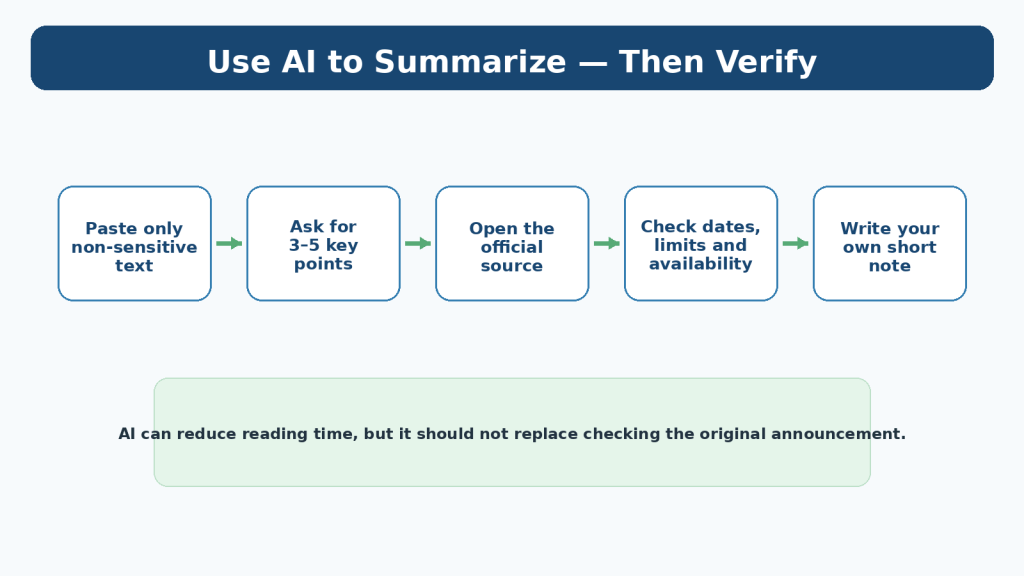
Figure 10. AI can shorten a long announcement, but important details should still be checked against the original source.
Explanation: AI is useful for compression, but the original source remains necessary for dates, conditions, pricing, privacy, and availability.
Ask Three Questions Before You Spend More Time on a Story
Every important-looking headline does not deserve a deep dive. Ask three questions first.
What actually changed? Does the change affect you now? What action, if any, should you take? If you cannot answer the first question from a reliable source, the story is not ready to guide a decision.
If the answer to the second question is no, save the item only if it supports a future goal. If the answer to the third question is “nothing,” you can stop reading.
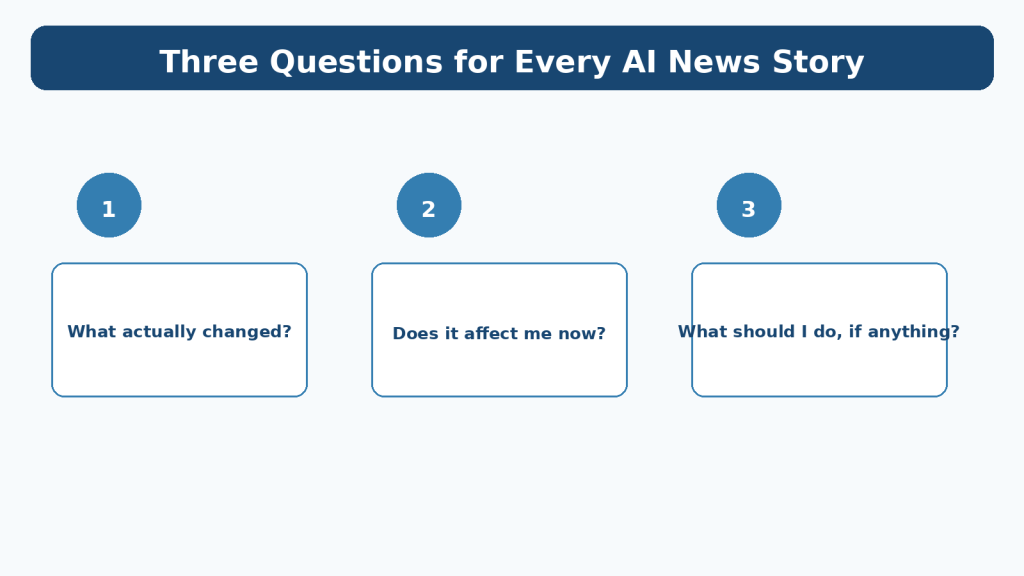
Figure 11. Three simple questions help you decide what an AI news story means for you.
Explanation: These questions shift attention from headline excitement to practical meaning.
Basic Verification Before You Act
Article 098 will cover reliability checking in detail. For Article 097, use a simple minimum check before acting on a news story.
Confirm the original date, identify the original source, look for an official documentation or release-note page, and check whether the story clearly separates announced capabilities from tested or generally available capabilities.
If a claim is important but only appears in reposts or commentary, wait. Being a little later and correct is more useful than being first and wrong.
- Check the publication and update date.
- Open the original announcement when possible.
- Look for plan, region, platform, or rollout conditions.
- Distinguish demonstrated features from features available to you.
- Do not treat a social screenshot as sufficient proof for an important decision.
Protect Privacy When Using AI for News Summaries
Do not paste private emails, confidential workplace announcements, unreleased documents, customer information, account details, or other sensitive material into a consumer AI service simply because you want a faster summary.
For public AI news, use the public announcement itself. For private material, follow the rules that apply to that information and your organization.
For personal ChatGPT accounts, OpenAI provides Data Controls, including a setting that affects whether new conversations are used to improve models and Temporary Chat behavior. Product settings and retention practices can change, so check current official documentation when privacy matters.
Privacy controls are useful, but they do not turn unnecessary sharing into a good habit. The safest approach is still to remove information that does not need to be shared.
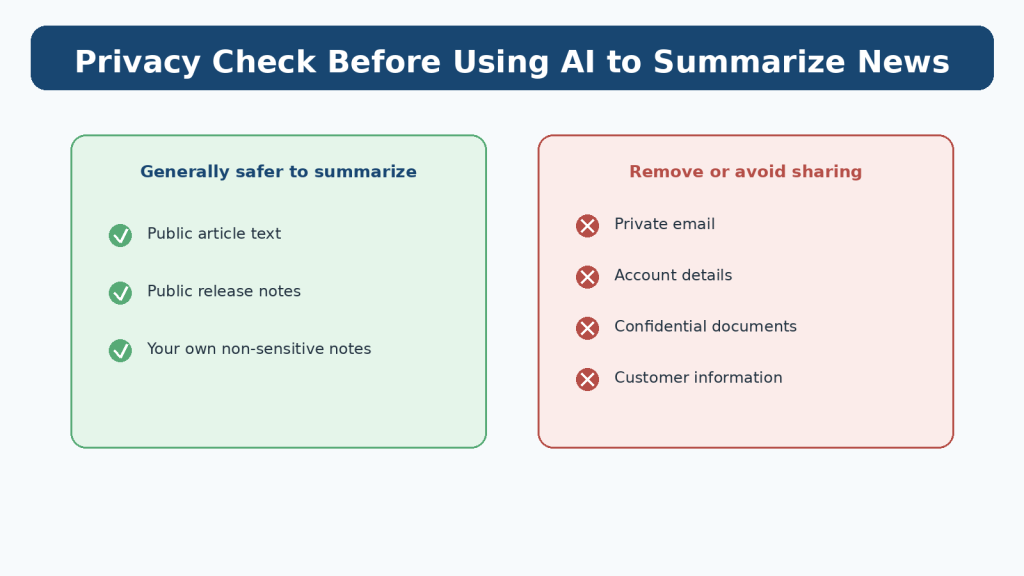
Figure 13. Before using an AI assistant to summarize material, separate public information from private or confidential information.
Explanation: Privacy-safe habits matter even when the task seems as simple as summarizing text.
Common Beginner Mistakes
Most AI-news overload comes from the system used to consume news rather than from the amount of information available.
Mistake 1: Following too many sources
Ten newsletters that repeat the same announcements do not create ten times more understanding. Start with a few sources and add another only when it contributes something genuinely different.
How to Avoid This Mistake: Keep a three-to-five-source core list and review it monthly.
Mistake 2: Treating every announcement as urgent
Many announcements require no immediate action.
How to Avoid This Mistake: Ask whether the change affects a tool, cost, policy, or goal that matters to you now.
Mistake 3: Reading commentary before the original source
Commentary can shape your interpretation before you know what was actually announced.
How to Avoid This Mistake: Open the official release note or announcement first for product facts.
Mistake 4: Collecting links without reviewing them
A folder containing hundreds of unread links is another form of overload.
How to Avoid This Mistake: Delete saved items during the weekly review if they are no longer useful.
Mistake 5: Changing your workflow based on a headline
A feature may not be available to you or may not work as expected.
How to Avoid This Mistake: Verify availability and test before replacing a working process.
Benefits and Limitations of Using AI for News
AI can help you summarize, classify, compare, and organize information, but those conveniences have limits.
Benefits
AI can shorten long public announcements, turn several saved notes into a weekly recap, group items by topic, explain unfamiliar technical terms, and help you identify which updates relate to your stated goals.
Limitations
AI summaries can miss qualifiers, confuse dates, overstate certainty, or fail to distinguish an announcement from a completed rollout. An AI assistant may also lack access to a source unless you provide it or use a supported browsing feature.
How to Reduce This Limitation: Use AI to organize information, but check the original source for consequential details.
Common Myths About Following AI News
Myth 1: You need to read AI news every day
Reality: A weekly review is enough for many beginners. Daily scanning is optional.
Myth 2: If everyone is talking about a tool, you need to switch to it
Reality: Popularity does not automatically make a tool better for your particular workflow.
Myth 3: A new model makes older skills useless
Reality: Clear prompting, verification, privacy awareness, file organization, accessibility, and subject knowledge remain useful even as models change.
Myth 4: More sources make you better informed
Reality: Repetition can increase confidence without increasing accuracy. Source quality and relevance matter more than quantity.
Myth 5: An AI-generated summary means you do not need the source
Reality: The source is still necessary when details matter.
What to Do When You Feel Overwhelmed
If your news routine begins creating anxiety, distraction, or a growing backlog, simplify it immediately. You do not need to catch up on everything you missed.
Pause nonessential alerts, shrink your source list, narrow your watchlist to the tools you currently use, and return to one weekly review.
A useful reset is to ignore old unread items and start again with the current week. Important product changes normally remain documented in release notes or official help pages.
Your goal is sustainable awareness, not perfect historical coverage.
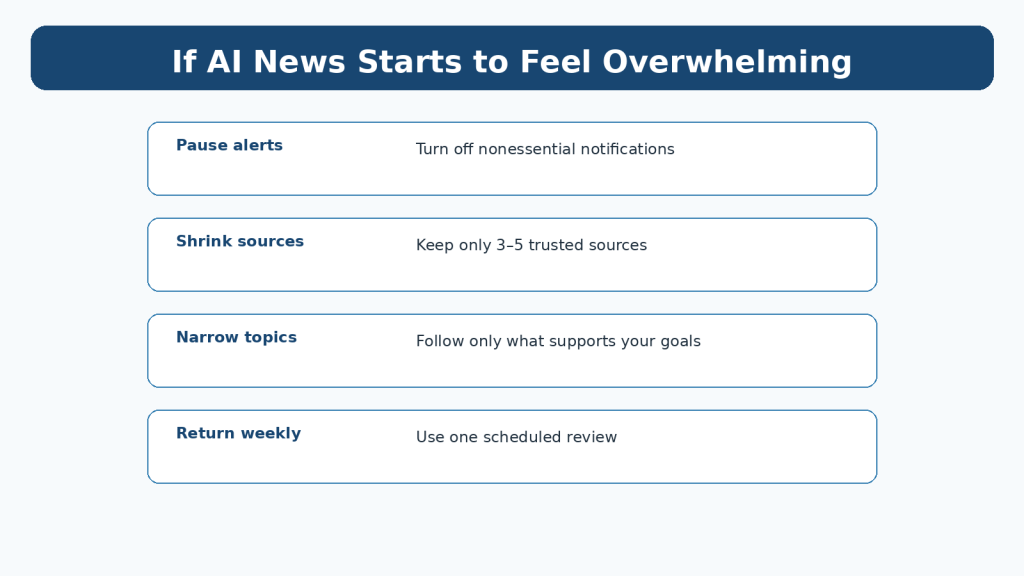
Figure 12. When AI news becomes overwhelming, reduce alerts, sources, and topics instead of trying to catch up with everything.
Explanation: Reducing inputs is a better response to overload than trying to read a growing backlog.
A Four-Week Beginner Routine
You can build the habit gradually instead of designing the perfect system on the first day.
1. Week 1: Choose three to five first-party sources connected to tools you actually use.
2. Week 2: Write a short personal watchlist and stop following topics outside it.
3. Week 3: Start a simple weekly news log and record only items that affect your goals.
4. Week 4: Remove sources and notifications that created more noise than value.
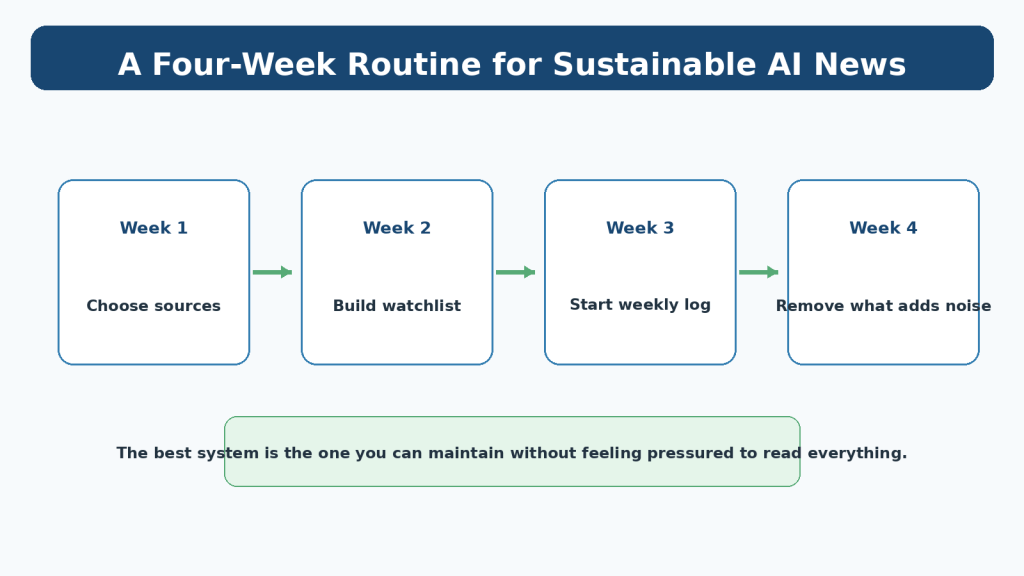
Figure 14. Build a sustainable AI news habit gradually by choosing sources, narrowing topics, keeping a log, and removing noise.
Explanation: A gradual routine is easier to maintain than trying to build a perfect news system in one day.
Frequently Asked Questions
How often should a beginner check AI news?
Once a week is enough for many people. If your work depends on a fast-changing tool, add a short daily scan without abandoning the weekly review.
Which AI news sources should I follow?
Start with official release notes, product documentation, and newsrooms for the tools you use. Add a small number of independent sources when you need context or outside reporting.
Should I follow AI news on social media?
You can use social media for discovery, but important claims should be checked against a stronger source before you act.
Can ChatGPT summarize AI news for me?
Yes, it can help summarize public material you provide or information it can access through supported features. Important details should still be checked against the original source.
Do I need to understand technical benchmarks?
Not unless they relate to a decision you need to make. Beginners can focus first on practical changes: what a tool can do, whether it is available, what it costs, what limits apply, and how it affects privacy or workflow.
What if I miss an important announcement?
Do not worry. Major product changes are usually documented in official release notes, help centers, or newsrooms and can be found later.
Should I change tools whenever a competitor releases something new?
No. Test changes against your own needs. Switching tools has a cost in time, learning, files, settings, and workflow disruption.
Key Takeaways
- You do not need to follow everything happening in AI.
- Build a small watchlist around your actual tools and goals.
- Use first-party release notes and documentation as your starting point for product facts.
- Treat announcements, rollouts, and availability as different stages.
- Use a short daily scan or one 30-minute weekly review instead of constant checking.
- Keep a simple news log with only items that matter to you.
- Reduce notifications and repeated coverage.
- Use AI to summarize public information, then verify consequential details in the original source.
- Do not paste unnecessary private or confidential information into an AI service.
- Delete low-value sources and saved items regularly.
- Being sustainably informed is more useful than trying to be first.
Final Tip
When AI news feels urgent, ask yourself one question: “What decision will this information help me make?” If you cannot identify a useful decision, you probably do not need to spend more time on the story today.
A calm, repeatable routine will teach you more over a year than repeatedly trying to catch up with every headline.
Continue Learning
Article 097 starts the AI Mastery AI News series. The next articles build on the same repeatable workflow rather than depending on short-lived headlines.
- Article 098 — How to Check Whether an AI News Story Is Reliable (2026) — link after publication.
- Article 099 — How to Compare AI Product Announcements and Updates (2026) — link after publication.
- Article 100 — How to Create a Weekly AI News Review Workflow (2026) — link after publication.
Sources and References
The following official sources were reviewed for the product-update, privacy, and source-selection guidance in this article. Information was checked on August 16, 2026. AI products, release channels, plan conditions, interfaces, and policies can change, so readers should check current official information when a specific update matters to them.
- OpenAI — ChatGPT Release Notes — Official changelog for current ChatGPT product updates. Open official source
- OpenAI — Model Release Notes — Official notes for model-level updates and changes. Open official source
- OpenAI — Data Controls FAQ — Current information about ChatGPT data controls and Temporary Chat. Open official source
- Google — Official AI News and Updates — Google’s official AI news page for product, research, and Gemini-related announcements. Open official source
- Google — Innovation & AI — Google’s broader official innovation and AI publication hub. Open official source
- Anthropic — Newsroom — Anthropic’s official announcements, product releases, research, and company updates. Open official source
- Microsoft — Copilot Blog — Microsoft’s official Copilot news, tips, and product updates. Open official source
- Microsoft — Copilot Release Notes — Official Copilot release-note collection. Open official source
Important Note
This article provides general educational guidance about following AI news. It does not guarantee that a particular source will remain current or that every announcement will apply to every user. Readers do not need to reread every release note every day. Check current official information when you first use a feature, when a change affects your plan or workflow, when you receive an important update notice, and periodically as part of your normal review routine.

