
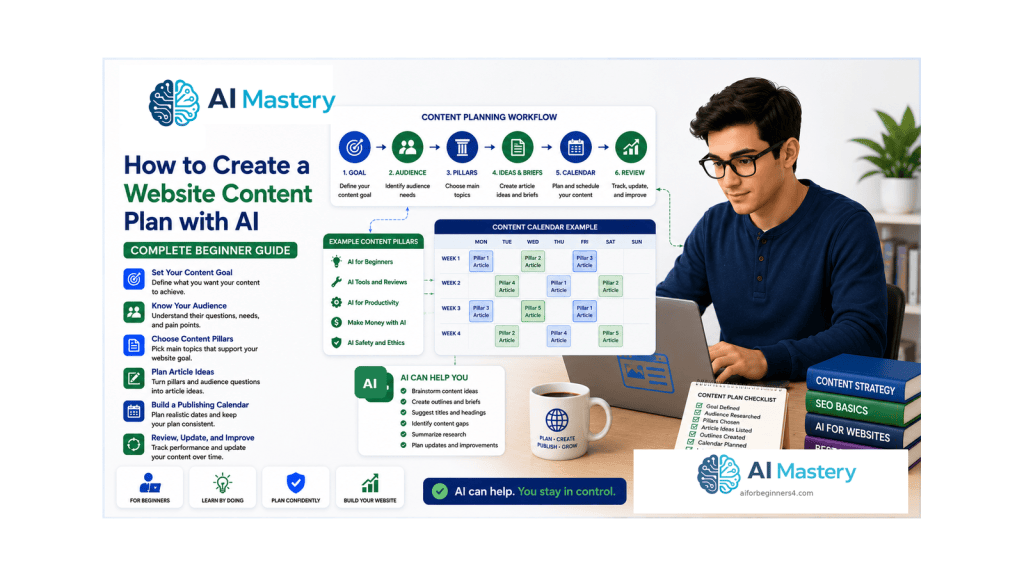
Estimated reading time: 25–30 minutes
Last updated: August 16, 2026
Introduction
A website content plan is a practical list of what you intend to publish, why each piece matters, who it is for, and how the pieces connect. It prevents a beginner website from becoming a random collection of posts written only because an idea appeared interesting that day.
Artificial intelligence can make planning easier by helping you brainstorm article ideas, group related topics, turn audience questions into outlines, and compare different publishing sequences. AI does not know your website goals automatically, and it can suggest repetitive, inaccurate, outdated, or unsuitable topics. The strongest workflow is therefore AI-assisted planning followed by human review.
This guide continues the Website Planning series after choosing a website topic and audience and planning the main pages and navigation. The next task is to decide what ongoing posts and resources will help your audience after the website structure is in place.
The goal is not to publish as much as possible. The goal is to create a realistic plan for useful, accurate, accessible, and maintainable content.
What You’ll Learn
By the end of this guide, you will know how to turn a website goal and audience into an organized beginner content plan.
You will learn how to:
- define content pillars
- turn audience questions into article ideas
- audit existing posts before planning new ones
- avoid duplicate or overlapping articles
- create a realistic publishing calendar
- prepare a simple article brief
- use AI for brainstorming without surrendering editorial judgement
- apply people-first content principles
- plan categories, tags, and internal links
- include accessibility in the content plan
- review privacy, permission, licensing, and disclosure issues
- schedule updates for time-sensitive content
- avoid common content-planning mistakes
Before You Start
Have three pieces of information ready: the website topic, the main audience, and the purpose of the website. If you completed Articles 091–093, reuse the decisions already made instead of starting over.
Create a simple planning document or spreadsheet. You only need columns for working title, audience need, content pillar, status, target publish order, important sources, figures or screenshots, internal links, and update notes. The plan can grow later.
If your website already contains posts, list them before generating new ideas. An inventory is one of the best ways to prevent unnecessary duplication.
Do Not Publish the AI Brainstorm Directly
Treat brainstorming output as a draft. Remove ideas that are too broad, unsupported, repetitive, outside your website purpose, or unsuitable for your audience.
Protect Sensitive Information
Do not paste private customer records, confidential business plans, passwords, access tokens, unpublished personal data, or other unnecessary sensitive information into an AI tool.
What Is a Website Content Plan?
A content plan connects the website goal to the information you will publish over time. It answers questions such as: What topics belong on this site? Which questions should be answered first? Which articles belong together? What should a reader learn next? Which posts will need future updates?
A useful plan contains enough detail to guide your work without becoming another complicated project. For a beginner, a page with content pillars, article ideas, priorities, and status notes is often enough.
WordPress posts are individual pieces of ongoing blog content. WordPress.com also allows posts to be categorized, tagged, previewed, published, or scheduled. These tools become easier to use when the editorial structure is decided before the post is written.
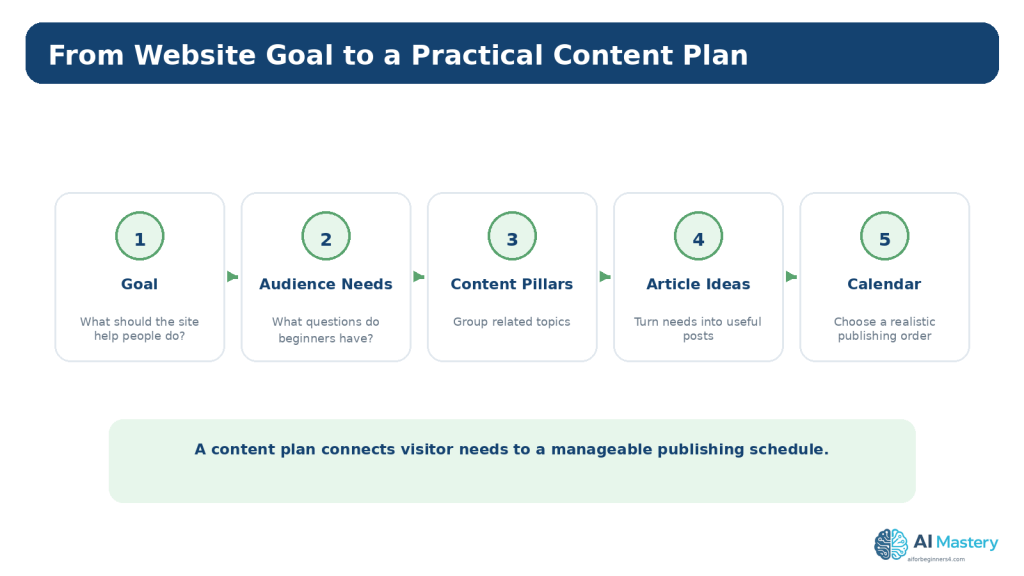
Figure 1. A website content plan connects the site goal and audience needs to organized topics, articles, and a realistic publishing order.
Explanation: Planning the sequence before drafting helps keep the website focused and makes future maintenance easier.
Define Your Content Pillars
A content pillar is a broad subject area that belongs naturally within your website topic. Pillars help you decide whether a new article fits the site and where readers should find related content.
For example, a beginner AI education website might use pillars such as AI Fundamentals, ChatGPT, Google Gemini, Claude AI, AI Images, AI Video, AI Coding, and Productivity. Each pillar can contain many specific tutorials, comparisons, explanations, and updates.
Keep pillars broad enough to support several useful articles but narrow enough that the relationship among those articles is obvious.
Ask AI to Suggest Possible Pillars
Example prompt: “My website teaches complete beginners how to use practical AI tools. Suggest 6–10 broad content pillars. For each pillar, explain what beginner questions it would cover. Do not suggest article titles yet.” Review the result and keep only the pillars that match the real website.
Reality: More Pillars Are Not Automatically Better
Too many top-level topics can make the site feel unfocused. Add a pillar only when there is a genuine group of content to support it.
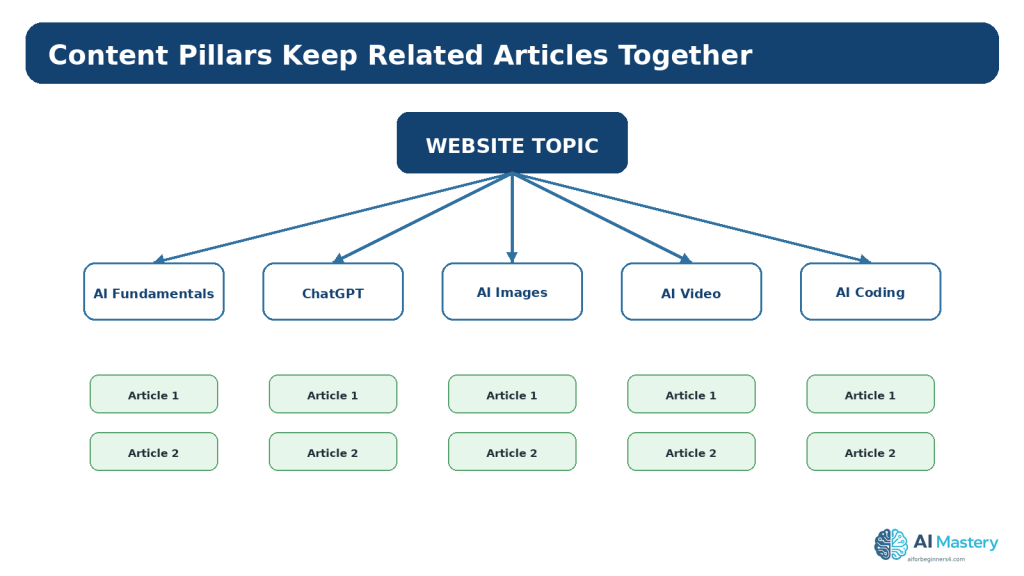
Figure 2. Content pillars group related articles under broad subjects that fit the website’s purpose.
Explanation: Pillars make it easier to decide whether a new idea belongs on the site and where related posts should be organized.
Turn Audience Questions into Article Ideas
The strongest beginner article ideas usually begin with a reader need rather than a desire to fill a calendar. Write the questions your audience is likely to ask before creating titles.
For each question, identify the reader’s intent. A person may want to understand a concept, complete a task, compare two choices, solve a problem, or decide what to learn next. The article should make one useful promise that matches that intent.
Google currently recommends creating helpful, reliable, people-first content. Its guidance warns against producing content mainly to manipulate search rankings. SEO can support discovery, but the content still needs to help people first.
Example: From Question to Article
Question: “How do I organize my website articles?” Intent: complete a practical task. Article idea: “How to Create a Website Content Plan with AI.” The title describes the outcome instead of promising unrealistic traffic or results.
Use AI to Expand a Real Question
Give the AI the audience, question, desired outcome, and what has already been published. Ask for several distinct article angles, then remove weak or overlapping options.
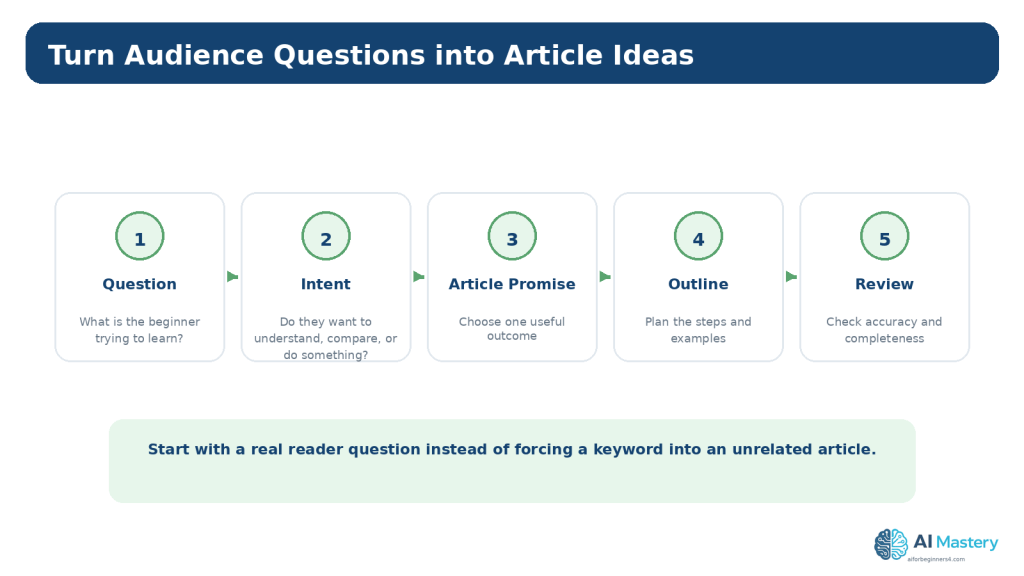
Figure 3. Start with a real audience question, identify the reader’s intent, and turn it into one clear article outcome.
Explanation: This keeps article ideas focused on reader needs instead of generating titles without a useful purpose.
Audit Existing Content Before Planning More
If the website already has content, create a simple inventory. Record the article number or URL, title, category, main purpose, publication date, current status, and whether an update is needed.
Divide the inventory into four useful groups: already published and current, published but needing an update, missing topics that would genuinely help the audience, and duplicate or overlapping ideas that should not become separate articles.
A content gap is not simply a keyword you have not used. It is an important audience need that your existing content does not yet serve well.
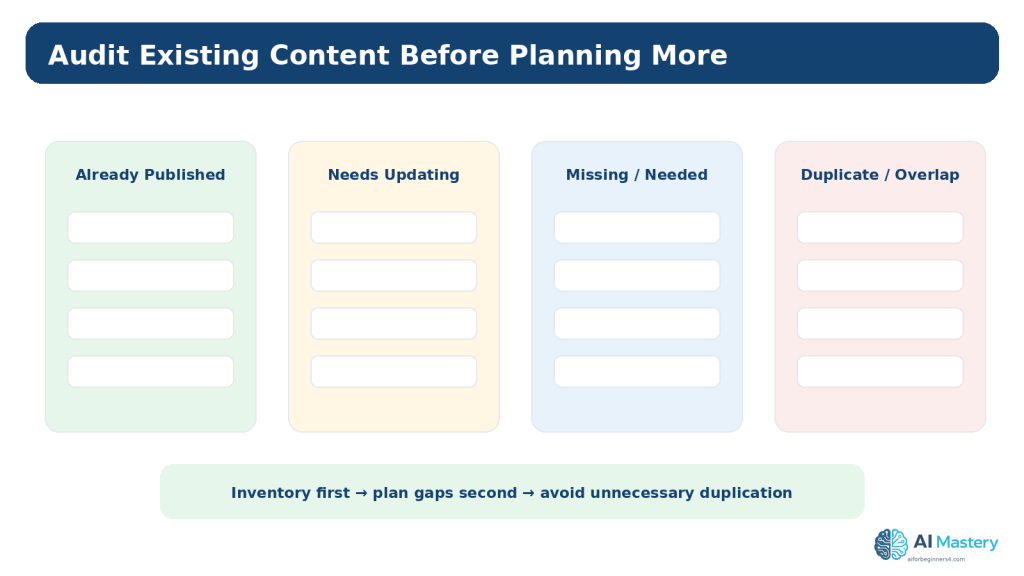
Figure 4. A content inventory helps you identify updates, real gaps, and unnecessary duplication before planning more articles.
Explanation: A missing keyword is not automatically a content gap; the missing item should represent a genuine reader need.
Prioritize the Articles
Not every useful idea needs to be written immediately. Prioritization makes the plan realistic.
For a beginner series, foundation articles usually come before advanced tutorials. A setup article should appear before a tutorial that assumes the setup is complete. A comparison may be more useful after readers understand the products being compared.
Also consider how time-sensitive a topic is. Software interfaces, pricing, plan limits, platform policies, and regulations may need more frequent updates than stable conceptual topics.
A Simple Priority Method
Mark each idea as High, Medium, or Later. High means it is foundational, fills an important gap, or is needed before another planned article. Medium means useful but not blocking. Later means valuable but not necessary for the current learning sequence.
Do Not Promise a Publishing Frequency You Cannot Maintain
A smaller realistic schedule is better than an ambitious calendar that creates rushed, poorly reviewed content.
Create a Simple Content Calendar
A content calendar places the approved ideas into a practical order. It can be weekly, biweekly, monthly, or simply a numbered sequence. The schedule should match the time required to research, draft, create visuals, review sources, check accessibility, and publish carefully.
WordPress.com currently lets authors publish immediately or schedule posts for a later date. Scheduling is useful after a post is complete, but it does not replace editorial planning or final review.
Include an update column as well as a publish column. Some articles should be checked periodically because the information can change.
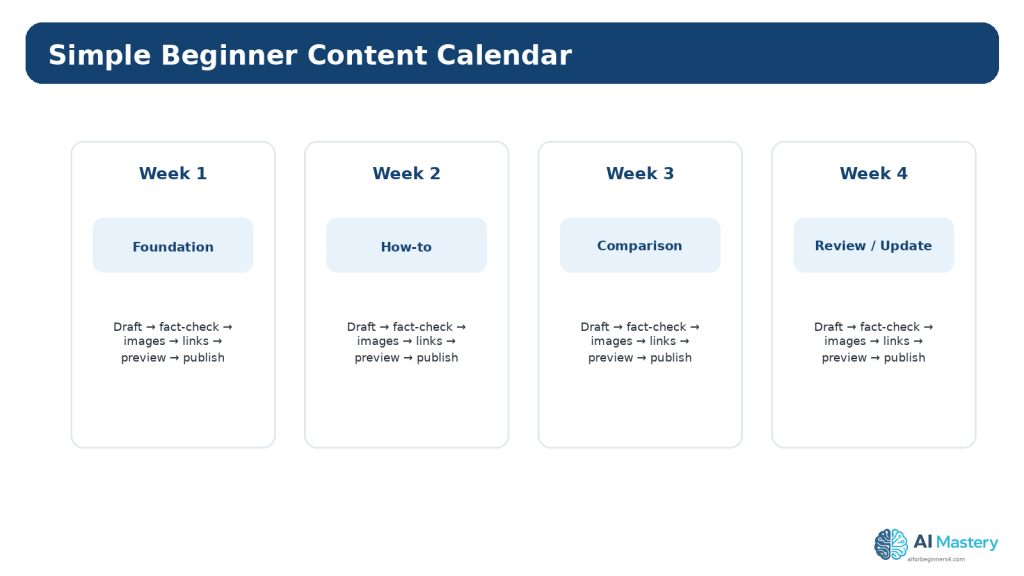
Figure 5. A simple content calendar turns approved ideas into a realistic order that leaves time for research, review, visuals, and final checks.
Explanation: Choose a schedule you can maintain without rushing important accuracy, accessibility, or licensing work.
Prepare a Simple Article Brief
Before drafting, create a short brief so the article has a clear boundary. The brief should state the working title, intended reader, problem or goal, expected outcome, main sections, important examples, official sources to verify, useful figures, internal links, and any privacy, licensing, disclosure, or accessibility concerns.
A brief reduces drift. It also gives an AI assistant better context because you can ask for help with one approved section instead of asking it to invent the entire strategy each time.
For AI Mastery, the brief should also preserve article numbering, category, tags, figure numbering, featured-image metadata, and the Continue Learning sequence.
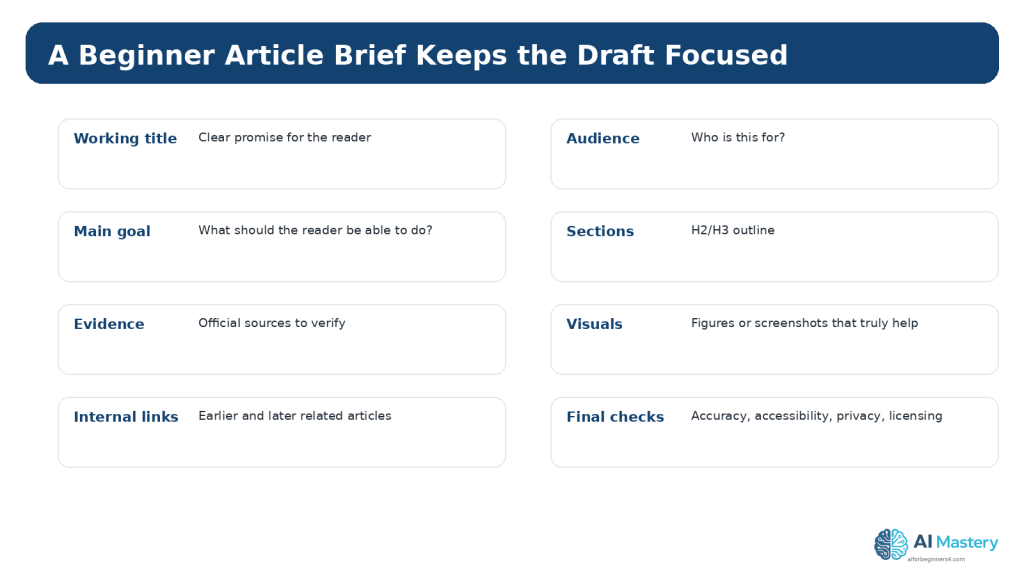
Figure 6. A short article brief keeps the draft focused and records the important checks before writing begins.
Explanation: The brief also gives an AI assistant better context because the boundaries of the article are already defined.
Use AI for Brainstorming and Planning
AI is most useful when the prompt contains context. A vague request such as “Give me 100 blog ideas” usually produces a broad list that requires substantial cleanup.
A stronger prompt explains the website purpose, audience, current content, content pillars, exclusions, desired format, and the type of ideas needed. Ask for fewer high-quality options and request a reason for each one.
After receiving suggestions, compare them with the inventory and content pillars. Remove duplicates, topics outside the site purpose, unsupported claims, and ideas that are too advanced for the intended reader.
Example Planning Prompt
“I run a beginner AI education website. My audience is complete beginners. My existing pillars are ChatGPT, Gemini, Claude AI, AI Images, AI Video, AI Coding, Productivity, and Website Planning. Suggest 12 distinct beginner article ideas that fill likely learning gaps. For each idea, give the audience question, learning outcome, best pillar, and whether it should come early or later. Do not duplicate the titles I provide below.”
Ask for Criticism, Not Only Ideas
You can also ask: “Which of these ideas overlap? Which are too broad? Which would require frequent updates? Which depend on an earlier lesson?” This often improves the plan more than another round of brainstorming.
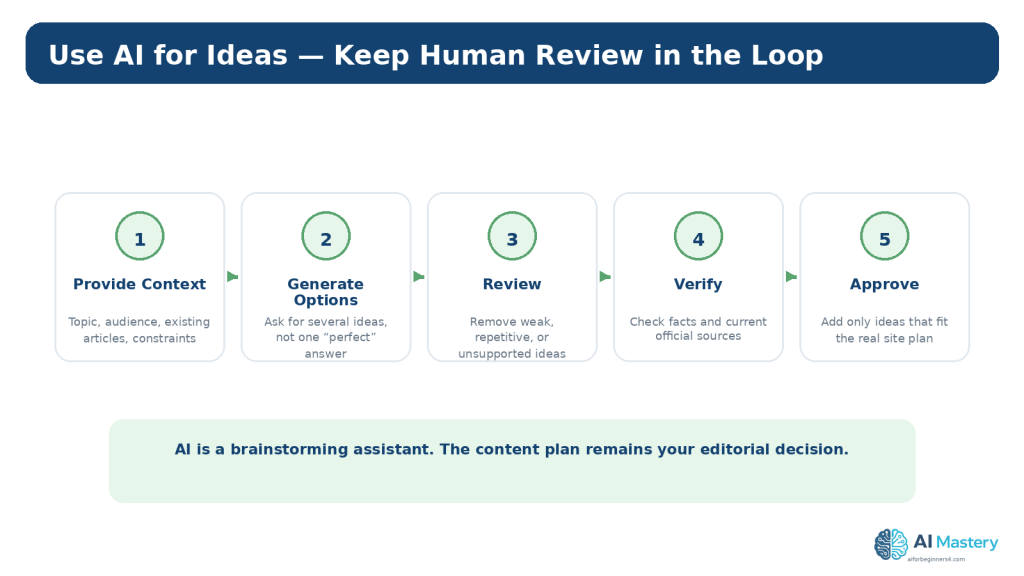
Figure 7. AI can generate planning options, but the final content plan should be reviewed, verified, and approved by the site owner.
Explanation: The most useful AI workflow creates options and criticism rather than treating the first response as the final strategy.
Keep the Plan People-First
Google’s current guidance emphasizes helpful, reliable, people-first content. That means your plan should begin with real readers and useful outcomes, not with mass-producing pages simply because an automated system can generate them quickly.
Ask whether the article belongs on the site, whether the intended reader benefits, whether the topic is adequately supported, and whether you can provide useful explanation, examples, testing, or experience beyond generic text.
A plan should also leave room to update weak or outdated articles instead of always creating something new.
Reality: AI Volume Is Not a Content Strategy
The ability to generate large amounts of text does not guarantee quality, originality, usefulness, accuracy, accessibility, or search visibility.
How to Avoid This Mistake
Limit the calendar to work you can research, review, illustrate, and maintain responsibly.
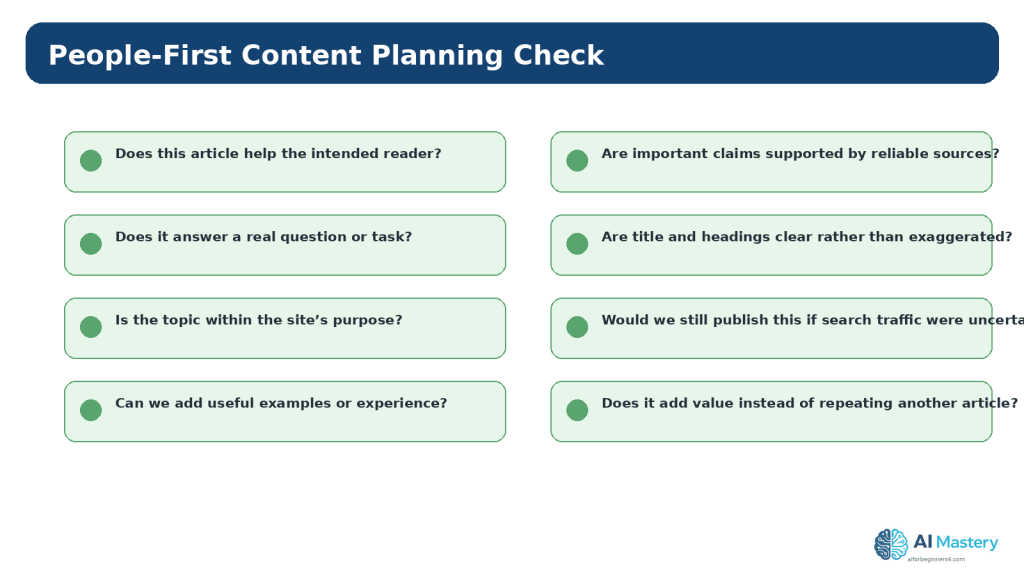
Figure 8. People-first planning asks whether each article genuinely helps the intended reader before considering publication volume or search visibility.
Explanation: Useful, reliable content should remain the goal even when AI can produce drafts quickly.
Plan Categories and Tags in WordPress
WordPress categories are useful for broad content organization. Tags can provide narrower labels when they genuinely help group related posts. A content plan should decide the naming conventions before many posts are published.
Use consistent capitalization and terminology. Avoid creating a new category or tag for every article. Too many nearly identical labels make the archive harder to understand and maintain.
For a series, choose one primary category and a small set of meaningful tags that reflect how readers might browse related material.
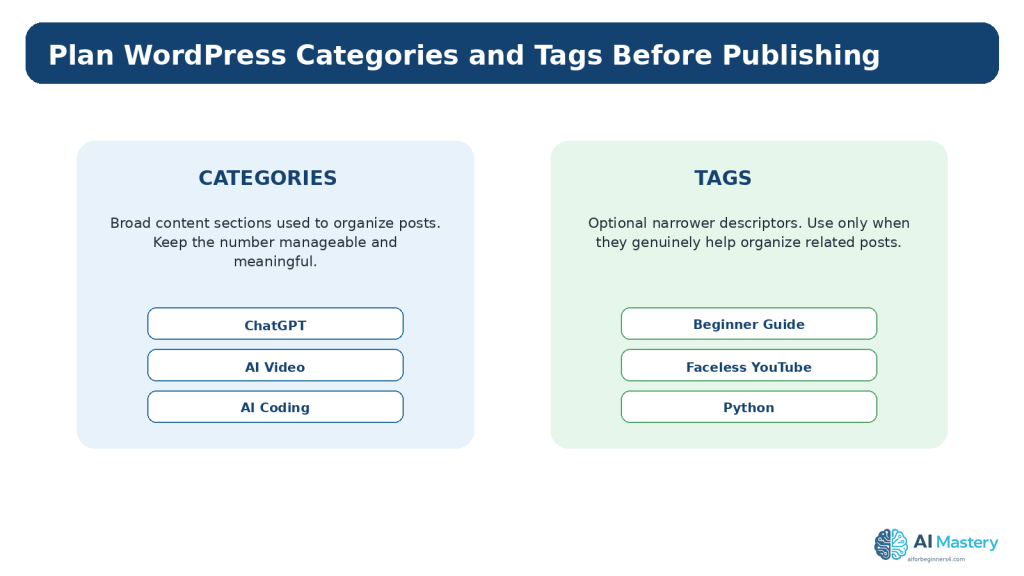
Figure 9. Categories organize broad groups of posts, while tags can provide narrower labels when they genuinely improve organization.
Explanation: Consistent taxonomy is easier to maintain than creating a new label for every article.
Plan Internal Links Before Drafting
Internal links help readers move from one useful lesson to another and can also help search engines discover related pages. Google Search Essentials recommends crawlable links and descriptive words in prominent locations such as titles, headings, alt text, and link text.
For every planned article, note one or two earlier posts it should link to and one or two later posts that can be added after publication. This creates a learning path instead of isolated articles.
Do not force links simply because two posts share a keyword. Link when the destination genuinely helps the reader continue or understand the current topic.
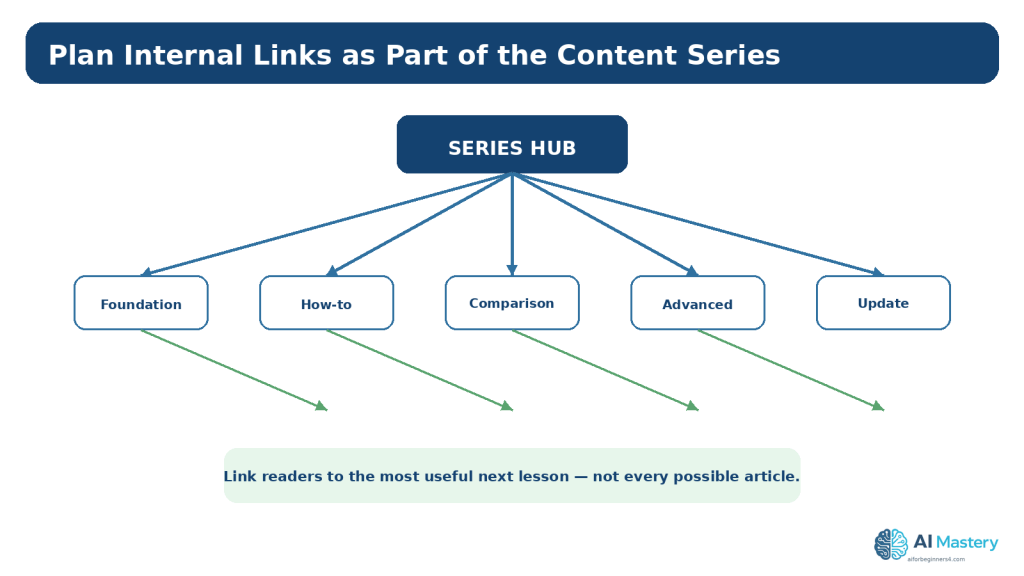
Figure 10. Internal links can be planned as part of the learning path instead of being added randomly after publication.
Explanation: Link to the most useful next or supporting lesson rather than forcing every related article into every post.
Plan Accessibility Before Writing
Accessibility is easier when it is included in the brief rather than added after publication. Plan a logical heading structure, meaningful links, text alternatives for informative images, captions or transcripts for media when needed, and clear instructions.
WCAG 2.2 requires text alternatives for non-text content in relevant situations and clear headings and labels. W3C’s current writing guidance also recommends informative titles, meaningful headings, meaningful link text, and useful image alternatives.
An AI review can help identify possible issues, but it does not prove WCAG conformance. Human review and testing are still required.
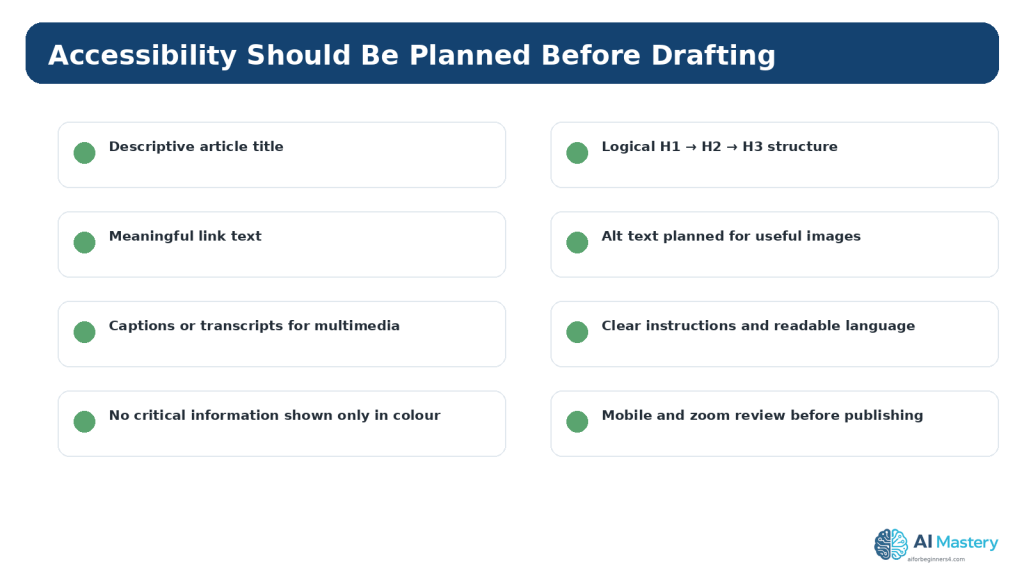
Figure 11. Accessibility is easier to support when titles, headings, links, image alternatives, and multimedia requirements are planned before drafting.
Explanation: These checks are useful starting habits but do not by themselves prove full WCAG conformance.
Plan Privacy, Permissions, Licensing, and Disclosure
Content planning is also the right time to identify material that requires permission or special review. This may include identifiable people, interviews, customer examples, private screenshots, third-party images, music, fonts, templates, icons, datasets, or code.
Do not assume that AI-generated material is automatically copyright-free, licensed for commercial use, or safe to publish. When third-party material is involved, verify the licence and intended-use conditions at the original source and keep records.
For realistic synthetic media, disclose AI use when viewers could reasonably mistake the content for a real event or person, and follow any platform-specific disclosure rules.
When using ChatGPT with unpublished planning information, remember that personal ChatGPT accounts can use conversations for model improvement depending on settings. OpenAI’s Data Controls let users manage this, and Temporary Chats are not used to train models and are deleted after 30 days. These controls are useful, but they are not a reason to share information that does not need to be shared.
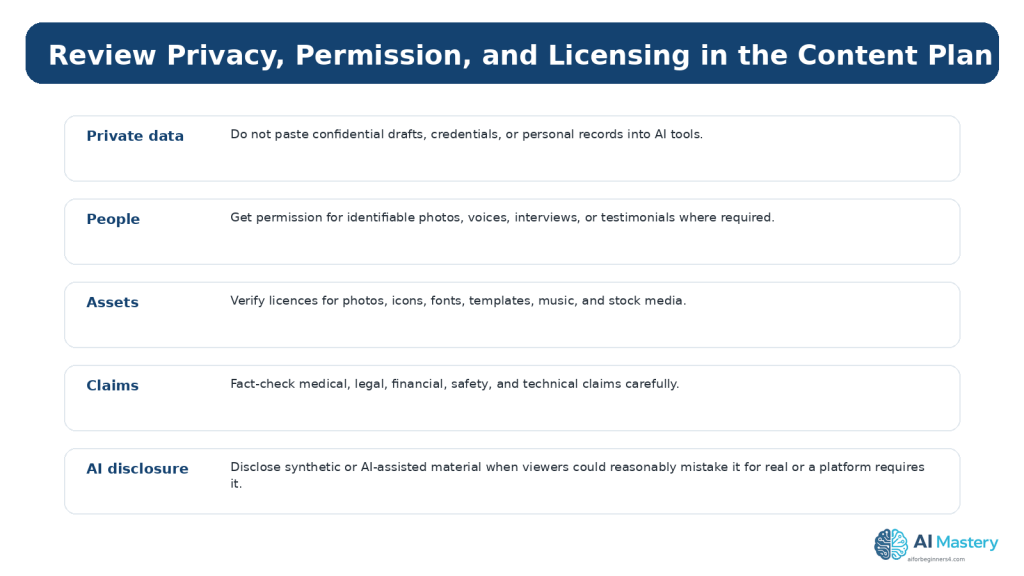
Figure 12. Content planning should identify privacy, permission, licensing, factual accuracy, and disclosure requirements before publication.
Explanation: Recording these requirements early reduces the risk of discovering a serious problem after the article is finished.
Build an Update Plan
Publishing is not the end of the content lifecycle. Add an update field to the plan so you can identify articles that need future review.
Check sooner when an article depends on software interfaces, pricing, plan conditions, laws, platform policies, AI disclosure rules, privacy practices, or product features. Stable educational concepts can usually be reviewed less often.
Readers do not need to reread every policy before every small edit. A practical approach is to check current official information when first using a feature or service, when a plan or feature changes, when you receive an update notice, when an article makes important claims, and periodically thereafter.
Benefits of Creating a Content Plan
A content plan gives a beginner website direction. Instead of deciding what to publish at the last minute, you can see the learning sequence, prepare sources in advance, and notice where a new article depends on an earlier lesson.
Planning also improves consistency. You can use the same naming rules, categories, tags, figure conventions, source standards, and WordPress checklist across a series. That makes the site easier to maintain and makes it easier for readers to understand how the articles relate.
Another benefit is workload control. When research, writing, figures, accessibility checks, licensing checks, internal links, and WordPress preparation are visible in the plan, you can estimate whether the schedule is realistic before committing to it.
Benefit 1: Fewer Duplicate Articles
The inventory and pillar structure make overlapping ideas easier to see before you spend time drafting them.
Benefit 2: Better Learning Order
Foundation articles can be published before tutorials that depend on them, helping complete beginners move through the series logically.
Benefit 3: Easier Source Preparation
You can identify which articles need official technical, policy, privacy, legal, or licensing sources before the writing begins.
Benefit 4: More Consistent WordPress Publishing
Categories, tags, excerpts, featured images, internal links, and update notes can be planned as part of the article instead of being added from memory at the end.
Limitations of AI-Assisted Content Planning
AI can generate many ideas quickly, but speed is not the same as editorial quality. An AI model can suggest topics that are already covered, misunderstand the intended audience, invent product capabilities, recommend outdated features, or present a weak idea with confident wording.
AI also does not automatically know the complete history of your website unless you provide reliable context. If the prompt does not include the current article list, categories, published URLs, or planned sequence, the suggestions may conflict with decisions you already made.
For these reasons, AI-assisted planning works best when you maintain your own authoritative content list and use AI to analyze or expand that list rather than asking it to reconstruct the entire website from memory.
Limitation 1: Suggestions Can Be Repetitive
Different wording can hide the fact that two ideas teach the same thing. Compare the learning outcome, not only the title.
Limitation 2: Suggestions Can Become Outdated
Software, platform interfaces, product plans, policies, and search guidance change. Verify time-sensitive ideas before committing them to the calendar.
Limitation 3: AI Does Not Guarantee Search Demand
A plausible article idea is not proof that people will search for it or that it will rank. Treat traffic estimates and SEO predictions cautiously.
How to Reduce These Limitations
Give the AI your current article inventory, audience, content pillars, exclusions, and desired learning order. Then verify the approved plan against current official sources and your actual website.
Common Myths About Content Planning and AI
Content planning is often described in ways that make it sound either more complicated or more automatic than it really is. These myths can push beginners toward unnecessary tools or unrealistic publishing goals.
Myth 1: You Need Hundreds of Article Ideas Before Starting
Reality: A short sequence of useful, well-reviewed articles is enough to begin. Add more ideas as the site and audience develop.
Myth 2: Every Article Needs a High-Volume Keyword
Reality: An article can be valuable because it answers an important reader question, supports another tutorial, explains a site feature, or fills a real learning gap.
Myth 3: AI Can Create the Entire Strategy Automatically
Reality: AI can generate options, but the website owner must decide what fits the audience, verify facts, manage risks, and maintain the final plan.
Myth 4: A Content Calendar Must Use Exact Dates
Reality: A numbered publishing order can work perfectly well when you do not need fixed dates. Use exact scheduling only when it genuinely helps your workflow.
Myth 5: Once the Plan Is Finished, It Should Never Change
Reality: A content plan is a working document. Update it when articles are published, products change, policies are revised, new audience needs appear, or an old topic no longer deserves a separate article.
Example: Turn a Website Series into a Working Plan
Imagine a beginner website that wants to teach website planning with AI. The broad pillar is Website Planning. The audience is a complete beginner who wants to move from an idea to an organized, maintainable website.
The series can be arranged so each article prepares the reader for the next one. Article 091 establishes the overall website plan. Article 092 identifies the topic and audience. Article 093 plans pages and navigation. Article 094 creates the editorial content plan. Article 095 can then introduce beginner SEO planning, and Article 096 can explain review and maintenance.
That sequence is more useful than publishing the six articles in a random order because the reader can build one decision on top of another.
Inside the content plan, record each article number, exact title, status, category, tags, important sources, figure count, internal links, published URL when available, and review date. This becomes the authoritative series record and reduces the risk of accidental duplicate titles or broken learning order.
Example Content-Plan Fields
Article number; exact title; reader question; learning outcome; content pillar; status; category; tags; source requirements; featured image; figure count; internal links; WordPress excerpt; published URL; last reviewed date; next review date.
Why This Example Matters
The plan does not need special software. The value comes from keeping the editorial decisions visible and current.
Common Mistakes Beginners Make
Content planning problems are usually easier to fix before the article is written. Review the plan for the following mistakes.
Mistake 1: Too Many Similar Ideas
Several titles may describe almost the same reader outcome. Combine them or clearly separate the purpose before drafting.
Mistake 2: Planning Only Around Search Phrases
Search demand can inform a plan, but it should not replace audience needs, site purpose, accuracy, and usefulness.
Mistake 3: Publishing Faster Than You Can Review
Rushed output increases the risk of factual errors, weak sourcing, licensing problems, poor accessibility, and inconsistent formatting.
Mistake 4: Inconsistent Categories and Tags
Agree on taxonomy before the archive grows.
Mistake 5: No Update Schedule
Time-sensitive articles can become misleading if they are never revisited.
Mistake 6: Treating AI Suggestions as Approved
Every idea still needs editorial review.
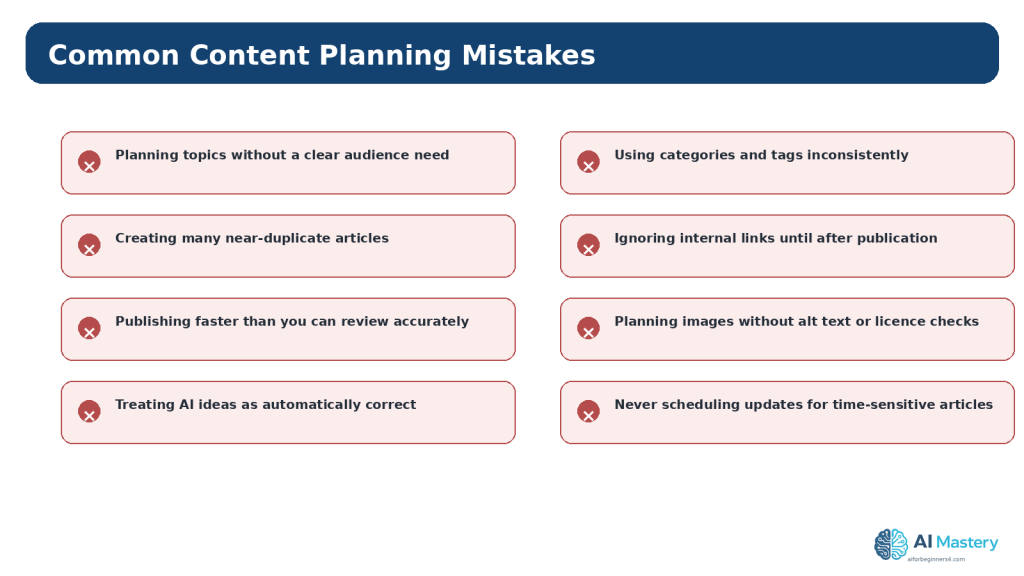
Figure 13. Common content-planning mistakes usually come from unclear priorities, duplication, rushed review, or missing maintenance decisions.
Explanation: Fixing the planning process is usually easier than repairing a large archive after inconsistent publishing.
A Practical Content-Planning Workflow
Use this repeatable process whenever you start a new content series.
Step-by-Step Workflow
1. 1. Confirm the website goal and audience.
2. 2. List the current content pillars.
3. 3. Inventory existing posts.
4. 4. Collect real audience questions.
5. 5. Use AI to suggest possible gaps and article ideas.
6. 6. Remove duplicates and unsuitable ideas.
7. 7. Prioritize the useful ideas.
8. 8. Create simple article briefs.
9. 9. Plan categories, tags, figures, and internal links.
10. 10. Add source, accessibility, privacy, and licensing checks.
11. 11. Put the approved articles into a realistic publishing order.
12. 12. Add update dates for time-sensitive topics.
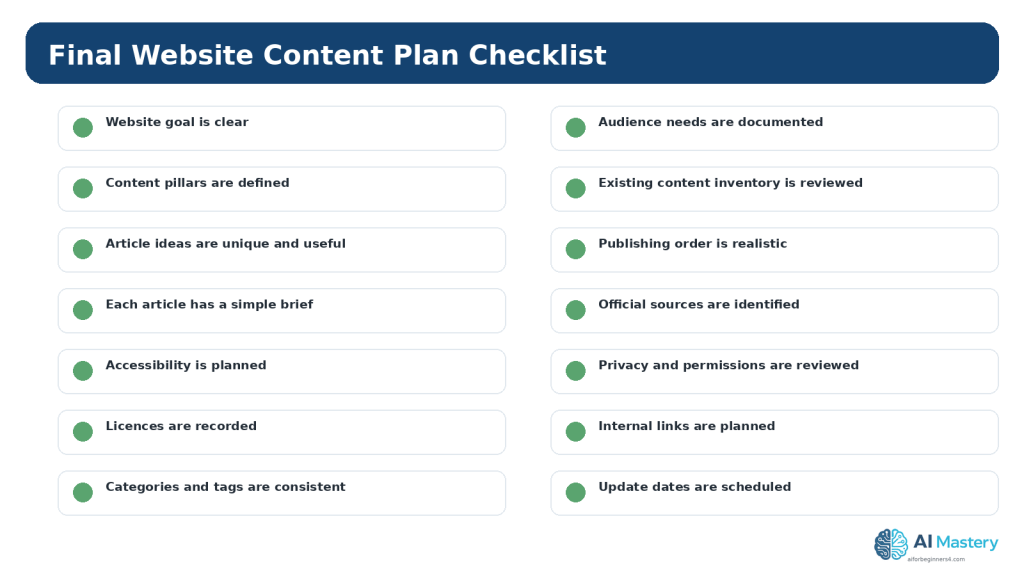
Figure 14. Use a final checklist to confirm that the content plan is useful, realistic, reviewable, and maintainable.
Explanation: Save the approved plan as a working record and update it whenever an article is published, changed, or retired.
Frequently Asked Questions
How many articles should I plan at once?
There is no required number. Plan enough to see the learning path, but keep the active queue small enough that you can review and maintain it.
Should every content idea come from AI?
No. Reader questions, your own experience, support issues, website analytics, product documentation, and gaps in existing tutorials can all provide useful ideas.
Can AI choose my final titles?
It can suggest titles, but you should choose wording that accurately describes the article and avoids hype or promises the article cannot support.
Do I need a publishing calendar?
A calendar is useful, but a simple numbered sequence can be enough for a beginner if dates are not important.
Should I delete an old article when I plan a better one?
Not automatically. First decide whether the existing post can be updated, merged, redirected, or retained for a different purpose.
Will a content plan guarantee traffic?
No. A plan improves organization and consistency, but search visibility and audience growth depend on many factors and are not guaranteed.
Key Takeaways
A website content plan turns audience needs into a manageable publishing sequence. It helps you see what belongs on the site, what already exists, what is missing, and what needs future review.
Use AI to generate options and challenge the plan, not to replace your editorial judgement. Keep the plan people-first, verify important claims with current official sources, and include accessibility, privacy, permission, licensing, and internal-link decisions before drafting.
A smaller plan that you can research, review, publish, and maintain responsibly is more useful than a huge list of unreviewed ideas.
Final Tip
Keep one master content plan and update it after every publication. Mark what is completed, what changed, which links still need to be added, and which articles need future review. This turns the plan into a working record rather than a forgotten brainstorming document.
Continue Learning
Article 094 completes the content-planning step of the Website Planning series. Next, move from editorial planning into beginner SEO planning so each useful article is also easy for search engines and readers to understand.
Article 095 — How to Plan Beginner SEO Content with AI (2026).
Article 096 — How to Review and Maintain an AI-Assisted Website (2026)
Sources and References
The following official and authoritative sources were reviewed for the WordPress, search, accessibility, privacy, copyright, and licensing information in this article. Information was checked on August 16, 2026. Platform interfaces, policies, standards, and licence conditions can change, so readers should check current official information when it matters to their project.
13. WordPress.com — Create a Post. Current guidance for creating, previewing, publishing, scheduling, and managing posts. Open official source
14. WordPress.com — Categories. Current guidance for organizing posts with categories and tags. Open official source
15. Google Search Central — Creating Helpful, Reliable, People-First Content. Current guidance for people-first content and avoiding search-engine-first publishing. Open official source
16. Google Search Central — SEO Starter Guide. Current SEO fundamentals for helping search engines and users understand content. Open official source
17. Google Search Essentials. Current technical and content essentials, including helpful content and crawlable links. Open official source
18. W3C WAI — WCAG 2.2. Accessibility standard used for text alternatives, structure, headings, labels, and other accessibility guidance. Open official source
19. W3C WAI — Writing for Web Accessibility. Current practical guidance for titles, headings, link text, image alternatives, and clear instructions. Open official source
20. W3C WAI — Images Tutorial. Guidance for choosing appropriate text alternatives for images. Open official source
21. OpenAI — Data Controls FAQ. Current guidance for training controls and Temporary Chat, including the stated 30-day deletion period. Open official source
22. OpenAI — How Your Data Is Used to Improve Model Performance. Additional official explanation of model-improvement controls and Temporary Chat. Open official source
23. WIPO — Copyright. General authoritative copyright reference for written and visual works. Open official source
24. Creative Commons — CC Licenses. Official reference for Creative Commons licence conditions and permissions. Open official source
Important Note
This article provides general educational information about website content planning, WordPress, accessibility, privacy, copyright, licensing, search visibility, and responsible AI use. It is not legal, privacy, cybersecurity, SEO, or other professional advice. Search visibility and traffic are not guaranteed, and sensitive or regulated projects may require qualified professional review.

